Enriching thousands of products by hand is slow, expensive, and error-prone. Descriptions lag. SEO meta stays empty. Translations pile up.
So teams reach for AI. But bolting a raw LLM onto a PIM is risky. Bad output can overwrite live catalog data instantly.
The Webkul ProductEnrichmentAgentBundle solves this for Pimcore 12. It brings Pimcore Product Enrichment to Studio with a safe-by-default, human-review workflow.
In short, it handles eight enrichment tasks safely. Nothing lands on a live product until a person approves it.
This post explains what the bundle does, how it works end-to-end, and why its design keeps your catalog safe. It targets Pimcore developers, solution architects, and PIM teams.
What is the Pimcore Product Enrichment Agent?
The bundle is a self-contained Pimcore 12 Studio bundle for AI product enrichment. A neutral request goes in. A credential-selected provider returns structured field values.
In short, it generates content for your Pimcore data objects using a large language model.
However, it never writes to a product on its own. Every generated value waits in a review queue first. A human approves before anything lands on a live object.
Because of that gate, Pimcore Product Enrichment stays predictable. You get AI speed without AI surprises.
The bundle handles eight neutral enrichment tasks.
For example: long descriptions, short descriptions, SEO meta, attribute extraction, category suggestions, image alt text, brand-voice rewrites, and localized copy.
Each task pairs a template with a profile. The template holds the prompt and output schema. The profile binds a target class, field mappings, and languages.
You define both once in Studio. Then you reference them by name in batch runs. Therefore templates stay reusable across profiles and teams.
Pimcore Product Enrichment: provider-agnostic by design
Most AI tools lock you to one vendor. This bundle does not. Instead, it puts four real LLM providers behind one neutral seam.
You can use OpenAI, Anthropic, Gemini, or Azure OpenAI. Anthropic is the default provider. A deterministic Fake provider ships too, for testing without live tokens.
An Example provider ships as well. It is a demo adapter that proves the add-a-provider pattern works with zero core edits.
Because they all sit behind the same contract, you swap vendors by switching a credential. No core code changes.
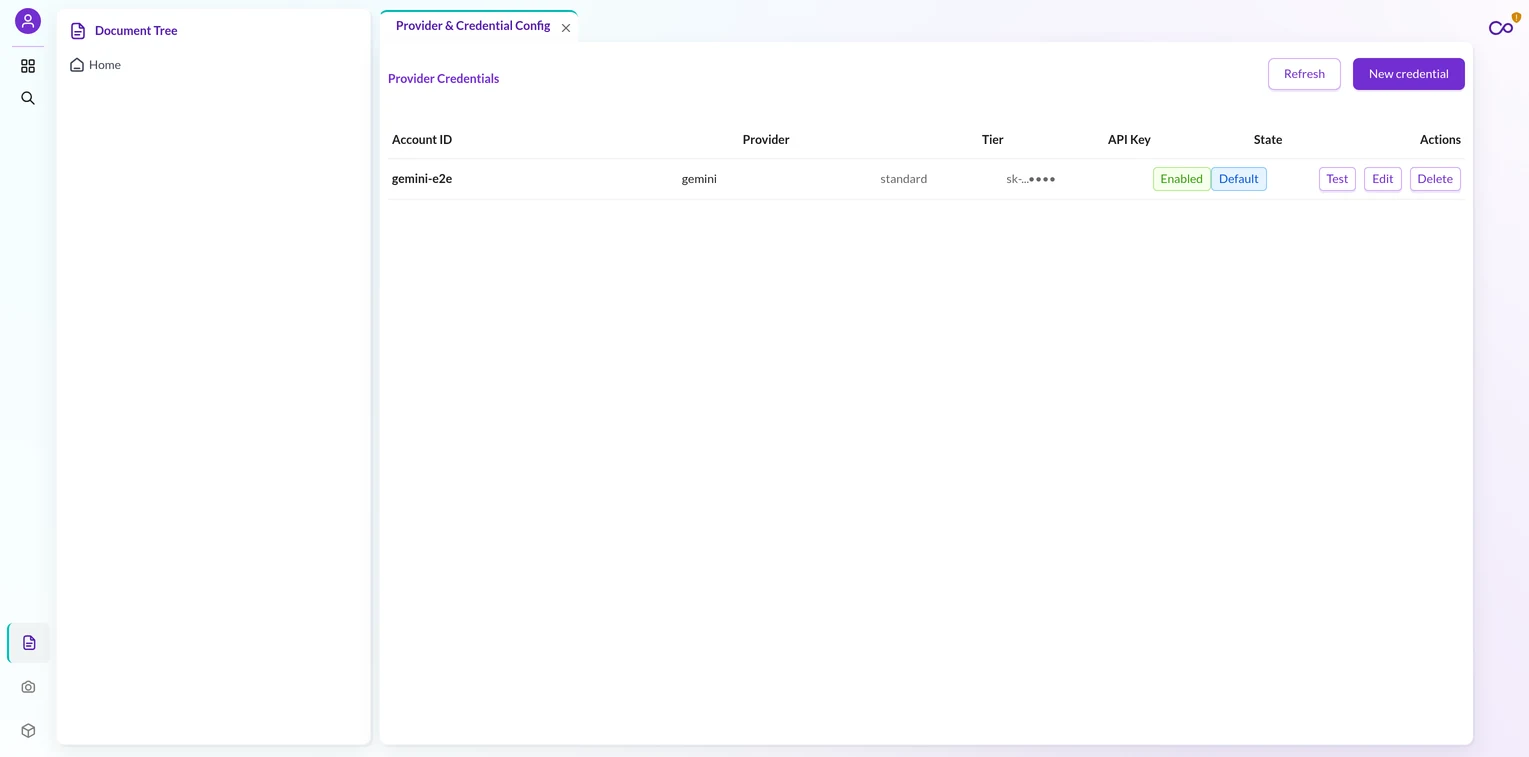
Here is how the providers compare at a glance.
| Provider | Role | Notes |
|---|---|---|
| Anthropic | Default | Ships out of the box |
| OpenAI | Real | Swap via credential |
| Gemini | Real | Live-verified adapter |
| Azure OpenAI | Real | Per-credential API version |
| Fake | Test only | Deterministic, no network |
| Example | Demo | Proof of the seam |
How does one seam serve every provider? A strict architecture keeps them apart.
The bundle enforces a one-way dependency law. Consumers depend only on the contract and DTO layers. The core depends on those too, but never on a concrete provider or vendor SDK.
Because of that law, Pimcore Product Enrichment stays isolated from any single vendor. Vendor SDK code lives in exactly one place per vendor.
Therefore a leak cannot spread. An automated isolation test scans every source file. It fails the build if a vendor symbol appears outside its own provider directory.
Each real adapter follows the same seven-file anatomy. The Fake provider needs only three files. The Example provider proves the add-a-provider pattern touches only its own provider folder.
Capabilities are credential-bound, not global. So two Azure credentials with different API versions can behave differently from the same code. That is per-credential adaptation, done cleanly.
How Pimcore Product Enrichment works end-to-end
The workflow is linear and easy to follow. Let me walk each step.
Set up: install, credential, and profile
First, install. The installer creates three infrastructure tables plus your DataObject classes. For instance, it adds config, job-tracking, and per-item log tables.
It also installs six DataObject classes by name. These cover credentials, profiles, prompt templates, results, enrichment runs, and the usage ledger.
Add a credential (step 2). You save a provider API key through the credential controller. The controller never returns the plaintext key. Instead, Studio shows a fixed masked value.
Then, define a prompt template and a profile. A template carries the output schema, temperature, and token limit.
A profile binds a target class by name, an optional model override, field mappings, and target languages.
Because the class is resolved by name and not by a numeric id, profiles stay safe across environments. If you are new to class setup, see this guide on class settings in Pimcore.
One template field can map to many class fields across profiles. So a single long-description prompt feeds several targets.
Remove a class field after saving, and the mapping goes stale and is skipped during generation.
Generate, preview, review, and apply
Preview results (step 4: dry-run first). You call preview for a single product and profile. The response shows the proposed value, the previous value, the model, the finish reason, and usage counts.
Preview writes nothing. It is a dry run. Therefore you can test prompts freely without touching your catalog.
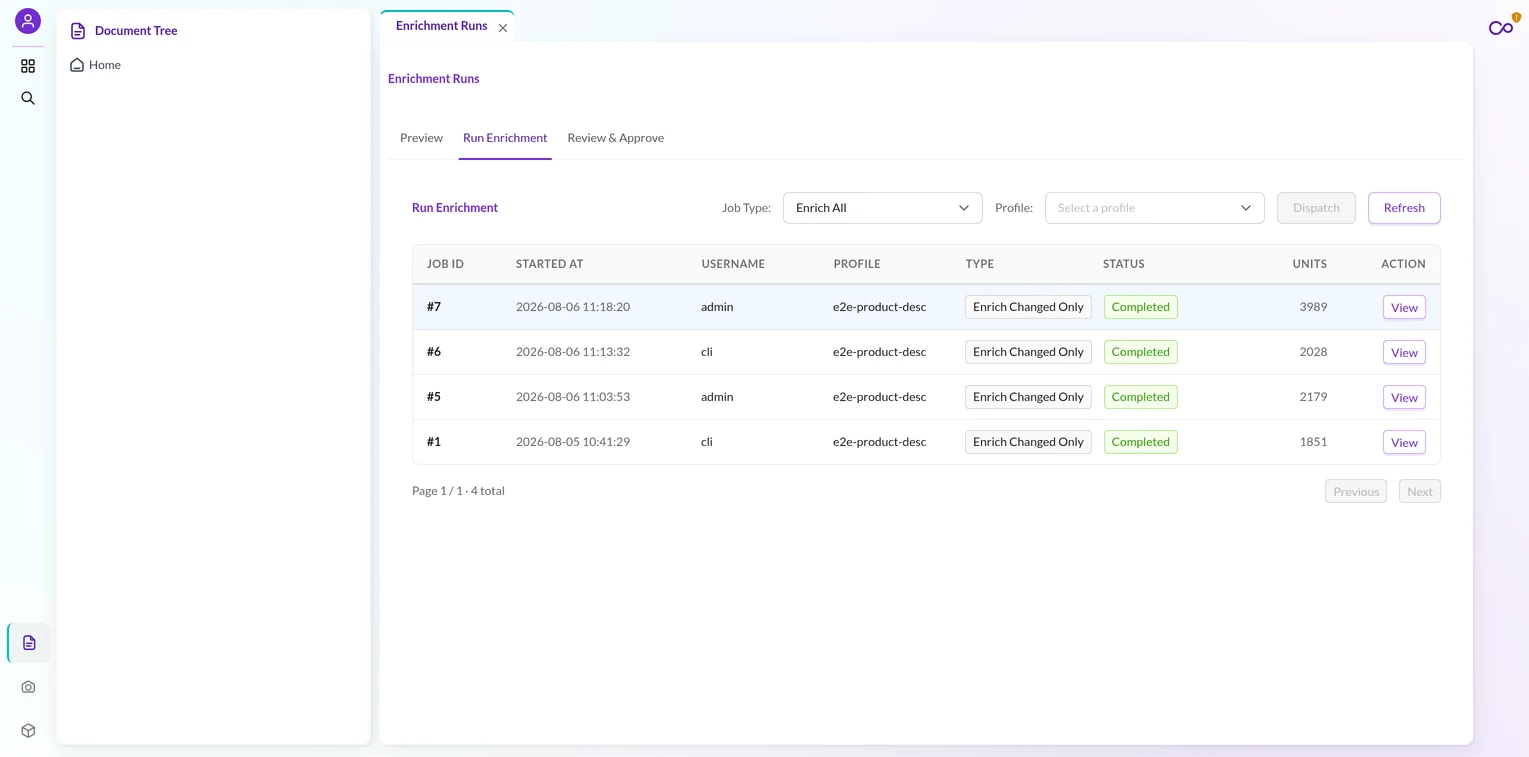
Next, dispatch a batch. You run a generate job through the run controller. This creates a tracking row and queues an async message. The call returns a job id instantly.
The batch job loops every product across your field mappings and target languages. It writes one pending result row per outcome. Crucially, it writes nothing onto the products themselves.
Then, review. The review queue lists pending results with a live proposed-versus-current diff. You approve, reject, or edit each value.
You can act on results one at a time or in bulk. Rejected results stay in history for audit. So you can re-run the batch to regenerate them later.
Apply approved rows (the write-only step). Approved rows feed a scoped apply job. Only this job writes onto live products. Only this job reindexes.
Here is the key detail that ties it together. Preview and batch share one code unit for each field.
That shared unit makes sync-preview and async-batch byte-identical. So the value you see in preview is exactly the value the batch produces. There is no drift between the two paths.
Getting started: requirements and a worked example
Before your first run, confirm a few basics. You need Pimcore 12 with Studio and an async Messenger worker running. You also need one provider API key.
Then plan your DataObject work up front. Decide which product class you will enrich. List the exact fields the AI may fill.
Here is a small worked example. Say you want German copy for a Product class. You enrich long_description and meta_title in the de locale.
First, create a template with a two-field schema. Then bind a profile to Product, map both fields, and set de as the target language. Then you preview one product before any batch.
Safe by default: human review
Safety is the core design principle here. Nothing writes to a product until a person approves it. This is not marketing; it is enforced in code.
Consider the three job types. The generate job writes only pending rows. The re-enrich-changed job does the same for products changed since a watermark.
Only the third job, apply, commits values onto products. As a result, the blast radius of AI output stays tiny until a human signs off.
The bundle also defaults to non-destructive behavior. Overwrite-existing defaults to false. So a slot that already holds a value gets skipped, not clobbered.
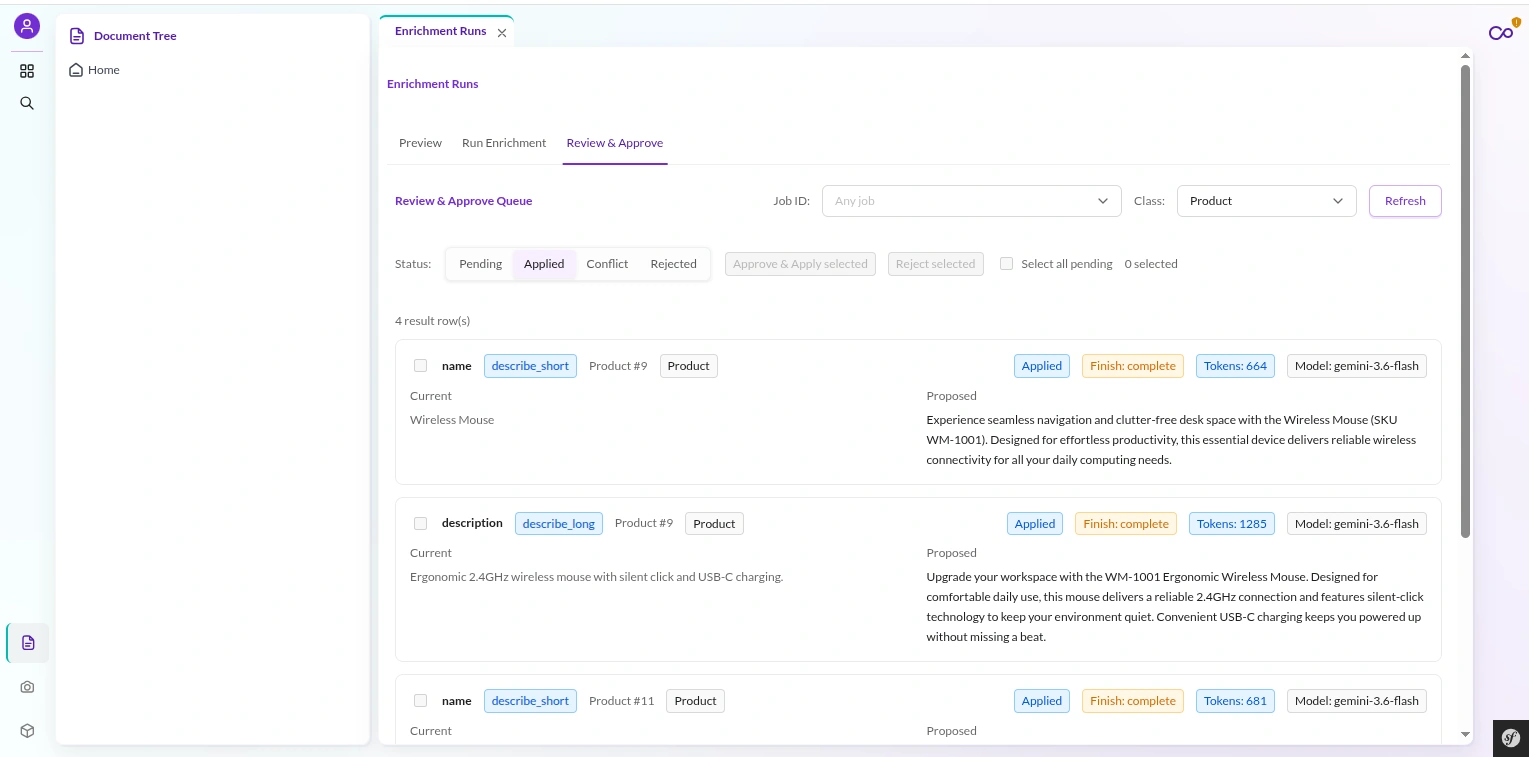
There is an opt-in auto-apply for teams that want speed. Even then, it only fires when the slot is empty and overwrite stays off. Therefore it can never silently replace existing content.
A conflict guard protects every apply. At generate time, the bundle hashes the live source value. At apply time, it recomputes that hash with identical canonicalization.
If the hashes match, the source is unchanged and the value applies. If they differ, the row is marked as a conflict and dropped. However, an operator can force the apply when they intend to override.
The result state machine only moves one way, toward a terminal state. A pending row becomes approved, rejected, applied, or conflict. Once terminal, it never re-commits.
That matters for retries. The bundle marks a row applied only after the product save succeeds. So a re-dispatched job never re-applies work that already landed. Idempotency is built in.
Built-in prompt-injection defense
Product data is untrusted input. A malicious description could try to hijack the model. Therefore the bundle ships a two-layer defense.
First, the renderer wraps interpolated product data in a fenced block. The placeholder resolver strips and neutralizes any fence tokens hidden in the source data.
Second, system-channel framing tells the model to treat the fenced block as data, not instructions. As a result, the model does not follow commands smuggled inside a product field.
On top of that, structured output constrains the response shape. The schema transformer converts your once-authored neutral schema into the dialect each model supports.
That transform is capability-driven, keyed on the credential-bound capabilities. It is never keyed on a provider id.
Four branches cover strict JSON schema, tool use, Gemini’s response schema, and a JSON-object fallback.
Async at scale: jobs and Studio
Pimcore Product Enrichment relies on async queues for scale. Batch enrichment must not block a web request. So the bundle runs jobs on Symfony Messenger.
The transport is hard-coded to a Doctrine queue. This is deliberate. A dev environment often flips the default transport to sync, which would run heavy jobs inline.
The literal transport prevents that trap.
Under the hood, the job engine follows the reader-processor-writer pattern. Each scope wires its own trio.
For example, generate uses a class-listing reader, a batch processor, and a pending-result writer.
The engine scales carefully. It disables versioning during the run. It also clears the runtime cache and collects garbage after each batch. Therefore long jobs stay memory-stable.
Terminal status is well defined. A clean finish marks the job completed. A quota error pauses it without retry. Any other error marks it failed. The processor absorbs rate limits with bounded backoff.
A failed job records the error reason in its run history. So you can read the log, fix the cause, and re-dispatch a fresh batch.
The bundle retains pending results from the failed run for cleanup or re-approval.
You can drive the whole path from the CLI too. A console dispatch command creates the tracking row and queues the job. A standard Messenger consumer then processes it.
This proves the async path headlessly.
The Studio UI ties it together for operators. It is a React and Module Federation plugin with six navigation leaves.
These cover credentials, profiles, prompt templates, enrichment runs, run history, and a usage-and-budget dashboard.
The enrichment-runs screen is tabbed. It holds preview, batch run, and review-and-approve in one workspace. So an operator moves through the flow without leaving the page.
Fine-grained access control: roles, permissions, and teams
Fine-grained access control matters in a PIM. This bundle uses seventeen granular permission keys. There is no coarse umbrella key.
For instance, viewing credentials, managing them, and testing them are separate keys. Review-apply is separate from review-reject. Therefore you can grant exactly the access each role needs.
Those keys compose into clear role archetypes. The table below shows a common split.
| Role | Can do |
|---|---|
| Content operator | Review, approve, reject, re-enrich |
| PIM manager | Also manage profiles, templates, credentials |
| Admin | All seventeen keys |
The real enforcement is server-side and fail-closed. An authentication subscriber runs on the controller event at high priority. It checks every route against a permission map.
If a route is not mapped, the subscriber denies it. In short, an unmapped route is never open by accident. The Studio UI gating is only cosmetic; the backend is the true authority.
Extensible, config-driven Pimcore Product Enrichment
The bundle stays flexible without core edits. First, the target product class is config-driven and resolved by name. A per-profile override can point a profile at a different class.
Next, provider discovery is automatic. Symfony tags every provider, and a registry builds an id-to-provider map at runtime. So adding a provider needs no edit to the service wiring.
Also, every vendor error funnels through one mapper per vendor. Each mapper translates SDK and HTTP errors into neutral exception types.
These are keyed on meaning, such as authentication, quota, rate-limit, or model-not-found. Never on a bare HTTP number.
Cost is easy to plan up front. Estimate average tokens per product, then multiply by catalog size. For instance, 500 tokens across 10,000 products is about 5M tokens.
Set per-credential quotas in the credential form to cap spend. Provider pricing varies for this task. Gemini is often cheaper for simple schemas.
Finally, credentials are encrypted at rest. The bundle uses libsodium secretbox with a versioned envelope prefix.
A subscriber encrypts the key on save and enforces a single active default per provider. Decryption happens only when a call needs the key.
This safe, layered approach mirrors how Webkul builds its other Pimcore integrations. For example, see the Pimcore Magento 2 connector and the Pimcore BigCommerce connector.
Conclusion
AI can enrich a huge catalog fast. But raw AI near a live PIM is dangerous. The ProductEnrichmentAgentBundle removes that danger.
It gives you provider choice, a shared safe path for preview and batch, and a hard human-review gate. Therefore Pimcore Product Enrichment becomes practical for real production catalogs.
You get four LLM providers plus a Fake tester, encrypted credentials, prompt-injection defense, and fine-grained ACL. Above all, nothing writes to a product until a human approves.
This safety model defines Pimcore Product Enrichment in production.
If you want AI product enrichment done safely on Pimcore 12, this bundle is built for it. To scope a rollout for your catalog, talk to the Webkul Pimcore team.

Be the first to comment.