Keeping a Pimcore catalog and a BigCommerce store in sync by hand takes too long. The Webkul Pimcore BigCommerce Connector does it for you.
It connects Pimcore 12 to your BigCommerce store over the V3 REST Catalog API and moves your catalog both ways — products, variants, categories, brands, channels, options, modifiers and metafields.
Everything runs inside the Pimcore Studio UI. No middleware to host, no CSV exports, no switching between two admins.
The connection is simple: one store-level API account, one static token on the X-Auth-Token header.
The connector models every catalog object as a native Pimcore DataObject, maps each to your classes, and syncs through an async job engine you can watch run live.
Pimcore BigCommerce Connector: Key Features at a Glance
- Bidirectional catalog sync — import from BigCommerce into Pimcore, export from Pimcore to BigCommerce, entity by entity.
- V3 REST Catalog API — single API, store-level API account, static
X-Auth-Token. No OAuth dance, no token refresh, no legacy transport to babysit. - Native variant tree — BigCommerce variants become Concrete children of your product class, with options and option values as first-class linked classes.
- Fully dynamic object mapping — the connector ships default classes but binds to any Pimcore class you point it at, resolved by name at runtime.
- Channel and Locale aware — a per-channel, per-locale store-view grid, with translations pushed through BigCommerce’s GraphQL Translations Admin API.
- Async jobs with live progress — every sync runs on a Doctrine Messenger queue behind a Supervisor worker, with step-by-step counts and a cooperative Stop button.
- Idempotent and self-healing — an id-mapping table plus match-before-create means re-running a job never duplicates and never corrupts.
- Auditable Sync Mappings — a read-only grid inside Studio surfaces every row of the id-mapping table, so you can see exactly which Pimcore object is linked to which BigCommerce id.
- Fine-grained ACL — 15 permission keys, fail-closed at a single controller chokepoint, mapped across every route.
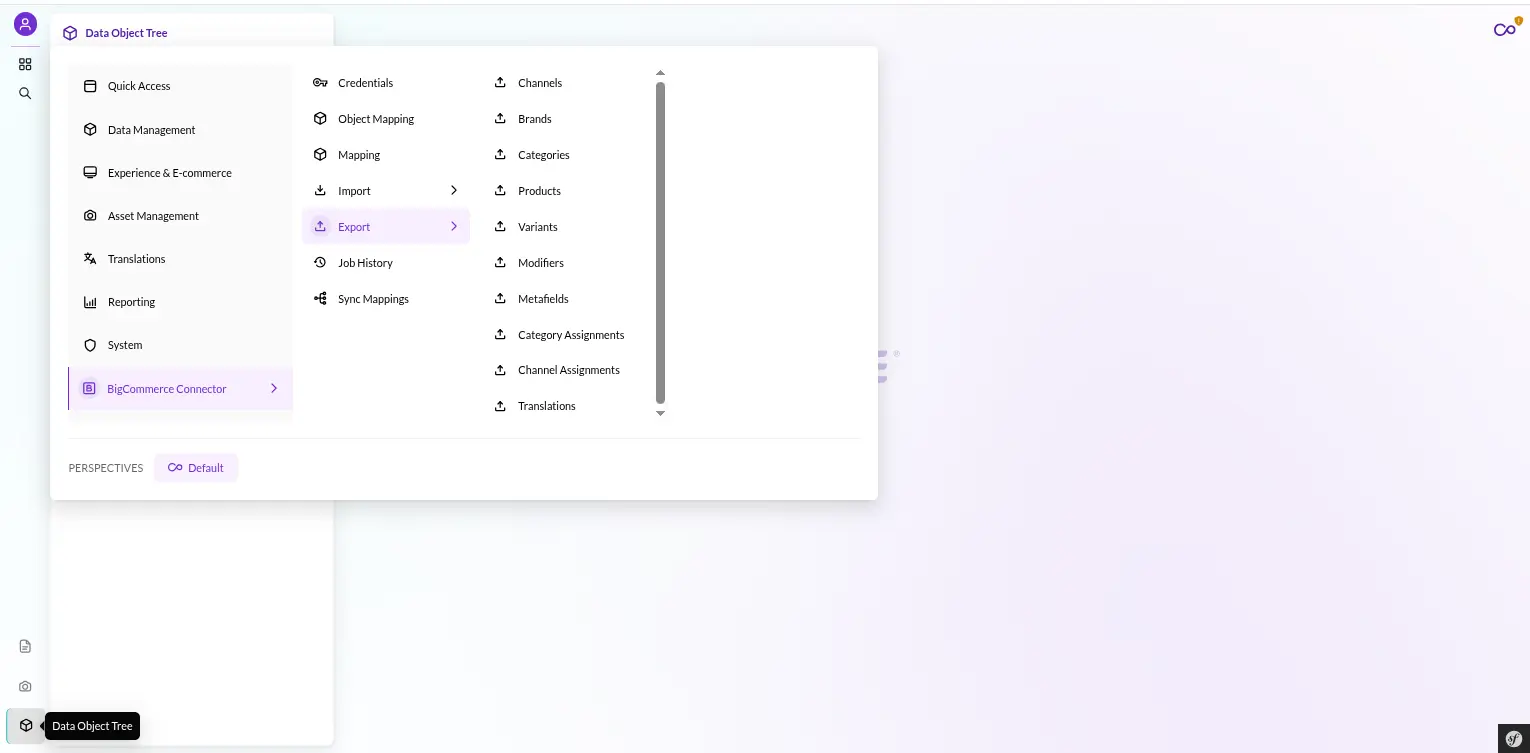
- Studio-native UI — a Module Federation plugin adds a full BigCommerce Connector navigation group, with one dispatch screen per entity in each direction. Nothing external to open.
Connecting: One Store API Account, One Token
BigCommerce authentication is refreshingly boring, and Pimcore BigCommerce Connector keeps it that way.
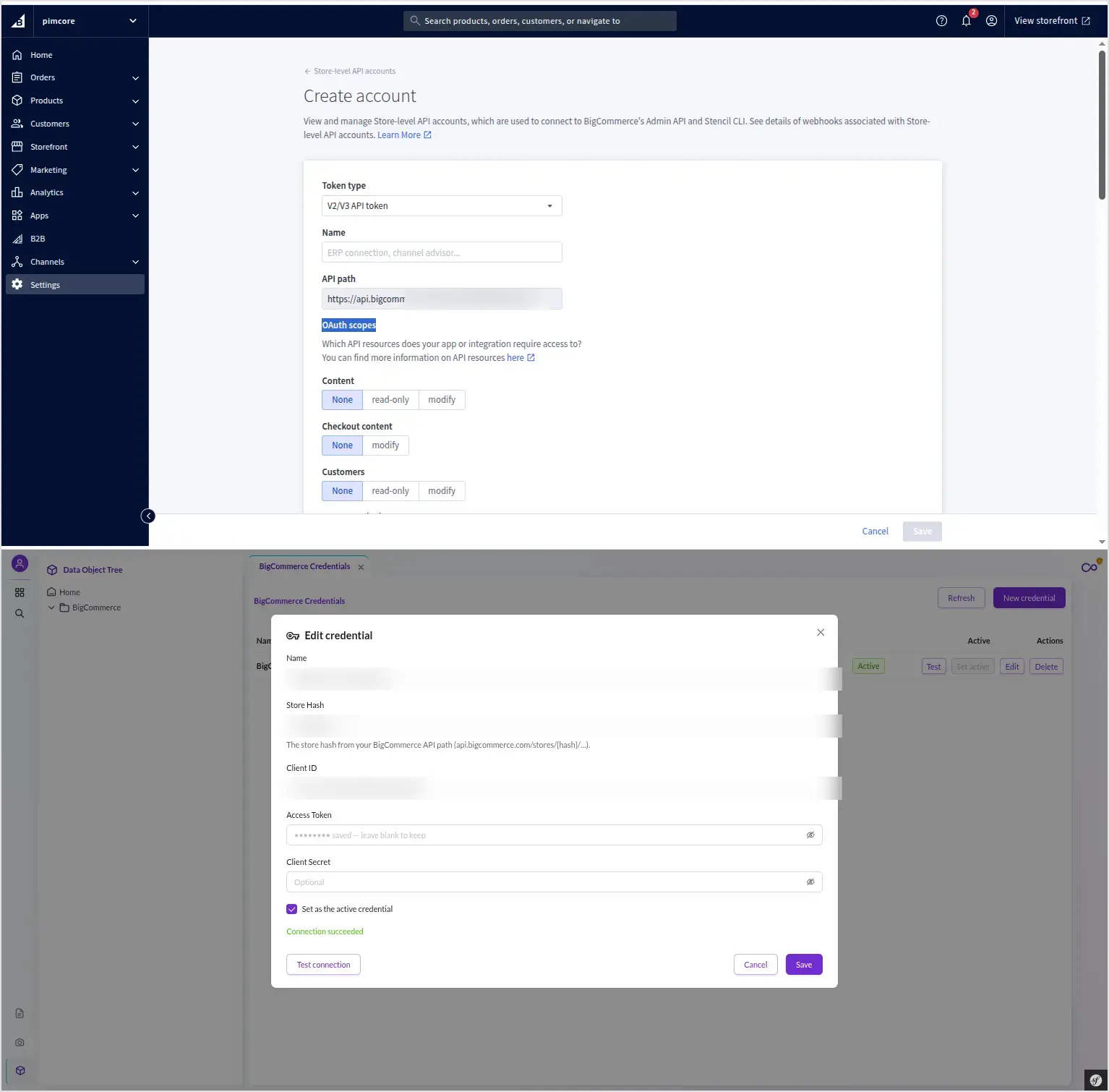
You create a store-level API account in your BigCommerce control panel, grant it the scopes you need, and copy the access token.
That token is issued once and never expires on its own — there is no OAuth token exchange, no refresh cycle, nothing to rotate on a timer.
Under the hood the connector talks to:
https://api.bigcommerce.com/stores/{store_hash}/v3/
Every request carries the token on the X-Auth-Token header.
A small XAuthTokenStrategy behind an AuthStrategyInterface handles that, so the HTTP client itself never knows how it authenticates.
It just calls, and gets back a uniform envelope: {success, http_code, data, error}.
Scopes matter, and the connector holds you to them. It asks only for what it needs — read-only where it reads, write where it writes:
products_read_only/productsinformation_read_only/informationchannel_settings_read_only/channel_settingschannel_listings_read_only/channel_listingssites_read_only/sites
Least-privilege by design.
Each job type declares the scopes it requires, and the connector validates them before it dispatches — so a missing scope is caught at the door, not three hundred products into a run.
Installing Pimcore BigCommerce Connector: One Command
Installation is a single script. From the project root:
bash src/Webkul/BigCommerceConnectorBundle/install/config.sh
That script detects whether you are on Docker or bare-metal PHP, wires the composer autoload, registers the bundle, builds the Studio UI plugin, and sets up the Supervisor workers.
Then pimcore:bundle:install does the heavy lifting inside Pimcore. When it finishes you have:
- 3 database tables —
bigcommerce_config(JSON config),bigcommerce_id_mapping(the sync source of truth), andbigcommerce_jobs(job history and counts). - 10 DataObject classes —
WkBigCommerceCredential,BcChannel,BcBrand,BcCategory,BcProduct,BcProductOption,BcOptionValue,BcModifier,BcModifierValue, andBcMetafield. - 15 permissions — 3 legacy umbrella grants plus 12 granular ACL keys.
- Two queue workers — a
bigcommerce_importconsumer and abigcommerce_exportconsumer, each running serially to stay within BigCommerce’s rate limits.
The installer creates every class idempotently and resolves it by name, never by hardcoded id, so re-running stays safe.
If you prefer to script it, the bundle exposes the same steps as console commands: bigcommerce:objects:install, bigcommerce:permissions:install, and bigcommerce:store:ensure-grid.
There is also bigcommerce:mapping:show to inspect the current object and field mapping from the CLI, and bigcommerce:jobs:dispatch / bigcommerce:jobs:run to trigger jobs headlessly.
Setting Up Pimcore BigCommerce Connector in Studio
Open the BigCommerce Connector group in the Studio navigation and start at Credentials.
A credential carries the store_hash, client_id, access_token, and the space-, comma-, or newline-separated scopes.
Studio stores secrets as write-only input fields — it replays the token on every request but never shows it back to you.
You keep a single active credential, and the connector resolves it by name rather than by id, so nothing breaks if internal ids shift. Before you sync anything, click Test Connection. That fires:
GET /catalog/summary
If your store hash and token resolve, the connector reports back the authenticated status, the auth strategy in use, and your store hash — proof the pipe is open.
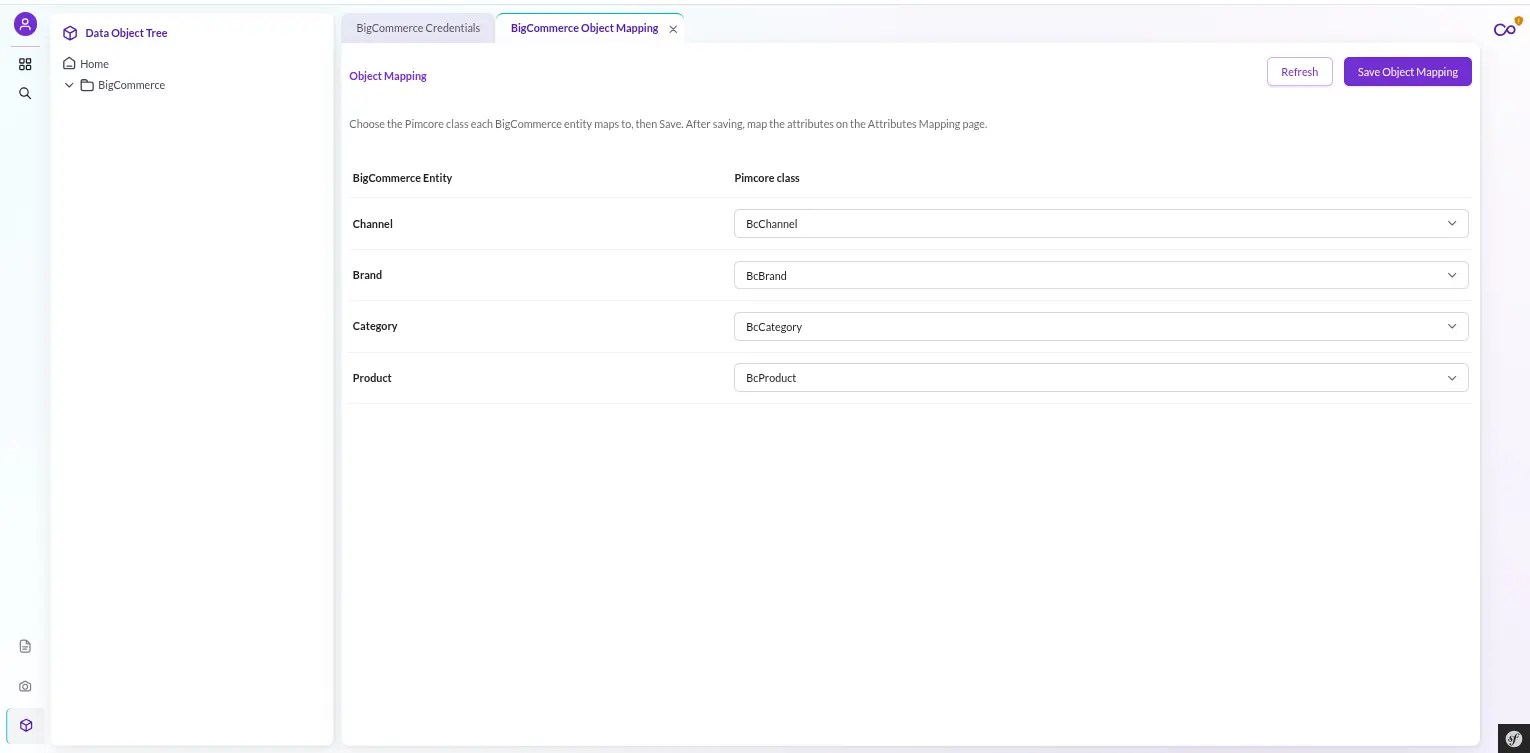
Object Mapping: Pimcore BigCommerce Connector Adapts to Your Classes
Here is the part that stops the connector from becoming a straitjacket. The 10 classes it installs are defaults, not requirements.
Object Mapping is fully dynamic: for each entity — product, category, brand, channel, option, and so on — you pick which Pimcore class carries it.
There are no static Bc* references buried in the job code. A MappingResolver resolves everything at runtime, looking the class up by name.
If you have not overridden it, the resolver falls back to the seeded default.
That means you can point product at your existing catalog class instead of BcProduct, and the readers, processors, and writers follow — no fork, no patch.
Field Mapping works the same way, one row per BigCommerce field, and the connector only ever advertises the standard, writable V3 fields.
Read-only fields are never offered as targets you could waste time mapping. You can also inspect the current object and field mapping straight from the CLI with bigcommerce:mapping:show.
Store and Channel Mapping: Channel by Locale
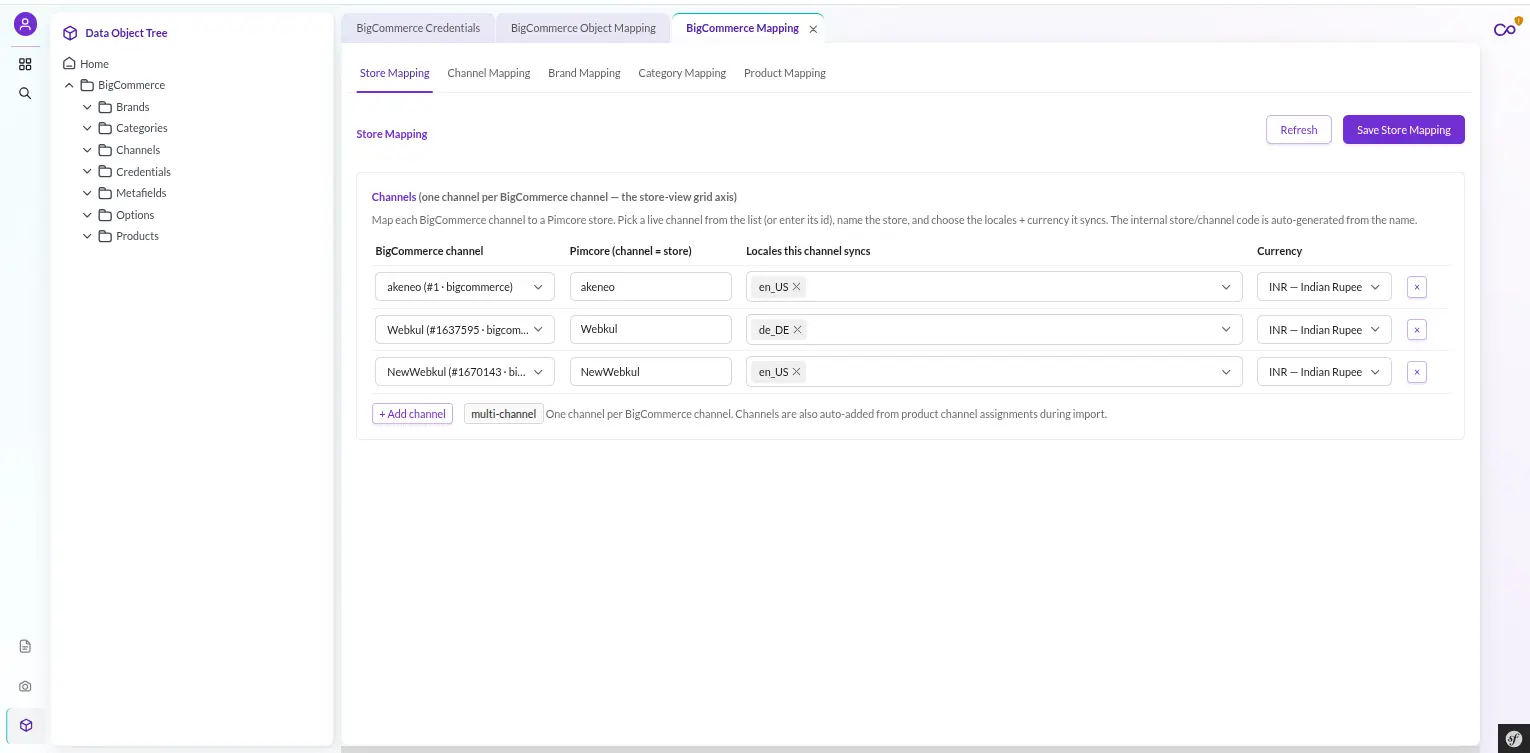
BigCommerce sells across multiple channels, each of which can carry multiple locales. The connector models that as a store-view grid.
On your catalog classes (product and category) a storeValues FieldCollection holds one item per channel, and inside each item a Localizedfields block holds the per-locale content.
The Channel Mapping page lists the live BigCommerce channels — it calls GET /v3/channels for you — so you map each real channel to its Pimcore locales and currency, then save.
This is not optional decoration: store mapping must be explicitly saved.
Jobs that are channel-scoped stay blocked until it is, so Pimcore BigCommerce Connector never silently guesses a default channel and writes content to the wrong storefront.
Categories: The Trees API, Parents First
Categories are a hierarchy, and hierarchies break if you write a child before its parent exists.
The connector reads categories through BigCommerce’s Trees API (catalog/trees/categories) and materialises the entire tree in one pass.
It then topologically sorts the tree parents-first, breadth-first, before writing a single node.
It also round-trips the tree_id so the structure lands back where it belongs (BigCommerce’s default tree is tree_id=1).
On export, categories do not go one at a time — they use the batch-collection endpoint with an array body and id-in-body updates.
A gotcha the connector handles for you: a 2xx from the batch endpoint does not guarantee every item saved.
The writer confirms the returned id per item, and if one dropped, it recreates it — a self-healing batch write.
And if any page of the tree fails to fetch, the import writes nothing rather than orphan children into a corrupt tree.
Products: Flat Data, Then the Sub-Resources
A BigCommerce product is not one flat record — it is a core object plus a fan of sub-resources. The connector mirrors that with a multi-step job.
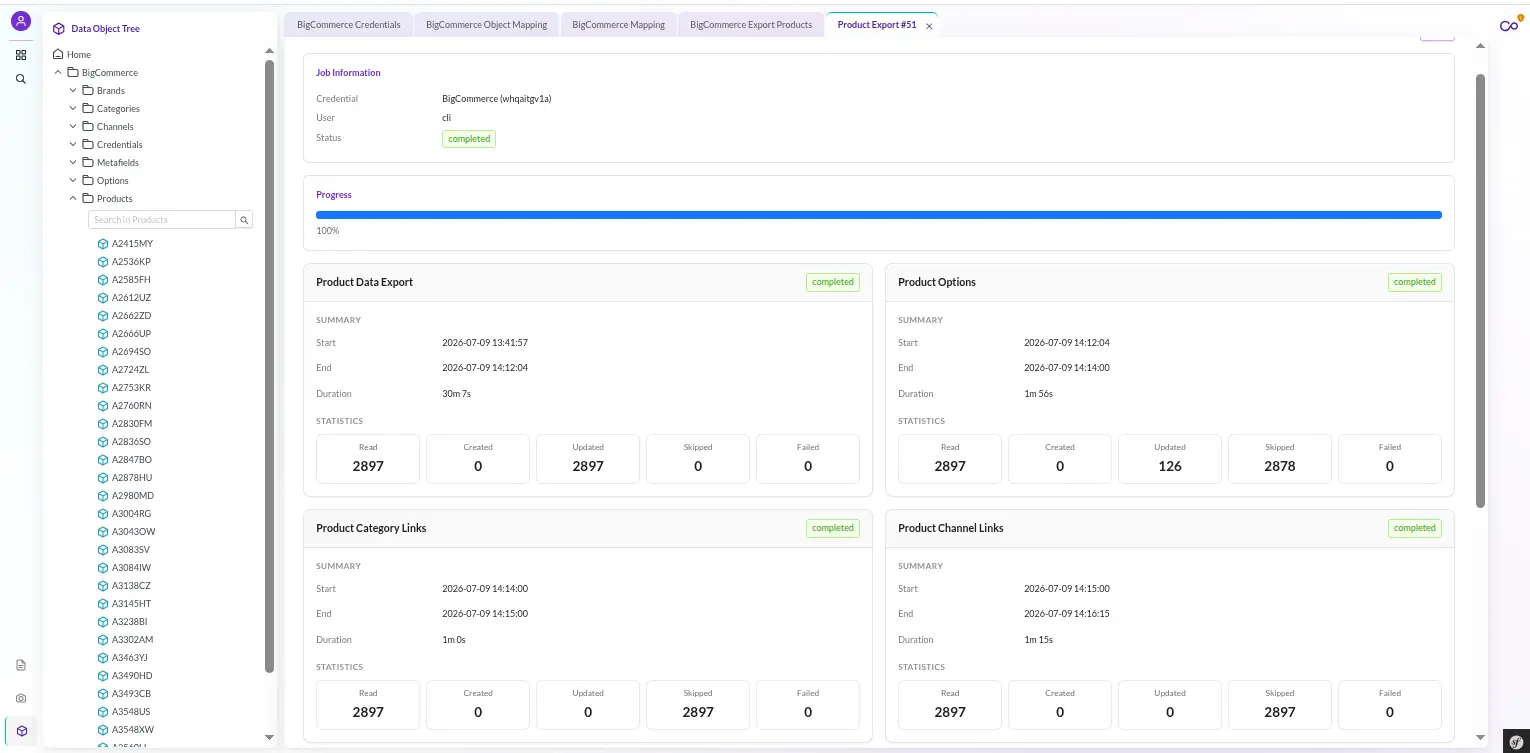
Product import runs as four steps: DATA (the primary step — the flat product record), then three sub-resource steps:
- custom fields
- images
- videos
The primary DATA step owns the headline totals you see in the UI; each secondary step reports its own counts alongside.
Custom fields land in a BcProductCustomField FieldCollection, and videos in a BcProductVideo FieldCollection — both carry Pimcore-safe field names.
BigCommerce’s value and type collide with reserved Pimcore names, so the connector renames them to fieldValue and videoType.
That rename pattern is a recurring, deliberate detail.
Wherever a BigCommerce field name would collide with a Pimcore reserved word, the connector renames it one way.
type becomes productType on the product, channelType on the channel, optionType on the option, and modifierType on the modifier.
The metafield’s key and value become metaKey and metaValue.
These are the only renames, and they are documented, so nothing surprises you at mapping time.
Product Options and Variants: A Native Variant Tree
This is where thin CSV tools fall over and the connector shines.
BigCommerce variants become native Pimcore variants — Concrete children filed under the product object, not duplicated as separate products.
The variant axes are first-class classes of their own: BcProductOption for the option (name, its type, and a config JSON) and BcOptionValue for each value (label, sort order, value data).
A variant references option value ids, so the options step always runs before the variant step.
Two design choices make this robust:
- The reader skips the base variant on import. BigCommerce’s base variant is the product itself — importing it would duplicate the product, so the reader drops it and imports only real variants, carrying just the present, non-null scalar overrides (anything absent inherits from the parent).
- Variants never leak out as standalone products on export. The variant export reader pages only variant-type children, while the base product reader pages only objects — so a variant is never accidentally pushed to BigCommerce as its own product.
Modifiers: The Non-Variant Add-Ons
Not every product option creates a SKU. Text fields, gift-wrap toggles, engraving lines — BigCommerce calls these modifiers, and the connector keeps them cleanly separate from variants.
BcModifier and BcModifierValue model them per product, and — critically — modifiers never create a SKU.
On export the connector writes them through the nested /modifiers/{id}/values endpoint, additively and idempotently, so re-running never duplicates a modifier value.
Metafields: One Class, Four Owners
BigCommerce lets you attach metafields to products, variants, categories, and brands.
Rather than spray four near-identical classes across your data model, Pimcore BigCommerce Connector uses one BcMetafield class with a polymorphic owner relation.
A single metafield entry in the id-mapping table backs it.
Match-before-create keys on the (namespace, key) pair scoped to the owner, and variant metafields are correctly nested under their product.
Ownership matters here. The connector runs under one stable store-level API account, so it only writes the metafields it owns.
It leaves metafields owned by other apps (a different client id) untouched — it preserves them and never overwrites them.
Assignments: Category and Channel Membership, Always Additive
The connector handles product-to-category and product-to-channel links with surgical care, because getting them wrong deletes data.
These relations are never sent on the product body — putting a category array on a product update in BigCommerce is a full overwrite that would wipe memberships you did not include.
Instead they ride dedicated, additive assignment steps: export PUTs only the missing pairs and never clears, and import UNIONs new memberships into the relation without removing what is already there.
Every BigCommerce assignment endpoint the connector touches is additive and idempotent by design.
Translations: GraphQL for the Non-Default Locales
REST V3 writes the global catalog value that channels inherit.
Per-channel, per-locale content overrides live somewhere else — BigCommerce’s GraphQL Translations Admin API — and the connector speaks it. A separate GraphQlClient hits:
POST https://api.bigcommerce.com/stores/{store_hash}/graphql
with the same X-Auth-Token.
A TranslationsTransport service exposes getChannelLocales(), getOverrides(), and setOverrides(), and dedicated import and export translation jobs fan out over channel by non-default-locale.
The translatable fields are the ones that actually matter. For products: name, description, page title, meta description, and meta keywords.
For categories: name, description, page title, and meta description.
Export is diff-based: it skips an unchanged locale entirely, explicitly clears an emptied field, and keeps the default-locale content on REST as the base value. Only the overrides travel over GraphQL.
Straight talk: the Translations Admin API is BETA and Catalyst-positioned on BigCommerce’s side, and channel-locale management is GraphQL-only with no REST equivalent.
The connector implements it fully, and stays honest about that dependency.
Images and Media
The connector treats product images as a managed gallery.
On import the connector downloads the bytes into a real Pimcore Asset\Image, de-duplicated by filename plus content hash, and rebuilds the product gallery.
On export it uploads via multipart — and critically, it skips images already on BigCommerce by consulting an asset-to-image mapping, so re-running an export does not re-POST every image every time.
BigCommerce has no native image de-duplication and filename matching is unreliable, so Pimcore BigCommerce Connector carries its own.
Brand and category images get the same download-and-dedup treatment into their own Pimcore asset folders (BrandImages, CategoryImages), so media handling is not product-only.
The connector import-manages videos via the BcProductVideo FieldCollection, full-replace per product.
The Single-API Design: REST-First, GraphQL Only Where REST Can’t Reach
Worth being explicit, because it shapes everything above: BigCommerce is a single-API integration. There is no dual transport, no legacy fallback, no OAuth exchange to route around.
Every catalog job runs over V3 REST with one capability — REST — and that is the whole story for products, categories, brands, channels, options, modifiers, metafields, and assignments.
The only place GraphQL enters is the narrow surface REST cannot reach: channel-locale management and per-channel, per-locale translations. Same token, same envelope shape, same store.
It is a scalpel, not a second transport — which keeps the moving parts few and the failure modes predictable.
Watch Pimcore BigCommerce Connector Sync Live
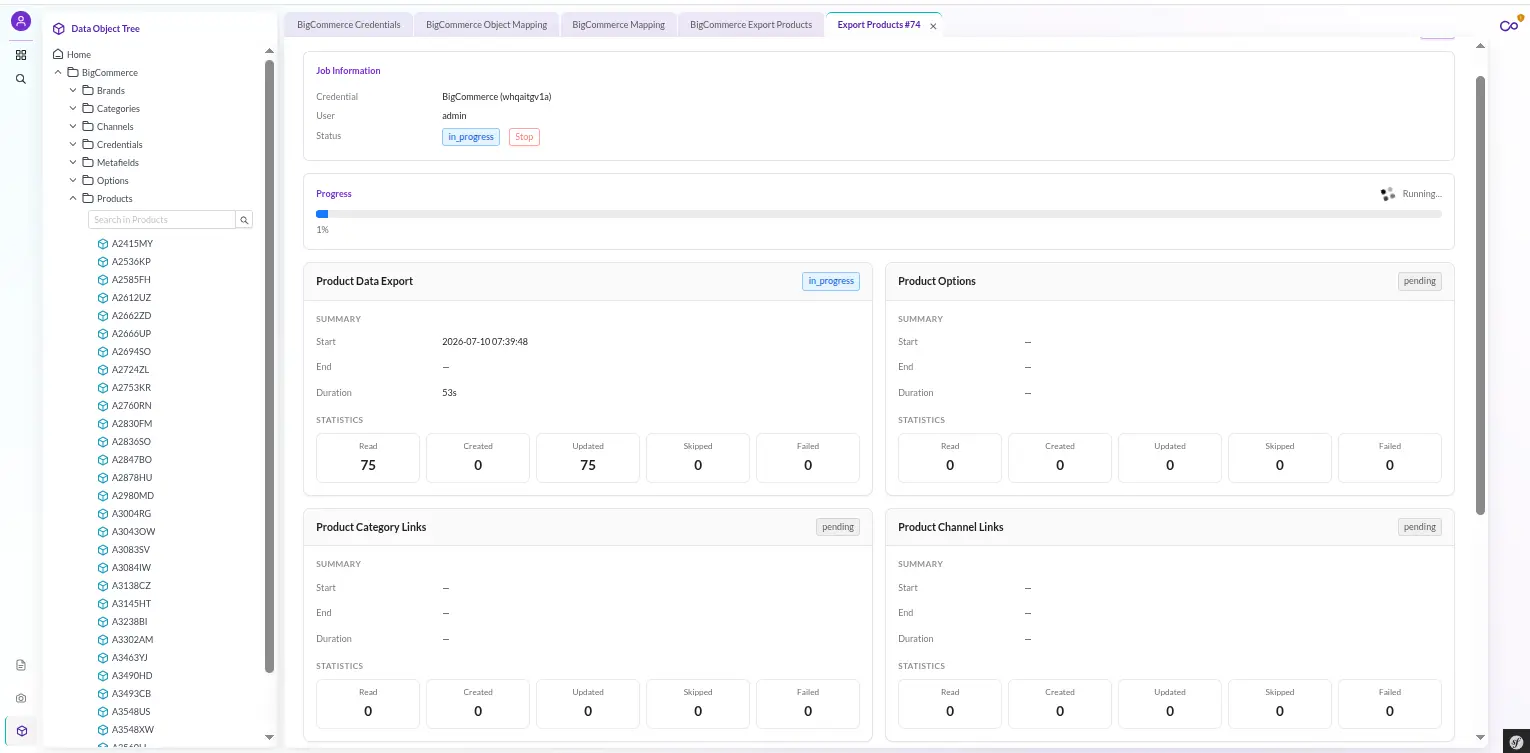
Sync work runs asynchronously. Dispatching a job drops a message on a Doctrine Messenger queue — bigcommerce_import or bigcommerce_export — and a Supervisor-managed worker picks it up.
Your Studio session stays responsive; the work happens in the background.
The Import and Export folders each expose one dispatch screen per entity — Channels, Brands, Categories, Products, Variants, Options/Modifiers, Metafields, assignments, and Translations.
So an operator can run a single entity type in a single direction on demand, rather than an all-or-nothing sync.
But you are not flying blind. Each job is built on a Reader-to-Processor-to-Writer step engine that reports as it goes.
The Job History screen lists every run, and clicking a row opens a live detail view with:
- per-step StepCards — the primary DATA step and each secondary step, side by side, each with its own read, write, update, skip, and fail counts;
- a structured log stream — success, warning, error, and info levels, capped so a runaway job cannot flood you;
- and a Stop button that stops cooperatively.
That last point matters. Stop does not kill a process mid-write.
It flips a flag the worker checks at each batch boundary, so the run finishes its current batch cleanly and then halts — no half-written products, no torn state.
Exporting to BigCommerce
Export reverses the pipeline: a Reader pulls your mapped Pimcore objects, parents-first, and a Writer pushes them to BigCommerce. The write logic is anchored on the id-mapping table:
- Mapping exists — the connector PUTs an update to
{endpoint}/{bcId}. - PUT returns 404 — the remote object was deleted, so the connector POSTs a fresh one and re-anchors the mapping. Self-healing.
- No mapping — it POSTs a create and records the new mapping.
The connector resolves relations from Pimcore id to BigCommerce id through that same table, and the export never pushes the store-view grid.
REST V3 writes global values, and the per-channel overrides go through the translation path instead.
Product export runs as a five-step job: DATA (with categories deliberately omitted from the body), category assignments, channel assignments, images, and custom fields.
Product options are synced by their own dedicated export job.
Importing from BigCommerce
Import is the mirror image, and here Pimcore BigCommerce Connector does one thing export does not: it reindexes automatically.
Every import job handler is final and guarantees a reindex of the affected classes after all steps complete.
So your Pimcore search and grids reflect the new data immediately. (Export never reindexes — there is nothing local to re-index.)
Imports honor per-job filters passed through the job context, and page through the standard V3 pagination envelope in batches of 25 (capped at BigCommerce’s max of 250).
Every entity runs through the same generic writer, which resolves the target class dynamically and upserts idempotently.
Why Pimcore BigCommerce Connector Won’t Break on the Second Run
Most connector pain shows up on re-runs: duplicates, wiped relations, half-applied changes. This one is built to survive them.
- Pre-flight validation. A
JobPreflightValidatorchecks store mapping and scopes before dispatch and blocks a job that would fail — rather than starting it and dying partway. A blocked job is a clear error, not a corrupted store. - Idempotent, self-healing writes. The
bigcommerce_id_mappingtable, scoped by store hash, is the single source of truth. When a mapping is missing, the connector matches on business keys —skufor products,namefor channels, brands, and categories — before creating, and re-links the mapping. Re-running never duplicates. - Empty never means delete. Unset values do not clear remote data. Relations are additive, translations are diff-based, and an emptied field is cleared only when you explicitly emptied it.
- Stuck-job recovery. A
JobRecoveryservice unlocks abandoned in-flight messages so orphaned jobs reprocess, and marks jobs running past a max runtime (7200s by default) as failed — so the UI never shows an eternally-spinning job. It runs at worker startup and is available manually asbigcommerce:jobs:recover.
And when you want to see the wiring for yourself, the Sync Mappings screen is right there in the navigation.
It is a read-only grid over the bigcommerce_id_mapping table that surfaces every link — Pimcore id to BigCommerce id, per entity.
An operator can audit exactly what is tied to what and diagnose sync state without leaving Studio.
Pimcore BigCommerce Connector Roles and Permissions
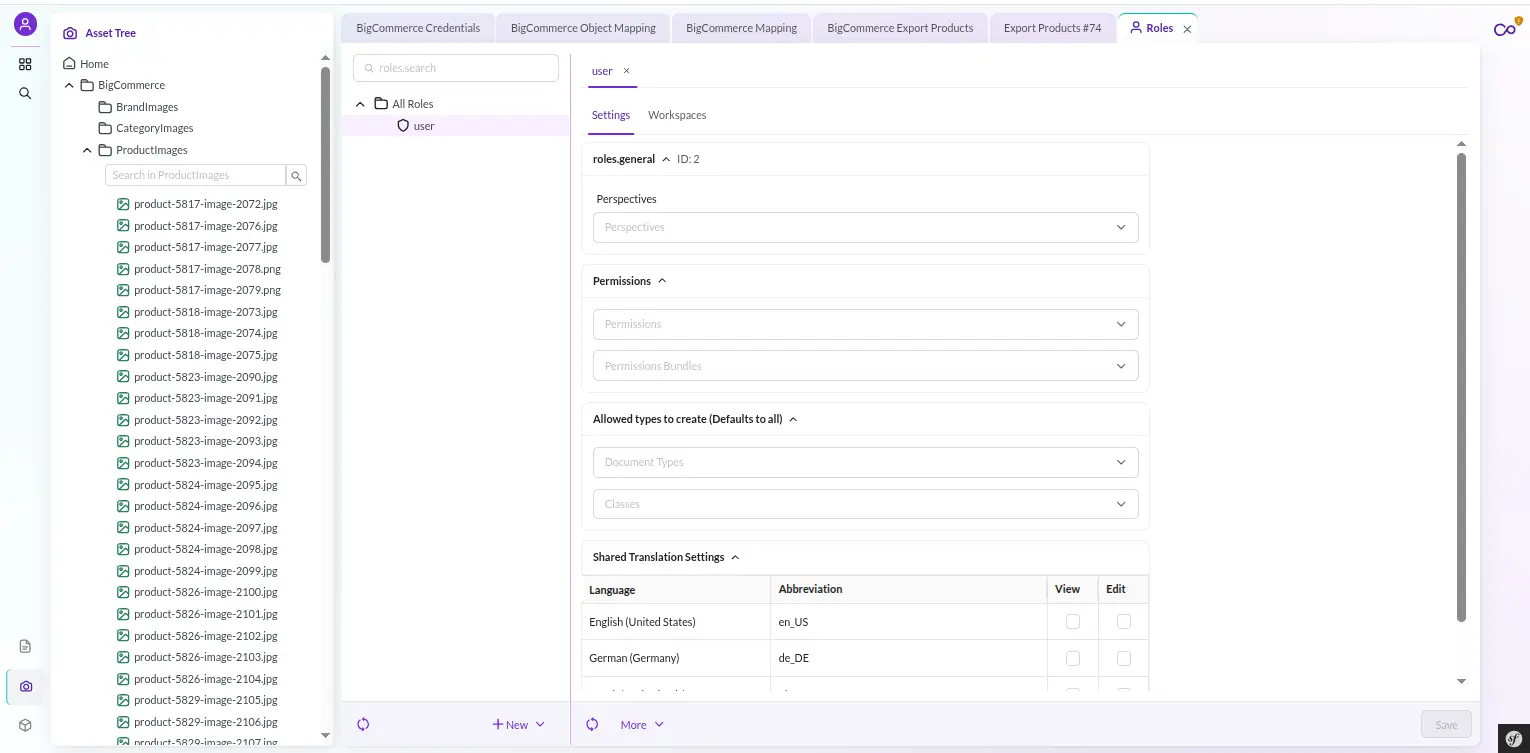
The connector ships 15 permission keys: 12 granular ACL keys plus 3 legacy umbrella grants.
The granular set splits view from manage and read from execute.
The keys: bigcommerce_credentials_view|manage|test, bigcommerce_mapping_view|manage, bigcommerce_store_mapping_view|manage, and bigcommerce_sync_mappings_view.
Plus bigcommerce_jobs_view|stop, bigcommerce_import_execute, and bigcommerce_export_execute.
So you can grant a teammate “run imports and watch jobs” without handing over credential management.
The grants are ergonomic, not flat: holding a higher permission implies the lower one, so granting manage also grants view, and the three legacy umbrella keys expand to their full granular sets.
When you migrate off the legacy keys, the installer’s --grant-legacy-holders option fans the equivalent granular grants to every role or user that held one.
Enforcement is fail-closed at a single chokepoint.
An ApiAuthenticationSubscriber on the controller event authenticates (401) before it authorizes (403).
It logs and denies any unmapped route, returning a JSON {success, error} envelope, authenticated by the admin session cookie rather than a separate firewall.
All 23 named routes are permission-mapped, and a shipped phpunit RouteCoverageTest reflects over the controller routes.
It asserts every route is mapped, carries the bigcommerce_ prefix, and exposes no /admin path — so a new endpoint literally cannot merge without a mapped permission.
Admin users bypass the checks.
One operational note: Pimcore loads permissions at login. An operator you re-permission keeps their old set until they log out and back in.
Pimcore BigCommerce Connector Result in Your Store
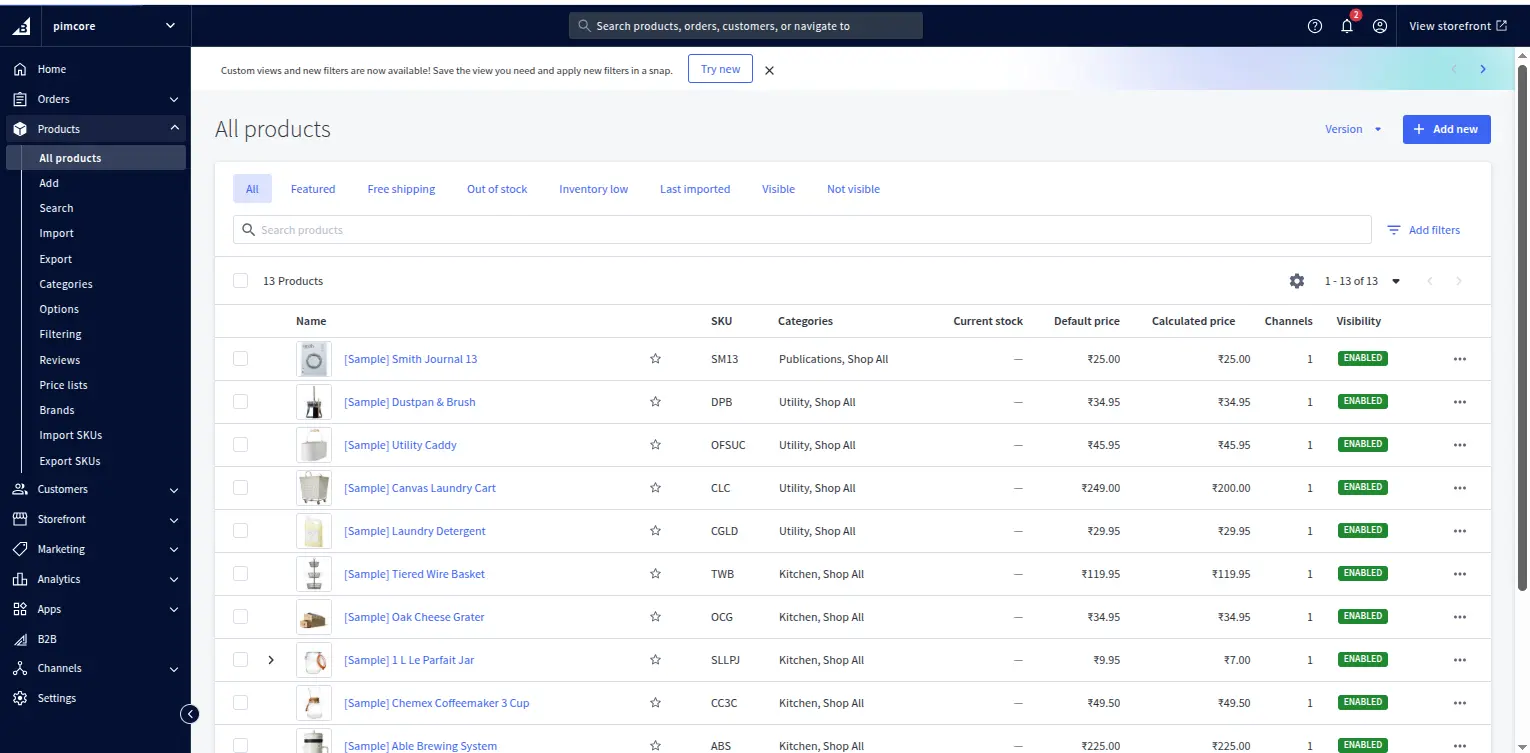
When a sync completes, your BigCommerce catalog reflects Pimcore exactly: products with their variants nested under them, categories in the right tree, brands and channels linked.
Custom fields and metafields are attached, images uploaded once, modifiers in place, and — where you configured them — per-channel, per-locale translations live.
Run it again tomorrow and it updates in place. No duplicates, no wiped memberships, no drift. Pimcore stays the source of truth, and BigCommerce stays in sync with it.
Try Pimcore BigCommerce Connector
If Pimcore is your product hub and BigCommerce is your storefront, Pimcore BigCommerce Connector is the bridge that stops the copy-paste and the CSV firefighting.
It installs with one command, sets up in Studio in minutes, and is built to be re-run every day without fear.
Explore more Pimcore integrations: Browse all our Pimcore-related blogs, including Magento 2, PrestaShop, Shopify, BigCommerce, and other integrations on our Pimcore Blogs.
Grab the Webkul Pimcore BigCommerce Connector from the Webkul Store, and if you have a question — mapping, scopes, a custom class, anything — raise a ticket at webkul.uvdesk.com.
We build these connectors for a living, and we’ll help you get yours running.

Be the first to comment.