Laravel Product Stock Alert (PSA) module notifies customers when an out-of-stock product returns to your Bagisto eCommerce Store.
With Laravel Product Stock Alert, customers subscribe to a product. Then they get an email once it is back in stock.
The admin can enable or disable the module from the Bagisto admin panel configuration, without touching any code.
Customers can subscribe from the product page or from the product cards on listing pages. So merchants recover sales that out-of-stock products might lose.
Please Note – Only logged-in customers can subscribe, because the system stores each subscription in the customer’s account.
The system sends back-in-stock emails through a queued job. So you must run a queue worker if your queue connection is not set to sync.
Requirements
- Bagisto: v2.5.0
- PHP: 8.4 or later
- Database: MySQL, MariaDB or PostgreSQL
Features of Laravel Product Stock Alert
- The admin can enable or disable the extension.
- Customers can subscribe to a “Notify me when available” alert on out-of-stock products.
- The notify button appears on the product page and on the product cards of listing pages.
- The button appears only for out-of-stock products, and only for logged-in customers.
- A product the customer already follows shows “Subscribed” on the first page load, so the label never changes after rendering.
- Each customer holds one stock alert per product, so duplicate subscriptions never happen.
- Every subscribed customer gets an email when the admin restocks a product.
- Queued emails mean that restocking a product with many subscribers never blocks the admin.
- Each email uses the default locale of the customer’s channel, not the admin’s locale.
- Configurable, grouped and bundle products work too. The module checks the sellable quantity of their simple products first.
- An admin grid lists every stock alert, with search, sort and filter.
- A status filter separates Pending alerts from Notified ones.
- After a back-in-stock email, the customer can subscribe again for the next time the product sells out.
- The full page cache never stores a logged-in customer’s page, so the button label never goes stale.
- Disabling the module hides the admin menu entry and turns off the admin and storefront routes.
- The module runs on MySQL, MariaDB and PostgreSQL, with or without a table prefix.
- Translations are available for all locales Bagisto supports.
Installation – Laravel Product Stock Alert
First, unzip the extension zip and merge the packages folder into the project root directory.
Next, go to the bootstrap/providers.php file and add the following line under Provider.
Webkul\PSA\Providers\PSAServiceProvider::class,
Then open the composer.json file and add the following line under ‘psr-4‘.
"Webkul\\PSA\\": "packages/Webkul/PSA/src"
Finally, run the commands below to complete the setup.
composer dump-autoload
php artisan psa:install
The psa:install command runs the module migration, publishes the prebuilt stylesheet and clears the application cache.
Initial Configuration – Settings
After the commands finish, open the PSA settings at Configure>General>PSA>PSA Settings.
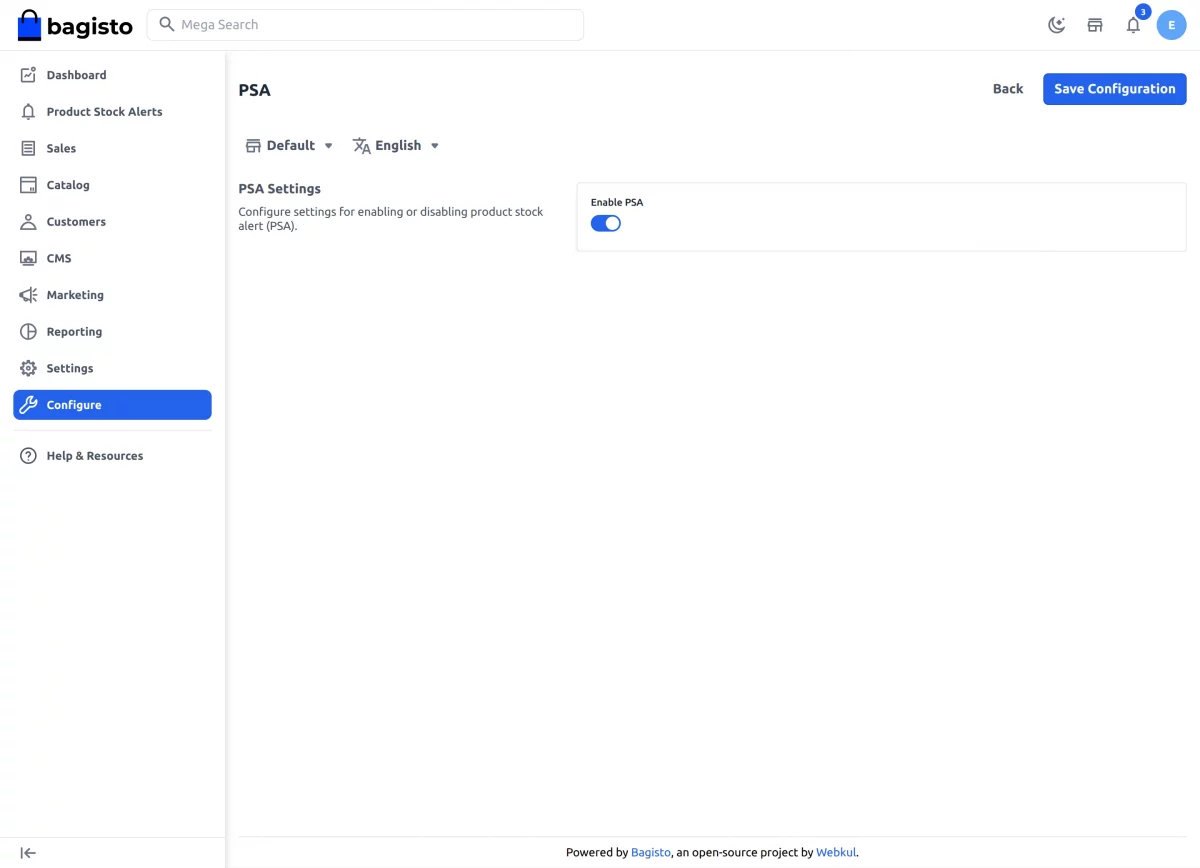
Here, the store admin sets the initial option.
- Enable PSA:- Turn the module on or off with the toggle. When the admin turns it off, the Notify button, the emails and the Product Stock Alerts menu all go away.
After that, click the Save button.
Storefront Workflow – Laravel Product Stock Alert
Customers must log in before they subscribe, because the system saves each stock alert to the customer’s account.
Now open any product that is out of stock. The customer sees the Notify me when available button on the product page.
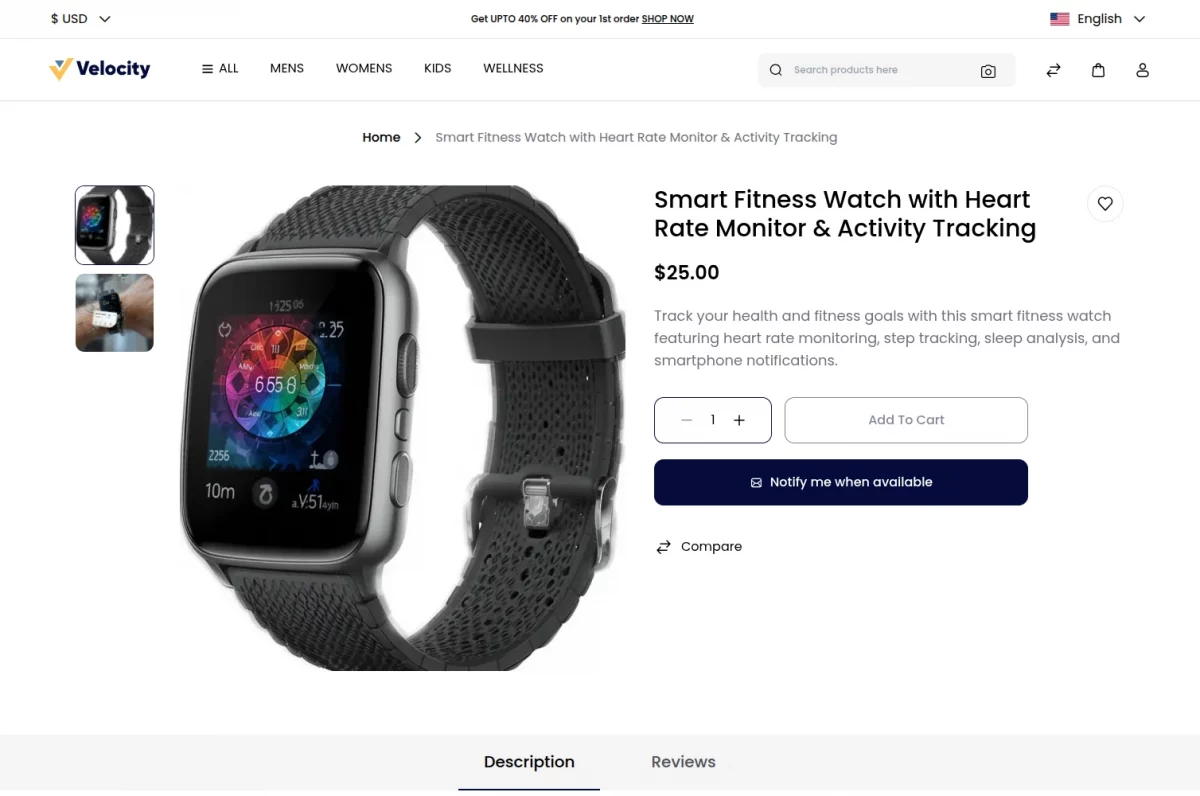
The same button also appears on the product cards of listing pages. So the customer can subscribe without opening the product.
After the click, the customer sees “You will be notified when the product is back in stock”. Then the button shows Subscribed.
Once the admin restocks the product, every waiting customer gets an email. It holds the product name and a button to the product page.
The system sends the email in the default locale of the customer’s channel. So each customer reads it in the store’s language.
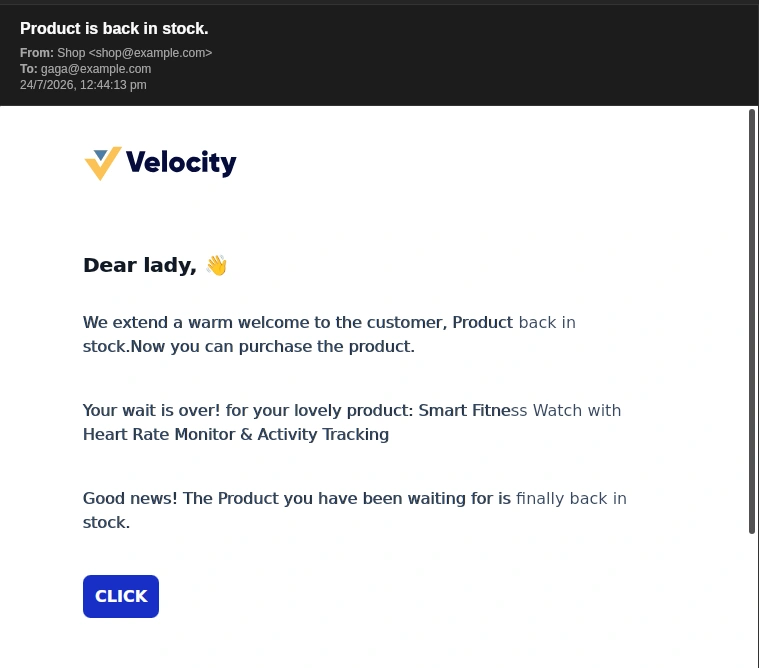
Stock Alert Details – Admin Backend
The admin sees all stock alert requests under Product Stock Alerts in the admin menu.
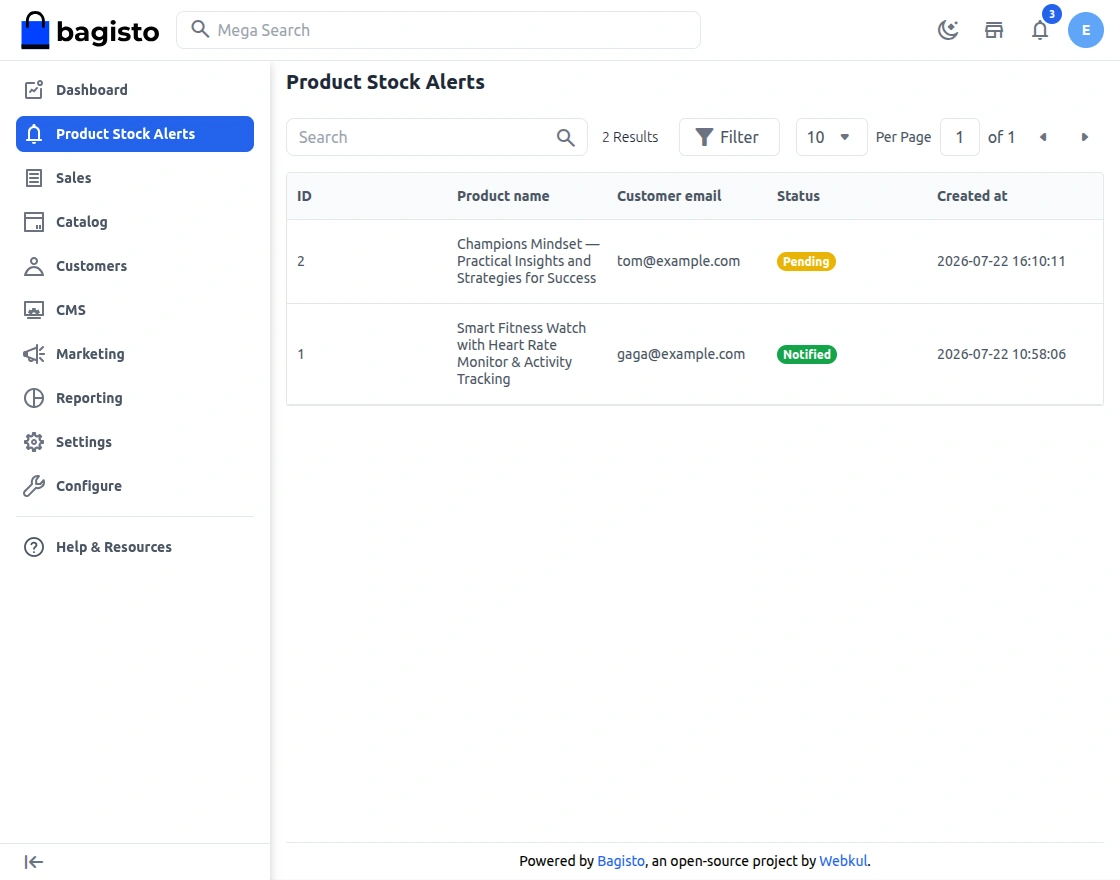
The listing shows these details for each request.
- ID:- The unique id of the stock alert request.
- Product Name:- The product the customer waits for.
- Customer Email:- The address that receives the notification.
- Status:- Pending until the product is back in stock. Then Notified once the email goes out.
- Created At:- The date the customer subscribed.
The admin can search by product name or customer email, and sort by any column. A status filter shows only Pending or only Notified requests.
When the admin saves a product with stock back in it, the system sends its pending alerts. Then it marks them Notified.
Support
That’s all for the Bagisto Product Stock Alert. Still have any issue? Feel free to add a ticket and let us know your views to make the module better at bagisto.uvdesk.com
Current Product Version - 2.5.0
Supported Framework Version - 2.5.0

Be the first to comment.