


















What if your store was ready for the Shopify holiday season before the rush even began?
The Shopify holiday season does not start on Black Friday. It starts weeks earlier, when shoppers begin comparing gifts, saving carts and clicking on ads.
By the time traffic peaks, your store should already be settled. Changes made in the middle of a sale are risky, and a slow checkout cannot be fixed in time to save that day’s orders.
Imagine a store that loads fast, checks out cleanly and holds up on your busiest day. That is what early preparation gives you.
This guide covers what to fix, what can wait, and roughly what it costs.
It is written for store owners, e-commerce managers and marketers. You only need to know which questions to ask.
With our Shopify development experience and a range of Webkul Shopify apps, we help brands get ready now and add features as their needs grow.
If you are starting a new store, explore Webkul’s Shopify Store Development Package and take the first step.
The Short Version
- Slow pages, heavy apps and a clumsy checkout cause most holiday problems. Fix those before anything cosmetic.
- Start with your product pages and your mobile experience. Most holiday traffic arrives on phones.
- Audit your apps now, then freeze code changes before your first big campaign.
- Do the essentials early and leave nice-to-have projects for January.
- Cost ranges are in the table below. They are indicative, not fixed quotes.
What Actually Breaks During Shopify Holiday Season Traffic
Stores rarely fail in dramatic ways. They get slow, confusing and a little annoying, and shoppers leave without saying why.
The usual causes are the same every year.
Product pages load slowly because of large images, heavy sliders and too many scripts. Apps pile up over the year, and each one adds code that the browser has to load.
The mobile layout hides the add to cart button below a wall of text.
The checkout asks for too much, or surprises people with shipping costs at the last step.
Shipping times, return rules and gift options are hard to find, so shoppers hesitate and then leave.
None of this is new. The problem is that holiday traffic is bigger, less patient and more likely to arrive through paid campaigns, so every flaw costs more.
A Practical Readiness Checklist for the Shopify Holiday Season
Work through these in order. The first three matter most.
1-Speed and performance
Fix your product page load time first. Then check collection pages and the homepage.
Shopify store speed optimization is mostly unglamorous work.
Compress and resize images. Remove sliders and videos that do not earn their space.
Delete scripts left behind by apps you no longer use. Check what your theme loads on every page, and ask whether each item needs to be there.
Run your key pages through a speed testing tool on a mobile connection, not just your office wifi. Note the slowest pages and fix those before polishing the rest.
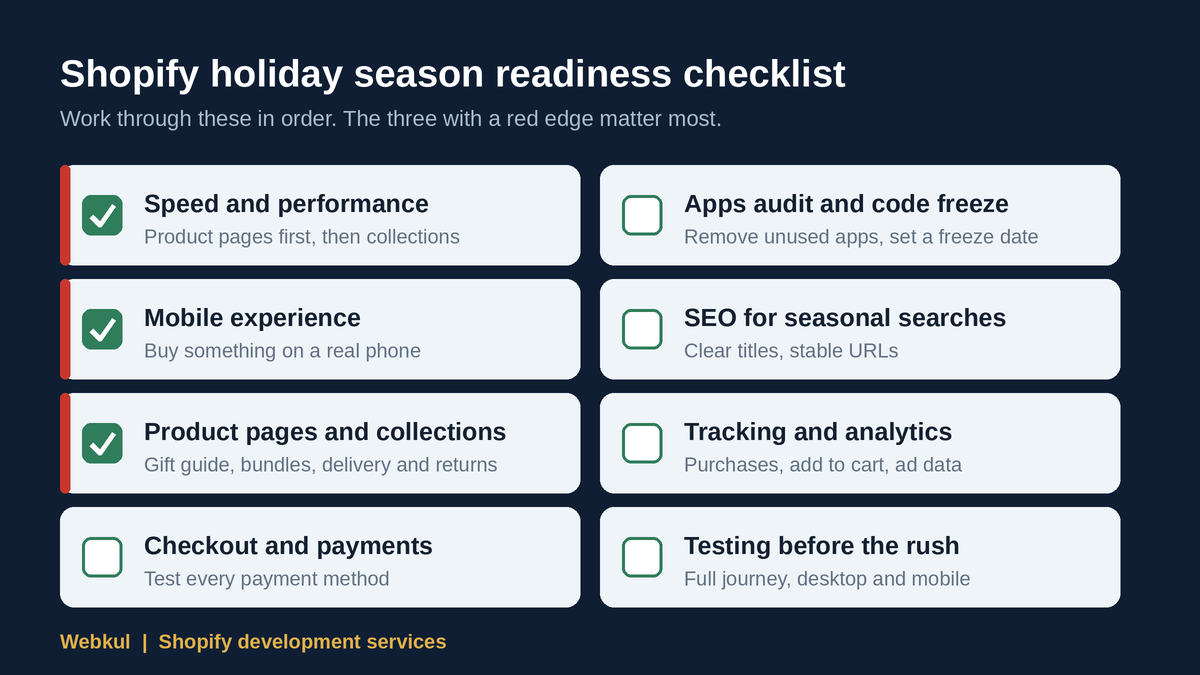
2-Mobile experience
Open your store on a real phone and buy something. Do it again on a cheaper phone if you can.
Look for buttons that are hard to tap, text that is too small, pop-ups that cover the page and filters that are painful to use.
Make sure the add to cart button is visible without hunting for it. Mobile problems hide easily because most teams build and review on desktop.
3-Product pages and collections
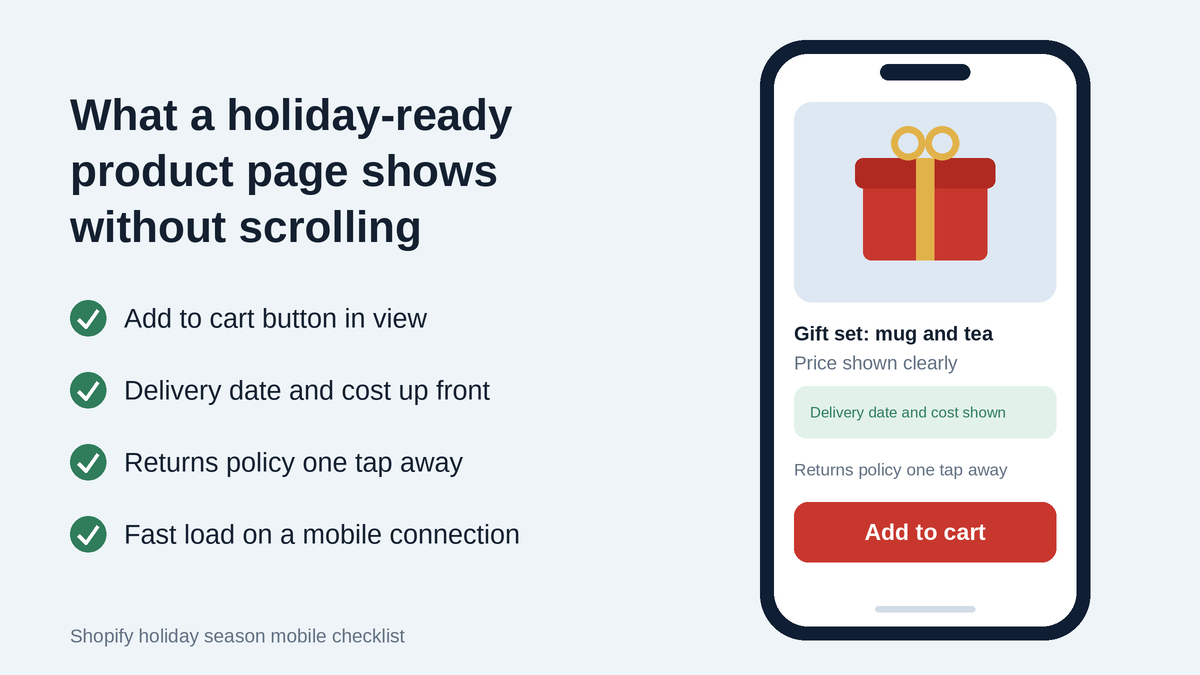
Gift shoppers want quick answers. Is this a good gift? Will it arrive in time? Can I return it?
Useful additions for the season include:
- a gift guide organized by budget, recipient or occasion
- bundles and gift sets for products that pair naturally
- a seasonal landing page that you can reuse each year
- clear delivery and return details on every product page
Do not build twenty collections. Build four or five that your best customers would actually browse.
4-Checkout and payment readiness
Place a test order using every payment method you offer. Check shipping rates, discount codes, taxes and the confirmation email.
Shopify hosts your checkout, which is a real advantage, but your options for customizing it depend on your plan.
Check the Shopify pricing page to see what your plan allows before you plan any checkout changes.
If you offer express payments, make sure they appear where shoppers expect them.
Remove anything that adds friction. Forced account creation is a common one.
5-Apps audit and the code freeze
Open your app list and ask three questions about each app. Do we still use it? Does it duplicate something another app or the theme already does? Does it add code to the storefront?
Remove what you do not need. Apps from the Shopify App Store are useful, but they add up quickly, and old ones tend to leave code behind after uninstalling. Ask your developer to check for leftovers.
Then set a code freeze. Pick a date before your first major campaign and agree that after it, only urgent fixes go live.
Write the date down and share it with your marketing team. A theme edit at 4 pm on a sale day is how stores break.
6-SEO for seasonal searches
Seasonal SEO is about being findable and clear, and nobody can promise rankings. Give your gift guides and seasonal pages clear titles and descriptions.
Make sure they are linked from your main navigation. Keep the same URL from year to year so the page can build history.
Check that your product titles and descriptions say what the product is, who it suits and why it makes a good gift.
The Shopify Help Center has practical guidance on editing page titles, descriptions and URLs.
7-Tracking and analytics
If tracking is broken, you will not know which campaigns work, and you will spend your holiday budget blind.
Check that purchases, add to cart events and checkout steps are recorded correctly. Confirm that your ad platforms receive the right data.
Test with a real order and compare the numbers. Fix this early, because you cannot recover data you did not collect.
8-Testing before the rush
Test the full journey as a customer would. Land from an ad, browse a collection, open a product, add to cart, apply a code, pay and read the confirmation email.
Then test it on mobile. Then ask someone who has never seen your store to do it while you watch. You will learn more from watching them for ten minutes than from an hour of reviewing it yourself.
What to Do Now and What Can Wait
Not everything needs to happen before the Shopify holiday season peaks. Splitting the work keeps the risk low.
Do now: speed fixes, mobile fixes, the apps audit, checkout testing, tracking checks and any seasonal landing pages you need for campaigns.
Do next, if time allows: bundles, gift guides, improved product descriptions and small design improvements.
Can wait until January: a full redesign, a platform migration, a headless rebuild or any large custom feature.
These projects need proper planning and testing. Rushing them in peak season is a common and expensive mistake.
If you are unsure which bucket something belongs in, ask whether it affects the buying path. If it does not, it can probably wait.
When It Makes Sense to Bring in a Development Team
Many holiday tasks you can handle yourself. Editing copy, building a collection and adjusting a banner do not need a developer.
A team makes sense when the work touches the theme code, speed, checkout behavior or integrations.
It also helps when your in-house person is already stretched, or when you want a second pair of eyes before traffic arrives.
We are a Shopify service partner, and our team has years of experience building and fixing Shopify and e-commerce stores. Our Shopify development services cover:
- Shopify store setup for new stores
- theme customization and UI/UX improvements
- speed and SEO optimization
- custom features, built through custom app and feature development
- app integration
- migration from another platform
- ongoing support and maintenance
- headless development for brands that need it
Most stores do not need headless. It suits brands with very specific design or performance requirements, and we will tell you plainly if your store does not need it.
Speed, SEO and Conversions Belong in the Build
We treat speed, SEO and conversion basics as part of the build, not a separate project at the end.
That means we think about image handling, script loading and page structure while we design a page, instead of patching them later.
It means a seasonal landing page ships with proper titles, headings and links. It means the checkout path is reviewed as part of any change to the cart or product page.
This approach is cheaper than fixing problems after launch. It is also less stressful, because you are not discovering issues during your busiest week.
Good Shopify development services should work this way, whoever you choose.
What a Shopify Holiday Season Project Costs
Here are indicative ranges for common project types.
| Project type | Indicative range |
|---|---|
| Basic Shopify store setup | $1,500 to $2,500 |
| Custom UI / theme customization project | $2,500 to $5,000 |
| Branded store (setup plus custom UI) | $4,000 to $7,500 |
These are indicative ranges, not fixed quotes. The final cost depends on your scope.
A few more points so there are no surprises:
- Development and customization work is billed hourly, based on scope.
- Custom features, headless development and marketplaces are scoped after we understand your requirements, so we do not give numbers for them upfront.
- Third-party app subscriptions are billed separately by the app providers.
- Hours purchased are deducted as work happens. Remaining hours can be used later for updates and improvements, subject to applicable terms.
If you are not sure which row you fall into, that is a normal place to start. Share what you have and we will point you to the closest fit.
Not sure what your store needs before the rush? Share your requirements with our team and we will tell you what we would fix first and what can wait.
Mistakes That Quietly Cost the Most During the Shopify Holiday Season
Most of these are small, and all of them are avoidable.
- Launching big changes during peak days. A new theme section or app on a sale day gives you no time to catch problems.
- Testing only on desktop. Your shoppers are mostly on phones.
- Adding apps for every idea. Each one adds weight and another thing that can break.
- Hiding shipping and return information. Uncertainty makes shoppers leave, and gift buyers worry about delivery dates.
- Skipping a tracking check. You find out too late that your ad data is wrong.
- Having no plan for who fixes things. Decide in advance who is on call if something breaks on a sale day.
A Note on the Black Friday Offer
We are offering 10% off our Shopify development services, valid till Black Friday only. If you were already planning this work, it is a reasonable time to start the conversation.
If you were not, do not let a discount push you into a project you do not need.

What to Bring to the First Conversation
You do not need a formal brief. A short note with these points is enough:
- your store URL and current theme
- the biggest problem you want solved before the Shopify holiday season peaks
- the apps you use and any you are unsure about
- your campaign plans and the date of your first big promotion
- any features you want but are not sure are possible
- your rough budget range, if you have one
Even a half-written list helps us give you a useful answer.
Questions people usually ask
When should I start preparing my store for the Shopify holiday season?
As early as you can. Speed fixes, app cleanup and testing take longer than people expect, and you need time to test changes before campaigns begin.
What should I fix first?
Product page load time, then the mobile experience, then the checkout path. These affect every visitor who intends to buy.
Can I prepare my store without a developer?
Partly. You can edit content, build collections and review your apps yourself. Theme code, speed work, custom features and integrations usually need a developer.
How much does it cost to get a store holiday-ready?
It depends on scope. Our indicative ranges are listed in the cost table above, and they are not fixed quotes. Third-party app subscriptions are billed separately.
Do too many apps slow down my store?
They can. Many apps load their own code on your storefront. Remove what you do not use, and have a developer check for leftover code.
Do I need headless development for the holiday season?
Most stores do not. It is a larger project that suits brands with specific requirements, and it is scoped after we understand your needs.
It is not a good idea to start one in the middle of peak season.
Ready for the Shopify Holiday Season? Share Your Requirements
If you want a second opinion on your store, talk to us. Share your requirements with our team and we will tell you what we would build first, roughly what it takes, and what can wait.
And if you decide to work with us before Black Friday, you can use our 10% discount on Shopify development services. It is valid till Black Friday only.

Be the first to comment.