


















Laravel Marketplace Store Pickup extension adds a fast, flexible click‑and‑collect option to your marketplace.
It lets sellers create physical pickup points and lets customers choose Pick up from store at checkout.
Pickup costs the buyer nothing, so it cuts shipping costs and speeds up fulfillment. Buyers also choose exactly where to collect their orders.
Note: This module is an add-on of Laravel Multi-Vendor Marketplace Extension.You must install the main extension before using this module. Read the Laravel Multi Vendor Marketplace guide for its setup.
Features of Laravel Marketplace Store Pickup Extension
- Enable or disable the pickup method from the configuration.
- Set the method title and description for each locale.
- Set how many minutes an OTP stays valid.
- Admins create pickup stores for the owner or for any seller.
- Sellers create their own pickup stores from the seller panel.
- Link each store to one inventory source, so stock decides availability.
- Set opening hours for each weekday and add holiday dates.
- Customers see an Available Stores section on the product page.
- Checkout offers one free pickup option for each store that has stock.
- Checkout explains why pickup is unavailable when the cart does not qualify.
- Customers filter category pages with Free Store Pickup.
- The system emails a six-digit OTP to the customer.
- Admins and sellers must verify the OTP before they ship the order.
- Admins and sellers manage pickup orders from their own order lists.
- Customers see Ready to Pickup on processing pickup orders.
Laravel Marketplace Store Pickup Module Installation
Requirements:
- Bagisto: v2.5.0
- Bagisto Marketplace: v2.5.0.0
Installation:
- Unzip the extension zip and merge the “packages” folder into the project root directory.
- Open the composer.json file and add the following line under ‘psr-4’:
"Webkul\\MarketplaceStorePickupShipping\\":"packages/Webkul/MarketplaceStorePickupShipping/src"
- Run the following command:
composer dump-autoload
- Open the bootstrap/providers.php file and add the following line:
use Webkul\MarketplaceStorePickupShipping\Providers\MarketplaceStorePickupShippingServiceProvider;

return [
	MarketplaceStorePickupShippingServiceProvider::class,
]
- Run the install command. It runs the migrations, publishes the assets, and clears the caches:
php artisan mp-store-pickup:install
That’s it. Open the project on your domain.
Admin Management of Laravel Marketplace Store Pickup
After the install, the admin finds the Marketplace Store Pickup method of the Laravel Marketplace Store Pickup extension under Configuration-> Sales-> Shipping Methods.
The admin configures the method by opening Shipping Methods -> Marketplace Store Pickup. Enable the Marketplace extension too, or the pickup menus stay hidden.
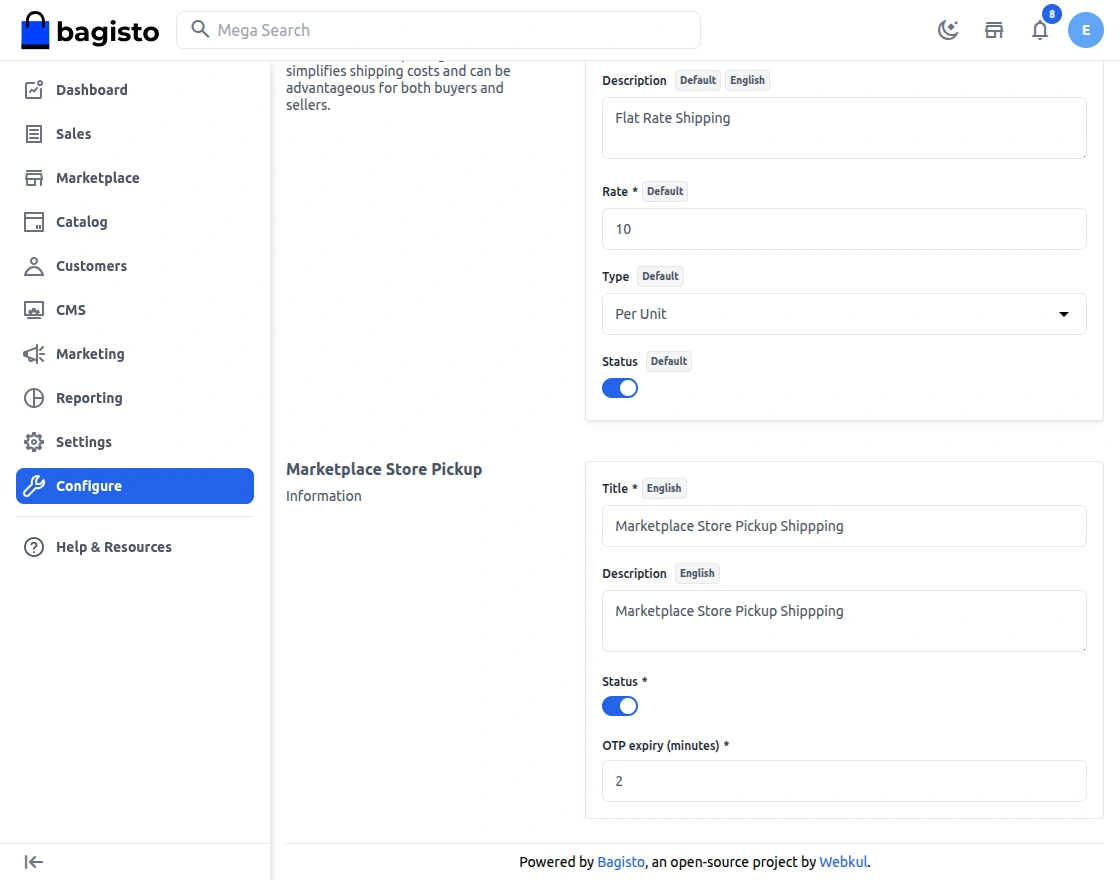
- Title — Sets the method name customers see at checkout. It is required and has one value per locale.
- Description — Adds optional text for the method, also set for each locale.
- Status — Turns the method on or off. It is on by default.
- OTP expiry (minutes) — Sets how long an OTP stays valid. The default is 2 minutes.
Once the method is active, the admin opens Marketplace → Store Pickup. It holds two pages: Pickup Orders and Stores.
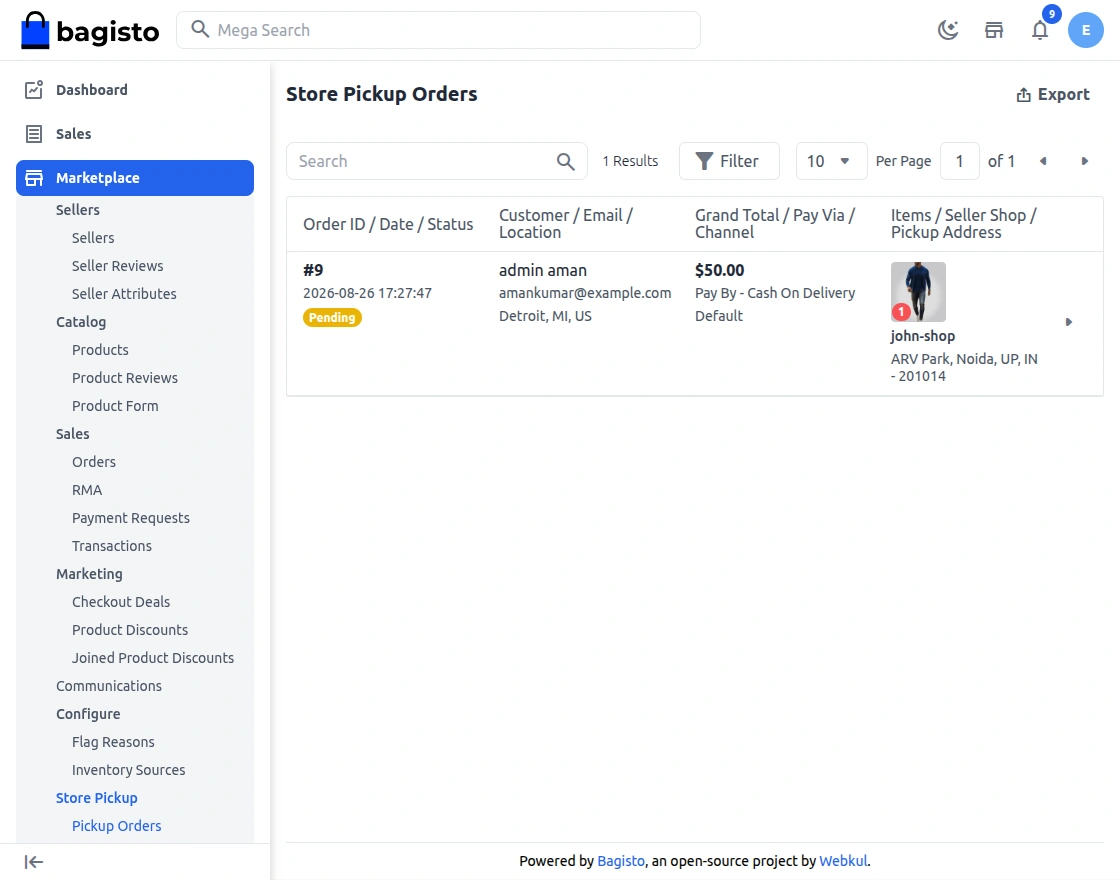
The Pickup Orders page lists every store pickup order. Columns include order ID, date, status, customer, email, location, grand total, payment method, channel, items, seller shop, and pickup address. The View action opens the order.
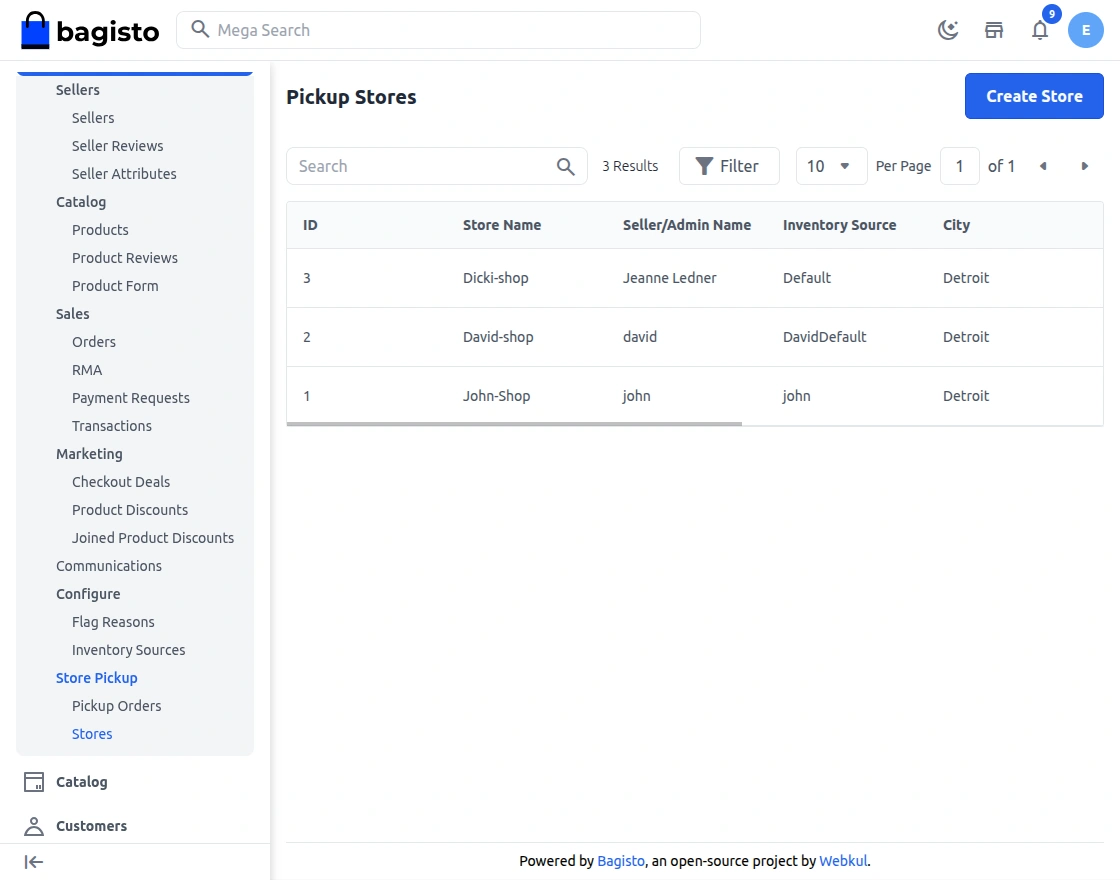
The Stores page lists all pickup stores. It shows ID, store name, seller or admin name, inventory source, city, state, country, and status. Each row offers edit and delete actions.
Create Store
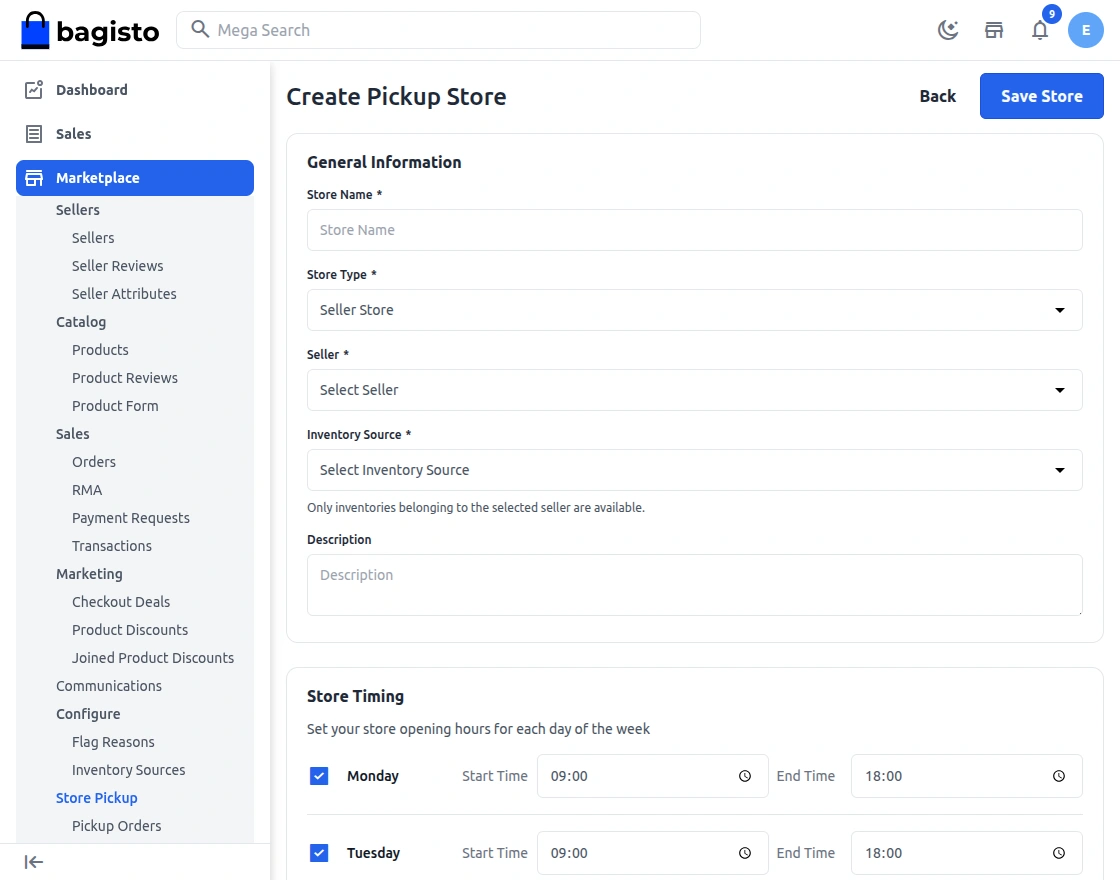
Clicking Create Store opens a form. The admin creates a pickup location for an admin user or for a specific seller.
General Information
- Store Name — Enter the public name of the pickup location. Customers see it at checkout and on the product page.
- Store Type — Choose Admin Store or Seller Store. The type cannot change after you save.
- Seller — For a Seller Store, pick the seller from the dropdown. The seller cannot change later.
- Admin User — For an Admin Store, pick the admin who manages it. One admin can manage only one store.
- Inventory Source — Admin stores list only inventory sources without a seller. Seller stores list only that seller’s sources. A source serves one store only.
- Description — Add an internal note about the store.
Store Timing and Holidays
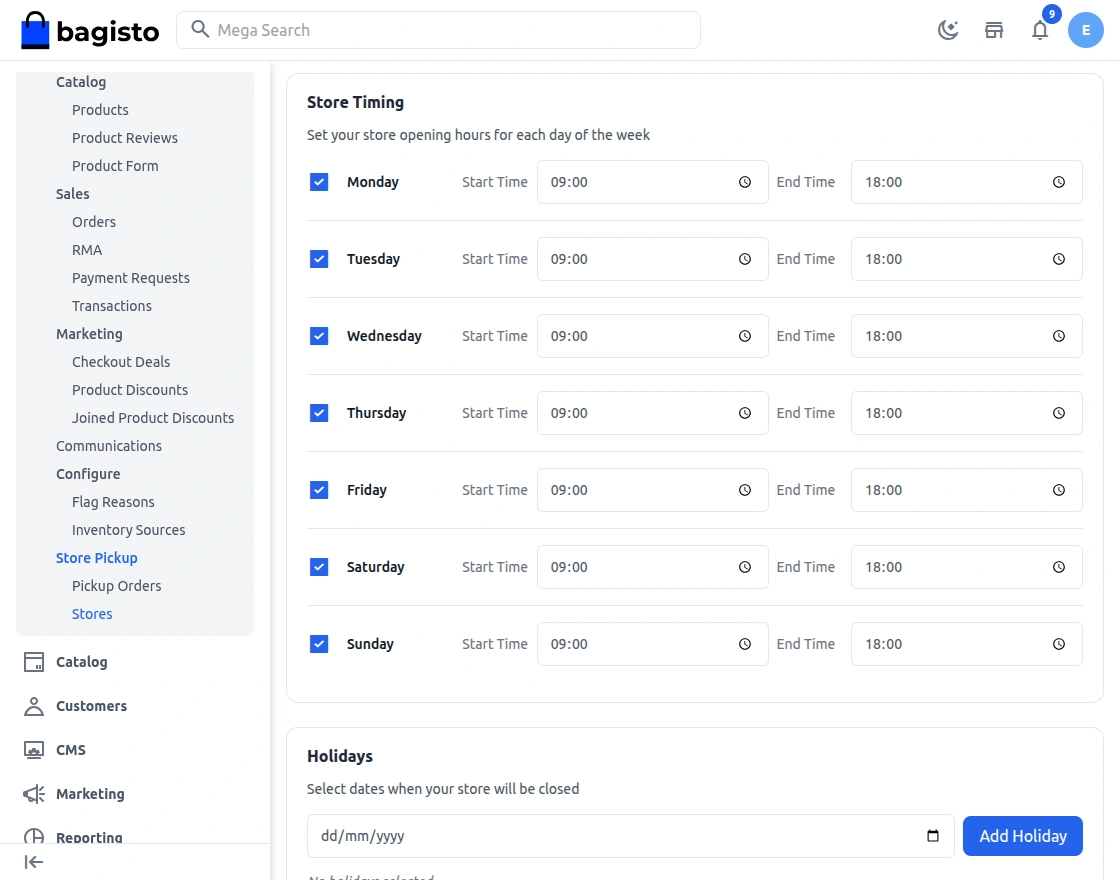
Store Timing — Set the opening hours for each day of the week. Switch a day on or off, then enter its Start Time and End Time.
Product page display — Customers read these hours in the store’s timing table.
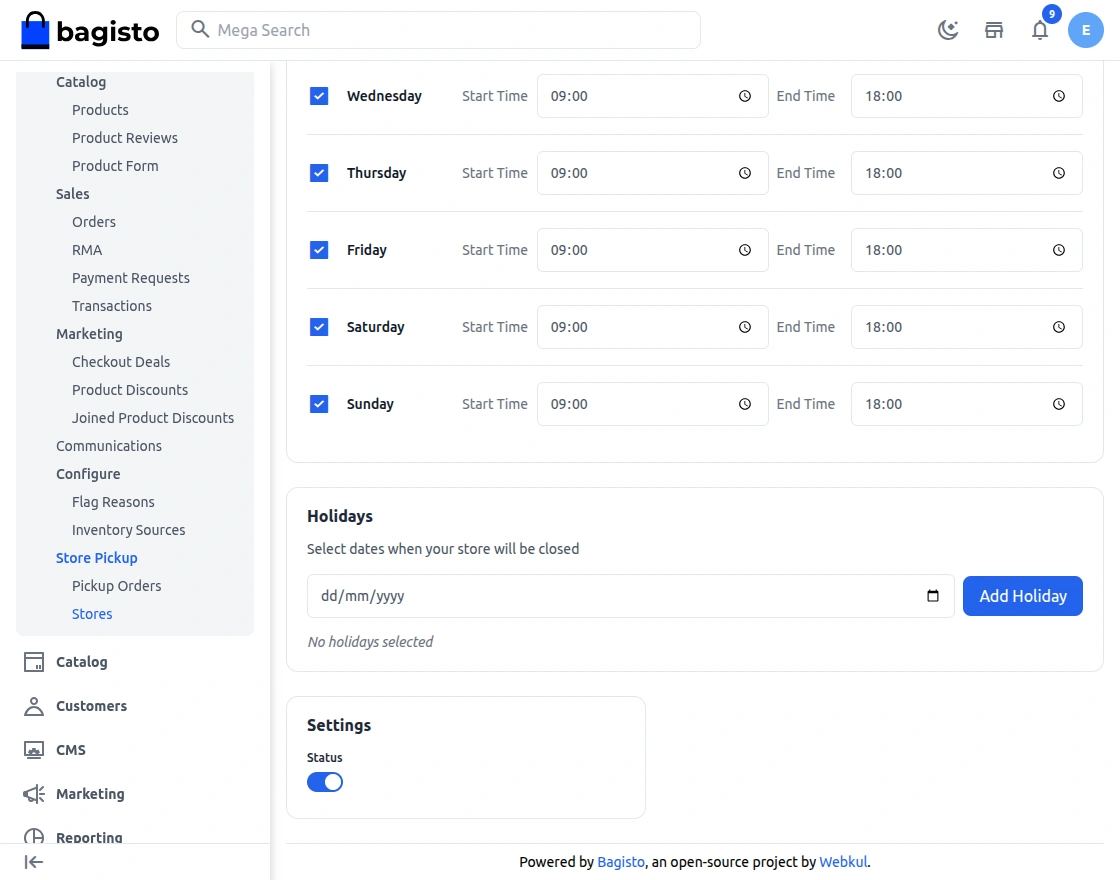
Holidays — Click Add Holiday to add one date, or repeat it for several dates. Use Remove to delete a date. The product page lists these dates as closed days.
Settings
Status — Set the store to Active or Inactive. Inactive stores disappear from the product page and from checkout.
Laravel Marketplace Store Pickup on the Product Page
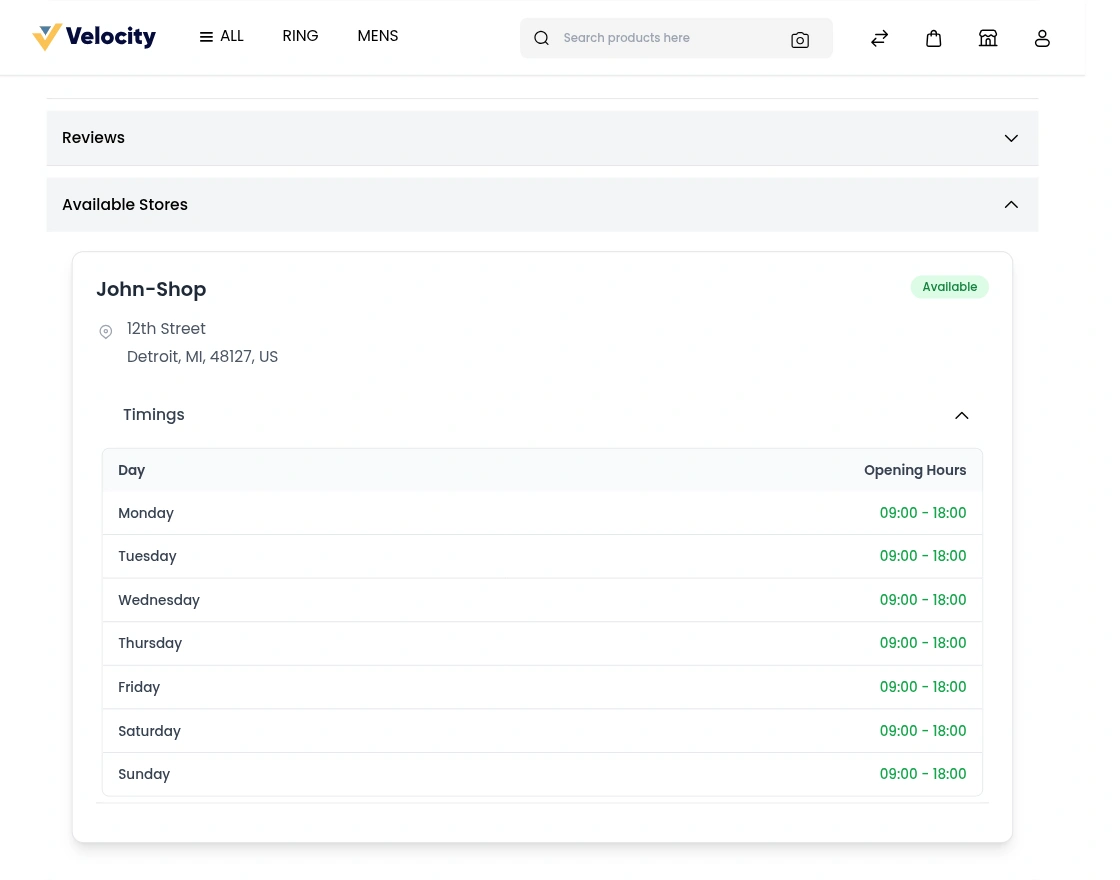
With Laravel Marketplace Store Pickup, the product page shows an Available Stores section. It lists every pickup store whose inventory source holds stock of that product.
Each store card shows the store name, its full address, an opening-hours table, and its holiday dates.
A store appears only when the store is active and its inventory source is active. The source must also hold stock of the product.
If no store qualifies, the section says that the product is not currently available for store pickup.
Laravel Marketplace Store Pickup Seller Guide
With Laravel Marketplace Store Pickup, sellers create and manage their own pickup locations, control availability, and handle pickup orders without admin help.
This lets sellers offer local click‑and‑collect and cut shipping costs. Nearby customers also get faster fulfillment. For a distance-based alternative, see the Bagisto Marketplace Store Locator guide.
Laravel Marketplace Store Pickup Checkout Flow
Selecting Shipping Method
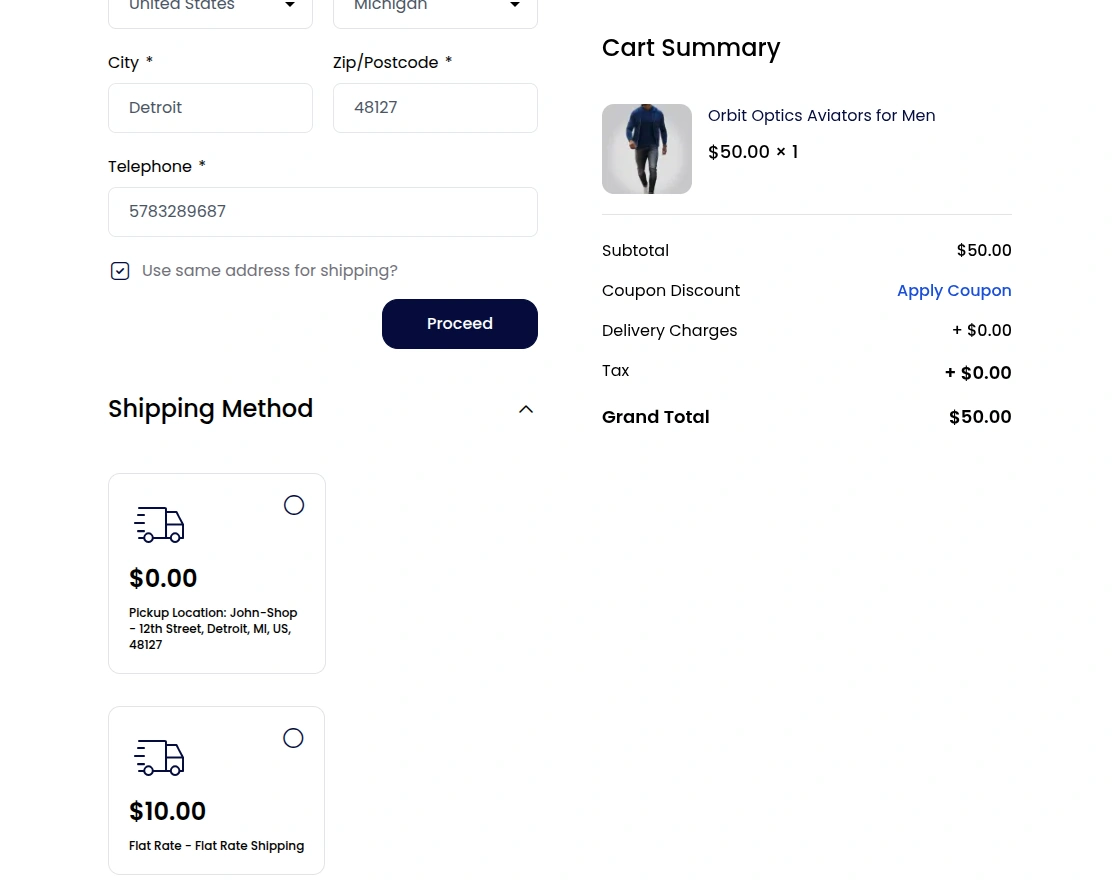
At the shipping step, the extension shows one pickup option for each eligible store. Each option reads Pickup Location: store name and shows the store address.
Pickup is always free. The option appears only for carts from the admin alone or from one seller. The store must also stock every product.
When pickup does not apply, checkout shows a notice instead. The notice names one reason:
- The cart mixes admin and seller products.
- The cart holds products from more than one seller.
- No active pickup store exists for these products.
- No store has every item in stock.
Shoppers can also tick Free Store Pickup in the category page filters. The filter keeps only products that an active pickup store stocks.
Creating and Managing Stores
In the Laravel Marketplace Store Pickup extension, the seller panel has a Store Pickup menu with two pages: Orders and Stores. Sellers create pickup locations, edit or delete existing stores, and view their pickup orders.
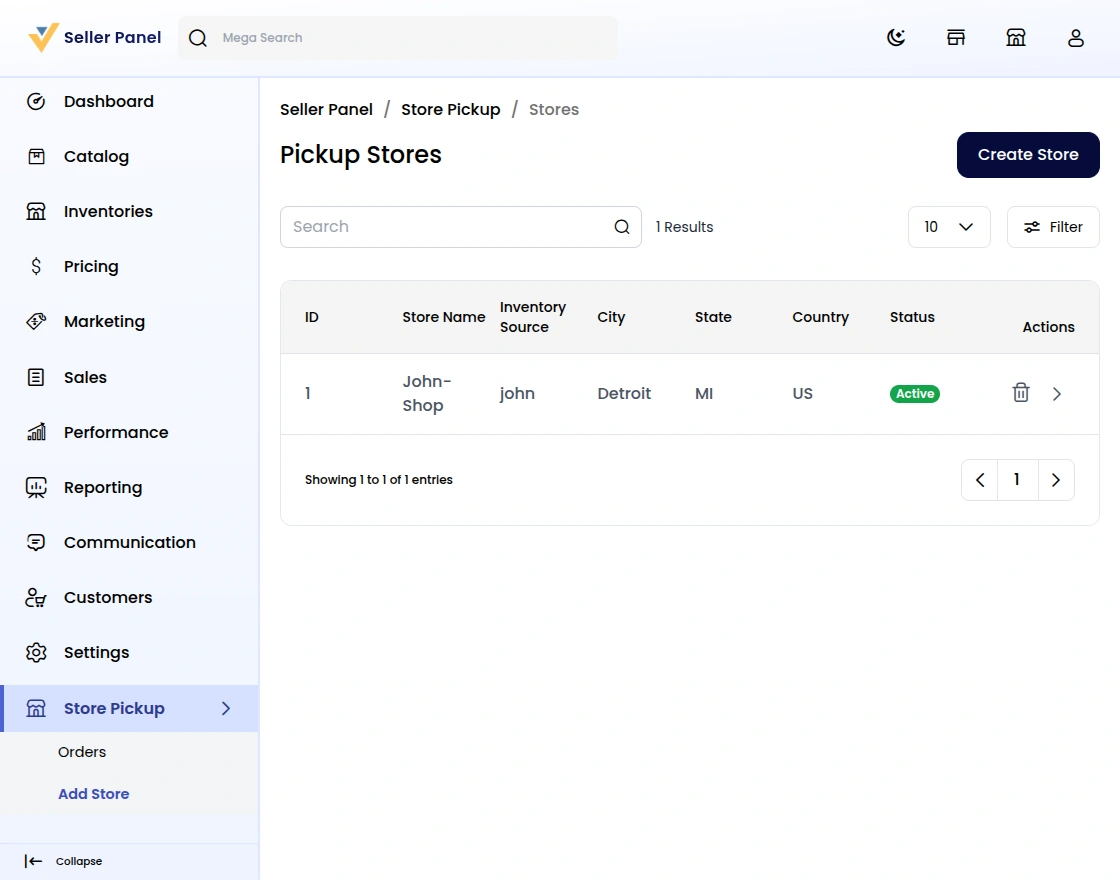
Create Store
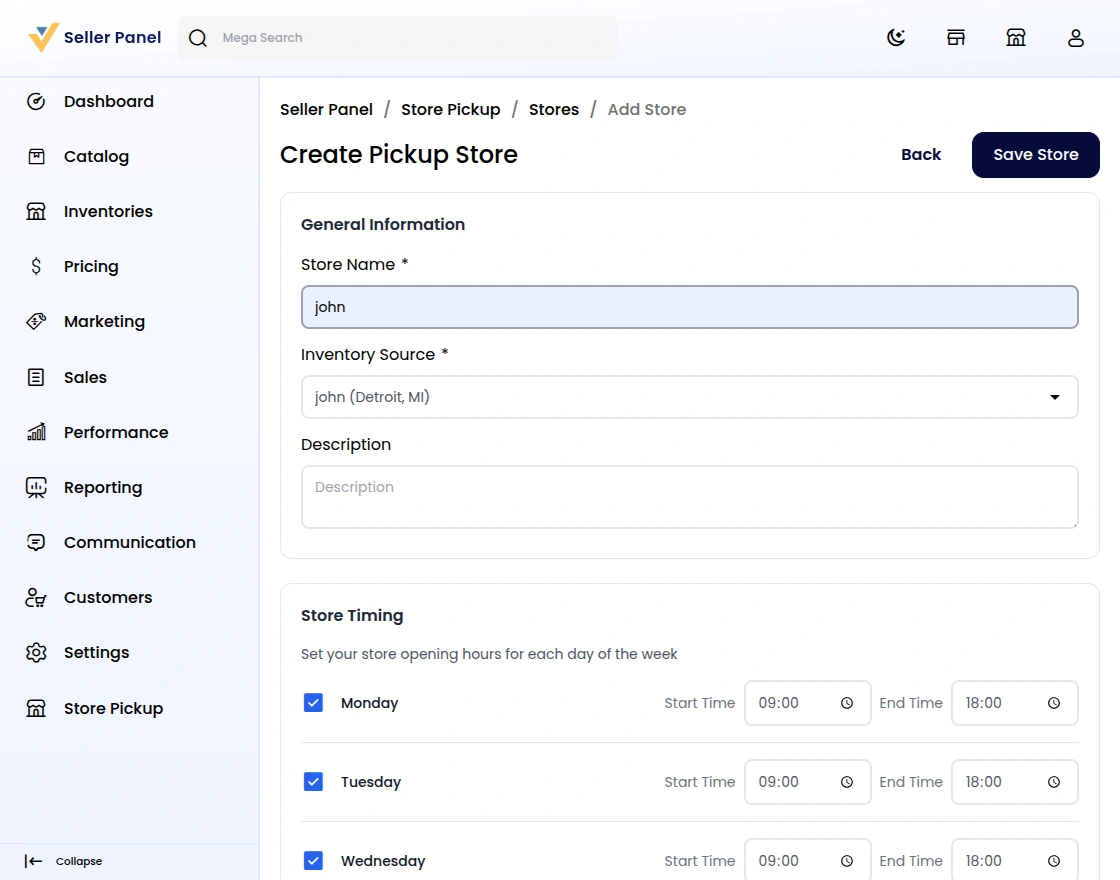
Clicking Create Store on Store Pickup → Stores opens the store form. Sellers add a pickup location for their products.
The form has Store Name, Inventory Source, Description, Status, Store Timing, and Holidays. Only the seller’s own inventory sources appear, and each source serves one store. An Active store goes live on the storefront once its source holds stock.
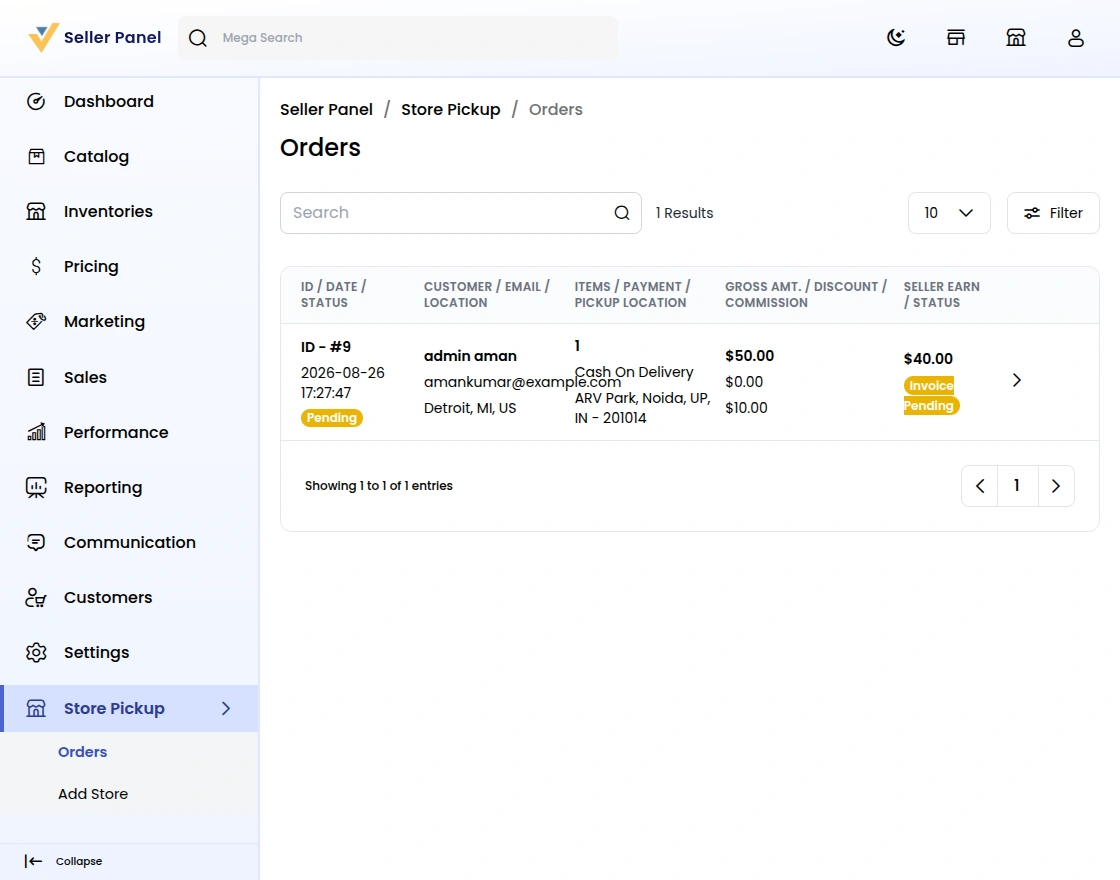
Seller Store Pickup Orders
On Store Pickup → Orders, sellers see every pickup order for their stores. The list shows order ID, date, status, customer, email, location, items, payment, and pickup location. It also shows gross amount, discount, commission, seller earnings, and payout status.
This view gives sellers a clear overview, so they manage pickups efficiently.
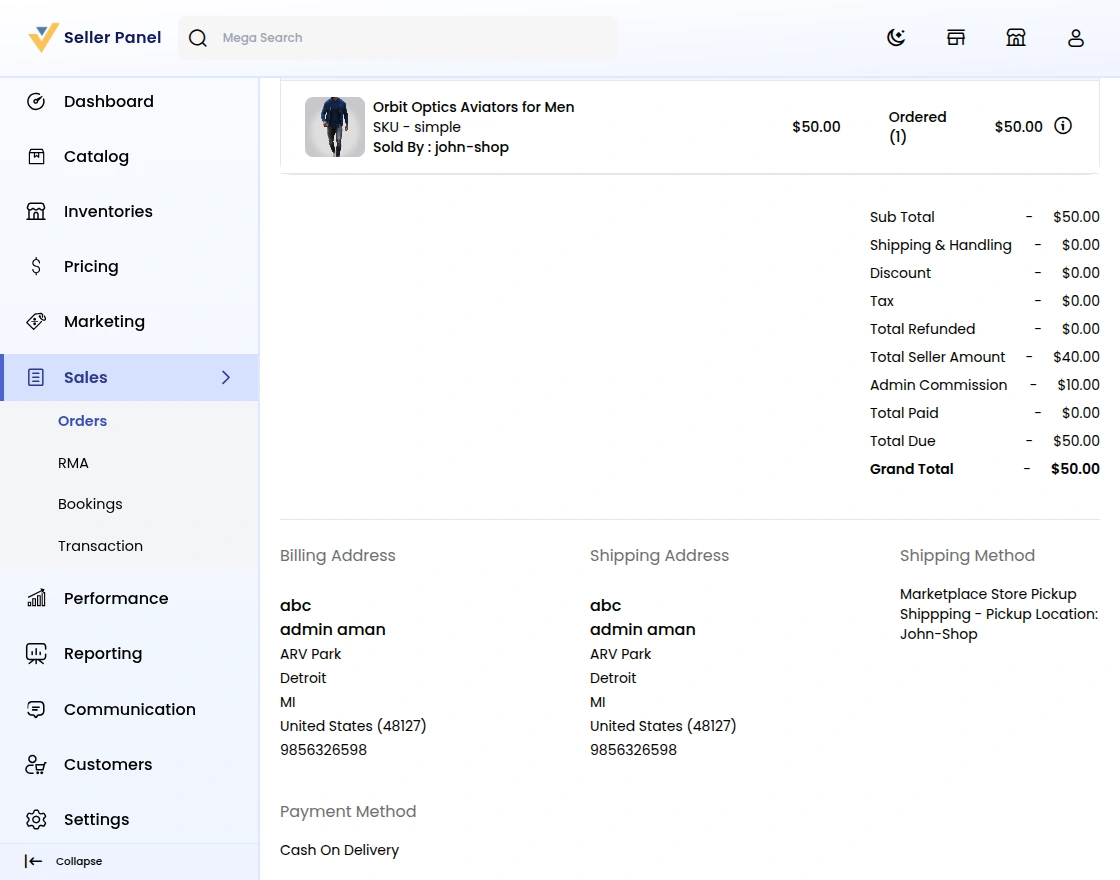
Order Handover with OTP
When the customer arrives, the seller opens the order and starts the shipment. The shipment page shows an OTP Verification box for pickup orders.
Generate OTP
- The shipment page of every store pickup order shows a Generate OTP button.
- Clicking Generate OTP emails a six-digit one‑time password to the customer.
OTP Verification Requirement
- The seller enters the code the customer shows and clicks Verify OTP.
- Without verification, the system blocks the shipment, so nobody hands over an unverified order.
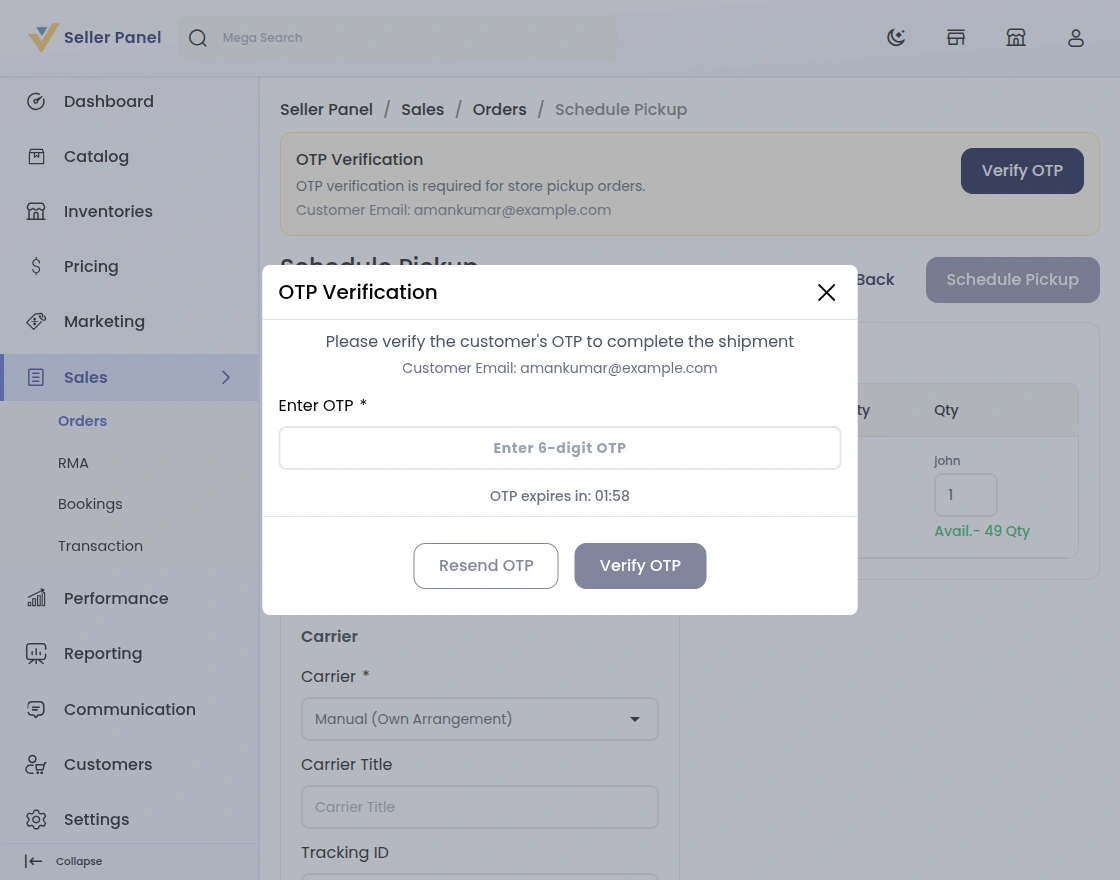
- The OTP expires after the minutes set in the configuration. A countdown shows the time left.
- Resend OTP works only after the current code expires.
- Admins follow the same flow. The Ship button on a pickup order opens the OTP window.
- Customers see Ready to Pickup on processing pickup orders in My Orders.
Laravel Marketplace Store Pickup Support
That covers the Laravel Marketplace Store Pickup extension. For any queries or doubts, reach out to us at [email protected]. You can also raise a ticket at our HelpDesk System.
Current Product Version - v2.5.0.0
Supported Framework Version - Bagisto v2.5.0

Be the first to comment.