


















In this guide, we’ll walk through how to get response in JSON, XML, HTML format from controller in Magento 2 using clean and practical code examples.
We can change the response content type as per the requirement in magento.
We assume our module name is Webkul_Extension and front name is webext.
Step #1 = Get response in json format in magento 2.
Path = app/code/Webkul/Extension/Controller/Index/Json.php
<?php
namespace Webkul\Extension\Controller\Index;

class Json extends \Magento\Framework\App\Action\Action
{
	protected $_pageFactory;
    /**
     * @var \Magento\Framework\Controller\Result\JsonFactory
     */
    protected $resultJsonFactory;

	public function __construct(
		\Magento\Framework\App\Action\Context $context,
		\Magento\Framework\View\Result\PageFactory $pageFactory,
        \Magento\Framework\Controller\Result\JsonFactory $resultJsonFactory
    ) {
		$this->resultJsonFactory = $resultJsonFactory;
		return parent::__construct($context);
	}
	public function execute()
	{
        $result = $this->resultJsonFactory->create();
		// Response in json format
        $data = [
            'product' =>'Product Data',
            'profile' =>'Profile Data',
        ];
        $result->setData($data);
        return $result;
	}
}

Step #2 = Get response in HTML format in magento 2.
Path = app/code/Webkul/Extension/Controller/Index/Html.php
<?php
namespace Webkul\Extension\Controller\Index;

class Html extends \Magento\Framework\App\Action\Action
{
	protected $_pageFactory;
    /**
     * @var \Magento\Framework\Controller\Result\RawFactory
     */
    protected $resultRawFactory;

	public function __construct(
		\Magento\Framework\App\Action\Context $context,
		\Magento\Framework\View\Result\PageFactory $pageFactory,
        \Magento\Framework\Controller\Result\RawFactory $resultRawFactory,
    ) {
		$this->resultRawFactory = $resultRawFactory;
		return parent::__construct($context);
	}
	public function execute()
	{
        $result = $this->resultRawFactory->create();
        // $result->setHeader('Content-Type', 'text/xml');
        // Response in html format
        $content = '<h1>Webkul product</h1>
                    <p>Webkul product content goes here</p>';
        $result->setContents($content);

        return $result;
	}
}
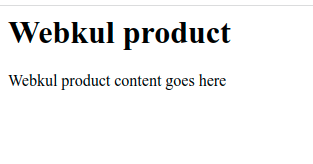
#2 = Get response in XML format in magento 2.
Path = app/code/Webkul/Extension/Controller/Index/Xml.php
<?php
namespace Webkul\Extension\Controller\Index;

class Xml extends \Magento\Framework\App\Action\Action
{
	protected $_pageFactory;
    /**
     * @var \Magento\Framework\Controller\Result\RawFactory
     */
    protected $resultRawFactory;

	public function __construct(
		\Magento\Framework\App\Action\Context $context,
		\Magento\Framework\View\Result\PageFactory $pageFactory,
        \Magento\Framework\Controller\Result\RawFactory $resultRawFactory,
    ) {
		$this->resultRawFactory = $resultRawFactory;
		return parent::__construct($context);
	}
	public function execute()
	{
        $result = $this->resultRawFactory->create();
        // Response in xml format
        $content = '<product>
                        <productData>Webkul product</productData>
                        <profileData>Webkul</profileData>
                    </product>';
        $result->setHeader('Content-Type', 'text/xml');
        $result->setContents($content);

        return $result;
	}
}


Be the first to comment.