One WordPress install. Thousands of independent sites. A single login that follows you across all of them.
That is WordPress Multisite, and the magic isn’t in the dashboard — it’s in how the database is laid out.
This guide explains exactly how WordPress Multisite stores and retrieves data across thousands of sites: the table structure, how a request is matched to the right site, where shared data lives, and the functions that read it back.
By the end, you’ll know precisely where any piece of data lives in a Multisite network — and how WordPress finds it again.
What WordPress Multisite Actually Is
WordPress Multisite is a native feature that lets a single WordPress installation run a network of many sites from one codebase, one database, and one set of users.
Each site in the network feels independent — its own posts, its own theme, its own admin — but under the hood they all share the same WordPress core, the same plugins directory, and the same database connection.
The network can be served two ways: as subdomains (site1.example.com) or as subdirectories (example.com/site1). The data model is identical for both.
The whole system rests on one idea: some data is global to the network, and some data belongs to a single site. How WordPress separates and reconnects those two is the heart of this article.
How Multisite Stores Data: Global vs. Per-Site Tables
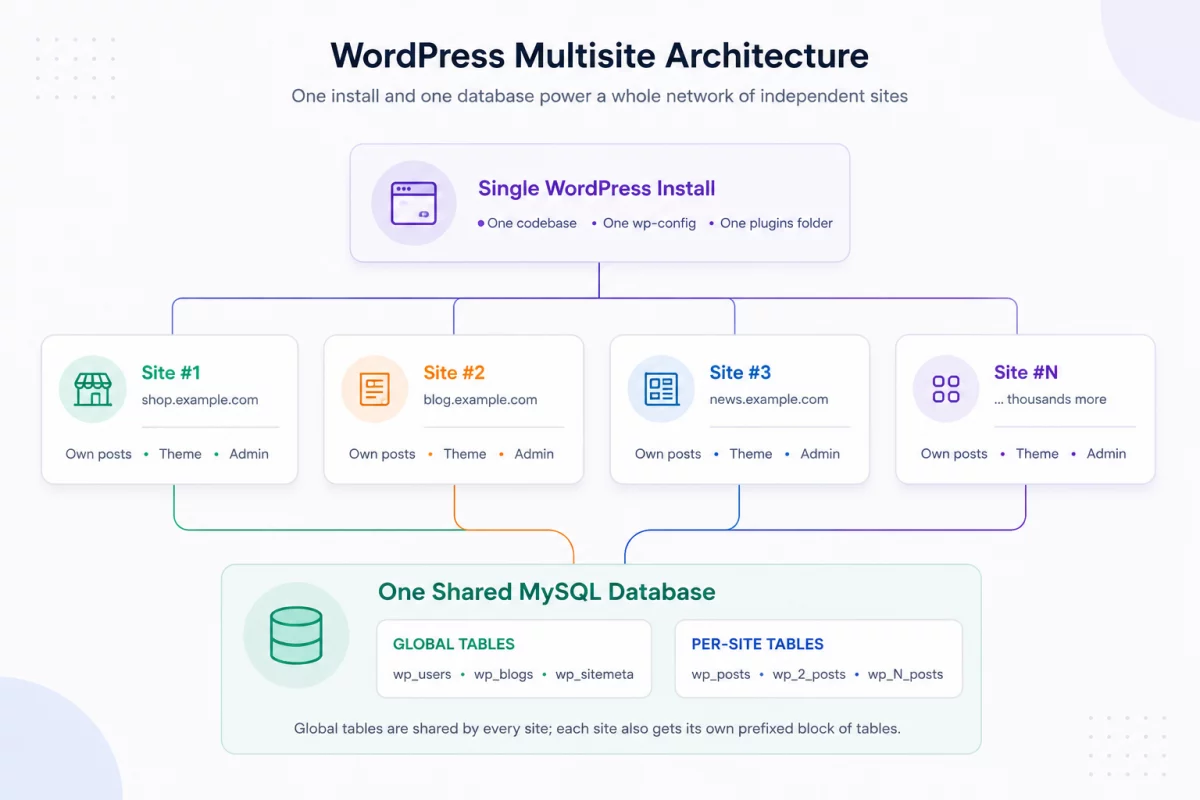
When you enable Multisite, WordPress adds a small set of network-wide tables and then creates a fresh block of tables for every site you add.
The global tables exist exactly once per network and hold data that belongs to everyone:
wp_blogs— one row per site in the network.wp_site— the network(s) themselves.wp_sitemeta— network-level options and settings.wp_users— every user, shared across the whole network.wp_usermeta— user metadata, also shared.
The per-site tables are duplicated for every site, prefixed with the site’s numeric ID. The main site (site 1) uses the plain wp_ prefix, while site 2 gets wp_2_, site 3 gets wp_3_, and so on.
So a network of 1,000 sites doesn’t have one posts table — it has 1,000 of them: wp_posts, wp_2_posts, wp_3_posts … wp_1000_posts.
-- Global tables (one set per network)
wp_blogs
wp_blog_versions
wp_site
wp_sitemeta
wp_users
wp_usermeta
wp_registration_log
wp_signups

-- Per-site tables for the MAIN site (blog_id = 1)
wp_posts
wp_postmeta
wp_options
wp_terms
wp_term_taxonomy
wp_term_relationships
wp_comments
wp_commentmeta

-- Per-site tables for site #2 (blog_id = 2) — same shape, new prefix
wp_2_posts
wp_2_postmeta
wp_2_options
wp_2_terms
wp_2_term_taxonomy
wp_2_term_relationships
wp_2_comments
wp_2_commentmeta
This is the single most important fact about Multisite storage: each site is its own island of tables, connected to the rest of the network by a handful of shared global tables.
Why the Prefix Matters
The numeric prefix is how WordPress keeps each site’s content completely separate while sharing one database.
A post written on site 2 is stored in wp_2_posts and is invisible to a normal query on site 3, because that query reads wp_3_posts. There is no shared posts table and no site_id column to filter on — the separation is physical, table by table.
Users are the deliberate exception. Because wp_users has no prefix, one account exists once and can be granted access to many sites at the same time.
How WordPress Retrieves Data: Picking the Right Site
Every request to a Multisite network starts the same way: WordPress has to figure out which site it is serving before it can load any content.
It does this early in the bootstrap, by matching the incoming domain and path against the wp_blogs table.
- The request comes in for
shop.example.comorexample.com/shop. - WordPress looks up the matching
blog_idinwp_blogs. - That
blog_idsets the table prefix for the rest of the request — for examplewp_5_. - From that point on,
$wpdbreads and writes only that site’s tables.
The object that holds all of this is the global $wpdb. When the site is resolved, its prefix property is set, and helpers like $wpdb->posts automatically point at the right table.
<?php
// On site #5, these properties resolve to the site-specific tables.
global $wpdb;

echo $wpdb->prefix;   // "wp_5_"
echo $wpdb->posts;    // "wp_5_posts"
echo $wpdb->options;  // "wp_5_options"

// But user tables stay global — same for every site on the network.
echo $wpdb->users;    // "wp_users"
echo $wpdb->usermeta; // "wp_usermeta"
This is why a user can log in once and move between sites: the user tables never change prefix, while the content tables do. The same $wpdb object simply repoints at a different block of tables.
Reading Data From Another Site
Sometimes you need to read data that belongs to a different site in the network — for example, to show one site’s latest post on another.
The correct way is switch_to_blog(), which repoints $wpdb at the target site so your queries read that site’s tables. When you’re done, restore_current_blog() puts everything back.
<?php
/**
 * Read the latest post title from another site in the network.
 * switch_to_blog() repoints $wpdb; restore_current_blog() undoes it.
 */
function latest_title_from_site( $blog_id ) {
    switch_to_blog( $blog_id );

    // Any query here now runs against this site's tables (e.g. wp_5_posts).
    $recent = get_posts( [
        'numberposts' => 1,
        'post_status' => 'publish',
    ] );

    $title = $recent ? get_the_title( $recent[0] ) : '';

    restore_current_blog(); // ALWAYS restore — pair every switch.

    return $title;
}
The rule to remember: always pair every switch_to_blog() with a restore_current_blog(). If you switch and forget to restore, every later query in that request silently reads from the wrong site.
How Shared Data Is Stored and Retrieved
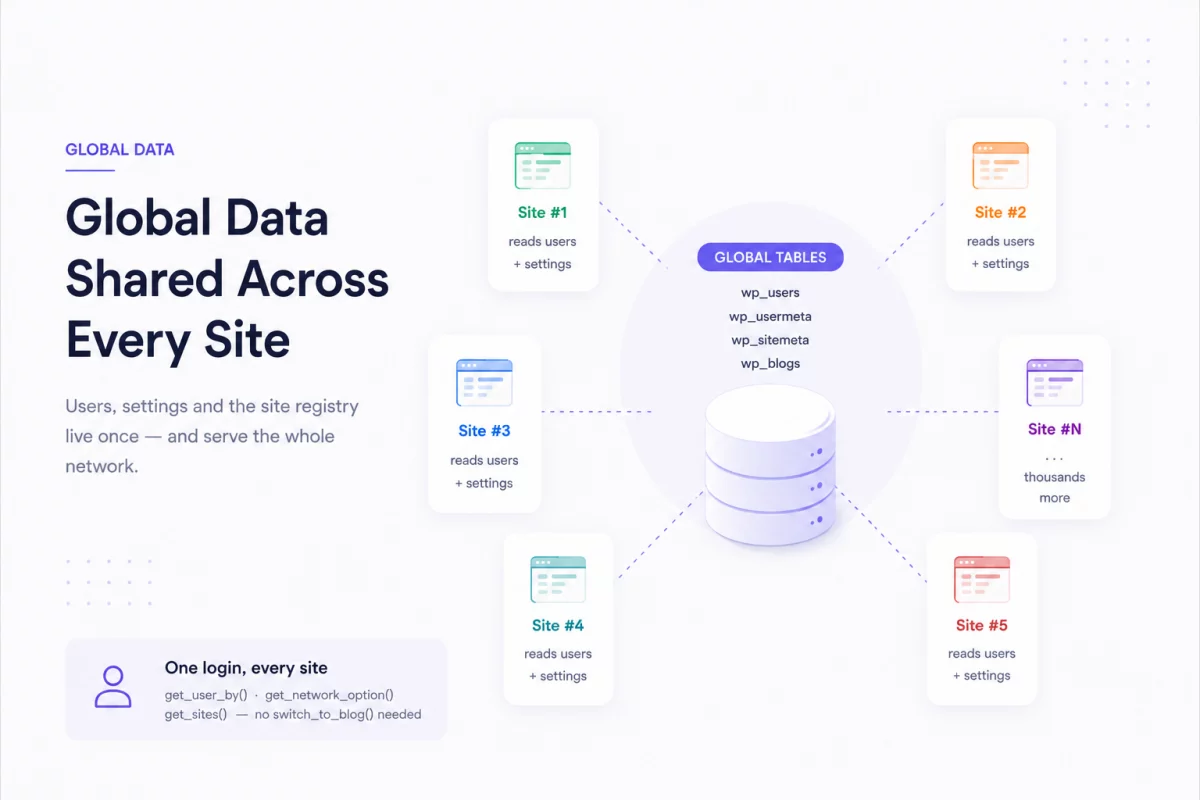
Not everything lives in a per-site table. Users, network settings, and the site registry are all global — and WordPress gives you dedicated functions to read them without switching sites at all.
Users and Capabilities
A user record is stored once in wp_users. What changes per site is the user’s capabilities — their role on each individual site.
Those capabilities live in wp_usermeta under prefixed keys: wp_capabilities for the main site, wp_2_capabilities for site 2, and so on. One row in a global table, one capability key per site the user belongs to.
<?php
// The user record itself is global — no switching required.
$user = get_user_by( 'email', '[email protected]' );

// Capabilities are per-site, stored as prefixed keys in wp_usermeta:
//   wp_capabilities   -> role on the main site
//   wp_2_capabilities -> role on site #2
//   wp_5_capabilities -> role on site #5

// Check which sites this user can access across the network.
$sites = get_blogs_of_user( $user->ID );
foreach ( $sites as $site ) {
    echo $site->blogname . ' — ' . $site->siteurl . "\n";
}
Network Options
Site-specific settings are stored in each site’s wp_options table and read with get_option(). Network-wide settings are different — they live in wp_sitemeta and are read with get_network_option().
<?php
// Per-site setting — comes from this site's wp_options (e.g. wp_5_options).
$site_title = get_option( 'blogname' );

// Network-wide setting — comes from the global wp_sitemeta table.
$network_setting = get_network_option( null, 'my_network_setting' );

// Storing them works the same way, in the matching table:
update_option( 'my_site_setting', 'value' );                  // wp_5_options
update_network_option( null, 'my_network_setting', 'value' ); // wp_sitemeta
The Site Registry
The wp_blogs table is the index of the entire network — every site, its domain, its path, and its status. Instead of querying it by hand, WordPress gives you get_sites(), which is cached and filterable.
<?php
// Retrieve the list of sites from the global wp_blogs registry.
$sites = get_sites( [
    'public'   => 1,
    'archived' => 0,
    'deleted'  => 0,
] );

foreach ( $sites as $site ) {
    echo $site->blog_id . ': ' . $site->domain . $site->path . "\n";
}

// Get details for a single site without switching into it.
$details = get_blog_details( 5 );
echo $details->blogname; // the name of site #5
Putting It All Together
Every piece of data in a Multisite network falls into one of two buckets, and knowing which is which tells you exactly where it lives and how to read it.
| Data | Where it’s stored | How to retrieve it |
|---|---|---|
| Posts, pages, comments | Per-site: wp_N_posts, wp_N_comments | Normal queries on the current site; switch_to_blog() for another |
| Site options | Per-site: wp_N_options | get_option() |
| Users | Global: wp_users | get_user_by(), get_users() |
| Roles / capabilities | Global: wp_usermeta (prefixed keys) | user_can(), get_blogs_of_user() |
| Network settings | Global: wp_sitemeta | get_network_option() |
| Site registry | Global: wp_blogs | get_sites(), get_blog_details() |
Conclusion
WordPress Multisite shares users, network settings, and site data in global tables, while each site stores its own content in separate prefixed tables for efficient management.
WordPress Multisite stores shared data in global tables and site content in prefixed tables. WordPress automatically resolves the correct tables, making cross-site data easy to manage.

Be the first to comment.