Next.js PPR (Partial Prerendering) combines static and dynamic rendering in a single page. It serves a fast static shell while streaming live content as it’s ready.
Traditionally, developers had to choose between fully static or fully dynamic pages when building a Next.js app. Next.js PPR removes that trade-off by combining both approaches.
In this guide, you’ll learn how Streaming and Partial Prerendering build faster product pages.
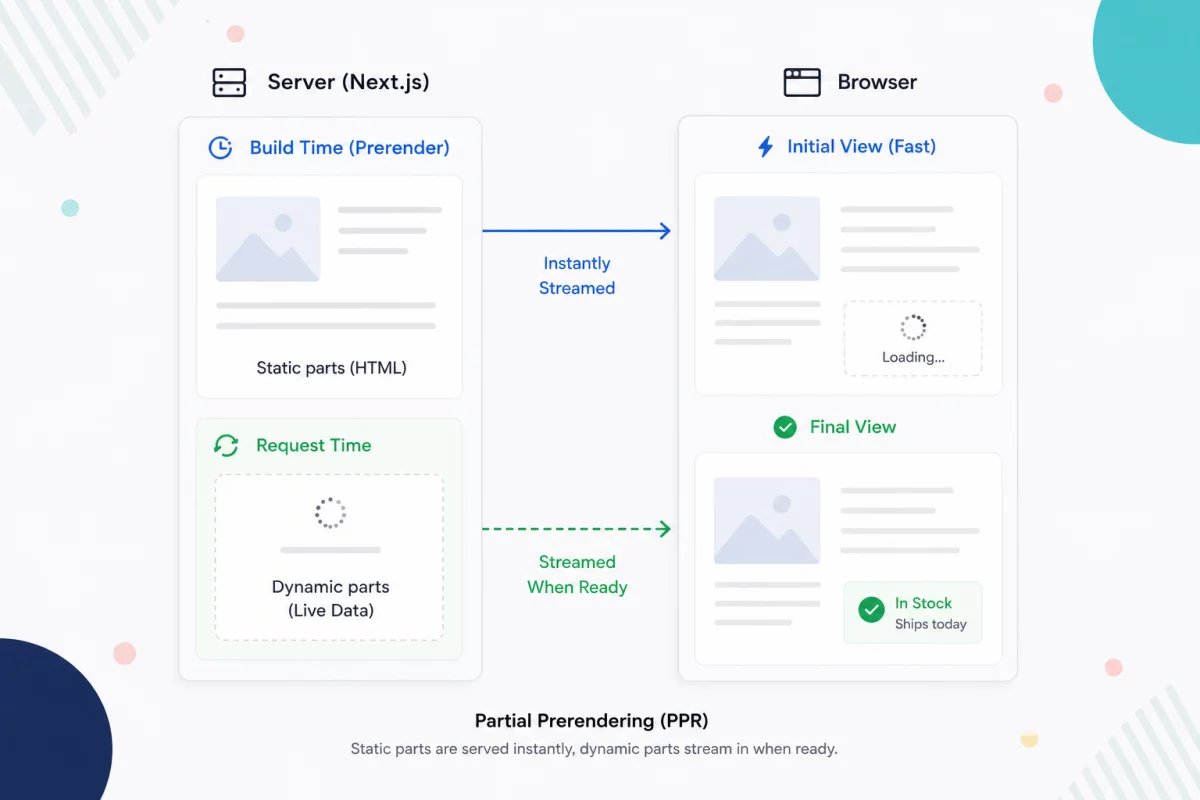
Challenges of Traditional Rendering in Modern Web Apps
Waiting for all live data delays the entire page. Making everything static, on the other hand, risks showing outdated information.
Streaming solves this by combining static and dynamic content, so users see the page sooner while live data loads in the background.
How Streaming Works
Instead of waiting for every request to finish, Next.js streams the page to the browser in smaller pieces.
The static content appears immediately, while sections that depend on live data continue loading in the background.
As each section becomes ready, it is displayed automatically. This reduces waiting time and makes the page feel much faster.
Stream Dynamic Sections with Suspense
React’s Suspense tells Next.js which parts of the page can load later.
Everything outside the Suspense boundary becomes part of the initial page. While the dynamic component fetches its data, users see a fallback UI instead of a blank space.
import { Suspense } from "react";
export default function ProductPage() {
 return (
 <>
 <ProductDetails />
 <Suspense fallback={<StockSkeleton />}>
  <LiveStock />
 </Suspense>
 </>
);
}
In this example, the product details appear immediately, while the stock information streams in once it’s available.
Keep Suspense Boundaries Small
A common mistake is wrapping large sections—or even the entire page—in a single Suspense boundary.
This delays more content than necessary because the browser waits for a larger part of the page.
Instead, wrap only the components that depend on live data to maximize streaming performance.
<Suspense fallback={<PriceSkeleton />}>
 <LivePrice sku={product.sku} />
 </Suspense>
Keeping the boundary small allows more of the page to be included in the initial render, making the application feel much faster.
Show Instant Feedback with Loading.js
Sometimes an entire route takes time to load. Adding a loading.js file lets Next.js display a loading state immediately while the page is being prepared.
export default function Loading() {
return <ProductGridSkeleton />;
 }
Instead of a blank screen, visitors see a skeleton UI that is replaced automatically when the page finishes loading.
When Should You Use Streaming?
Streaming works best when a page combines static content with live data.
Common examples include:
- Product pages with real-time inventory or pricing
- Category pages with personalized recommendations
- Shopping carts and checkout pages
- User dashboards and account pages
For pages that are entirely static, traditional prerendering is usually the simpler and faster option.
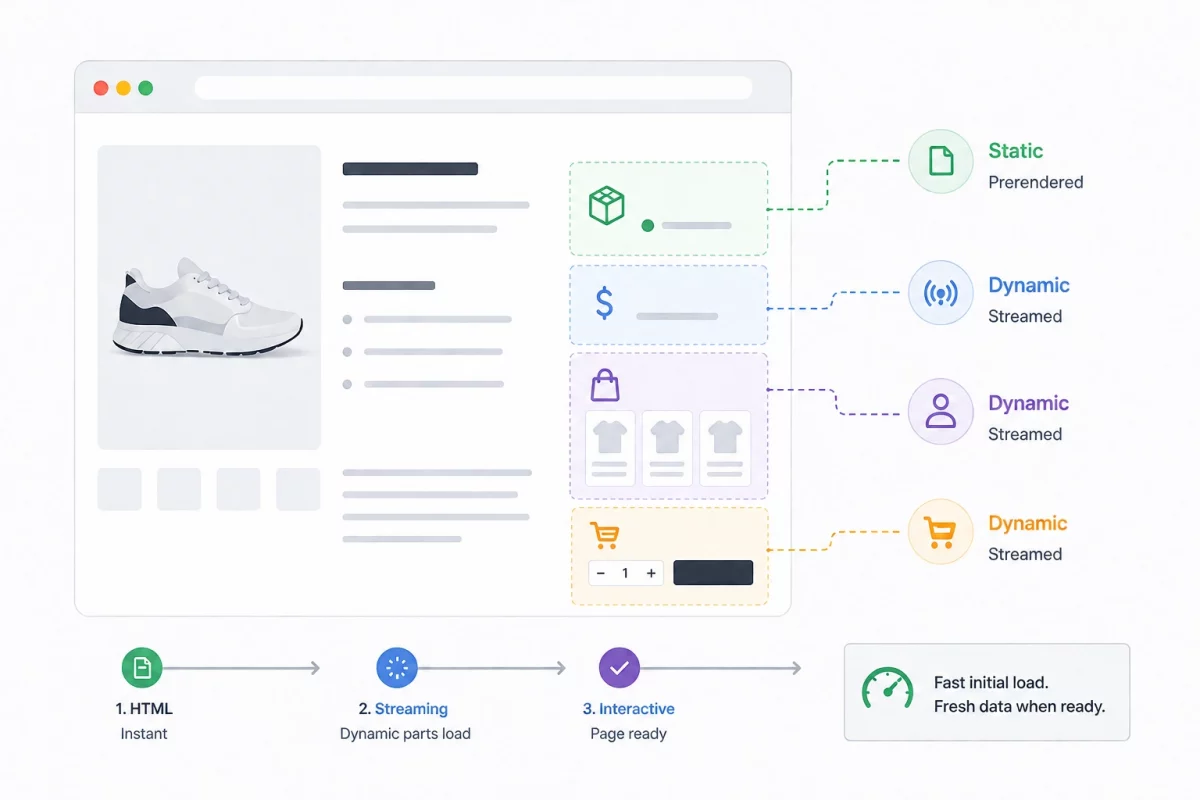
Conclusion
Next.js PPR and Streaming let you build fast pages without sacrificing fresh data. Render the stable parts of the page immediately, then stream only the sections that depend on live information.
Keep your Suspense boundaries focused on the smallest dynamic components so most of the page becomes visible instantly.
For an eCommerce storefront, this approach improves perceived performance and delivers a smoother shopping experience with minimal complexity.
Need reliable Next.js development services? Our experts build fast, scalable, and SEO-optimized Next.js applications for businesses of all sizes.

Be the first to comment.