


















CS Cart ERP Integration connects your store with an ERP system. This keeps daily operations simple and fast.
CS Cart handles the storefront. Meanwhile, the ERP manages inventory, purchasing, warehouses, and accounting.
As your business grows, these tasks get harder. Teams often switch between tools. This adds manual work and slows decisions.
However, CS Cart ERP Integration fixes this problem. Both systems stay connected through automatic sync. Therefore, orders, stock, and invoices always stay updated.
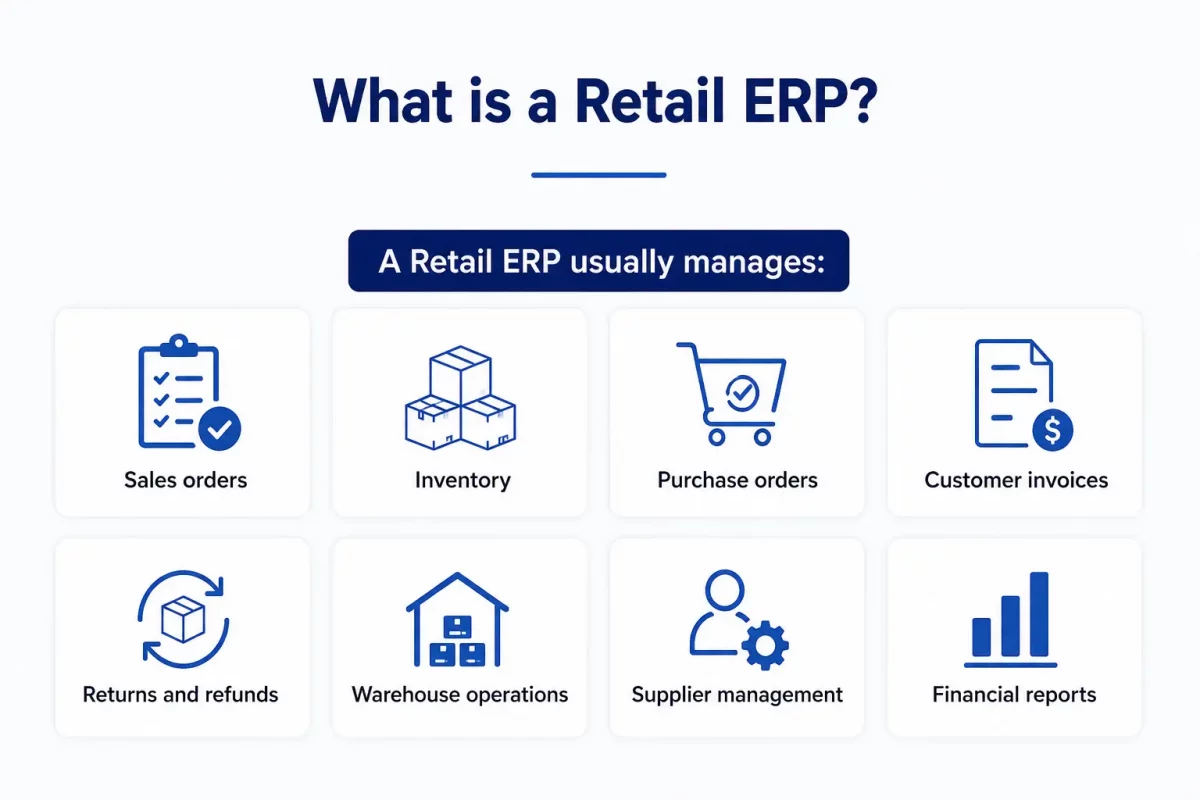
What is a Retail ERP?
A Retail ERP helps you run your entire business from a single location. Rather than using different tools, it links all departments together.
Sales, stock, purchasing, and accounts all work together. This helps everyone see what’s going on. It also reduces the amount of work that gets done twice.
A Retail ERP usually manages:
- Sales orders
- Inventory
- Purchase orders
- Customer invoices
- Returns and refunds
- Warehouse operations
- Supplier management
- Financial reports
Why Businesses Need CS Cart ERP Integration
Running an online store means more than selling products. Every order affects stock, shipping, and accounts too.
Without an ERP, teams update systems by hand. Consequently, mistakes creep in. Deliveries get delayed. Purchasing goes wrong.
Moreover, growing stores struggle with Multiple Warehouses. Teams waste time fixing errors instead of helping customers.
CS Cart ERP Integration solves this by linking your store to one central system. Therefore, every team works with real time data.
With CS Cart ERP Integration, your business can:
- Manage everything from one platform
- Track stock across every warehouse
- Create purchase orders before stock runs out
- Cut manual data entry
- Process orders faster
- Improve stock accuracy everywhere
- Generate invoices automatically
- Offer accurate stock info to shoppers
What You Gain From CS Cart ERP Integration
An ERP becomes powerful once it talks to your store directly. Instead of manual updates, both systems share data on their own.
When customers order, the ERP receives it instantly. Meanwhile, stock updates flow back to CS Cart without any manual work.
Similarly, warehouse teams get fulfillment tasks right away. As a result, they pick, pack, and ship faster.
Purchasing also improves, since stock stays under constant watch. Once stock hits a limit, the ERP creates a purchase request automatically.
Similarly, finance teams receive matched invoices and payments. Each transaction remains the same in both systems.
First and foremost, customers can view precise stock and order updates. This helps to create trust and enhances the shopping experience.
After CS Cart ERP Integration, your business gains:
- Automatic order sync
- Real time stock updates
- Faster warehouse work
- Automated purchasing
- Better supplier management
- Accurate financial records
- Smarter inventory planning
- Quicker order fulfillment
- Lower operational costs
- Happier customers
Key Features of CS Cart ERP Integration
1. Sales Order Management
Every order starts a chain of tasks behind the scenes. CS Cart ERP Integration sends each order to the ERP instantly.
As soon as checkout completes, the ERP receives full order details. Consequently, your team starts processing right away.
The ERP checks stock before reserving items for fulfillment. Meanwhile, CS Cart shows updated statuses as things move.
Furthermore, shipment updates and invoices sync automatically. Customers always see accurate information at every step.
This feature includes:
- Automatic sales order sync
- Customer info sync
- Real time stock checks
- Order status sync
- Shipment sync
- Invoice sync
- Multi channel order handling
Example: A customer buys a laptop and a mouse. Instantly, the ERP imports the order and reserves stock.
Next, warehouse staff get picking instructions right away. Finally, shipment updates sync back to CS Cart once dispatched.
2. Purchase Order Management
Keeping stock ready needs timely purchase decisions. CS Cart ERP Integration watches stock levels around the clock.
Whenever stock hits a reorder point, the ERP creates a purchase request. Therefore, teams act before shortages hurt sales.
Additionally, supplier details stay organized in one place. Buyers compare quotes and approve vendors much faster.
Once suppliers deliver, warehouse teams log the stock in the ERP. Consequently, updated numbers sync to CS Cart right away.
This feature includes:
- Automatic purchase requests
- Purchase order creation
- Supplier management
- Vendor quote comparison
- Goods receipt tracking
- Inventory replenishment
- Purchase tracking
Example: Your store sells out its last gaming keyboards during a sale. Immediately, the ERP spots low stock and creates a request.
After approval, the supplier ships new units. Finally, received stock updates both systems at once.
3. Invoice Management
Creating invoices by hand leads to extra work and errors. The CS Cart ERP Integration makes invoicing automatic after each order.
After the warehouse verifies the shipment, the ERP system automatically creates the invoice. At the same time, tax numbers and payment details remain correct in all places.
Also, finance teams can monitor invoices from a single screen. Every time a payment is updated, it syncs with CS Cart right away.
Credit notes, refunds, and reports stay connected too. As a result, accounting becomes quicker and more reliable.
This feature includes:
- Automatic Invoice Creation
- Tax calculation
- Payment tracking
- Credit note handling
- Accounting integration
- Invoice status sync
- Financial reporting
Example: A customer buys furniture and pays online. Immediately, the ERP creates the invoice after shipment.
Once payment clears, both systems show a “Paid” status. Therefore, your finance team skips manual reconciliation completely.
4. Backorder Management
When there are stock shortages, it shouldn’t lead to lost sales. The CS Cart ERP Integration manages backorders easily, keeping the shopping experience smooth.
Even if an item is out of stock, the ERP system will still take the order. In the meantime, the quantities that are waiting will be connected to stock that will come in the future.
Furthermore, purchasing teams get replenishment requests early. Customers also get timely updates along the way.
Once new stock arrives, the ERP allocates it to backorders automatically. Consequently, warehouse teams ship without extra manual work.
This feature includes:
- Backorder processing
- Automatic stock allocation
- Purchase request generation
- Customer notifications
- Priority based fulfillment
- Replenishment tracking
Example: A customer orders twenty headsets, but only fifteen exist. The ERP reserves those fifteen and creates a backorder for five.
Later, new stock arrives and updates the ERP right away. Finally, staff ship the rest without a new order.
5. Inventory Management
Having the right amount of stock means you can send out orders on time. The CS Cart ERP Integration makes sure your inventory is updated on all platforms.
Whenever a customer orders, stock updates instantly in both systems. Likewise, returns and transfers stay in sync too.
Additionally, businesses see every warehouse from one dashboard. This helps teams make faster stock decisions daily.
The ERP also supports planning through reservations, transfers, and valuation reports. Therefore, businesses stay accurate while cutting errors.
This feature includes:
- Real time stock sync
- Multi warehouse visibility
- Stock reservations
- Inventory adjustments
- Internal transfers
- Inventory valuation
- Lot and serial tracking
Example: A warehouse receives two hundred phones from a supplier. The ERP logs the receipt and updates stock right away.
Consequently, CS Cart shows the latest numbers with no manual work. Customers can buy the moment stock lands.
6. Warehouse Management
Fast delivery depends on organized warehouses, not just stock levels. CS Cart ERP Integration helps warehouses run smoothly, start to finish.
The ERP system takes care of places, storage areas, barcodes, and picking items. At the same time, employees stick to regular procedures that help reduce errors.
Furthermore, multi warehouse businesses can fulfill orders from the nearest site. This shortens delivery time and cuts shipping costs.
Managers can keep an eye on stock movement and productivity all from one dashboard. This makes the fulfillment process quicker and more organized.
This feature includes:
- Multi warehouse management
- Location management
- Barcode scanning
- Picking and packing
- Stock putaway
- Cycle counting
- Inventory routing
- Internal transfers
Example: We have warehouses in Delhi, Mumbai, and Bengaluru for our business. If a customer from Delhi makes an order on your store.
The ERP picks the Delhi warehouse since stock sits nearby. Therefore, staff fulfill it fast and cut delivery costs.
Top ERP Platforms for CS Cart ERP Integration
Choosing the right ERP depends on your goals and growth plans. The right fit keeps every department connected.
Many businesses pair CS Cart ERP Integration with established platforms. These manage stock, purchasing, accounts, and warehouses in one place.
1. ERPNext
ERPNext is an open source ERP built for flexibility. It brings core business tasks into one platform.
Moreover, ERPNext cuts manual work through automation. Businesses also gain clearer visibility into daily operations.
Key Features
- Sales and purchase management
- Real time stock tracking
- Warehouse management
- Production support
- Accounting and billing
- Customer and vendor management
- Reports and business data views
Best suited for
- Small businesses
- Medium sized businesses
- Wholesale companies
- Manufacturing companies
- Growing online stores
2. Aureus ERP
Aureus ERP is perfect for retail, warehouse, and wholesale companies. It links all departments on a single platform.
Also, connecting CS Cart with Aureus ERP helps automate things like orders, inventory, buying, and billing.
As a result, companies can reduce manual tasks quickly.
Key Features
- Sales order management
- Purchase order managemen
- Real time stock updates
- Multi warehouse management
- Manufacturing management
- Accounting and billing
- Returns and backorder management
Best suited for
- Online stores
- Wholesale businesses
- Manufacturing companies
- Growing eCommerce businesses
3. Odoo
Odoo ERP offers a modular ERP that adapts to your needs. Companies install only the apps they need.
Also, the CS Cart ERP Integration with Odoo automatically syncs data.
This means that stock, purchasing, and accounts are always connected no matter where you are.
Key Features
- Sales order sync
- Inventory management
- Purchase management
- Warehouse operations
- Manufacturing resource planning
- Accounting and billing
- CRM integration
Best Suited For
- Small businesses
- Medium businesses
- Multi channel retailers
- Manufacturing companies
- Growing online stores
Complete CS Cart ERP Workflow
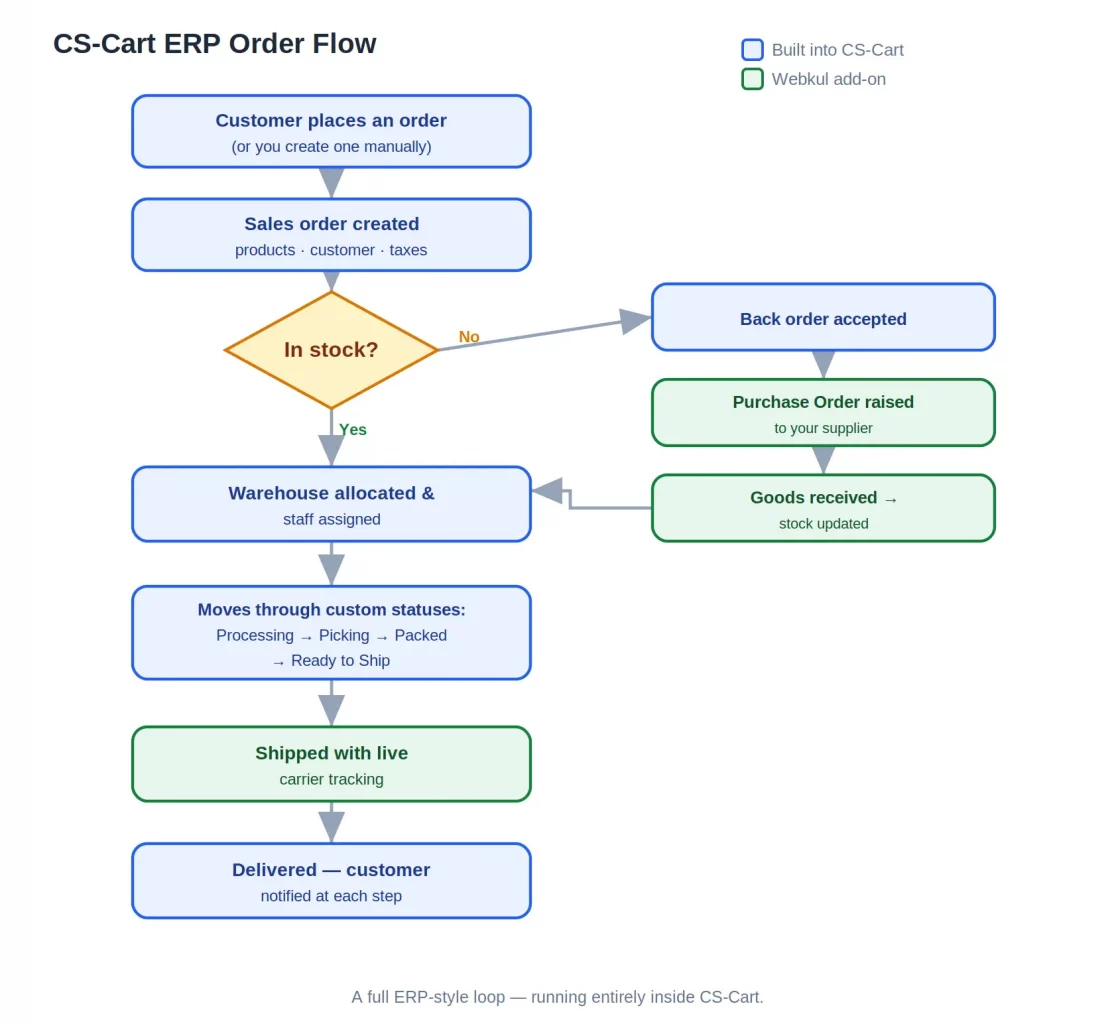
A customer places an order, and the ERP receives it instantly. The ERP checks stock before fulfillment begins.
Next, the ERP reserves stock and picks the best warehouse. Meanwhile, staff receive picking instructions right away.
If stock hits a reorder point, the ERP raises a purchase request. Consequently, suppliers get orders before shortages hit.
Warehouse teams then pick, pack, and ship using standard steps. Shipment updates sync with CS Cart at every milestone.
Meanwhile, the ERP builds invoices and updates financial reports. Therefore, finance teams always see accurate numbers.
Finally, customers get shipment alerts and tracking through CS Cart. Every team stays connected while delighting the customer.
Final Words
CS Cart ERP Integration links your store to daily operations. Sales, stock, purchasing, warehouses, and accounts work as one.
Moreover, automated workflows cut manual work and boost accuracy. As a result, your team fixes fewer errors and serves more customers.
Whether you pick ERPNext, Aureus ERP, or Odoo, the right choice fuels growth. A connected system simplifies daily retail work.
As your business grows, CS Cart ERP Integration scales with you. Consequently, you handle more orders without extra complexity.
Let’s Discuss Your Requirements
Our team is ready to help with retail ERP solutions. This includes setup, customization, and digital strategy.
- Email: [email protected]
- Create a Ticket: https://webkul.uvdesk.com/en/customer/create-ticket/
- Connect with us: https://webkul.com/contacts/
Reach out anytime — we’d love to help you find the right fit.

Be the first to comment.