You dispatch an import, an export, or a translation job in Pimcore. The job screen shows it as queued or started. Then nothing happens. The progress bar never moves, and the queue just grows.
This is the classic Pimcore Messenger Worker problem. The job sits in the queue, but no worker drains it. This guide walks through every common cause and its fix, in the order you should check them.
Everything here is grounded in a real Pimcore 12 (Platform 2026.1) install and its Symfony Messenger setup. So the commands and transport names are the actual ones you will use.
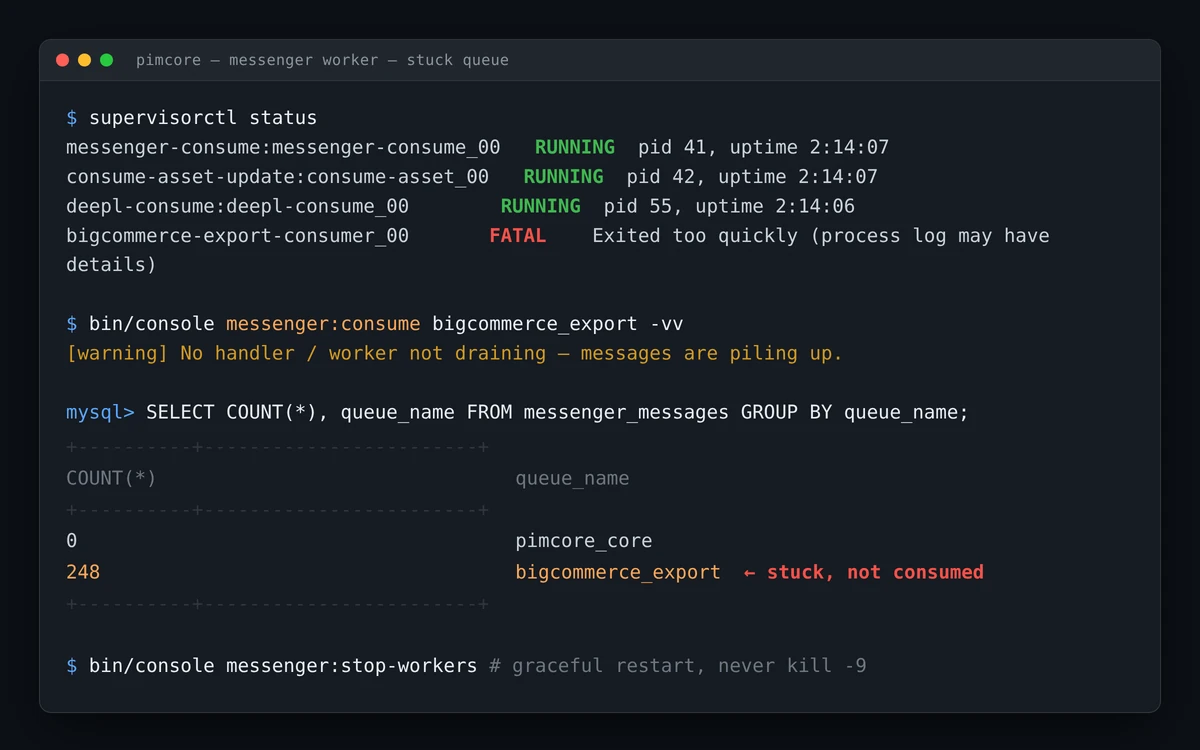
What a Stuck Queue Actually Means
Pimcore runs long jobs off the web request with Symfony Messenger. A controller drops a small message onto a transport. Then a long-running worker process picks it up and runs the job to completion.
That worker is a single command:
bin/console messenger:consume <transport> --memory-limit=250M --time-limit=3600
So a “stuck queue” almost always means one thing. The message is on the transport, but no healthy Pimcore Messenger Worker is consuming it. Your job stays started because nothing moved it forward.
The Messenger queue tracks delivery, not job progress. Pimcore keeps a separate tracking table for status and counts. So a frozen progress bar points at the worker, not your data.
First, Check the Pimcore Messenger Worker Is Running
Start with the obvious. Is a worker alive for that queue at all?
On Docker, the workers run under Supervisor. So check them there:
supervisorctl status
You want the messenger programs showing RUNNING, not FATAL or EXITED. On a stock Pimcore container, one program consumes the core transports:
messenger:consume pimcore_generic_data_index_queue scheduler_generic_data_index pimcore_core pimcore_maintenance pimcore_scheduled_tasks pimcore_image_optimize pimcore_asset_update pimcore_generic_execution_engine
Connector bundles add their own programs too. For example, a DeepL or BigCommerce install appends its own consumer for the deepl, bigcommerce_import, or bigcommerce_export queue.
No process manager? Then start a worker by hand and watch it live:
bin/console messenger:consume pimcore_core -vv
Cause 1: No Worker for That Specific Queue
This is the most common cause by far. A worker runs, but not for your queue.
Each connector uses its own transport. So a running core worker does nothing for a bigcommerce_export message. First, see where the backlog sits:
SELECT COUNT(*), queue_name FROM messenger_messages GROUP BY queue_name;
If rows pile up under a queue with no matching consumer, that is your answer. Add or restart the consumer for that exact transport. On Docker, that means a Supervisor program that names the queue.
Cause 2: The Transport Fell Back to sync://
Sometimes the job runs inline instead of queuing. As a result, the dispatch call blocks, and the browser hangs until the whole job finishes.
This happens when a transport resolves to sync://. Many dev .env files override the Messenger DSN prefix to sync:// to skip a real broker. So every “async” job then runs on the web request.
Confirm the routing your message actually got:
bin/console debug:config framework messenger.routing
Your message class should list senders: [your_queue]. However, if it shows sync or the wrong transport, the routing is off. Clear the cache and check again:
bin/console cache:clear
Cause 3: A kill -9 Ghost Is Blocking the Queue
Never kill -9 a worker while a job runs. It kills the process mid-message and leaves two problems behind.
- A permanent in_progress ghost — the tracking row froze because the worker died before writing a final status.
- An orphan-claimed message — the dead consumer set
delivered_at, so the Doctrine transport will not redeliver it for about an hour.
Meanwhile, any job queued behind that orphan waits too. So one bad kill stalls the whole queue.
To recover, delete the orphan message and close the ghost row:
DELETE FROM messenger_messages WHERE id = <orphanMsgId>;
UPDATE <job_table> SET status='stopped', ended_at=NOW() WHERE id=<id> AND status='in_progress';
Then re-dispatch from the UI. A fresh worker picks it up cleanly.
Cause 4: The Pimcore Messenger Worker Runs Stale Code
A worker loads your PHP once, at startup. After that, it keeps running the old code until it restarts.
So after any deploy or bundle change, the running worker still executes the pre-change snapshot.
The symptom is telling. You fix a bug, but the job behaves exactly as before. Or stop_requested flips to 1, yet the status never changes.
The fix is a graceful restart, never a hard kill:
bin/console messenger:stop-workers
This tells every worker to finish its current message and exit. Then the process manager respawns a fresh worker with the new code.
Cause 5: The Worker Died and Never Came Back
Workers are meant to recycle. The --memory-limit and --time-limit flags make each worker exit on purpose, so a long-lived PHP process does not leak forever.
That only works when something respawns it. So the Supervisor program needs autorestart=true. Without a process manager, the worker exits on recycle and simply never returns.
A heavy job can also hit the memory ceiling and exit early. If that happens often, raise the limit for that queue.
For example, the enrichment consumer here runs at --memory-limit=350M, rather than the default 250M.
Cause 6: A Supervisor Respawn Storm
Sometimes the worker is not stuck — it is crash-looping. A consumer that cannot boot exits instantly, and Supervisor respawns it instantly. So it forks dozens of times a second and burns CPU.
The usual trigger is a leftover program for a bundle that is no longer installed. Its transport is undefined, so the worker exits 1 every time.
A user= directive under a non-root Supervisor causes the same crash loop.
Harden every consumer program with
startsecs=1andstartretries=3. Then a real boot failure goes FATAL after three tries, instead of looping forever. Withstartsecs=0, Supervisor never gives up.
Delete the orphaned program blocks for bundles you removed. Keep only consumers whose bundle and transport both exist.
Cause 7: Failed Messages Piling Up
A throwing handler should land in a failure transport, not vanish. So check what failed and why:
bin/console messenger:failed:show
Read the error, fix the root cause, then retry the message:
bin/console messenger:failed:retry
This matters most for connector jobs. A bad credential or a rejected API call sends the message to the *_failed queue, where it waits for you.
The Pimcore Messenger Worker Diagnostic Cheat Sheet
Run these in order when a queue will not drain:
supervisorctl status— is a worker RUNNING for the queue?SELECT COUNT(*), queue_name FROM messenger_messages GROUP BY queue_name;— where is the backlog?bin/console debug:config framework messenger.routing— did the message route to a real transport, notsync?bin/console messenger:failed:show— did the handler throw?bin/console messenger:consume <queue> -vv— run one worker in the foreground and read the output.
One more rule for Docker. Supervisor reads its config only at start. So after you edit a program block, restart the Supervisor container, or the change never loads.
Keep the Pimcore Messenger Worker Healthy
A few habits prevent most stuck queues:
- Give each queue a worker with
autorestart=true, so a recycle always respawns. - Restart workers after every deploy with
messenger:stop-workers, neverkill -9. - Set
startsecs=1andstartretries=3so a broken consumer fails fast. - Watch
messenger_messagesand the*_failedqueue as your early-warning signals.
Freshly imported objects can also look “missing” even after a job completes. That is a separate index issue, not a worker one. Our guide on Pimcore reindex covers that fix.
Run Your Pimcore Jobs With Confidence
A stuck queue is almost always a Pimcore Messenger Worker problem, not a data problem.
So start with the worker, then the transport, then the failed queue. In that order, most cases resolve in minutes.
Webkul builds Pimcore connectors and bundles that lean on this exact job engine. The Magento 2, integrations all run async jobs the same way.
To go deeper, explore our Pimcore development services

Be the first to comment.