Every serious Pimcore data model hits the same question. You need to attach extra fields to an object, but plain fields are not enough.
Pimcore gives you three tools for this. Field Collections, Object Bricks, and Classification Store each solve a different shape of the problem.
Pick the wrong one and you pay for it later. You get awkward queries, blank variant data, or a class rebuild for every new attribute.
This guide compares Pimcore Field Collections, Object Bricks, and Classification Store head-to-head. You will learn what each one is, how it stores data, and exactly when to reach for it.
If you are new to the model layer, start with Data Objects in Pimcore and how to create a class Data Object in Pimcore.
Pimcore Field Collections, Object Bricks, and Classification Store at a glance
Think of them as three different relationships to your object.
- Field Collections — a repeatable, ordered list of field rows on one field. One-to-many.
- Object Bricks — an optional field group that attaches to specific classes. A conditional mixin.
- Classification Store — a runtime key/value attribute matrix, extensible without a rebuild.
You configure all three in Studio under Data Management > Data Model Definitions. Each tool has its own definition editor there.
Pimcore Field Collections: repeatable ordered rows
A Field Collection is a reusable, repeatable, ordered list of fields. You add the same structured row many times to a single field.
That makes it a one-to-many relationship. Think specs, phone numbers, price tiers, downloads, or channel-specific rows.
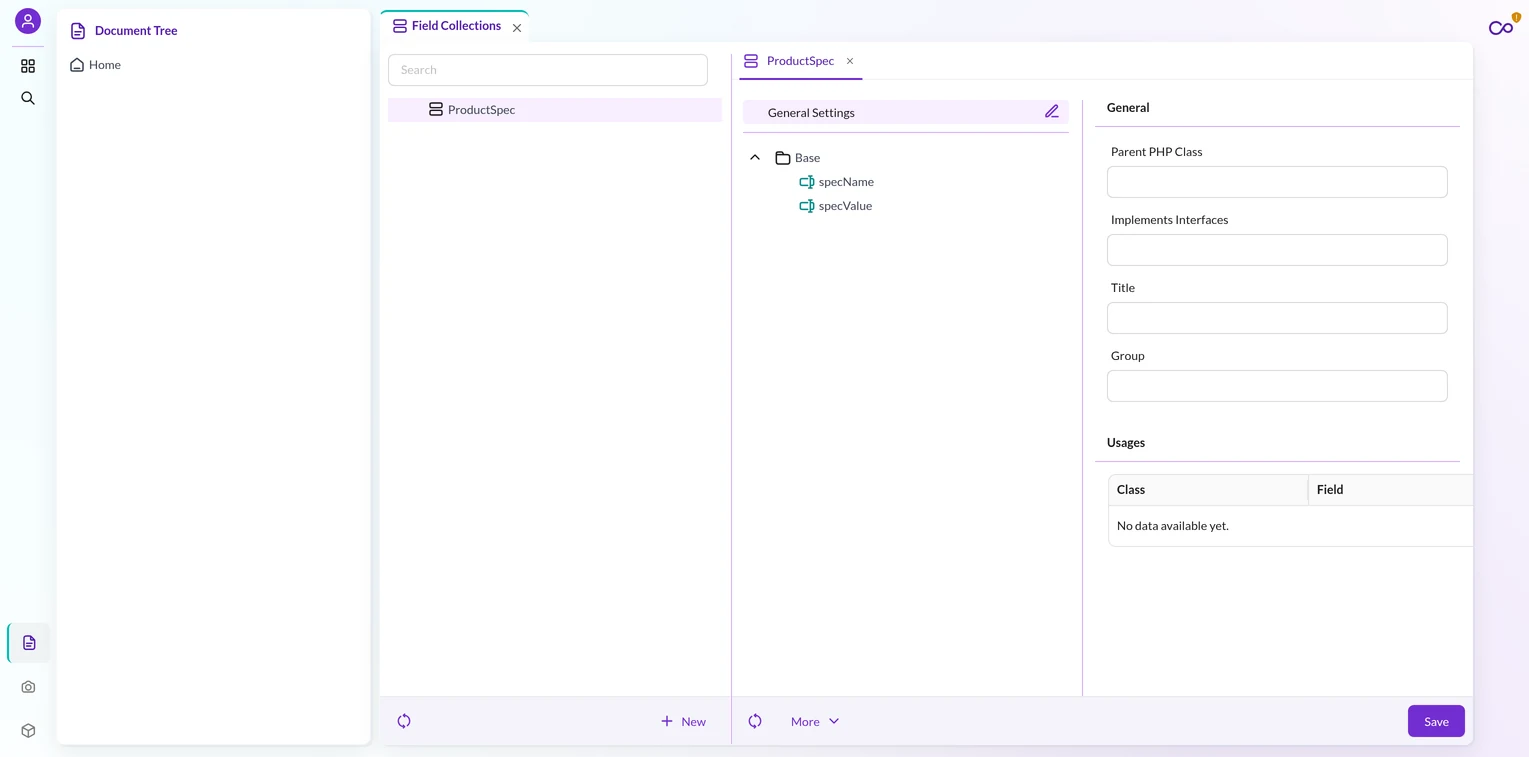
Field Collection storage
Pimcore stores each Field Collection in its own dedicated table. The pattern is object_collection_<FcKey>_<classId>, with a localized variant object_collection_<FcKey>_localized_<classId>.
All objects of the same class share this table. Because rows are identified by object id plus index, data stays separate from the base object and keeps it lean.
Field Collection API access
Call $object->getMyFcField(). It returns a Fieldcollection object that implements Iterator.
You access items by index, fieldname, or type. Also, each item exposes getFieldname(), getIndex(), and getType().
Querying Pimcore Field Collections items across many objects means reading objects first, then filtering their rows. So the base object query table holds no Field Collection values.
Field Collection localization and relations
A Field Collection item can carry its own Localizedfields container. As a result, you get a clean two-axis model: the item axis crossed with the locale axis.
For example, this pairs well with translation workflows like the Pimcore DeepL Bundle. Items can also hold relations.
Querying Pimcore Field Collections by a localized field value is even harder than querying by a non-localized field. Therefore you must join both the FC table and the localization table.
For most queryable attributes, store them as denormalized top-level fields instead. Meanwhile, keep the item structure for data you only read after loading the object.
Field Collection controls
The definition supports allowedTypes, minItems/maxItems, disallowReorder, and collapsible UI. You also get lazyLoading to load individual fields on demand.
Querying Field Collections
Querying across objects by a Field Collection item value is hard. That is because the data lives in separate tables, not denormalized into the object query table.
The built-in Listing API does not filter by Field Collection values. Instead, the workarounds are custom SQL, denormalizing key fields to the base object, or loading objects and filtering in memory.
Pimcore Object Bricks: optional field groups per class
An Object Brick is a reusable, developer-defined field group. It attaches conditionally to specific classes through an Objectbricks container field.
Treat it as a mixin or an optional attribute set. Typically you get one brick per type per object, not an ordered repeating list.
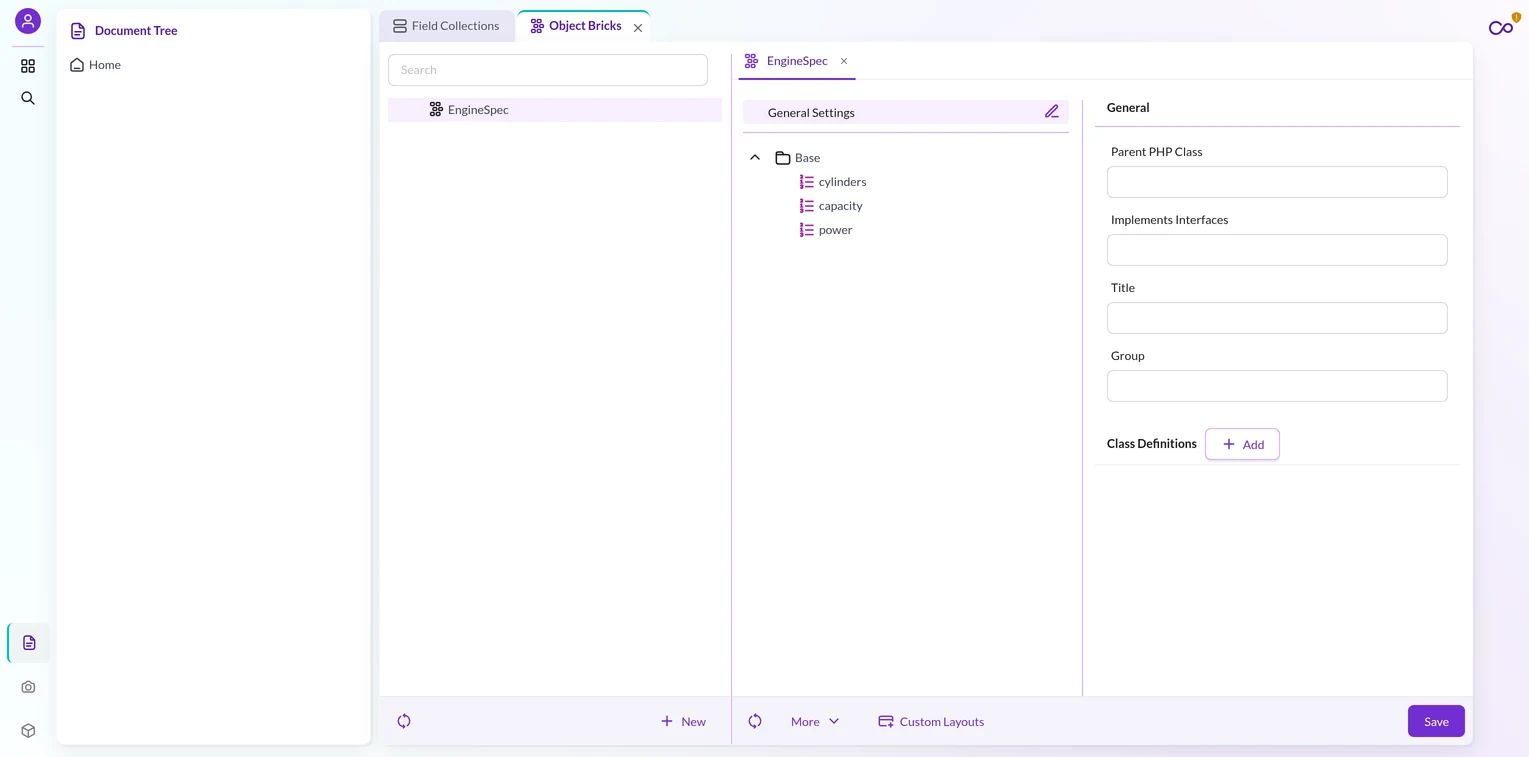
When to use it
Reach for a brick when only some objects need a set of fields. For instance, a Car class where only some cars carry an Engine brick is the classic case.
Bricks let you avoid null, unused columns in the common case. So the fields appear only where they apply.
Binding
A brick declares which classes and fields it attaches to via classDefinitions. Then, at save time, createContainerClasses() adds the brick key to each target field’s allowedTypes.
That binding is bidirectional. Therefore the brick knows its classes, and each class field knows its allowed bricks.
Storage
Pimcore creates per-bound-class tables. It names them object_brick_store_<brickKey>_<classId> and object_brick_query_<brickKey>_<classId>, plus localized variants when needed.
Each store table uses an (id, fieldname) composite primary key. As a result, multiple brick types coexist in a single Objectbricks field.
Pimcore stores each type separately under its own fieldname. So one container field can hold several distinct bricks.
The query table gives bricks indexed lookups. Also, Pimcore validates table names to stay within 64 characters.
API access
Reach a field via $object->getBricks()->getEngine()->getCylinders(). Here the getBricks() call returns the container, and each brick type has its own typed getter.
Pimcore generates a container class per class-field binding. It lives at PIMCORE_CLASS_DIRECTORY/DataObject/<ClassName>/<FieldName>.php.
Inheritance
With class inheritance on, a child auto-creates an empty parent brick via createParentBrick() in save(). That empty brick lets values inherit down the chain.
If class inheritance is off, no brick scaffolding is created, so the child will not inherit parent values. For how inheritance and variants behave at the class level, see class settings in Pimcore.
The limit
An Object Brick is not a repeatable list. Instead you get one brick per type per object, and maxItems counts distinct types, not rows.
Bricks must declare their class bindings. However, a free Field Collection has no such requirement.
Pimcore Classification Store: runtime attribute matrix
Classification Store is a single object field holding a dynamic key/value attribute store. It organizes attributes in three tiers: Keys, Groups, and Group Collections, all tied to a Store.
The store is unbounded and sparse. Values exist only for the groups you activate on an object.
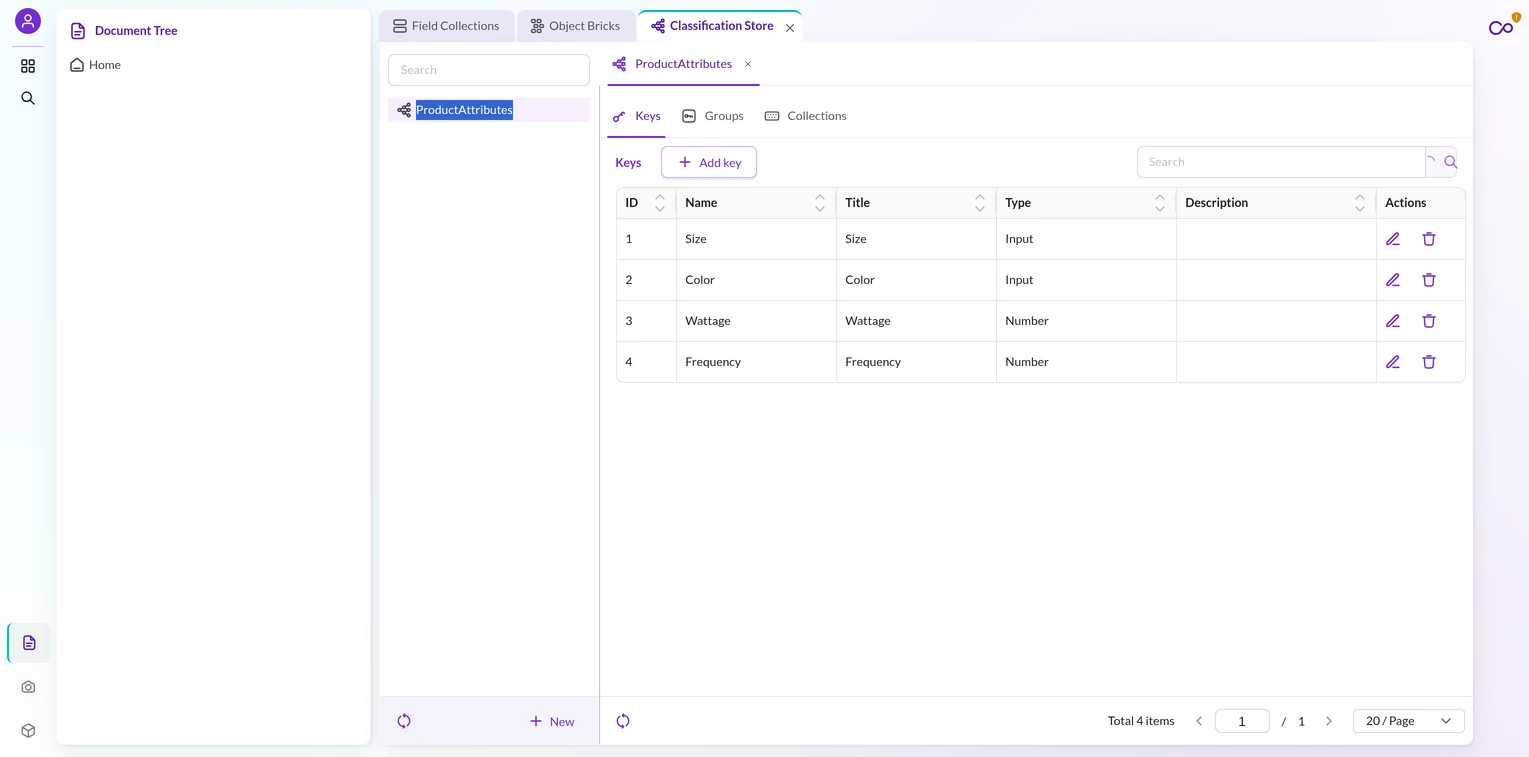
Runtime configuration
Admins create and toggle Keys, Groups, and Collections at runtime. Studio drives this through 29-plus CRUD controllers, not hardcoded class definitions.
All this configuration is admin-facing through the Studio UI. So adding an attribute needs no class rebuild, which is the headline advantage.
When to use it
Use it for catalogs where categories need radically different attribute sets. For example, shoes need size and color, electronics need wattage, furniture needs material.
Without it, you would create a class per category. Classification Store avoids that attribute explosion. That is why marketplace and PIM connectors like the Pimcore Magento 2 Connector lean on it.
Storage
Classification Store uses two layers. This split is exactly why it stays extensible at runtime without a rebuild.
First, the global configuration layer. Tables like classificationstore_keys, classificationstore_groups, and classificationstore_collections define what attributes exist, and admins manage them.
Next, the per-object data layer. Pimcore uses object_classificationstore_data_<classId> for values and object_classificationstore_groups_<classId> for active groups, one pair of tables per class.
Because the config layer sits apart from the data layer, you add or retire attributes without touching class definitions. Each key carries a type, a JSON definition, and an enabled flag.
Localization
Localization is a per-key setting, since each key definition carries a localized flag.
When the flag is true, Pimcore stores values with a language column. If it is false, the values stay language-agnostic.
Programmatic access
The ClassificationStoreFieldDataMarshaller handles read and write. Connectors set values via $object->setClassificationStoreData() without triggering a rebuild.
Inheritance
A child inherits values from all of the parent’s active groups, unless you explicitly deactivate a group. Also, metadata tracks each inherited value and its source object id.
The limit
Values are key/value, not first-class columns. Because of that, filtering by a specific key needs table joins and is harder than querying a normal field.
The MarshallerService persists values through normalization, not raw SQL types. Also, Pimcore does not support Grid and CSV export of these values.
Do not use it for small, fixed attribute sets. Instead, plain fields or a Field Collection fit those better.
Pimcore Field Collections vs Object Bricks vs Classification Store, compared
Here is the same set of dimensions across all three.
| Dimension | Field Collections | Object Bricks | Classification Store |
|---|---|---|---|
| Shape | Repeatable ordered rows (1-to-many) | Optional single group per type | Sparse key/value matrix (group × key) |
| Bound to a class? | No, free and reusable | Yes, via classDefinitions |
No, tied to a Store |
| Who configures it | Developer, at class level | Developer, at class level | Admin, at runtime (no rebuild) |
| Storage table | Dedicated per-class FC tables | Per-class brick store + query tables | Global config tables + per-object data tables |
| Query support | Weak (separate tables, no Listing API) | Indexed query table per class | Weak (marshalled key/value) |
| Localization | Nested Localizedfields (2-axis) | Inherits parent localized values | Per-key language column when localized |
| Inheritance | Wholesale replace on variant | Empty-parent-brick, per-field override | Per-key, activeGroups propagate |
| Best for | Repeating rows: specs, tiers, channels | Optional fields some objects need | Many attributes across varied categories |
For queryable Field Collection fields, remember the workarounds. So run custom SQL, denormalize key fields to the base object, or load all objects and filter in memory.
The built-in Listing API does not support Field Collection filtering. So plan for that before you model reporting on FC data.
Which one should you use?
Match the tool to the shape of your data. These rules cover most cases.
- Choose Field Collections when you need multiple ordered rows of the same structure. Price tiers, phone numbers, and per-channel grids fit here.
- Choose Object Bricks when only some objects need an extra field group. An optional
EngineorTechnicalSpecsset is the textbook case. - Choose Classification Store when many categories need different attribute sets. Add attributes at runtime without touching class definitions.
Now the anti-patterns. These are the wrong-tool mistakes teams make most.
- Avoid Classification Store for small, fixed attribute sets. It renders awkwardly and conflates axes; use plain fields or a Field Collection.
- Skip an Object Brick when you need a repeatable list. One brick per type is a hard ceiling, so switch to a Field Collection.
- Reconsider Field Collections when you need queryable, first-class columns. Filtering and reporting want denormalized fields, not separate tables.
One more axis matters: who owns change. Developers own Field Collections and Bricks, which need a rebuild. Admins own Classification Store, which does not.
When to reach for Pimcore Field Collections again, in one line: any time the data is a repeating, ordered set of rows you read after loading the object.
Real gotchas to plan for
These traps bite teams in production. Design around them early.
The variant wholesale-replace trap. A variant’s Field Collection replaces the parent’s entirely. There is no per-field inheritance.
Set one field on a variant’s FC item, and every other field the parent carried goes blank. Only wholesale-replace when the variant truly owns the full tuple.
Otherwise, implement a merge. Copy the parent’s FC item, set the one field, then append the missing rows.
The variant Listing regression. A class Listing defaults its object types to object, variant, and folder.
The moment a connector creates variant children, every existing Listing over that class starts returning variants too. Audit each Listing after you enable variants.
Add ->setObjectTypes([OBJECT_TYPE_OBJECT]) wherever only top-level objects are meant.
Classification Store queryability. Its values are marshalled key/value pairs, not columns. Cross-object filtering and reporting on specific keys stay weak.
If you need heavy querying on an attribute, promote it to a real field. Reserve the store for the long tail of varied attributes.
The empty-parent-brick behavior. Bricks inherit only because Pimcore auto-creates an empty child brick when the parent has one.
An Object Brick with inheritance off gets no scaffolding. So parent values never flow down to the child.
Conclusion
Pimcore Field Collections, Object Bricks, and Classification Store are not interchangeable. Each maps to a different data shape.
Reach for Pimcore Field Collections when the data is repeatable ordered rows. Object Bricks fit optional field groups that only some classes need.
Classification Store wins when many categories need different attributes, all configured at runtime.
When you match the tool to the shape, your model stays clean and fast. Pick wrong, and you inherit awkward queries, blank variants, and needless rebuilds.
Need help modeling a complex Pimcore catalog or building a connector around it? The Webkul Pimcore team can architect the data model and the integrations for you.

Be the first to comment.