Introduction
Odoo Payment Payrexx Recurring Module is a best tool designed to automate and simplify the management of recurring payments within Odoo ERP system.
Ideal for businesses offering subscriptions or memberships, this module streamlines the billing process, ensuring timely and secure transactions with minimal manual effort.
Embrace the efficiency of automated billing and transform your payment management with the Odoo Payment Payrexx Recurring Module.
Features
- Ensures safe and reliable payment processing through Payrexx.
- Experience quick and smooth transactions with minimal delays.
- Accept payments via all major credit and debit cards.
- Automatically debit payments for recurring subscriptions, streamlining billing.
- Easily configure and manage trial periods for subscriptions.
- Detailed transaction tracking in Payrexx and Odoo.
Installation
- Once you purchase the App from the Webkul store, you will receive a link to download the module’s zip file.
- Extract the file on your system after the download finishes. As a result, you will be able to see a folder named- ‘payment_payrexx_recurring.
- Copy and paste this folder inside your Odoo Add-Ons path.
- Now, open the Odoo App and click on the Settings menu. Here, click on Activate the Developer Mode.
- Then, open the Apps menu and click on ‘Update Modules List.’
- In the search bar, remove all the filters and search ‘payment_payrexx_recurring’
- You will be able to see the module in the search results. Click on ‘Install’ to install it
Workflow
1. After installation, configure the API and plugin integration with the unique API key to enable Odoo Payment Payrexx Recurring Gateway module.
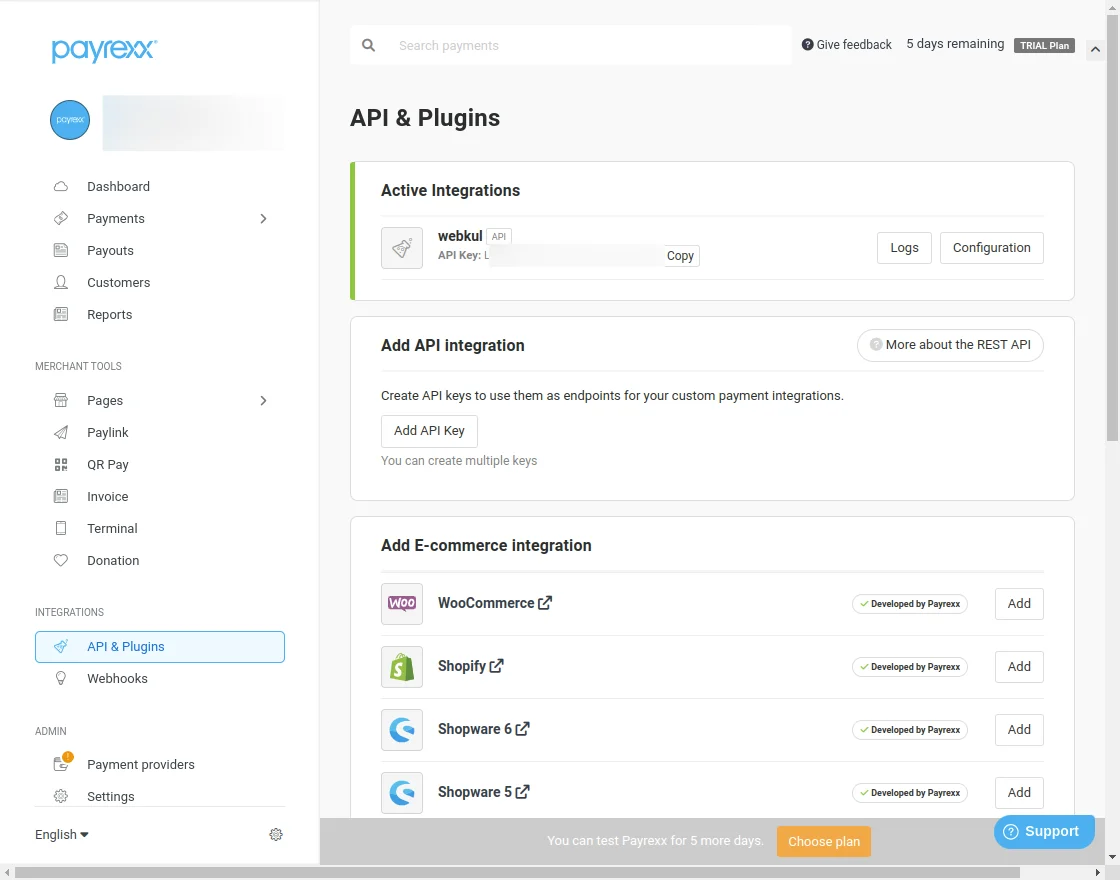
2. Configure the Payrexx webhooks integration to enable secure and seamless subscription payments with Payrexx.

3. Configure the Odoo Payment Payrexx Recurring Gateway to enable secure and seamless subscription payments.

4. Users can choose any desired subscription-based products.

5. On the product page click on the add to cart to ensure flexibility and clear pricing to enhance customer choices.

6. On the checkout page confirm the quantity of the product then click on the checkout button for the next process.

7. In the payment section select Payrexx as the payment method, which offers secure, encrypted transactions.

8. Receive a successful payment confirmation, reassuring customers that their transaction has been completed smoothly.

9. Automatically generate an invoice in Odoo, streamlining billing and ensuring accurate financial records.

10. View subscription details directly in Odoo, providing easy management of customer subscriptions and renewals.

11. Ensure accurate and synchronized data across Odoo and Payrexx, minimizing errors and improving workflow efficiency.

Need Help?
We hope you find this guide useful! Your feedback is welcome in the comments below. If you have any issues or questions, please submit a ticket at the UV Desk.
For any further inquiries, feel free to reach out to us via our support email.
Thank you for your attention!
Current Product Version - 1.0.0
Supported Framework Version - Odoo 19, 18, 17

Be the first to comment.