


















Background processing in WordPress lets your site handle heavy tasks without slowing down.
However, heavy tasks can slow everything down. Things like sending bulk emails, generating reports, or syncing data with an external API can freeze the page load.
As a result, background processing in WordPress becomes essential. It lets WordPress handle heavy work without making the user wait.
In this blog, we will look at how background processing in WordPress works. We will also see practical ways to build one, using tools straight from the official WordPress Plugin Handbook.
What Is Background Processing?
Background processing in WordPress means running a task separately from the normal page load.
The user does not have to wait for it to finish. WordPress continues the task in the background.
This is useful for long-running or resource-heavy operations.
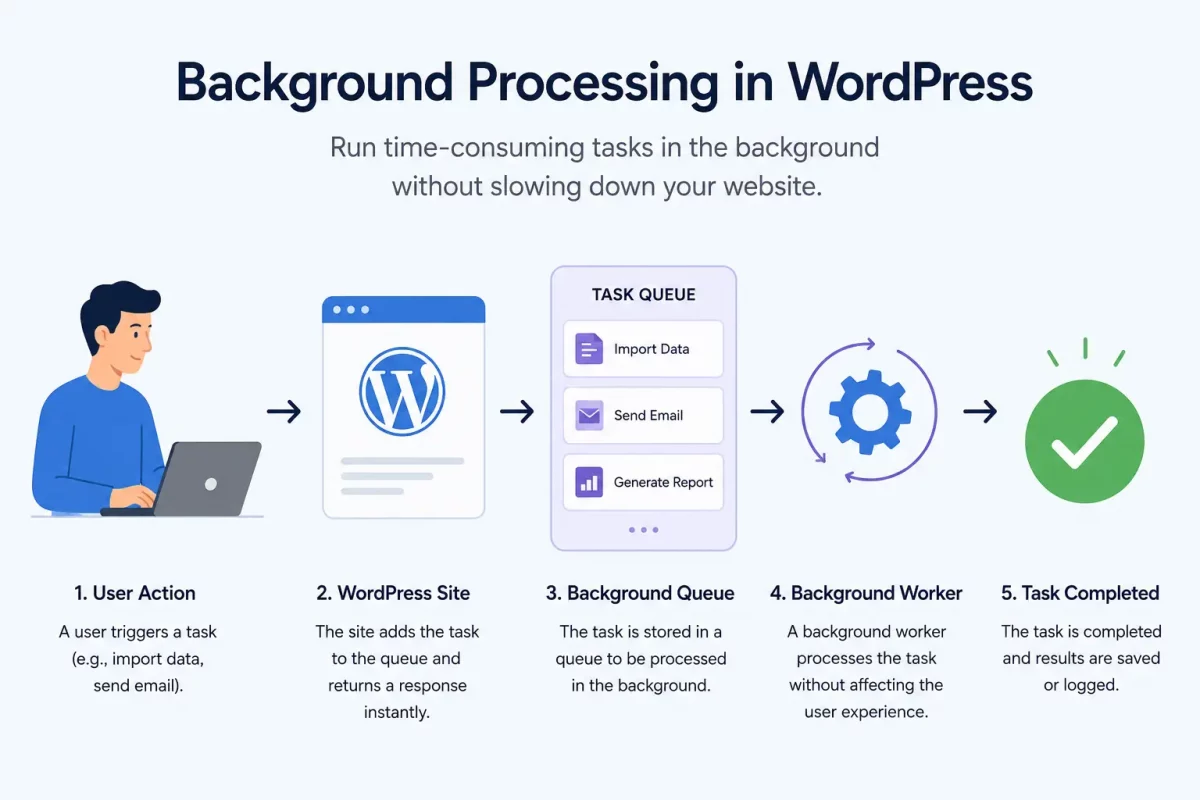
Why WordPress Needs Background Processing
By default, WordPress requests have a time limit. Long tasks can hit that limit and fail.
Therefore, background processing helps avoid timeouts. In addition, it keeps the site responsive for visitors.
It is commonly used in plugins that handle imports, exports, or large data updates.
Common Use Cases for Background Processing
Some real examples where this pattern is useful:
- Sending newsletters to thousands of subscribers
- Importing large CSV files
- Syncing products with a third-party service
- Generating PDF reports
- Processing image uploads in bulk
Core Building Blocks
WordPress offers several tools for building reliable background processing. Let’s look at them one by one.
1. WP-Cron for Scheduled Tasks
First, WP-Cron lets you schedule tasks to run later. However, it isn’t a true system cron job, but it works close enough for most cases.
if ( ! wp_next_scheduled( 'my_background_task' ) ) {
    wp_schedule_event( time(), 'hourly', 'my_background_task' );
}

add_action( 'my_background_task', 'run_my_background_task' );

function run_my_background_task() {
    // Task logic here
}
This code schedules a task to run every hour.
2. Action Scheduler for Queued Jobs
Next, Action Scheduler is a queue management library used by WooCommerce for this kind of task. It handles queued background jobs better than WP-Cron.
Additionally, it supports retries, logging, and large task queues.
as_schedule_single_action( time(), 'process_single_item', array( $item_id ) );
3. WP_Background_Process for Batch Jobs
Finally, the WP_Background_Process class is designed for processing large batches of data. It comes from the WP Background Processing library.
As a result, you don’t have to manage batches manually.
class My_Background_Process extends WP_Background_Process {
    protected $action = 'my_batch_process';

    protected function task( $item ) {
        // Process one item
        return false;
    }
}
This schedules one background job for a single item.
Choosing the Right Approach
Not every task requires the same tool. Instead, choose one based on your workload.
Use WP-Cron for simple, recurring tasks that run on a schedule.
When reliability and automatic retries matter, choose Action Scheduler.
For processing large batches of data, WP_Background_Process is the better option.
Best Practices for Background Processing in WordPress
Keep tasks small and focused. This reduces memory usage and improves reliability.
Additionally, always add proper error handling. Background tasks should fail gracefully.
Likewise, log task progress to simplify debugging.
Finally, avoid infinite loops by defining a clear exit condition.
Test with real data volume, not just small samples.
Common Mistakes to Avoid
One common mistake is running heavy logic directly during the page request.
Similarly, ignoring server timeouts can cause large jobs to fail.
Moreover, failing to log errors makes debugging much harder.
Finally, skipping queue limits can overload the server.
Conclusion
Background processing in WordPress makes sites faster and more reliable.
It is essential for plugins that handle heavy or long-running tasks.
To begin with, start small. Then, choose the right tool for your workload. Then scale as needed.
Ultimately, with the right setup, background processing in WordPress can handle heavy operations efficiently without affecting the user experience.

Be the first to comment.