


















Managing PrestaShop and Odoo separately can lead to stock errors, delayed orders, and repeated data entry.
An Odoo PrestaShop Connector links both systems to simplify daily store operations.
But which connector offers the right features, version support, and pricing for your business?
This guide compares five options: Webkul, VentorTech, Globalteckz, Jupical, and TeqStars.
Compare their features, prices, and sync capabilities to choose the right connector for your store in 2026.
Odoo PrestaShop Connectors Comparison
The table puts the five connectors side by side on the points that decide most purchases.
Build a shortlist here, then read each section for the detail behind the row.
| Connector | Odoo Versions | PrestaShop Versions | Key Sync Areas | Stock Sync | Order Import | Stores | Listed Price* |
|---|---|---|---|---|---|---|---|
| Webkul Odoo PrestaShop Connector | 9–20 | 1.7, 8.x & 9.x | Products, combinations, categories, customers, carriers, orders, stock, order status, refunds | Real-time | Real-time, cron, or manual | Multiple | $199.00 |
| VentorTech Odoo PrestaShop Connector PRO | 13–20 | 1.6–9.x, Thirty Bees | Products, combinations, images, features, stock, orders, customers, tracking | Real-time or cron | Webhooks or cron | Multiple | $567.76 |
| Globalteckz Odoo PrestaShop Connector | 11–19 | Not listed | Products, variants, categories, customers, suppliers, carriers, orders, stock | Cron or on demand | Cron or manual | Multiple | $247.99 |
| Jupical PrestaShop Odoo Connector | 17–20 | Not listed | Products, brands, suppliers, taxes, cart rules, price rules, orders, abandoned carts | Cron | Cron or manual | Not stated | $232.71 |
| TeqStars PrestaShop Connector | 17–19 | 1.7.x, 8.x | Products, combinations, brands, tags, orders, customers, stock, prices, images | Cron or manual | Cron or manual | Multiple | $250.32 |
*Prices were taken in October 2026 from each vendor’s product page and its Odoo 20 Apps Store listing.
Webkul lists the Odoo PrestaShop Connector at $199.00 on its own store, the lowest listed price of the five.
None of the five runs on standard Odoo Online plans. Each is listed for Odoo.sh and On-Premise only.
Features change between Odoo releases, so every detail here follows the listing for that version.
More Metrics to Compare
Price and versions rarely tell the full story. These points often decide the cost of running a connector.
| Connector | Refunds and Returns | Multistore Handling | Support Included | Demo or Trial | Licence |
|---|---|---|---|---|---|
| Webkul | Credit slips listed | Multiple stores | 3 months | Live demo | Webkul licence, one domain |
| VentorTech | Not listed | Per-shop integrations, shared-stock mode | 90 days (Apps), or subscription | Free demo on request | OPL-1 |
| Globalteckz | Not listed | Separate shop instances | Not stated | Live demo, trial instance | LGPL-3 |
| Jupical | Not listed | Not stated | Not stated | Docs and videos | OPL-1 |
| TeqStars | Not listed | Multiple stores, own settings each | Not stated | Personalised demo | OPL-1 |
How We Compared These Odoo PrestaShop Connectors
We reviewed each connector using its published documentation and current Odoo Apps Store listing:
- Odoo releases the module is published for
- PrestaShop versions named by the vendor
- Product, combination, and category sync
- Stock update trigger: real-time or scheduled
- Order, customer, and carrier import
- Order status sent back to PrestaShop
- Refunds, returns, and credit slips
- Direction of each sync
- Multistore and PrestaShop multishop handling
- Cron jobs, webhooks, and error logs
- Hosting: Odoo.sh and On-Premise
- Vendor partner status with Odoo and PrestaShop
- Support period, documentation, and demo access
- Listed price for the current build
Modules are rebuilt for each Odoo release. Check the feature list for the exact version you run before you buy.
1. Webkul Odoo PrestaShop Connector
Best suited for: Merchants who want orders and stock synced in real time between PrestaShop and Odoo, with wide Odoo version coverage.
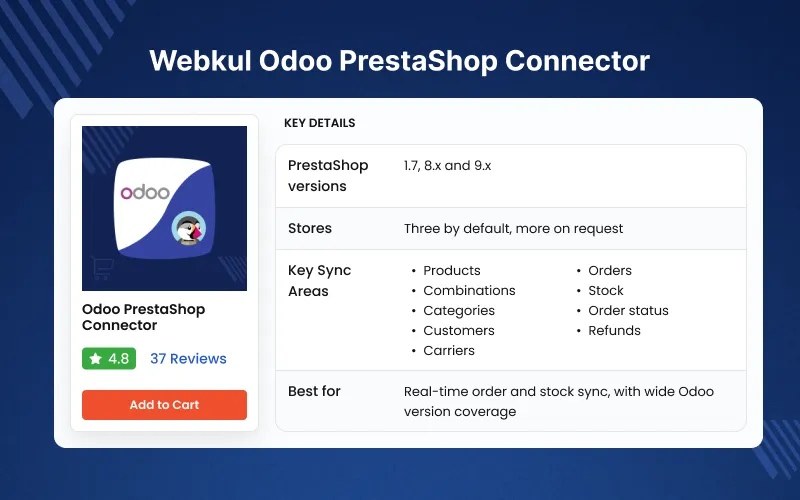
Webkul Odoo PrestaShop Connector syncs products, categories, customers, carriers, orders, and stock.
It lists builds for Odoo 9 through 20, in Community and Enterprise.
Webkul is an Odoo Silver Partner. On the PrestaShop side, it is a 3 Star Expert and a Superhero Seller on the Addons Marketplace.
That means one team maintains the code against both the Odoo and PrestaShop APIs.
It installs as two modules, one in Odoo and one in PrestaShop, which you link with the shop URL and an API key.
Stock is pushed to PrestaShop when an Odoo stock operation is validated, based on on-hand or forecasted quantity.
Each PrestaShop order reaches Odoo as a sale order the moment it is placed, so staff never wait for the next cron run.
One Odoo database handles three PrestaShop stores by default, and Webkul support raises that limit on request.
Key Features
- Published for Odoo 9 to 20, on Odoo.sh and On-Premise
- Two modules, one for Odoo and one for PrestaShop, linked by URL and API key
- Two-way sync of products, categories, and attributes
- PrestaShop combinations mapped to Odoo variants, each with its own reference, price, and barcode
- Product name, SKU, EAN13, descriptions, sale price, cost, images, and dimensions
- Real-time stock push from Odoo, with a default warehouse and location
- Odoo POS sales deducted from the same stock the website sells against
- Real-time order export from PrestaShop, plus scheduled or manual imports
- Order import with lines, taxes, discounts, carrier charges, and payment method
- Order state mapping that drives confirmation, invoicing, and delivery in Odoo
- Paid, shipped, and cancelled status sent back to PrestaShop
- Tracking numbers sent back to PrestaShop as deliveries leave the warehouse
- Refunds and returns imported as credit slips, as listed for Odoo 19 and 20
- Customers, addresses, and company names imported as Odoo contacts
- PrestaShop carriers created as Odoo delivery methods
- Scheduled, incremental, and selective imports by ID
- Duplicate guards that match products on SKU and barcode
- Missing Order menu to find and retry orders that did not arrive
- Dashboard with charts, plus sync history and error logs
Pros
- Odoo Silver Partner with PrestaShop 3 Star Expert status
- Widest Odoo range here, up to Odoo 20
- Stock updates on inventory movement, not only on a timer
- Refunds and returns are listed, which most rivals here lack
- Real-time order export, not only scheduled imports
- Lowest listed price of the five
- Live demo and a detailed user guide
- Rated 4.8 from 37 customer reviews on the Webkul Store
Cons
- Two modules to install and update, one in Odoo and one in PrestaShop
- Odoo Online users need Odoo.sh first, as with every connector here
Price
$199.00 one-time on the Webkul Store, with three months of support.
Try the live demo or read the user guide before you buy.
For custom workflows, Webkul’s Odoo developers can extend the module.
2. VentorTech Odoo PrestaShop Connector PRO
Best suited for: Stores on older or mixed PrestaShop versions, and multishop setups that need order automation.
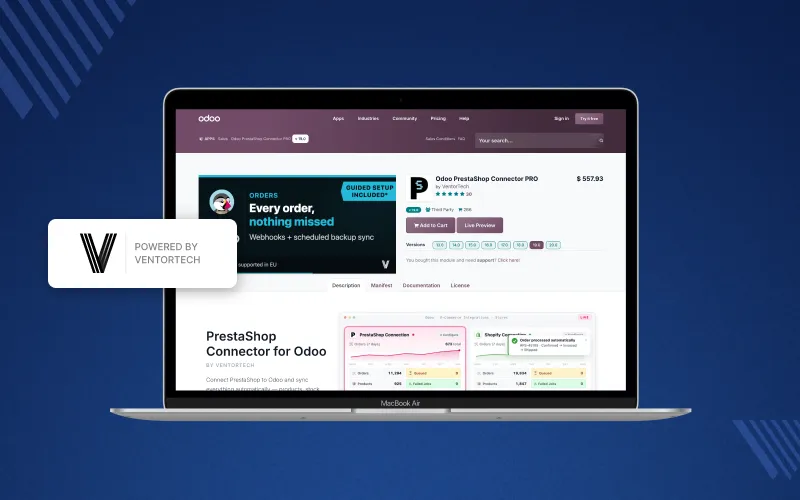
VentorTech Odoo PrestaShop Connector PRO names support for PrestaShop 1.6 through 9.x, plus the Thirty Bees fork.
The Apps Store lists builds for Odoo 13 to 20. It has the most ratings of the five on its listing.
Orders can arrive in near real time through an optional PrestaShop webhook module, with a scheduled import as backup.
Key Features
- Two-way sync of products, combinations, images, categories, and attributes
- PrestaShop features synced separately from variants
- Tier prices, customer group prices, and multilingual translations
- Product packs mapped to Odoo bills of materials
- Real-time or scheduled stock sync, with multi-warehouse aggregation
- Shared-stock mode for PrestaShop native multishop
- Order import through webhooks, cron, or a manual wizard
- Up to seven automated order steps, including confirm, ship, invoice, and pay
- Cart rule discounts kept per voucher code
- Tracking numbers exported to PrestaShop
- VAT number and personal ID captured on customers
Pros
- Widest PrestaShop version coverage, from 1.6 to 9.x
- Webhook-based order import
- Deep order automation
- Strong multishop and multi-warehouse handling
- Free demo with your own store
Cons
- Highest price in this comparison
- Returns and refunds are marked as coming soon
- Webhooks need an extra module on the PrestaShop side
- Manufacturing (mrp) is listed as a dependency
Price
$567.76 one-time on the Odoo 19 listing, with 90 days of support.
VentorTech also sells 1, 2, or 3-year subscriptions with ongoing support, so compare licence types too.
3. Globalteckz Odoo PrestaShop Connector
Best suited for: Stores on Odoo 11 to 19 that need suppliers, manufacturers, and customer groups in Odoo.
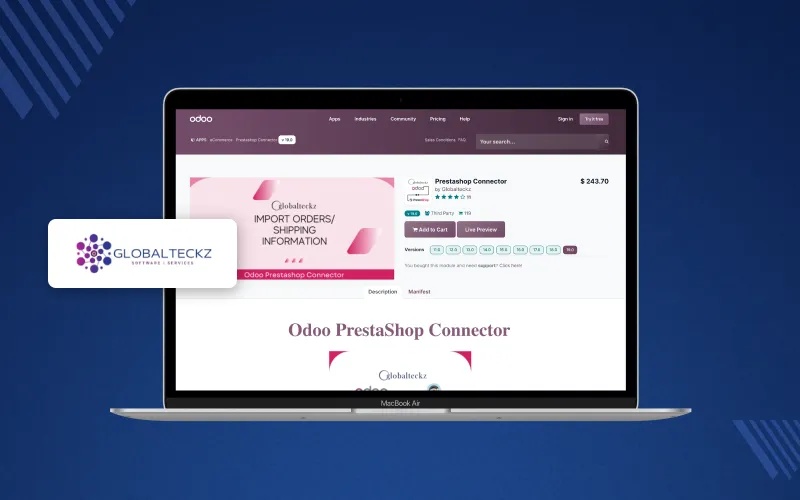
Globalteckz Odoo PrestaShop Connector focuses on bulk imports from PrestaShop into Odoo.
Globalteckz is also an Odoo Silver Partner. The module is published under LGPL-3, so the source is open to edit.
It offers both a live demo and a sandbox trial instance before purchase.
Key Features
- Import of countries, states, and addresses
- Customers, customer groups, suppliers, and manufacturers
- Attributes, values, categories, and inventory
- Carriers and sales orders, with configurable order status on import
- Export of categories, customers, and products with variants to PrestaShop
- Product name and stock updates pushed from Odoo
- Schedulers for imports, exports, and updates
- Log history with operation and timestamp for each failure
- Multiple PrestaShop shops as separate instances
Pros
- Long Odoo coverage, from 11 to 19
- LGPL-3 licence allows code changes
- Supplier and manufacturer data come into Odoo
- Trial instance for hands-on testing
Cons
- No Odoo 20 build as of October 2026
- PrestaShop versions are not named on the listing
- No refund or return sync listed
- Sync runs on schedulers, not webhooks
Price
$247.99 on the Odoo 19 listing, checked in October 2026.
4. Jupical PrestaShop Odoo Connector
Best suited for: Stores that run many discounts and want PrestaShop pricing rules managed from Odoo.
Jupical PrestaShop Odoo Connector covers a wide range of catalog and store settings.
It is published for Odoo 17 to 20. Enterprise runs on Odoo.sh or On-Premise, and Community on On-Premise.
It also imports abandoned carts into Odoo CRM, which none of the other four list.
Key Features
- Sync of products, categories, brands, suppliers, features, attributes, and tags
- Cart rules and catalog price rules between Odoo and PrestaShop
- Currencies, taxes, carriers, and payment methods
- Order import with customer, product, tax, and shipping details
- Invoices created based on order status
- Order status and shipping information synced
- Abandoned carts converted into CRM opportunities
- Central dashboard with cron scheduling and activity monitoring
Pros
- Odoo 20 build available
- Broad pricing and discount rule coverage
- CRM link for abandoned carts
- Price below most rivals
Cons
- No builds before Odoo 17
- Store limits and PrestaShop versions are not stated
- Stock sync runs on a schedule
- No refund or return sync listed
Price
$232.71 on the Odoo 19 listing and $235.00 for Odoo 20, checked in October 2026.
5. TeqStars PrestaShop Connector
Best suited for: Stores on PrestaShop 1.7 or 8 that want queue-based imports and per-variant stock control.
TeqStars PrestaShop Connector is published for Odoo 17 to 19 and names PrestaShop 1.7.x and 8.x.
Imports run through queues. If a record fails, it is logged and skipped, and the queue keeps going.
Each store gets its own configuration, with a dashboard to compare stores and marketplaces.
Key Features
- Import of categories with full hierarchy
- Products with combinations, tags, brands, prices, stock, and images
- Orders with discounts, delivery charges, gift charges, and taxes
- Export of products, prices, images, and stock to PrestaShop
- Publish or unpublish products from Odoo
- Per-variant toggle to skip items from stock export
- Order status updated on delivery or cancellation
- Order state, payment, and tax mapping
- Queue jobs, error logs, and activity alerts
Pros
- Clear PrestaShop version support
- Queue-based imports handle failed records well
- Brand records synced both ways
- Useful per-variant stock control
Cons
- No Odoo 20 build and nothing before Odoo 17
- No PrestaShop 1.6 or 9 listed
- Sync is scheduled or manual
- No refund or return sync listed
Price
$250.32 on the Odoo 19 listing, checked in October 2026.
Odoo PrestaShop Connector: Which Features Should You Check?
The right PrestaShop ERP integration depends on how your store runs day to day, not on the longest feature list.
Odoo and PrestaShop Versions
Start with the Odoo release you run, since each module is sold per version.
Webkul, VentorTech, and Jupical publish Odoo 20 builds. Globalteckz and TeqStars stop at Odoo 19.
Then confirm your PrestaShop version. VentorTech names 1.6 to 9.x, and TeqStars names 1.7 and 8.
Product and Combination Sync
When Odoo holds the master catalog, check how the connector handles:
- Combinations mapped to Odoo variants
- SKU references and EAN13 barcodes
- Prices, cost, and specific price rules
- Images and multilingual text
- Categories, brands, and features
Stock Sync
Real-time stock push lowers the risk of overselling during busy periods.
Webkul and VentorTech push stock on stock moves. The others rely on scheduled jobs.
Order Sync
Check how orders arrive: webhooks, cron jobs, or manual imports.
Also check how taxes, discounts, and carriers map, and whether status goes back to PrestaShop.
Refunds and Returns
Refunds affect your accounting, so check how credit slips reach Odoo.
Webkul lists credit slip import. VentorTech marks it as coming soon, and the others do not list it.
Multistore Support
If you run PrestaShop multishop, confirm how many stores one Odoo database accepts.
Also check whether stock and prices can be set per shop.
Hosting
All five need Odoo.sh or an On-Premise server. Standard Odoo Online plans do not accept third-party modules.
Price and Support
Compare the price for your exact Odoo version, not the lowest price on the page.
Listed prices run from $199 to $567.76, but support terms and subscriptions change what you really pay over time.
Benefits of Connecting PrestaShop With Odoo
A working Odoo PrestaShop integration gives your team one view of catalog, stock, and orders.
Less Manual Data Entry
Products, customers, and orders move between systems instead of being typed twice.
Accurate Stock Levels
PrestaShop quantities follow Odoo inventory, so you sell only what the warehouse holds.
Orders Handled in Odoo
PrestaShop orders flow through Odoo sales, picking, invoicing, and delivery like any other order.
Cleaner Accounting
Taxes, discounts, and refunds reach Odoo as proper records, which keeps revenue reporting correct.
One Backend for Many Stores
A single Odoo database can manage several PrestaShop stores and other sales channels.
Summary
The right Odoo PrestaShop Connector removes double entry and keeps stock, orders, and accounting aligned.
These five differ mainly in version coverage, stock and order triggers, refund handling, multistore support, and price.
VentorTech suits older PrestaShop versions and heavy order automation. Jupical suits discount-heavy catalogs.
Shortlist two, then test them on a staging store with real products, combinations, and a test order.
If you need real-time order and stock sync with Odoo 20 support, start with the Webkul Odoo PrestaShop Connector.
Its live demo lets you test the sync before you spend anything.
If you want to replace PrestaShop, consider moving your store to Odoo before choosing a connector for ongoing synchronization.
Frequently Asked Questions
What is an Odoo PrestaShop Connector?
An Odoo PrestaShop Connector links both platforms to sync products, customers, orders, inventory, and other store data automatically.
Which Odoo PrestaShop Connector supports Odoo 20?
Webkul, VentorTech, and Jupical offer Odoo 20 builds, according to their published listings reviewed in October 2026.
Which Odoo PrestaShop Connector offers real-time stock sync?
Webkul and VentorTech support stock updates triggered by inventory movements, helping keep PrestaShop stock aligned with Odoo.
Can I manage multiple PrestaShop stores through Odoo?
Yes, most listed connectors support multiple stores, but store limits and configuration options vary between vendors.
Do Odoo PrestaShop Connectors work with Odoo Online?
No, the five connectors reviewed require Odoo.sh or On-Premise hosting rather than standard Odoo Online plans.
Which Odoo PrestaShop Connector supports refunds and returns?
Webkul lists credit slip import for Odoo 19 and 20, while VentorTech marks refund support as coming soon.
How much does an Odoo PrestaShop Connector cost?
The listed prices range from $199 to $567.76, depending on the connector and the Odoo version selected.
What should I check before choosing a PrestaShop Odoo integration?
Check version compatibility, stock and order sync, refund handling, multistore support, hosting requirements, licence terms, and vendor support.

Be the first to comment.