Overview
AliExpress Dropshipping is a very popular e-commerce business marketplace.
Store owners can sell AliExpress products to their customers without actually stocking the items themselves.
Therefore, the merchant purchases the product ordered by a customer from AliExpress to fulfill the orders of customers.
So, to integrate your BigCommerce store to AliExpress, ” BigCommerce AliExpress Dropshipping” has developed.
By using our “BigCommerce AliExpress Dropshipping”, an admin can import products along with their options, description, and other details into their BigCommerce store.
Therefore, he can start selling those products in his own store very easily without managing the products to his store.
Once the order has been placed on the BigCommerce store, the admin can place that order on AliExpress with a single click.
Further, the admin has the functionality to update the product prices via “Price Rule”. And also other product details after importing the product to the store.
After he/she receives the order for the imported product, he places the same order on AliExpress. And, gets it shipped directly from their warehouse to the customer.
Important Note:
-
-
- For importing products from the AliExpress website, you need to install the BigCommerce AliExpress Importer extension in your Google Chrome web browser. For this, you can add the extension and install it from here
Note – If the Chrome extension link is not working, then you can directly download the extension from here: Direct Download
Here is the user guide on how to install the unpacked extension in Chrome- AliExpress Currency and BigCommerce store Currency should be the same.
-
Features of BigCommerce AliExpress Dropshipping
General Features:
- Functionality to import products from the AliExpress product page to your BigCommerce store.
- A custom-built AliExpress Importer Chrome Browser Extension is available on the Chrome Extension Store.
- Easy to configure and manage at the admin end.
Import Features of Product:
- Imports products with details like Product Name, Price, metadata, main image, additional image, options, and product details.
- Functionality to set a default category to which products get imported from AliExpress.
Product Options Feature:
- Import products with various options along with the images.
Product Data Update Feature:
- An admin can modify the data of the product like Name, Price, Metadata while importing from AliExpress.
Price Rule Features:
- Admin can increment or decrement the price of products through “Price Rule”.
- Set the “Price Rule” value in %.
Order Automation Features:
- Admin can place orders on AliExpress with a single click if any order for imported products is created on BigCommerce.
- When admin clicks on place order, all the products in the order will be automatically added to the cart, and the admin can get the shipping address in one click.
Updated Features
- Admin can select the product details to import as per their requirement.
- Admin has the functionality to select the product’s images and options to import.
- Functionality to import AliExpress products along with the available inventory.
- Functionality to import AliExpress products variants within the stock.
- Option to set the SKU prefix to AliExpress imported products as per choice.
- Option to set Order notification.
Video Tutorials
Installation Of Chrome Extension
Firstly, you need to install the “BigCommerce AliExpress Importer” extension on your Google Chrome browser for importing the products. Click here to download the Chrome extension.

After clicking on “Add to Chrome” button, the extension will be added to the Chrome browser.
Consequently, when you go to the product page of AliExpress, you will find a blue icon to “Update Authentication Data”.
Therefore, this helps to validate the data in order to import products into your BigCommerce Store.
Flow Of Installation And Configuration
Step1:
Firstly, log in to the Backend panel of your BigCommerce store.Secondly, go to “Apps” and find “AliExpress Product Importer”.
After that, click on the application, then click on “Install”.

Step2:
Further, click on “Confirm” to confirm the installation.

Step3:
After that, configure the settings of the application as given below:
Settings:
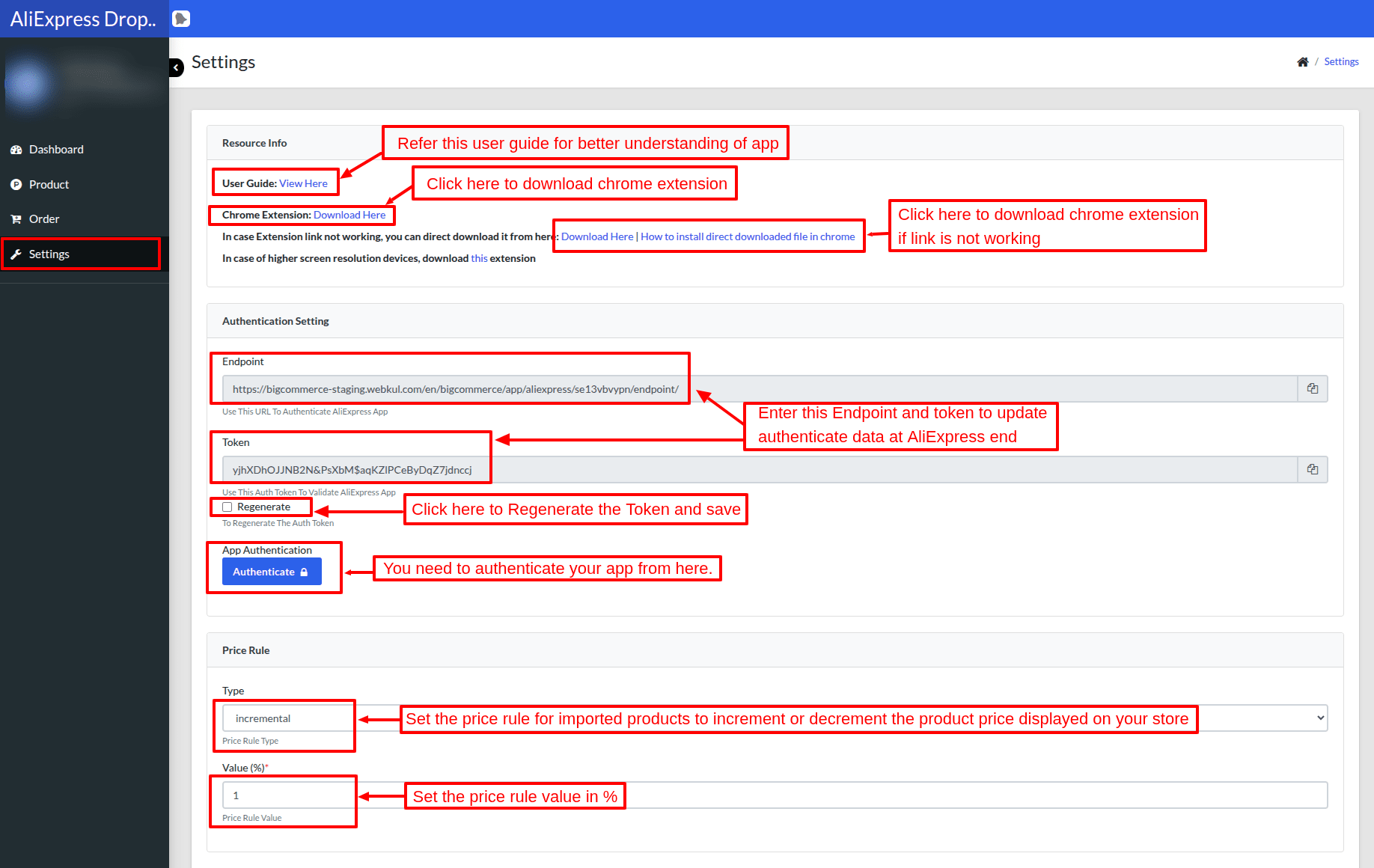
Refer the user guide for better understanding of application and click on “Download Here” to download the chorome extension.
Go to the settings section of your app. You will find the “Endpoint” and “Token” in the “Authentication Settings”.
Enter these values at the AliExpress end to validate the data from AliExpress.
Meanwhile, admin can also regenerate the token to authenticate. And, he can “increment” Or “decrement” the product’s price through “Price Rule”, which is imported from AliExpress.
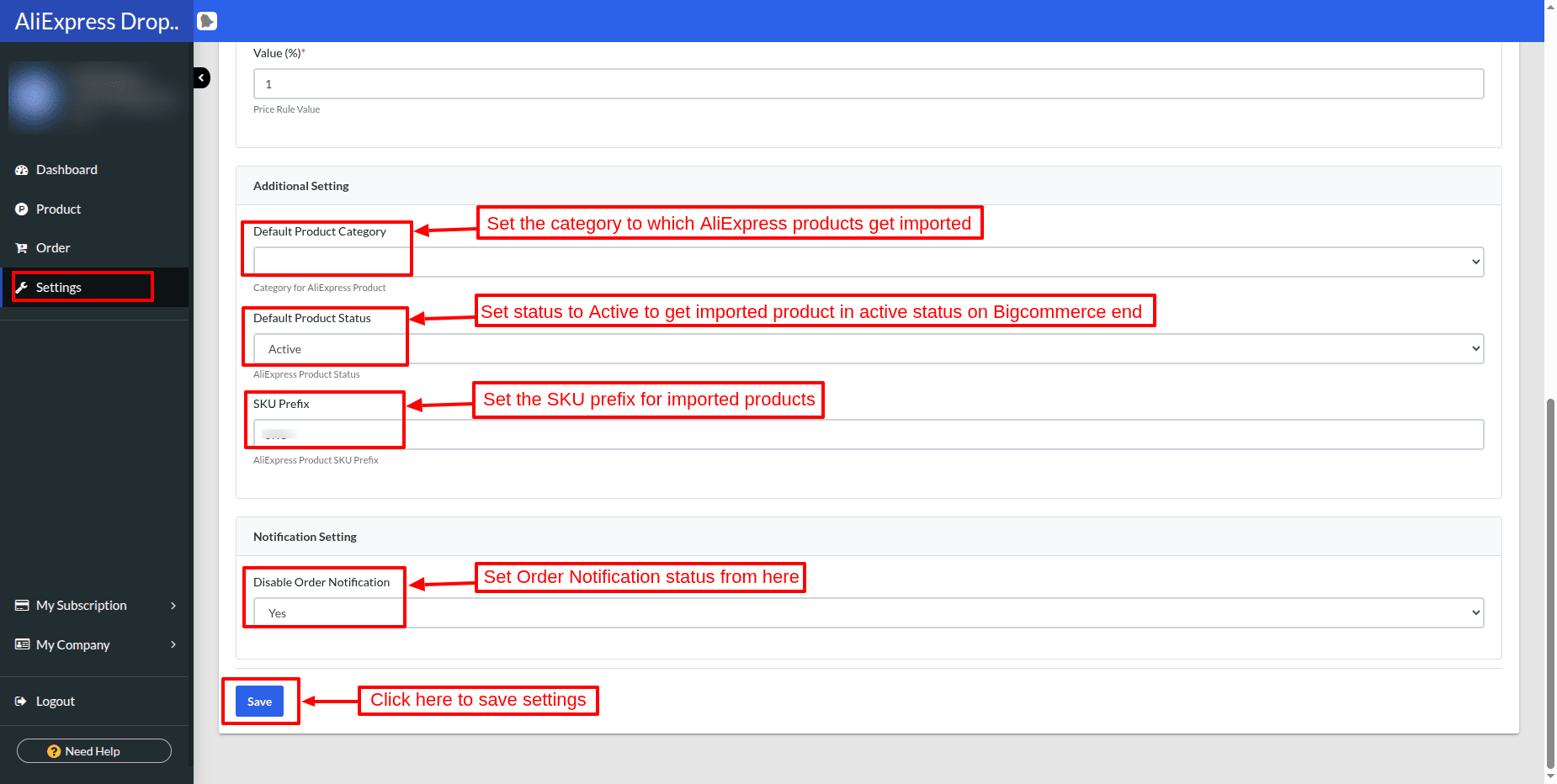
Set the default category , default status and SKU prefix to which AliExpress products get imported.
Set order notification status amd click on Save.
Dashboard:
Admin can view the complete details about their store in the Dashboard.
Admin can view the current subscription and manage the transaction and subscription.
Also, the view of the settings done in the application is provided. Meanwhile, it shows the recent ten AliExpress imported products and orders in the Dashboard.


How to import products from AliExpress->
Step4:
Visit the AliExpress website. Further, you can see the blue icon for “Update Authentication Data”.
This helps to validate data in order to import products from AliExpress.

After that, enter the “Endpoint URL” and “Token” from your BigCommerce app settings to validate the data.

Once you have completed the validation, the admin can import products from the AliExpress product page to your BigCommerce store.

Further, after clicking on the “import” icon, the admin can find the following details to import along with the products:
Under the Basic tab, the admin selects which product details to import into BigCommerce.
The admin imports details such as Metadata, Product Images, Specifications, and Description.
The admin can also import the product price as either the Original Price or the Discounted Price.
Specifications and descriptions of a product will be imported into a single field. i.e., both will be imported in the Description field.

2. Under the Details tab, the admin can find the product’s details like Name, Price, Meta Title & Description, and Meta Tag keywords.
So, the admin can edit the details of the imported products from here.

3. Under the Additional tab, the admin can select the product’s variants, which will import on BigCommerce. Most importantly, minimum one product variant needs to be chosen to import.

Product:
When products are imported, an admin can view the imported products in the product section at the backend. So, the admin can edit, view, and delete imported products from here.

Front End View
Given below is the front-end view of the imported product from AliExpress.
A customer can view the details of the imported product and order the product from the BigCommerce store.
 Here you can view the product imported from AliExpress to your BigCommerce store.
Product imported with the details like Product Name, Price, metadata, main image, additional image, options, and product description.

Order:
When a customer places an order for a product imported from AliExpress, the admin can find the details of the order from the backend.
Therefore, the admin can edit, delete, or place this order to AliExpress.

When the admin clicks Place Order, the system redirects them to AliExpress, adds all ordered products to the cart, and proceeds to checkout.
From where the admin can view the BigCommerce Order details at the checkout page, as shown in the snapshots.


Admin can add the shipping address details as shown in the snapshots


After Review the order, the admin can do the payment through the selected payment method and place an order to AliExpress.

My Subscription:
Subscription: An admin can view the current plan details under “Subscription”. So, the admin can upgrade the current plan by clicking on “Upgrade plan”.


After clicking on “Upgrade plan”, the admin can find the various plans and select the plan of their choice.

Transaction: Admin can view the list of all the transactions of the store.

My Company:
Company Profile: Here you can find the details about the company.

Company settings In this section, you can synchronize the settings from the BigCommerce store.

Support
That’s all for AliExpress Dropshipping For BigCommerce . Still, have an issue, feel free to add a ticket and let us know your views to make the application better webkul.uvdesk.com
For More Development on Wix, contact us.
Current Product Version - 1.0
Supported Framework Version - BigCommerce


13 comments
No, the billing info of the admin does not get sent to the customers.
If you have any other queries then please generate a ticket at [email protected]
so that we can assist you in a better way!
Regards,
Webkul
The token is for the authentication purpose, you will get the token at your store end. You need to open your Bigcommerce backend panel and go to My Apps >> Aliexpress dropshipping application >> settings, here you will get the endpoint and token for authentication.
For any other queries, you can generate a ticket at https://webkul.uvdesk.com/en/
And if a seller prices change (update) will our automatically update as well, while having our in/decremental
Greetings for the day!!
I would like to inform you that you just need to place the order of the imported product on aliexpress and enter the shipping details of the customer, further you need to choose the shipping methods provided by the aliexpress site to place an order.
For any other queries, you can generate a ticket at https://webkul.uvdesk.com/en/
Thanks!!
No, you don’t need to contact the store for dropshipping. You need to just create an order on aliexpress with your customer shipping details.
For more details, Kindly watch video from 9:40(https://www.youtube.com/watch?v=mMlIOCsMjDA&feature=youtu.be)
CAn you tell me that if “something went wrong” signal after I am imported a product?
Extension Link: https://chrome.google.com/webstore/detail/bigcommerce-aliexpress-im/ddfkbnbccmdlgkildemomhldmgejbghn