If you run a growing WooCommerce store, wp_postmeta performance is probably something you have already struggled with. Everything feels fast in the beginning, and then it slowly starts to drag.
Category pages take longer to load. Filters feel sluggish. Search stops feeling instant.
One of the biggest performance challenges in WooCommerce development is the wp_postmeta table
As your catalog grows, this table becomes one of the biggest bottlenecks in the WordPress database.
How WooCommerce Stores Product Data
WooCommerce keeps your products in the wp_posts table.
But the important details, like price, SKU, stock status, and custom attributes, all go into wp_postmeta.
This follows the Entity-Attribute-Value (EAV) model, where every attribute is saved as a key-value pair.
It is flexible and easy to extend, but that flexibility comes at a cost as your data grows.
The illustration below compares WooCommerce’s traditional EAV-style storage with HPOS and custom tables.
A single query to read one product’s meta looks like this:
SELECT * FROM wp_postmeta WHERE post_id = 123;
This pulls every meta row for one product, and that row count is where the trouble begins.
Why wp_postmeta Performance Gets Worse at Scale
Many developers assume slowdowns start once a store crosses a certain product count.
In reality, the real factor is the total number of metadata rows.
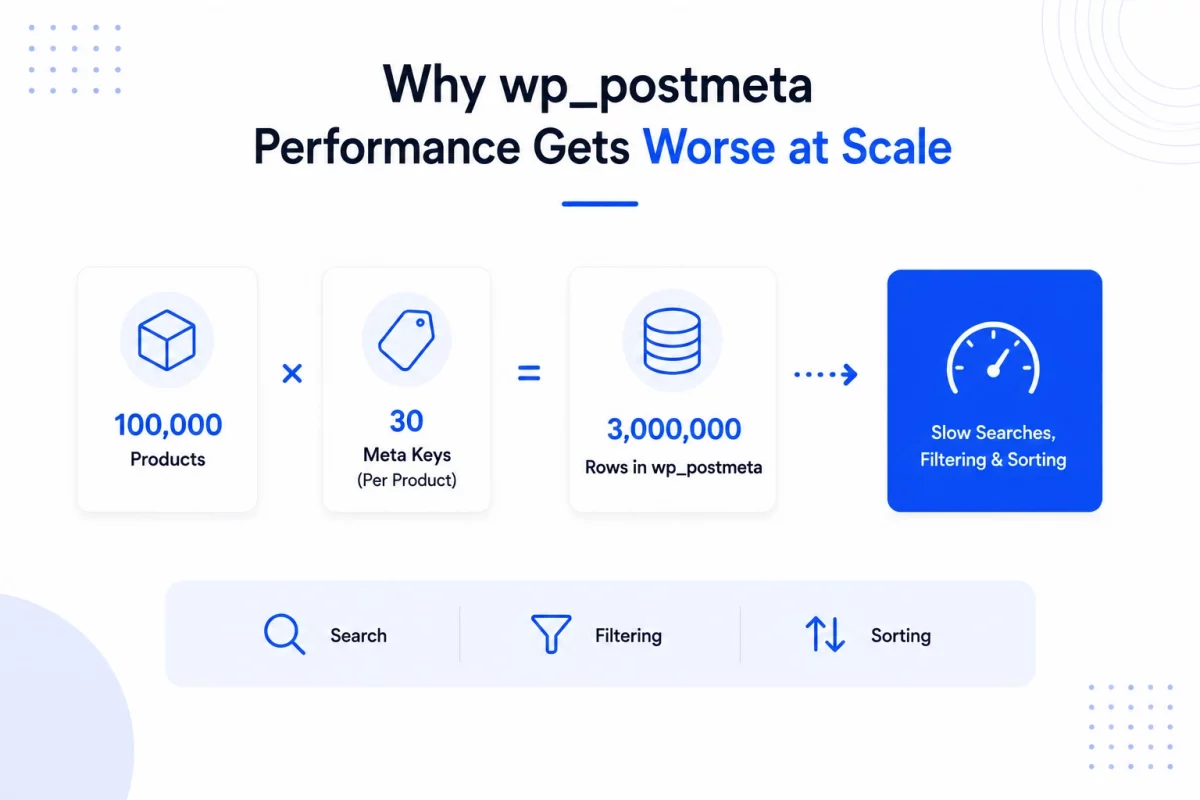
Take a store with 100,000 products and 30 meta keys per product.
That alone creates around 3 million rows inside wp_postmeta.
At that size, MySQL has to work through huge volumes of metadata for search, filtering, and sorting.
How Product Filtering Slows Down
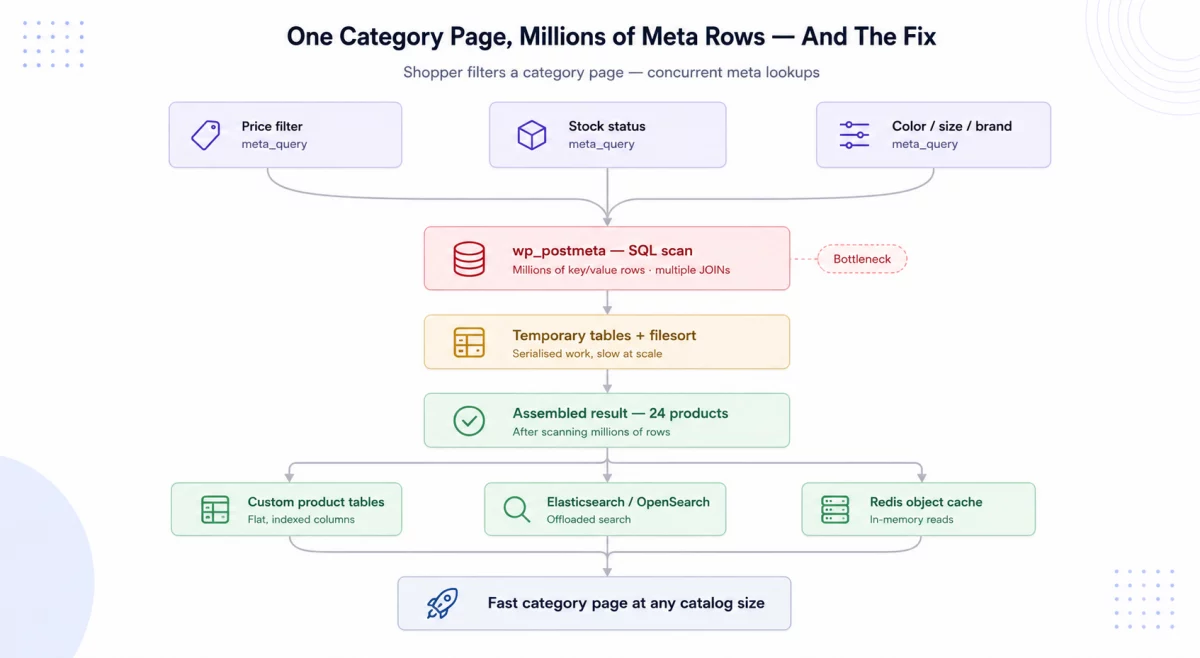
WooCommerce leans heavily on meta queries to filter products.
$args = array(
    'meta_query' => array(
        array(
            'key'   => '_stock_status',
            'value' => 'instock'
        )
    )
);
This filters products by their stock status using a lookup against the meta table.
Shoppers today expect instant filtering by price, color, size, and brand.
Since all of that lives in wp_postmeta, category pages are usually where slowdowns show up first.
A page showing just 24 products can force the database to scan millions of meta rows behind the scenes.
How Product Search Is Affected
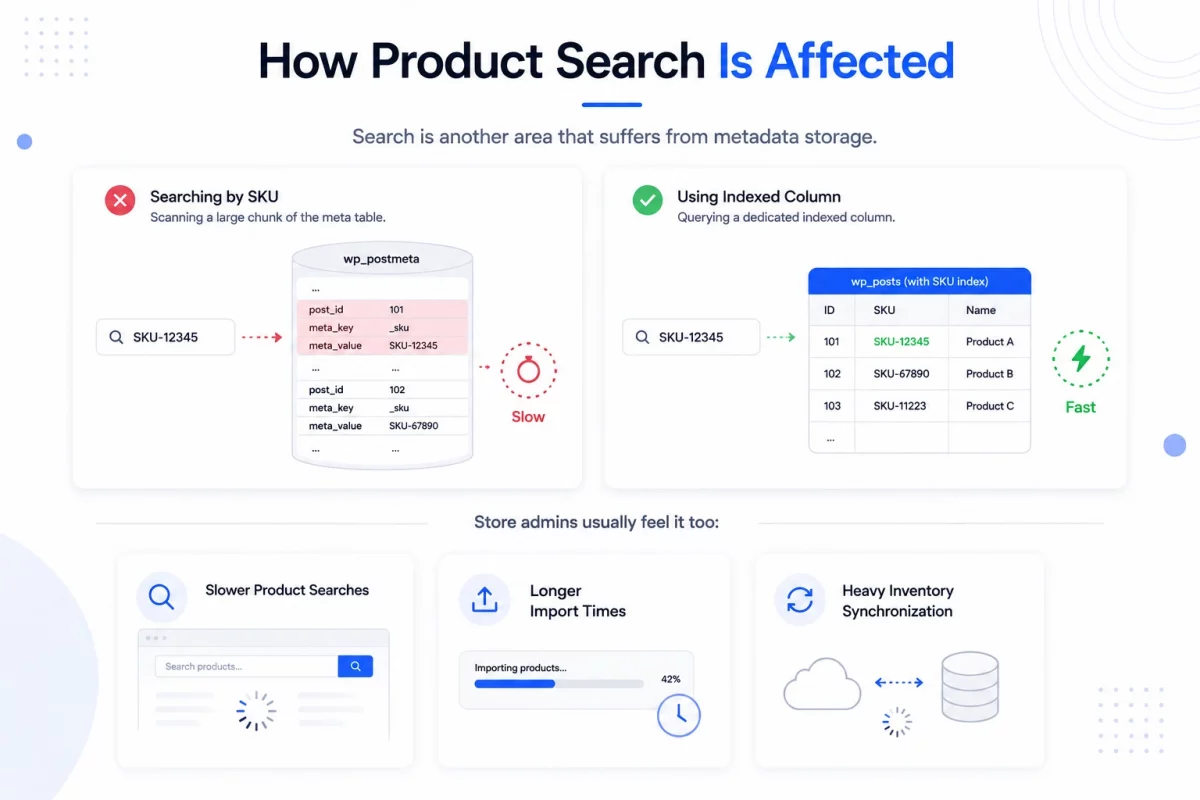
Search is another area that suffers from metadata storage.
Searching by SKU often means scanning a large chunk of the meta table.
Compared to querying a dedicated indexed column, this is far less efficient.
Store admins usually feel it too:
- Slower product searches in the dashboard
- Longer import times
- Heavy inventory synchronization
A Real-World Example
Picture a store with 250,000 products and 40 meta records per product.
That pushes wp_postmeta past 10 million rows.
Under peak traffic, these stores often see:
- Increased page load times
- High CPU usage
- Database bottlenecks
Why Indexes Alone Do Not Fix wp_postmeta Performance
Recent WooCommerce versions added product lookup tables and other performance improvements.
These reduce the dependency on wp_postmeta for some operations.
But very large catalogs can still hit bottlenecks when filtering, searching, or sorting on metadata.
Indexes help query speed, but they cannot fix the underlying architecture.
Large meta queries still need multiple joins, temporary tables, and extra processing.
As the catalog grows, the database spends more time assembling data than actually returning it.
How Enterprise Stores Fix wp_postmeta Performance
Large stores rely on a few proven strategies to keep performance stable at scale.
1. Custom Product Tables
Frequently queried product data is moved into dedicated flat tables.
CREATE TABLE wc_products (
    id BIGINT PRIMARY KEY,
    sku VARCHAR(100),
    price DECIMAL(10,2),
    stock INT
);
This lets the store read product data directly, without joining the meta table every time.
2. Offloading Search to Dedicated Engines
Many enterprise stores move search and filtering to engines built for it.
- Elasticsearch
- OpenSearch
These handle large catalogs far more efficiently than MySQL alone.
For a deeper look at speeding up search, see our guide on Elasticsearch for WooCommerce.
3. Redis Object Caching
Redis keeps frequently requested data in memory instead of hitting the database.
The result is fewer queries, lower server load, and faster page generation.
4. Ongoing Database Optimization
Regular maintenance stays essential for high-performance stores.
Common tasks include index optimization, query analysis, cleanup, and table optimization.
When wp_postmeta Performance Becomes Critical
Most small and medium stores never run into these limits.
The pain usually starts when a store has:
- Hundreds of thousands of products
- Millions of metadata records
- Advanced layered filtering
- High search traffic
- Frequent ERP or inventory sync
At this point, database architecture becomes one of the biggest factors in performance.
Key Takeaways
The wp_postmeta table gives WooCommerce its flexibility, but that same design can slow large stores down.
Stores with huge catalogs usually need architectural changes to keep search and filtering fast.
Most enterprise stores combine several strategies:
- HPOS for efficient order management
- Custom product tables for faster lookups
- Redis object caching to cut database load
- Elasticsearch or OpenSearch for fast search
- Regular database maintenance
Conclusion
The wp_postmeta table is a big reason WooCommerce is so flexible and easy to extend.
But that same flexibility creates scaling challenges for very large catalogs.
As metadata grows, even simple actions start to depend on heavy database queries, and wp_postmeta performance quietly becomes your real limit.
Understanding these limits is the key to building WooCommerce stores that stay fast and reliable as they grow.

Be the first to comment.