


















React applications feel fast because they update only what changes.
However, components can sometimes re-render more often than necessary.
Unnecessary re-renders can make applications slower and harder to scale.
This becomes more noticeable as your component tree grows larger.
The good news is that React provides simple ways to optimize rendering behavior.
In this article, we’ll learn what causes re-renders and how to reduce unnecessary ones using practical techniques.
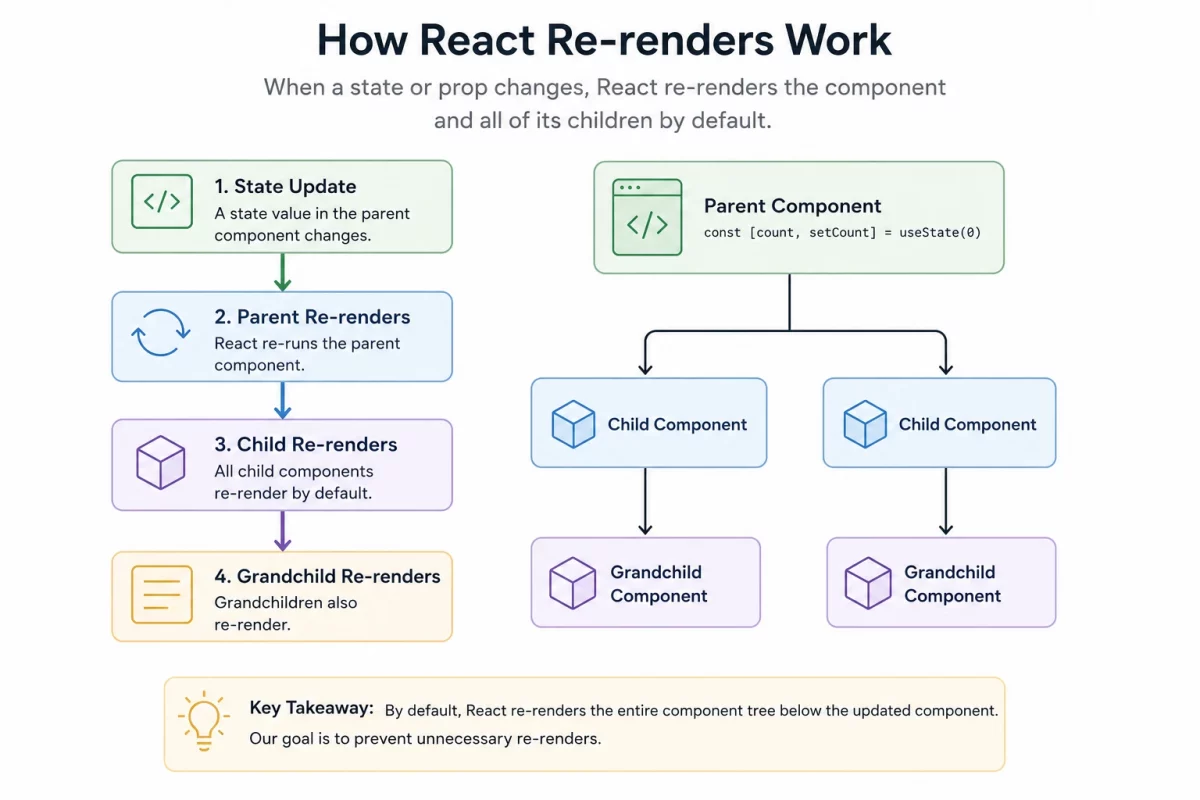
Why Reducing Re-renders Matters
Not every re-render is a problem.
React is designed to re-render components whenever their data changes.
The goal is not to stop all re-renders.
The goal is to avoid unnecessary work that affects performance.
Reducing unnecessary re-renders can improve responsiveness and make components easier to maintain.
Small optimizations can make a noticeable difference in larger applications.
Understanding When React Components Re-render
React components usually re-render when
- When a component’s state changes.
- When the props passed to a component change.
- When its parent component re-renders.
- When the value provided by a consumed Context changes.
Common Techniques to Reduce Re-renders
Use React.memo for Pure Components
React.memo prevents a component from re-rendering if its props haven’t changed.
const UserCard = React.memo(function UserCard({ name }) {
  return <div>{name}</div>;
});
This works well for components that render the same output given the same props.
Memoize Values with useMemo
useMemo caches the result of an expensive calculation between renders.
const sortedList = useMemo(() => sortItems(items), [items]);
Use it when a calculation is genuinely expensive, not for every single value.
Memoize Functions with useCallback
Functions are recreated on every render by default. useCallback keeps the same function reference across renders.
const handleClick = useCallback(() => {
  doSomething(id);
}, [id]);
This matters most when the function is passed to a memoized child component.
Keep State as Local as Possible
State placed too high in the component tree causes every child below it to re-render on every update.
Move state closer to where it’s actually used, instead of lifting it up by default.

Be the first to comment.