Introduction
The Pimcore 12 SAP S/4HANA Connector keeps your catalog and business data in sync between Pimcore and SAP S/4HANA.
It syncs products, categories, customers, orders, stock, prices, and media automatically, in both directions. Moreover, every sync runs as a background job inside Pimcore Studio.
As a result, keeping your product data and ERP records aligned is faster and far more reliable.
Copying products and business-partner records between Pimcore and SAP by hand doesn’t scale. So Webkul built the Pimcore 12 SAP S/4HANA Connector to remove the copy-paste.
It bridges your Pimcore data model and your SAP S/4HANA system over the SAP OData APIs (API_PRODUCT_SRV, API_BUSINESS_PARTNER, API_SALES_ORDER_SRV, and more). As a result, products, categories, customers, and orders all flow automatically, in both directions.
It’s built natively for Pimcore 12 and SAP S/4HANA. Also, it brings two big upgrades. First, every sync runs as a restartable background job.
So large data sets no longer block your screen or time out. Meanwhile, you watch each run on a live progress view. Second, it’s bidirectional.
It both imports from and exports to SAP. Because of that, you can seed Pimcore from an existing S/4HANA system, then push curated changes back out.
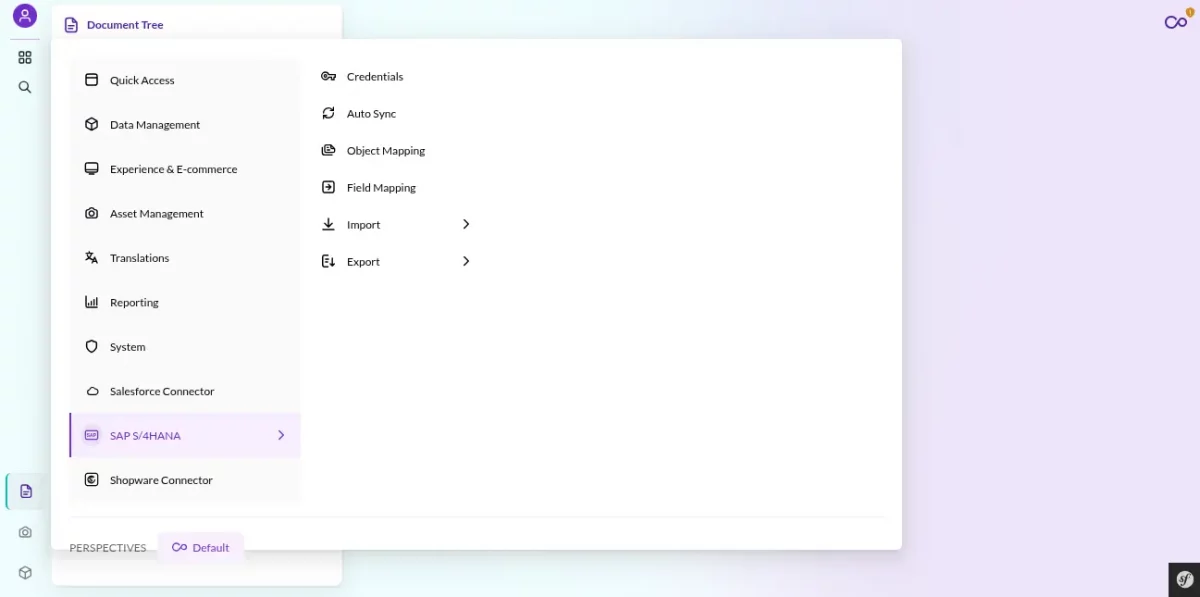
The Pimcore 12 SAP S/4HANA Connector also lives natively inside the new Pimcore Studio UI. Furthermore, it adds its own screens for credentials, mapping, and the job runner.
So there are no separate tools to learn.
Server Requirements
The connector runs on top of a standard Pimcore 12 install, so if Pimcore runs, the connector runs. Here is what that stack needs.
| Component | Requirement |
|---|---|
| PHP | 8.4 or 8.5 (CLI + FPM), with pdo_mysql, intl, mbstring, curl, gd / imagick, zip, exif, opcache |
| Symfony | 7.4 (installed as a Pimcore dependency) |
| Pimcore | Pimcore 12 — Platform 2026.1 (pimcore/pimcore: 2026.1.x) with the Studio UI bundle |
| Database | MariaDB 10.11+ or MySQL 8.0+ |
| Web server | Nginx or Apache 2.4 |
| Composer | Composer 2 |
| Node.js | 22+ — only if you rebuild the Studio UI assets yourself |
| Message queue | A running Symfony Messenger worker (Supervisor is recommended) — this is what drives the background sync jobs |
| SAP S/4HANA | An S/4HANA system exposing the OData APIs, reachable from the Pimcore server over HTTPS, with either an OAuth 2.0 Client Credentials service key or an SAP Business Accelerator Hub sandbox APIKey |
A few PHP settings matter for large data sets. So set memory_limit to at least 512M (1G for big imports), and raise max_execution_time for the CLI. Because the syncs run in the background, the web request itself never has to wait.
Key Features of the Pimcore 12 SAP S/4HANA Connector
- Bidirectional sync — import and export for Products, Categories, Customers, Orders, plus Stock, Price, and Media.
- Asynchronous job engine — syncs run in the background on a dedicated queue, so they never block your work.
- Live Job-History view — real-time status, read / created / updated counts per step, an elapsed clock, a run-history grid, and one-click Stop and Retry.
- Config-driven mapping — point the connector at your Pimcore classes per SAP entity on screen; nothing to hard-code.
- Idempotent, match-before-create — a per-entity business key (SKU, category code, customer number, order number) keeps Pimcore and SAP in step, so re-runs update instead of duplicating.
- CSRF-aware OData transport — token caching, automatic CSRF fetch/replay for writes, and
Retry-After-honouring backoff on429/5xx. - Quota-aware — an exhausted SAP API-gateway quota is treated as terminal, so a dead job can’t burn the rest of your quota one request at a time.
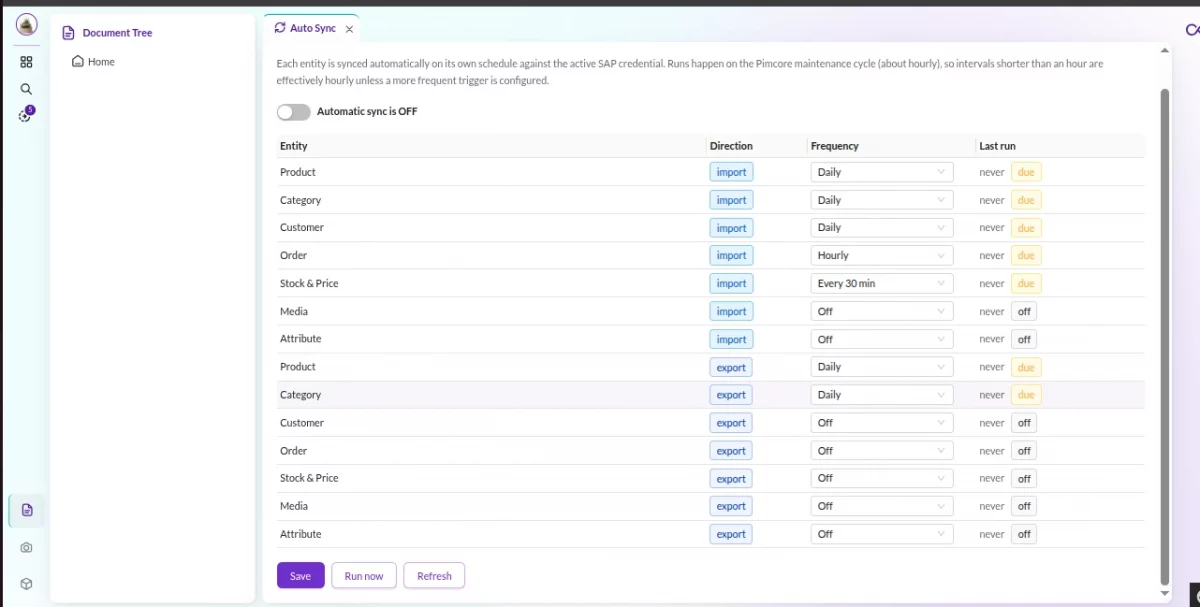
- Auto Sync — per-entity schedules (stock & price every 30 min, orders hourly, everything else daily) driven by a Pimcore maintenance task, with no extra cron entry.
- Granular ACL — fine-grained permission keys under a “SAP S/4HANA Connector” category, enforced fail-closed on every route.
Connecting the Pimcore 12 SAP S/4HANA Connector to SAP
The connector talks to SAP over the SAP OData APIs using one of two authentication modes — whichever your landscape uses:
- OAuth 2.0 Client Credentials — a service-key Client ID and Client Secret. The connector fetches a bearer token, caches it until expiry, and re-authenticates automatically on a
401. - Sandbox APIKey — the SAP Business Accelerator Hub
api.s4.sap.comAPIKey, ideal for trials and proof-of-concept work.
The two modes are mutually exclusive per credential, and the connector auto-resolves which one to use. For write operations, S/4HANA requires a CSRF token — the client fetches and replays it for you, so exports “just work”.
Setting Up the Pimcore 12 SAP S/4HANA Connector in Studio
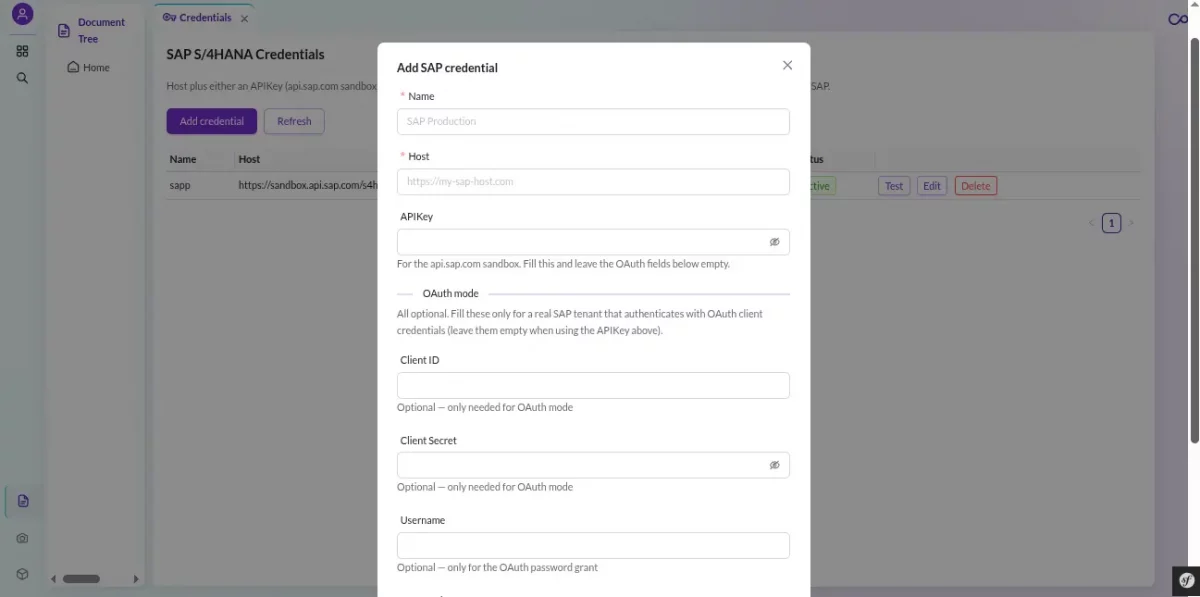
In Pimcore, open SAP S/4HANA Connector → Credentials. Then click Add credential and enter your Name, Host (your S/4HANA OData base URL), and either the Client ID + Client Secret or the APIKey. Next, click Test connection.
The connector then performs a real handshake and calls SAP live, so you get instant confirmation that everything is wired up. Secrets are stored masked, showing only the last few characters.
You can store multiple credential profiles and mark one as active.
Object Mapping: the Connector Adapts to Your Data Model
Most connectors force you into fixed class names. This one, however, treats “which Pimcore class is a SAP Product?” as a simple setting.
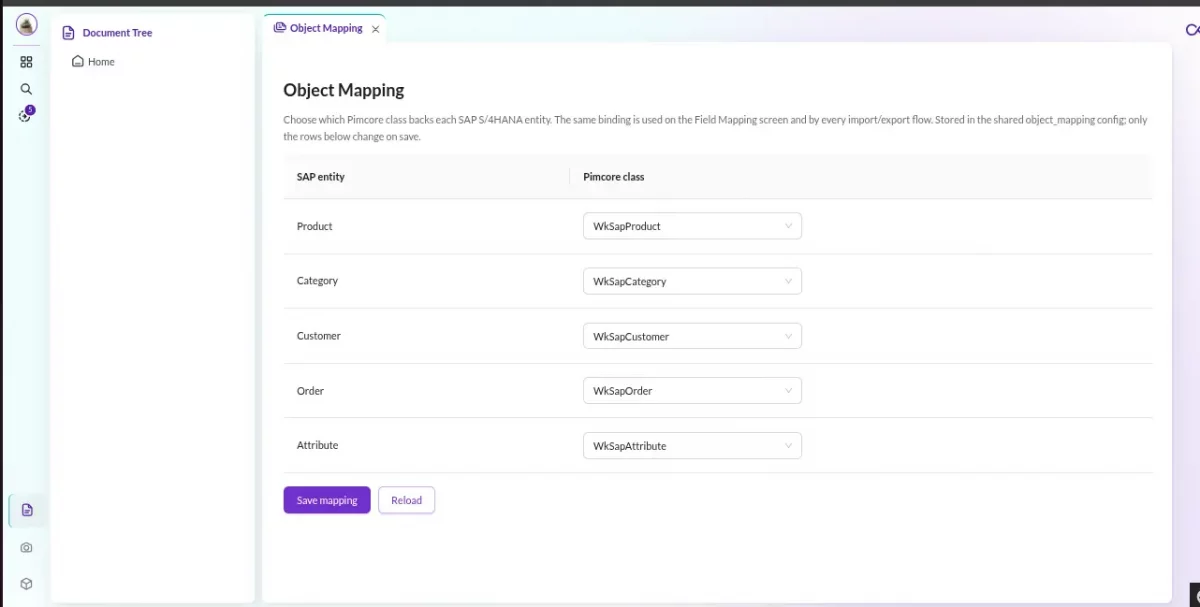
On the Object Mapping screen, you point each SAP entity (Product, Category, Customer, Order) at whatever classes your team already uses. So the connector adapts to your data model, instead of the other way around.
It comes pre-configured — the installer seeds lean WkSap* classes and the mapping — so the Pimcore 12 SAP S/4HANA Connector works out of the box. Also, you can repoint it any time.
Field Mapping
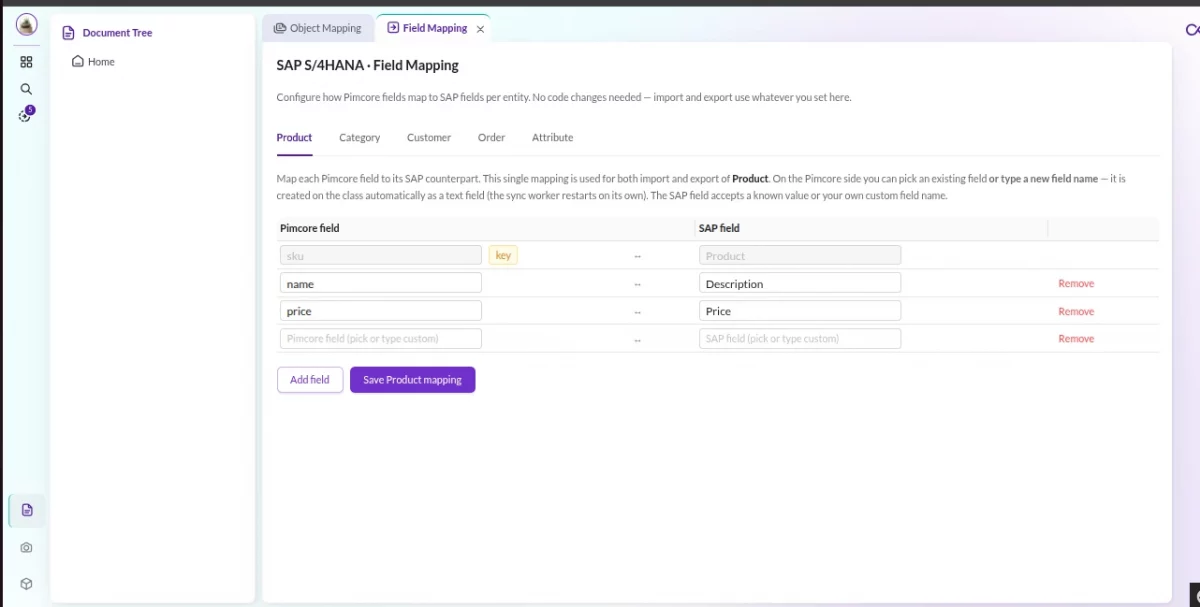
Beyond the class level, the Field Mapping screen lets you line up individual fields — Pimcore field on one side, SAP OData field on the other. One shared map drives both import and export, so you configure it once. Only the fields you map are synced, and a per-entity match key is used to find-or-create records.
The Entities It Syncs
The connector maps the objects at the heart of an S/4HANA system, each to a Pimcore DataObject class you control:
| SAP S/4HANA | Pimcore (default) | Match key |
|---|---|---|
A_Product (API_PRODUCT_SRV) | WkSapProduct | sku ↔ Product |
A_ProductGroup | WkSapCategory | category code |
A_BusinessPartner / A_Customer (API_BUSINESS_PARTNER) | WkSapCustomer | customer number |
A_SalesOrder (API_SALES_ORDER_SRV) | WkSapOrder | order number |
A_MatlStkInAcctMod + A_SlsPrcgCndnRecdValidity | WkSapProduct (in place) | sku |
AttachmentContentSet | Pimcore DAM asset → productImage | byte hash |
Products are a little special: the connector uses the OData to_Description expand to bring every locale’s description back in a single page. Stock and price don’t create new records — they update the matching WkSapProduct in place. And media is deduplicated by byte content, so repeat imports never grow the asset tree.
Exporting to SAP
With your mapping saved, open Export and pick an entity — say Product. Then pick the connection and click Start. The connector then pushes your records out via the SAP OData collection, with the fields you mapped.
Exports are safe to re-run. Instead of duplicating, the connector matches on the business key (SKU, category code, customer number, order number) before it writes, so the same Pimcore object always lands on the same SAP record. Sometimes a record can’t be exported. In that case, it’s flagged as a clear warning that tells you exactly what to fix — one bad record surfaces as a warning instead of sinking the whole job.
Importing from SAP
Already have a live S/4HANA system? Then import it into Pimcore in a few clicks. In fact, it’s the fastest way to onboard your data. Import is also additive.
So each run creates what’s missing and updates what exists, matching each SAP record back to Pimcore by the entity’s business key. As a result, you can bootstrap once and re-run any time without duplicates. Products even skip the save entirely when nothing changed, keeping version history clean, and records flagged for deletion in SAP are skipped rather than resurrected.
Because import and export stay linked, the workflow is simple. First, import to seed Pimcore. Then enrich your content there. Finally, export it back.
As a result, every change lands on the original SAP record.
Runs as a Background Job
Every import and export dispatched from Studio runs on a dedicated Symfony Messenger queue, drained by a Supervisor-managed worker. So a large sync never blocks the browser or times out a web request.
You watch each run on a live execution view — status, per-step read / write / update counts, an elapsed clock, structured errors and warnings, and one-click Stop and Retry. A stop request is honoured both mid-run and while the job is still queued.
Auto Sync — Set It and Forget It
Beyond on-demand runs, the connector can keep Pimcore and SAP aligned on a schedule. Each entity gets its own interval — stock and price every 30 minutes, orders hourly, everything else daily by default, and 0 turns a schedule off.
It’s driven by a Pimcore maintenance task, so there’s no extra cron entry to manage. And it’s idempotent: a job that’s still queued is never re-enqueued on the next tick, so schedules can’t pile up.
Permissions & Access Control
The connector ships a granular permission model, enforced fail-closed on every route — an ungranted action returns 403. Keys under the “SAP S/4HANA Connector” category let you split view, manage, test, import, export, and stop across your team.
Grant them in Pimcore Settings → Users / Roles → Permissions, ideally on a role. The Studio UI reads your effective grants and shows or hides each control to match exactly what the backend will allow — the frontend is cosmetic, the backend is the sole authority.
Try the Pimcore 12 SAP S/4HANA Connector
Want to see it in action? The connector even ships with a dev-only mock S/4HANA, so you can run a full import and export end to end — 12 products, 4 categories, 5 customers, 4 orders, plus stock, price, and image endpoints — without a live SAP system.
So you can map entities and run a sync without setting anything up. Finally, when you’re ready to roll it out, grab it from the Webkul Store.
Your purchase includes the bundle, documentation, and support.

Be the first to comment.