Online auction websites are useful when fixed pricing does not match the way buyers value a product.
They work well for rare items, clearance stock, charity sales, supplier bidding, limited drops, and marketplace selling.
The main challenge is choosing the right way to build it.
Many store owners are not sure how to create an auction website, which auction type fits their business, or whether they need a custom platform.
With WooCommerce and a WooCommerce auction plugin, you can create a publish-ready auction website much faster.
A basic setup can be ready within a day or two if hosting, theme, payment, and product details are already planned.
In this guide, you will learn how to create an online auction website with WooCommerce, use one setup for multiple auction types, and match each auction model with real business scenarios.
We will also cover the key features needed to manage bids, winners, payments, and auction rules.
If you want to build a WooCommerce auction marketplace, the same setup can be extended with a WooCommerce marketplace plugin.
Create a Publish-Ready Auction Website with WooCommerce
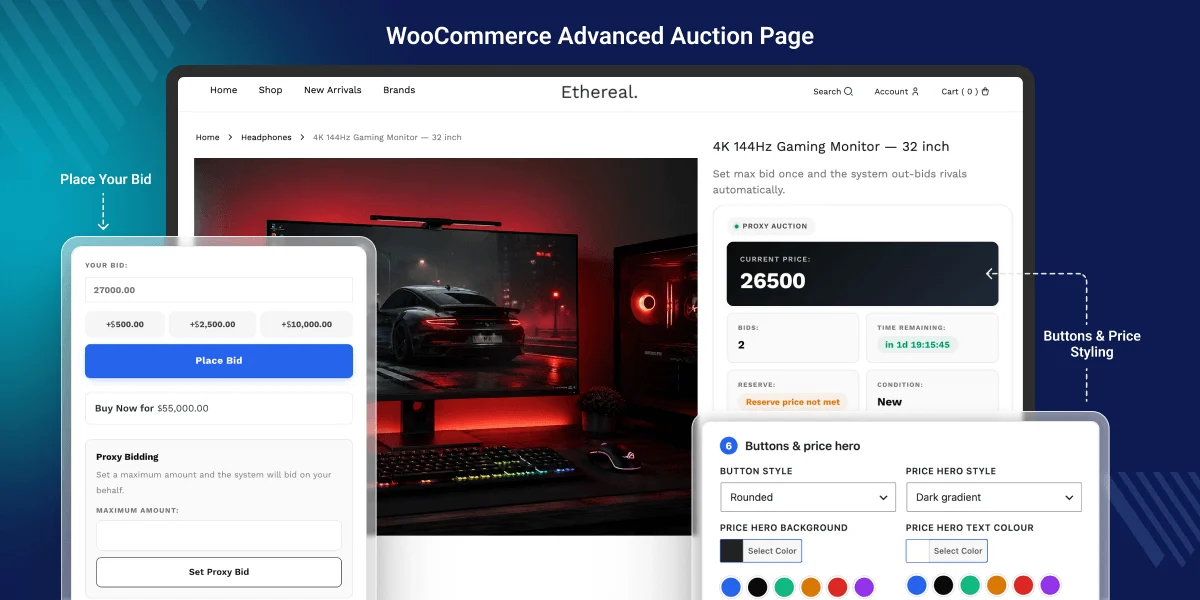
WooCommerce gives you the base to sell products online. It manages products, customers, checkout, orders, taxes, shipping, and payment flow.
To run auctions, your store also needs bidding, auction timers, bid increments, reserve price, auction status, winner handling, and payment reminders.
An auction plugin for WooCommerce adds these features inside your existing store. You do not need to build a custom auction platform from the start.
This makes WooCommerce a practical choice for a WordPress auction website, especially when you want to launch quickly and still keep room for future changes.
Steps to Set Up an Auction Website with WooCommerce
The setup should start with a stable WooCommerce base. After that, the auction plugin can handle bidding, auction rules, and winner management.
1. Choose Hosting Built for Auction Traffic
Auction pages need fast server response times because users watch timers, place bids, and refresh bid activity often. Slow hosting can hurt the bidding experience.
Look for hosting with SSD or NVMe storage, enough PHP workers, object caching such as Redis, and good database performance. For busy auctions, this matters more than a basic shared plan.
You should also use caching carefully. Static pages can be cached, but live bid areas, cart, checkout, and account pages should not show stale data.
For a faster start, you can use a ready server image or managed setup. Webkul can support Apache or Nginx-based AWS image options for WordPress and WooCommerce stores.
2. Install WordPress and WooCommerce
After the server is ready, install WordPress and WooCommerce. Set up currency, payment methods, tax, shipping, customer accounts, and basic store pages.
This gives your site the normal eCommerce flow. Buyers can register, view products, bid on items, win auctions, and pay through WooCommerce checkout.
3. Pick a WooCommerce-Compatible Theme
You can start with the default WooCommerce theme or choose a theme that fits your auction category. The design should keep bids, price, timer, and product details easy to read.
An antique auction may need a clean catalog layout. A limited product drop may need a faster, modern layout with strong product images and clear action buttons.
You can also check the Shoplix WooCommerce Theme, which is fully compatible with Auction plugin.
4. Add the WooCommerce Auction Plugin
Once WooCommerce is ready, install the WooCommerce Auction add-on. It adds auction product types, bidding rules, countdown timers, auction status, and winner handling.
You can then create auction products, choose the auction type, set the starting price, add reserve price, define bid increments, and decide the auction duration.
5. Test Before You Publish
Before the first live auction, test the full flow with a low-value product. Check bid placement, outbid emails, countdown behavior, winner selection, payment, and order creation.
For full module settings, follow the WooCommerce auction plugin documentation. The blog should guide the launch plan, while the docs should guide detailed configuration.
Business Scenarios and Best Auction Models
An online auction website is not limited to one type of product. The same setup can support many business cases if you choose the right auction model.
| Business scenario | Best auction model | Why it fits |
|---|---|---|
| Collectibles and antiques | Standard auction, reserve auction | Buyers compete based on rarity and demand. |
| Clearance and liquidation | Standard auction, no-reserve auction | Stores can move old or excess stock faster. |
| Charity and fundraising | Charity auction, silent auction | Donors can bid on items, services, or experiences. |
| B2B procurement | Reverse auction | Suppliers compete by offering lower prices. |
| Limited product drops | Standard auction, seated auction | Brands can manage demand for limited items. |
| Art, vehicle, and event lots | Event-based auction | Many lots can be grouped under one sale event. |
| Marketplace selling | Vendor auction model | Multiple sellers can list auction products. |
Collectibles and Antique Auctions
Rare products often have flexible value. Coins, antiques, signed items, art pieces, and collectibles can attract different bids from different buyers.
A standard auction lets demand decide the final price. A reserve price helps the seller avoid selling below a safe minimum value.
Liquidation and Clearance Sales
Retailers can use auctions to sell old stock, returned goods, seasonal products, or excess inventory.
A no-reserve auction can bring faster buyer action when the main goal is stock movement instead of fixed-margin selling.
Charity and Fundraising Auctions
Charity groups, NGOs, schools, clubs, and communities can run fundraising auctions for products, services, tickets, or sponsored experiences.
Silent auctions can keep bids private, while charity auctions can help increase donor interest during a campaign or event.
B2B Reverse Auctions
A reverse auction helps buyers collect lower bids from suppliers. It fits procurement, vendor selection, bulk buying, and service contracts.
For example, a company can invite suppliers to bid for a supply deal. The buyer can then choose the best offer based on price and terms.
Limited Product Drops
Brands can use auctions when demand is higher than available stock. This can apply to limited editions, special releases, or premium items.
A seated auction can limit access to approved buyers or members. It keeps the event more controlled and can create a better buyer experience.
Vendor-Based Auction Marketplace
If many sellers need to list auction products, you can create an auction marketplace with WooCommerce and a compatible marketplace plugin.
This path fits antique marketplaces, local seller portals, B2B sourcing platforms, art communities, and niche multi-vendor auction websites.
Auction Types to Use in This Setup
Different auction types support different goals. With one WooCommerce auction setup, you can run many selling models without creating separate websites.
- Standard auction: Buyers place higher bids, and the highest bidder wins when the auction ends.
- Reverse auction: Suppliers or sellers place lower bids, often for procurement or B2B buying.
- Sealed auction: Bids stay hidden until the auction ends, which helps with private or high-value sales.
- Silent auction: Buyers bid privately, often for charity, events, or restricted groups.
- Proxy bidding: Buyers set a maximum bid, and the system bids up to that limit.
- Absentee bidding: Buyers can place bids when they cannot stay active during the live auction.
- Dutch auction: The price drops until a buyer accepts it.
- Penny auction: Each bid raises the price by a small amount.
- No-reserve auction: The product can sell without a minimum reserve price.
- Unique bid auction: The winning rule depends on a unique bid pattern.
- Charity auction: The auction supports fundraising or donation-based selling.
Key Features Needed for an Online Bidding Website
A strong online bidding website should help buyers act with confidence and help the store owner manage auctions without manual follow-up.
- Real-time bidding: Shows updated bid value, price, and auction status without forcing users to refresh the page.
- Countdown timer: Helps buyers understand how much time is left before bidding closes.
- Proxy bidding: Lets buyers set their maximum bid and stay active even when they are not online.
- Absentee bidding: Allows users to place bids before the auction starts or when they cannot join live.
- Reserve price: Protects the seller by setting the minimum acceptable selling price.
- Bid increments: Keeps the bidding process clean by defining how much each new bid should increase.
- Buy now price: Gives buyers a direct purchase option when instant sale is allowed.
- Anti-sniping: Extends auction time when a bid is placed near the end, so other bidders can respond.
- Wallet payments: Helps frequent bidders pay faster where wallet flow is enabled.
- Winner checkout: Lets the winning buyer complete payment through WooCommerce checkout.
- Email notifications: Sends alerts for bids, outbid status, wins, losses, reminders, and payment actions.
- Buyer dashboard: Lets users track active bids, won auctions, lost auctions, and payment status.
- Watchlist: Allows buyers to save auctions and return before the bidding ends.
Benefits of Using Webkul WooCommerce Auction Plugin
Many basic auction plugins focus only on adding a bid option to products.
A real auction website needs more than that. It needs auction types, payment flow, buyer tools, admin control, and trust features.
Webkul WooCommerce Auction Plugin brings many of these features in one setup. This helps store owners run different auction models without depending on several separate tools.
- 11 auction types: You can run standard, reverse, sealed, proxy, penny, Dutch, unique bid, seated, silent, no-reserve, and charity auctions from one WooCommerce setup.
- Built-in wallet support: Users can add wallet balance and use it for auction payments where enabled. This can help reduce payment delays after a buyer wins an auction.
- WooCommerce checkout and gateway support: Winners can complete payment through the normal WooCommerce checkout flow. The store can use payment gateways supported by WooCommerce.
- Proxy and absentee bidding: Buyers can set a maximum bid or place bids when they cannot stay active during the auction. This helps increase participation from serious buyers.
- Anti-sniping protection: The auction time can extend when a bid is placed near closing. This gives other bidders a fair chance to respond.
- Reserve price and bid increment rules: Store owners can set starting bid, reserve price, buy now price, and bid increments. This helps protect product value and keeps bidding clear.
- Real-time bidding experience: Buyers can see updated bids, price, and countdown changes without refreshing the page.
- Buyer dashboard and watchlist: Users can track active bids, won auctions, lost auctions, saved auctions, and payment status from their account area.
- Auction notifications: The plugin can send alerts for bid activity, outbid status, auction wins, losses, reminders, relists, and payment actions.
- Admin auction management: Store owners can manage bids, winners, auction status, relists, bid logs, and reports from the backend.
- Security and audit features: Bid validation, activity logs, bidder masking, and fraud checks help improve trust during live auctions.
- Marketplace extension: If the business needs multiple vendors, the auction setup can be extended with a compatible WooCommerce marketplace plugin.
Build an Auction Marketplace with WooCommerce
A single-seller auction site is enough when one store owner manages all products. This fits brands, charities, retailers, and auction houses.
A marketplace is better when many sellers need to list and manage their own auction products. In that case, the auction setup can be extended with a marketplace plugin.
A WooCommerce auction marketplace can support vendor products, seller listings, commission flow, auction management, and multi-seller bidding activity.
This model fits niche auction platforms, antique seller networks, local product portals, B2B sourcing websites, and multi-vendor auction websites.
Launch Faster with Hosting, Theme, and Setup Support
Some businesses can launch with the plugin and documentation. Others may need help with hosting, server setup, theme setup, payment flow, or custom auction rules.
Webkul offers complete WooCommerce development services to help businesses launch with WooCommerce products, server setup, theme setup, and marketplace setup.
For example, a business may need a server setup, auction plugin installation, custom design changes, or a special vendor workflow.
This end-to-end support can save time when the goal is to publish quickly and avoid delays in technical setup, design, or custom development.
When Auctions Beat Fixed Pricing
An auction model is a better choice when product value depends on demand, rarity, urgency, or buyer competition.
Fixed pricing works for regular products. Auctions are stronger for rare products, limited stock, charity items, supplier bidding, and products where buyers may pay different values.
If your store already runs on WooCommerce, adding auction features is usually faster than building a custom online bidding platform from scratch.
Start Building Your Auction Website
Creating an online auction website with WooCommerce is a practical path for many businesses. You can start with a normal store and add bidding features through a plugin.
The same setup can support collectibles, liquidation sales, charity auctions, reverse bidding, product drops, event auctions, and marketplace selling.
If you want to launch faster, Webkul WooCommerce Auction Plugin can help you add auction types, real-time bidding, payment flow, winner checkout, and auction management to your store.
For full configuration, use the module documentation and set up the plugin based on your auction model, payment flow, and business needs.
Yes, you can create an online auction website with WooCommerce by adding an auction plugin. It adds bidding, timers, auction rules, winner handling, and payment flow to your store.
Not always, if your business can use WooCommerce checkout, products, users, and payment gateways, Webkul auction plugin can be a faster and lower-effort option.
It can support collectibles, antiques, clearance stock, charity items, limited products, art, vehicles, B2B procurement deals, and vendor-listed products.
Yes, one setup can support models such as standard auction, reverse auction, sealed auction, proxy bidding, silent auction, and charity auction.
Yes, if you want vendors to list auction products, you can extend the setup with a compatible WooCommerce marketplace plugin.
An auction website can be made publish-ready within a day or two if hosting, theme, payment, products, and basic setup details are ready.

Be the first to comment.