Next.js 16 Caching helps improve application performance by reducing unnecessary rendering, data fetching, and network requests.
Instead of generating the same content repeatedly, Next.js reuses cached results to deliver faster responses, making it ideal for headless commerce applications.
Understanding how Full Route Cache, Data Cache, and Router Cache work together is essential for building scalable applications.
In this guide, we explain Next.js 16 caching concepts in simple terms and show how they improve application performance.
Why Caching Matters in Next.js 16
Every request consumes server resources. Without caching, applications repeatedly fetch data and render pages even when the content remains unchanged.

Next.js caching reduces backend load, improves response times, and delivers a faster user experience.
Understanding Next.js 16 Caching Architecture
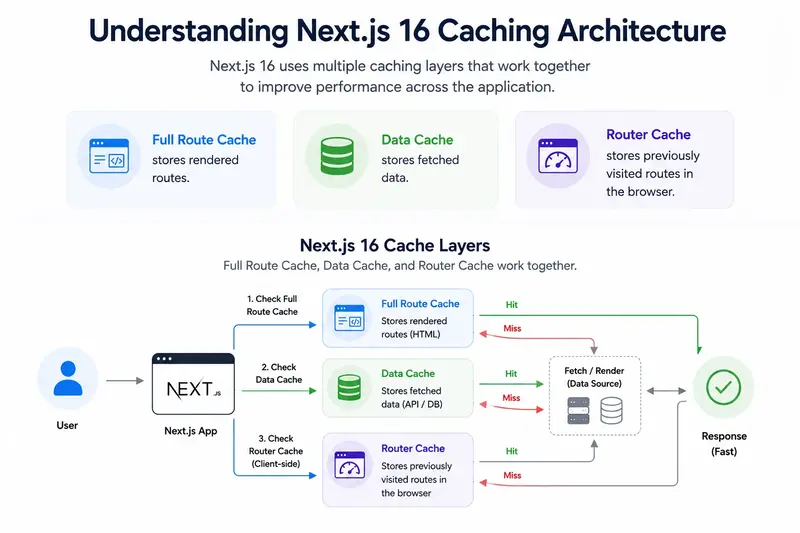
Next.js 16 uses multiple caching layers that work together to improve performance across the application.
- Full Route Cache stores rendered routes.
- Data Cache stores fetched data.
- Router Cache stores previously visited routes in the browser.
What Is Full Route Cache?
Full Route Cache stores the rendered output of a route. When the same page is requested again, Next.js can serve the cached result instead of rendering the page from scratch.
This works especially well for blogs, documentation pages, landing pages, and CMS content that does not change frequently.
export const revalidate = 3600;

async function getBlogPost(slug) {
  const res = await fetch(
    `https://api.example.com/blog/${slug}`
  );

  return res.json();
}

export default async function BlogPage({ params }) {
  const post = await getBlogPost(params.slug);

  return (
    <article>
      <h1>{post.title}</h1>
      <p>{post.content}</p>
    </article>
  );
}
The page is generated once and reused for future requests, making it ideal for content that changes infrequently, such as blogs, documentation, and landing pages.
What Is Data Cache?
Data Cache stores the results of fetch requests. Instead of calling an API repeatedly, Next.js can reuse previously fetched data.
This reduces API traffic and improves page response times significantly.
const products = await fetch(
  "https://api.example.com/products",
  {
    next: {
      revalidate: 300
    }
  }
).then(res => res.json());
Caching fetch responses reduces unnecessary API calls and helps applications serve data faster while lowering backend load.
What Is Router Cache?
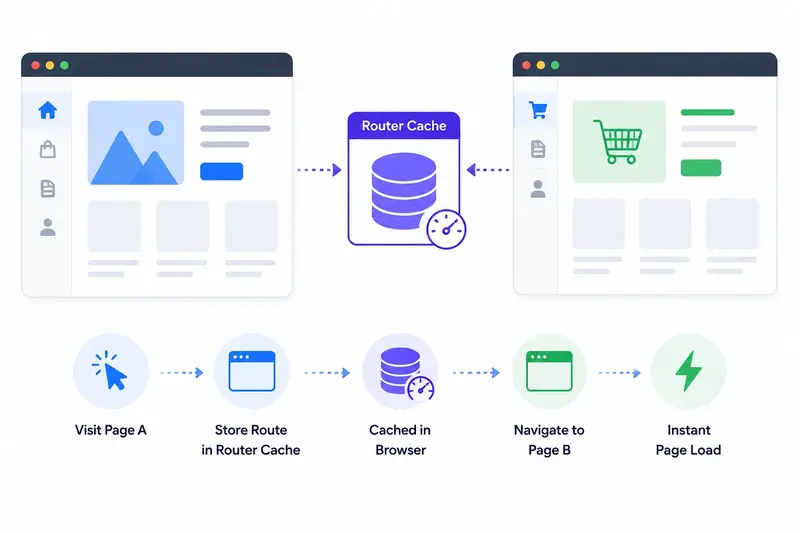
Router Cache exists in the browser and stores previously visited routes. When users navigate between pages, Next.js can instantly restore cached route segments.
This creates faster page transitions and improves the overall navigation experience.
Router Cache works automatically in Next.js. Pages visited through client-side navigation are cached in the browser for faster transitions.
On-Demand Cache Revalidation with revalidateTag()
Sometimes waiting for cache expiration is not enough. Next.js allows developers to refresh specific cached data immediately using cache tags.
import { revalidateTag } from "next/cache";

export async function updateProduct() {
  revalidateTag("products");
}
Tag-based revalidation provides granular cache control by refreshing only the affected data instead of clearing the entire cache.
On-Demand Route Revalidation with revalidatePath()
Route-based invalidation is useful when a specific page needs to be refreshed after content updates.
import { revalidatePath } from "next/cache";

export async function updateCategory() {
  revalidatePath("/category/shoes");
}
This ensures visitors receive updated content without clearing unrelated cached routes.
When to Use Each Cache Type
| Cache Type | Best Use Case |
|---|---|
| Full Route Cache | Blogs, CMS pages, product pages |
| Data Cache | API responses and external data |
| Router Cache | Client-side navigation |
| revalidateTag() | Updating specific cached datasets |
| revalidatePath() | Refreshing individual routes |
Best Practices for Next.js 16 Caching
- Use Full Route Cache for stable content.
- Use Data Cache to reduce API requests.
- Apply cache tags for granular invalidation.
- Use revalidatePath() for targeted route updates.
- Avoid unnecessary cache invalidations.
- Monitor cache hit rates in production.
Conclusion
Next.js 16 Caching combines Full Route Cache, Data Cache, and Router Cache to deliver faster applications and reduce infrastructure load.
By understanding how each caching layer works and using revalidateTag() and revalidatePath() correctly, developers can build scalable and high-performance Next.js applications.

Be the first to comment.