SEO in Next.js 16 is more straightforward than ever, making it an ideal framework for modern headless eCommerce and web applications.
Next.js 16 SEO works because of Server Components, a built-in Metadata API, and streaming SSR. Your pages are fully rendered before they reach any crawler.
This guide covers the most important Next.js 16 SEO best practices for building modern web applications.
Why Next.js 16 Works Well for SEO
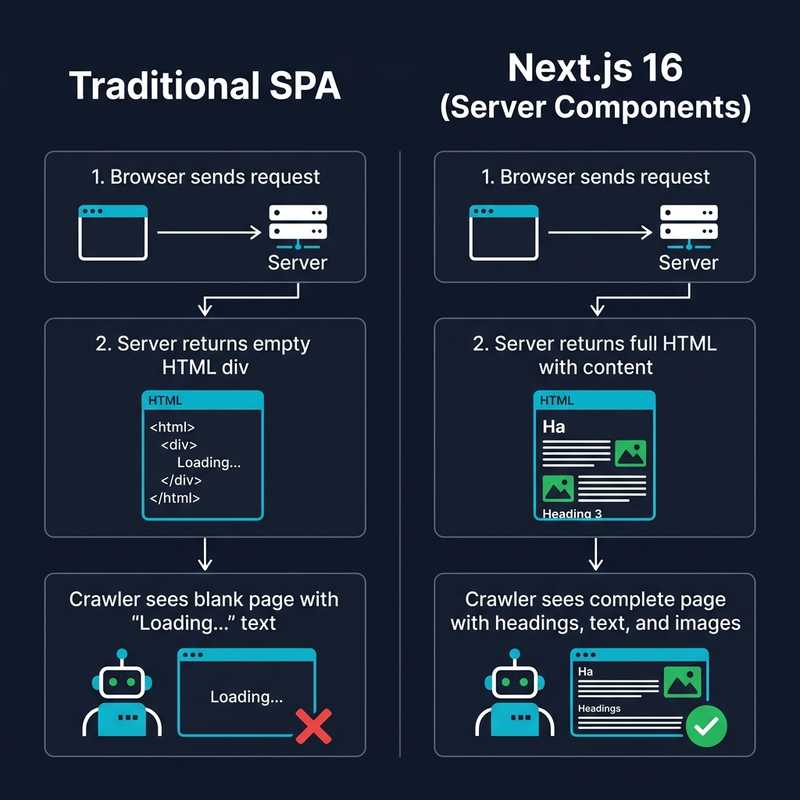
Traditional React apps ship an empty HTML shell. Content appears only after JavaScript executes. Crawlers often miss it entirely.
Next.js 16 renders pages on the server by default. The HTML already contains all the content when it reaches the browser.
- Server Components — zero client JS for content pages.
- Metadata API — titles, descriptions, and OG tags managed declaratively.
- Streaming SSR — faster Time to First Byte.
- Built-in image and font optimization — better Core Web Vitals.
Next.js 16 SEO: Setting Up Page Metadata
Every page needs a unique title and description. Next.js 16 handles this through the Metadata API.
For static pages, export a metadata object directly.
// app/about/page.tsx
export const metadata: Metadata = {
  title: 'About Us | MyStore',
  description: 'Learn about our mission and team.',
};
For dynamic pages like products, use generateMetadata to fetch data and build tags on the fly.
// app/products/[slug]/page.tsx
export async function generateMetadata({ params }): Promise<Metadata> {
  const { slug } = await params;
  const product = await fetchProduct(slug);

  return {
    title: `${product.name} | MyStore`,
    description: product.shortDescription,
    alternates: {
      canonical: `https://mystore.com/products/${slug}`,
    },
  };
}
Set a global title template in the root layout. A child page with title “Running Shoes” automatically renders as “Running Shoes | MyStore”.
// app/layout.tsx
export const metadata: Metadata = {
  title: {
    default: 'MyStore — Online Shopping',
    template: '%s | MyStore',
  },
  metadataBase: new URL('https://mystore.com'),
};
Open Graph and Twitter Cards
Social sharing is another important part of Next.js 16 SEO. Open Graph tags control the preview that appears when someone shares your page.
return {
  openGraph: {
    title: product.name,
    description: product.shortDescription,
    url: `https://mystore.com/products/${slug}`,
    images: [{ url: product.image, width: 1200, height: 630, alt: product.name }],
    type: 'website',
  },
  twitter: {
    card: 'summary_large_image',
    title: product.name,
    images: [product.image],
  },
};
Next.js 16 also supports generating OG images dynamically using ImageResponse, so you do not need to create preview images manually.

Structured Data with JSON-LD
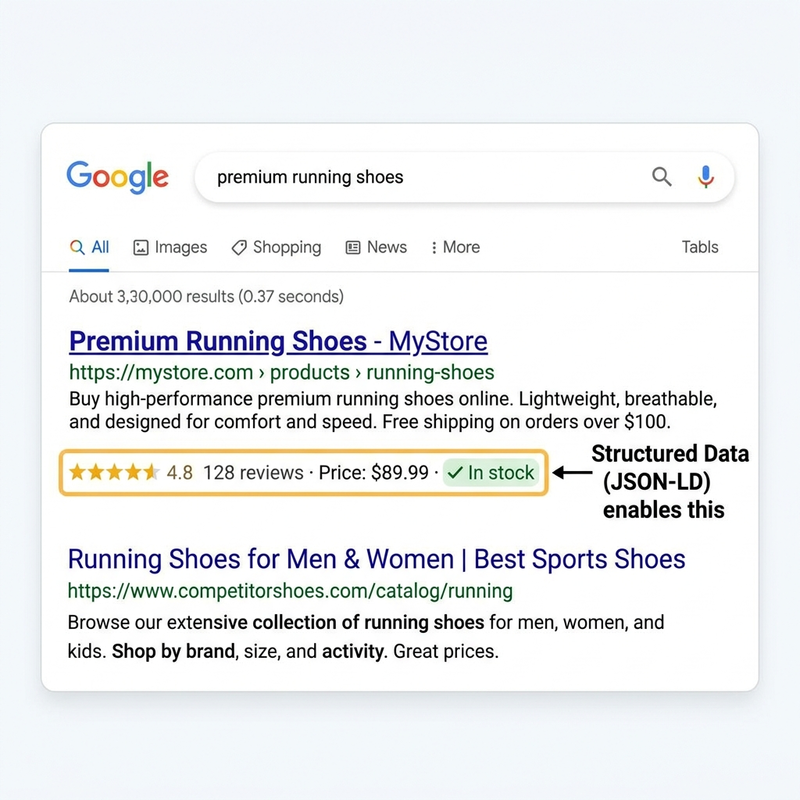
Structured data helps Google show rich results like star ratings and prices directly in search listings.
Create a reusable component that outputs JSON-LD for product pages.
export function ProductJsonLd({ product }) {
  const jsonLd = {
    '@context': 'https://schema.org',
    '@type': 'Product',
    name: product.name,
    image: product.image,
    offers: {
      '@type': 'Offer',
      price: product.price,
      priceCurrency: product.currency,
      availability: `https://schema.org/${product.availability}`,
    },
  };

  return (
    <script type="application/ld+json"
      dangerouslySetInnerHTML={{ __html: JSON.stringify(jsonLd) }} />
  );
}
You can follow the same pattern for breadcrumbs and FAQ schemas.
Sitemap and Robots.txt
A sitemap is a key part of any Next.js 16 SEO setup. It tells search engines which pages exist on your site.
// app/sitemap.ts
export default async function sitemap(): Promise<MetadataRoute.Sitemap> {
  const products = await fetchAllProductSlugs();

  return [
    { url: 'https://mystore.com', changeFrequency: 'daily', priority: 1.0 },
    ...products.map((p) => ({
      url: `https://mystore.com/products/${p.slug}`,
      lastModified: new Date(p.updatedAt),
      priority: 0.8,
    })),
  ];
}
For robots.txt, block private routes like checkout and account pages to save crawl budget.
// app/robots.ts
export default function robots(): MetadataRoute.Robots {
  return {
    rules: [{ userAgent: '*', allow: '/', disallow: ['/api/', '/checkout/', '/cart/', '/account/'] }],
    sitemap: 'https://mystore.com/sitemap.xml',
  };
}
Image Optimization for Next.js 16 SEO
Images are one of the biggest factors in page speed. The next/image component handles optimization automatically.
- Always add descriptive alt text for image search visibility.
- Use the priority prop on hero images to improve LCP.
- Set the sizes prop to serve the right image per viewport.
<Image
  src={product.mainImage}
  alt="Blue running shoes, side view"
  width={1200} height={600}
  priority
  sizes="100vw"
/>
Server Components vs Client Components
This is the biggest Next.js 16 SEO advantage. Server Components send fully rendered HTML to crawlers.
//  BAD — Client Component (crawler sees "Loading...")
'use client';
export default function BadProductPage() {
  const [product, setProduct] = useState(null);
  useEffect(() => {
    fetch('/api/product/123').then(r => r.json()).then(setProduct);
  }, []);
  if (!product) return <div>Loading...</div>;
  return <h1>{product.name}</h1>;
}

//  GOOD — Server Component (crawler sees actual content)
export default async function GoodProductPage({ params }) {
  const { slug } = await params;
  const product = await fetchProduct(slug);
  return <h1>{product.name}</h1>;
}
Keep content pages as Server Components. Only use Client Components for interactive elements like Add to Cart buttons.

Core Web Vitals and Next.js 16 SEO
Google uses three Core Web Vitals as ranking signals.
- LCP — main content should load under 2.5 seconds. Use Server Components and priority images.
- CLS — layout should not shift during loading. Set image dimensions and use font-display swap.
- INP — interactions should respond under 200ms. Avoid blocking the main thread.
Use next/font to self-host Google Fonts. This eliminates external requests and prevents layout shifts.
import { Inter } from 'next/font/google';

const inter = Inter({ subsets: ['latin'], display: 'swap' });

export default function RootLayout({ children }) {
  return (
    <html lang="en" className={inter.className}>
      <body>{children}</body>
    </html>
  );
}
Common Mistakes to Avoid
Fetching content on the client. Crawlers see empty HTML. Use Server Components for content pages.
Empty alt text on images. A missed opportunity for image search traffic.
No canonical URLs. Query parameters create duplicate pages in Google’s index.
Multiple h1 tags. Each page should have exactly one h1.
Blocking _next/static in robots.txt. Google needs JS and CSS files to render pages properly.
Wrapping Up
Next.js 16 SEO works best when you combine Server Components, proper metadata, structured data, and performance optimization together.
Keep content in Server Components, set metadata on every page, and monitor your performance in Google Search Console.

Be the first to comment.