


















Magento 2 Headless Checkout is where conversions happen. Even the fastest storefront can lose sales if the checkout experience is not optimized.
A fast storefront means very little if customers encounter issues while adding products to their cart, logging in, selecting shipping methods, or placing orders.
Headless checkout is more complex because the frontend, APIs, and customer sessions operate separately.
This article explores Magento 2 Headless Checkout workflows, including carts, cart merging, shipping, payments, and order placement.
Understanding Magento 2 Headless Checkout Architecture
In a headless setup, the frontend communicates with Magento APIs to manage cart and checkout operations.
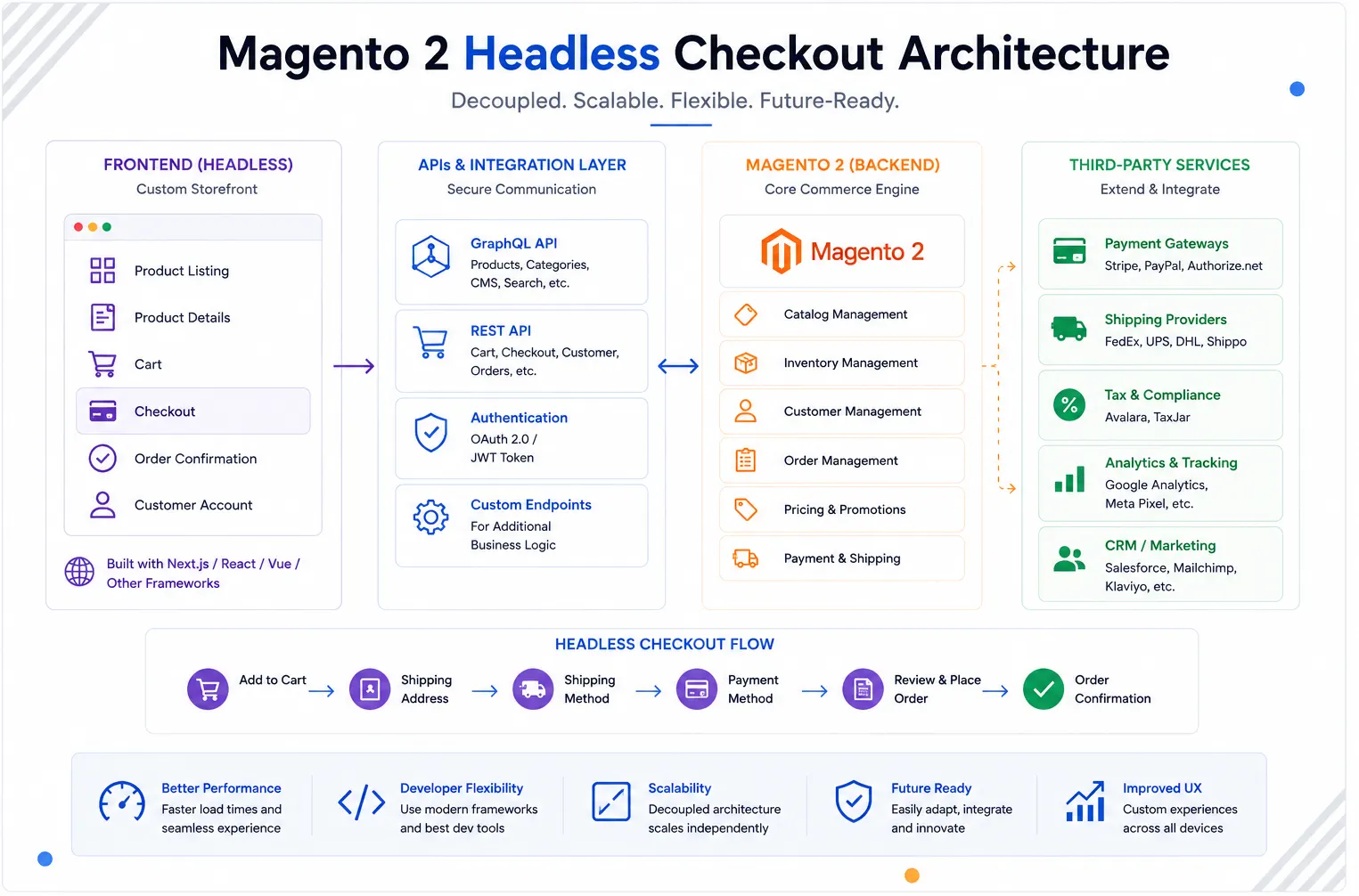
A typical checkout request flows through multiple layers before an order is placed.
- Next.js storefront handles customer interactions.
- Magento APIs manage cart and checkout data.
- Shipping providers return delivery options.
- Payment gateways process transactions.
- Magento creates and manages orders.
Creating a Guest Cart
Magento generates a unique cart ID for guest users and uses it throughout the checkout process.
mutation {
  createEmptyCart
}
The returned cart ID should be stored on the frontend and reused for future cart operations.
Adding Products to the Cart
After creating a cart, products can be added using GraphQL mutations.
mutation AddToCart(
  $cartId: String!
) {
  addSimpleProductsToCart(
    input: {
      cart_id: $cartId
      cart_items: [
        {
          sku: "24-MB01"
          quantity: 1
        }
      ]
    }
  ) {
    cart {
      items {
        quantity
      }
    }
  }
}
Magento validates inventory, pricing, and product status before updating the cart.
Guest Cart vs Customer Cart
Magento supports two different cart types.
- Guest Cart — Created for anonymous visitors.
- Customer Cart — Associated with a logged-in customer account.
Customer carts persist across devices and sessions, while guest carts remain temporary.
Customer Authentication
Customers can authenticate during checkout or before starting their shopping journey.
mutation {
  generateCustomerToken(
    email: "[email protected]"
    password: "password"
  ) {
    token
  }
}
The generated token is then used for customer-specific API requests.
Understanding Cart Merge Logic
One of the most important Magento 2 Headless Checkout workflows occurs when a guest user logs in.
At this point Magento must decide how the guest cart and customer cart should be combined.
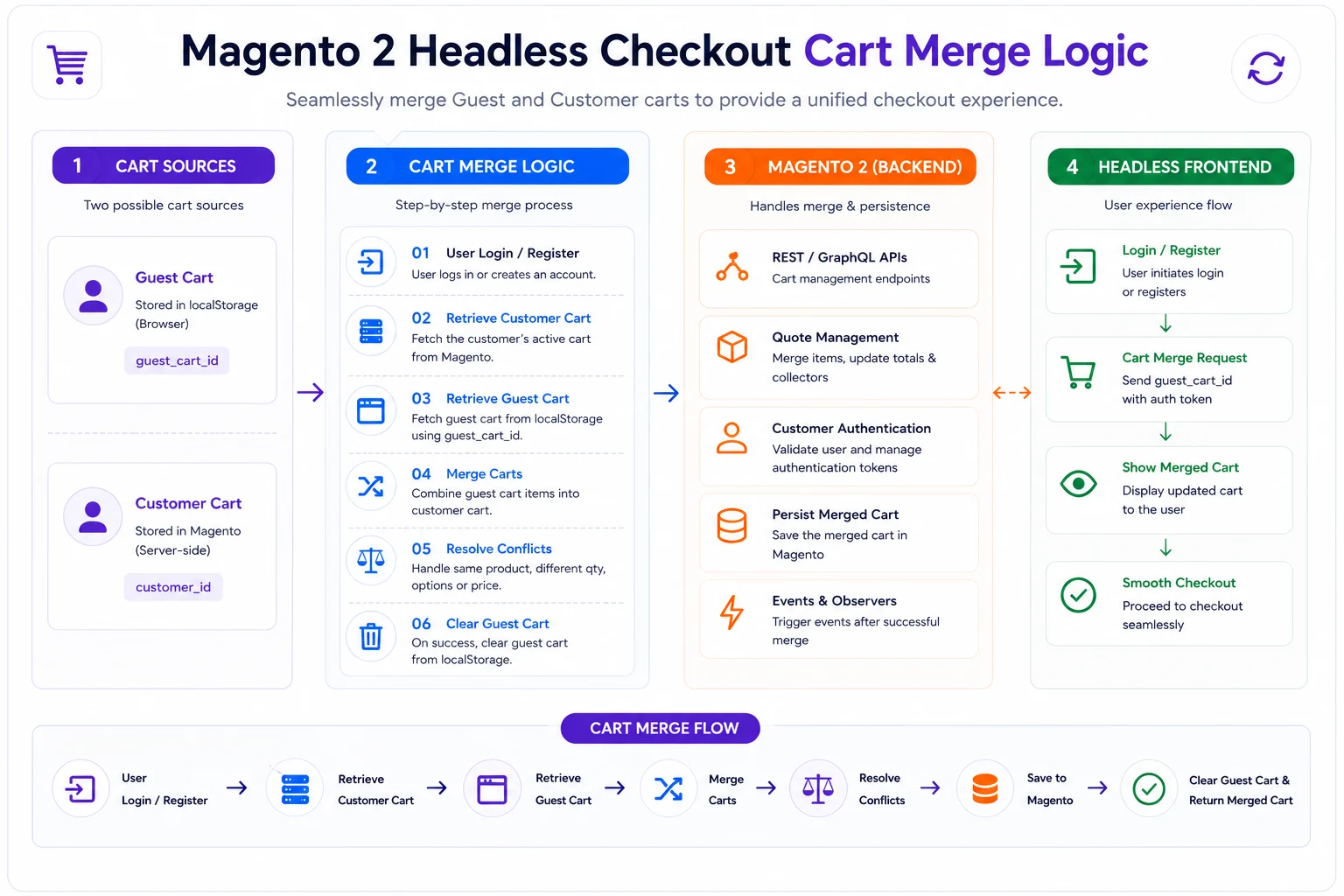
- Guest user adds products.
- Customer already has an existing cart.
- Customer logs in.
- Magento merges both carts.
- Duplicate products have quantities combined.
This behavior can be customized based on business requirements.
Managing Shipping Addresses
Before calculating shipping costs, Magento requires a shipping address.
Address information determines available shipping methods, tax calculations, and delivery estimates.
Fetching Shipping Methods
Once an address is provided, Magento returns available shipping options.
- Flat Rate
- Free Shipping
- Table Rate
- Third-Party Carriers
The storefront displays available shipping options before checkout continues.
Applying Coupons and Discounts
Coupon codes are commonly applied during checkout to adjust pricing and promotional offers.
Magento validates the coupon and recalculates cart totals in real time.
Managing Payment Methods
After shipping is selected, the checkout process moves to payment.
Magento supports payment providers such as PayPal, Stripe, Adyen, Razorpay, and custom gateways.
The frontend should display only the payment methods returned by Magento for the current cart and shipping configuration.
Placing an Order
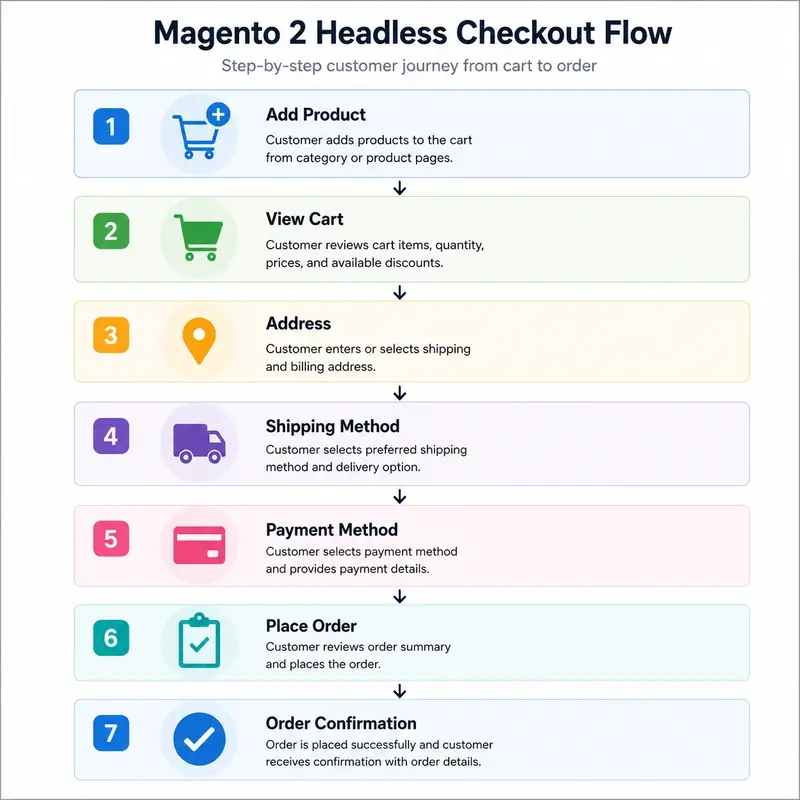
Once shipping and payment information are complete, Magento can place the order.
mutation {
  placeOrder(
    input: {
      cart_id: "cart-id"
    }
  ) {
    order {
      order_number
    }
  }
}
The order is created in Magento and returned to the frontend for confirmation.
Common Checkout Challenges
- Guest cart expiration.
- Cart synchronization issues.
- Duplicate cart items after login.
- Slow shipping calculations.
- Payment gateway failures.
- Session management inconsistencies.
- Checkout API latency.
Most checkout issues originate from these workflows rather than the storefront UI.
Magento 2 Headless Checkout Best Practices
- Persist cart identifiers securely.
- Handle cart merge scenarios carefully.
- Cache non-sensitive checkout data where possible.
- Validate inventory before order placement.
- Implement proper error handling for payment failures.
- Monitor checkout API response times.
- Protect checkout endpoints with rate limiting.
These best practices help improve checkout reliability and customer experience.
Conclusion
Magento 2 Headless Storefront Checkout combines cart management, authentication, shipping, payments, and order processing into a single workflow.
A well-implemented headless checkout delivers a fast, flexible, and scalable shopping experience powered by modern frontend technologies.

Be the first to comment.