Laravel Marketplace Order Accept Extension is an add-on to the Marketplace extension.
This extension allows sellers to accept or reject orders within a turnaround time (TAT) the admin sets.
If the seller does not respond within this time, a scheduled console command auto-cancels the pending order.
Note: Bagisto Marketplace Order Accept is an addon of “Bagisto Multi-Vendor Marketplace Extension”.
You can also explore our Laravel Development Services and Quality Bagisto Extensions.
Features
- Fetch new or pending orders that customers place.
- Allow sellers to accept or cancel orders from their order dashboard.
- Customer, Seller, and Admin receive email notifications when a seller accepts an order.
- Customer, Seller, and Admin receive email notifications when the system cancels an order after TAT expiry.
- Admin can enable or disable notifications for Customer, Seller, and Admin separately.
- The admin can set a global Turn Around Time (TAT) for sellers to accept orders.
- Admin can set a custom Turn Around Time (TAT) for individual sellers.
- The system automatically cancels orders that remain unaccepted beyond the configured TAT.
- Enable or disable the option for sellers to cancel orders after acceptance.
- Sellers cannot generate invoices or shipments until they accept the order.
- Automated cancellation of pending orders through a scheduled command.
- Customer can track the order status from their account panel.
Installation of the module
Unzip the extension zip file and merge the “packages” folder into the project root directory.
Step 1: Open the root composer.json file and add the following line under the autoload.psr-4 section:
"Webkul\\MarketplaceOrderAccept\\": "packages/Webkul/MarketplaceOrderAccept/src"
Step 2: Refresh the autoloader so the new namespace resolves:
composer dump-autoload
Step 3: Register the service provider. Open bootstrap/providers.php and add the following import:
use Webkul\MarketplaceOrderAccept\Providers\MarketplaceOrderAcceptServiceProvider;
Then add it inside the return array (must load after Webkul\Marketplace‘s provider):
MarketplaceOrderAcceptServiceProvider::class,
Step 4: Run the installer to complete the setup:
php artisan marketplace-order-accept:install
Step 5 (Important — Cron Setup): The auto-cancel feature requires you to schedule the following command. Add it to your bootstrap/app.php inside withSchedule():
$schedule->command('marketplace-order-accept:cancel-pending')->everyFifteenMinutes();
Without this schedule, the system will not auto-cancel pending orders after TAT expiry.
Module Configuration
After installation, the admin can configure the module from the admin panel.
Go to Configure → Marketplace → Order Accept → General in the admin sidebar.
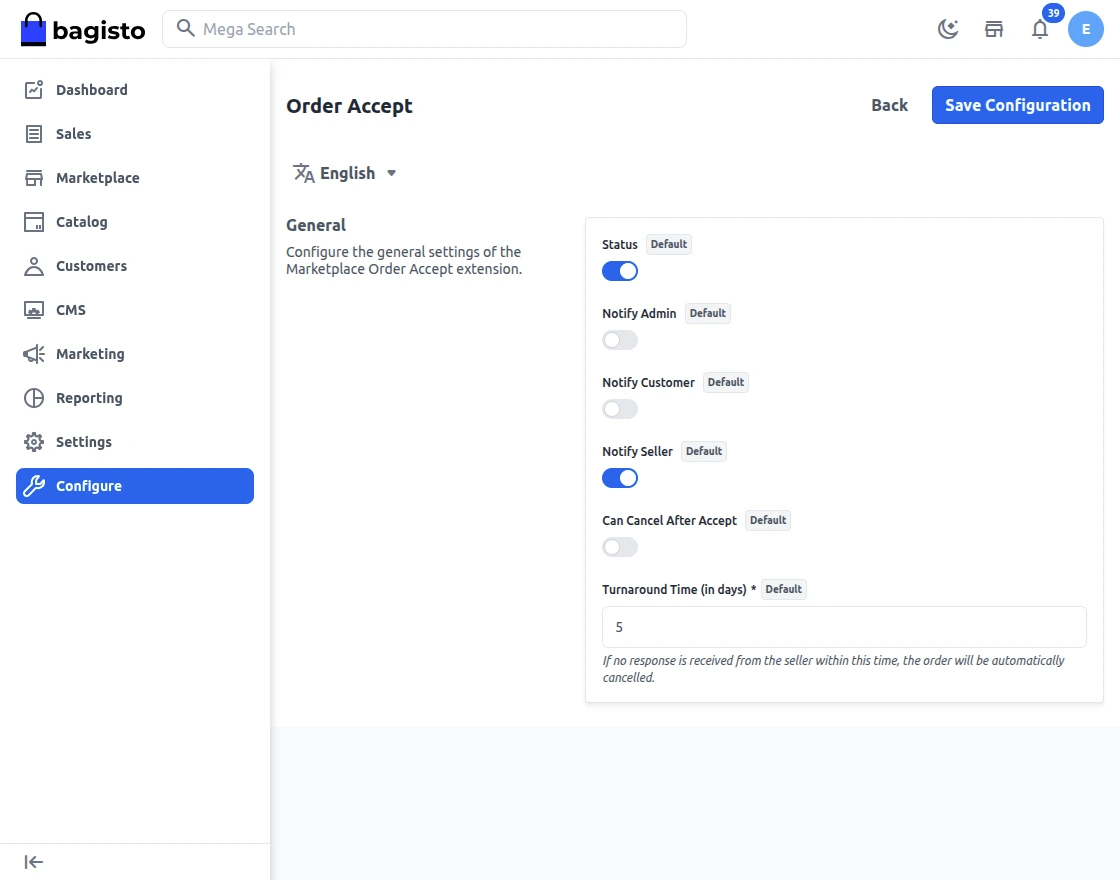
Status: Enable or disable the module globally.
Notify Admin: Enable or disable email notifications to the admin when a seller accepts an order or the system cancels it after TAT expiry.
The Notify Customer option turns email notifications to the customer on or off when the seller accepts their order or the system cancels it after TAT expiry.
Notify Seller: Enable or disable email notifications to the seller when they accept an order or the system cancels it after TAT expiry.
Can Cancel After Accept: Enable or disable the seller’s ability to cancel an order after they have accepted it.
Turnaround Time (in days): Set the default TAT (1-30 days) for sellers to accept orders. Sellers can override this on their profile.
Seller Panel
On the Seller orders section, each order displays an Acceptance Status column. Sellers can accept or cancel pending customer orders before the TAT deadline.

If the seller accepts the order (Accept mass action or individual accept), the module updates the acceptance status to Accepted. The seller can then create invoices or shipments for the accepted order.

If you enable “Can Cancel After Accept” in the configuration, the seller can also cancel an order even after accepting it by clicking the Cancel button.

After cancellation, the module updates the order status to Cancelled and adjusts the payout status accordingly, as shown below.

Support
That’s all for the Bagisto Marketplace Order Accept extension. Still have any issues? Feel free to add a ticket and let us know your views to make the module better at [email protected].
Current Product Version - v2.4.10
Supported Framework Version - Bagisto v2.4.10

Be the first to comment.