CS-Cart ChatGPT Product Feed helps store owners generate structured product data that can be used by AI-powered platforms like ChatGPT.
It ensures that your product catalog is organized in a machine-readable format, making it easier for AI systems to process and utilize the data.
This improves how products are delivered to AI platforms for use in intelligent workflows such as product discovery, recommendations, and automated interactions.
Well-structured data helps ensure accurate and consistent results.
Furthermore, with this add-on, the admin can easily configure feed settings and control which products are included in the feed.
In addition, vendors can independently select their own products, making it suitable for both single-store and multi-vendor environments.
Also, Admins can manage feed configuration, product selection, and data structure directly from the backend, ensuring full control over the generated feed.
Note: Before installing the add-on, extract the downloaded package.
- Install the License Manager add-on first.
- Then install the required add-on.
- Follow the license activation steps to generate your license key.
Features
- Admin can configure feed settings for product data generation
- Admin can select products on behalf of vendors for the feed
- Vendors can select their own products to include in the feed
- Generates structured, machine-readable product data
- Keeps product feed updated based on store product changes (via cron or regeneration)
- Ensures consistent and accurate product data output
- Flexible control over feed configuration and product inclusion
- Designed for compatibility with AI platforms like ChatGPT
Installation
To install CS-Cart ChatGPT Product Feed, follow these steps:
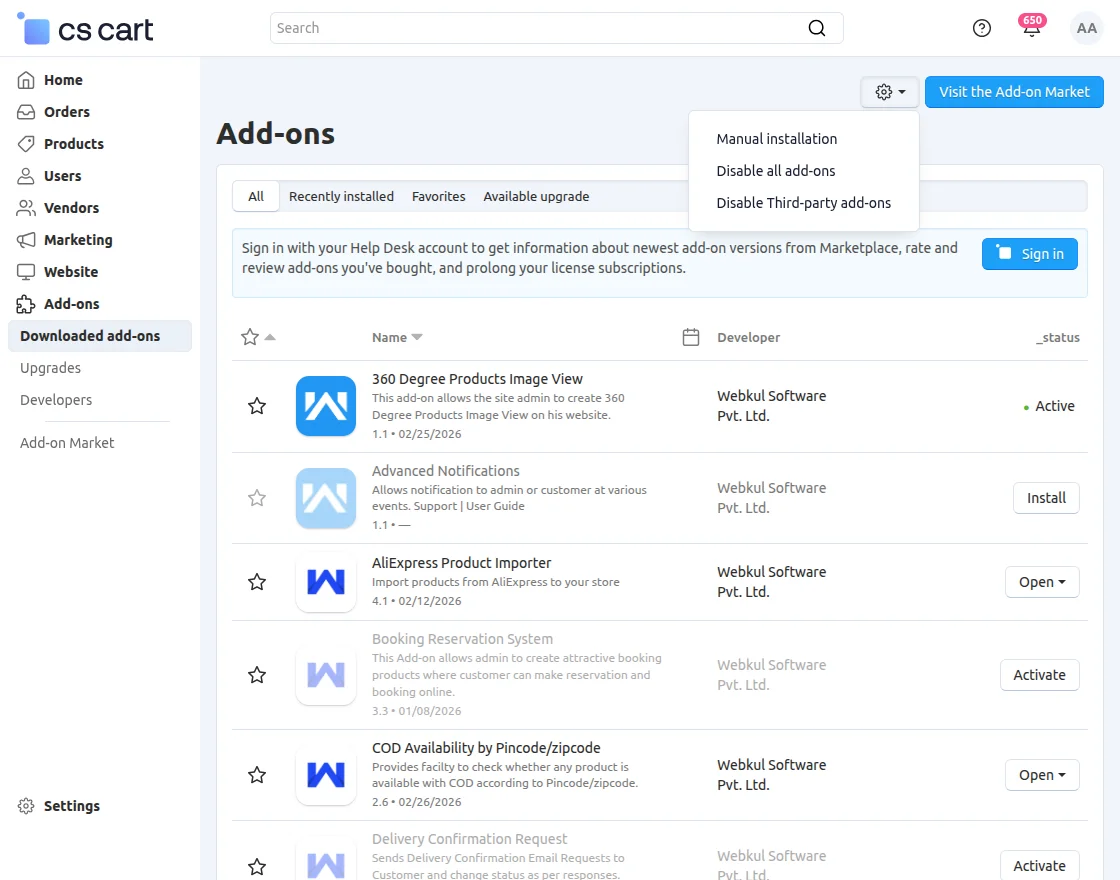
- Go to Manage Add-ons, click on the gear drop-down, and select Manual Installation.
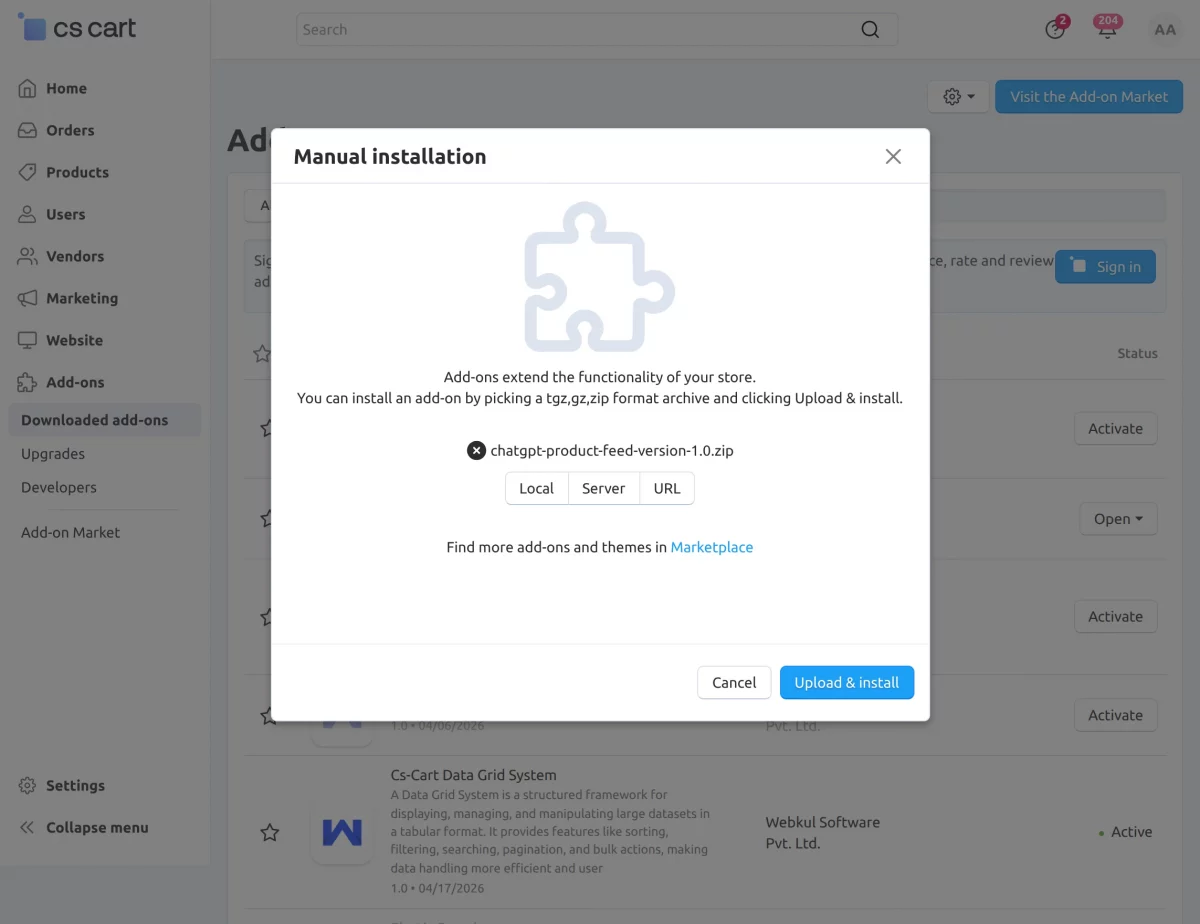
2. Select the zip File and click on Upload & install.
Add-on Configuration
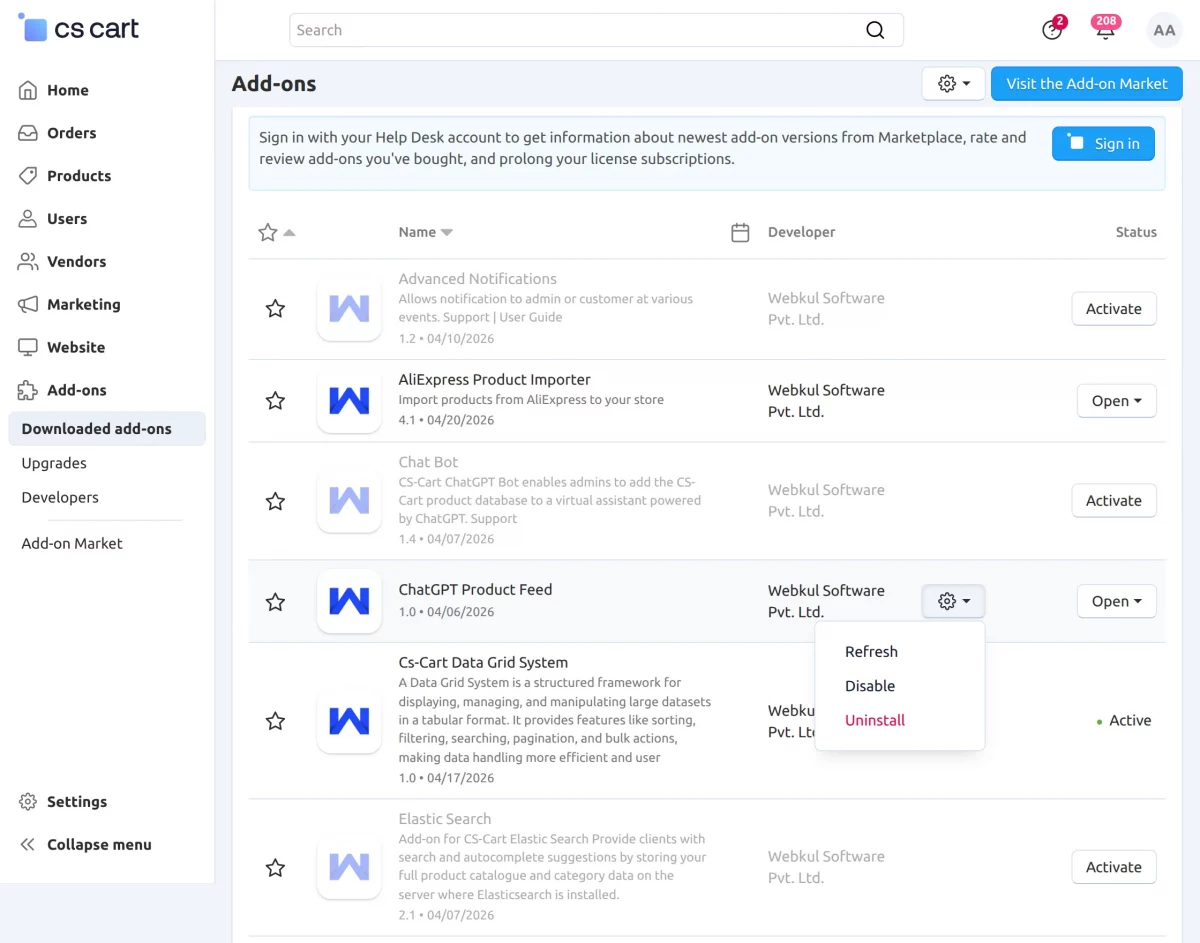
After installation of the add-on, you will find ChatGPT Product Feed in the list of the available add-ons.
Now, Click on “settings” to enable, disable, or refresh.
Apply Through the ChatGPT Merchant Portal
To make your products available for AI-driven shopping experiences, you must first join the merchant program through ChatGPT.
After that, you can showcase your store in AI-powered product discovery and shopping experiences.
Apply here: https://chatgpt.com/merchants
Product Display in ChatGPT
Once registered, you can also submit your product feed for review.
After approval, your products may become eligible to appear in ChatGPT shopping results based on relevance, availability, and platform support.
Consequently, customers can discover your products more easily through AI-powered search experiences.
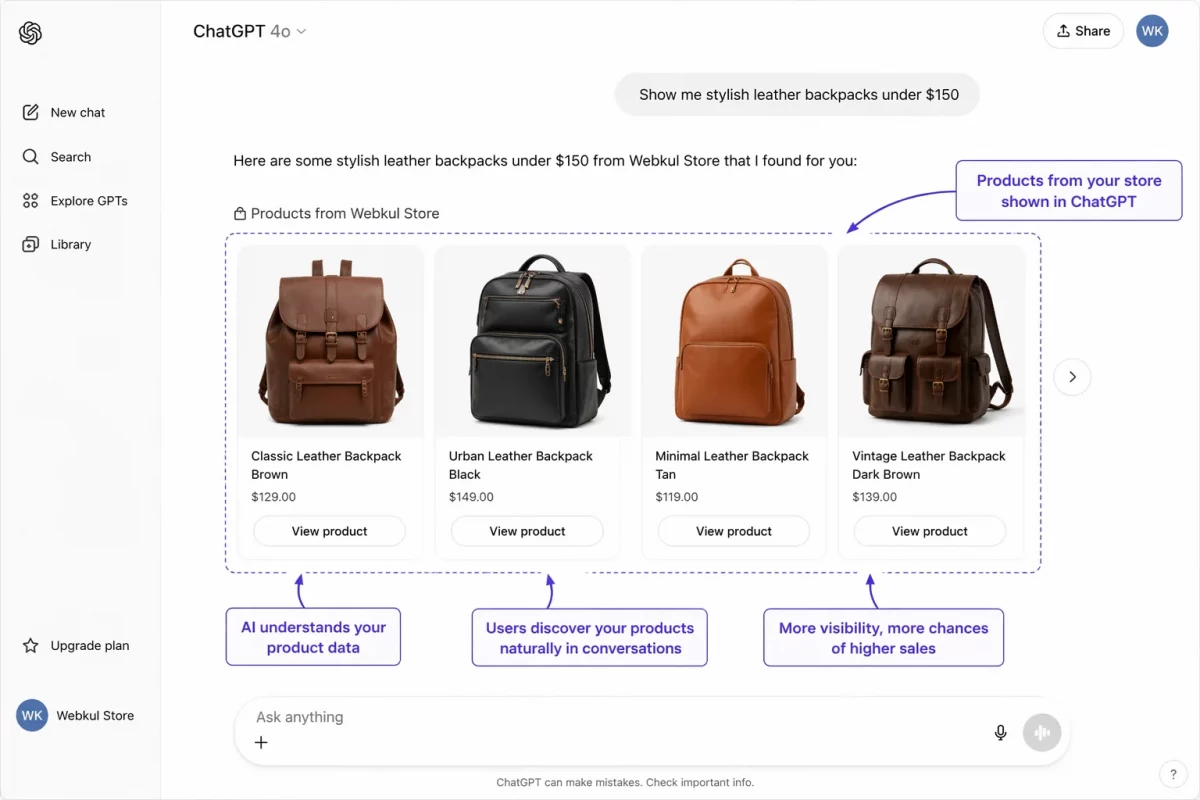
This allows:
- Increased chances of engagement and conversions
- Natural product discovery through user queries
- Direct visibility of your catalog inside ChatGPT
Admin Panel Configuration – ChatGPT Product Feed
In the admin panel, navigate to Marketing → ChatGPT Feeds
Here, you will find the configuration page to set up and manage the ChatGPT product feed.
In addition, this section allows you to define feed details, connect with ChatGPT, and control product data behavior efficiently.
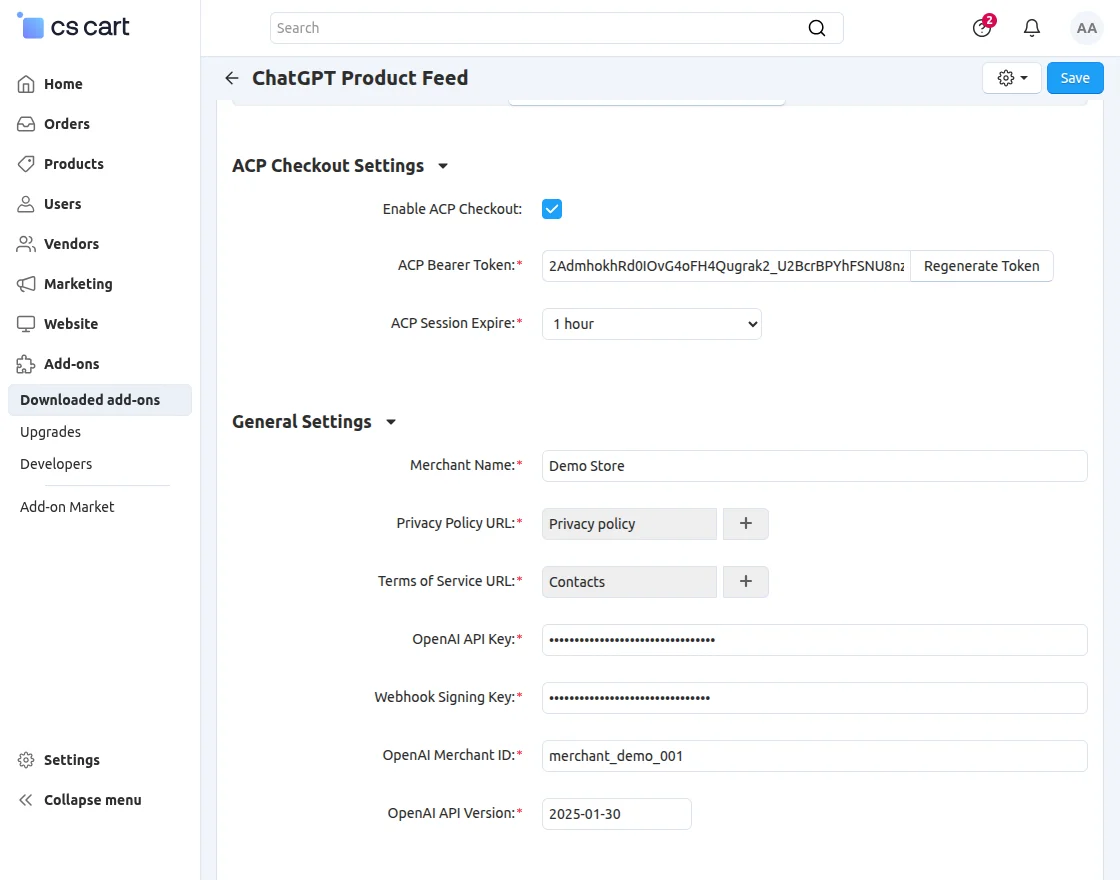
ACP Checkout Settings + General Settings
- Enable ACP Checkout : Enable or disable ACP (AI Commerce Platform) Checkout integration for ChatGPT shopping experiences.
- ACP Bearer Token : Secure token used to authenticate ACP requests. Can be regenerated for security.
- ACP Session Expire : Duration before ACP checkout session expires.
- Merchant Name : Store name shown in ChatGPT shopping and checkout.
- Privacy Policy URL : Link to your store privacy policy page.
- Terms of Service URL : Link to your store terms and conditions page.
- OpenAI API Key : API key used to connect with OpenAI services.
- Webhook Signing Key : Used to verify webhook authenticity and security.
- OpenAI Merchant ID : Unique merchant identifier for ChatGPT integration.
- OpenAI API Version : API version used for OpenAI integration compatibility.
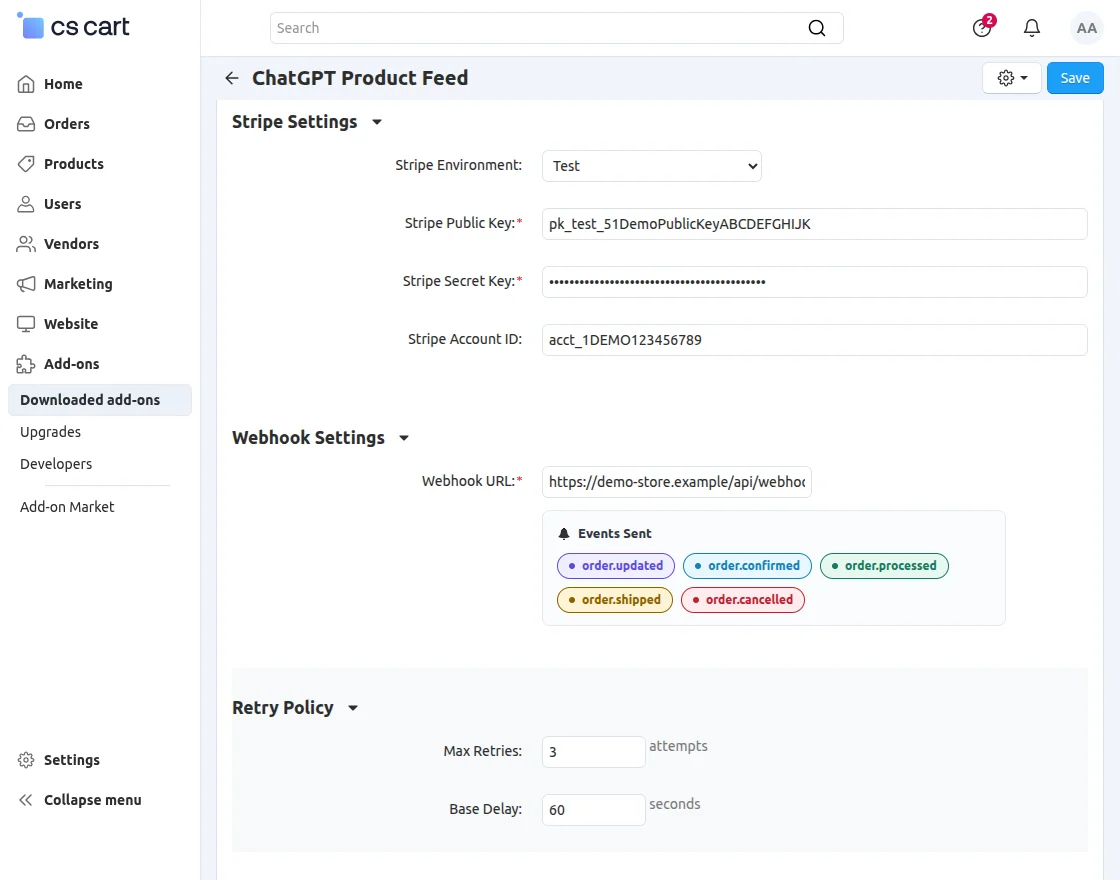
Stripe Settings + Webhook Settings
- Stripe Environment : Choose environment:
- Test (sandbox mode)
- Live (production mode)
- Stripe Public Key : Publishable key used on frontend checkout.
- Stripe Secret Key : Secret key used for payment processing.
- Stripe Account ID : Connected Stripe account identifier.
- Webhook URL : Endpoint that receives order and checkout events.
- Events Sent :
- order.updated
- order.confirmed
- order.processed
- order.shipped
- order.cancelled
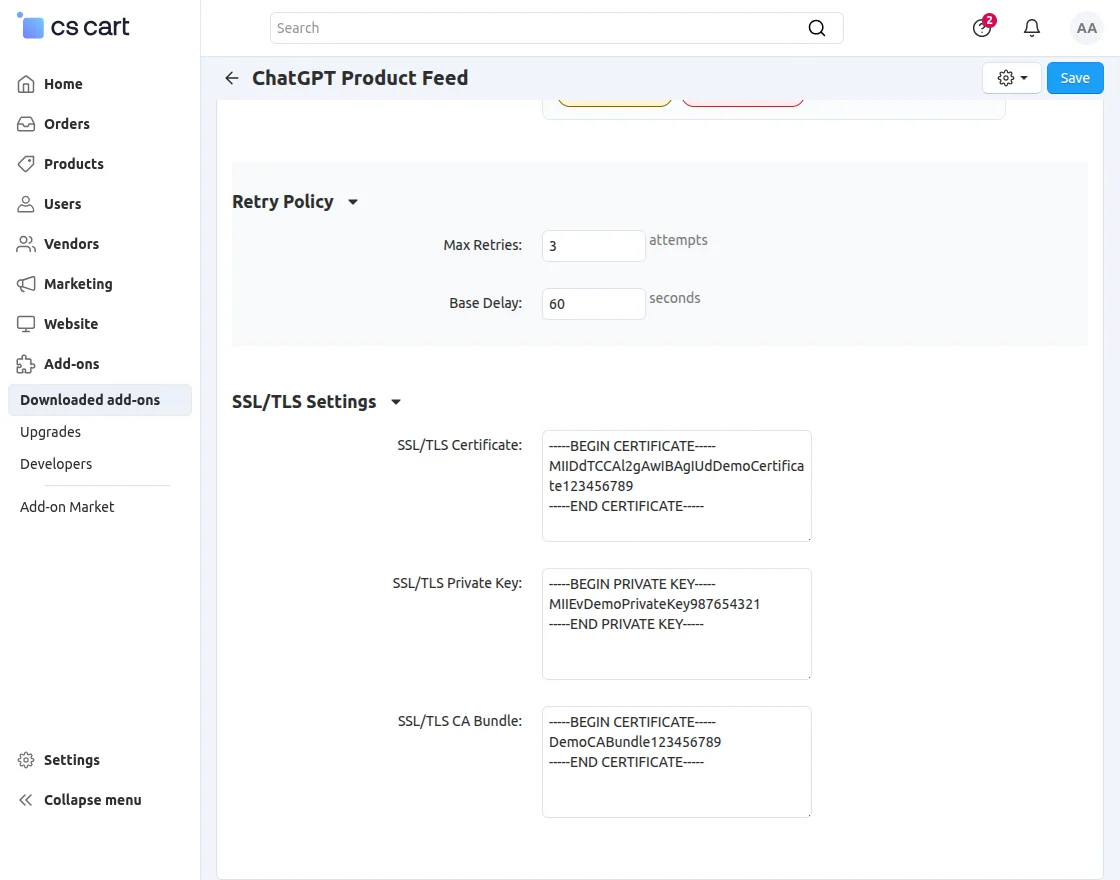
Retry Policy + SSL/TLS Settings
- Max Retries : Number of retry attempts for failed webhook delivery.
- Base Delay : Initial delay (in seconds) between retries.
- SSL/TLS Certificate : Certificate used for secure HTTPS communication.
- SSL/TLS Private Key : Private key for SSL certificate.
- SSL/TLS CA Bundle : CA bundle for certificate validation.
Marketing → ChatGPT Product Feed
The ChatGPT Product Feed module allows administrators to manage product synchronization, checkout configuration, security validation, and integration logs for ChatGPT-powered shopping experiences.
Additionally, it provides centralized control over feed management, ACP sessions, and webhook monitoring.
Additionally, it helps merchants monitor feed performance, manage ACP checkout activity, and maintain secure communication between the store and ChatGPT services.
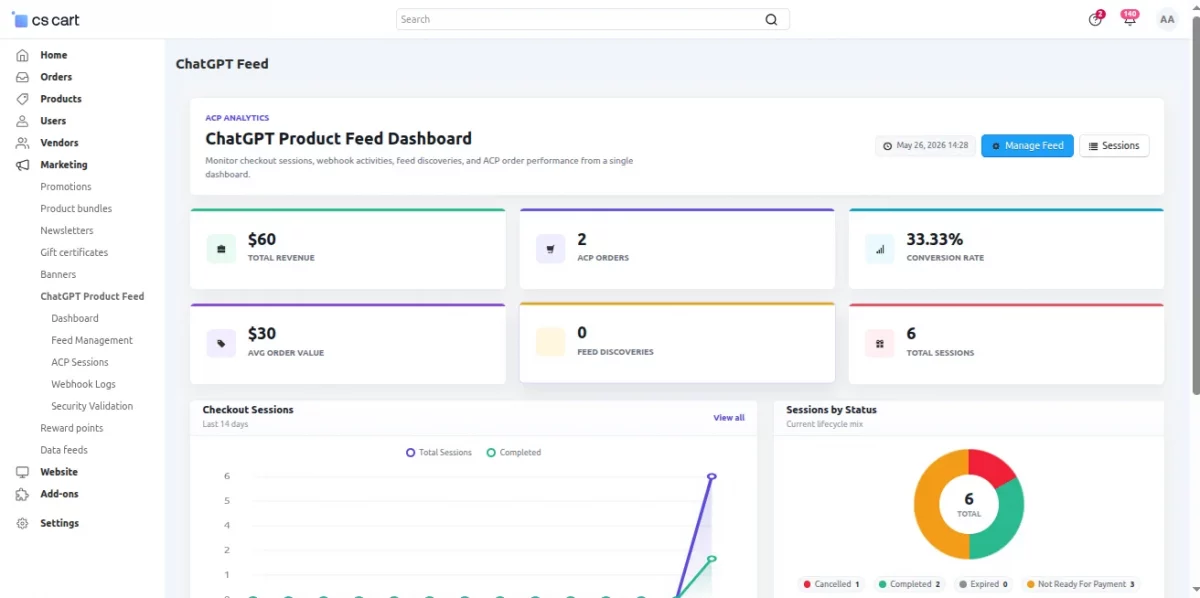
Dashboard – ACP Analytics
The ACP Analytics Dashboard provides a centralized overview of ChatGPT product feed performance, checkout activity, and order analytics.
It helps merchants monitor real-time engagement, conversions, and feed-driven sales from a single interface.
Feed Management
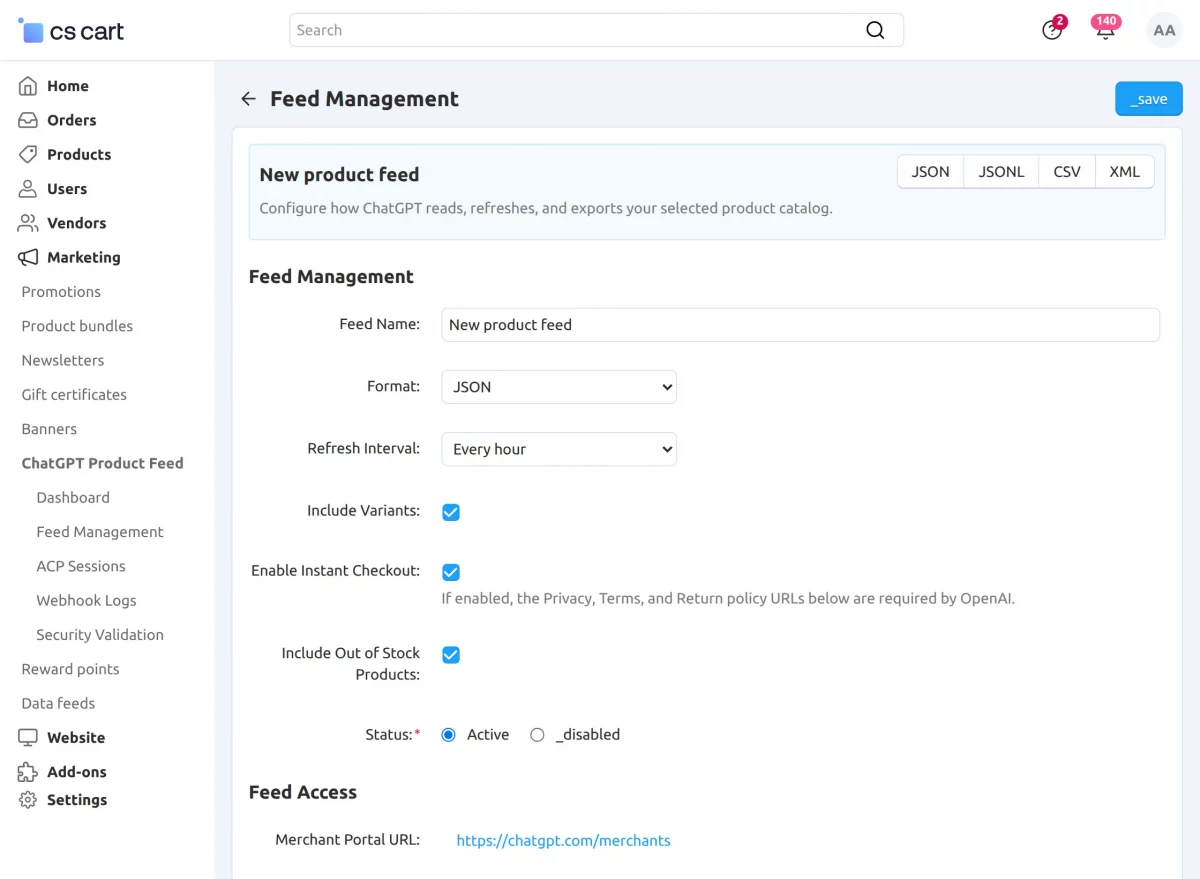
This section defines the core configuration of the ChatGPT product feed, including format, refresh behavior, product structure, and instant checkout settings.
- Feed Name : Name used to identify the product feed.
- Default Feed Name : System-defined fallback name for the feed.
- Feed Format : Defines output format of the feed:
- JSON
- JSONL
- CSV
- XML
- Refresh Interval : Controls how often the feed is updated (e.g., hourly).
- Include Variants : Determines whether product variants (size, color, etc.) are included.
- Enable Instant Checkout : Enables direct checkout from ChatGPT.
- Instant Checkout Description : Text shown during instant checkout flow.
- Include Out of Stock Products : Controls whether unavailable products appear in the feed.
- Status : Enables or disables the feed.
Feed Access
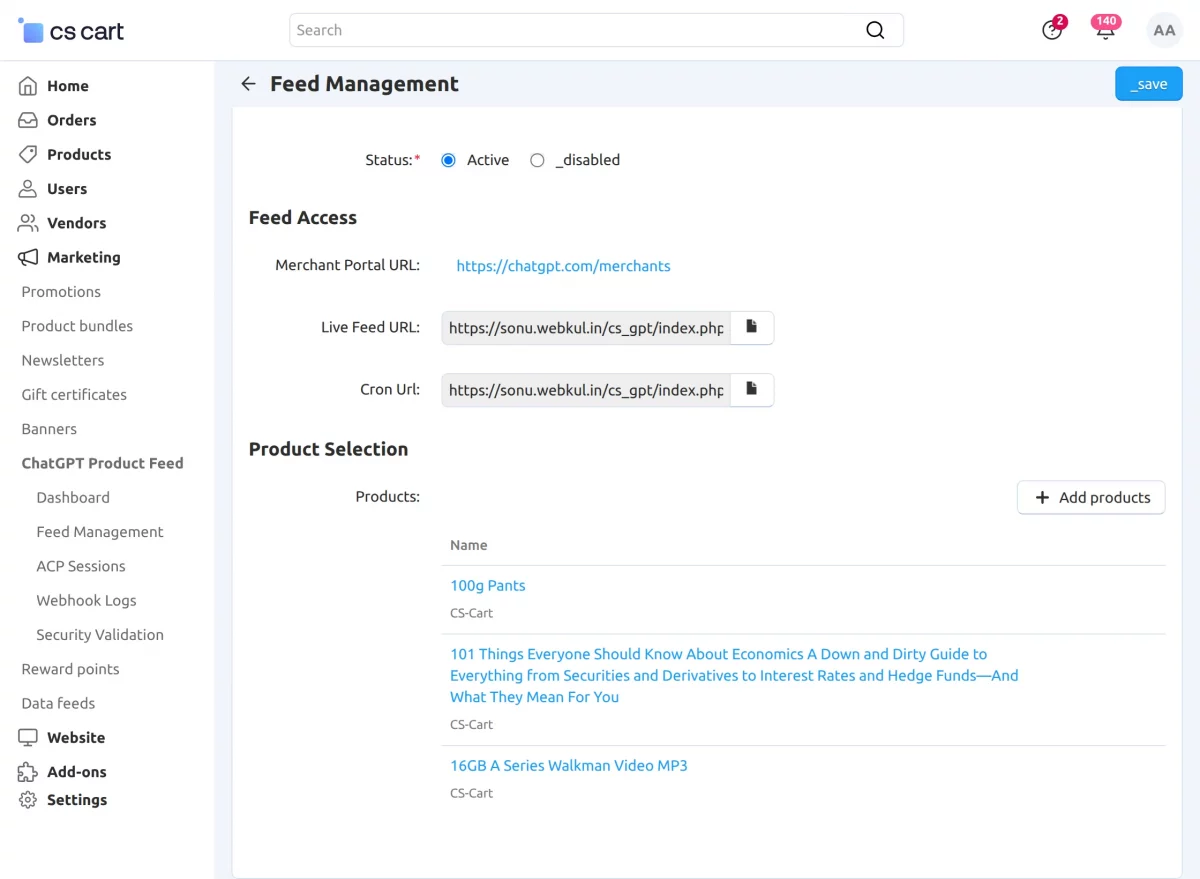
This section manages access points and endpoints required for ChatGPT integration and feed synchronization.
- Merchant Portal URL : Link to the ChatGPT merchant dashboard.
- Live Feed URL : Public URL used by ChatGPT to fetch product feed data.
- Cron URL : URL used to automatically refresh and regenerate the product feed via scheduled jobs.
Product Selection
This section allows administrators to control which products are included in the ChatGPT feed.
- Products : Manually select products to include in the feed.
- Selected products are only those shared with ChatGPT for discovery and shopping.
- If no products are selected, the feed may include all eligible products based on configuration.
Sessions – ACP Checkout
The Sessions section displays all ACP checkout sessions generated from ChatGPT product feed activity.
Additionally, each session represents a user checkout journey along with its current status and lifecycle stage.
Additionally, you can filter sessions by status such as completed, cancelled, expired, or ready for payment.
You can also control the number of records displayed per page (for example, 50 per page) for easier session management and tracking.
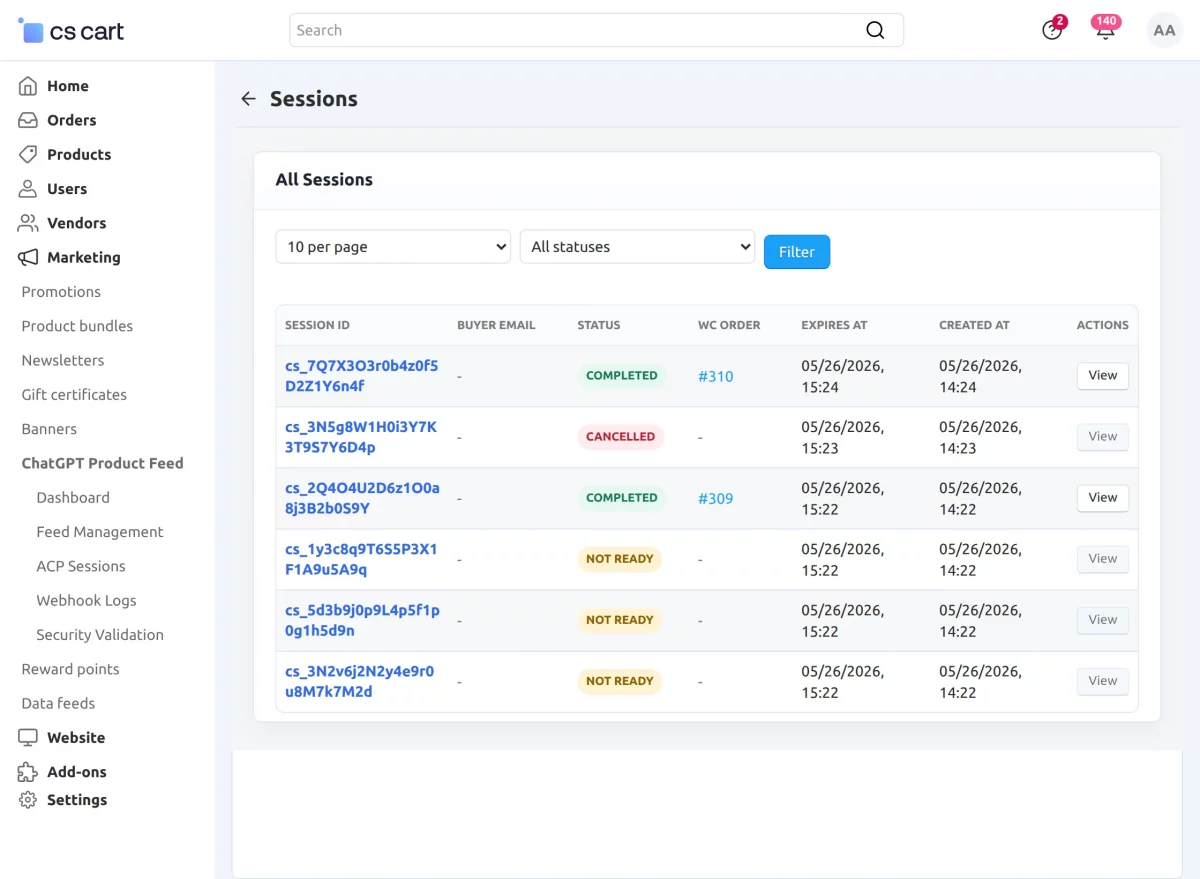
If no data is available, a “No sessions found” message is shown, indicating there is no activity for the selected filter.
The Webhook Logs section records all webhook events exchanged between your store and the ACP/ChatGPT integration.
Additionally, it helps administrators monitor event delivery, verify responses, and troubleshoot integration issues efficiently.
ChatGPT Security Validation Test
The Production Readiness section helps verify whether your ChatGPT product feed integration is properly configured and ready for production use.
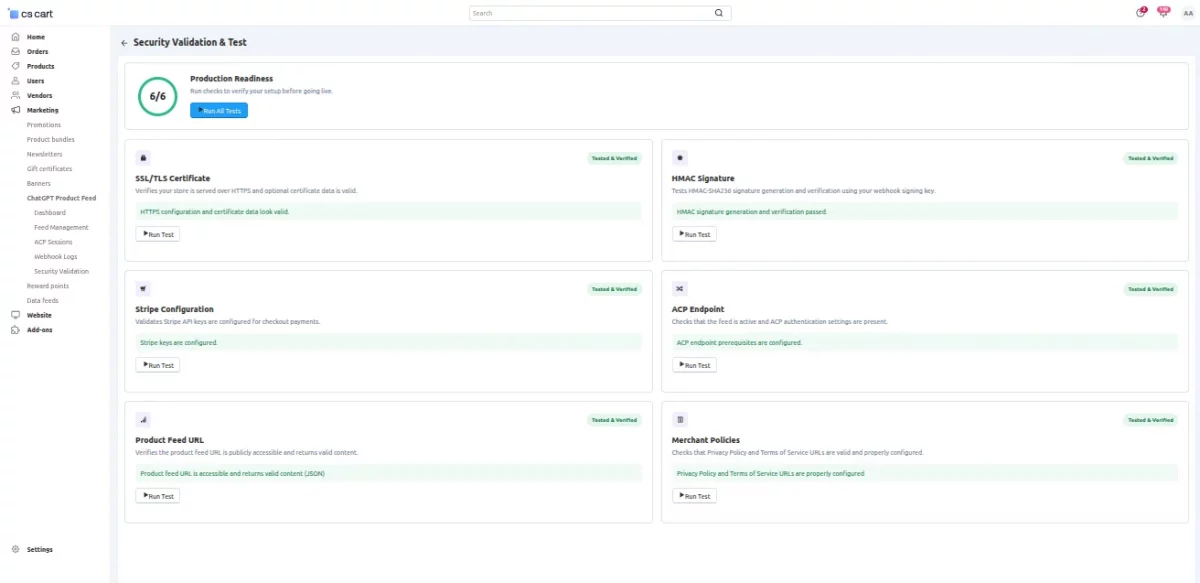
It includes multiple validation tests to ensure secure communication, correct API configuration, and feed accessibility.
Administrators can run individual tests or use Run All Tests to validate the complete integration setup.
Available Validation Tests
- SSL/TLS Certificate : Verifies that the SSL/TLS certificate is valid and properly configured for secure communication.
- HMAC Signature : Tests webhook signature validation to ensure request authenticity and security.
- Stripe Configuration : Checks whether Stripe credentials and payment configuration are correctly set up.
- ACP Endpoint : Validates ACP endpoint connectivity and response handling.
- Product Feed URL : Verifies that the product feed URL is publicly accessible and returns valid feed data.
- Merchant Policies : Checks whether Privacy Policy and Terms of Service URLs are properly configured and accessible.
This is all about the CS-Cart ChatGPT Product Feed add-on, which helps your store connect with AI platforms through structured and reliable product data.
As a result, your products can be shared more accurately and efficiently across AI-driven systems.
Support
For assistance with CS-Cart ChatGPT Product Feed setup or customization, contact [email protected] or Webkul Support.
Discover more powerful CS-Cart extensions to enhance your store’s functionality!
Current Product Version - 1.0
Supported Framework Version - (4.18.x - 4.20.x)

Be the first to comment.