Running a WooCommerce auction needs more than a normal product page. You need bidding rules, timers, winner handling, payment flow, and clear auction status.
The problem is that WooCommerce does not include auction features by default.
Store owners need a WooCommerce Auction plugin to add bids, countdowns, reserve prices, and winner checkout.
If planning setup, this Webkul guide explains creating a WooCommerce auction website with bidding, timers, winner checkout, and payments.
Choosing the right plugin is challenging because features range from simple bidding to live, proxy, reverse auctions, and marketplaces.
In this guide, you will compare the top WooCommerce auction plugins for 2026. You will see what each plugin does, where it fits, and what to check before buying.
What Is a WooCommerce Auction Plugin?
A WooCommerce Auction plugin lets you sell products through bids instead of fixed prices only.
It adds auction settings to your store. These may include start price, end time, reserve price, buy now price, bid increment, auction countdown timer, and winner rules.
How a WooCommerce auction plugin works
This plugin adds auction features to WooCommerce products. Customers place bids, the system tracks them, and the winner is selected when the auction ends.
After that, the winner can pay through WooCommerce checkout. This keeps tax, shipping, customer data, and order records in one place.
Why WooCommerce stores need auction features
WooCommerce is built for normal product sales. It does not include bid history, winner selection, proxy bidding, anti-sniping, or auction email alerts by default.
That is why store owners use an auction plugin for WooCommerce. It adds the bidding layer while keeping the store on WordPress and WooCommerce.
Common use cases for online auction stores
Auction plugins work well for collectibles, antiques, used products, jewelry, art, vehicles, event items, charity products, and limited product drops.
They can also help B2B stores run reverse auctions. In this model, suppliers compete by offering lower prices, and the buyer chooses the best offer.
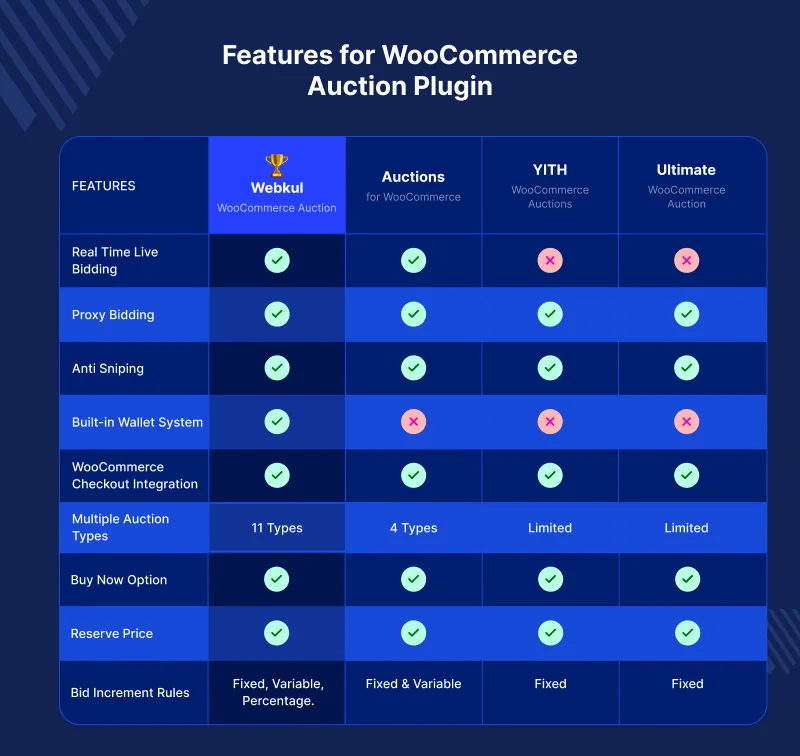
WooCommerce Auction Plugin Comparison Table
Use this table to compare the main features first. It gives a quick view before you read the full plugin reviews.
| Plugin | Best for | Auction types | Live bidding | Proxy bidding | Anti-sniping | Checkout support | Price |
|---|---|---|---|---|---|---|---|
| Webkul WooCommerce Auction Plugin | Stores that need more auction control | 11 | Yes | Yes | Yes | Yes | $99 |
| Auctions for WooCommerce | Live auction stores | 4+ | Yes | Yes | Yes | Yes | $149/year |
| WooCommerce Simple Auctions | Simple auction websites | 4 | Yes | Yes | Yes | Yes | $59 |
| Auctions Made Easy for WooCommerce | Flexible auction formats | 5 | Yes | Yes | Not clear | Yes | $79/year |
| Ultimate Auction for WooCommerce | Basic auction needs | Basic | Not clear | Pro option | Pro option | Yes | Free / Pro |
| Dokan Simple Auctions | Multivendor auction marketplaces | Depends on setup | Depends on setup | Yes | Depends on setup | Yes | $49/year plus required tools |
| Ultimate Auction Pro | WordPress auction sites with Pro tools | Multiple | Yes | Yes | Yes | Yes | Check official pricing |
Pricing may change. Always check the official product page before you buy or update your comparison.
How We Selected These WooCommerce Auction Plugins
We compared these plugins using public product pages, official documentation, feature lists, pricing pages, and real store use cases.
The goal was to select auction plugins for WooCommerce supporting bidding, payments, and product auctions instead of listing every available plugin.
Auction features and bidding options
A useful auction plugin should support standard, reverse, sealed, proxy, or unique bidding models matching your store requirements.
For stores with more complex needs, the number of auction types matters. For simple stores, a clean product bidding flow may be enough.
Ease of setup for WooCommerce store owners
A good auction plugin for WooCommerce should work with normal products, customer accounts, checkout, payments, and order records.
Store owners should not need to rebuild the whole website just to sell auction products.
Real-time bidding and user experience
Live bidding helps buyers see price, bid status, and countdown changes without confusion.
This is important for high-demand products, collectibles, vehicles, art, and other items where users may bid near the closing time.
Payment, checkout, and order flow
Winning an auction is only part of the process. The winner must be able to pay, receive order details, and complete checkout without extra manual work.
This is why WooCommerce checkout support, payment reminders, and auction payment flow are important.
Business use cases and store fit
We also checked where each plugin fits in real business use. Some are better for simple auction stores. Some work better for marketplaces or B2B auction models.
A plugin should match the store model, not just offer a long feature list.
Pricing, support, and updates
Auction stores rely on accurate timers, bidding, and payments, making regular updates and reliable support essential.
A cheap plugin can be costly if bid tracking, winner handling, or checkout fails during a live auction.
What Is a WooCommerce Auction Plugin?
A WooCommerce advanced Auction plugin lets you sell products through bids instead of fixed prices only.
It adds auction settings to your store. These may include start price, end time, reserve price, buy now price, bid increment, auction countdown timer, and winner rules.
How a WooCommerce auction plugin works
This plugin adds auction features to WooCommerce products. Customers place bids, the system tracks them, and the winner is selected when the auction ends.
After that, the winner can pay through WooCommerce checkout. This keeps tax, shipping, customer data, and order records in one place.
Why WooCommerce stores need auction features
WooCommerce is built for normal product sales. It does not include bid history, winner selection, proxy bidding, anti-sniping, or auction email alerts by default.
That is why store owners use an auction plugin for WooCommerce. It adds the bidding layer while keeping the store on WordPress and WooCommerce.
Common use cases for online auction stores
Auction plugins work well for collectibles, antiques, used products, jewelry, art, vehicles, event items, charity products, and limited product drops.
They can also help B2B stores run reverse auctions. In this model, suppliers compete by offering lower prices, and the buyer chooses the best offer.
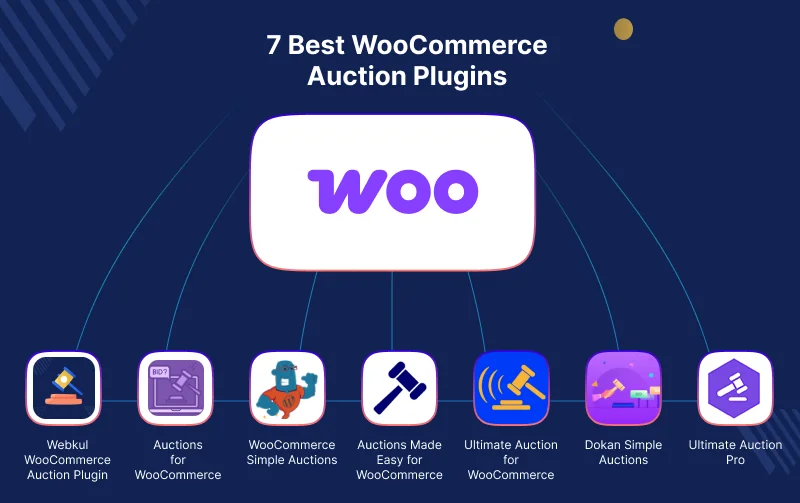
7 Best WooCommerce Auction Plugins for Online Bidding Stores
Below are seven WooCommerce auction plugin options to consider in 2026. Each one has a different use case, so the right choice depends on your store.
1. Webkul WooCommerce Auction Plugin
Webkul Advance Auction Plugin for WooCommerce works well when your store needs one or more bidding models from one WooCommerce auction setup.
It supports 11 auction types, real-time bidding, proxy bidding, absentee bidding, anti-sniping, wallet payments, WooCommerce checkout, reports, shortcodes, and widgets.

Where it works well
This plugin supports multiple bidding models with live updates, proxy bidding, anti-sniping, wallets, winner checkout, bid logs, and reports.
For example, you may want standard auctions for collectibles, reverse auctions for B2B buying, and sealed bidding for private offers.
It also fits stores that run auction events, limited product drops, charity sales, liquidation stock, or high-value product bidding.
Main bidding features
Webkul supports real-time bidding without page refresh. This helps bidders see the latest price, timer, and bid status during an active auction.
This plugin also supports proxy bidding. Buyers can set their maximum bid, and the system can place bids for them based on the auction rules.
Absentee bidding is useful when buyers cannot join the auction live. They can place bids before the auction starts and stay in the bidding process.
Anti-sniping helps keep bidding fair. If a bid comes in close to the end time, the auction can extend so other bidders get time to respond.
Store control and payment flow
Admins can set starting bid, reserve price, buy now price, bid increments, and auction rules.
This plugin also supports fixed, variable, percentage, and custom bid increments. This gives store owners more control over how bids increase.
For payments, this plugin works with WooCommerce checkout and WooCommerce payment gateways.
It also supports wallet payments and a pay-all-won-auctions flow for frequent bidders.
This can reduce the need for separate auction payment-flow tools, especially when customers win more than one auction.
Real business use cases
A liquidation store can use auctions to sell excess stock without setting deep fixed discounts.
A collectible store can use reserve price, bid history, and auction winner details to manage high-value items with more trust.
A charity store can run event-based auctions and use bidding to increase donation value.
A B2B store can use reverse auctions to collect supplier offers where the lowest suitable bid may win.
For a full setup guide, Webkul also has a practical article on how to create an auction website with WooCommerce.
Pros
- Supports 11 auction types
- Real-time bidding without page refresh
- Proxy and absentee bidding
- Anti-sniping with time extension
- Reserve price and buy now price
- Wallet payments and WooCommerce checkout
- Bid logs, reports, shortcodes, and widgets
Things to check
- It may offer more features than a very small store needs.
- Store teams should plan auction rules before setup.
- Marketplace use may need a compatible marketplace setup.
Best fit
Use Webkul if your store needs one or more auction formats, live bidding, proxy bidding, wallet support, reports, and a smoother winner checkout flow.
2. Auctions for WooCommerce
Auctions for WooCommerce is a paid extension listed on the WooCommerce marketplace.
It is made for stores that want a WooCommerce auction system with live Ajax bid refresh, anti-sniping, proxy auctions, and auction notifications.

Where it works well
This plugin is a good fit for stores where bidders are active near the auction end time.
It can work well for antiques, memorabilia, classic cars, collectibles, and other items where buyers may watch the auction closely.
Main features
This plugin supports normal, reverse, silent, and proxy auctions. It also supports seated auctions, where users can buy a seat before bidding.
Store owners can set starting bid, bid increments, reserve price, buy now price, auction start time, and auction end time.
It also includes anti-sniping, variable bid increments, live Ajax bid refreshing, browser notifications, widgets, shortcodes, and WPML support.
Pros
- Good live bidding features
- Supports common auction types
- Includes anti-sniping
- Has variable bid increments
- Listed on the WooCommerce marketplace
Things to check
- It has a yearly cost.
- Auto charge features depend on stored card details and Stripe.
- Stores with complex rules should test the full workflow first.
Best fit
Use this plugin if you want a live auction plugin from the WooCommerce marketplace and need strong bidding updates.
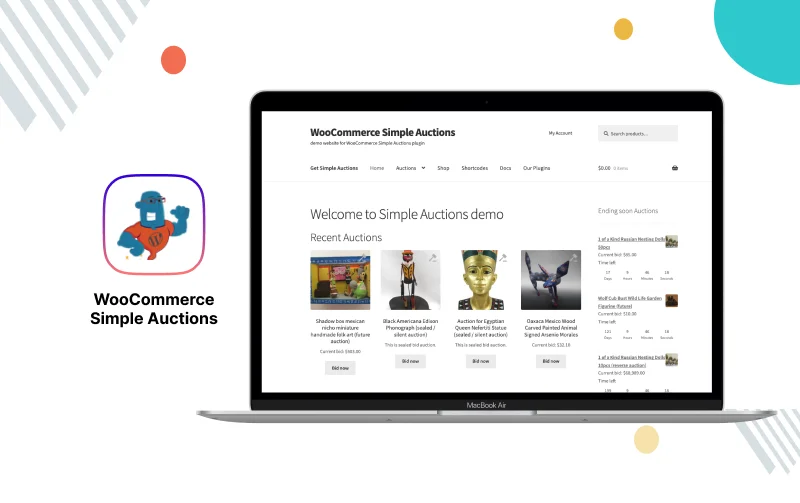
3. WooCommerce Simple Auctions
WooCommerce Simple Auctions is a long-running auction plugin for WordPress and WooCommerce.
It is built for store owners who want to create an eBay-style auction website without building custom auction software.
Where it works well
This option is useful for simple product bidding websites.
It is a good fit if you want normal auctions, reverse auctions, sealed auctions, and proxy or automatic bidding in a familiar WooCommerce setup.
Main features
This plugin adds an auction product type to WooCommerce. Store owners can set start price, price increment, reserve price, buy now price, start time, and end time.
It also supports Ajax bidding, anti-sniping, email notifications, auction history, reports, widgets, shortcodes, relisting, and auction watchlist features.
Pros
- Good for eBay-style auction websites
- Supports regular, reverse, sealed, and proxy auctions
- Includes anti-sniping
- Offers auction reports and history
- Works with normal WooCommerce flow
Things to check
- Some extra features may need add-ons.
- The interface may feel more practical than modern.
- Check support and update terms before buying.
Best fit
Use this plugin if you want a simple WooCommerce bidding plugin for regular auction products and eBay-style selling.
4. Auctions Made Easy for WooCommerce
Auctions Made Easy for WooCommerce is a paid WooCommerce marketplace extension for creating and managing online auctions.
It supports five auction types and gives both admins and customers a dashboard to manage auction activity.

Where it works well
This plugin fits stores that need more auction formats than a basic setup, but still want a managed WooCommerce extension.
It can work for stores that need normal auctions, reverse auctions, sealed auctions, proxy auctions, and unique auctions.
Main features
This plugin supports auction registration, registration fees, bid fees, buy now price, reserve price, automatic winner selection, and customer dashboards.
It also supports auction email notifications, watchlists, bid increment rules, winner payment flow, failed auction relist, and checkout blocks.
Pros
- Supports five auction types
- Includes admin and customer dashboards
- Offers registration and bid fee options
- Supports reserve price and buy now price
- Works with WooCommerce checkout
Things to check
- Guest bidding is not supported based on the official FAQ.
- Some users may need help with cron setup.
- Review current ratings and support history before buying.
Best fit
Use this plugin if you want several auction formats with customer dashboards and a WooCommerce marketplace product.
5. Ultimate Auction for WooCommerce
Ultimate Auction for WooCommerce is available in the WordPress plugin directory.
It is useful for store owners who want to test auction features before choosing a larger paid setup.

Where it works well
This plugin is a good starting point for basic auction needs.
It can help small stores test product bidding, auction pages, and buyer interest without a large upfront cost.
Main features
This plugin lets store owners create auction products in WooCommerce. It can help with basic bidding, auction display, and product-level auction selling.
The vendor also offers Pro options for stores that need more features like automatic bidding, anti-sniping, watchlists, and relisting.
Pros
- Free version available
- Useful for basic auction testing
- Works with WooCommerce
- Pro version adds more auction tools
Things to check
- The free version may be limited for serious stores.
- More useful features may need Pro.
- Not ideal for stores with complex auction rules.
Best fit
Use this if you want to test a WordPress auction plugin before moving to a more complete auction system.
6. Dokan Simple Auctions
Dokan Simple Auctions is made for Dokan marketplace users.
It is not a standalone auction plugin. It integrates WooCommerce Simple Auctions with Dokan so vendors can sell auction products from their dashboards.
Where it works well
This option fits stores that want a multivendor auction marketplace.
It is useful when vendors need to create auction listings, manage auction products, and sell auctionable items next to regular products.
Main features
The module requires WooCommerce, Dokan Pro, and WooCommerce Simple Auctions.
Once set up, it helps marketplace owners let vendors offer auctionable products through a Dokan-based marketplace flow.
This can work for art marketplaces, collectible marketplaces, used goods platforms, and vendor-based bidding stores.
Pros
- Good for Dokan-based auction marketplaces
- Lets vendors sell auctionable products
- Can support auction and regular products together
- Useful for niche marketplace models
Things to check
- It is not a standalone plugin.
- It requires Dokan Pro and WooCommerce Simple Auctions.
- Total setup cost may be higher than the module price.
Best fit
Use this if you already use Dokan or want to build a vendor-led auction marketplace on WooCommerce.
7. Ultimate Auction Pro
Ultimate Auction Pro is a WordPress and WooCommerce auction plugin for stores that need Pro auction features.
It can support stores that want automatic bidding, variable increments, soft close, auto relist, and bulk auction import.
Where it works well
This plugin is useful for stores that want a WordPress auction site with extra selling tools.
It can fit art, vehicle, collectible, nonprofit, and service auction use cases where relisting and automatic bidding may matter.
Main features
Ultimate Auction Pro includes automatic bidding, variable increment, soft-close or anti-sniping, auto relist, bulk import, and credit card collection options.
It also offers widgets, shortcodes, custom emails, watchlist, and WooCommerce support.
Pros
- Supports automatic bidding
- Includes anti-sniping
- Offers auto relist and bulk import
- Useful for WordPress auction websites
- Works for several auction niches
Things to check
- Pricing should be checked on the official page.
- Some features may depend on the selected plan.
- Test WooCommerce checkout flow before using it for large events.
Best fit
Use this plugin if you need a Pro WordPress auction plugin with tools like auto relist, bulk import, and automatic bidding.
Feature Comparison: Which WooCommerce Auction Plugin Offers More?
Feature count matters, but the best WooCommerce auction plugin should match your store’s selling model and buyer behavior.
Auction types and bidding methods
Webkul offers the widest range in this list with 11 auction types. This makes it useful for stores that want to test or run many auction models.
Auctions Made Easy supports five auction types, while other plugins cover standard, reverse, sealed, silent, and proxy bidding.
Real-time bidding and Ajax updates
Real-time bidding matters when users compete near the closing time. It keeps the price, timer, and bid status clear.
Webkul supports bidding without page refresh. Auctions for WooCommerce and WooCommerce Simple Auctions also support live or Ajax-style bidding features.
Proxy bidding and automatic bids
Proxy bidding lets buyers set their maximum bid. The system then bids for them based on the rules.
This helps buyers stay active even if they are not online during the full auction. It also keeps bidding moving on long-running auctions.
Anti-sniping and soft close auctions
Anti-sniping extends the auction when a bid comes in near the end. This gives other bidders time to respond.
This is useful for high-value products, collectibles, vehicles, rare goods, and any auction where last-second bidding can feel unfair.
Reserve price and buy now price
A reserve price protects sellers from selling below a minimum amount.
A buy now price gives buyers a faster purchase option. This is useful when a store wants bidding but still wants a direct sale path.
Bid increment and auction timer controls
Bid increments stop bidders from raising the price by very small amounts. They keep bidding cleaner and easier to follow.
Auction timer controls also matter. Stores should check start time, end time, countdown display, relist rules, and soft close settings.
Seller, admin, and customer controls
Admins need to see bids, winners, payment status, logs, reports, and failed auctions.
Customers need clear pages for active bids, won auctions, lost auctions, watchlists, payment reminders, and auction winner details.
For marketplaces, sellers also need controls to create and manage auction products from their own dashboard.
WooCommerce checkout and auction payment flow
The winner should be able to pay through WooCommerce checkout. This keeps orders, shipping, tax, payment gateways, and customer records in one system.
For active bidding stores, wallet payments, payment reminders, and pay-all-won-auctions options can make the process smoother.
How to Choose the Best WooCommerce Auction Plugin
The right choice depends on your store size, bidding model, product type, and checkout needs.
Do not choose only by feature count. A simple auction store and a busy live bidding website need different tools.
For a simple auction store
Choose a lighter plugin if you only need start price, end time, reserve price, buy now price, and normal bidding.
WooCommerce Simple Auctions or Ultimate Auction for WooCommerce may work well for small stores that are testing auctions.
For a real-time bidding website
Choose a plugin with live bid updates, clear timer display, bid history, and anti-sniping.
Webkul and Auctions for WooCommerce are good options when bidding speed and buyer trust matter.
For reverse auctions and sealed bidding
Reverse auctions are useful for B2B buying and supplier quotes. Sealed bidding works when bids need to stay private until the auction ends.
Webkul, Auctions Made Easy, and WooCommerce Simple Auctions can support these use cases in different ways.
For a multivendor auction marketplace
If vendors need to list auction products, you need marketplace support.
Dokan Simple Auctions is useful for Dokan users. Webkul can also fit vendor auction use cases when used with a compatible marketplace setup.
For stores that need stronger bidding rules
Choose a plugin with bid increments, reserve price, buy now price, proxy bidding, anti-sniping, logs, reports, and payment controls.
Webkul can be a good fit here because it brings many bidding, payment, and admin controls into one WooCommerce auction setup.
Why Webkul WooCommerce Auction Plugin Is a Strong Choice
Webkul WooCommerce Auction Plugin is built for store owners who want more than a basic bid button.
It helps manage bidding rules, auction types, live bid updates, buyer actions, payment flow, reports, and admin controls from WooCommerce.
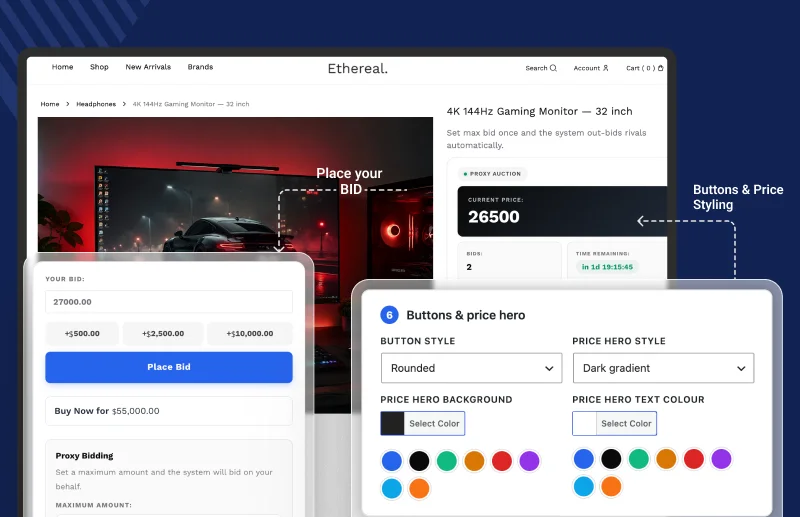
This makes it useful when a store wants one auction setup for bidding models, live updates, wallet payments, checkout, reports, shortcodes, and widgets.
Supports different auction business models
This plugin supports standard, reverse, sealed, proxy, penny, Dutch, unique bid, seated, silent, no-reserve, and charity auctions.
This helps stores run public auctions, private bids, fundraising events, supplier bids, and limited access auctions without separate tools for each auction model.
Helps create a live bidding experience
Live updates reduce confusion during active auctions.
Buyers can see current bid, timer, and bid status changes without refreshing the page. This is useful when several bidders are active at the same time.
Gives admins better auction control
Admins can manage bid rules, auction status, winners, reports, email templates, watchlists, and relists.
This matters because auction stores need clear records. If a bidder asks about the result, the admin should be able to check bid history and auction logs.
Works with WooCommerce checkout
This plugin connects auction winners with WooCommerce checkout. This keeps payment, orders, tax, shipping, and customer records inside the store.
It also supports wallet payments, payment reminders, and pay-all-won-auctions checkout. This can reduce separate setup work for common auction payment needs.
Fits growing auction stores
A small store may start with a few auction products. But as bidding grows, the store may need more rules, better reporting, and better payment follow-up.
Webkul can be a good fit when the store wants to grow from basic product bidding to a more complete online bidding store.
Final Verdict: Best WooCommerce Auction Plugin in 2026
The best WooCommerce Auction plugin in 2026 depends on what you want to build.
For a simple auction website, WooCommerce Simple Auctions can be enough. For a Dokan marketplace, Dokan Simple Auctions is the better fit.
For stores that need more auction types, live bidding, proxy bids, anti-sniping, wallet payments, reports, and admin control, Webkul is a good fit to review.
| Store need | Recommended plugin |
|---|---|
| More auction control and several bidding models | Webkul WooCommerce Auction Plugin |
| One WooCommerce setup with wallet, checkout, and auction reports | Webkul WooCommerce Auction Plugin |
| Real-time bidding with advanced bidding rules | Webkul WooCommerce Auction Plugin or Auctions for WooCommerce |
| Simple eBay-style auction website | WooCommerce Simple Auctions |
| Flexible auction formats with dashboards | Auctions Made Easy for WooCommerce or Webkul WooCommerce Auction Plugin |
| Free or basic auction testing | Ultimate Auction for WooCommerce |
| Dokan-based auction marketplace | Dokan Simple Auctions |
| Growing auction store with payment flow and admin controls | Webkul WooCommerce Auction Plugin |
If you want a product bidding website that may grow into a larger auction store, include Webkul WooCommerce Auction Plugin in your shortlist.
If you only need a small test, begin with a simpler tool and upgrade when your auction rules become more complex.
FAQs About WooCommerce Auction Plugins
What is the best WooCommerce auction plugin in 2026?
Webkul WooCommerce Auction Plugin is a strong choice for multiple auction types, live bidding, proxy bids, anti-sniping, and checkout, while simpler plugins suit basic auction stores.
Can I create an auction website with WooCommerce?
Yes, WooCommerce can run an auction website with the right auction plugin, adding bidding, timers, bid history, winner selection, payments, and auction product settings.
Does WooCommerce support auctions by default?
No, WooCommerce does not support auctions by default. You need an auction plugin to add bidding, countdown timers, bid increments, winner selection, and checkout.
Can I add real-time bidding to WooCommerce?
Yes, you can add real-time bidding with a WooCommerce auction plugin that updates bids, prices, and countdown timers instantly without refreshing the product page.
Can I use proxy bidding in WooCommerce?
Yes, some WooCommerce auction plugins support proxy bidding, allowing buyers to set a maximum bid while the system automatically places bids based on auction rules.
Can I run reverse auctions in WooCommerce?
Yes, you can run reverse auctions in WooCommerce with a compatible auction plugin, making them suitable for supplier quotes, procurement, B2B marketplaces, and service bidding.
Which WooCommerce auction plugin is best for online bidding stores?
Webkul WooCommerce Auction Plugin is well-suited for online bidding stores needing multiple auction types, live bidding, flexible bid rules, wallet support, and payments.
Can I build a multivendor auction marketplace with WooCommerce?
Yes, you can build a multivendor auction marketplace with WooCommerce by combining an auction plugin with a compatible marketplace plugin for vendor management.
What features should I check before choosing an auction plugin?
Choose an auction plugin that supports your auction types, live bidding, payments, checkout, theme compatibility, updates, reports, anti-sniping, and support.
Is a WordPress auction plugin enough for a WooCommerce store?
No, A WordPress auction plugin alone is not always enough for a WooCommerce store. Use a WooCommerce-compatible plugin for bidding, checkout, orders, payments, shipping, and taxes.

Be the first to comment.