


















Building an online marketplace like Amazon is the ultimate goal for many scaling businesses.
If you want to build Amazon-like marketplace WooCommerce, you can create a multi-vendor platform where multiple sellers list and sell products without you having to own or manage the inventory yourself.
With the right WooCommerce multi-vendor marketplace solution, you can manage sellers, products, orders, commissions, payments, and shipping from a single platform.
Learn more about building and managing a multi-vendor store with WooCommerce Marketplace.
The Vision Behind an Amazon-Like Platform
An Amazon-like platform requires a seamless harmony of independent business functions.
You need tools to register sellers, manage enormous catalogs, and display customer reviews.
It also requires systems to handle split payments, calculate commissions, and track shipping.
The key is connecting all these moving parts into one cohesive, automated customer journey.
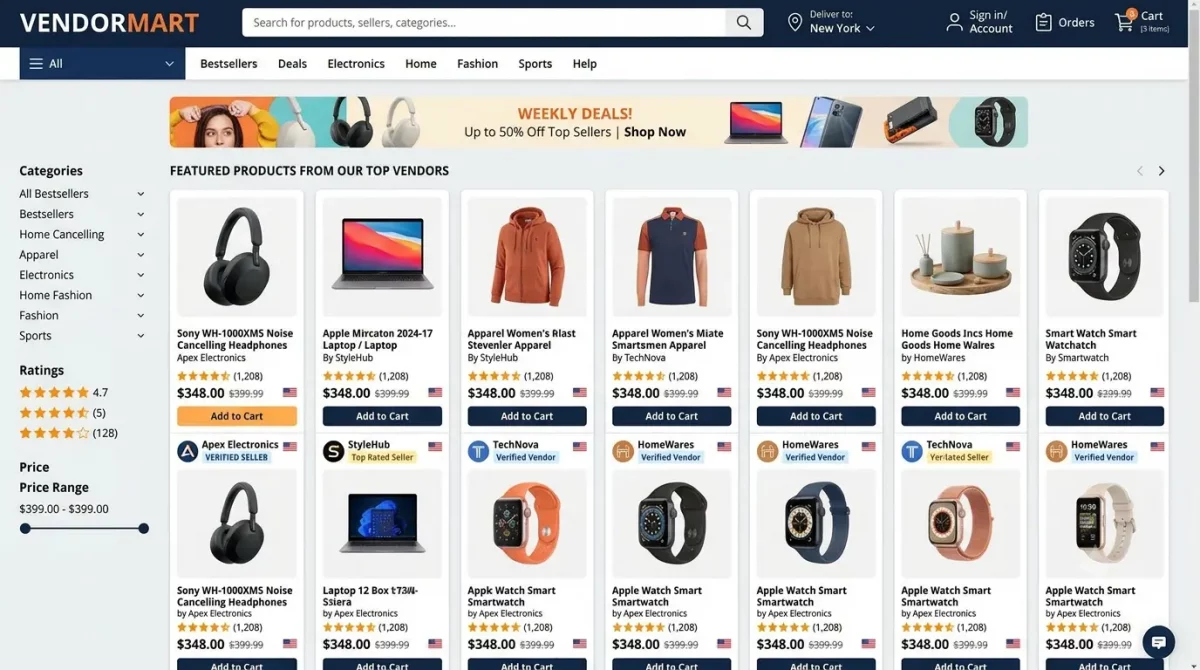
Choosing Your Marketplace Foundation
You do not need to build this complex infrastructure from scratch.
A successful marketplace is built on an eCommerce engine, a multi-vendor layer, and external integrations.
WooCommerce serves as the robust, open-source underlying eCommerce foundation for your operations.
To unlock multi-vendor capabilities, you need a specialized core marketplace layer on top of it.
Top 5 WooCommerce Plugins for Building an Amazon-Like Marketplace
When building a marketplace like Amazon, choosing the right multi-vendor plugin is critical. Here are the top 5 options and first is Webkul WooCommerce Marketplace:
- A powerful solution with advanced features for scaling marketplaces.
- Provides comprehensive seller dashboards, commission rules, and shipping management.
- WooCommerce Multi-Vendor Marketplace (WCFM Marketplace)
- One of the most popular solutions with comprehensive vendor management tools.
- Offers front-end vendor dashboards, commission management, and shipping integrations.
- WC Vendors
- A robust plugin that turns your WooCommerce store into a multi-vendor marketplace.
- Supports vendor registration, product management, and automated payouts.
- Product Vendors (by WooCommerce)
- Official WooCommerce solution for adding multi-vendor capabilities.
- Seamlessly integrates with WooCommerce core and extensions.
- Dokan
- Feature-rich multi-vendor marketplace solution with front-end vendor dashboards.
- Includes social authentication, product review systems, and refund management.
For a detailed comparison of leading options, explore our guide to the Best WooCommerce Multi-Vendor Plugins and find the right solution for your marketplace needs.
Mapping the Marketplace Solutions
To implement this, you need a clear overview of how different solutions work together.
The following map outlines the essential requirements and their corresponding technical integrations.
| Requirement | Marketplace Solution | Integration Overview |
|---|---|---|
| Multiple sellers | Multi-vendor marketplace plugin | Connects sellers with the central marketplace admin dashboard |
| Products | Vendor/product management | Sellers manage their own catalog through front-end dashboards |
| Customer shopping | Storefront + marketplace UX | Customers browse and purchase products from multiple sellers |
| Payments | Payment gateway / marketplace payment platform | Connects checkout payments with multi-vendor transaction rules |
| Commission | Marketplace commission system | Calculates and reserves the marketplace commission from seller sales |
| Payouts | Vendor payout system | Transfers remaining earnings to sellers according to schedule |
| Shipping | Shipping integration | Connects sellers, orders, carriers, and tracking information |
| Reviews | Product/vendor review system | Builds customer trust through transparent ratings and feedback |
| Search | Advanced search integration | Helps customers discover products instantly with filters |
| ERP/CRM | API/integration layer | Connects marketplace operations with your back-office systems |
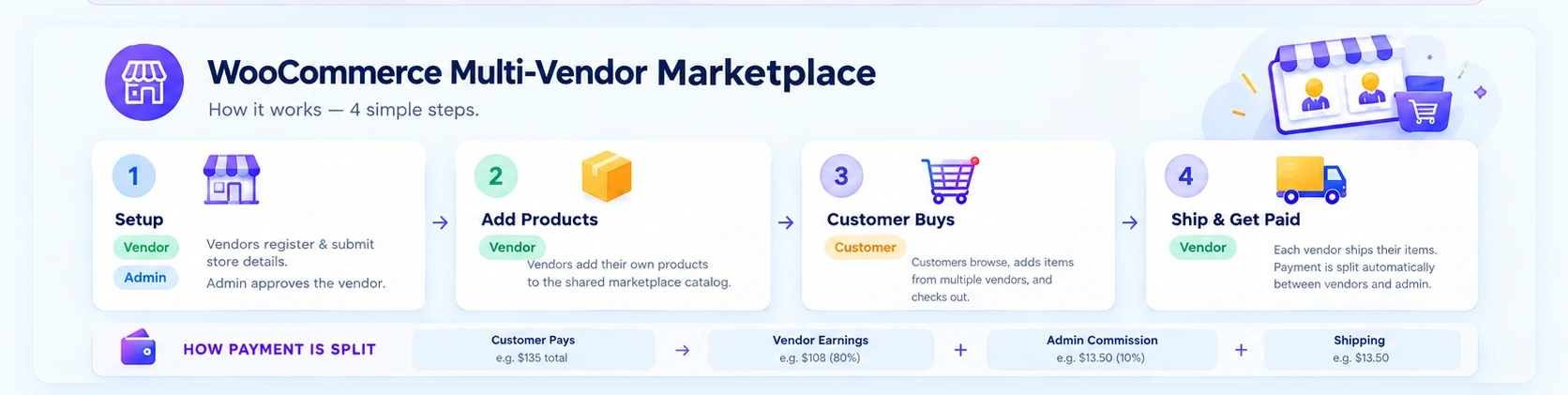
The Complete Marketplace Journey
To understand how these solutions interact, let us look at the complete transaction lifecycle.
- Seller Joins: A new vendor registers through the marketplace front-end registration form.
- Seller Adds Products: The vendor uploads physical or digital products via their dashboard.
- Customer Discovers: A visitor searches the catalog and finds items from different sellers.
- Cart & Checkout: The buyer adds products from multiple vendors to a single shopping cart.
- Payment Processing: The payment gateway processes the total amount securely at checkout.
- Commission Split: The system instantly calculates and deducts the marketplace owner’s share.
- Earnings Log: The seller’s net earnings are automatically recorded in their virtual ledger.
- Order Fulfillment: The dashboard splits the order, and each seller prepares their specific items.
- Logistics & Delivery: Sellers ship the items and upload carrier tracking codes for the customer.
- Vendor Payout: The platform releases the remaining funds to the seller based on agreed terms.
Recreating the Amazon-Like Experience
Recreating Amazon does not mean copying their exact design or user interface.
Instead, it means providing the same fast, intuitive, and trustworthy shopping experience.
This requires an advanced search engine like Elasticsearch to handle complex, multi-faceted queries.
Product pages must clearly display who is selling the item and show verified buyer reviews.
You should also offer smart product recommendations and clear, multi-seller shipping options.
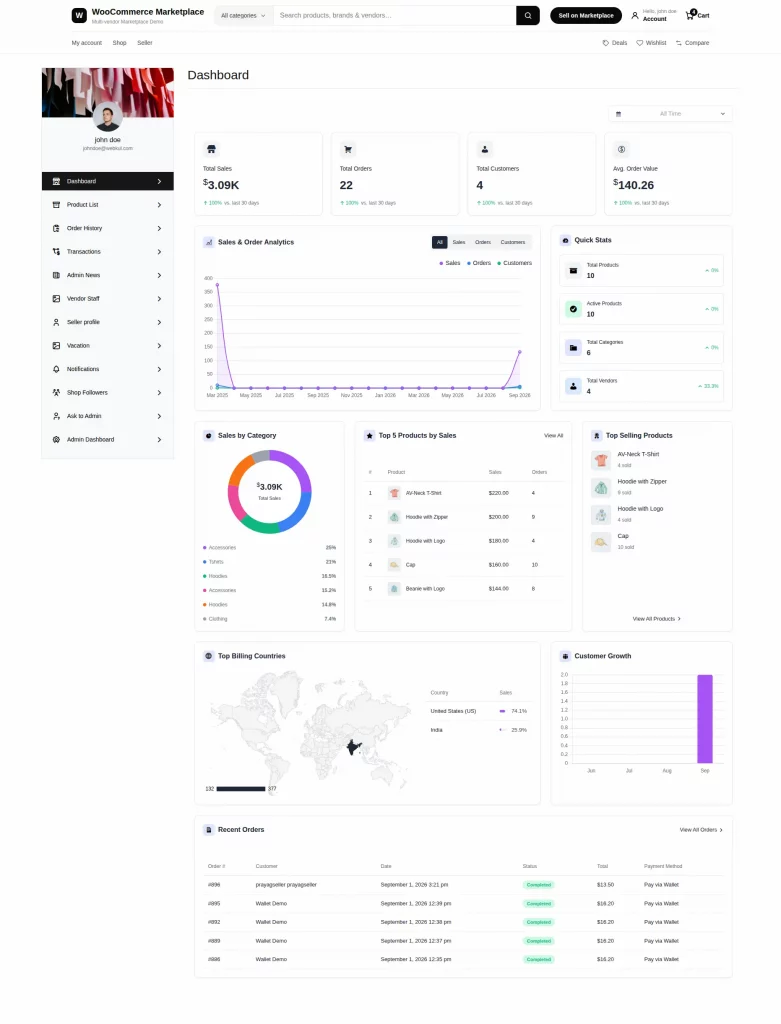
Designing a Multi-Seller Storefront with a Dedicated Theme
The user experience of a multi-vendor platform is vastly different from a standard eCommerce shop.
Standard themes do not have built-in visual areas for independent seller profiles or seller badges.
To solve this, choose a specialized marketplace theme that is compatible with your selected multi-vendor plugin.
A dedicated marketplace theme delivers several critical design advantages out of the box:
- Unified Front-End Brand: It keeps your overall marketplace design clean, uniform, and highly professional.
- Dedicated Vendor Storefronts: It automatically formats separate shop landing pages for individual sellers.
- Frictionless Navigation: It provides optimized sidebars, product category trees, and high-density grids.
- Mobile-First Responsiveness: It ensures customers can easily buy from multiple sellers on any screen.
- Pre-Optimized Layouts: It removes the need for extensive visual development, saving you time and cost.
Structuring Your Payment Architecture
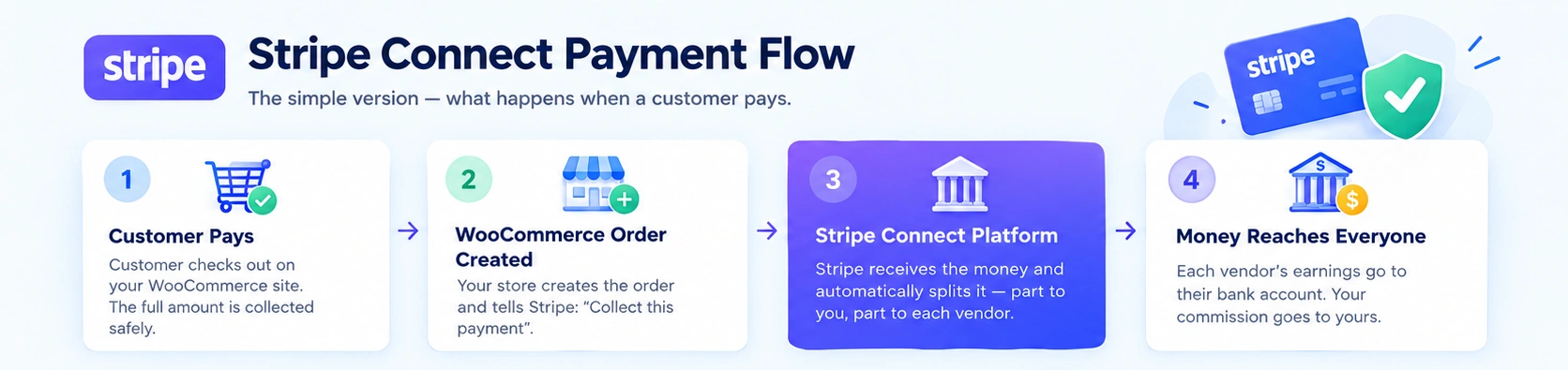
The payment system is the financial heart of your entire multi-vendor marketplace.
Money flows from the customer to the gateway, and is then split between you and your sellers.
A standard payment gateway cannot handle the unique complexity of multi-vendor transactions.
You must choose a payment architecture that matches your business model and legal regulations.
Model A: Escrow & Manual Payouts
The marketplace collects the full payment and manually pays sellers after a verification period.
Model B: Automated Split Payments
The gateway splits the payment instantly at checkout, sending commissions to you and earnings to sellers.
Model C: Specialized Marketplace Platforms
Services like Stripe Connect or PayPal for Marketplaces manage automated, compliant onboarding and payouts.
Implementation Framework: Configure, Integrate, Customize, Develop
Launching a successful marketplace requires a structured technical implementation strategy.
You can divide your development efforts into four clear phases to manage costs and complexity.
Configure
Enable existing out-of-the-box features like vendor registration, email notifications, and store settings.
Integrate
Connect external services like payment gateways, shipping carriers, and tax automation software.
Customize
Modify existing features to align with your specific branding, design guidelines, and user flows.
Develop
Write bespoke plugins or APIs for completely unique workflows that standard tools do not provide.
Your Strategic Marketplace Roadmap
To launch your Amazon-like marketplace successfully, follow this structured, step-by-step roadmap.
- Plan Your Model: Define your commission structure, target audience, and shipping policies.
- Set Up Your Foundation: Deploy high-performance web hosting and install the base WooCommerce engine.
- Choose Your Marketplace Plugin: Select a multi-vendor solution like WCFM, WC Vendors, Dokan, or Webkul based on your needs.
- Install the Marketplace Theme: Apply a dedicated marketplace theme to format seller-specific layouts and dashboard views.
- Set Up Vendor Tools: Configure the front-end seller registration page and vendor dashboards.
- Design the Customer Experience: Build an intuitive homepage, advanced search, and product filters.
- Connect Financial Systems: Integrate a marketplace payment platform like Stripe Connect for payouts.
- Automate Logistics: Integrate multi-vendor shipping calculators and carrier tracking systems.
- Run Complete Tests: Verify the full customer and seller journey using sandbox environments.
- Launch & Scale: Open your doors, onboard your first sellers, and optimize performance as you grow.
Conclusion
Building an Amazon-like marketplace with Webkul WooCommerce Marketplace is a journey of connecting individual, high-performance solutions.
By combining WooCommerce with a robust multi-vendor plugin and dedicated theme, you establish a powerful foundation.
This combination allows you to focus on scaling your seller network without worrying about core coding.
Start with a clear commission strategy, choose robust gateway partners, and begin onboarding your first sellers today.

Be the first to comment.