Learning how to manage component state in Hyvä using Magewire is one of the most important parts of building interactive, reactive storefronts.
Magewire makes this simple by allowing PHP properties to stay synchronized with the frontend automatically. Instead of writing complex JavaScript, you can manage UI state directly from your Magewire component.
In this guide, you’ll learn how to manage component state in Hyvä using Magewire, how state synchronization works, and how to combine Magewire with Alpine.js for a better user experience.
If you are new to this, start with our guide on creating reactive components in Hyvä using Magewire.
What Is Component State in Magewire?
Component state is the data your UI depends on.
For example, a counter value, search text, form input, modal visibility, or selected product can all be considered component state.
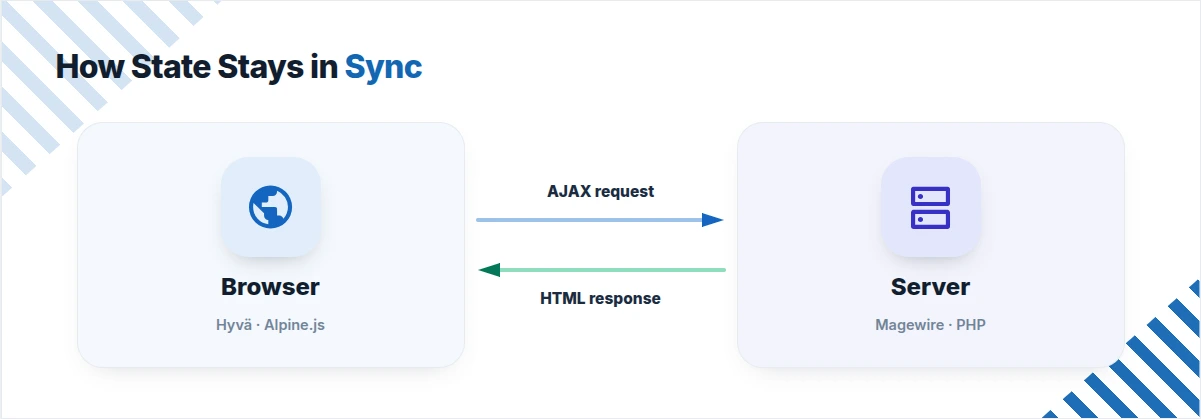
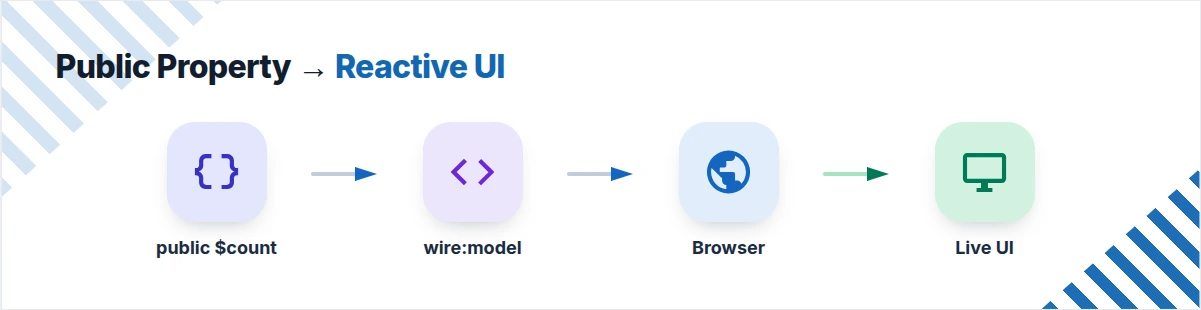
In Magewire, every public PHP property automatically becomes part of the component state.
Whenever the value changes, Magewire sends an AJAX request and updates only the affected HTML instead of refreshing the entire page.
This server-driven approach keeps your frontend clean while reducing JavaScript complexity.
Why Manage Component State in Hyvä Using Magewire?
Using Magewire for state management offers several benefits.
- Write business logic in PHP.
- Automatically synchronize data between backend and frontend.
- Reduce custom JavaScript.
- Keep Hyvä components reactive.
- Integrate seamlessly with Alpine.js.
This makes Magewire an excellent choice for building dynamic Hyvä components.
Step 1: Declare Component State
Every value you want Magewire to track must be declared as a public property.
Use the mount() lifecycle method to initialize values when the component loads.
namespace Vendor\Module\Magewire;

use Magewirephp\Magewire\Component;

class Counter extends Component
{
    public int $count = 0;

    public function mount(): void
    {
        if ($this->count === 0) {
            $this->count = 1;
        }
    }

    public function increment(): void
    {
        $this->count++;
    }
}
The $count property becomes part of the frontend state automatically.
Understanding the mount() Method
The mount() method runs only once when the component is first loaded.
Use it to:
- Load default values
- Fetch initial data
- Initialize component state
- Prepare variables before rendering
Unlike action methods, mount() is not executed during every AJAX request.
Step 2: Bind State in the PHTML Template
Magewire exposes the component through the $magewire variable.
You can display state, trigger actions, and synchronize form fields using wire directives.
<?php $magewire = $block->getMagewire(); ?>

<div>

    <p>
        Current Count:
        <span><?= $magewire->count ?></span>
    </p>

    <button wire:click="increment">
        Increment
    </button>

    <input
        type="text"
        wire:model="count"
    />

</div>
Here:
<?= $magewire->count ?>displays the current state.wire:clickcalls a PHP method.wire:modelkeeps the input synchronized with the PHP property.
How State Synchronization Works
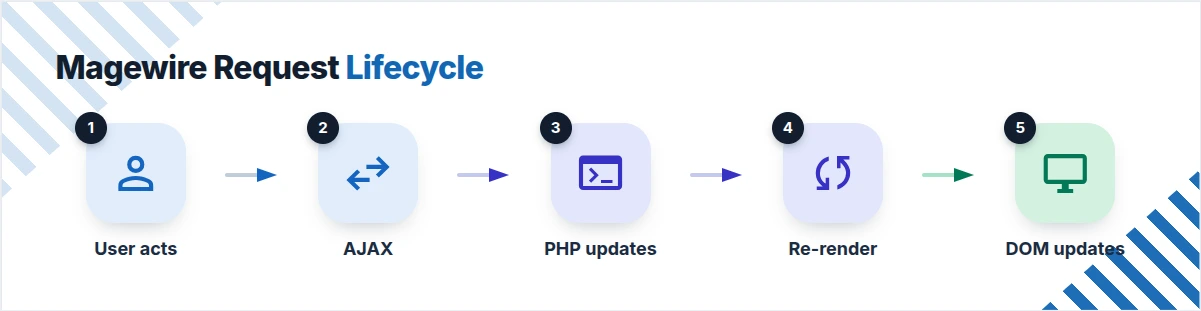
Magewire automatically keeps frontend and backend data synchronized.
The workflow is straightforward:
- A user interacts with the page.
- Magewire sends an AJAX request.
- The PHP component updates its public property.
- Magewire re-renders only the affected HTML.
- The browser receives the updated markup.
This process happens automatically without writing manual AJAX code.
Choosing the Right wire:model Directive
Magewire provides multiple synchronization options depending on your use case.
wire:model
Updates the property immediately after every input change.
<input wire:model="count">
Use this when instant updates are required.
wire:model.lazy
Updates the property only after the input loses focus.
<input wire:model.lazy="count">
This reduces unnecessary AJAX requests.
wire:model.debounce.500ms
Waits until the user stops typing before sending the update.
<input wire:model.debounce.500ms="count">
This option works well for search fields and live filtering.
Integrating Magewire with Alpine.js
Hyvä uses Alpine.js for lightweight frontend interactions.
Magewire integrates naturally with Alpine, allowing both tools to work together without conflicts.
There are two common approaches.
Option 1: Synchronize State with @entangle
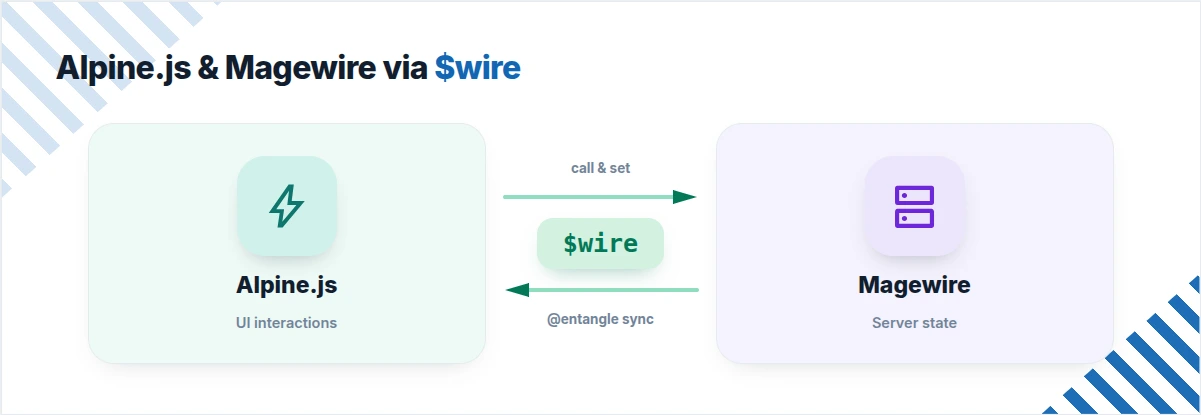
The @entangle directive creates two-way synchronization between Alpine.js and Magewire.
<div x-data="{ open: @entangle('isFormSaved') }">

    <div x-show="open">
        Form submitted successfully!
    </div>

</div>
If the PHP property changes, Alpine updates automatically.
Likewise, Alpine changes are synchronized back to Magewire.
Option 2: Access Magewire Using $wire
You can directly call Magewire methods or update properties from Alpine.
<div x-data="{}">

    <button @click="this.$wire.increment()">
        Increment via Alpine
    </button>

    <button @click="this.$wire.set('count', 10)">
        Set Count to 10
    </button>

</div>
This approach is useful when Alpine controls the interaction but Magewire manages the application state.
Responding to State Changes with Lifecycle Hooks
Magewire provides lifecycle hooks that execute automatically whenever a property changes.
These hooks are useful for validation, formatting, or applying business rules.
public function updatedCount($value): void
{
    if ($value > 100) {
        $this->count = 100;
    }
}
The updatedCount() method runs immediately after the count property changes.
Magewire also supports the updating<Property>() hook, which runs before the property is updated.
These hooks help keep component state consistent without adding extra frontend logic.
Best Practices to Manage Component State in Hyvä Using Magewire
Follow these recommendations when building Magewire components:
- Keep component state in public properties.
- Use
mount()only for initialization. - Keep business logic inside PHP methods.
- Choose the correct
wire:modelmodifier for each input. - Use Alpine.js only for lightweight UI interactions.
- Validate state using lifecycle hooks.
- Avoid storing unnecessary data in component properties.
These practices make components easier to maintain and improve performance.
Common Mistakes to Avoid
Developers often encounter these issues while working with Magewire:
- Declaring state as
privateorprotected. - Putting initialization logic inside action methods.
- Using
wire:modelfor every field unnecessarily. - Mixing too much JavaScript with Magewire.
- Ignoring lifecycle hooks for validation.
Keeping your components focused helps improve readability and maintainability.
Conclusion
Managing component state in Hyvä using Magewire is straightforward once you understand how public properties, wire directives, and lifecycle hooks work together.
Magewire automatically synchronizes backend state with the frontend, allowing you to build interactive components without writing complex JavaScript.
When combined with Alpine.js, you get a clean balance between server-driven state management and lightweight frontend interactions, making Hyvä development faster, simpler, and easier to maintain.

Be the first to comment.