A Practical Guide to Selecting Cloud Infrastructure, Estimating Costs, and Scaling Your SaaS Business.
1. Introduction
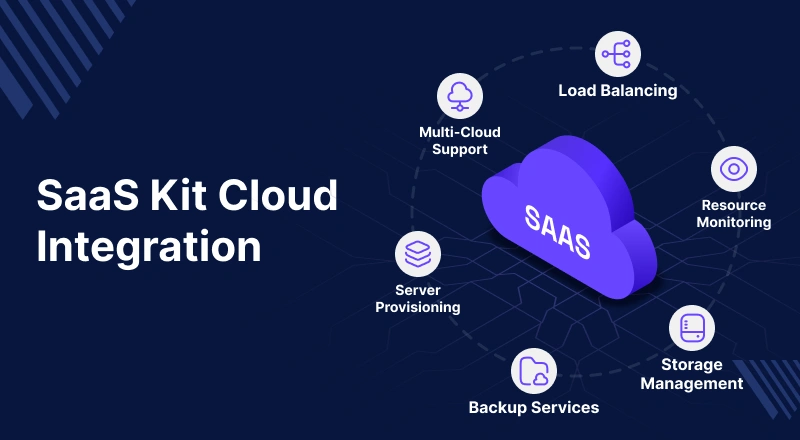
Launching an Odoo SaaS business involves more than simply buying a server and deploying customer databases.
Cloud Infrastructure & Storage planning plays the key role and success depends heavily on selecting the right infrastructure early and planning for future growth.
A common pitfall for new SaaS providers is under-provisioning resources (causing performance bottlenecks) or over-provisioning (leading to underutilized infrastructure and wasted capital).
This guide helps SaaS providers make data-driven infrastructure decisions. By the end of this document, you will understand:
- Which cloud provider fits your business stage and budget?
- How many customer instances can a server realistically support?
- Expected monthly infrastructure costs.
- When and how to scale your infrastructure smoothly.
All recommendations in this guide are tailored for Odoo SaaS Kit deployments, assuming low-to-medium user activity. It also includes Development in a SaaS Business.
2. Infrastructure Requirements Before You Launch
Infrastructure planning must be driven by projected customer onboarding rather than current needs.
Instead of asking “Which server should I buy?”, ask “How many customers do I expect to onboard over the next 6 to 12 months?”
In an Odoo SaaS Kit deployment, each customer instance consumes a share of server resources: processing power (vCPU), memory (RAM), storage, and network bandwidth.
As you onboard clients, database sizes grow, user activity spikes, and background jobs increase resource demands.
Variable Factors Impacting Resource Loads
Your actual capacity limits will fluctuate based on five key operational variables:
- User Concurrency
- App Complexity
- Database Footprint
- Scheduled Background Tasks
- Third-Party API Integrations
Baseline Sizing Guideline
As a rule of thumb, allocate the following baseline per tenant:
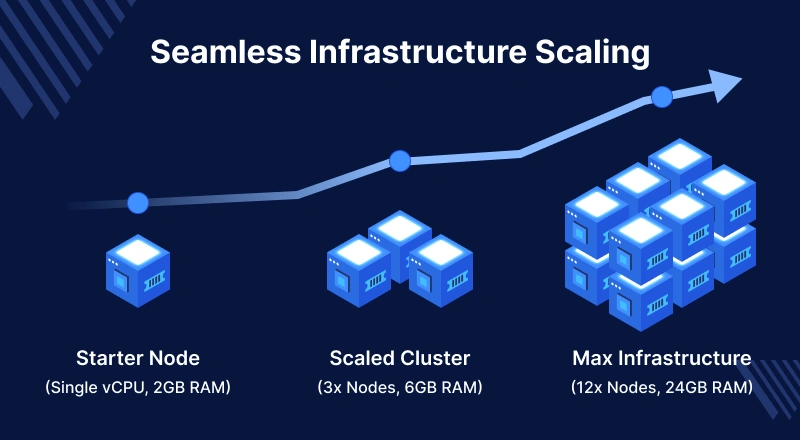
1 vCPU + 2 GB RAM per SaaS customer instance.
Actual consumption fluctuates based on:
- Concurrent user count per database.
- Number and complexity of installed Odoo applications.
- Database volume and daily transaction frequency.
- Third-party API integrations.
3. Selecting The Right Cloud Provider
The ideal cloud vendor depends on your budget, technical expertise, and growth velocity. Some prioritize affordability and simplicity, while others offer enterprise-grade scalability.
Cloud Provider Plans & Capacity Comparison
| Cloud Provider | Recommended Plan | CPU | RAM | Estimated Monthly Cost (USD) | Recommended Odoo SaaS Customers | Best For |
| Contabo | VPS 8 Core | 8 vCPU | 24 GB | $18 – $22 | 15 – 20 Clients | New SaaS Businesses |
| Contabo | VPS 12 Core | 12 vCPU | 48 GB | $32 – $38 | 35 – 40 Clients | Growing SaaS Businesses |
| DigitalOcean | Premium Droplet | 8 vCPU | 16 GB | $96 | 10 – 15 Clients | Startups seeking simplicity |
DigitalOcean | Premium Droplet | 8 vCPU | 32 GB | $192 | 20 – 25 Clients | Growing SaaS Businesses |
| Hetzner | CPX51 | 16 vCPU | 32 GB | $40 – $50 | 25 – 35 Clients | Cost-Conscious Businesses |
| Linode (Akamai) | Dedicated CPU | 8 vCPU | 16 GB | $72 – $90 | 15 – 20 Clients | Small to Mid-Size SaaS |
| Google Cloud | Custom VM | 8 vCPU | 32 GB | $140 – $210 | 20 – 30 Clients | Data-Heavy Applications |
| AWS | EC2 m7i / Equiv. | 8 vCPU | 32 GB | $150 – $220 | 20 – 30 Clients | Enterprise SaaS |
| Azure | D-Series VM | 8 vCPU | 32 GB | $150 – $230 | 20 – 30 Clients | Microsoft-Based Enterprises |
Cloud Provider Service Ecosystem
| Provider | Compute Service | Storage Service | Database Service | Networking Service | Auto Scaling |
| AWS | EC2 | S3, EBS | RDS, Aurora | VPC, ELB | Yes |
| Google Cloud | Compute Engine | Cloud Storage | Cloud SQL | VPC, Load Balancer | Yes |
| Azure | Virtual Machines | Blob Storage | Azure SQL | Virtual Network | Yes |
| DigitalOcean | Droplets | Spaces | Managed Database | VPC Network | Limited |
| Contabo | VPS | Local SSD | Self-Managed | Basic Networking | No |
| Hetzner | Cloud Server | Volume Storage | Self-Managed | Private Networking | No |
| Linode | Linode Instances | Object Storage | Managed Database | VPC Network | Limited |
Core Ecosystem Definitions
- Compute: The virtual server hosting your Odoo application core.
- Storage: Houses customer attachments, images, documents, and backups.
- Database: Stores structured ERP tables (sales, inventory, accounting).
- Networking: Secures communications via firewalls, private networks, and load balancers.
- Auto Scaling: Dynamic adjustment of compute resources during peak traffic spikes.
4. Server Sizing & Customer Slicing
Scenario 1: Validating a New SaaS Business (0 – 6 Months)
- Goal: Host 10 to 20 customers.
- Recommended Specs: 8 vCPU, 24 GB RAM, 200 GB NVMe Storage, 600 Mbps Network.
- Estimated Cost: ~$18 USD/month (e.g., Contabo VPS 8 Core).
- Takeaway: Maximizes ROI while validating your product-market fit.
Scenario 2: Aggressive Growth Plan (6 – 12 Months)
- Goal: Host 20 to 40 customers.
- Recommended Specs: 12 vCPU, 48 GB RAM, 250 GB NVMe Storage, 800 Mbps Network.
- Estimated Cost: ~$32 USD/month (e.g., Contabo VPS 12 Core).
- Takeaway: Eliminates immediate migration overheads and buffers high transaction spikes.
Tenant Segmentation Matrix
- Low Usage: Small teams, limited daily entries, basic apps (CRM, Sales). Low resource impact.
- Medium Usage: Multi-user collaboration, active inventory operations, frequent invoicing. Standard impact.
- High Usage: Large concurrent user bases, continuous manufacturing runs, heavy API integrations. High resource impact; requires isolated resource allocation.
5. Scaling Strategies & Upgrades
Avoid premature upgrades. Monitor performance metrics continuously and initiate scaling only when:
- vCPU utilization spikes above 70% during business hours.
- RAM utilization consistently exceeds 75%.
- User-facing response times degrade during peak operational hours.
Scaling Methodologies
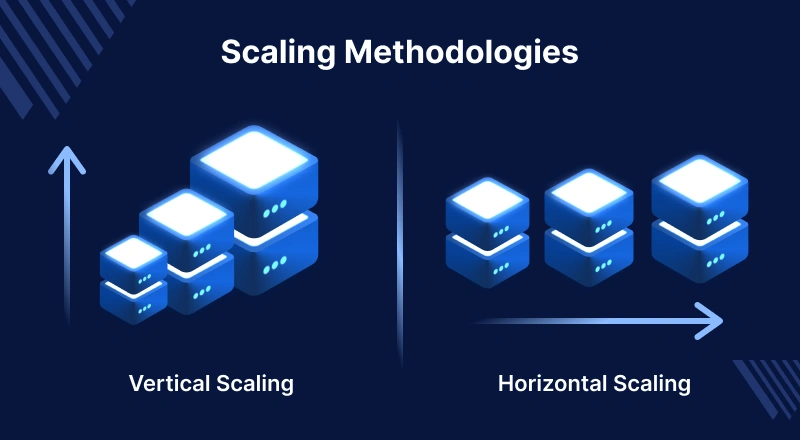
Vertical Scaling (Scale Up):
Vertical scaling is a process of increasing capacity of a single server by upgrading its hardware resources, such as adding more CPU cores, increasing RAM, using faster SSD, or improving network.
Instead of adding more servers, the existing server becomes more powerful, allowing it to handle a higher workload.
This approach is simple to implement because it usually requires minimal changes to the application architecture.
However, vertical scaling has limitations since every server has a maximum hardware capacity.
It can also become expensive as higher-end hardware costs significantly more, and upgrading a production server may require downtime.
Horizontal Scaling (Scale Out):
Horizontal scaling is the process of increasing application capacity by adding multiple servers instead of upgrading a single one.
The workload is distributed across these servers using a load balancer, allowing the application to handle a much larger number of users and requests.
This approach provides better scalability, high availability, and fault tolerance because if one server fails, the remaining servers continue serving users.
Although horizontal scaling requires a more complex architecture, including load balancing, database replication, and synchronization.
It is the preferred approach for large-scale SaaS platforms and cloud-native applications because it can scale almost indefinitely as demand grows.
Remote Database Configuration
As the number of customer databases grows on a SaaS platform, the SaaS administrator may choose to configure a remote PostgreSQL database to improve infrastructure efficiency.
The SaaS Kit supports connecting to a remote database server, enabling the application and database to run on separate machines.
Benefits:
- Separates the application and database workloads.
- Improves performance for multiple SaaS instances.
- Allows independent scaling of the application and database servers.
- Enhances security by isolating the database server.
- Simplifies backup, maintenance, and disaster recovery.
- Supports a more scalable and reliable SaaS infrastructure.
6. Financial Blueprint & Break-Even Analysis
Understanding your break-even trajectory requires factoring in upfront software license costs and recurring infrastructure costs against subscription revenue.
Upfront Capital & Operations Setup
- Odoo SaaS Kit License: $699 (One-time)
- Baseline Infrastructure: $18/month (Contabo VPS 8 Core)
6-Month Operations Projection
- Months 1–3: Setup, deployment, and testing. 0 Customers. Cumulative Cost: $753.
- Month 4: Onboard 5 customers on a basic subscription tier ($25/month/customer).
- Monthly Revenue: $125
- Net Monthly Profit: $125 – $18 = $107
- Unrecovered Investment: $646
- Months 5–6: Steady state with the baseline 5 customers. Unrecovered investment drops to $432 by Month 6.
Growth Sprint (Month 7)
Onboarding 10 additional clients boosts your base to 15 active subscribers:
Monthly Revenue = 15 \times \$25 = \$375$$
Net Monthly Profit = \$375 – \$18 = \$357$$
At this pace, the remaining $432 investment is fully recovered in 12 months, with the business breaking even around Month 8.
7. SaaS Subscription & Pricing Strategy
To compete effectively with Odoo Online, you must position your pricing based on localized Odoo subscription baselines, operational costs, and the proprietary value-added layers you package.
Odoo Online Baseline Price Index (Per Baseline)
| Region | Standard Plan | Custom Plan |
| India | $8 – $11 | $13 – $17 |
| UAE | $13 – $17 | $20 – $26 |
| Saudi Arabia | $16 – $21 | $25 – $32 |
User/Month Monitored Subscription Tiers
Instead of complex per-user pricing, offering fixed, predictable subscription brackets simplifies the sales pipeline for B2B prospects.
Regional Strategy: India (Fixed-Tier Framework)
- Starter ($29/mo): Up to 5 users. Best for small businesses.
- Growth ($59/mo): Up to 15 users. Designed for scaling operations.
- Business ($99/mo): Up to 30 users. Target market: Established companies.
Regional Strategy: Middle East (Managed ERP Positioning)
- Starter ($49/mo): Up to 5 users.
- Growth ($99/mo): Up to 15 users. Includes priority support.
- Enterprise ($199/mo): Up to 30 users. Includes periodic compliance/accounting audits.
8. Value Differentiation: Odoo Online vs. Odoo SaaS Kit
SaaS platforms succeed not by undercutting raw hosting prices, but by offering customized vertical ecosystem solutions that Odoo Online cannot natively provide due to platform constraints.
Functional Comparison
| Feature | Odoo Online | Odoo SaaS Kit |
| Standard Core App Suites | ✓ | ✓ |
| Managed Cloud Architecture | ✓ | ✓ |
| Isolated Tenant Databases | ✓ | ✓ |
| Third-Party App Store Modules | ✗ | ✓ |
| Custom Code & App Deployments | ✗ | ✓ |
| Vertical Industrial Localizations | Limited | ✓ |
| Advanced Marketplace Integrations | Limited | ✓ |
| Root Infrastructure Control | ✗ | ✓ |
Strategic Takeaway: Leverage the flexibility of the Odoo SaaS Kit to target vertical markets (e.g., “Odoo for Healthcare” or “Odoo for Multi-Warehouse Logistics”).
Bundling niche custom modules, pre-configured workflows, and local support creates a highly defensive business model that justifies premium SaaS pricing.

Be the first to comment.