SalesforceIQ is Customer Relationship Management (CRM) solution for Small Business . It tracks and analyzes the day-to-day interactions that create and sustain business relationships.
To Create New Custom Integration In SalesforceIQ :
- Log in to your SalesforceIQ Account. You must log in as an administrator or as a user who has the “Modify All Data” Permission.
- Go to Settings
- Select Integrations
- Go to Custom integration and Select CUSTOM

- Fill all detail and Get TOKEN ( API Key and API Secret Key ) and Save it.
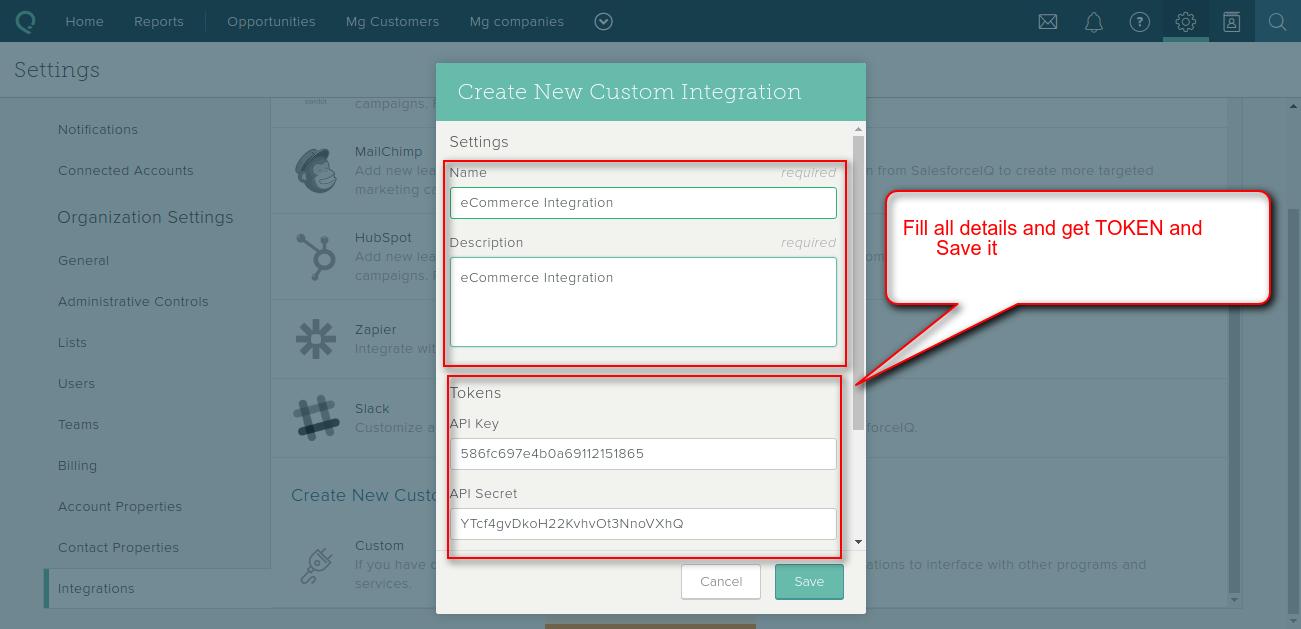
NOTE : Write down your Secret and store it in a safe place. This will only be displayed once.
Support
That is all for the How to Create New Custom Integration In SalesforceIQ, still have any issue feel free to add a ticket and let us know your views to make this Blog better webkul.uvdesk.com

Be the first to comment.