Pimcore 12 (Platform 2026.1) ships Studio, a React single-page app. A Pimcore Studio Plugin is now a React micro-frontend, not an ExtJS panel.
This guide walks you through building a Pimcore Studio Plugin end to end.
Our goal is simple. Add a nav item and a screen to Studio by shipping a federated React remote the host loads at runtime.
The old admin panel is retired. So if you searched pimcore extjs replacement or pimcore studio ui extend, this post is your map.
We will cover the PHP entry-point provider, the rsbuild toolchain, and the React registration. Every command, class, and config key here is real.
If you are new to Pimcore setup, start with our guide to the Pimcore development environment. It covers the base install this plugin sits on.
Why Studio Plugins Replaced ExtJS, and the Three-Part Architecture
Pimcore’s classic admin ran on ExtJS. In Platform 2026.1, that admin is removed. Studio, a React SPA, takes its place.
The whole shell is built on Module Federation. Studio is the host. Your plugin is a federated remote container it loads and bootstraps.
You no longer register ExtJS classes. You ship a React remote instead — that remote is your Pimcore Studio Plugin.
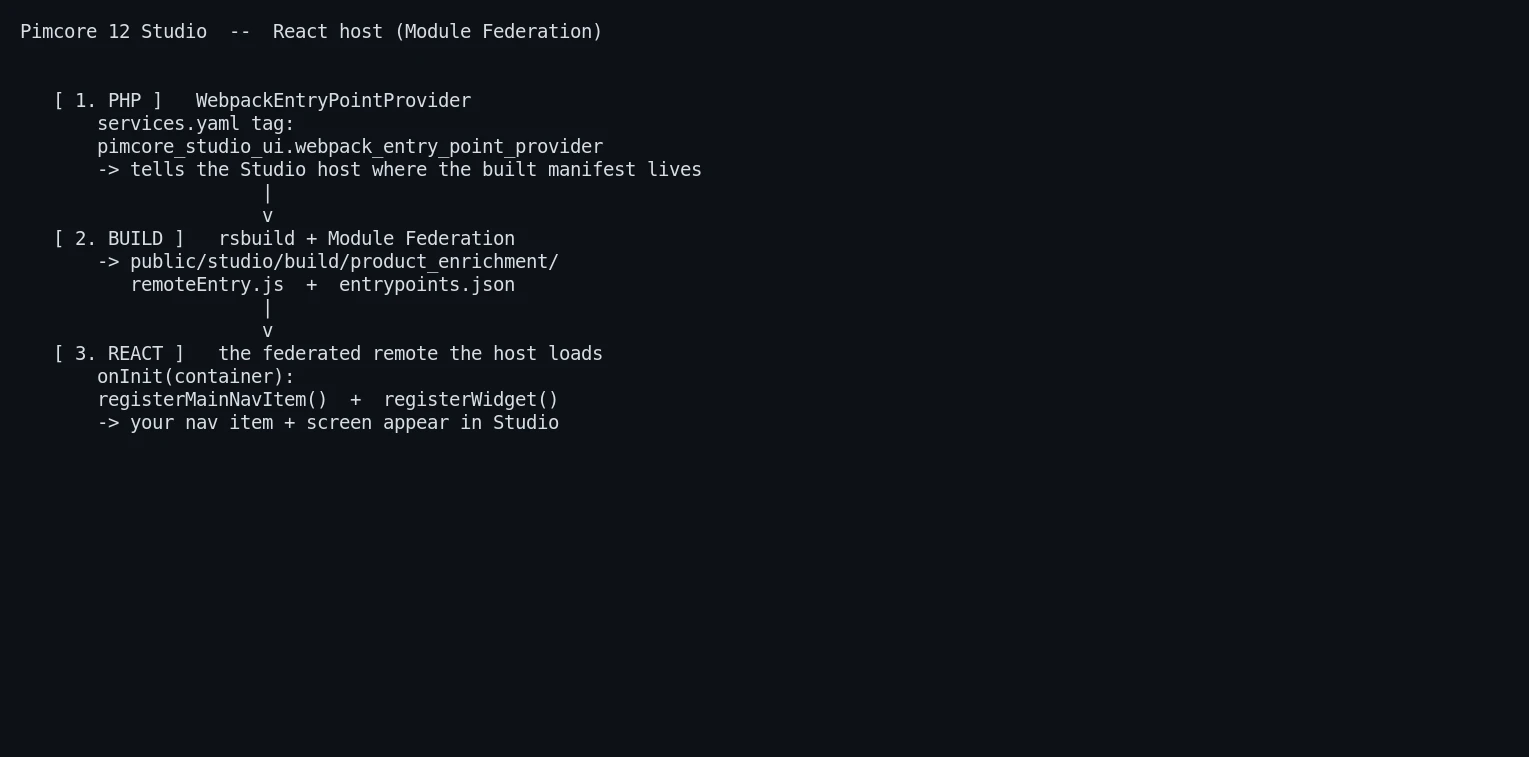
A plugin has three moving parts. Learn these once and the rest is mechanical.
First, a PHP seam. A WebpackEntryPointProvider service, tagged for Studio, tells the host where your built JS manifest lives on disk.
Second, the build output. rsbuild writes a federated bundle to public/studio/build/<PLUGIN_NAME>/ inside your bundle root.
Third, the runtime. The host injects an exposeRemote.js bootstrap, registers your remote, then calls your plugin object’s onInit hook.
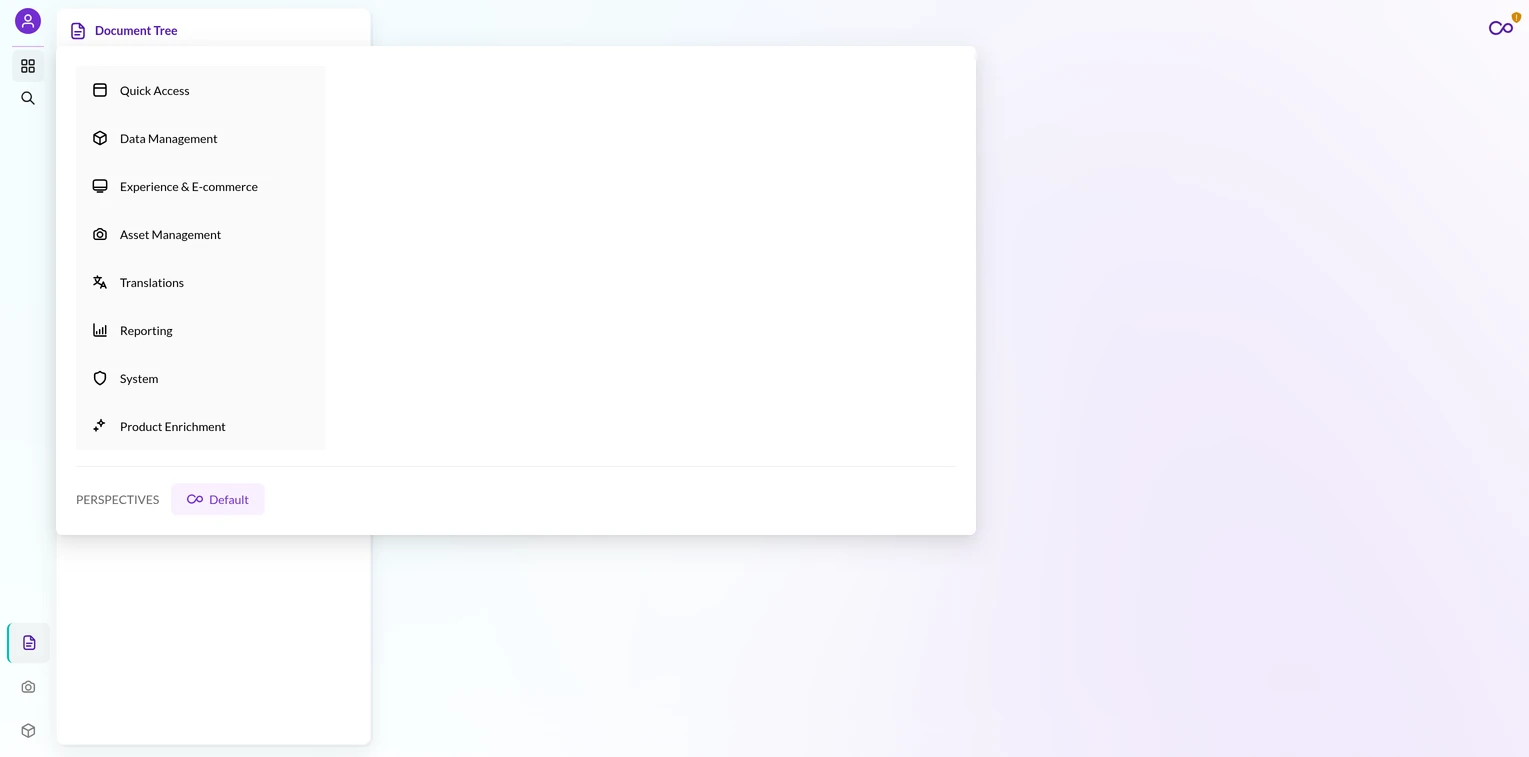
That hook registers your nav items and widgets into the host’s dependency-injection container. Nothing lands in a database.
Scaffold the Pimcore Studio Plugin Directory
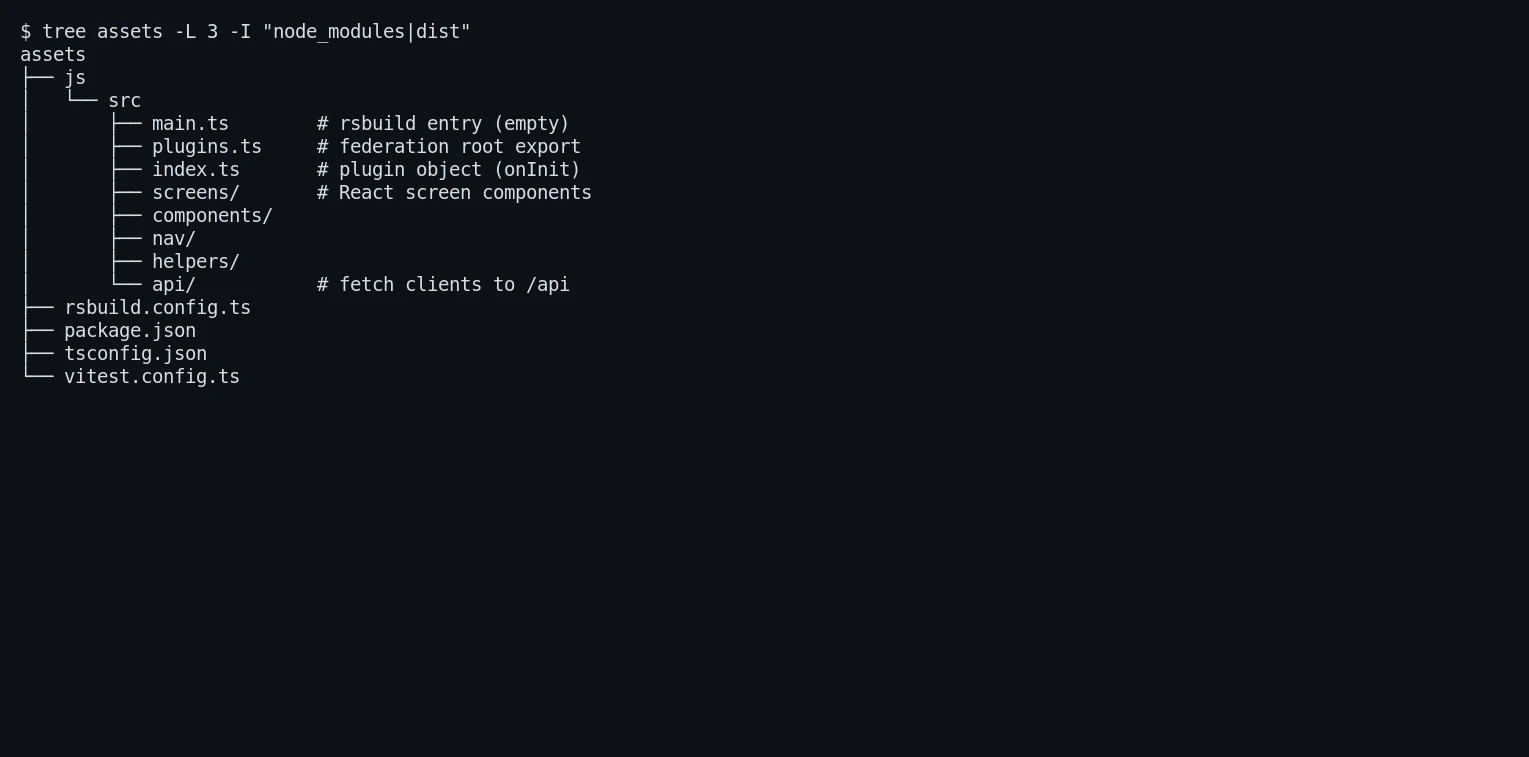
Your frontend lives in an assets/ directory inside the bundle. This is the source root for your Pimcore Studio Plugin.
The layout is small and predictable:
assets/
├── js/src/
│   ├── main.ts        # rsbuild entry (intentionally empty)
│   ├── plugins.ts     # federation root export
│   ├── index.ts       # plugin object definition
│   ├── screens/       # React screen components
│   └── api/           # fetch clients to your /api backend
├── rsbuild.config.ts
├── tsconfig.json
└── package.json
Note that main.ts stays empty on purpose. The real surface is the federation exposes, not the entry file.
Pin the Studio SDK in package.json
The SDK version is the single most important line in your package.json. Pin it to the exact host version.
{
  "dependencies": {
    "@pimcore/studio-ui-bundle": "2026.1.3",
    "antd": "^5.22.0",
    "i18next": "^23.16.8",
    "react": "18.3.1",
    "react-dom": "18.3.1",
    "react-i18next": "^14.1.3",
    "react-redux": "^9.1.2"
  },
  "scripts": {
    "build": "rsbuild build",
    "dev": "NODE_ENV=development rsbuild build --watch",
    "type-check": "tsc --noEmit",
    "test": "vitest run"
  }
}
Never use ^, canary, or latest on the SDK. Version drift causes “remotes not resolved” errors or type-check failures.
Verify the host version with a quick composer check. Run composer show pimcore/studio-ui-bundle and match the npm pin to it.
The npm package is types-only. It ships .d.ts files for TypeScript, but no runtime .js. The real code comes from the running host.
Configure rsbuild and Module Federation
The rsbuild.config.ts file wires up Module Federation and the output path. Two constants act as the single source of truth.
const PLUGIN_NAME = 'product_enrichment'
const BUNDLE_ASSET_NAME = 'productenrichmentagent'

export default defineConfig({
    plugins: [
        pluginReact(),
        pluginModuleFederation({
            name: PLUGIN_NAME,
            filename: 'remoteEntry.js',
            exposes: { '.': './js/src/plugins.ts' },
            remotes: {
                '@pimcore/studio-ui-bundle': createDynamicRemote('pimcore_studio_ui_bundle'),
            },
            shared: {
                react: { singleton: true, requiredVersion: false },
                'react-dom': { singleton: true, requiredVersion: false },
                antd: { singleton: true, requiredVersion: false },
                i18next: { singleton: true, requiredVersion: false },
                'react-i18next': { singleton: true, requiredVersion: false },
                'react-redux': { singleton: true, requiredVersion: false },
            },
        }),
        pluginGenerateEntrypoints(),
    ],
    source: { entry: { main: './js/src/main.ts' } },
    output: {
        distPath: { root: '../public/studio/build/' + PLUGIN_NAME },
        assetPrefix: '/bundles/' + BUNDLE_ASSET_NAME + '/studio/build/' + PLUGIN_NAME + '/',
        cleanDistPath: true,
        manifest: true,
        filename: { js: '[name].js' },
    },
})
The remotes mapping externalizes the SDK. Without it, the build fails with Package subpath './app' is not defined by "exports".
That distPath escapes assets/ into the bundle’s public/ folder. This placement is what lets assets:install publish it later.
Your tsconfig.json needs skipLibCheck: true. The SDK’s type tree references many packages, and checking all of them drowns you in false positives.
Register the Bundle Before You Wire Studio
None of the PHP seam matters until Symfony knows the bundle exists. Register and install it first.
Add the bundle to config/bundles.php so the kernel loads it:
Webkul\ProductEnrichmentAgentBundle\ProductEnrichmentAgentBundle::class => ['all' => true],
Then install it and warm the cache:
bin/console cache:clear
bin/console pimcore:bundle:install ProductEnrichmentAgentBundle
Skip this and the provider, services.yaml, and controllers never load. Your nav will never appear, no matter how clean the frontend build is.
Register the Entry Point in PHP
Now the PHP seam. This class tells Studio where your Pimcore Studio Plugin manifest sits on disk.
namespace Webkul\ProductEnrichmentAgentBundle\Webpack;

use Pimcore\Bundle\StudioUiBundle\Webpack\WebpackEntryPointProviderInterface;

class WebpackEntryPointProvider implements WebpackEntryPointProviderInterface
{
    public function getEntryPointsJsonLocations(): array
    {
        return glob(__DIR__ . '/../../public/studio/build/*/entrypoints.json') ?: [];
    }

    public function getEntryPoints(): array
    {
        return $this->getEntryPointsJsonLocations() === [] ? [] : ['exposeRemote'];
    }

    public function getOptionalEntryPoints(): array
    {
        return [];
    }
}
The glob() uses a wildcard directory, so renaming the plugin never breaks the lookup. That ?: [] guard returns an empty array before your first build.
Note getEntryPoints() returns ['exposeRemote'], not main. That named entry is the Module Federation bootstrap the host injects.
Wrap the whole class in if (interface_exists(WebpackEntryPointProviderInterface::class)) { … }. This lets the bundle boot headless for CLI and jobs when Studio is absent.
Then tag the service so the host discovers it. Add these three lines to your services.yaml:
Webkul\ProductEnrichmentAgentBundle\Webpack\WebpackEntryPointProvider:
    tags:
        - { name: 'pimcore_studio_ui.webpack_entry_point_provider' }
The tag string is exactly pimcore_studio_ui.webpack_entry_point_provider. No alias, no id.
Write the JS Entry and the Plugin Object
The federation root is plugins.ts. It re-exports the plugin object the host imports from '.'.
import { productEnrichmentAgentPlugin } from './index'
export { productEnrichmentAgentPlugin }
The plugin object itself lives in index.ts. Its onInit hook receives the host’s container and registers everything. Start with the imports and the local types, so the snippet compiles as shown:
import type { ComponentType } from 'react'
import type { Container } from 'inversify'
import { serviceIds } from '@pimcore/studio-ui-bundle/app'
import { CredentialConfig } from './screens/CredentialConfig'
import { ProductEnrichmentIcon, PRODUCT_ENRICHMENT_ICON } from './components/ProductEnrichmentIcon'
import { PE_NAV_PERMISSION } from './nav/permissions'
import { WIDGET_CREDENTIALS } from './components/widgetIds'

interface MainNavRegistryLike {
    registerMainNavItem: (item: Record<string, unknown>) => void
}
interface WidgetRegistryLike {
    registerWidget: (widget: { name: string; component: ComponentType }) => void
}
With the types in place, the plugin object is a small, declarative shape:
export const productEnrichmentAgentPlugin = {
    name: 'product-enrichment-agent',
    priority: 70,

    onInit: ({ container }: { container: Container }): void => {
        try {
            const mainNav = container.get<MainNavRegistryLike>(serviceIds.mainNavRegistry)
            const widgets = container.get<WidgetRegistryLike>(serviceIds.widgetManager)

            widgets.registerWidget({ name: WIDGET_CREDENTIALS, component: CredentialConfig })

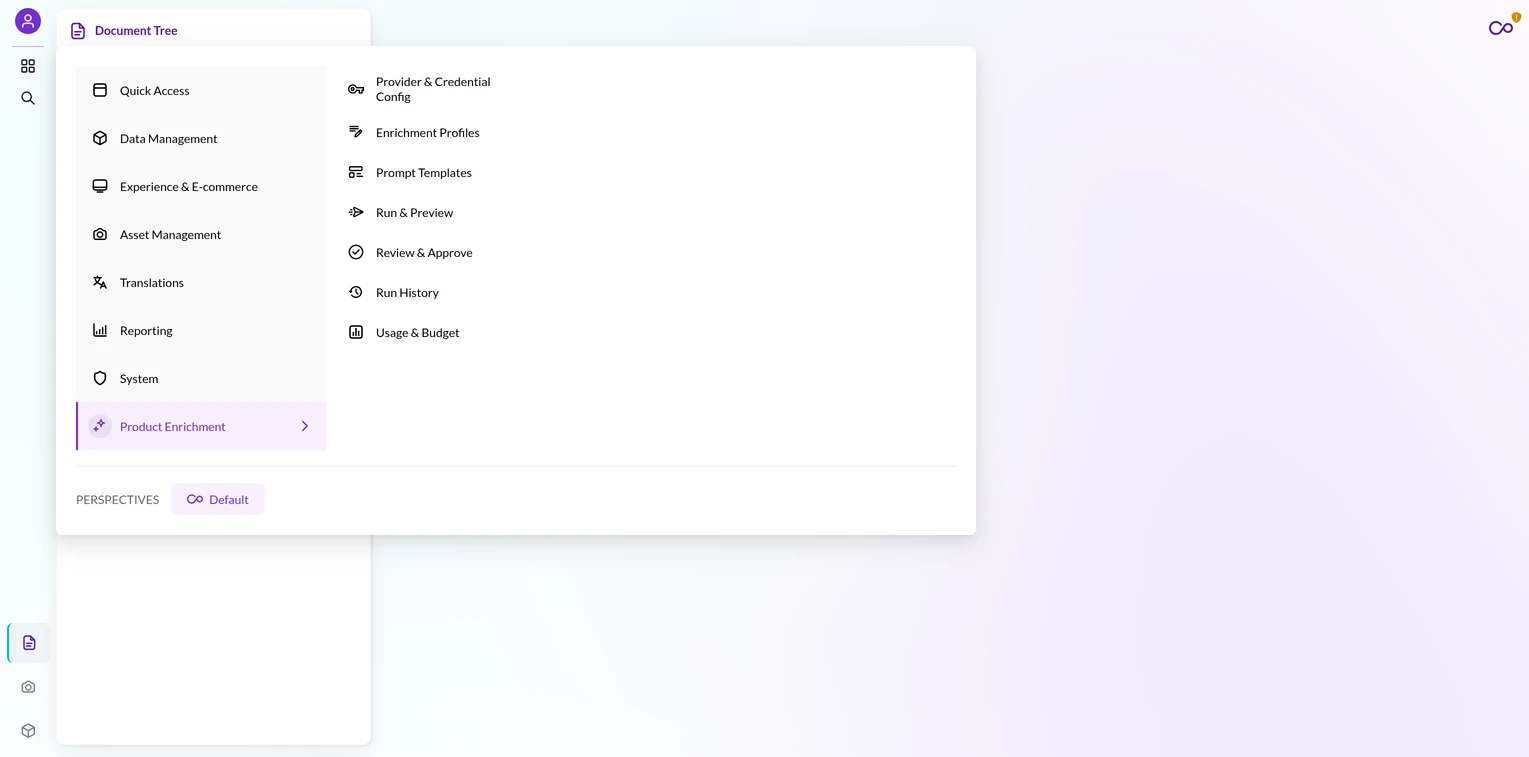
            mainNav.registerMainNavItem({
                path: 'Product Enrichment',
                label: 'Product Enrichment',
                icon: PRODUCT_ENRICHMENT_ICON,
                order: 9999,
            })

            mainNav.registerMainNavItem({
                path: 'Product Enrichment/Provider & Credential Config',
                label: 'Provider & Credential Config',
                icon: 'key',
                order: 10,
                permission: PE_NAV_PERMISSION.credentialsView,
                id: WIDGET_CREDENTIALS,
                widgetConfig: {
                    type: 'tab',
                    name: 'Provider & Credential Config',
                    component: WIDGET_CREDENTIALS,
                    id: WIDGET_CREDENTIALS,
                    config: { translationKey: 'Provider & Credential Config' },
                },
            })
        } catch (err) {
            console.error('[ProductEnrichment] failed to register plugin:', err)
        }
    },

    onStartup: (): void => {},
}
The host hands you the container. You resolve services with container.get(serviceIds.mainNavRegistry) and friends.
Always import IDs from serviceIds. Never invent a string like 'MainNavRegistry'.
Register parent folders first, then leaves. A folder has no widgetConfig; a leaf does. The leaf’s component is a string widget name, bound separately by registerWidget.
A leaf icon: must be an existing host icon name, or it renders blank. Built-in names like 'key' resolve; an unknown string silently produces an empty glyph.
Keep the whole body in a try/catch with a prefixed log. If onInit throws, the host silently drops your entire nav, and this log is your only breadcrumb.
Build a React Screen and Mount It
A screen is a plain React component. It uses SDK components and talks to your bundle’s own /api backend.
import React, { useCallback, useEffect, useState } from 'react'
import { useTranslation } from '@pimcore/studio-ui-bundle/app'
import { Content, Flex, Text, Title } from '@pimcore/studio-ui-bundle/components'
import { listProfiles, type ProfileRow } from '../api/profiles'

export const Profiles = (): React.ReactElement => {
    const { t } = useTranslation()
    const [rows, setRows] = useState<ProfileRow[]>([])
    const [loading, setLoading] = useState<boolean>(true)
    const [error, setError] = useState<string | null>(null)

    const reload = useCallback(async (): Promise<void> => {
        setLoading(true); setError(null)
        try {
            setRows(await listProfiles())
        } catch (e) {
            setError(e instanceof Error ? e.message : String(e))
        } finally {
            setLoading(false)
        }
    }, [])

    useEffect(() => { void reload() }, [reload])

    return (
        <Content padded loading={loading}>
            <Flex align="center" justify="space-between">
                <Title level={4}>{t('Enrichment Profiles')}</Title>
            </Flex>
            {error !== null && <Text type="danger">{error}</Text>}
            {!loading && rows.length === 0 && <Text type="secondary">{t('No profiles yet.')}</Text>}
        </Content>
    )
}
Import UI parts from @pimcore/studio-ui-bundle/components. Never import raw antd. The SDK wraps antd with the host’s theme and i18n.
Your fetch client lives in api/. It carries the Studio session cookie and throws on failure.
The bundle ships the matching ProfileController, mounted at /api/product-enrichment-agent/profiles, so this endpoint is real, not assumed:
export const PROFILE_BASE = '/api/product-enrichment-agent'

async function getJson<T>(path: string, fallback: string): Promise<T> {
    const res = await fetch(PROFILE_BASE + path, {
        method: 'GET',
        credentials: 'include',
        headers: { Accept: 'application/json' },
    })
    const result = await res.json()
    if (!result.success || result.data === undefined) {
        throw new Error(result.error ?? fallback)
    }
    return result.data
}

export async function listProfiles(): Promise<ProfileRow[]> {
    const data = await getJson<{ profiles?: ProfileRow[] }>('/profiles', 'Failed to load profiles.')
    return data.profiles ?? []
}
That credentials: 'include' line is critical. It carries the session cookie so backend auth works. Let the screen’s try/catch render the error state.
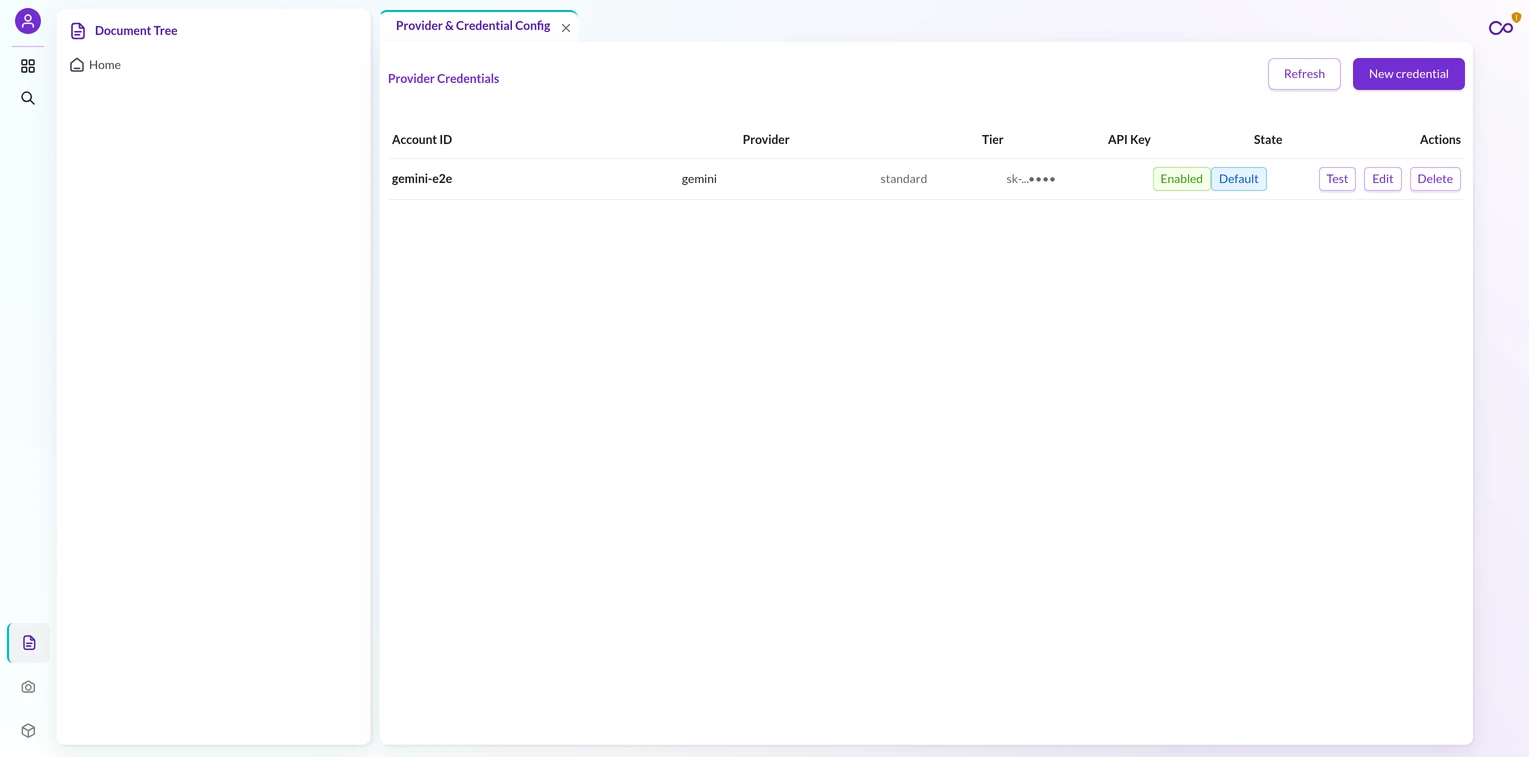
The Rules-of-Hooks Trap That Hides Your Menu
This gotcha deserves its own section. It is the single most common Studio plugin killer.
A hook placed after a conditional return compiles fine under SWC. On the second render it throws Rendered more hooks than during the previous render.
The host catches that error and swallows it. Your entire menu then vanishes with no error on first paint.
The fix is a rule, not a workaround. Every useState, useEffect, useRef, and useMemo must sit above any conditional return.
So never write if (loading) return <Spinner/> before your hooks. Instead, render async states as JSX and gate them with <Content loading={loading}>.
Watch for identifier shadowing too. A useState setter shadowed by a later const binding fails silently, and state updates stop working.
Build and Load Your Pimcore Studio Plugin
The build loop is a short, ordered sequence. Do the steps in order.
cd assets
npm install
npm run type-check
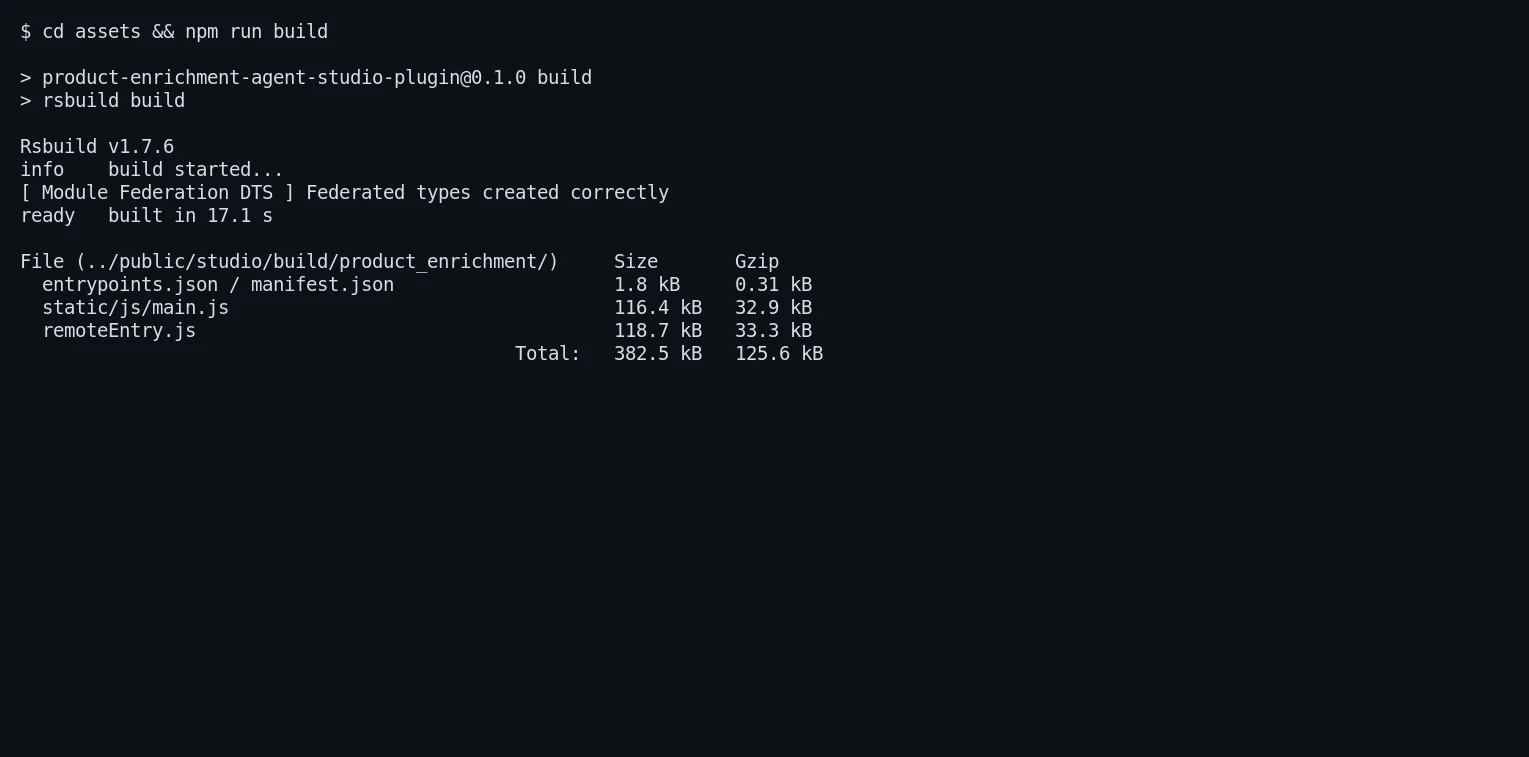
npm run build
bin/console cache:clear
bin/console assets:install public --symlink --relative
The type-check step matters because rsbuild’s SWC is more permissive than tsc. Real type errors slip through the build otherwise.
npm run build writes to ../public/studio/build/product_enrichment/. It produces entrypoints.json, remoteEntry.js, and the hashed JS chunks.
Then assets:install symlinks that output under public/bundles/productenrichmentagent/. Do not run it without building first; it only symlinks, it does not compile.
For live work, run the watch loop with npm run dev. It rebuilds on every source change into the same output directory.
Studio must actually be served and running for the remote to load. Open the Studio URL for your install, then do a hard browser refresh.
cache:clear never touches static JS, and the browser caches remoteEntry.js aggressively.
Gotchas Every Pimcore Studio Plugin Developer Hits
A few traps recur across every Pimcore Studio Plugin. Learn them before they cost you an afternoon.
Version pin. The npm SDK must equal the composer host version. Drift breaks federation at runtime or types at build.
Shared singletons. react, react-dom, antd, i18next, react-i18next, and react-redux are all singleton: true. That unifies hooks, theme, and the Redux store with the host.
Container ownership. When building in Docker, pass -u "$(id -u):$(id -g)" and -e HOME=/tmp. Otherwise root owns your node_modules and build output.
Mount the bundle root. The output path escapes assets/, so mount the whole bundle, not just assets/. Otherwise the host never sees the build.
ACL is backend-owned. A frontend can(permission) check is cosmetic. It disables a button but never blocks the API. The controller’s #[IsGranted(...)] is the real authority.
Translations are automatic. Use useTranslation() and English string keys. The shared i18n singleton auto-registers new keys in the host translation admin.
Icons need currentColor. Register a custom SVG via iconLibrary.register. Use stroke="currentColor" so it inherits the nav’s active and inactive theme.
The classic bundle is gone. Do not look for ExtJS hooks. In 2026.1 there is only the Studio remote path described here.
Verify the Pimcore Studio Plugin Registration
Two console commands confirm your Pimcore Studio Plugin wiring before you touch the browser. Run them after cache:clear.
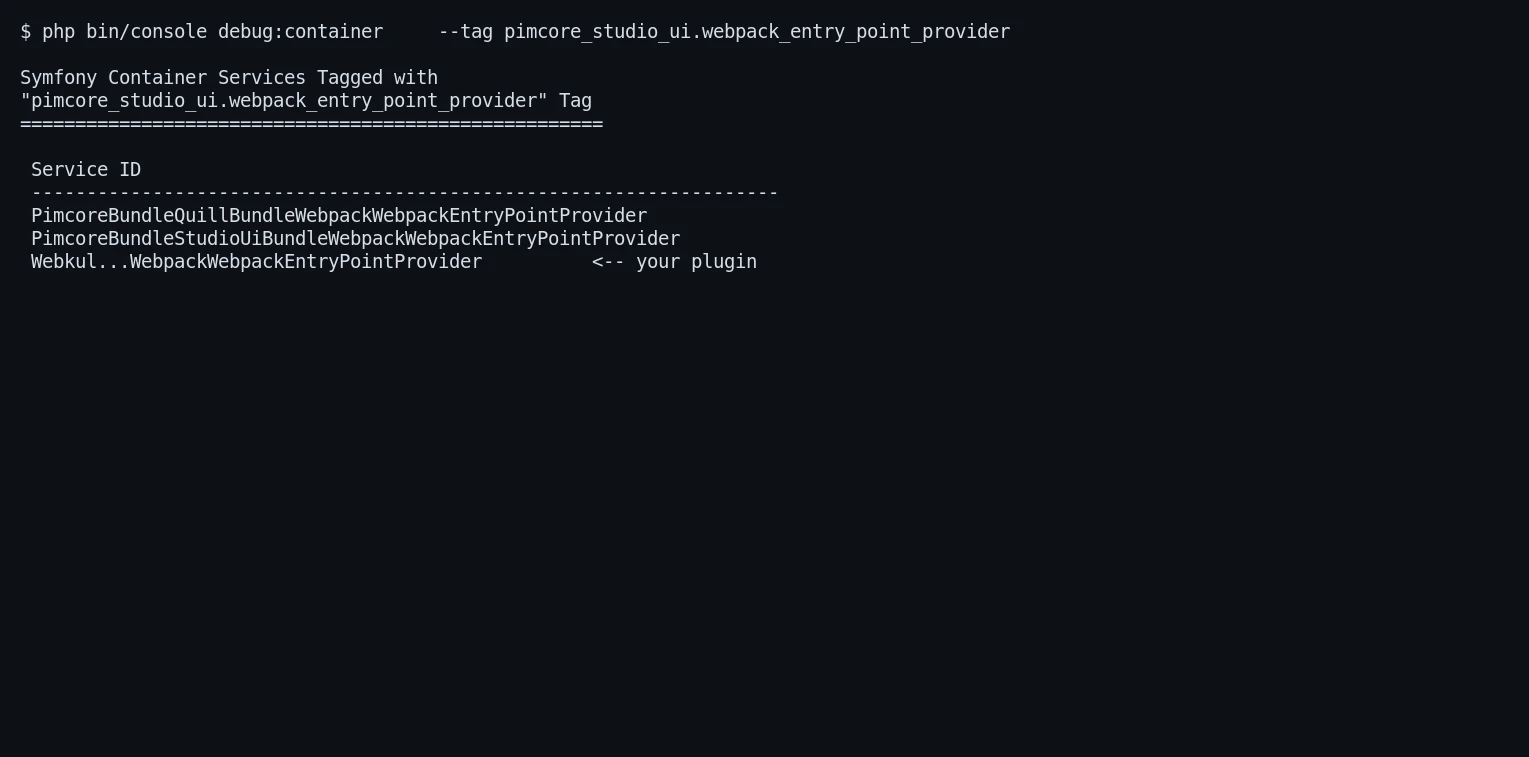
bin/console debug:container --tag pimcore_studio_ui.webpack_entry_point_provider
bin/console lint:container
The first lists your provider under the Studio tag. If it is missing, recheck the services.yaml tag string.
The second validates the container compiles cleanly. A green result here means the PHP seam is sound.
Wrap-Up and Next Steps
You now have a full Pimcore Studio Plugin path: PHP points at the manifest, rsbuild builds the remote, and React registers a nav item and screen.
The pattern scales — add more widgets, screens, and /api routes on the same foundation.
Studio plugins also pair well with connectors. See how we ship UI for the Pimcore Magento 2 connector, the Pimcore Shopify connector
Need a custom Studio plugin or a full PIM integration built for you? Talk to the Webkul Pimcore development team and we will help you ship it.

Be the first to comment.