Some time we confuse on how to set default currency in Opencart so today we will learn about the currency setting in Opencart. When we first install Opencart in our server then Opencart set US Dollar as the default currency. But we can the change the default currency by doing some changes. First we need to create a currency as per our need. Here I have created Indian Rupee for an example.

If we want to set this currency as a default currency then we have to set value as 1 . Then we have to go Opencart system->setting after that we have to select currency as Indian rupee under the Local tab.

In the above image we can see there is an option i.e “Auto Update Currency”,if we choose yes then every time after login from admin end ,all the currencies will update automatically. After this we have to click the refresh button of the system->localisation->currencies page .
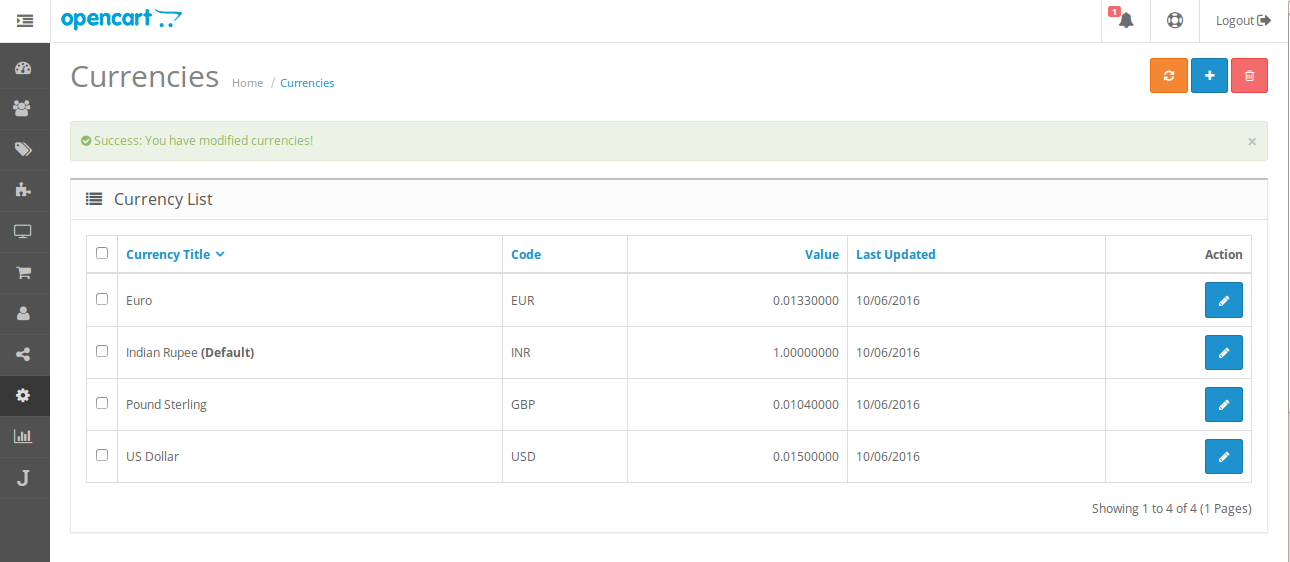
After refresh you can see Indian Rupee is changed to default currency and rest all the currencies are converted respect to the Indian Rupee.Now we have successfully changed the default currency to the Indian Rupee. Now at the front end all the prices will be changed respect to the Indian Rupee.

Be the first to comment.