What is Requisition List
A requisition list in Magento is a list of things that can be utilized for generating orders later. Users can establish requisition lists of the things they commonly order and use them to reorder the items on a regular basis. Each item in a requisition list has the following qualities, each of which is linked to a catalog entry: Product Name, Image, SKU, Size, Colour, and Current Product Price.
Use of Requisition List
When purchasing frequently purchased products, using a requisition list saves time because things are added immediately from the list to the shopping cart. Customers can keep several lists that focus on items from different vendors, buyers, teams, campaigns, or anything else that helps them streamline their workflow. Both logged-in users and unregistered users can access it.
Advantages of a Requisition List
1. Buyers are free to create as many requisition lists and characterize them as they see fit. This is particularly useful for B2B buyers who want to group products depending on the type of product, department, frequency of reorder, or other factors. Users are able to create lists over time and edit them as necessary.
2. Since wholesalers don’t have to go through the browsing process again, using the requisition list could significantly cut down on their purchasing time. If their chosen product list is already accessible, customers can go straight to the checkout since all goods can be added directly to the shopping cart if necessary.
3. This works flawlessly for both customers who are signed in and random visitors to your website. Another benefit is that the requisition list will always be accessible even after it successfully completes the checkout.
Difference between Requisition list and Wishlist
1. After adding items to the shopping cart, a requisition list is not automatically removed. It can be applied numerous times.
2. Requisition lists’ user interface uses a compact view to display a lot of things.
Enable Requisition List
On the Admin sidebar, go to Stores > Settings > Configuration.
In the left panel, expand General and go to B2B Features and Enable Requisition List.
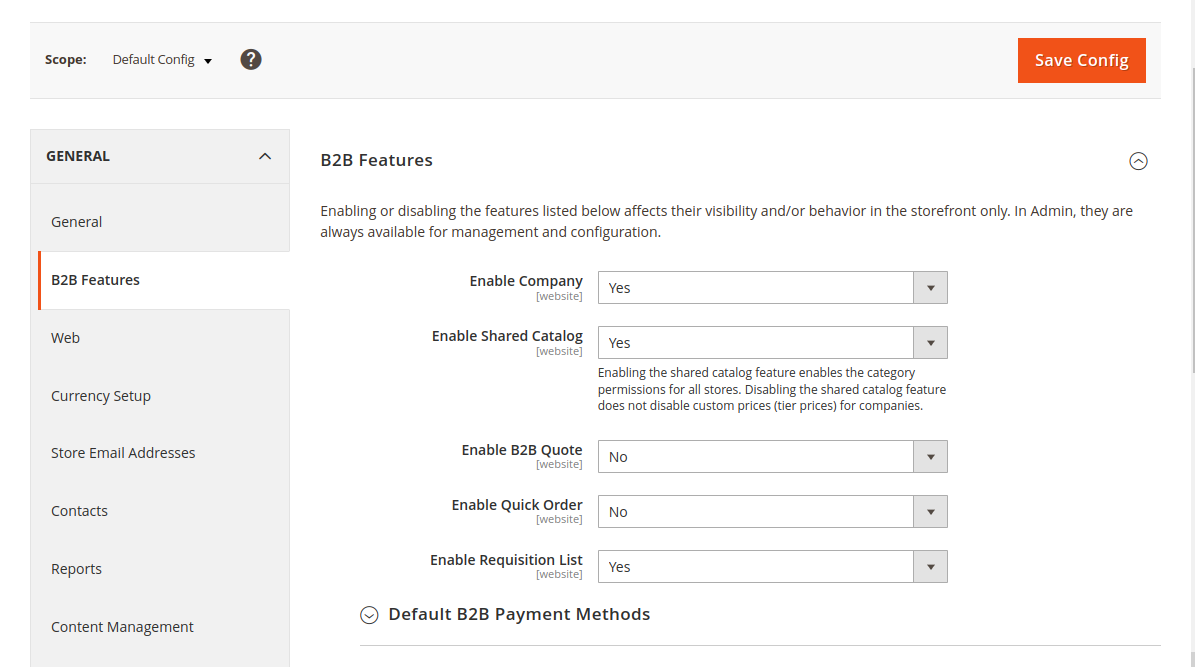
Note: This feature is only available for the Magento 2 Enterprise B2B Edition
That’s all you need to do. I hope this helps.
Reference: https://experienceleague.adobe.com/docs/commerce-admin/b2b/requisition-lists/requisition-lists.html
You can also check our other js blogs: https://webkul.com/blog/category/javascript/

Be the first to comment.