Updating/Editing meta fields of multiple products one by one manually can be tedious and time-consuming.
Thanks to PrestaShop Custom Product & Category Meta Details, now you don’t have to navigate through each product and category to update meta fields.
This extension allows store owners to update PrestaShop meta information such as meta title, meta keywords, and meta description for multiple products and categories at once.
In default PrestaShop, you have to go through each product page, find the SEO section, and update each product one by one.
This extension can be of great help for PrestaShop stores that have a large number of products.
Also, once you are done updating the meta details of products and categories, you can preview how these details will be visible on search engines.
Note: The Meta Keywords field has been removed in PrestaShop versions 9 and above. Therefore, it will only be available for PrestaShop versions below 9.x.x.
Check the overview of the plugin in the video mentioned below –
Features of Prestashop Custom Product & Category Meta Details
- Update meta title, meta description, and meta keywords (not available in PrestaShop version 9) of multiple products and categories at once.
- Two views are available in the module in which meta details are displayed on product and category meta edit pages.
- You can choose to update the meta fields of multiple products or all the catalog products at once.
- Post update, you can take a preview of how product’s meta details will be visible on search engines.
- Option to add meta keywords for the products. (not available in PrestaShop version 9)
- Compatible with PrestaShop multi-store feature.
Installation
- Go to back-office ->modules ->Module Manager.
- Now, click on “Upload a module” button and select the module’s zip file.
- In this way, the module gets install on Prestashop.


Prestashop Custom Product & Category Meta Details: Configuration & Workflow

There are two views available in module in which meta fields are displayed on product and category meta edit pages.
If selected Details list view, then you can enable or disable the view button and row wise save on the product and category meta edit pages.
Post integration, two new tabs “Product Meta Edit” and “Category Meta Edit” get available under Catalog in the back office. From these tabs, you can update the meta fields of products & categories.

For PrestaShop 9.x.x and above
If you are using PrestaShop version 9.x.x or above, the meta keywords column will not be displayed as referred to in the image below.
For PrestaShop below 9.x.x
Product Meta Edit – Details List View
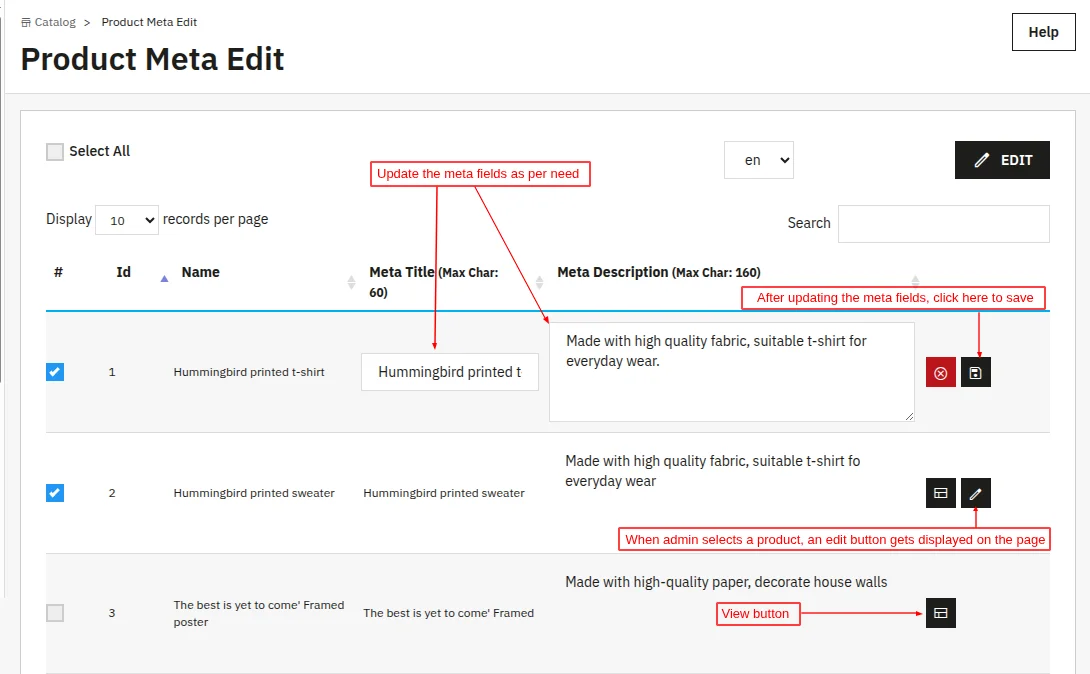
In this view, meta title, meta description, and meta keywords fields are mentioned along with the product names as shown below:

As configured, a view button is mention in every row. When you select a product, an edit button gets available in every row as enabled while configuring the module settings.
You can update the meta fields of the product by clicking on this button.


After updating the meta fields, when you click on the view button a popup appears on the page. From this popup, you can view how the product will look on the search engine.

Also, you can update the meta fields of the multiple products at once. Simply, select the products and then click on EDIT button given above the search bar.

After updating the meta fields, click on save button.

Similarly, you can update the meta fields of all the catalog products at once by simply clicking on Select All checkbox.
Product Meta Edit – Meta List View
In this view, meta title, meta description, and product URL are displayed vertically just like the snippet in search engine results.
If selected this view, then you can update the product and category meta fields one by one only.

When you double click on a block, a popup appears on page from where you can update product’s meta fields.

Category Meta Edit
You can update the category meta fields in the same way you have updated the product meta fields.
Details List View

Meta List View


This was all about the PrestaShop Custom Product & Category Meta Details Module. I hope this document will help you in checking the functionality of the module in a better way.
Also, do let us know about your views in the comments.
Support
For any kind of technical assistance, just raise a ticket at http://webkul.uvdesk.com and for any doubt contact us at [email protected]
Also, please explore our Prestashop development services and vast range of quality Prestashop addons.
Current Product Version - 4.0.3
Supported Framework Version - 9.x.x, 8.x.x, 1.7.x.x

Be the first to comment.