


















CS-Cart Payment and Shipping method restriction This splendid extension will help users to restrict payment and Shipping methods available to customers based on Products, Categories, Order Conditions, Date and Time, User Groups, Countries, and States.
This extension works by excluding selected payment and shipping options for customers during the checkout process based on the configured restrictions.
Therefore it will help users to create very flexible payment and shipping method rules by restricting access to payment and shipping methods for customers in certain situations.
Note:
- Install the add-on.
- Enter the license key.
- Follow the license activation steps.
Check a brief overview of the plugin –
CS-Cart Payment and Shipping method restriction
- Indeed Well integrated with CS-Cart, CS-Cart Multivendor, CS-Cart Multivendor Plus, CS-Cart Multivendor Ultimate.
- Functionality to restrict payment and shipping options based on products.
- Moreover Easy to configure and use via admin end.
- Option to view the restrictions on cart and checkout page.
- Admin and vendor both can manage the functionality of payment and shipping restriction.
- The functionality of payment and shipping restriction on the category.
- In addition functionality to restrict payment options based on categories and gift certificates.
- Functionality to restrict payment methods based on minimum order quantity.
- Functionality to restrict payment methods based on minimum order total/price.
- Option to apply date and time-based restrictions on payment methods.
- Functionality to restrict shipping methods based on date and time.
- Option to configure start and end dates and times for payment and shipping restrictions.
- Functionality to restrict payment and shipping methods based on customer user groups.
- Functionality to restrict payment and shipping methods based on country and state.
- Functionality to restrict multiple payment and shipping methods based on configured conditions.
- Compatible with CS-Cart versions up to 4.20.x.
- Added License Manager support for license activation.
Installation
After downloading the CS-Cart Payment and Shipping Method Restriction add-on, you’ll get one zip file, one install.txt file, and a relevant User Guide manual doc.
Read it carefully for proper configuration.
Go to Manage Add-ons, and click on “Manual Installation” as shown below in the
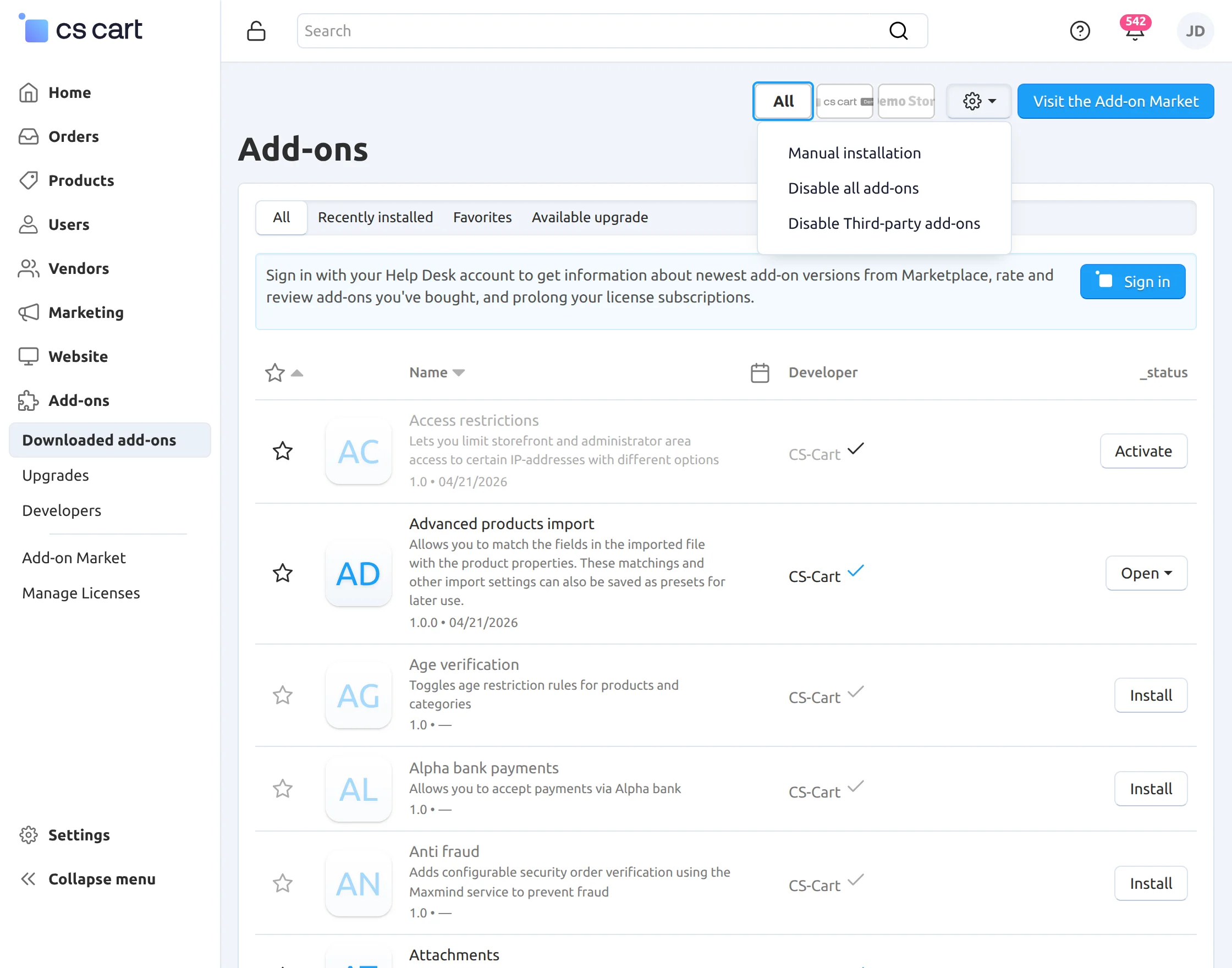
Click on “Local” to browse the zip file, and then click on “Upload & Install” as shown below in the snapshot.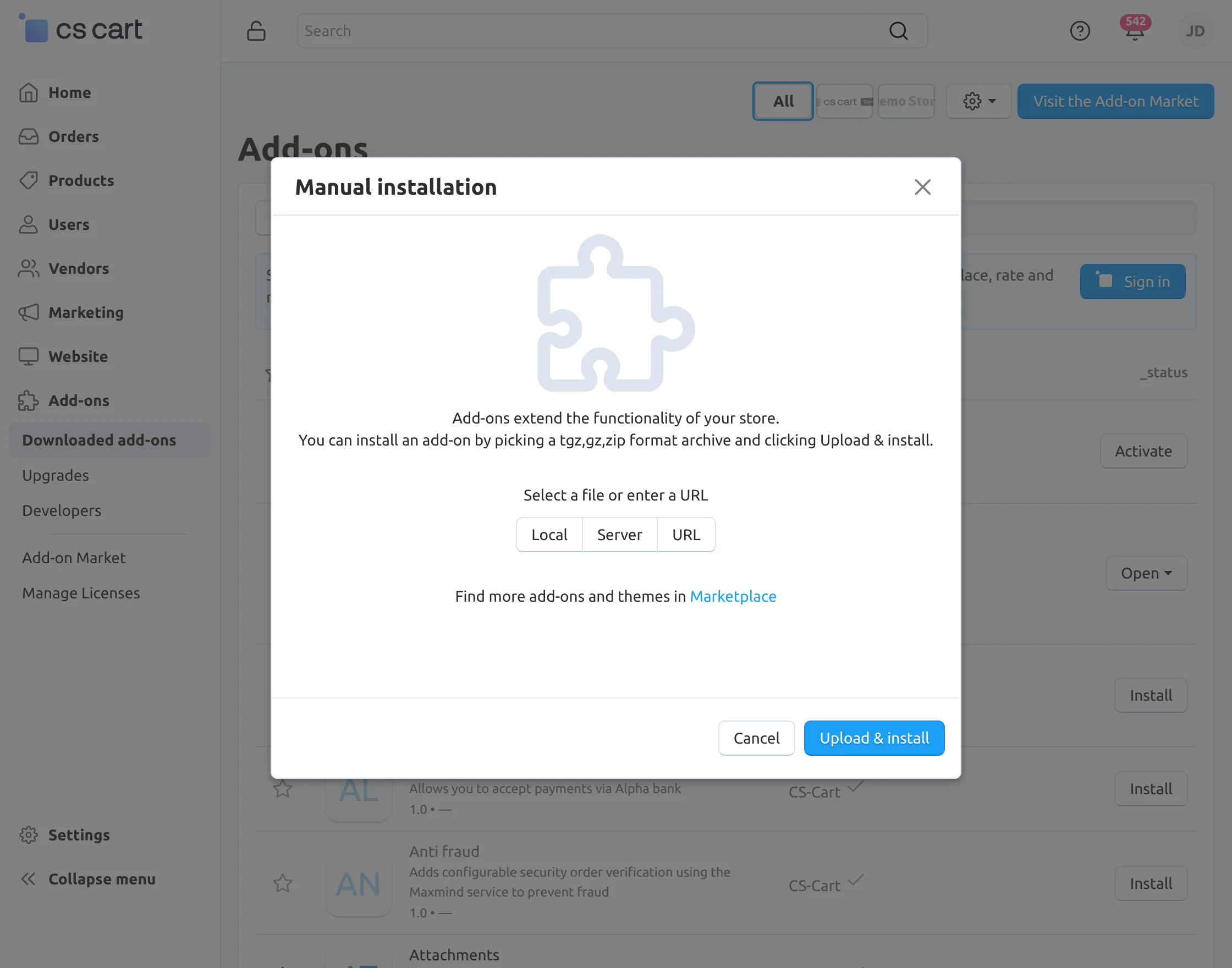
After installation of the add-on, you will find the “Payment and Shipping Method restriction”add-on in the list of add-on
Module Configuration | Admin
The admin can configure the Payment Method Restriction add-on from the CS-Cart admin panel. The available fields and their purpose are as follows:
Payment Method Restriction
- Disable Payment Method for Gift Certificate: Enable this option to restrict selected payment methods when a gift certificate is added to the cart.
- Payment Methods: Select one or multiple payment methods to be restricted, such as Credit Card, C.O.D, Phone Ordering, or Purchase Order.
Order Total & Quantity Restrictions
- Minimum Order Total: Enter the minimum order value, for example 300.00.
- Minimum Order Quantity: Enter the minimum number of products/items, for example 2.
- Restricted Payment Methods: Select the payment methods that should be restricted when the configured order conditions are met.
Date and Time Restrictions
- Enable Date and Time Restriction: Enable this option to apply restrictions for a specific time period.
- Start Date and Time: Enter the date and time when the restriction should start.
- End Date and Time: Enter the date and time when the restriction should end.
- Restricted Payment Methods for Date/Time: Select the payment methods to restrict during the specified period.
- Restricted Shipping Methods for Date/Time: Select the shipping methods to restrict during the specified period, such as Aramex Shipping or custom shipping methods.
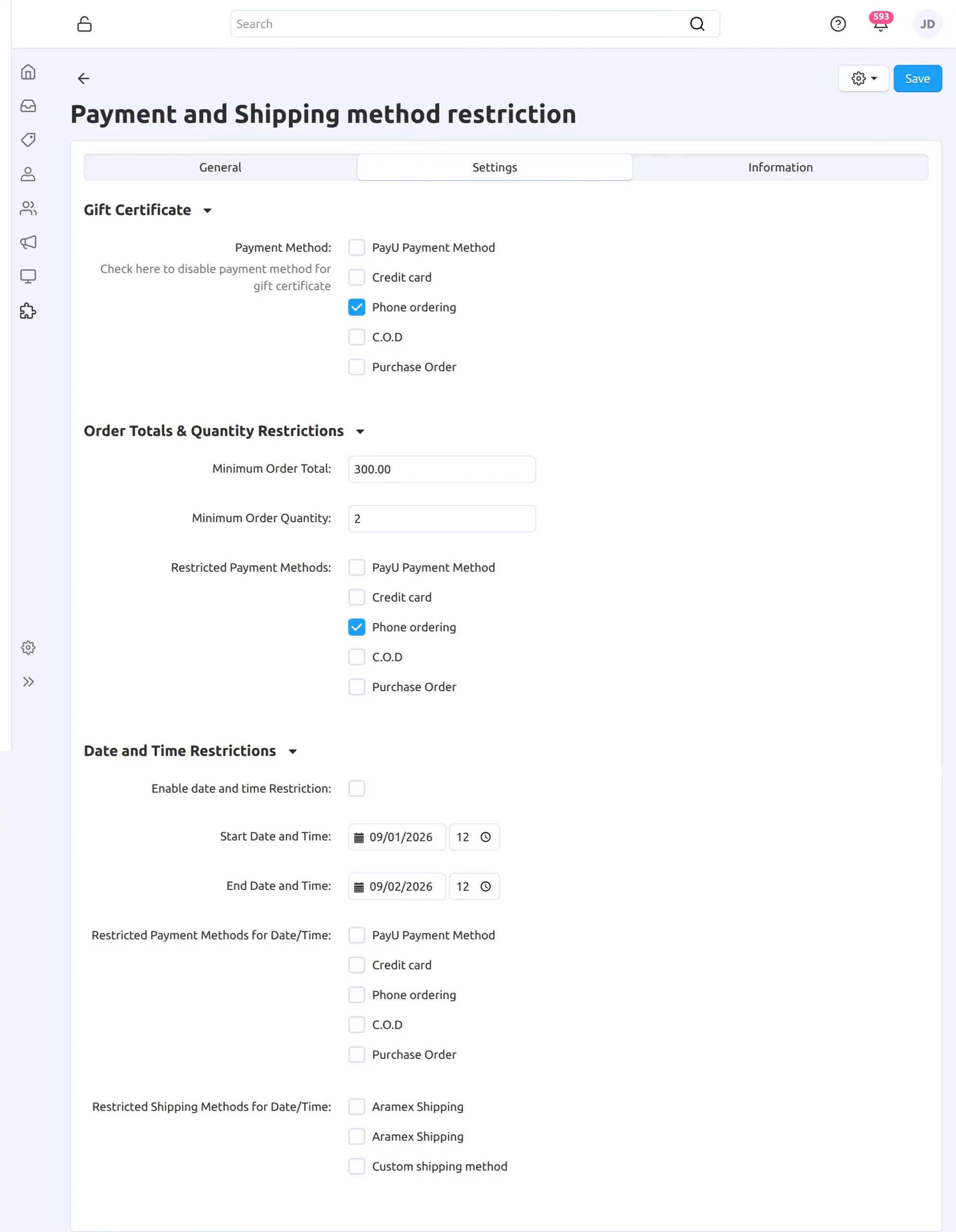
Admin Backend Configuration
First, navigate to the ‘Products‘ section.
Then, click on the desired product and open the ‘Payment and Shipping Restrictions‘ tab.
From there, select the payment and shipping methods you want to restrict for that product.
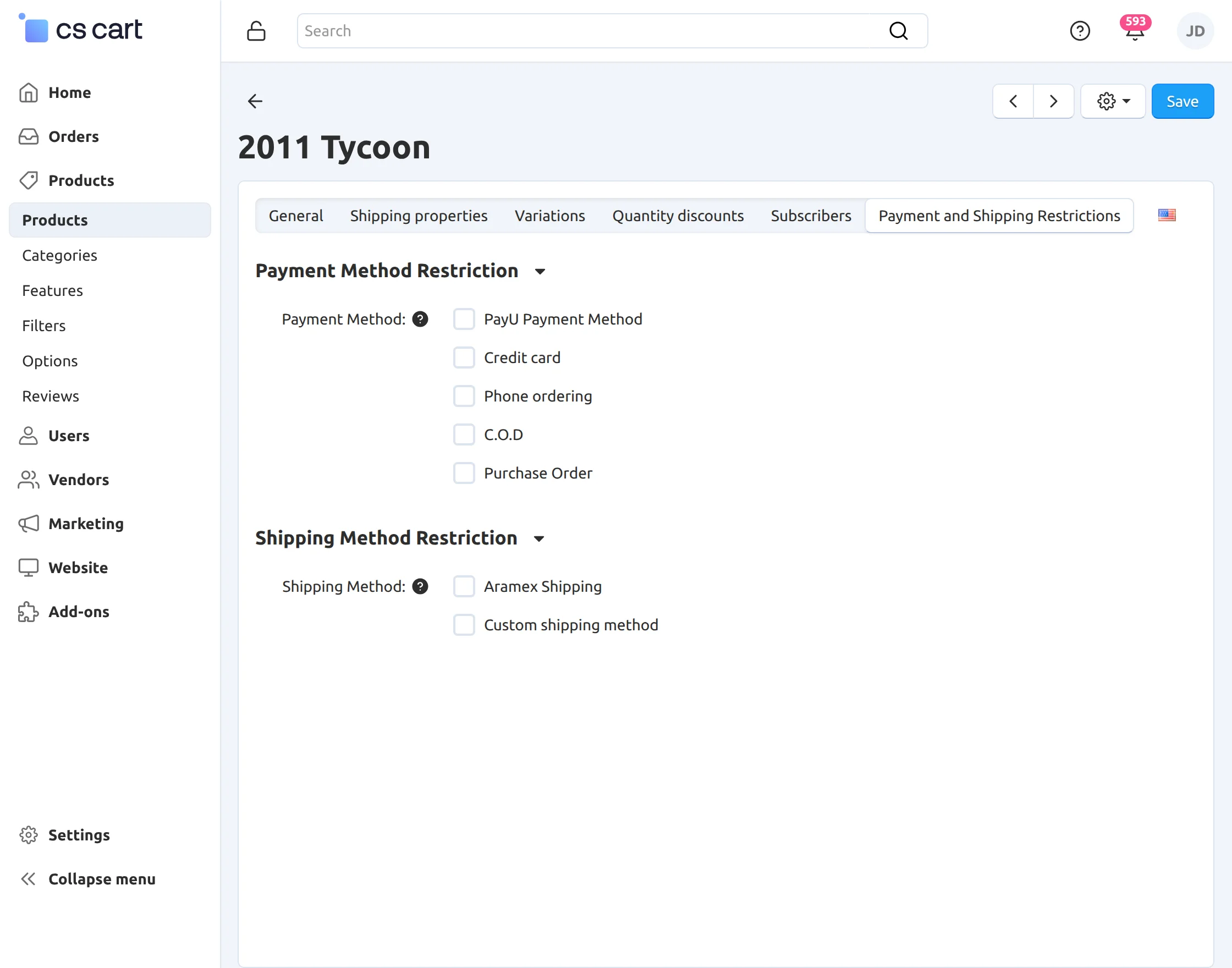
The same payment and shipping restriction settings can also be configured by vendors from their respective vendor panels.
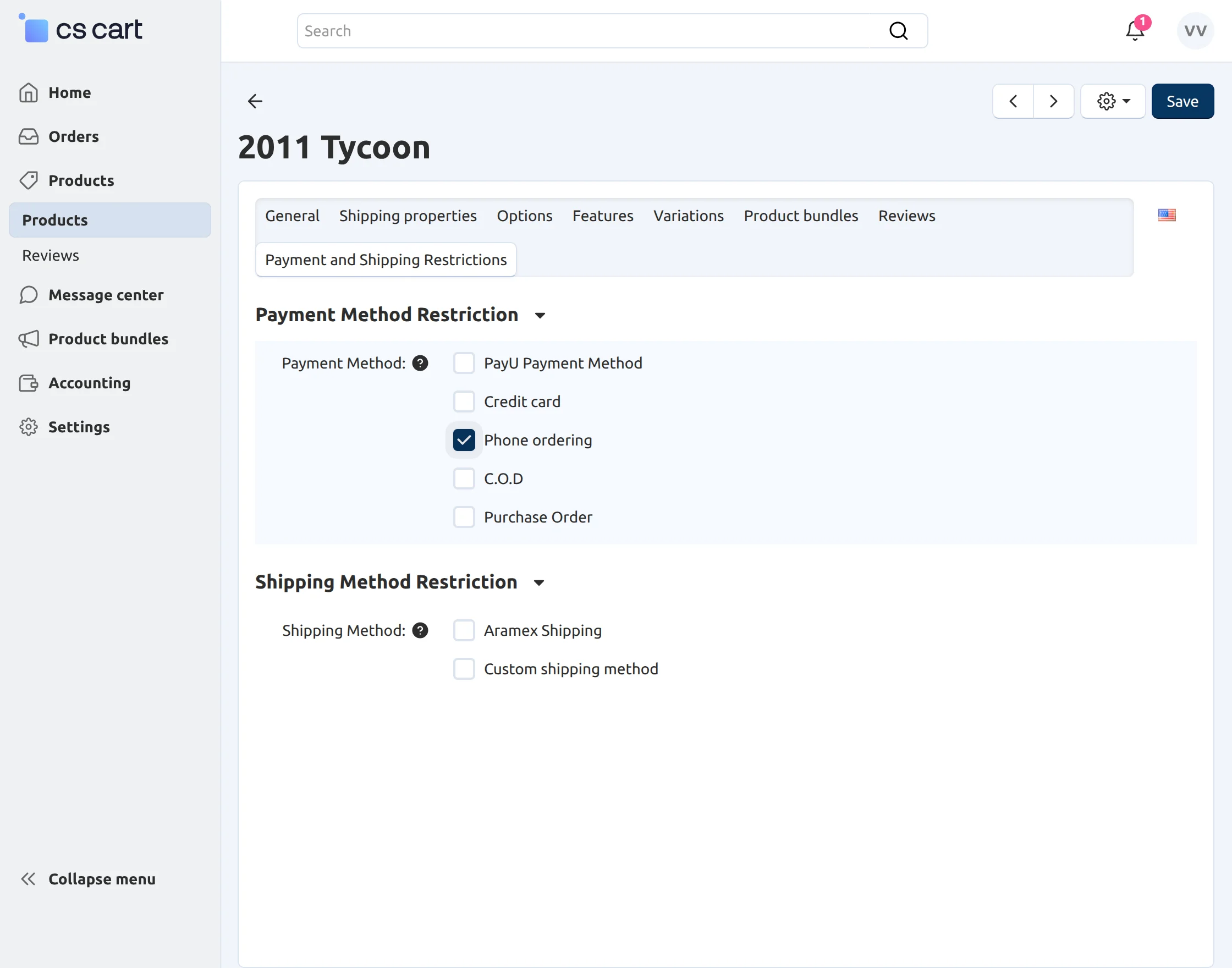
** NOTE: The backend view of both admin and vendor are same. The individual vendor can restrict the payment method of their products.
Follow the below-mentioned steps to restrict payment by categories:
- Firstly Go to Products -> Categories.
- Select the desired category for which you want to restrict the payment method.
- Click on Payment and Shipping Restrictions tab on the category edit page.
- Select the desired payment method that you want to restrict.
- Finally Click the box provided for restricting chosen payment method for all the subcategory as shown below in the snapshot.
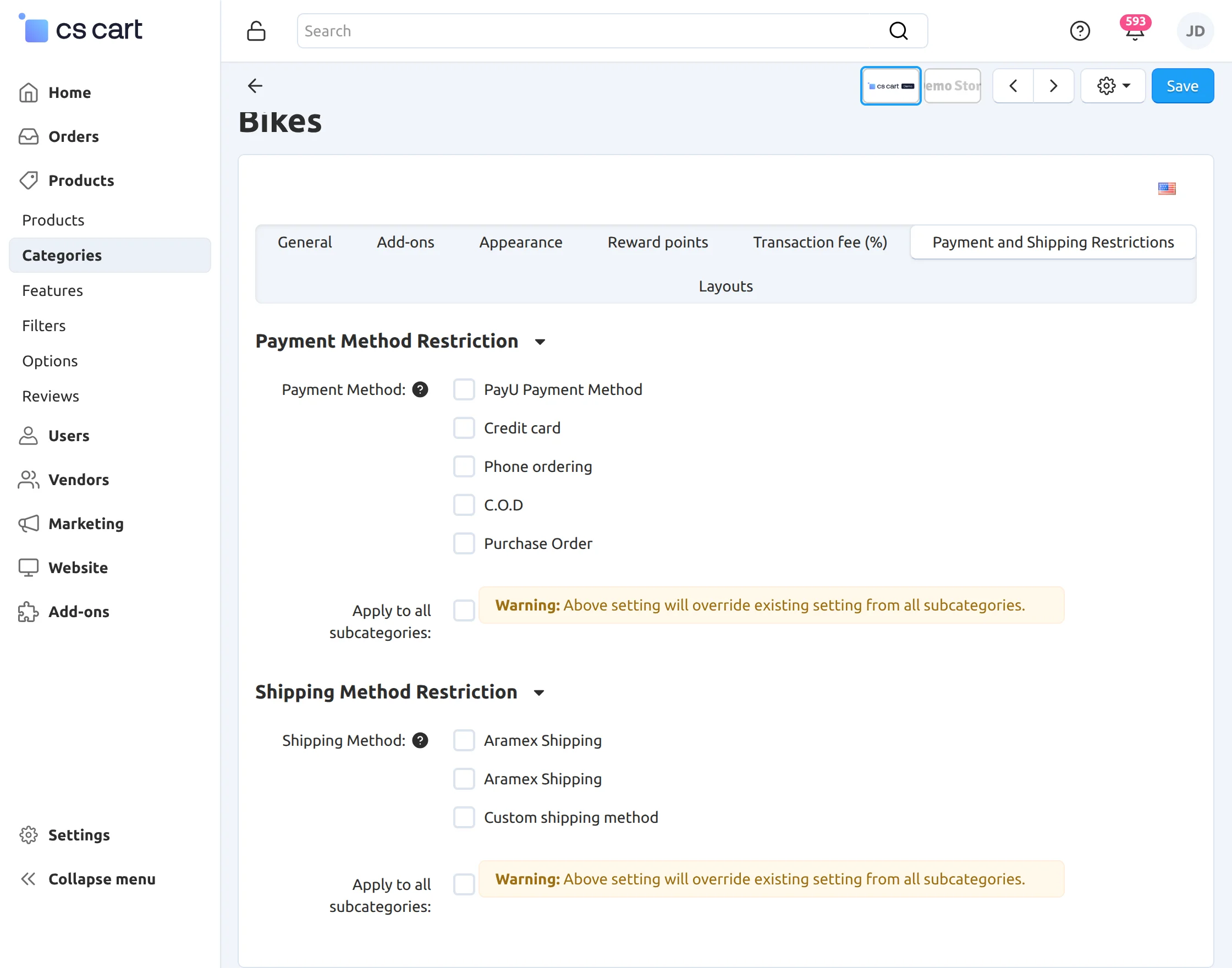
How to restrict Payment and Shipping Methods based on User Groups?
The add-on also allows the admin to restrict payment and shipping methods based on customer user groups.
Firstly, go to Customers > User Groups and create or edit the desired customer user group.
While creating or editing the user group, enable the ‘Payment & Shipping Restrictions’ option.
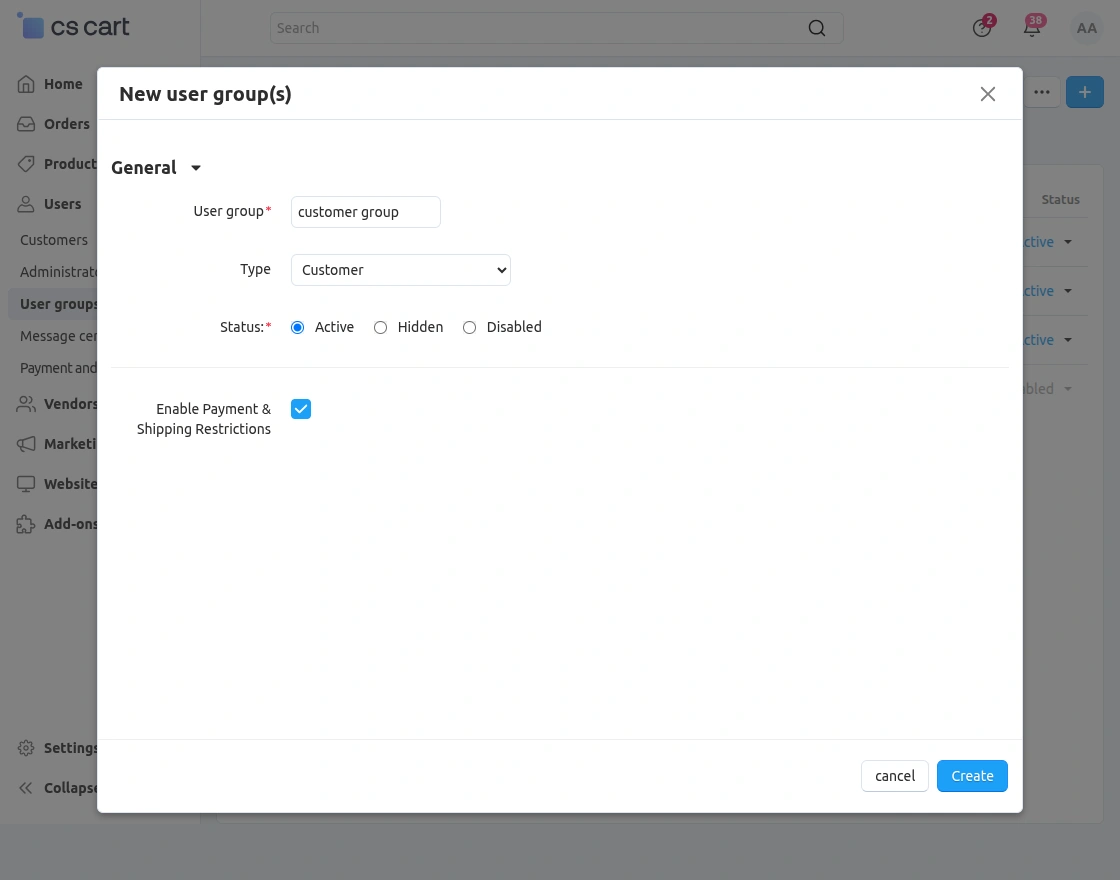
After enabling the option, save the user group to apply the payment and shipping restriction functionality.
Now, go to Customers > Payment and Shipping Restrictions User Group.
Here, the admin can view the customer user groups and configure their restricted payment and shipping methods.
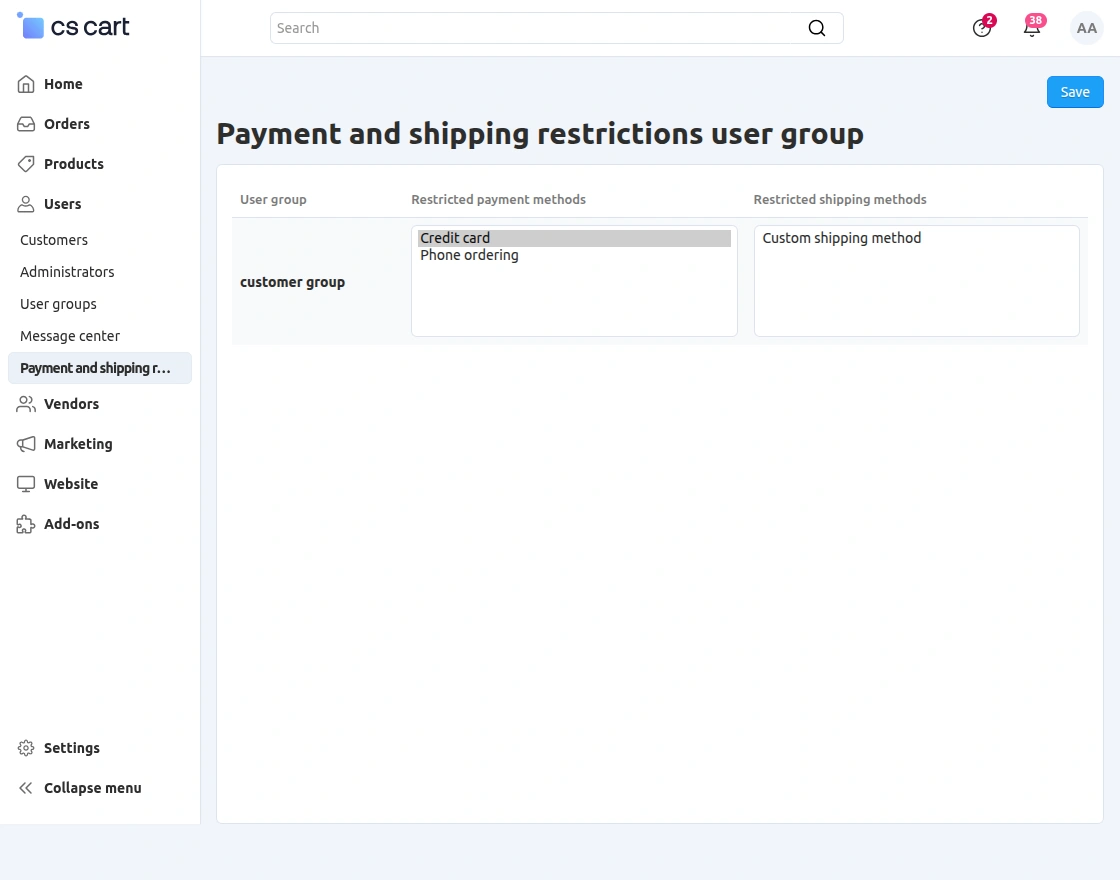
Select the required payment methods that you want to restrict for the respective customer user group.
Similarly, select the shipping methods that you want to restrict for the respective customer user group.
Finally, click on the ‘Save’ button to apply the configured restrictions.
Countries and States Based Restrictions
The add-on also allows the admin to restrict payment and shipping methods based on countries and states.
For payment method restrictions, select the desired payment method and open the ‘Payment restrictions‘ tab.
Under the ‘Countries‘ section, select the countries for which the selected payment method should be restricted.
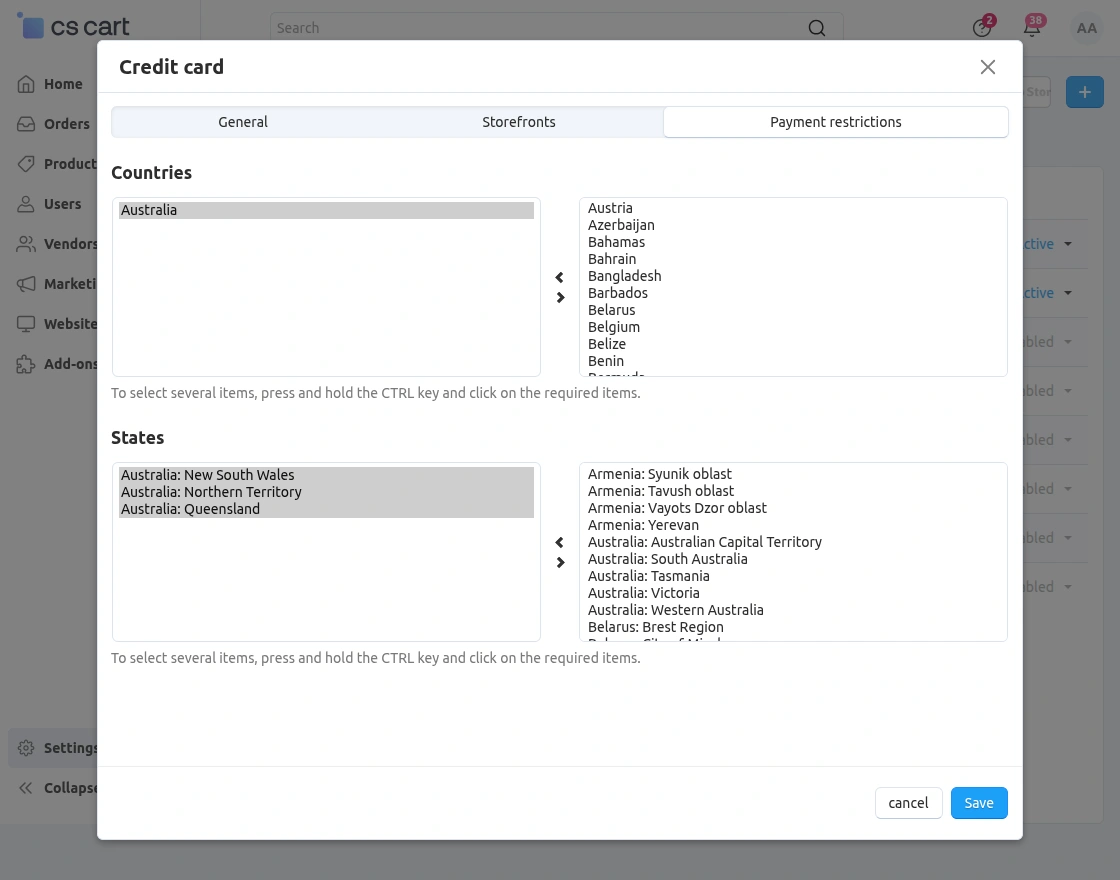
Similarly, select the required states under the ‘States‘ section to restrict the payment method for specific states.
Finally, click on the ‘Save‘ button to apply the configured payment restrictions.
Shipping Method Restrictions
The admin can also restrict shipping methods based on specific countries and states.
For this, select the desired shipping method and open the ‘Shipping restrictions‘ tab.
Under the ‘Countries‘ section, select the countries for which the shipping method should be restricted.
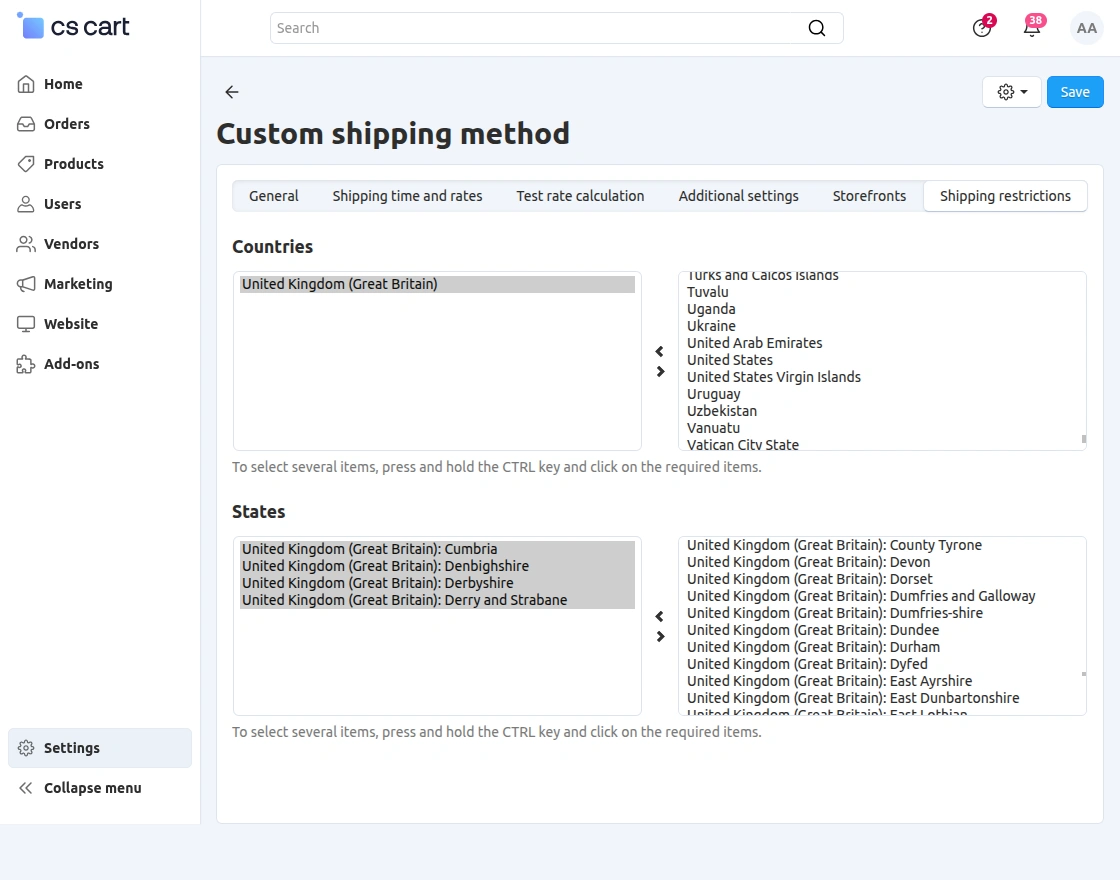
Similarly, select the required states under the ‘States‘ section to restrict the shipping method for specific states.
Finally, click on the ‘Save‘ button to apply the configured shipping restrictions.
Vendor Panel Configuration
The vendor can also restrict shipping methods based on specific countries and states from the vendor panel.
First, navigate to the ‘Shipping Methods‘ section from the vendor panel.
Then, select the desired shipping method and open the ‘Shipping restrictions‘ tab.
Under the ‘Countries‘ section, select the countries for which the shipping method should be restricted.
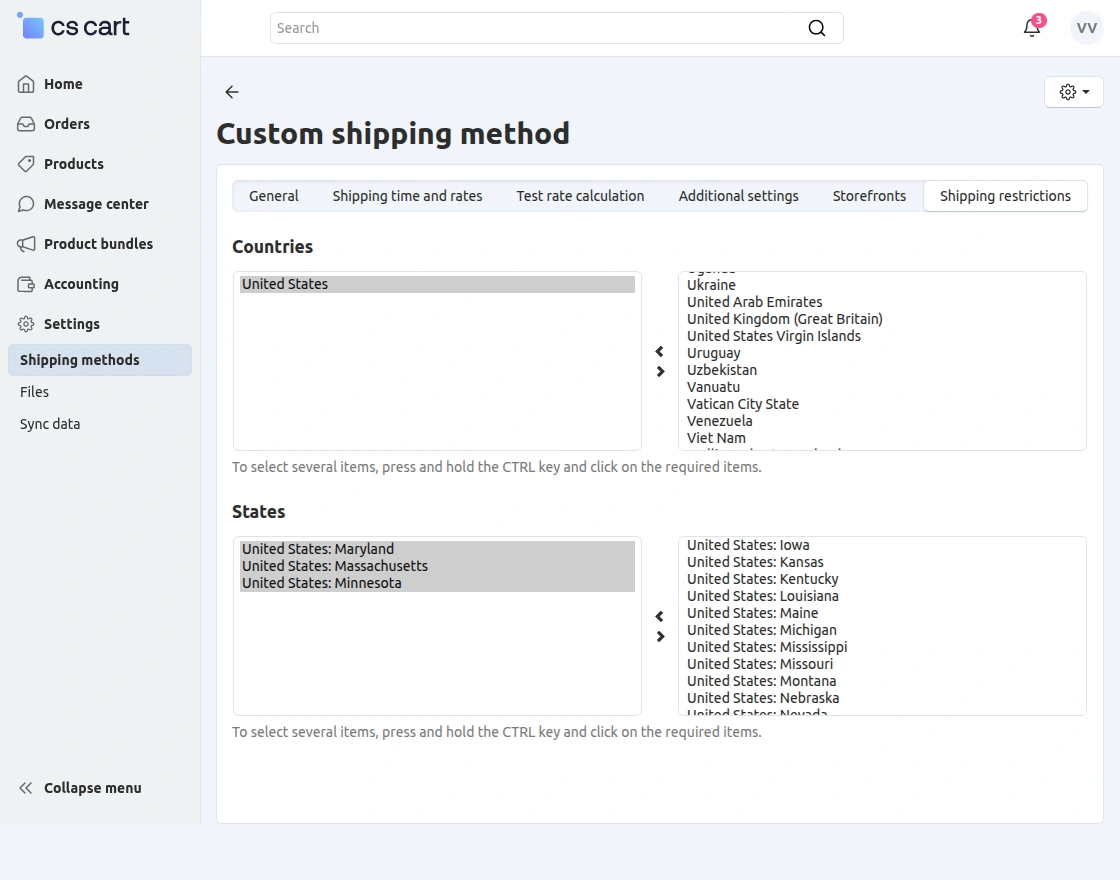
Similarly, select the required states under the ‘States‘ section to restrict the shipping method for specific states.
After selecting the required countries and states, save the shipping method settings.
The configured shipping restrictions will apply to the selected countries and states for the vendor’s shipping method.
Frontend
This snapshot displays the payment and Shipping methods that are restricted for a product during the checkout process.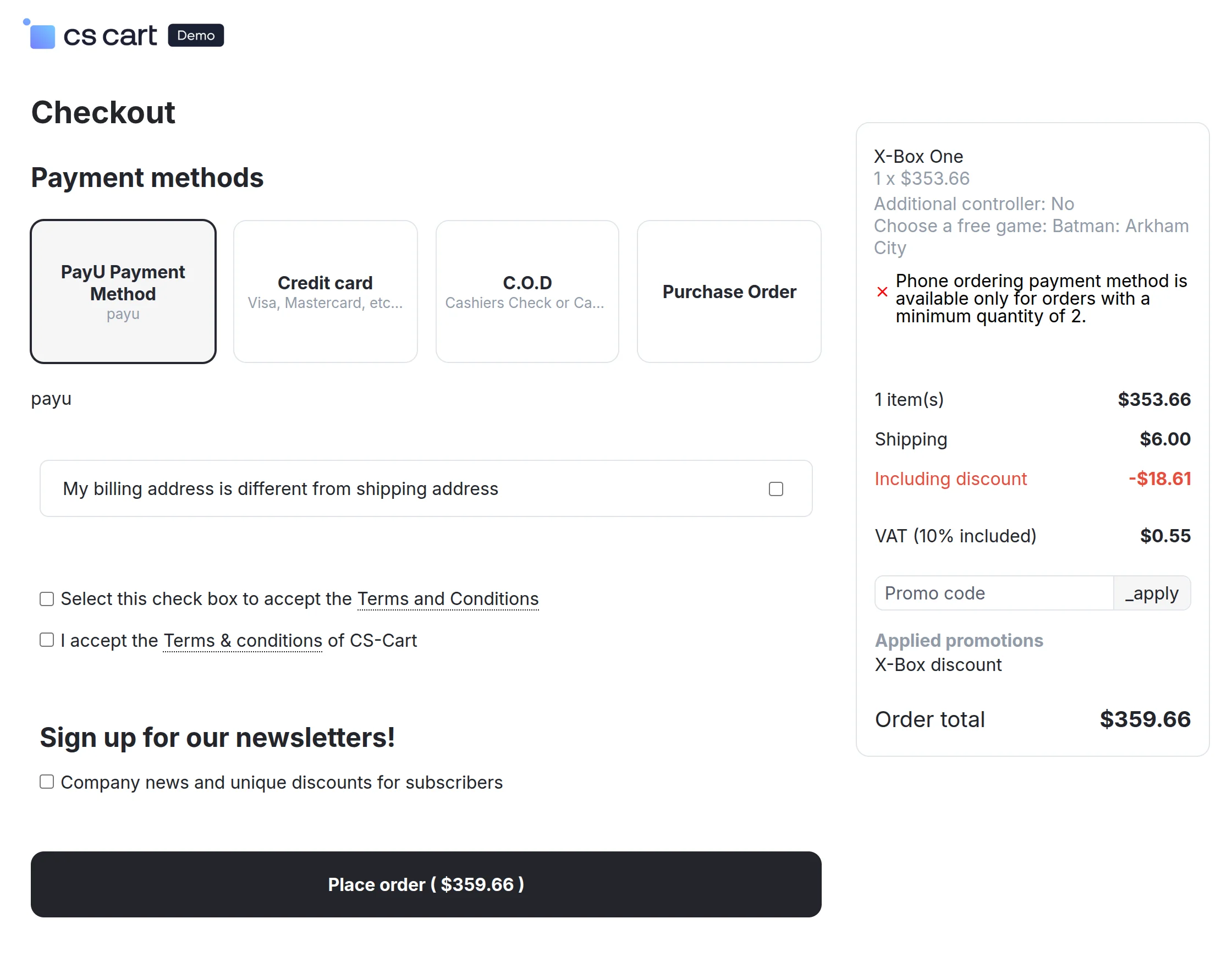
NOTE : You can explore Cs-cart payment methods .
Support
If you have any questions, suggestions, or customization requests, feel free to contact us at [email protected] or submit a ticket at webkul.uvdesk.com.
Explore our premium-quality CS Cart Extensions to enhance your store functionality.
You can also explore our CS-Cart Development Services and Quality CS-Cart add-ons.
Current Product Version - 3.4
Supported Framework Version - 4.18.x, 4.19.x, 4.20.x

Be the first to comment.