Introduction
In this blog, we will explain about WebSocket & Implementing WebSocket in Prestashop Module and demonstrate it with a real-time order status update to customer example.
Prestashop is a powerful eCommerce platform, but it does not provide native support for real-time communication.
Most dynamic features, such as order updates, notifications, or dashboards, rely on polling or page refresh
By the end of this tutorial, you will understand:
- What is WebSocket, how does WebSocket differ from HTTP, & their Importance.
- Why WebSocket cannot run directly inside Prestashop
- The correct architecture for WebSocket
- How to capture order status events
- How to push real-time updates to the frontend
What is WebSocket?
WebSocket is a communication technology that allows a persistent, two-way connection between a client (such as a web browser) and a server.
Unlike traditional HTTP communication, where the client must repeatedly send requests to receive updated data, WebSocket maintains an open connection.
This enables the server to push data to the client instantly whenever an event occurs.
In simple terms, WebSocket enables real-time communication on the web.
How does WebSocket differ from HTTP?
Traditional HTTP follows a request–response model:
- The browser requests data
- The server responds
- The connection is closed
To get updated data, the browser must send another request, often using polling or AJAX calls. This leads to delays and unnecessary server load.
WebSocket, on the other hand, works on a persistent connection model:
- A single connection is established
- Both client and server can send data at any time
- The connection remains open until explicitly closed
This approach significantly reduces latency and improves performance for real-time applications.
Why WebSockets are important
WebSockets enable applications to react instantly to changes without waiting for the user to refresh the page.
This is especially useful in scenarios where data changes frequently or needs to be delivered immediately.
Common examples include:
Stock or inventory updates
Live order tracking
Real-time notifications
Chat applications
Live dashboards
Why WebSockets cannot run directly in Prestashop
Prestashop is PHP-based and works on a request–response lifecycle.
WebSockets require persistent connections, which PHP does not support natively.
Therefore, the correct approach is:
- Run a separate WebSocket server (Node.js or similar)
- Let the Prestashop module send events to this server
- Let clients (FO/BO) listen in real time
Architecture overview
Prestashop Module (PHP)
 ├── Order Status Hook
 ├── Token Controller
 ├── WebSocket JS Client
        ↓
External WebSocket Server (Node.js + Socket.IO)
        ↓
Browser (FO / BO)
Technologies used
Prestashop side
- Custom Prestashop Module
actionOrderStatusPostUpdate&displayHeaderhookTools::hash()for token generation
WebSocket Server
- Node.js
- Express
- Socket.IO
Step 1: Create the WebSocket Server
Install dependencies
mkdir prestashop-ws
cd prestashop-ws
npm init -y
npm install express socket.io
WebSocket Server Code: Create server.js file
const express = require('express');
const http = require('http');
const socketIo = require('socket.io');

const app = express();
const server = http.createServer(app);
const io = socketIo(server, {
    cors: { origin: '*' }
});

io.use((socket, next) => {
    try {
        const token = socket.handshake.auth.token;
        if (!token || token.length < 20) {
            return next(new Error('Unauthorized'));
        }
        next();
    } catch {
        next(new Error('Unauthorized'));
    }
});

io.on('connection', (socket) => {
    console.log('Client connected');

    socket.on('disconnect', () => {
        console.log('Client disconnected');
    });
});

app.use(express.json());

app.get('/', (req, res) => {
  res.send('WebSocket server is running');
});

app.post('/order-update', (req, res) => {
    io.emit('order_status_update', req.body);
    res.send({ success: true });
});

app.get('/health', (req, res) => {
  res.json({ status: 'ok', uptime: process.uptime() });
});

server.listen(3000, () => {
    console.log('WebSocket running on port 3000');
});
Run the server by using the command on the terminal: node server.js
Step 2: Create Prestashop module
Module structure
modules/realtimeorder/
 ├── realtimeorder.php
 ├── controllers/
 │    └── front/
 │         └── token.php
 └── views/
      └── js/
           └── ws.js
Hook used
actionOrderStatusPostUpdate
displayHeader
Main module file
realtimeorder.php
class RealtimeOrder extends Module
{
    public function hookDisplayHeader()
    {
        $this->context->controller->addjQueryPlugin('growl', null, true); // For notification
        Media::addJsDef([
        'realtimeorderTokenUrl' => $this->context->link->getModuleLink(
                $this->name,
                'token',
                [],
                true
            ),
        ]);

        // Socket.IO CDN
        $this->context->controller->registerJavascript(
            'socket-io-cdn',
            'https://cdn.socket.io/4.7.2/socket.io.min.js',
            [
                'server' => 'remote',
                'position' => 'head',
                'priority' => 10,
            ]
        );

        // Your WebSocket client script
        $this->context->controller->registerJavascript(
            'realtimeorder-ws',
            'modules/'.$this->name.'/views/js/ws.js',
            [
                'position' => 'bottom',
                'priority' => 150,
            ]
        );
    }
}
Step 3: Capture order status changes
Prestashop provides a hook (actionOrderStatusPostUpdate) that triggers for every order status change.
Hook implementation
    public function hookActionOrderStatusPostUpdate($params)
    {
        $order = new Order($params['id_order']);
        $state = new OrderState($params['newOrderStatus']->id);

        $payload = [
            'order_id' => $order->id,
            'status_id' => $state->id,
            'status_name' => $state->name[$this->context->language->id],
            'date' => date('Y-m-d H:i:s')
        ];

        $this->sendToWebSocket($payload);
    }

    private function sendToWebSocket(array $data)
    {
        $ch = curl_init('http://127.0.0.1:3000/order-update'); // It URL:PORT Where our WebSocket is running.

        curl_setopt_array($ch, [
            CURLOPT_POST => true,
            CURLOPT_HTTPHEADER => ['Content-Type: application/json'],
            CURLOPT_POSTFIELDS => json_encode($data),
            CURLOPT_RETURNTRANSFER => true,
            CURLOPT_TIMEOUT => 2
        ]);

        curl_exec($ch);
        curl_close($ch);
    }
Step 4: Token controller (Security)
controllers/front/token.php
class RealtimeOrderTokenModuleFrontController extends ModuleFrontController
{
    public function initContent()
    {
        parent::initContent();

        header('Content-Type: application/json');

        $userId = $this->context->customer->isLogged()
            ? (int) $this->context->customer->id
            : 0;

        echo json_encode([
            'token' => Tools::hash($userId . '|' . time())
        ]);
        exit;
    }
}
Step 5: Frontend WebSocket Client
views/js/ws.js
fetch(realtimeorderTokenUrl)
    .then(res => res.json())
    .then(data => {
        const socket = io('http://localhost:3000', {
            auth: { token: data.token }
        });

        socket.on('order_status_update', (payload) => {
            console.log('Order updated:', payload);

            // Example UI update
           $.growl.notice({title: "Order Updated", message: `Order ID: ${payload.order_id}, Current status:${payload.status_name}`})
        });
    });
After implementation
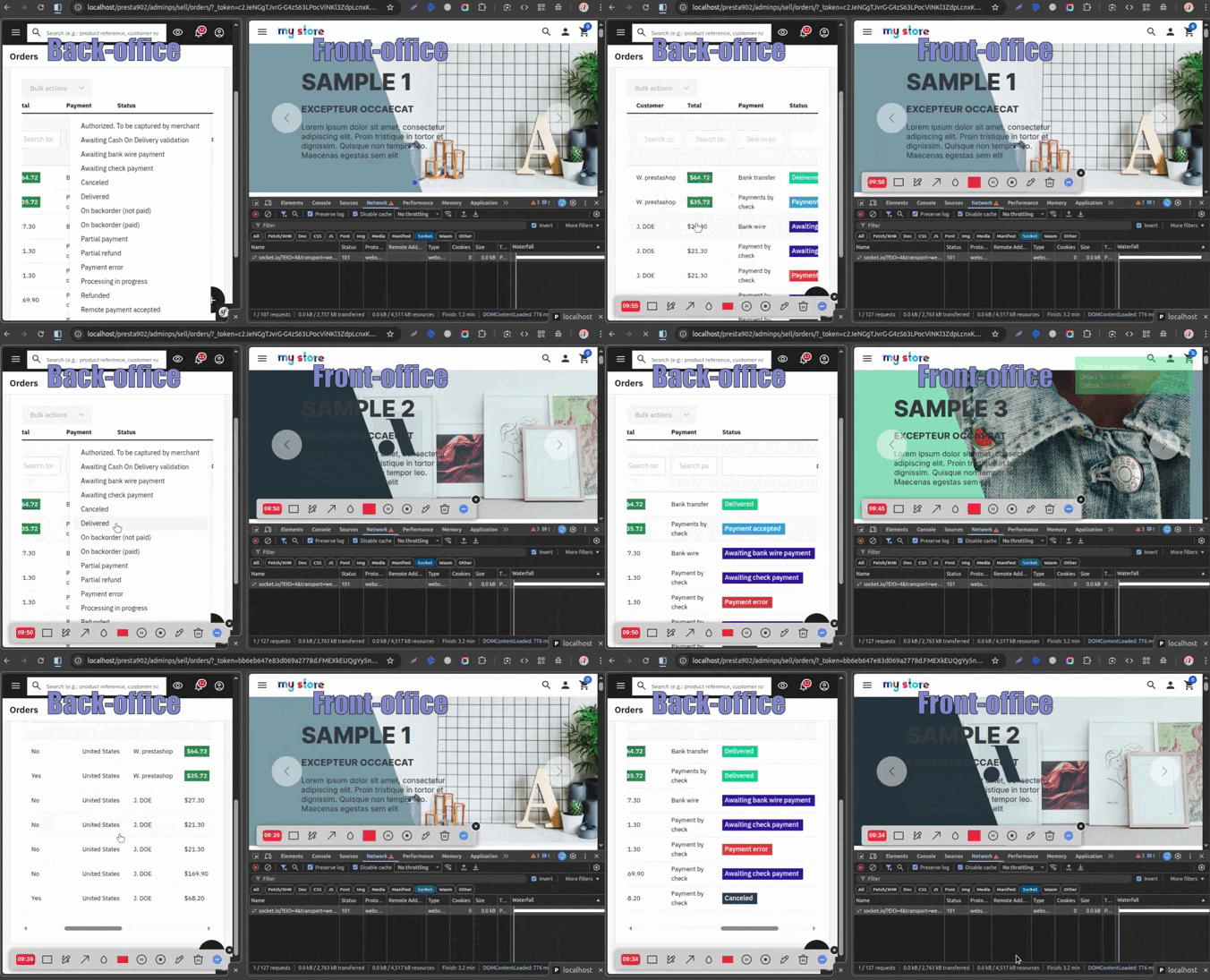
You can view the Socket connection on your prestashop Front-office:

After the successful connection, you can see your outcome. We are showing the growl notification to the customer while changing the order status from Back-office.
Conclusion
Implementing WebSockets in Prestashop Module can significantly enhance the user experience in Prestashop.
By separating the WebSocket server from the Prestashop module and using hooks efficiently, we can build real-time, scalable, and secure features without impacting performance.
This approach is fully compatible with Prestashop 1.7.x, 8.x.x and 9.x.x and follows best development practices.
That’s all about this blog. Hope it will help you.
If you are facing any issues or have any doubts about the above process, please feel free to contact us through the comment section.
Also, you can explore our Prestashop Development Services and a large range of quality Prestashop Modules.
For any doubt, contact us at [email protected]

Be the first to comment.