Creating a multi vendor marketplace is not only about allowing many sellers to list products on one platform.
The real work starts when you need to manage seller onboarding, product approval, commissions, payouts, shipping, returns, reviews, and customer support at scale.
A weak marketplace setup can create problems for buyers, sellers, and admins. Orders get delayed, payouts become confusing, and product quality becomes hard to control.
This guide explains how to create a multi vendor marketplace with the right business model, platform, features, and launch plan.
You will learn:
- How a multi vendor marketplace works
- Which marketplace model fits your business
- What features buyers, sellers, and admins need
- How to choose the right marketplace platform
- What costs and challenges you should plan for
- How AI can improve search, support, reporting, and seller productivity
We will also include practical lessons from Webkul’s marketplace implementation experience across ecommerce, B2B, retail, food, and mobile commerce projects.
By the end, you will have a clear roadmap to plan, build, launch, and scale a multi vendor marketplace with fewer mistakes.
What is a multi vendor marketplace?
A multi vendor marketplace is an ecommerce platform where many sellers can register, list products or services, receive orders, and sell to buyers from one website or app.
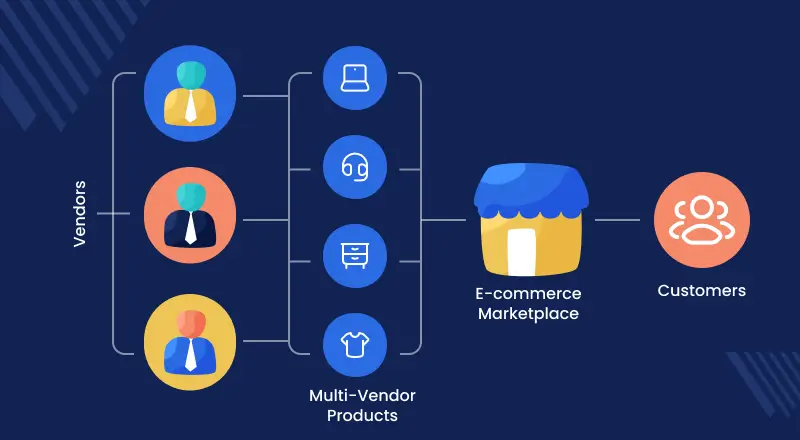
The marketplace owner manages the platform. Vendors manage their own products, inventory, pricing, orders, and fulfillment based on the rules set by the admin.
Amazon, Etsy, Alibaba, and Airbnb are well-known marketplace examples. But a marketplace can also be built for a niche, region, B2B network, rental business, or local service.
A multi vendor marketplace platform gives the admin tools to control sellers, products, commissions, payments, shipping, reviews, and reports from one backend.
Multi vendor marketplace vs normal ecommerce store
| Area | Normal ecommerce store | Multi vendor marketplace |
| Sellers | One business sells products | Many vendors sell products |
| Inventory | Store owner manages inventory | Vendors manage their own stock |
| Product catalog | Limited to one seller | Can grow with many sellers |
| Revenue | Product margin | Commission, subscription, ads, listing fee |
| Operations | Simpler | More seller, payout, and quality workflows |
| Admin control | Store-level control | Vendor, product, order, and payout control |
| Growth model | Brand-led growth | Seller-led and category-led growth |
A normal ecommerce store is easier to manage. A multi vendor ecommerce marketplace can scale faster, but it needs stronger workflows.
That is why platform choice matters from the start.
How does a multi vendor marketplace work?
A marketplace connects buyers and sellers through one platform. The buyer gets a single shopping experience, while the admin manages sellers in the background.
The basic flow is simple:
- A vendor registers on the marketplace.
- The admin approves or rejects the vendor.
- The vendor adds products or services.
- The admin reviews product listings if approval is enabled.
- A buyer places an order.
- The system calculates commission.
- The vendor fulfills the order.
- The admin or system processes payout.
- The buyer can review the product, seller, or service.
This flow may look simple, but each step needs clear rules.
For example, a food marketplace may need expiry dates, local delivery, and seller hygiene checks. A B2B marketplace may need quote requests, company accounts, and custom pricing.
Buyer journey
The buyer searches, compares, adds products to cart, checks seller details, places the order, tracks delivery, and raises support requests if needed.
The buyer should not feel marketplace complexity. Search, checkout, payment, and support should feel smooth.
Seller journey
The seller registers, completes profile details, adds products, manages stock, processes orders, handles shipment, and tracks earnings.
The seller dashboard should let vendors update products, process orders, check earnings, and respond to buyers without waiting for admin help.
Admin journey
The admin controls vendor approval, catalog rules, commission setup, product moderation, order visibility, payout tracking, reports, and dispute handling.
The admin dashboard should give clear control without making daily operations slow.
Payment, commission, and payout flow
Payment can be handled in different ways. The buyer may pay once, and the platform later divides the amount between the admin and vendor.
The marketplace can earn through fixed commission, category-based commission, seller plans, listing fees, ads, or service charges.
Before launch, define when vendors get paid. It can be after order placement, shipment, delivery, return window, or admin approval.
This prevents seller confusion and reduces payout-related support issues.
Webkul implementation note: In many marketplace projects, payout planning affects order flow, refunds, seller trust, and admin workload. It should be planned before development starts.
Why create a multi vendor marketplace?
A marketplace can help a business grow faster than a single-seller ecommerce store.

You can add more sellers, more products, more locations, and more categories without owning every item.
This model is also growing at a global level. Euromonitor reported that online marketplaces generated 62% of global retail ecommerce sales in 2024, reaching USD 2.4 trillion.
The same report said third-party seller sales grew from 72% of total marketplace sales in 2014 to 81% in 2024.
This shows why many ecommerce businesses are moving from single-seller stores to marketplace models. The model helps them expand catalog, add sellers, and grow without owning every product.
Grow catalog without owning all inventory
In a single-vendor store, the business must buy, store, and manage most products.
In a marketplace, vendors bring their own products. This helps the platform grow its catalog with less inventory pressure.
Reach more buyers and sellers
A marketplace can attract buyers because it gives more choice. It can attract sellers because it gives them access to more customers.
This creates a network effect. More sellers bring more products. More products bring more buyers. More buyers attract more sellers.
Build a niche marketplace business
You do not need to compete with Amazon from day one.
Many successful marketplaces focus on one niche, such as handmade goods, spare parts, food products, B2B supplies, outdoor gear, rentals, or local services.
For example, an outdoor gear marketplace needs strong category filters, product details, and seller trust. A B2B procurement marketplace needs vendor verification and bulk order logic.
Create more revenue streams
A marketplace owner can earn from:
- Commission on every order
- Seller subscription plans
- Featured product listings
- Vendor membership plans
- Ads and promotions
- Service fees
- Delivery or fulfillment charges
- Setup or onboarding fees
The right revenue model depends on your market, seller type, order value, and competition.
Types of multi vendor marketplaces you can create
Before you choose a marketplace platform, decide what type of marketplace you want to build.
The business model affects features, payment flow, vendor onboarding, and cost.
| Marketplace type | Example use case | Must-have workflow |
| Product marketplace | Fashion, food, electronics, outdoor gear | Catalog, inventory, shipping, returns |
| Service marketplace | Home repair, consulting, beauty services | Booking, provider profile, availability |
| Rental marketplace | Luggage storage, equipment rental | Time slots, deposits, location |
| B2B marketplace | Wholesale, procurement, industrial supplies | Quotes, bulk pricing, company accounts |
| B2C marketplace | Retail sellers and consumers | Product search, checkout, seller ratings |
| C2C marketplace | People selling to people | Easy listing, trust checks, messaging |
| Hyperlocal marketplace | Local food, grocery, nearby sellers | Location, delivery radius, vendor mapping |
| Digital product marketplace | Downloads, courses, software files | Digital delivery, license control |
| Booking marketplace | Appointments and reservations | Calendar, time slots, cancellation rules |
A platform that works for fashion may not work for industrial B2B procurement.
That is why it is better to plan workflows before choosing software.
Product marketplace
A product marketplace is the most common model. Vendors list physical products, and buyers purchase them through the platform.
This model needs strong catalog management, search, filters, inventory sync, shipping, tax, returns, and seller ratings.
Fashion, electronics, grocery, furniture, food products, and accessories often use this model.
In fashion marketplaces, size charts, product images, seller quality, and return rules matter a lot. A weak product page can reduce trust and increase returns.
For example, Webkul’s Everest marketplace project shows how an outdoor recreation marketplace may need clear categories, seller onboarding, and strong product discovery for brands.
Service marketplace
A service marketplace connects buyers with service providers.
Examples include home services, business services, repair, consulting, beauty, cleaning, or professional services.
This model needs booking, service location, provider availability, reviews, cancellation rules, and sometimes chat between buyer and seller.
Webkul also provides Marketplace development services for businesses that need service booking, provider profiles, local availability, and service-based workflows.
Rental marketplace
A rental marketplace lets vendors rent products or spaces for a fixed time.
Examples include luggage storage, equipment rental, car rental, room rental, event gear, or coworking spaces.
This model needs availability calendars, rental duration, deposits, late fees, pickup or delivery, and return confirmation.
For example, Webkul’s LuggyBox marketplace project shows how a luggage storage marketplace may need vendor locations, booking slots, and availability management instead of normal product checkout.
B2B marketplace
A B2B marketplace connects business buyers with vendors, wholesalers, suppliers, or manufacturers.
It often needs quote requests, bulk pricing, company approvals, tax documents, purchase orders, credit limits, and role-based buying.
A B2B marketplace may also need supplier verification and compliance checks.
B2B ecommerce is growing fast. Grand View Research estimated the global B2B ecommerce market at USD 24.1 trillion in 2025 and projected it to reach USD 105.9 trillion by 2033.
For this reason, B2B marketplace platforms often need more than a simple seller signup.
They need supplier verification, quote requests, bulk pricing, account-based buying, and order approval workflows.
For example, Webkul’s Diverse Marketplace project shows how a B2B marketplace can support vendor discovery, supplier visibility, and compliant purchase workflows.
Webkul’s Schneider Electric marketplace project also shows how enterprise B2B marketplaces may need pricing logic, quote systems, RMA, customer credit, vendor rewards, and custom seller workflows.
Hyperlocal marketplace
A hyperlocal marketplace connects buyers with nearby sellers or service providers.
It works well for grocery, food delivery, local retail, pharmacy, repair services, and same-day delivery.
This model needs location-based seller mapping, delivery radius, local inventory, delivery slots, and fast order routing.
For example, Webkul’s Fast Come marketplace project used local vendor discovery and map-based seller location features for a food delivery marketplace.
How to create a multi vendor marketplace in 10 steps
You can create a marketplace in many ways. But the planning logic should stay the same.
Start with business clarity, then choose the platform, then build seller and buyer workflows.
How to create an ecommerce multi vendor marketplace
To create an ecommerce multi vendor marketplace, start with product catalog rules, seller onboarding, inventory management, checkout, shipping, returns, commission setup, and payout flow.
Once these workflows are stable, you can add advanced features like mobile apps, AI search, product content automation, ERP integration, and seller analytics.
This ecommerce-specific planning is important because product marketplaces have more catalog, shipping, stock, tax, and return complexity than many service or listing platforms.
1. Choose a niche and target audience
Do not start too broad.
A broad marketplace needs more sellers, more buyers, more categories, and more money to build trust.
A niche marketplace is easier to position. It also gives better SEO focus.
Examples:
- Marketplace for outdoor recreation gear like Webkul’s Everest marketplace project
- B2B marketplace for certified suppliers like Diverse Marketplace
- Food product marketplace like BhavyaSmart
- Hyperlocal food marketplace like Fast Come
- Rental marketplace for luggage storage like LuggyBox
- Enterprise B2B marketplace like Schneider Electric
Choose a niche where buyers have a real problem and sellers need better reach.
2. Study buyers and sellers
A marketplace has two customers: buyers and sellers.
You need to understand both.
Ask these buyer questions:
- What are they trying to buy?
- How do they search?
- What makes them trust a seller?
- What payment and delivery options do they expect?
- What stops them from buying today?
Ask these seller questions:
- Why will they join your platform?
- What tools do they need?
- How will they upload products?
- How often do they update inventory?
- How do they want payouts?
- What support will they need?
If sellers do not get value, they will not stay. If buyers do not get trust, they will not return.
3. Select the marketplace business model
Your business model defines how buyers and sellers interact on the platform.
It also decides what features you need in the first version.
| Marketplace model | Example use case | Important workflow |
| Product marketplace | Food, fashion, electronics, outdoor gear | Catalog, inventory, shipping, returns |
| Service marketplace | Home repair, beauty, consulting | Booking, provider profile, availability |
| Rental marketplace | Luggage storage, equipment rental | Time slots, deposits, location |
| B2B marketplace | Wholesale, industrial supplies, procurement | Quotes, bulk pricing, company accounts |
| Hyperlocal marketplace | Local food, grocery, nearby sellers | Location, delivery radius, vendor mapping |
| Digital product marketplace | Courses, downloads, software files | File delivery, license rules, access control |
| Quote-based marketplace | Industrial, custom products, B2B sourcing | RFQ, negotiation, approval flow |
The model affects checkout, payment, vendor approval, product data, and support.
For example, a B2B marketplace may not need instant checkout for every order. It may need quote requests, negotiated pricing, and company-level approval.
A rental marketplace may not need normal inventory checkout. It may need availability slots, location rules, deposits, and booking confirmation.
4. Decide the revenue model
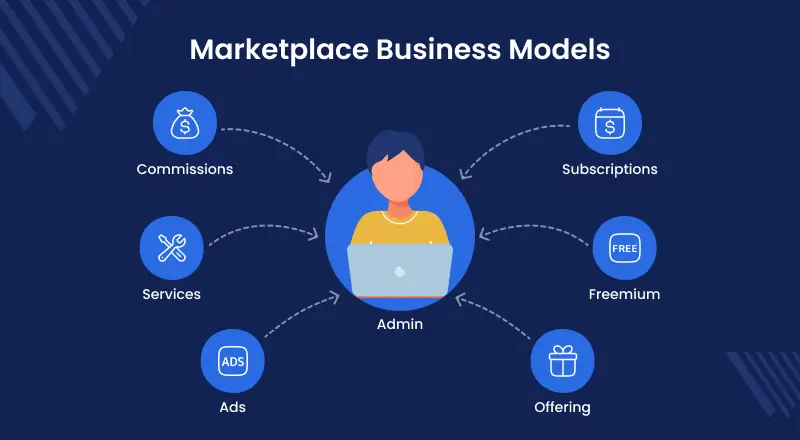
Your marketplace should have a clear revenue plan from the start.
Commission is common, but it is not the only way to earn from a multi vendor marketplace.
| Revenue model | Best for | Example |
| Commission per order | Product and service marketplaces | Admin earns a percentage on each order |
| Seller subscription | B2B or premium seller networks | Vendors pay monthly to sell |
| Listing fee | Classifieds or niche product marketplaces | Seller pays to publish listings |
| Featured listing | Competitive product marketplaces | Seller pays for better visibility |
| Lead fee | Service or B2B marketplaces | Vendor pays for qualified buyer leads |
| Booking fee | Rental or service marketplaces | Platform earns on each confirmed booking |
| Advertising | Large marketplaces with traffic | Sellers pay for promoted placements |
| Setup or onboarding fee | Curated B2B or premium marketplaces | Seller pays to join or get verified |
For low-margin products, a subscription or listing fee may work better than commission.
For B2B, a paid supplier plan or lead model may make more sense.
For rental or service marketplaces, booking fees can be easier to manage than product-style commissions.
5. Choose the right marketplace platform
A multi vendor marketplace platform should match your business model, budget, and growth plan.
You can choose from:
- SaaS marketplace platform
- Shopify multi vendor app
- WooCommerce marketplace plugin
- Magento or Adobe Commerce marketplace
- Bagisto marketplace
- OpenCart marketplace
- PrestaShop marketplace
- CS-Cart marketplace
- Custom marketplace development
Do not choose only by price.
Choose based on vendor workflow, catalog size, checkout needs, integration needs, customization, mobile app support, and future scale.
6. Plan vendor onboarding
Vendor onboarding is one of the most important parts of marketplace success.
If onboarding is slow, sellers will drop off. If approval is too loose, product quality can suffer.
A good onboarding flow includes:
- Seller registration form
- Business details
- Store URL or seller profile
- Tax or compliance details
- Bank or payout details
- Product category access
- Admin approval
- Seller agreement
- Vendor dashboard access
For B2B or regulated products, seller verification should be stronger.
For smaller marketplaces, manual approval may be better in the beginning. It gives the admin more control over quality.
7. Build buyer, seller, and admin features
A marketplace is not one dashboard. It is a system for three user groups.
Buyers need smooth discovery and checkout.
Sellers need tools to manage products, orders, stock, and earnings.
Admins need control over vendors, commissions, payments, disputes, reports, and content.
Do not build every feature in version one. Build the features needed for your first launch and add advanced workflows later.
8. Set up payments, commissions, and payouts
Payment planning should happen early.
Decide:
- Who receives the buyer payment?
- How is commission calculated?
- When does the seller get paid?
- What happens after refund?
- Who pays shipping?
- Who handles tax?
- What happens if one cart has products from many sellers?
These answers affect your marketplace architecture.
For example, a cart with products from three vendors may need order splitting, seller-wise shipping, vendor commission, and separate payout records.
9. Launch an MVP
An MVP is the first usable version of your marketplace.
It should not be incomplete. It should be focused.
A good marketplace MVP includes:
- Seller registration
- Product listing
- Product approval
- Buyer search
- Cart and checkout
- Order management
- Commission setup
- Seller dashboard
- Admin dashboard
- Basic payout process
- Reviews or ratings
- Support process
Launch with a small group of sellers and buyers.
This helps you test real workflows before spending on advanced features.
10. Track data, improve, and scale
After launch, track the numbers that show marketplace health.
Important marketplace metrics include:
- Active sellers
- Active buyers
- Product approval time
- Search-to-product view rate
- Cart conversion
- Order cancellation rate
- Return rate
- Vendor response time
- Payout delay
- Repeat purchase rate
Do not scale only by adding more sellers.
Scale by improving trust, search, fulfillment, product data, and seller performance.
Must-have features of a multi vendor marketplace platform
A good multi vendor platform should help buyers shop, sellers sell, and admins control the business.
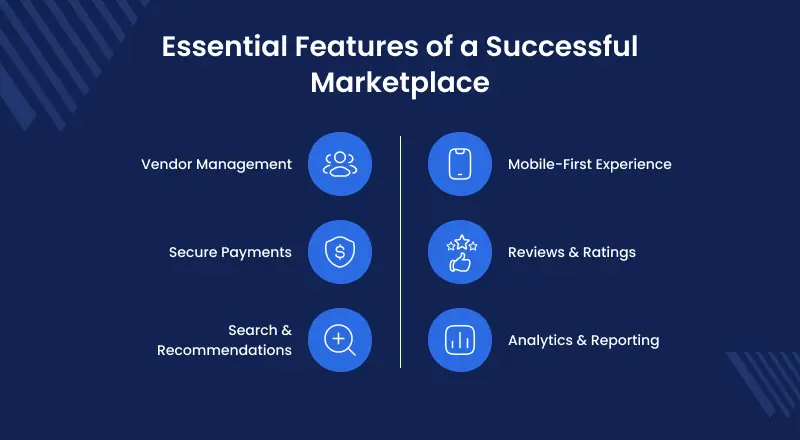
The features should match your business model, but some features are common in most marketplaces.
Buyer features
| Feature | Why it matters |
| Search and filters | Helps buyers find the right product faster |
| Seller profile | Builds trust in the vendor |
| Product comparison | Useful when many sellers offer similar products |
| Cart and checkout | Keeps the buying flow simple |
| Multiple payment options | Reduces checkout drop-off |
| Order tracking | Reduces support queries |
| Ratings and reviews | Helps buyers choose trusted sellers |
| Return and refund request | Builds confidence before purchase |
| Wishlist | Helps buyers save products |
| Support system | Solves order and product issues |
The buyer should not need to understand the backend complexity.
They should see products, seller details, delivery options, price, reviews, and clear support rules.
Seller features
| Feature | Why it matters |
| Seller registration | Lets vendors join the marketplace |
| Seller dashboard | Helps sellers manage daily work |
| Product upload | Lets sellers add and update listings |
| Inventory management | Prevents overselling |
| Order management | Helps sellers process orders |
| Shipment management | Tracks fulfillment |
| Earnings dashboard | Shows sales, commission, and payout data |
| Seller profile | Helps vendors build trust |
| Bulk upload | Saves time for large catalogs |
| Seller support | Helps vendors solve issues faster |
For many marketplaces, seller experience decides growth.
If sellers find the platform hard to use, they will not upload products regularly.
Admin features
| Feature | Why it matters |
| Vendor approval | Controls who can sell |
| Product approval | Protects catalog quality |
| Commission management | Defines platform revenue |
| Order split | Helps manage multi-seller orders |
| Payout management | Tracks vendor earnings |
| Seller membership | Adds subscription revenue |
| Reports and analytics | Helps admins make decisions |
| Dispute management | Handles buyer-seller issues |
| Review moderation | Prevents abuse |
| Role-based access | Helps teams manage operations |
Admin control should be strong but not slow.
Too much manual work can block growth. Too little control can damage trust.
Webkul implementation note: Webkul’s Marketplace supports seller product listings, inventory, orders, shipment, profile pages, and multiple product types.
This kind of seller control becomes important as vendor count grows.
Payment and commission features
Payment features need special planning because they affect trust and cash flow.
A marketplace may need:
- Split payment
- Seller-wise commission
- Category-wise commission
- Fixed or percentage commission
- Vendor payout reports
- Refund adjustment
- Seller wallet
- Payment gateway integration
- Invoice generation
- Tax support
For B2B marketplaces, payment may also include offline payment, purchase orders, credit terms, or quote-based payment.
Shipping and order management features
Shipping becomes complex when many sellers sell from different locations.
Important shipping features include:
- Seller-wise shipping
- Admin shipping
- Vendor shipping
- Delivery zones
- Shipping labels
- Order splitting
- Shipment tracking
- Pickup support
- Return shipping
- Hyperlocal delivery rules
A marketplace selling food, grocery, or local products may need location-based delivery. A B2B marketplace may need freight or custom shipping quotes.
Review, dispute, and support features
Trust is one of the hardest parts of marketplace growth.
You need tools for:
- Product reviews
- Seller ratings
- Buyer complaints
- Order disputes
- Refund requests
- Return approval
- Admin moderation
- Seller response tracking
The goal is not only to solve issues. The goal is to make buyers and sellers feel that the platform is fair.
How to choose the right multi vendor marketplace platform
The right marketplace platform depends on your business stage, budget, catalog size, customization needs, and future growth plan.
A small marketplace may need fast launch. A B2B marketplace may need custom workflows. An enterprise marketplace may need deep integrations.
| Platform approach | Best for | Main benefit | Limitation |
| SaaS marketplace platform | MVPs and simple workflows | Fast launch | Limited customization |
| Shopify multi vendor marketplace | Retail and D2C marketplaces | Easy ecommerce setup | Complex workflows may need apps or custom work |
| Magento / Adobe Commerce marketplace | Scalable and complex ecommerce | Strong customization and B2B support | Higher planning and development effort |
| Bagisto marketplace | Open-source Laravel projects | Code ownership and flexibility | Needs technical development support |
| CS-Cart marketplace | Marketplace-first businesses | Built for multi vendor operations | Platform fit should be checked by workflow |
| Custom marketplace development | Unique or enterprise workflows | Full control | Higher cost and longer timeline |
SaaS marketplace platform
A SaaS marketplace platform is useful when you want a faster launch with less technical setup.
It can work well for MVPs, service marketplaces, rental marketplaces, and simple product marketplaces.
The main benefit is speed. The main limitation is customization.
Choose SaaS if:
- You need to test an idea quickly
- Your workflow is simple
- You do not need deep customization
- You prefer monthly pricing
- You do not want to manage hosting
Avoid SaaS if your marketplace needs complex seller rules, custom checkout, deep ERP integration, or strong ownership of code.
Shopify multi vendor marketplace
Shopify is a strong choice for brands that already use Shopify and want to add marketplace features.
A Shopify multi vendor marketplace can work for retail, fashion, D2C, niche products, and small to mid-size marketplaces.
Webkul’s Marketplace for Shopify helps convert a Shopify store into a marketplace where sellers can create shops, add products, and admins can manage commissions.
Choose Shopify if:
- You want a fast ecommerce setup
- You already use Shopify
- Your marketplace workflow is not very complex
- You need a simple seller portal
- You want access to Shopify apps
Shopify may need extra apps or custom work for complex vendor workflows, advanced commission logic, or deep B2B needs.
Magento / Adobe Commerce multi vendor marketplace
Magento and Adobe Commerce are good for complex ecommerce and large marketplace projects.
They fit businesses that need scale, customization, multi-store, B2B features, advanced catalog rules, and enterprise integrations.
Webkul provides e-commerce marketplace development and marketplace extensions for Adobe Commerce, Magento, Shopify, WooCommerce, Bagisto, CS-Cart, OpenCart, PrestaShop, and other platforms.
Choose Magento or Adobe Commerce if:
- You have a large catalog
- You need advanced seller workflows
- You need B2B or wholesale features
- You need custom checkout or payment logic
- You need ERP, CRM, PIM, or warehouse integration
- You want strong control over marketplace architecture
Many Webkul marketplace projects use Magento 2 or Adobe Commerce when the business needs deeper control over vendor dashboards, product approval, order management, and seller operations.
Bagisto marketplace platform
Bagisto can be a strong choice for businesses that want an open-source Laravel-based ecommerce foundation.
It is useful when you need ownership, custom development, and flexibility.
Choose Bagisto if:
- You prefer open-source technology
- You want Laravel-based development
- You need custom marketplace workflows
- You want control over the codebase
- You are planning long-term customization
Bagisto can be useful for startups and businesses that want a custom marketplace without starting from zero.
CS-Cart marketplace
CS-Cart marketplace can work well for businesses that want marketplace features with lower complexity than enterprise commerce.
CS-Cart can be useful when marketplace functionality is central to the business.
Choose these platforms when:
- You need a practical ecommerce setup
- You want marketplace modules
- You have a controlled catalog size
- You need customization but not enterprise complexity
The right choice depends on your team, budget, hosting preference, and future feature needs.
Custom marketplace development
Custom development is useful when your marketplace model is not standard.
You may need custom development if:
- Checkout flow is unique
- Vendor rules are complex
- Product data is highly specific
- You need mobile apps
- You need headless commerce
- You need advanced AI search
- You need complex ERP or warehouse integration
- You need country-specific compliance
Custom marketplace development costs more, but it gives more control.
It is often better for long-term marketplace businesses with clear workflows and serious growth plans.
Cost to create a multi vendor marketplace
The cost to create a multi vendor marketplace depends on the platform, features, design, customization, integrations, and launch scope.
A basic marketplace MVP costs less than a custom enterprise marketplace. But the cheapest setup is not always the best choice.
A poor setup can cost more later through rework, failed vendor onboarding, payment issues, and slow performance.
What affects marketplace development cost?
The biggest cost drivers are:
- Platform choice
- Number of vendor roles
- Product catalog size
- Custom design
- Seller dashboard features
- Commission logic
- Split payment setup
- Shipping rules
- Mobile app
- AI search or chatbot
- ERP, CRM, or PIM integration
- B2B features
- Multi-language and multi-currency setup
- Security and compliance needs
- Support and maintenance
A product marketplace with simple commission is easier to build.
A B2B marketplace with quotes, approvals, bulk pricing, company accounts, and supplier compliance needs more planning and development.
MVP marketplace cost
An MVP should include only the features required to test the business.
Focus on:
- Vendor registration
- Product listing
- Admin approval
- Buyer search
- Checkout
- Commission setup
- Order management
- Basic payout tracking
- Seller dashboard
- Admin dashboard
This stage is for learning. Avoid advanced automation until you know how buyers and sellers behave.
Growth-stage marketplace cost
A growing marketplace needs better tools for scale.
You may need:
- Bulk product upload
- Advanced search
- Seller subscriptions
- Mobile app
- Seller analytics
- Multiple shipping methods
- Return management
- Review moderation
- Marketing tools
- Better reports
- Payment automation
At this stage, the goal is to reduce admin work and improve seller productivity.
Enterprise marketplace cost
Enterprise marketplaces need deeper control.
They may require:
- ERP integration
- PIM integration
- CRM integration
- Vendor compliance workflow
- Multi-country setup
- Advanced tax rules
- Custom checkout
- Headless frontend
- High-performance hosting
- Security review
- Role-based admin access
- SLA-based support
Enterprise cost is mostly driven by integration, compliance, scale, and custom workflows.
Hidden costs to plan for
Do not plan only development cost.
Also plan for:
- Hosting
- Maintenance
- Security updates
- Payment gateway fees
- Support team
- Seller onboarding
- Product moderation
- Content and SEO
- Marketing
- Legal agreements
- Refund and dispute handling
- Analytics tools
A marketplace is not a one-time project. It is an operating system for buyers, sellers, and admins.
How AI can improve a multi vendor marketplace
AI is not required to launch every marketplace.
You can start with strong vendor onboarding, product listing, checkout, commission, order, and payout workflows.
But as the marketplace grows, AI can improve product discovery, seller productivity, support, reporting, and sales channels.
Use AI where it removes friction. Do not add AI only because it sounds modern.
AI shopping feed and AI commerce discovery
AI shopping is becoming a new product discovery channel.
A marketplace can prepare structured product data so AI shopping systems can better understand products, prices, availability, images, seller details, and shipping data.
OpenAI’s product feed documentation says merchants can provide a structured product feed so products can be discovered inside ChatGPT with accurate discovery, pricing, and seller context.
You can review the OpenAI product feed specification for the type of product data AI shopping systems may need.
This matters more for marketplaces because many vendors may write product titles and descriptions in different ways.
A clean product feed can help AI systems understand what each product is, who it is for, and when it should appear.
For a multi vendor ecommerce marketplace, feed quality is not only an SEO task. It is also a catalog governance task.
Semantic search for better product discovery
Marketplace users do not always search with exact product names.
They may search like this:
- “cotton dress for summer”
- “black office chair under 100”
- “men watch with digital display”
- “spare part for this machine model”
- “wireless earbuds with noise cancellation”
Semantic search helps understand search intent, attributes, and meaning.
This is useful when different vendors use different words for similar products.
For example, one seller may write “men’s digital watch,” another may write “LED sports watch,” and another may write “black electronic wrist watch.”
A normal keyword search may miss useful results. AI-powered search can reduce that gap.
Webkul’s Semantic Search supports natural language product search and returns semantically relevant products instead of only exact keyword matches.
Image search for visual product discovery
Image search is useful when buyers know what they want but do not know the exact name.
A buyer can upload an image of a dress, chair, spare part, jewelry item, shoe, bag, or accessory.
The marketplace can show visually similar products from different vendors.
This is useful for fashion, furniture, decor, accessories, auto parts, and industrial products.
Webkul’s AI Image Search allows users to search products using related product images and visual pattern search.
AI chatbot for buyers, sellers, and admins
A marketplace chatbot should not only answer basic buyer questions.
It can support all three user groups.
Buyers can ask:
- Where is my order?
- Which seller offers faster delivery?
- What is the return policy?
- Can you suggest similar products?
Sellers can ask:
- Why was my product rejected?
- How do I upload products in bulk?
- When will I receive payout?
- Which orders are pending shipment?
Admins can ask:
- Which sellers have delayed orders?
- Which products need approval?
- Which vendors have high return rates?
- Which categories are growing this month?
This can reduce support load and help teams move faster.
Webkul’s AI Chatbot supports product queries and checkout actions from the chat interface. Itsalso supports product queries, order tracking, and customer support using open-source LLMs.
Product content generation for sellers
Many sellers do not write strong product content.
They may upload short titles, copied descriptions, missing SEO fields, weak images, or incomplete product data.
AI can help sellers create:
- Product titles
- Short descriptions
- Long descriptions
- Meta titles
- Meta descriptions
- Product highlights
- Category content
- FAQs
- Translation drafts
This can improve catalog quality and save seller time.
Webkul’s Multi Vendor ChatGPT Content Generator helps marketplace vendors generate product descriptions and SEO content.
But AI content should still be reviewed. Price, warranty, safety claims, ingredients, compliance, and technical specs must stay accurate.
Natural language reports for admins and vendors
Marketplace admins often need reports, but they may not know SQL or database structure.
Natural language reporting can help them ask questions in plain English.
Examples:
- Which seller had the highest sales this month?
- Which products have high views but low orders?
- Which vendors have the most refund requests?
- Show pending orders by vendor.
- Which categories have low stock?
- Which sellers have delayed shipments?
This helps admins and vendors make faster decisions without waiting for a custom report every time.
Webkul’s AI Reporting is built to simplify data exploration and support faster reporting decisions.
Webkul implementation note:
AI should be added where it improves a real workflow, such as search, support, product data, reporting, or seller productivity. It should not replace basic marketplace planning.
Common challenges in multi vendor marketplace development
A marketplace has more moving parts than a normal ecommerce store.
The biggest challenges usually appear after launch, when sellers, buyers, orders, returns, and payouts start growing.
Getting both buyers and sellers
This is the classic marketplace problem.
Buyers will not come if there are not enough sellers. Sellers will not join if there are not enough buyers.
Start with one niche, one region, or one category.
Build density before expanding.
For example, a marketplace for outdoor recreation gear can start with one strong category, such as camping or hiking, before adding every outdoor product type.
Managing vendor quality
Not every seller will follow your quality standards.
Some may upload poor images, wrong prices, duplicate products, or slow shipment updates.
Use vendor approval, product approval, seller ratings, and clear seller rules.
For sensitive categories, add document verification or manual onboarding.
Handling payments and payouts
Payments become complex when many sellers are involved.
Refunds, cancellations, partial shipments, split payments, and delayed payouts must be planned before launch.
Do not treat payout as an afterthought.
A clear payout process protects both the marketplace owner and sellers.
Managing shipping and returns
Shipping is easy when one seller ships all products.
It becomes harder when a cart has products from many sellers.
You may need seller-wise shipping, split orders, delivery zones, shipment tracking, and return rules by vendor.
For food, grocery, or hyperlocal marketplaces, delivery time and seller location are very important.
Building trust between buyers and sellers
Trust is the main currency of a marketplace.
Buyers need to trust the product, seller, payment, delivery, and return policy.
Sellers need to trust payout, admin rules, support, and platform fairness.
Use ratings, verified sellers, clear policies, dispute handling, and transparent communication.
Scaling product data and traffic
A growing marketplace can quickly face catalog and performance issues.
Common problems include duplicate products, weak filters, slow search, missing attributes, and poor product pages.
Plan product attributes, category structure, search logic, and hosting early.
This is especially important for large product marketplaces and B2B catalogs.
Real multi vendor marketplace examples from Webkul projects
Webkul has worked on marketplace projects across industries, platforms, and business models.
The examples below are not added as full case studies. They are used as proof points to show how different marketplace models need different workflows.
| Webkul project | Marketplace type | What it shows |
| Everest | Outdoor product marketplace | Niche marketplaces need seller onboarding, product discovery, and category depth |
| Diverse Marketplace | B2B supplier marketplace | B2B marketplaces need supplier visibility, vendor discovery, and compliant workflows |
| SupplyApp | Industrial B2B marketplace | Industrial marketplaces need performance, vendor control, and large product range support |
| BhavyaSmart | Food product marketplace | Food marketplaces need product data, seller approval, inventory control, and trust |
| Fast Come | Hyperlocal food marketplace | Local marketplaces need vendor location, delivery availability, and nearby seller discovery |
| LuggyBox | Rental and booking marketplace | Rental marketplaces need booking slots, availability, vendor locations, and custom rules |
| Renesent | Shopify marketplace with mobile app | Mobile marketplaces need buyer and seller access from the app |
| SHEconomy | Mobile-first social commerce marketplace | Marketplace growth can depend on mobile speed, accessibility, and engagement |
| Schneider Electric | Enterprise B2B marketplace | Enterprise marketplaces may need pricing logic, quote systems, RMA, customer credit, and custom seller workflows |
These examples show one important point.
A marketplace should not be planned only as a seller listing feature.
It should be planned around the real business workflow: how vendors join, how buyers search, how orders move, how payments work, and how the admin controls growth.
Marketplace launch checklist
Use this checklist before launch.
It will help you avoid common operational gaps.
Before launch
| Task | Why it matters |
| Define niche | Keeps positioning clear |
| Finalize business model | Guides platform and feature choices |
| Select revenue model | Defines how the marketplace earns |
| Create seller agreement | Sets rules for vendors |
| Set commission rules | Avoids payout confusion |
| Create vendor onboarding flow | Helps sellers join smoothly |
| Set product approval rules | Protects catalog quality |
| Configure payment gateway | Enables checkout |
| Plan payout process | Builds seller trust |
| Set shipping rules | Reduces order issues |
| Create return policy | Builds buyer confidence |
| Add support process | Handles disputes clearly |
| Test mobile experience | Many buyers shop on mobile |
| Set analytics | Tracks marketplace health |
| Prepare SEO basics | Helps product and category discovery |
During launch
Start with a small group of trusted sellers.
Test real orders, refunds, product approval, shipping, commission, and payout.
Ask sellers where they face friction.
Ask buyers where they lose trust.
Fix these problems before adding more sellers.
After launch
Track marketplace health every week.
Watch:
- Vendor activation
- Product approval time
- Failed searches
- Cart abandonment
- Delayed shipments
- Refund rate
- Seller complaints
- Buyer support tickets
- Payout delays
- Repeat purchase rate
Growth should be based on data, not guesswork.
Mistakes to avoid when creating a multi vendor marketplace
A marketplace can fail even if the technology works.
Most problems happen because the business model, vendor workflow, or operations were not planned well.
Starting too broad
Do not try to launch every category at once.
A broad marketplace needs more sellers, more content, more moderation, and more marketing.
Start with a clear category, location, or audience.
Expand after you build traction.
Ignoring vendor experience
Many marketplace owners focus only on buyers.
But sellers are the supply side of the business.
If sellers cannot upload products, manage orders, or understand payouts, they will leave.
Make the seller dashboard simple and useful.
Building too many features too early
More features do not always mean a better marketplace.
Too many features can slow launch, increase cost, and confuse users.
Start with core workflows. Add advanced tools after real usage data.
Not planning payouts properly
Vendor payout issues can quickly damage trust.
Define payout timing, refund adjustment, commission rules, tax handling, and payout reports before launch.
A seller should always know how earnings are calculated.
Weak product search
Search is one of the most important features in a marketplace.
If buyers cannot find products, they will not buy.
Use proper product attributes, filters, category structure, and search logic.
For large catalogs, semantic search can improve discovery.
Poor product data
Marketplace sellers may upload incomplete or low-quality data.
Set product data rules from the beginning.
Define required fields, image rules, title format, category attributes, and approval workflow.
AI can help create product content, but admins should still review important claims.
No dispute process
Disputes will happen.
Buyers may complain about delivery, product quality, refund delay, or wrong items.
Sellers may complain about payment, returns, or unfair reviews.
Create a clear dispute process before launch.
How to choose the right marketplace development partner
A marketplace development partner should understand more than ecommerce design and coding.
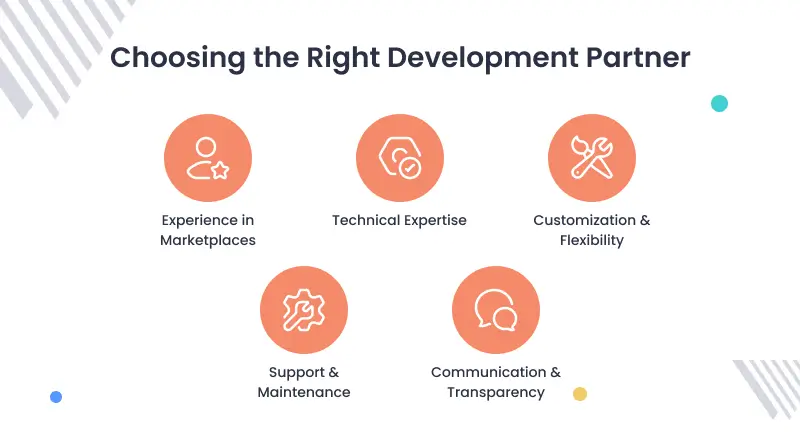
They should understand seller onboarding, product approval, commission logic, payout flow, shipping, returns, vendor dashboards, admin control, and marketplace growth.
Before choosing a partner, check if they have experience with your marketplace model.
A B2B marketplace needs different workflows than a fashion marketplace. A rental marketplace needs different logic than a product marketplace.
Check these points before finalizing a development partner:
| What to check | Why it matters |
|---|---|
| Marketplace experience | They should understand buyer, seller, and admin workflows |
| Platform expertise | They should know the platform you want to use |
| Customization ability | Your marketplace may need workflows beyond default features |
| Payment and payout knowledge | Vendor commission, refund, and payout logic must be planned correctly |
| Integration experience | ERP, CRM, PIM, shipping, payment, and AI tools may be needed |
| Mobile app capability | Many marketplaces need buyer and seller access from mobile |
| Post-launch support | Marketplace issues often appear after real sellers and buyers start using it |
| Case studies | Real examples show practical experience, not only claims |
Webkul has worked on marketplace projects across Magento, Adobe Commerce, Shopify, WooCommerce, Bagisto, CS-Cart, OpenCart, PrestaShop, and mobile commerce.
This experience helps when a marketplace needs custom seller workflows, B2B features, AI search, vendor dashboards, payment logic, or third-party integrations.
You can explore Webkul’s marketplace development services if you need help planning, building, customizing, or scaling a multi vendor marketplace.
How to make your multi vendor marketplace SEO and AI-search ready
SEO should be planned before your marketplace grows.
A multi vendor marketplace can create thousands of product, seller, category, and filter pages.
If these pages are not planned well, search engines may find thin pages, duplicate pages, or weak product data.
AI search also depends on clear and reliable content. Google says the same SEO best practices apply for AI features, including AI Overviews and AI Mode.
So the goal is simple. Make your marketplace useful for buyers, clear for search engines, and structured enough for AI systems to understand.
Build clean category pages
Category pages should not be only a product grid.
A good category page should explain what the buyer can find, show useful filters, and help users compare products from different sellers.
For example, a B2B industrial marketplace may need category pages for tools, HVAC, MRO, electricals, or spare parts.
A fashion marketplace may need categories for men, women, size, fabric, occasion, color, and brand.
Do not create too many thin category pages. Start with categories that buyers actually search for and sellers can support with enough products.
Google’s SEO Starter Guide recommends making pages easy for search engines to crawl, index, and understand.
Use helpful content, not only keywords
Marketplace SEO should not depend only on product titles and category names.
Create helpful content around buyer problems, product choices, comparison needs, seller trust, and buying guides.
Google’s helpful content guidance says content should be made for people first, not only to attract search traffic.
For a multi vendor marketplace, this can include:
- Buying guides
- Category guides
- Product comparison pages
- Seller stories
- Vendor onboarding guides
- Product care guides
- B2B procurement guides
- Return and shipping explainers
This helps the marketplace build topical authority instead of depending only on product pages.
Use structured product data
Product pages should have clear and complete information.
Add important details like product title, price, availability, images, brand, seller, description, reviews, shipping details, and return policy.
Google says structured data helps it understand page content.
For ecommerce product pages, Google’s Product structured data can help product information appear in richer ways in Google Search.
For a multi vendor marketplace, structured data becomes even more important because many sellers may list similar products.
Clean product data helps buyers, search engines, and AI shopping systems understand what each product is and who is selling it.
Avoid duplicate product pages
Duplicate product pages are common in marketplaces.
Many sellers may sell the same product with slightly different titles, images, or descriptions. This can create weak or repeated pages.
Plan how your marketplace will handle similar products.
You may need canonical tags, grouped product offers, seller-specific pricing, or clear rules for duplicate listings.
Google explains that canonical URLs help show which version of duplicate or very similar pages should be treated as the main version.
This is useful when multiple URLs show similar marketplace content.
Improve seller profile pages
Seller profile pages can support both SEO and trust.
A good seller page should show who the seller is, what they sell, where they operate, their ratings, reviews, policies, and support details.
For a B2B marketplace, seller pages may also need business documents, certifications, company profile, product range, and approval status.
For a local marketplace, seller location and delivery area may matter more.
These pages can rank for seller names, product niches, local searches, and branded queries.
They also help buyers decide whether they can trust a vendor.
Make internal links useful
Internal links help users and search engines move through your marketplace.
Link important category pages, seller pages, product pages, buying guides, and help pages in a natural way.
For example, a product page can link to the seller profile, related category, return policy, similar products, and buying guide.
Google’s Search Essentials recommends making links crawlable so Google can find other pages through links on your site.
Do not add internal links only for SEO. Add them where they help users make a better decision.
Keep product and seller data accurate
AI search and shopping systems need accurate product data.
For a marketplace, this means product titles, descriptions, price, stock, images, seller names, shipping rules, return policies, and availability should stay updated.
Bad product data can hurt search visibility, buyer trust, and conversion.
It can also create support problems when buyers see wrong stock, wrong pricing, or unclear seller information.
Set clear product data rules for sellers from the start.
Use clear answers, tables, and process flows
AI search systems work better when content is easy to understand.
Use direct answers under important headings and where users compare options. Use steps where users need a process.
For example, this article uses tables for marketplace types, platform choice, buyer features, seller features, admin features, and launch checklist.
This helps users scan the page faster.
It also makes the content easier for search engines and AI systems to understand.
Add real experience and proof
Generic content is not enough for a competitive marketplace topic.
Add real project examples, practical notes, screenshots, customer use cases, and implementation lessons where possible.
For example, Webkul marketplace projects across B2B, food, rental, hyperlocal, mobile, and enterprise commerce show how different marketplace models need different workflows.
This helps users understand that marketplace development is not only about adding sellers.
It is about planning how vendors join, how buyers search, how orders move, how payouts work, and how admins control growth.
Final thoughts
Start with one clear niche, a small group of trusted sellers, and the workflows needed to complete real orders.
Once the marketplace is stable, add advanced features like mobile apps, AI search, automation, reporting, and integrations.
A simple marketplace may start with an MVP. A B2B or enterprise marketplace may need deeper customization, integrations, and vendor control.
The best marketplace is not the one with the most features.
It is the one where buyers can find and trust products, sellers can manage business easily, and admins can control growth without daily chaos.
FAQs about creating a multi vendor marketplace
What is a multi vendor marketplace?
A multi vendor marketplace is an online platform where many sellers can register, list products or services, and sell to buyers through one website or app.
The marketplace owner manages the platform, commission, vendor rules, payments, and overall buyer experience.
How do I create a multi vendor marketplace?
To create a multi vendor marketplace, choose a niche, define buyers and sellers, select a business model, choose a marketplace platform, build vendor workflows, set payment rules, and launch an MVP.
After launch, track seller activity, buyer conversion, product quality, payout flow, and support issues.
How do I create an ecommerce multi vendor marketplace?
To create an ecommerce multi vendor marketplace, start with product catalog rules, seller onboarding, inventory management, checkout, shipping, returns, commission setup, and payout flow.
Once these workflows are stable, add advanced features like mobile apps, AI search, product content generation, ERP integration, and seller analytics.
What is a multi vendor marketplace platform?
A multi vendor marketplace platform is software that helps multiple sellers sell from one ecommerce website or app.
It usually includes seller registration, vendor dashboard, product approval, commission setup, order management, payment flow, and admin controls.
Which platform is best for a multi vendor marketplace?
The best platform depends on your business model.
Shopify can work for simple ecommerce marketplaces. WooCommerce works well with WordPress. Magento or Adobe Commerce is better for complex and scalable marketplaces.
Bagisto can be useful if you want an open-source Laravel-based marketplace. Custom development is better for unique workflows.
How much does it cost to create a multi vendor marketplace?
The cost depends on platform, features, design, vendor workflow, payment setup, mobile app, AI features, and integrations.
An MVP costs less than an enterprise marketplace. A B2B marketplace with quote requests, custom pricing, and ERP integration will cost more than a simple product marketplace.
Can I create an ecommerce multi vendor marketplace without coding?
Yes, you can start with SaaS tools, marketplace apps, or plugins if your workflow is simple.
But custom workflows, payment rules, B2B features, mobile apps, and integrations may need development support.
How do marketplace owners make money?
Marketplace owners can earn through commission, seller subscription, listing fees, featured products, advertising, lead fees, booking fees, or service charges.
The best revenue model depends on order value, seller type, product margin, and buyer behavior.
How do vendors get paid in a marketplace?
Vendors can get paid through manual payout, scheduled payout, seller wallet, or split payment setup.
The payout can happen after order placement, shipment, delivery, return window, or admin approval.
What features are needed in a multi vendor platform?
Important features include vendor registration, seller dashboard, product upload, product approval, order management, commission setup, payout, checkout, reviews, support, and admin reports.
Advanced marketplaces may also need mobile apps, AI search, B2B features, ERP integration, and multi-country support.
Is AI required for a multi vendor marketplace?
AI is not required to launch a marketplace.
But AI can help as the marketplace grows. It can improve semantic search, image search, product content generation, chatbot support, AI shopping feeds, and natural language reporting.
How long does it take to launch a marketplace?
Launch time depends on scope.
A simple MVP can launch faster if the business model is clear. A custom marketplace with B2B workflows, payment rules, mobile apps, and integrations will take longer.
The best approach is to launch a focused version first, then improve based on real buyer and seller behavior.

16 comments
Please email us your complete requirements at [email protected] and our team will assist you accordingly.
Thanks.
Thanks for the appreciation. In case of any further queries please drop us a mail at [email protected] and we will assist you accordingly.
Thanks
Thanks for the valuable words. Stayed tuned in for more such knowledgeable articles.
For any further queries or requirements kindly share it on [email protected].
Regards.
Thanks you for the valuable words. To know more you can refer here- Open Source Multi-Vendor Marketplace for B2B and B2C Commerce.
If still, you are having more queries share it on [email protected].
Thanks and Regards.
Thanks for your precious words!
If you need any marketplace solution, kindly write to us on [email protected].
Regards.
I would like to start a market place with mobile app, I dont have a website. please i need some one to take me through the whole process
thanks
Please email us your requirements at [email protected] and our team will assist you with complete details.
Thanks.
Thanks for the precious words. If you have any requirements kindly share it on [email protected]
Regards.
Our products are also sold in marketplaces of the larger retailers and from Mercado Libre the largest marketplace in the region. We sell only in Chile and in Chilean pesos and have integrated Transbank.cl payment gateway. I have a few sellers who want to add their products onto our shopify platform and wanted to understand the process involved and how you would overcome the challenges – Spanish language, Chilean payment gateway etc. I am going to be at CES Vegas next week in case someone from your team is there please advise. I am in Mumbai in April also. Do you have an office in Bombay?
Thanks For Sharing the requirement.
Our team will shortly connect with you over the HelpDesk system.
Additionally, for further details kindly share it at [email protected].
Thanks and Regards.