


















Your eCommerce journey shouldn’t end with an idea. This Black Friday, turn it into a fully functional Shopify store with Webkul!

What if you could go from planning your online business to having your own Shopify storefront without spending months figuring out themes, integrations, configurations, and technical complexities?
Imagine a store that does more than showcase your products. It supports your business operations and growth.
Customers can browse products, shop, make payments, and track orders through a seamless experience.
As your business grows, extend your store’s capabilities with the right eCommerce apps and integrations.
Sounds like the online business you’ve been planning? This Black Friday, Webkul brings you an opportunity to make it happen.
With Shopify store development expertise and a diverse ecosystem of Webkul Shopify apps, we help businesses build their online storefronts and extend their functionality as their requirements evolve.
30 Days. One Development Partner. A Shopify Store Built Around Your Business Goals.
Ready to turn your eCommerce vision into reality? Webkul helps you build a professional Shopify store with the right design, customisation, configurations, and functionality to support your business.
Explore Webkul’s Shopify Store Development Package and take the first step towards launching your online business.
Why Is Black Friday the Right Time to Launch Your Shopify Store?
Black Friday isn’t just about customers hunting for discounts. It’s also a great opportunity for businesses to strengthen their online presence.
Brands can use this shopping season to introduce new products, attract customers, and prepare for increased sales.
But here’s the challenge: customers have more choices than ever. If your brand doesn’t offer a convenient online shopping experience, potential customers may simply move to another store.
A successful eCommerce business needs more than an attractive homepage. It requires a well-structured storefront and smooth checkout.
Efficient order management and flexible functionality also help support your business as it grows.
That’s where having the right Shopify development partner makes a difference.
Instead of managing multiple technical requirements independently, you can work with Webkul to build a Shopify store that aligns with your business model, brand identity, and operational needs.
Launch Your Shopify Store in 30 Days with Webkul
Building an online store involves multiple activities, from understanding business requirements to configuring the storefront and testing its functionality.
Webkul’s Shopify Store Development Service helps bring these activities together through a structured development approach.
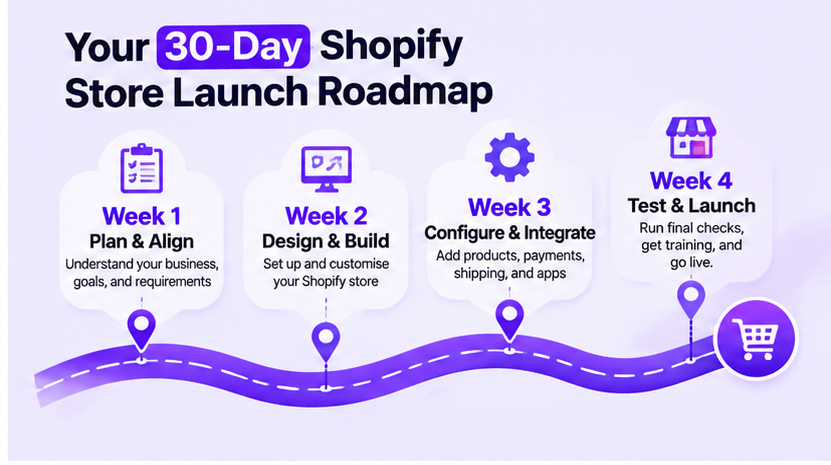
Here’s what your 30-day journey can look like.
Week 1: Understand Your Business. Plan Your Store.
Every successful online store starts with a clear understanding of the business behind it.
Webkul works around your requirements to establish the foundation of your Shopify store.
This stage may include:
- Understanding your business model and target audience.
- Identifying store design and theme requirements.
- Planning product categories and collections.
- Defining essential storefront pages.
- Identifying payment and shipping requirements.
- Understanding third-party app and integration needs.
The Webkul advantage: Your store development starts with your business requirements, not a one-size-fits-all template.
Week 2: Build a Store That Represents Your Brand
Your website is often the first impression customers have of your business. It should reflect your brand identity while making product discovery simple.
Webkul helps bring your storefront design to life using Shopify’s available theme templates and supported theme features.
Development activities include:
- Shopify theme implementation and customisation.
- Homepage and product page setup.
- Collection and category layouts.
- Navigation and menu configuration.
- Brand-specific visual elements.
- Responsive storefront configuration.
The objective is simple: create a professional storefront that gives customers a consistent and convenient shopping experience.
Week 3: Configure Your Store for Business Operations
A storefront may look impressive, but it also needs to work behind the scenes.
Webkul helps configure essential Shopify features to prepare your store for day-to-day operations.
This stage can include:
- Shopify store setup and basic configurations.
- Supported payment method configuration.
- Shipping option setup.
- Product uploads and catalogue organisation.
- Add-on app installation and configuration, where required.
- Essential store functionality setup.
Need something beyond standard Shopify functionality? Webkul’s Shopify app ecosystem offers additional capabilities that can help address specific business requirements.
Week 4: Test, Review and Prepare for Launch
Before your store goes live, its key shopping and operational workflows need to be reviewed.
This stage focuses on validating the configured store and preparing it for handover.
Activities include:
- Storefront functionality checks.
- Mobile and desktop responsiveness review.
- Product and collection verification.
- Cart and checkout testing.
- Payment and shipping configuration checks.
- Final review and client handover.
- Guidance on managing products, collections, and discounts.
Your result: A Shopify storefront developed around your requirements, with essential configurations and guidance to help you manage it.
More Than Shopify Store Development: Extend Your Store with Webkul Apps
Here’s where Webkul brings another advantage to your eCommerce journey. Launching a Shopify store is the first step.
As your business grows, you may want to introduce new selling models, automate operations, improve customer engagement, or connect your store with external systems.
You don’t necessarily need to start building every feature from scratch.
Webkul offers a wide range of Shopify apps designed to extend your store’s capabilities.
Let’s look at some ways these apps can support your business.
1. Want to Build Your Own MultiVendor Marketplace?
Why limit your business to selling your own products when you can build a platform where multiple vendors can sell through one storefront?
Webkul MultiVendor Marketplace helps transform a Shopify store into a multi-vendor marketplace.
It offers capabilities for:
- Vendor registration and management.
- Separate vendor product management.
- Commission management.
- Order and seller management.
- Marketplace administration.
Whether you’re planning a niche marketplace, a fashion marketplace, or a multi-seller retail platform, this app can help you explore a marketplace business model.
2. Want to Increase Customer Engagement and Repeat Purchases?
Customer retention is just as important as customer acquisition.
Webkul Wallet Management introduces wallet and cashback functionality to your Shopify store, helping businesses create additional incentives for customers to shop again.
Potential use cases include:
- Store wallet functionality.
- Cashback incentives.
- Customer wallet balance management.
- Encouraging repeat purchases.
3. Selling Products Through Subscriptions?
For businesses offering products that customers need regularly, subscription commerce can introduce a recurring purchase model.
Webkul Product Subscriptions helps businesses manage subscription-based purchases and recurring payment workflows.
It can be relevant for:
- Skincare and personal care brands.
- Monthly product boxes.
- Coffee and food subscriptions.
- Regular-use consumer products.
4. Need Better Order Management?
Order cancellations, returns, and exchanges are part of eCommerce operations. Managing these processes efficiently can improve the overall customer experience.
Webkul Order Management helps customers initiate and manage order-related requests through features such as:
- Order returns.
- Product exchanges.
- Order cancellations.
It helps businesses organise post-purchase interactions more efficiently.
5. Want to Offer Product Booking and Rental Services?
Not every Shopify business sells products that customers purchase and own.
Some businesses offer appointments, rentals, events, and time-based bookings.
Booking App by Webkul supports use cases such as:
- Appointment bookings.
- Product rentals.
- Event bookings.
- Concert and other booking experiences.
It’s an interesting option for businesses looking to introduce service-based or booking-based offerings through Shopify.
6. Want to Connect Shopify with Your ERP?
As an eCommerce business grows, managing products, orders, and inventory across separate systems can become challenging.
Webkul Odoo Connector helps synchronise Shopify data with Odoo, including products, orders, and quantities.
This can help businesses reduce repetitive data management and maintain better coordination between their storefront and business operations.
7. Want to Create Product Bundles and Increase Order Value?
Product bundles give customers an opportunity to purchase complementary products together.
Webkul Bundle Product helps businesses create product combinations and offer bundle-based discounts.
For example:
- Skincare starter kits.
- Festive gift combinations.
- Clothing sets.
- Complementary product packs.
It’s a useful way to introduce product combinations and encourage customers to explore more of your catalogue.
8. Want to Create Urgency Around Your Offers?
Limited-time offers can make promotional campaigns more engaging.
Webkul Lightning Deals helps businesses create deals and discounts to encourage customers to take advantage of promotional offers.
It can be useful during:
- Black Friday campaigns.
- Cyber Monday sales.
- Festive promotions.
- Seasonal clearance events.
Explore all Webkul Shopify apps: https://apps.shopify.com/partners/webkul
One Shopify Store. Multiple Possibilities. One Development Partner.
Consider these three business scenarios:
Scenario 1: You’re launching a fashion brand.
You need a visually appealing storefront, organised product collections, and a convenient shopping experience.
Start with Shopify store development and explore product bundles and wallet functionality as your business grows.
Scenario 2: You’re building a multi-vendor business.
You want to build a platform where multiple sellers can list and sell their products?
Webkul’s Shopify Store Development Service, combined with the MultiVendor Marketplace app, helps you create a multi-seller storefront with vendor management and marketplace functionality.
Scenario 3: You’re an established retailer managing multiple systems.
You already have products, orders, and inventory managed through an ERP. You need your Shopify storefront to work alongside your existing operations.
Explore the Odoo Connector and other relevant integration solutions.
The point is that Shopify development doesn’t have to stop at launching a website. Your store can evolve into a broader eCommerce ecosystem with the right applications and integrations.
Why Choose Webkul for Shopify Store Development?
Choosing a development partner isn’t just about getting a website delivered. It’s about working with a team that understands the technical and operational requirements of eCommerce businesses.
Here’s what makes Webkul a relevant partner for your Shopify journey:
1. Store Development Expertise
Get support for Shopify store setup, theme implementation, payment and shipping configuration, product uploads, and related development requirements.
2. A Broad Shopify App Ecosystem
Explore Webkul’s range of Shopify apps for marketplace development, subscriptions, bookings, order management, customer engagement, and business integrations.
3. Solutions for Different Business Models
Whether you’re launching a single-brand store, planning a multi-vendor marketplace, or introducing subscription-based selling, you can explore solutions aligned with your business model.
4. Integration Capabilities
Connect your Shopify store with relevant external systems and applications to support business workflows and data synchronisation.
5. Room to Expand
Start with the functionality your business needs today and explore additional features as your operations evolve.
Black Friday Special: Give Your eCommerce Business a Head Start

This Black Friday, don’t just think about what you want to buy. Think about what you want to build.
Your business deserves more than a social media page. It deserves a dedicated storefront, a smooth customer journey, and the technology to support its next stage of growth.
With Webkul’s Shopify Store Development Service and extensive Shopify app ecosystem, you can take the first step towards building an eCommerce business that’s ready for more.
Ready to launch your Shopify store?
Let’s turn your business idea into an online store.
Explore Webkul’s Shopify Store Development Package:
https://store.webkul.com/shopify-store-development-package.html
Explore Webkul’s Shopify Apps:
https://store.webkul.com/Shopify.html
Have questions or need assistance with your Shopify store development? Feel free to reach out to our team at [email protected]. We’d be happy to help you get started!
Or, you can raise a support ticket to share your requirements, discuss your project needs, or get assistance from our team.

Be the first to comment.