ERPNext Accounting Module helps businesses answer three essential questions: Are customers paying on time? What do we owe suppliers? Does the bank balance match the books?
It turns everyday activities—sales, purchases, stock movements, and expenses—into reliable, traceable financial records.
What the ERPNext Accounting Module Does
At its core, ERPNext follows double-entry bookkeeping. In other words, every transaction posts equal debit and credit totals, so the books always stay balanced.
Crucially, you don’t create these entries by hand. Instead, submitting a document — an invoice, a payment, a stock entry — generates the ledger postings automatically from that document’s values.
Three records work together to make any number traceable:
| Record | What it tells you |
|---|---|
| Source document | The business event itself: amounts, parties, taxes, dates, and references |
| GL Entry | The actual debit or credit posted to an account, along with its cost center, project, and other dimensions |
| Payment Ledger Entry | How receivables, payables, advances, and payments link and allocate against each other |
Because of this structure, ERPNext acts as a single source of financial truth. It stays connected across Procurement, Sales, Manufacturing, and Stock.
So the finance team never has to reconcile numbers between disconnected systems.
Core Building Blocks of ERPNext Accounting Module
Chart of Accounts
Every company gets its own Chart of Accounts, organized as a tree under Assets, Liabilities, Equity, Income, and Expenses.
Ledger accounts hold the actual postings, while group accounts organize everything for reporting.
Because ERPNext supports multi-company and multi-currency setups natively, the same flexible structure scales from a single small business up to a group of subsidiaries.
General Ledger
The General Ledger is the foundation underneath every other accounting report. Every submitted transaction — including ones from Stock and Manufacturing — automatically creates a GL entry.
As a result, the General Ledger report works like a time machine: you can drill into any single posting, trace it back to its source document, and verify exactly what created a number.
Managing Billing, Payables, and Receivables in ERPNext Accounting module
Cash flow management depends on knowing exactly who owes what, and when. ERPNext handles both sides of that equation:
- Accounts Receivable tracks customer invoices, due dates, and payment terms, and can split one invoice into scheduled instalments.
- Accounts Payable tracks vendor invoices, schedules payments, and manages outstanding liabilities.
- Aging reports and credit management tools flag overdue amounts before they become a real cash flow problem.
- Payment Requests let a business share a payment link directly with a customer, while Dunning automates follow-up on overdue receivables.
A Payment Entry records the actual money movement — received, paid, or transferred between accounts.
It can allocate one payment across several invoices, accept a partial payment, or hold an excess amount as unallocated credit for later use.
Taxes and Regional Compliance in ERPNext Accounting module
Tax compliance varies enormously by region, so ERPNext keeps tax logic modular rather than hardcoded.
Tax templates automatically add sales and purchase taxes to a transaction, while Tax Categories and Tax Rules pick the correct template based on the party, address, or item involved.
Item Tax Templates handle products that need different rates from the rest of an order.
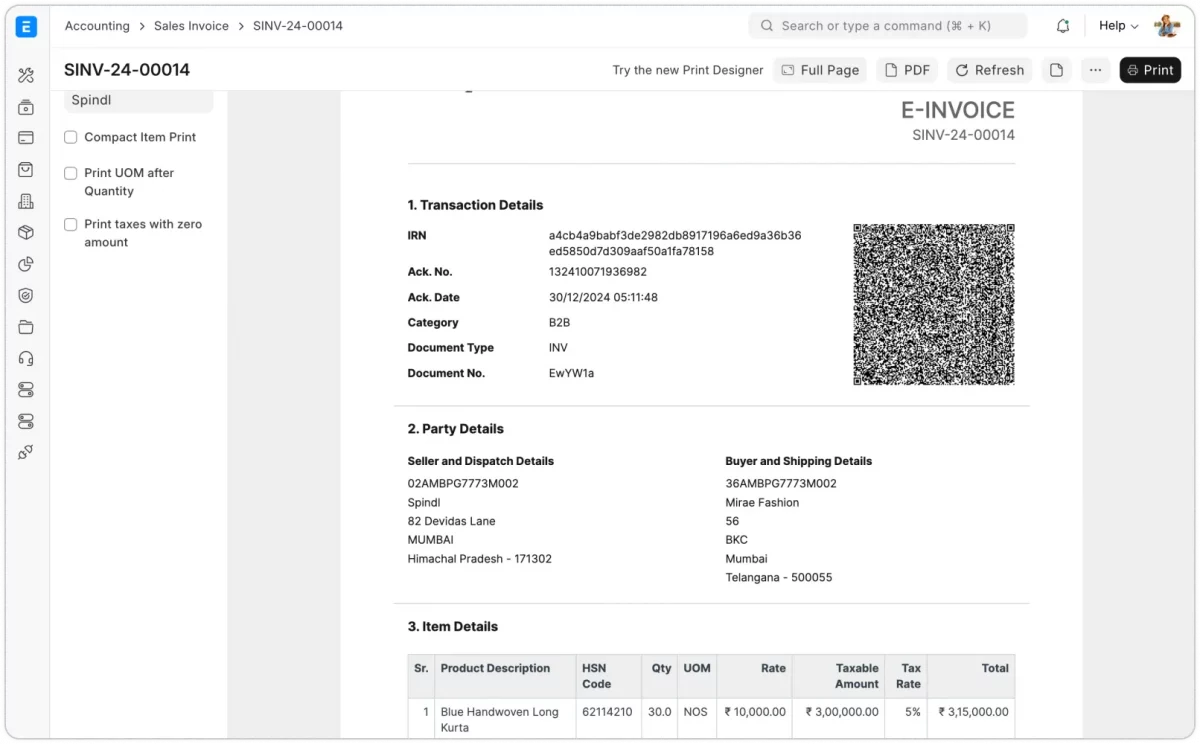
Image source: Frappe — ERPNext Accounting
For businesses with e-invoicing obligations, ERPNext integrates with regional government portals through REST APIs.
Or through dedicated localization apps for markets like India, UAE, and Saudi Arabia.
Cost Centers, Dimensions, and Budgeting
Knowing what was spent matters less than knowing where it was spent. Cost Centers help businesses track profitability across units, such as online and offline sales.
Accounting Dimensions add reporting segments like branches, departments, or business units without changing the Chart of Accounts.
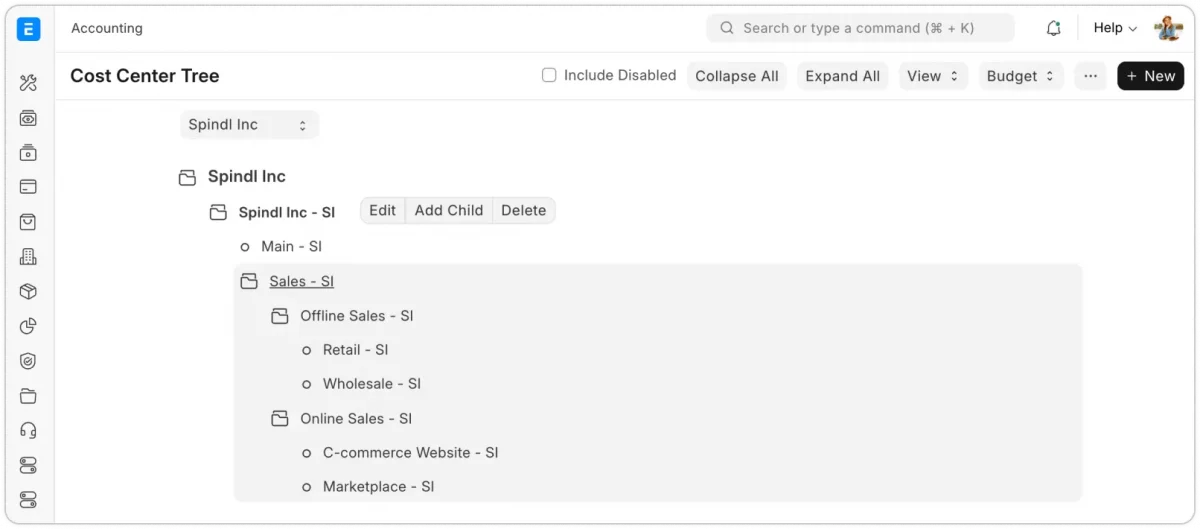
Image source: Frappe — ERPNext Accounting
On top of that, budgets can be set by account, cost center, project, or dimension, with monthly splits to catch overspending early.
ERPNext can even warn or block a transaction outright once it crosses a defined budget threshold.
Financial Statements and Reporting
This is where all the underlying structure pays off. With one click, ERPNext generates the reports a finance team actually needs day-to-day:
- General Ledger and Trial Balance, for account-level verification
- Balance Sheet, Profit & Loss Statement, and Cash Flow Statement
- Accounts Receivable and Payable with full aging analysis
- Liquidity ratios and other financial performance indicators
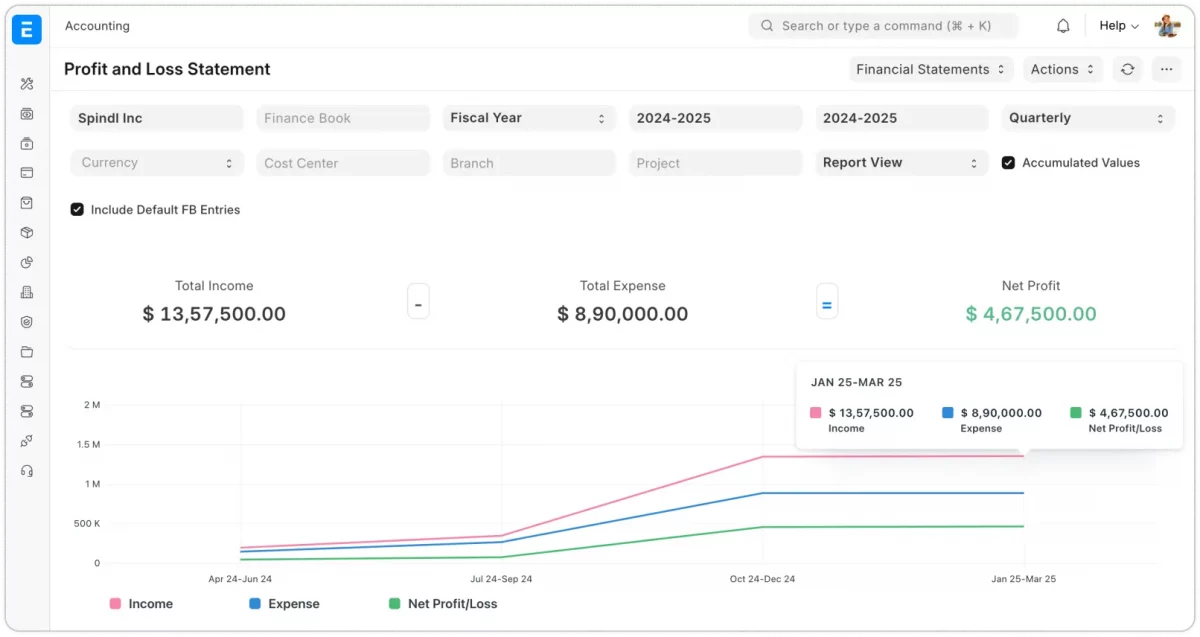
Image source: Frappe — ERPNext Accounting
Every report reads from submitted ledger data. Drafts never affect the books, while cancelling a submitted transaction automatically reverses its accounting effect—no manual cleanup required.
Assets and Depreciation
Fixed assets have their own dedicated lifecycle. ERPNext maintains an Asset Register and automated depreciation schedule, tracking assets from purchase through disposal or resale.
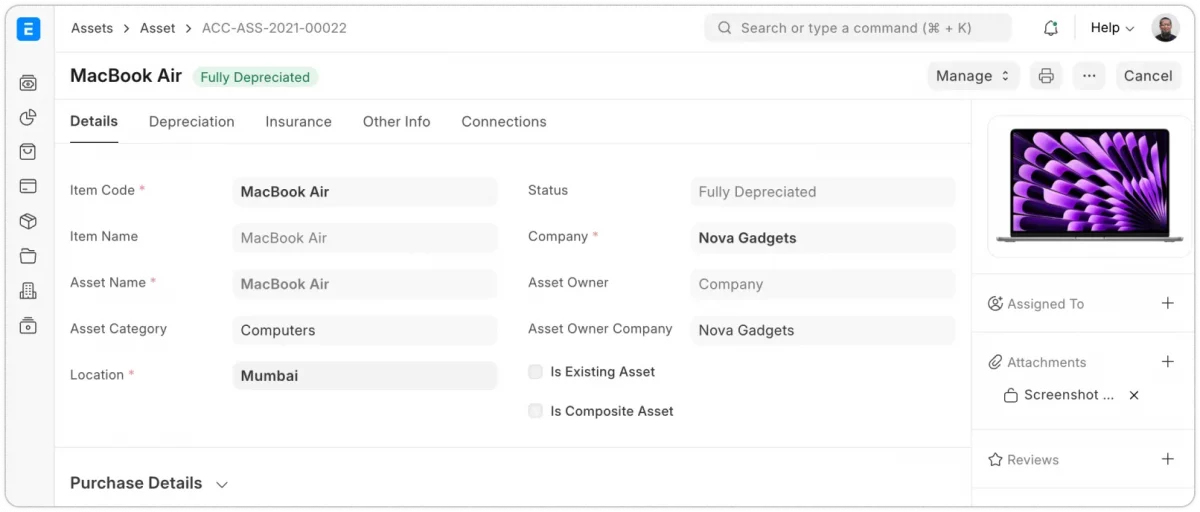
Image source: Frappe — ERPNext Accounting
Depreciation methods include Written Down Value, Straight Line, and Double Declining Balance, covering most international compliance standards out of the box.
Account Reconciliation
Matching payments manually takes hours. ERPNext’s Payment Reconciliation Tool matches payments, advances, and credit notes with outstanding invoices.
Separately, the Bank Reconciliation Tool imports bank statement data and matches it against recorded vouchers—so month-end no longer means manually cross-checking spreadsheets against PDF statements.
Multi-Company and Multi-Currency Management
Growing businesses rarely stay single-entity for long. ERPNext handles multiple companies, potentially across different countries and currencies, inside one unified account.
Inter-company sales and purchase transactions work out of the box, and every company still keeps its own fully balanced, independent ledger.
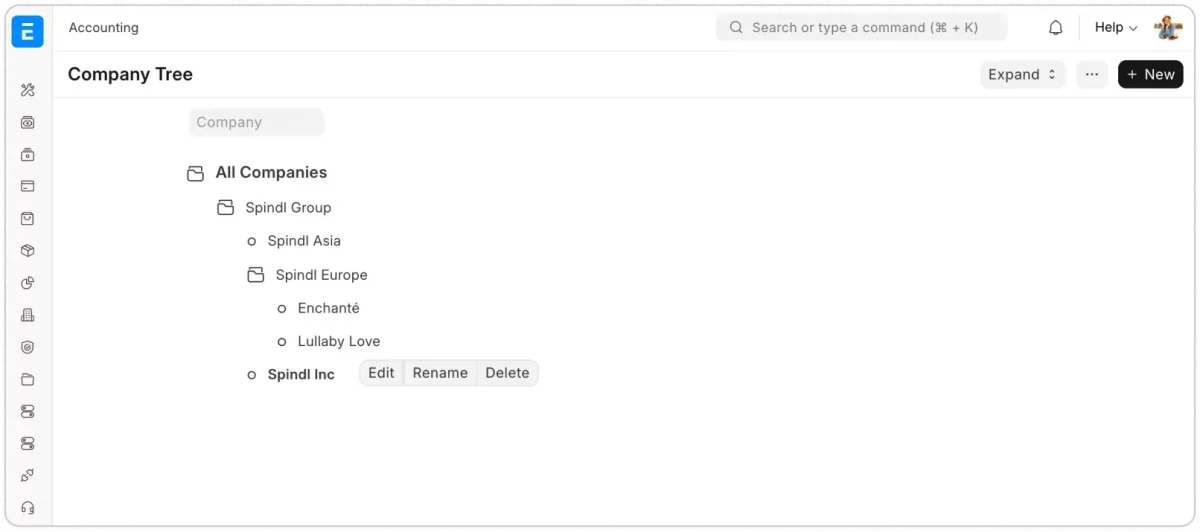
Image source: Frappe — ERPNext Accounting
The General Ledger captures balances in both a company’s base currency and each transaction’s original currency.
As a result, generating reports for customers or suppliers in their local currency takes no extra setup.
Closing, Controls, and Auditability
At period end, a Period Closing Voucher transfers the period’s profit or loss into the selected closing account.
Meanwhile, an Accounting Period can lock down selected transaction types entirely, preventing them from being posted, amended, or cancelled once a period closes.
Notably, ERPNext never simply deletes a finalized transaction.
Instead, its immutable-ledger approach creates reversal entries for any cancellation, preserving a complete audit trail — a detail that matters enormously the first time an auditor asks for one.
Why ERPNext Accounting module Matters for a Growing Business
Put together, these pieces reduce two things every finance team wants less of: manual spreadsheet work and dependence on external auditors for basic visibility.
Because Accounting integrates with Stock, Manufacturing, and Sales, financial reports trace back to real, submitted transactions—not manually maintained spreadsheets that drift out of sync.
Conclusion
The ERPNext Accounting module turns the everyday chaos of running a business — invoices, payments, stock movements, taxes — into a single, traceable financial record.
From a flexible Chart of Accounts through to full multi-company reporting, it gives finance teams the visibility they need without forcing them into rigid, one-size-fits-all workflows.
For any business still stitching together spreadsheets and disconnected tools, it’s a genuinely complete alternative.

Be the first to comment.