The WordPress Interactivity API makes WooCommerce checkout faster by updating parts of the page without a full reload.
Since checkout is the most critical step in the buying journey, a faster experience can help reduce cart abandonment.
In this blog, we’ll explore how the Interactivity API works and why it improves checkout performance.
What Is the WordPress Interactivity API
The WordPress Interactivity API is a standard way to add front-end interactivity to blocks.
It was introduced to replace the mix of custom jQuery and inline scripts most plugins used before.
Instead of reloading the page, it updates only the parts that change.
Why Checkout Pages Are Usually Slow
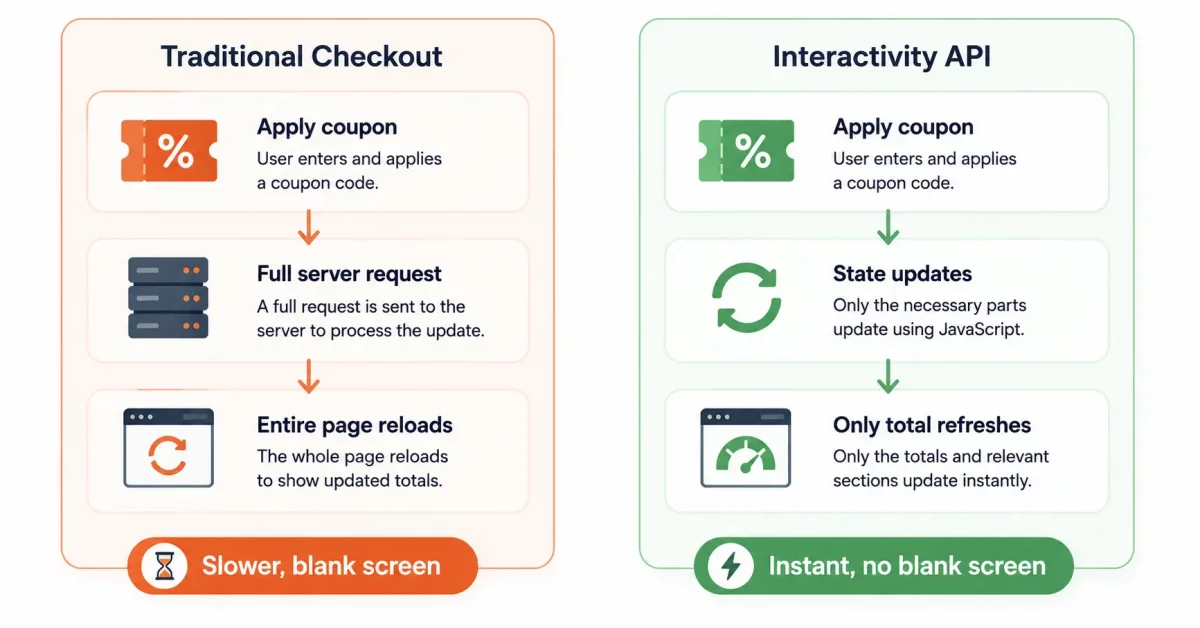
Traditional WooCommerce checkout reloads the page for many small actions. Applying a coupon, changing shipping, or updating quantity all trigger a refresh.
Each reload means a new server request, a new database query, and a full re-render of the page.
This adds up fast, especially on mobile connections.
How the Interactivity API Fixes This
Reactive State Instead of Full Reloads
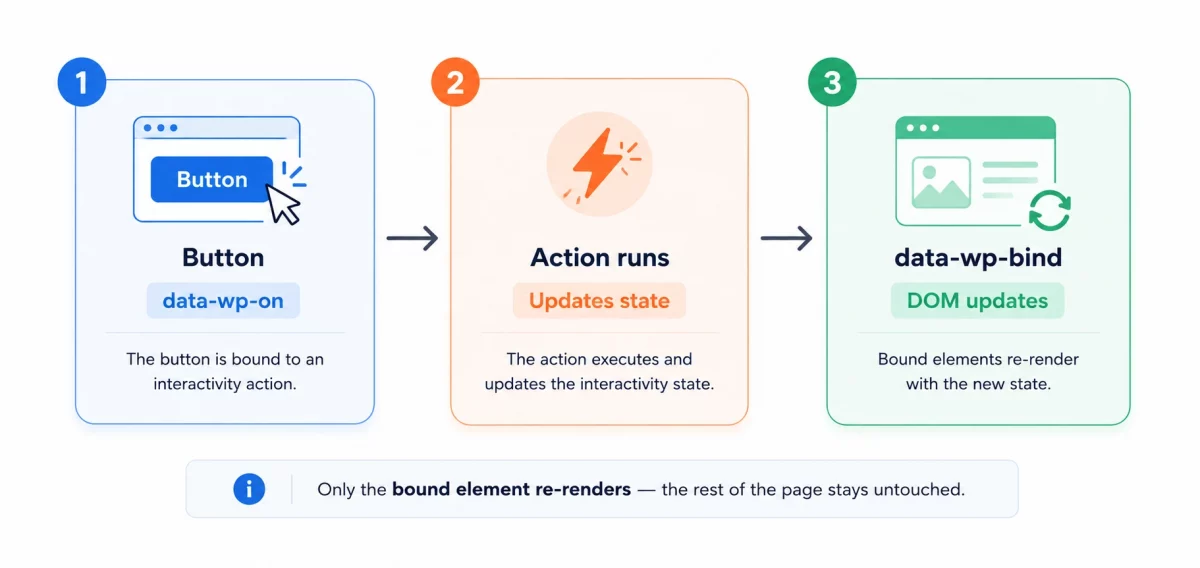
It uses a small reactive state object. When state changes, only the related part of the DOM updates.
This means checkout totals, shipping costs, or coupon fields can update instantly, without touching the rest of the page.
// Registering interactivity for a checkout block
wp_interactivity_state( 'my-plugin/checkout', array(
    'total' => 0,
    'isUpdating' => false,
) );
Directives Instead of Custom JavaScript
The API uses simple HTML directives like data-wp-on and data-wp-bind. These replace the custom JavaScript most checkout plugins had to write by hand.
<button data-wp-on--click="actions.updateShipping">
    Update Shipping
</button>
Smaller JavaScript Payloads
Because this system ships a small, shared runtime, plugins don’t need to load their own heavy JavaScript libraries.
Less JavaScript means faster page loads, especially on the checkout page where every script matters.
Real Impact of the Interactivity API on Checkoutact on WooCommerce Checkout
Fewer full-page reloads mean fewer server requests per checkout session.
Fewer server requests mean lower load on your hosting, especially during sales or high traffic.
Customers see instant feedback instead of a blank screen while the page reloads.
This is covered in more detail in the official WordPress Interactivity API documentation.
Should You Use It in Your Own Plugin
If you build custom checkout features, the WordPress Interactivity API is worth adopting.
It reduces the JavaScript you need to maintain. It also keeps your plugin compatible with how WordPress is moving forward.
For related reading, check our post on how WooCommerce processes a request, which covers the full request lifecycle this API plugs into.
Best Practices When Adopting It
Start with one small, isolated block. Don’t rewrite your entire checkout at once.
Keep your state object small and focused on what actually needs to update.
Test on real mobile connections, not just fast office Wi-Fi.
Wrapping Up
The WordPress Interactivity API makes WooCommerce checkout faster by cutting unnecessary page reloads and reducing JavaScript weight.
It’s a meaningful shift for store owners who care about speed and conversion.
If checkout speed matters to your store, this is one update worth paying attention to.

Be the first to comment.