Introducing wallet Management API for the Wallet management app for Shopify.
Wallet Management app for Shopify gives your eCommerce store a wallet concept for your customers.
This enables your customers to pay via wallet, recharge the wallet, and can even get refunds in the wallet and much more.
Now, the merchants using the Wallet management app can get access to the Wallet Management API using the app.
API stands for an Application programming interface. It is a set of tools and protocols that will help you build sync and much more.
POST Method of the API is where developers can interface with other APIs or systems to get the desired outcome. Moreover, it is more often utilized to create new resources.
GET Method of API is to read or retrieve a representation of a resource or information.
PUT Method of the API is where developers can interface with other APIs or systems to get the desired outcome. It is more often utilized to update existing resources.

Then, get the base URL.
Base URL – https://app-wallet.webkul.com/walletapi/api/doc
Use of Wallet Management API
Firstly, you need to understand exactly what actions you perform via the given APIs. Wallet Management API lets you do the following functions:
For TOKEN:-
Follow the below-mentioned steps to get Access and Refresh Token-
Visit the Wallet Management app >>Feature apps >>Wallet API Credentials>>From here, you need to create a User to get the token.
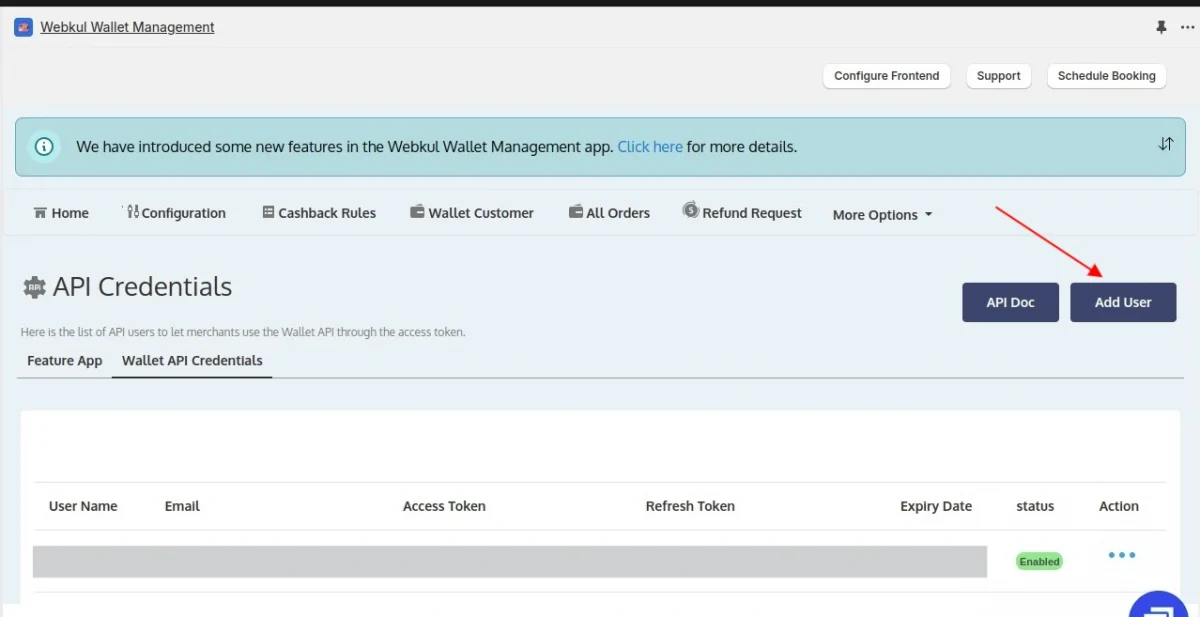
After creating a user, you can get the Access and Refresh token.

For CASHBACK
GET/api/cart/cashback.json
– Get cashback information for the entered amount
then, proceed to check the parameters.
Parameters
| Name | Description |
| total_amount string (query) | Enter an amount to check the cart cashback details. Default value : null |
GET/api/product/cashback.json
– Get cashback for the product.
Note – Use comma separation, to check multiple handles at the same time.
then, proceed to check the parameters.
Parameters
| Name | Description |
| handles string (query) | Enter the product handle to get the cashback information. |
POST/api/add/cart/cashback.json
– Used to create cashback rule for cart amount.
then, proceed to check the parameters.
Parameters
| Name | Description |
| User detail object (query) | This is user data |
POST/api/add/product/cashback.json
– Used to create cashback rule for product
then, proceed to check the parameters.
Parameters
| Name | Description |
| User detail object (query) | This is user data |
Pay By Wallet
Get/api/wallet/pay.json
– Used to get a discount coupon for entered amount.
then, proceed to check the parameters.
Parameters
| Name | Description |
| customer_email string (query) | Enter the email id of the customer. |
| amount string (query) | Enter the amount need to pay via wallet. Default value: null |
Refund Request API
POST/api/wallet/{transactionId}/refundrequest.json
– Used to generate a refund request
then, proceed to check the parameters.
Parameters
| Name | Description |
| Requested Amount object (query) | This is the requested refund amount. |
| transactionId * string (path) | Enter the transaction Id of the transaction. |
Wallet API
GET/api/wallet/transaction/details/email.json
– Used to get transaction details.
Note –
then, proceed to check the parameters.
Parameters
| Name | Description |
| customer_email string (query) | Returns a specific result if the Id matches. Default value: null |
Note – The customer email entered here will provide all the transaction details for the customer.
Here, the transactionId from the transaction details will be used to generate the refund request.
GET/api/wallet.json
– Used to get the current wallet balance of the customer
then, proceed to check the parameters.
Parameters
| Name | Description |
| customer_email string (query) | Returns a specific result if the Id matches. Default value: null |
PUT/api/wallet.json
– Used to update wallet amount.
then, proceed to check the parameters.
Parameters
| Name | Description |
| customer_email string (query) | This is the amount to be added Returns a specific result if the Id is matched. Default value: null |
| add_amount string (query) | The amount added by Admin/Customer Default value: null |
| added_by string (query) | Amount added by Admin/Customer Default value: null |
Token Properties
access_token – This is the access token from the Wallet Management API credentials.
Refresh_token – This is the refresh token from Wallet Management API credentials.
Cashback Properties
GET/api/cart/cashback.json
total_amount – It is the amount used to check the cart cashback details
GET/api/product/cashback.json
Handles – It is the product handle
POST/api/add/cart/cashback.json
cashback_amt – cashback amount the customer will receive.
cashback_type – It is either a percentage or a fixed price.
date_from – Start date for a cashback.
date_to – End date for a cashback.
target_amt – Min cart amount on which the customer will receive the cashback amount.
POST/api/add/product/cashback.json
cashback_amt – cashback amount the customer will receive.
cashback_type – It is either a percentage or a fixed price.
date_from – Start date for a cashback.
date_to – End date for a cashback.
handles – It is the shopify product handle
Pay By Wallet Properties
GET/api/wallet/pay.json
customer_email – The email id of the customer needs to be entered here.
amount – This is the amount that is to be paid by wallet
Refund Request API Properties
POST/api/wallet/{transactionId}/refundrequest.json
Requested Amount – This is the requested refund amount by the customer.
transactionId – This is the transaction ID that will be extracted from the GET/api/wallet/transaction/details/email.json
in which the customer email will be entered and the transaction details will be generated.
Wallet API Properties
GET/api/wallet/transaction/details/email.json
customer_email – When a customer email is entered, the transaction details are generated for the customer.
Note – The transaction details have the transaction ID which is used in POST/api/wallet/{transactionId}/refundrequest.json.
GET/api/wallet.json
customer_email – On entering the e-mail address of the customer, the current wallet balance of the customer is generated.
PUT/api/wallet.json
customer_email – Enter the customer e-mail for whom the wallet amount is to be updated
add_amount – Enter the amount that is to be added.
added_by – Added by Admin/Customer.
Demo
In conclusion, you can refer to the link given below to check the DEMO of the Wallet Management App for Shopify: https://wallet-management-demo-store.myshopify.com/pages/demo-details
Demo store password: 12345
Support
Moreover, if you need any kind of support/Consultancy then please raise a ticket at http://webkul.uvdesk.com/ or drop an email at [email protected]
Thanks for reading this blog!!! 🙂

Be the first to comment.