Want to improve your Odoo report generation? These 5 Odoo reporting modules make your work easier and save time. Transform daily reporting from tedious chores into quick, efficient processes.
Check out our blog on Odoo Dashboard: For Quick Tracking and Analysis for real-time data tracking. Dashboards work with reporting modules to give a complete view of business performance.
‘Reports – Your Business Intelligence, Simplified and Streamlined’
Think of reports like a GPS for your business. They show you where you are now, where you came from, and help you find the best path forward.
Without them, you’re essentially flying blind in today’s competitive marketplace. That’s where Odoo Apps can make reporting smarter and more reliable.
Imagine driving across the country without any signs or maps. That’s what running a business feels like without good reports.
You might get there, but you’ll waste time, money, and effort going the wrong way. Every wrong turn costs you valuable resources and opportunities.
Smart business owners know that using real data helps separate winning companies from struggling ones. Clear reports highlight trends you might otherwise miss.
When you have accurate information ready, you can change direction quickly, grab opportunities, and avoid costly mistakes. Data-driven solutions are what turn good businesses into great ones.
Essential Business Reports That Drive Success
Before we look at these modules, let’s check out the main reports every successful business needs. Each type serves a specific purpose in building a complete picture of your operations.
Money Reports
These show your complete financial picture and act like a health check for your company’s money. They reveal patterns in income, expenses, and cash flow that aren’t obvious day-to-day.
Sales reports
Track how your sales perform over time and see which products or customers bring in the most revenue. These insights help focus marketing and sales strategies for maximum impact.
Inventory Reports
Watch your stock levels and see how products move. Good inventory management improves cash flow, keeps customers happy, and avoids costly overstocking or stockouts.
Project Reports
Learn how your team uses time and see which projects are most profitable. Understanding efficiency helps price future work accurately and allocate resources smartly.
Shipping Reports
Track delivery times and shipping costs to keep customers satisfied. In today’s world, delivery experience often determines whether customers return or switch to competitors.
5 Great Odoo Modules for Easy Reporting
Ready to take your Odoo report generation to the next level? These five Odoo reporting modules solve key reporting challenges and streamline how you handle business information.
1. Print Odoo Reports via Zebra Printer
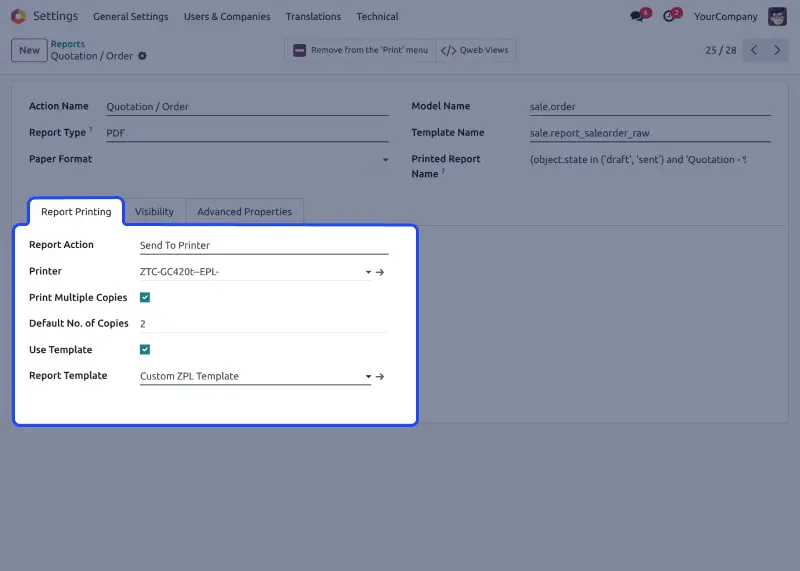
Technical Name: wk_odoo_directly_print_reports
Format: PDF
Stop the annoying download-then-print routine that wastes time every day. This module eliminates the frustrating multi-step process that breaks your workflow.
Print Odoo Reports via Zebra Printer connects straight to your printers using QZ Tray technology. No more downloading files before printing.
It’s like having a direct line from your Odoo data to printed copies. Your reports go from screen to paper in seconds, not minutes.

What Makes It Great:
- Print straight from Odoo without downloading files first
- Works with any Zebra printer on your network seamlessly
- Make custom print layouts that match your brand
- Set default printers for different reports automatically
- One-click printing from anywhere in your system instantly
Perfect For: Busy companies and warehouses that create lots of reports daily. Ideal for operations where printing speed directly impacts productivity and workflow efficiency.
2. Odoo Project Timesheet Reports
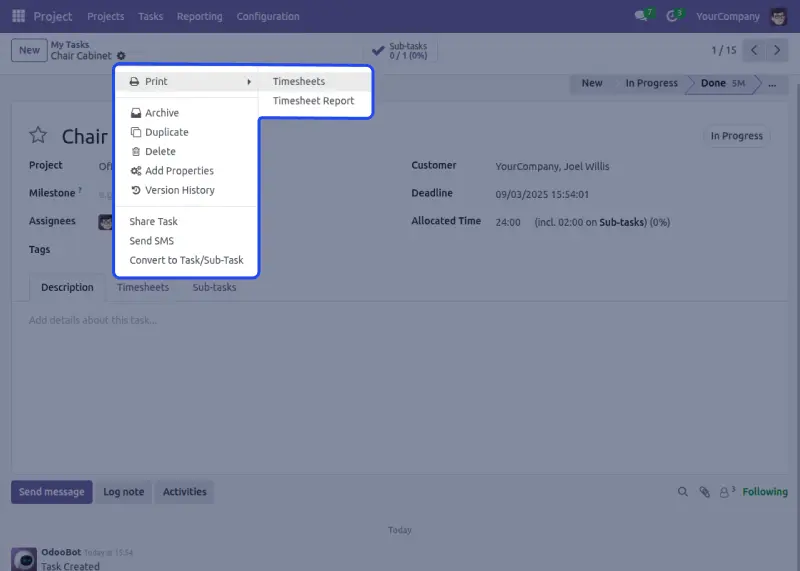
Technical Name: project_timesheet_reports
Format: PDF
Turn messy project work into organized workflows with timesheet reports that make sense. Get the visibility you need to manage projects like a pro.
Studies show businesses using good time tracking see productivity rise by 30%. Odoo Project Timesheet Reports makes tracking time easy and improves your Odoo report insights.
Your team will appreciate the simplicity, and your clients will love the transparency. Better visibility creates trust and boosts overall project efficiency.
What Makes It Great:
- See project progress as it happens in real-time
- Track time spent on tasks with easy-to-read reports and summaries
- Send timesheet reports straight to clients professionally
- Find your most efficient team members quickly
- Choose any date range for reports that fit your needs
- See exactly how time was spent on each project part clearly
Perfect For: Consulting companies, creative agencies, software teams, and service businesses that charge by the hour. Essential for any business where time tracking affects billing and profitability.
3. Odoo Print Payslip Excel Report
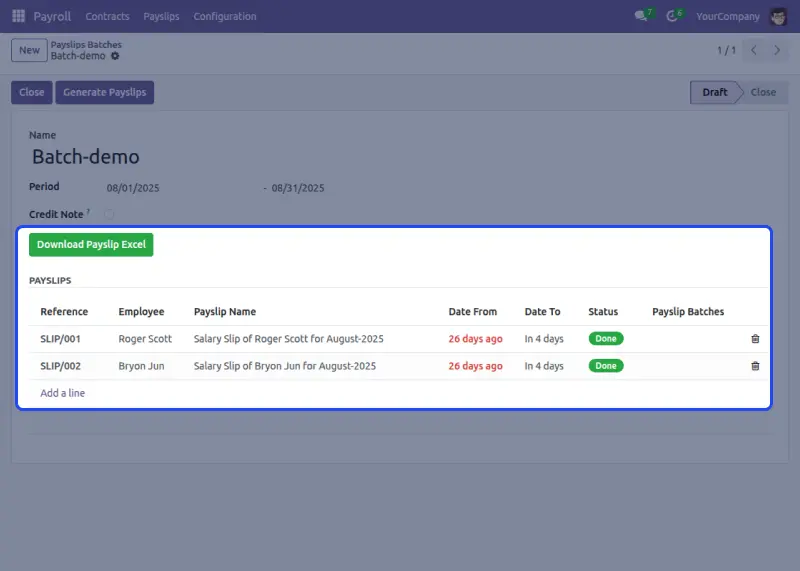
Technical Name: print_payslip_excel_report
Format: XLS and CSV
Turn payroll problems into smooth processes with Odoo Print Payslip Excel Report. Simplify one of your most important HR tasks.
Handling employee pay information becomes easy when you can work with payroll data in familiar spreadsheet formats.
Excel gives you the flexibility to analyze, modify, and share payroll information however your business needs it.
What Makes It Great:
- Create individual or multiple payslips in seconds, effortlessly
- Get editable Excel files for custom analysis and manipulation
- Group by date ranges, departments, or pay periods flexibly
- Add unlimited custom salary rules and deductions easily
- Works automatically with existing Odoo payroll data seamlessly
- Professional formatting ready for HR requirements and compliance
Perfect For: Growing businesses, HR teams with complex pay structures, and companies needing detailed payroll records.
Especially valuable for businesses with unique compensation structures or detailed reporting requirements.
4. Odoo Stock Picking & Delivery XLS Reports
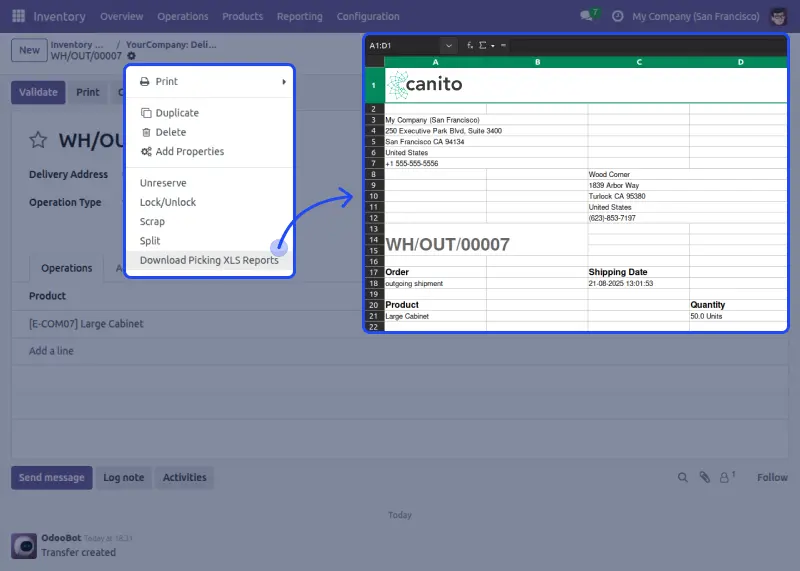
Technical Name: stock_picking_delivery_xls_reports
Format: XLS
Master shipping with delivery tracking that keeps customers happy and operations running smoothly. Turn logistics into your competitive advantage.
Today’s customers want Amazon-level delivery updates. Odoo Stock Picking & Delivery XLS Reports gives you tools to meet those expectations while keeping your warehouse work efficient.
Customer satisfaction starts with knowing exactly where every order stands. Clear delivery insights ensure smoother operations and happier customers.
What Makes It Great:
- Track the complete delivery process in a spreadsheet format easily
- Watch stock movements as they happen in real-time
- Handle multiple shipments on busy days without stress
- Send delivery updates to customers automatically
- Get performance numbers to improve delivery routes continuously
- Works easily with current inventory management systems perfectly
Perfect For: Online stores, shipping centers, and retail businesses rely on smooth delivery to keep customers loyal. Delivery performance directly impacts customer retention and long-term growth.
5. Odoo Docx Report Builder
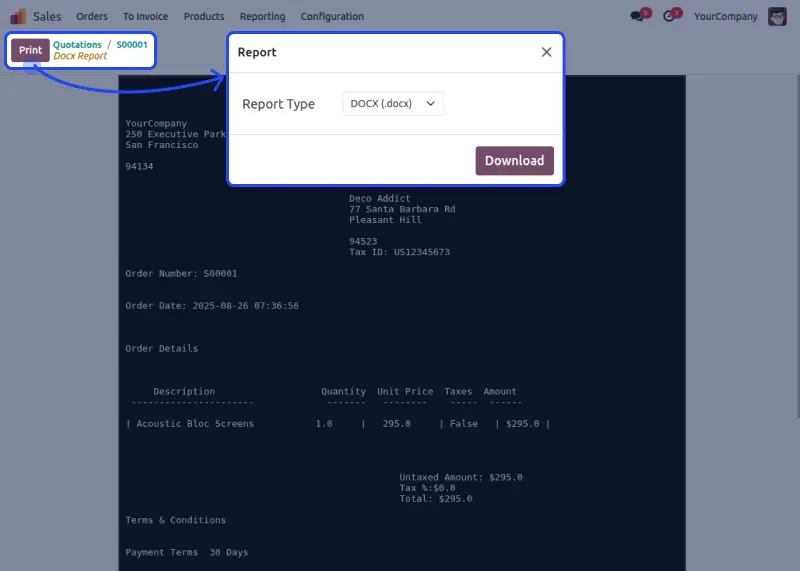
Technical Name: docx_report_builder
Format: DOCX
Create beautiful, professional documents that show your brand while keeping full customization control. Make every document a marketing opportunity with Odoo Docx Report Builder.
Sometimes, a PDF isn’t enough. When you need polished proposals, detailed contracts, or branded invoices clients can edit, the DOCX format gives you the professional look that makes you stand out.
Word documents also allow for collaborative editing and feedback. This makes them a flexible choice for businesses that need both professionalism and adaptability.
What Makes It Great:
- Upload your own branded templates for a consistent company look always
- Support for multiple languages for international business operations
- Easy drag-and-drop template management without technical skills
- Create complex documents for sales, legal, and operations quickly
- Full control over formatting, including pictures, tables, and styling, completely
- Works smoothly with existing Odoo workflows without disruption
Perfect For: Professional service companies, B2B businesses, law firms, and companies needing polished documents for clients.
Especially useful for businesses that frequently create proposals, contracts, or detailed client documentation.
The Real Impact on Your Business
These Odoo reporting modules aren’t just nice extras. They supercharge your Odoo report generation, boost productivity, and deliver real results.
Every business that implements them sees immediate improvements and benefits from faster, more accurate reporting.
Save Time: Get rid of repetitive tasks. Cut report creation time by up to 75%. Give your team more time for important work. Focus on growing your business instead of managing paperwork.
Fewer Mistakes: Automatic data collection stops typing errors that cost businesses thousands in fixes. Your reports become more accurate and trustworthy. Clients notice the difference in quality.
Different Formats: People like different formats. PDF, Excel, and Word options let everyone get information the way they prefer, with no file conversions or disappointed stakeholders.
Look Professional: Custom templates and consistent formatting build trust with clients and partners. A strong brand image and professional appearance lead to better business relationships.
Make Decisions Faster: When important business information is one click away, you can respond to opportunities and problems right away.
Quick access to data means quick responses to market changes. Speed often determines success in competitive markets.
Easy to Set Up
Each module works smoothly with your current Odoo setup. It won’t mess up your existing work processes. Installation usually takes just minutes, not hours, and you’ll be up and running quickly.
Most come with full support to ensure everything runs smoothly, letting your team start using these tools immediately without training. The learning curve is minimal, and benefits are immediate.
Custom changes are available if your business has special needs that standard features don’t cover. Every business is unique, and these modules can adapt to your specific requirements.
Ready to Change Your Reporting?
In today’s fast-moving business world, companies that can access, study, and act on information quickly are the ones that succeed.
These Odoo reporting modules give you that edge by making important business intelligence available whenever you need it.
Don’t let your competitors get ahead while you’re stuck with slow, manual processes. Stop letting manual reporting slow down your growth and limit your business potential.
With these modules, your Odoo report generation becomes faster, more accurate, and easier to manage. The sooner you implement these solutions, the sooner you’ll see results.


Be the first to comment.