Introduction
Odoo SEO-URL Redirect/Rewrite for Event module enhances your event pages’ visibility by allowing you to create clear, user-friendly URLs that boost search engine ranking.
With features for URL customization, bulk updates, and redirect management, Odoo SEO-URL Redirect/Rewrite for Event module ensures visitors can easily find the right event page.
Odoo SEO-URL Redirect/Rewrite for Event module supports permanent and temporary redirects, helping you manage URL changes effortlessly.
Prerequisites for using Odoo SEO-URL Redirect/Rewrite for Event module
This module is dependent on Odoo SEO-URL Redirect/Rewrite. In order to use “Odoo SEO-URL Redirect/Rewrite For Event,” you need to purchase this module as well.
Features
- Customize event URLs with SEO-friendly slugs for better search visibility.
- Add descriptive suffixes to event URLs for enhanced clarity.
- Set up 301 (permanent) and 302 (temporary) redirects to guide users smoothly.
- Bulk update event URLs using predefined patterns to save time.
- Prevent broken links and 404 errors with automatic redirects.
- Improve navigation with user-friendly URLs that make event pages easier to remember.
- Boost event page ranking with relevant keywords in URL slugs.
- Effortlessly manage multiple event page URLs in one go.
- Maintain SEO rankings with well-organized, optimized URL structures.
- Odoo SEO-URL Redirect/Rewrite for Event easily updates event page URLs without technical knowledge needed.
Installation
- Once you purchase the app from the Webkul store, you will receive the link to download the module zip file.
- Extract the file on your system after the download finishes. As a result, you will be able to see a folder named- ‘seo_url_redirect_event’
- Copy and paste this folder inside your Odoo Add-Ons path.
- Now, open the Odoo App and click on the Settings menu. Here, click on Activate the Developer Mode.
- Then, open the Apps menu and click on ‘Update Modules List.’
- In the search bar, remove all the filters and search ‘seo_url_redirect_event’
- The module will appear in the search results. Click on ‘Install’ to install it.
Workflow
- After installing the Odoo SEO-URL Redirect/Rewrite for Event module, Go to ‘Website> SEO URL Rewrite> SEO Rewrite Configuration> New’ to create the settings.

2. Now on the page configure the following settings:
- Enter the details of the SEO rewrite configuration.
- Check the box next to ‘Use Suffix in URL’ to enable suffixes in the category and product URL. You can enter suffix text, such as .php or .html, etc.
- Once done, click on the ‘Ready to Generate URL Keys’ button on the top left corner.

3. After that, click the ‘Generate Product SEO URL Keys’ button to create SEO URL Keys.

4. Go to ‘Website> SEO URL Rewrite> SEO Redirects.
- Redirects move traffic from one real, working URL to another. In contrast, rewrites involve creating a new URL and directing traffic from the original URL to this new one.
- Click on NEW at the top left corner.

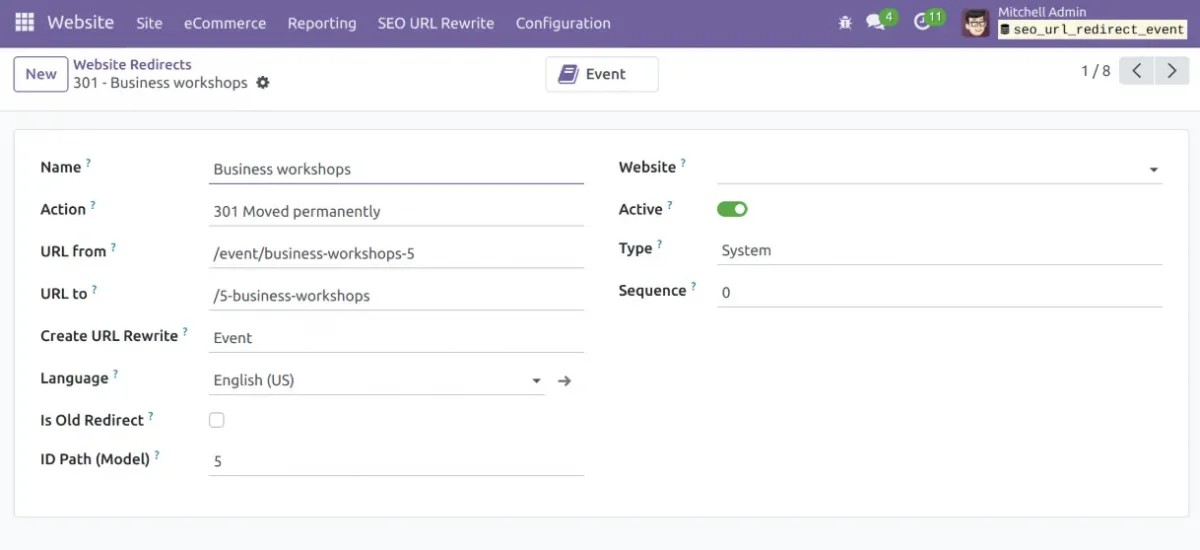
5. Once you click on NEW a form pops up on the page, fill in the following:
- Action- Not found, moved permanently, moved temporarily, redirect/rewrite(404, 301, 302, and 308 respectively).
- URL from- Old URL which you want to change. (NOTE: The slug of the source URL should be from the Odoo website).
- URL to- The URL you want to change to. (NOTE: The page should exist otherwise it will show a 404 error).
- Create URL Rewrites- Select Event
- Language- In case you have multiple languages installed, then choose the desired one.
- Is Old Redirect- Tick the checkbox if the ‘URL to’ already exists.
- Website- In case you have multiple websites.
- Enable the status as active.
- Type- Select between System and Custom according to your choice.
- Once done, click the ‘Save’ icon.
6. This is how the new event URL will look on the Odoo website.

7. You can also rewrite event and seo url keys and can update them in bulk by selecting them clicking on Actions > Update SEO Url.

NEED HELP?
Hope you find the guide helpful! Please feel free to share your feedback in the comments below.
If you still have any issues/queries regarding the same, please raise a ticket at the UV Desk.
I hope this helps. In case of any further queries, contact us at our support mail.
Thanks for paying attention!!
Current Product Version - 1.0.1
Supported Framework Version - ODOO V18, V17, V16, V15


Be the first to comment.