Introduction
Visual Studio Code Plugin for Magento 2 is a free VS Code addon that you may install to boost the capabilities of your Visual Studio Code.
Furthermore, it is an advanced Magento 2 AutoSuggestion extension for Visual Studio Code.
Note- For using the Visual Studio Code Plugin for Magento 2, the Magento root folder must be open in the workspace.
Features
- It helps to auto-suggest a list of Magento’s core class namespaces.
- It auto-suggests a list of class functions whose object is injected in the constructor.
- Boilerplates available for basic XML and PHP functionalities can be invoked by using the prefix ‘!wk’.
- Tables, columns, and constraints will be autocompleted in db_schema.xml
- One can create basic module files using a command palette.
- One can also update the namespaces for newly created files.
- Tags will be autosuggested, and basic functionalities (like Template Overriding) will be autocompleted in layout files.
- Groups, sections, fields, validations, etc., will be autosuggested in system.xml.
- The event name will show in a suggestion box in the events.xml file.
- Helper, controller, and shipping and payment method boiler plates are compatible with PHP 8.
Installation
Launch VS Code Quick Open (Ctrl+Shift+X), search for the following name to install the extension.
Search- Webkul.automagedev

Wants to know more about Installation, Visit Here.
Auto Suggestion in Visual Studio Code Plugin for Magento 2
While writing code, the related suggestions will appear just after entering the word Magento.

List of Class Functions in Visual Studio code plugin for Magento 2

We can see the related list of class functions whose object is inject in the constructor.
Create Basic Module Files in Visual Studio code plugin for Magento 2

We can create basic module files using the command palette.

Event Name Suggestion

The name of the event will appear in the events.xml file as a suggestion.
db_schema.xml
Tables, columns, and constraints are auto-completed in db_schema.xml

A column has- int, smallint, decimal, text, timestamp, and varchar.

A Constraint has – primary and foreign.

system.xml
Available tag suggestions –
- tab
- label
- resource
- validate
- comment
- source_model
- backend_model
- system
- depends
- section
- group
- field (text)
- field (select)
- field (multiselect)
- field (image)
- field (password)
- field (obscure)

Validations autocomplete –
- alphanumeric
- integer
- ipv4
- ipv6
- letters-only
- letters-with-basic-punc
- mobileUK
- no-marginal-whitespace
- no-whitespace
- phoneUK
- phoneUS
- required-entry
- time
- time12h
- validate-admin-password
- validate-alphanum-with-spaces
- validate-clean-url
- validate-currency-dollar
- validate-data
- validate-date-au
- validate-email
- validate-emailSender
- validate-fax
- validate-no-empty
- validate-no-html-tags
- validate-password
- validate-phoneLax
- validate-phoneStrict
- validate-select
- validate-ssn
- validate-street
- validate-url
- validate-xml-identifier
- validate-zip-us
- vinUS

Layout
Available suggestions –
- block
- referenceBlock
- container
- referenceContainer
- arguments
- head
- body
- action
- title
- css
- update
- link
- action (Template override)
- arguments (Template override).

Boiler Plate for Helper, Controller & Shipping:
One can create basic module files for helper, controller, shipping method, and payment method files using the command palette.

After that, you will see a list of helper, controller, shipping, and payment method boilerplates.

After tapping on one of the boiler plates, enter your Vendor_Module name.

Lastly, the respective selected boilerplate code will be created in your respective module.
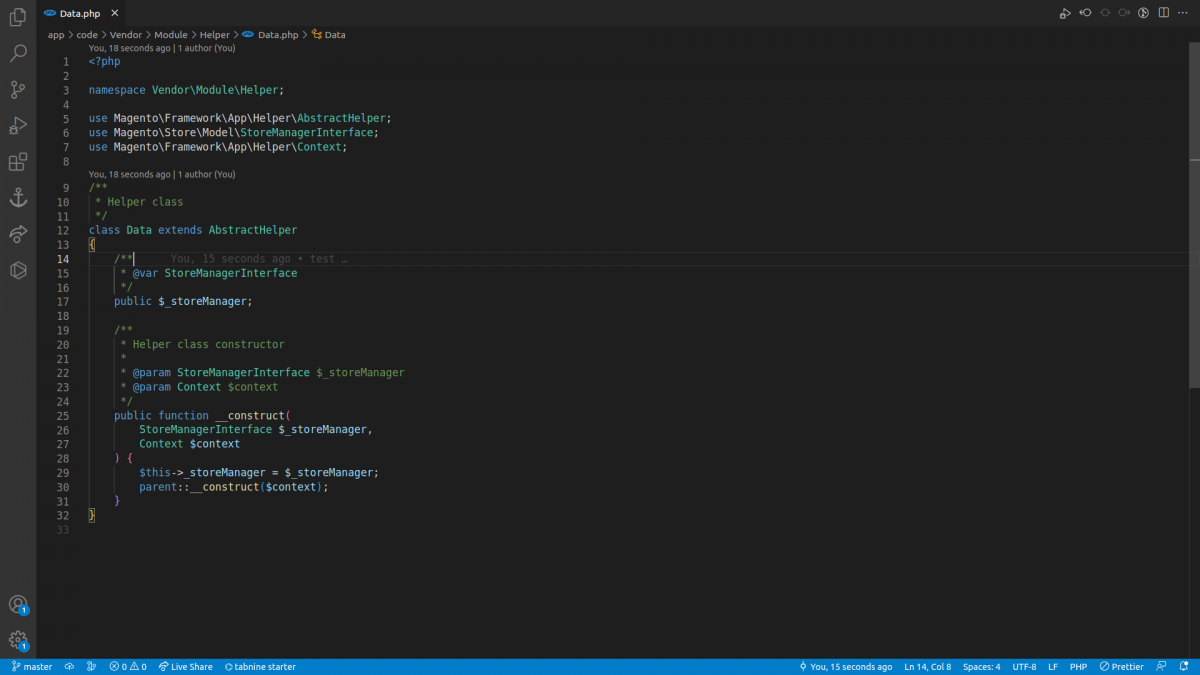
Helper, controller, and shipping and payment method boiler plates are compatible with PHP 8
In conclusion, this plugin helps you to make your visual code experience smooth.
So, that’s all about the Visual Studio Code Plugin for Magento 2, still have any issues, feel free to raise a ticket and let us know your views to make the module better https://webkul.uvdesk.com
For technical assistance, please get in touch with us via email at [email protected]
Additionally, explore a wide range of solutions to upgrade your store’s functionality by visiting the Magento 2 Modules section.
For expert guidance or custom feature development, hire experienced Magento 2 developers for your project.


Be the first to comment.