CS-Cart AI Product Data Translator helps store owners translate product details into multiple languages using artificial intelligence.
With this add-on, admins can easily translate product names, descriptions, and other details directly from the CS-Cart admin panel.
Moreover, the add-on supports multiple AI models such as ChatGPT, Gemini, and other LLMs to deliver accurate and natural translations.
As a result, this solution works best for CS-Cart stores that want to expand globally without manual translation work.
AI-based translation not only saves time but also improves consistency while keeping the original meaning of the product content.
In addition, the module is easy to install and configure, as all settings are available in a dedicated add-on configuration panel.
Admins can also translate individual product fields or multiple product details with just a few clicks.
Furthermore, the add-on allows store owners to export products along with their translated data for external use.
Features
- Supports translation into multiple languages, helping CS-Cart stores serve global customers with ease.
- Works with AI models like ChatGPT, Gemini, and other LLMs, so admins can choose the best AI engine for their needs.
- Allows separate translation of product names, descriptions, and metadata for better control over content.
- Enables bulk translation of multiple product details at once to save time and reduce manual effort.
- Lets store owners export products with translated data for easy reuse across different platforms.
Check out our CS-Cart Google Language Translator that lets admins add a Google Translate drop-down, allowing customers to browse in their preferred language.
Installation
After downloading the CS-Cart Translate Product Data add-on, you’ll get one zip file, one install.txt file, and a relevant User Guide manual doc. Read it carefully for proper configuration.
Go to Manage Add-ons, and click on “Manual Installation” as shown below in the snapshot.

Click on “Local” to browse the zip file, and then click on “Upload & Install” as shown below in the snapshot.

Add-on Configuration
After installing the add-on, you will find CS-Cart Translate Product Data in the list of available add-ons. We will then configure the settings.
Click on “settings” to enable, disable, install, or refresh.
Make sure the add-on is activated, as shown in the snapshot below.

Module Configuration | Admin
To configure the module, go to the Add-Ons >> Developers >> Webkul Software Pvt Ltd. >> Translate Product Data >> Settings.
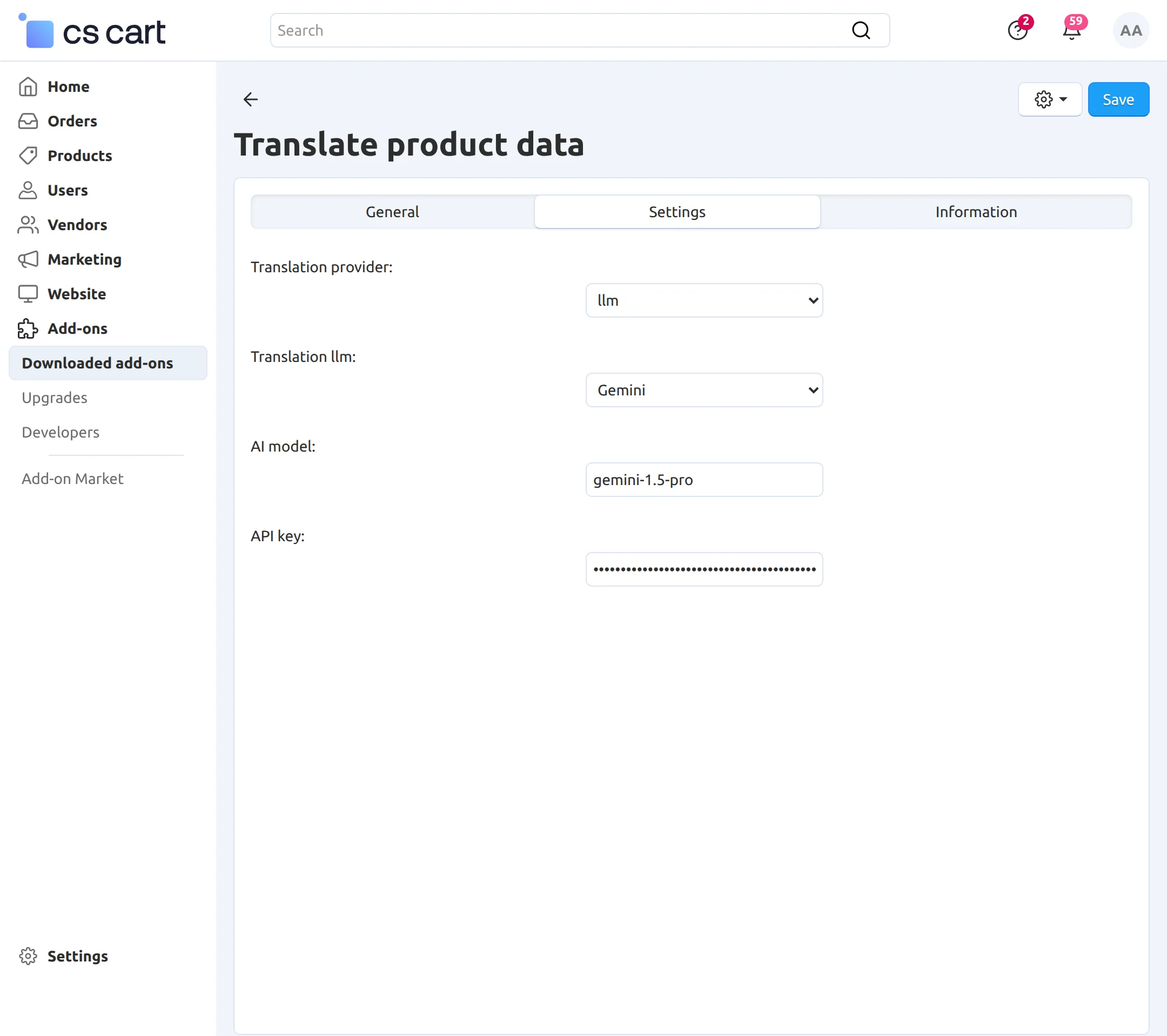
- Translate Provider: Select LLM as the translate provider to translate product data using AI.
- Translation LLM: Choose the LLM you want to use for translating product data.
- AI Model: Enter the AI model name provided by the selected LLM service.
- API Key: Enter the API key based on the selected LLM provider.
Install Language
The Translate Product feature works when multiple languages are available.
To enable additional languages, go to Settings >> Texts & Languages >> Languages and install the desired language.

After installation, you can manage the language settings as needed.
Translate Product Page Content Instantly with AI
To translate or export product data, navigate to the Products section.

After selecting the product, click on Edit Selection.

Select the fields you want to translate, such as Full Description, Short Description, Meta Description, Product Details, etc.
Next, select Modify Selected to update the selected fields.

From here, you can select the language in which you want to translate the product details.

After saving the details, the translated description will be visible in the product’s description.
Export Products After Translation
To export product details, navigate to Actions >> Export Selected.

Select the products you want to export.

Exports options:
Export in translated text of selected languages: Check the box to export the product descriptions in the chosen languages.
Language: Select the language into which you want to translate the data.
Finally, export the data to get it in your chosen language.
Support
If you have any questions, suggestions, or customization requests, feel free to contact us at [email protected] or submit a ticket at webkul.uvdesk.com.
Explore our premium-quality CS Cart Extensions to enhance your store functionality.
You can also explore our CS-Cart Development Services and Quality CS-Cart add-ons.
Current Product Version - 1.0
Supported Framework Version - (4.16.x , 4.17.x, 4.18.x, 4.19.x)


Be the first to comment.