CS-Cart Google Address Autocomplete Being a store owner, you put lots of effort into creating an ultimate buying experience.
But multiple fields to complete the checkout can slow down the process or even discourage your customers from making a purchase.
Also, this becomes even more apparent for the customers on mobile, and checking out on a small screen can be a long exercise in typing, misspelling, and re-typing.
Here comes the CS-Cart Google Address Autocomplete add-on for your CS-Cart stores.
which allows you to configure the autocomplete address in the vendor registration form and during checkout or editing the customer profile at the frontend.
This makes an easy and speedy experience, which will speed up the process by filling in the address info automatically with the help of Google APIs.
So, when customers arrive at checkout and start entering the first few characters of their address, Google Autocomplete will instantly finish the job and pre-populate their address.
Wrong addresses and re-typing are virtually eliminated.
This will save time for your customers and prevent typing errors.
Features and Benefits
- Well integrated with CS-Cart & Multi-Vendor.
- Simplify the checkout process by offering address autocomplete.
- Allow the customers/vendors to automatically fill in the address form fields, such as address 1, city, region/state, and postal code.
- Supports various place types (Geocode, Establishment, Regions, Cities, Address, etc.) via Place Autocomplete APIs.
- Option to display country-specific results in the autocomplete address suggestions.
- Avoid customers’ typing errors.
- Improve the user experience.
- Decrease cart abandonment and increase sales.
- Easy to configure and manage at the admin end.
- Now compatible with the CS-Cart Advanced RMA (Return Merchandise Authorization) module, the system provides seamless functionality when customers initiate return requests.
- It offers smart address suggestions on address input, making it easier for users to fill out the form quickly and accurately.
Installation of CS-Cart Google Address Autocomplete
To install CS-Cart Google Address Autocomplete, follow these steps:
- Go to Manage Add-ons, click on the gear drop-down, and select Manual Installation.

2. Select the zip File and click on Upload&install.

The add-on will be installed successfully!
Add-on Configuration
After installation of the add-on, you will find CS-Cart Google Address Autocomplete in the list of available add-ons.

- Enter the Google API keys. To get the API key, click here
- Enable the autocomplete address feature.
- Select the Google place type for the autocomplete address suggestions. Place types include-
- Geocode: It instructs the Place Autocomplete service to return only geocoding results, rather than business results.
- Address: It instructs the Place Autocomplete service to return only geocoding results with a precise address.
- Establishment: It instructs the Place Autocomplete service to return only business results.
- Regions: Type collection instructs the Places service to return any result matching the following types: locality, sub-locality, postal_code, country.
- Cities: Type collection instructs the Places service to return results that match locality
- Country Restriction: Select the country for which you want to restrict the address suggestions. Max 5 countries can be selected

So, just set the parameters and save.
Front-End View
CS-Cart Google Address Autocomplete add-on provides a seamless front-end experience by enabling smart address suggestions across multiple touchpoints.
Address autocomplete is available on the seller registration page, customer profile page (shipping address+Billing address), and the checkout page.
Address Autocomplete on Checkout Page
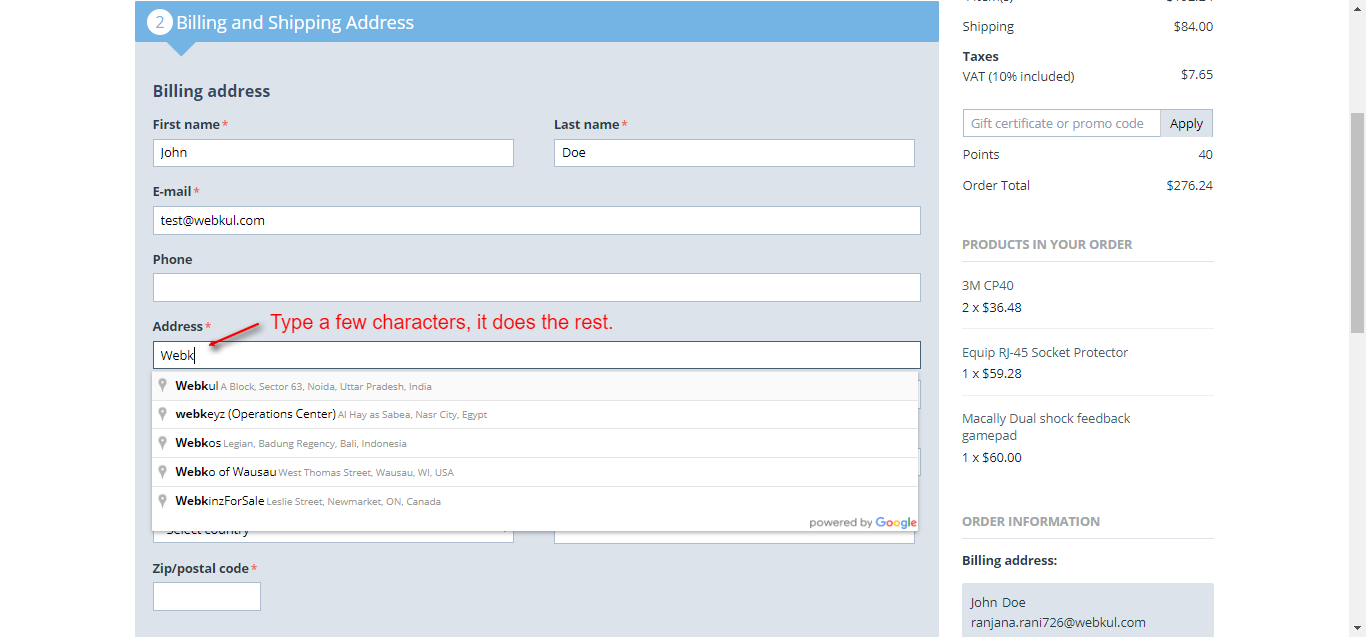
CS-Cart Google Address Autocomplete add-on simplifies the checkout process by enabling smart shipping address suggestions on the checkout page.
When customers begin typing their address, Google Autocomplete instantly displays relevant address suggestions in real time.
Address Autocomplete on Customer Profile Page
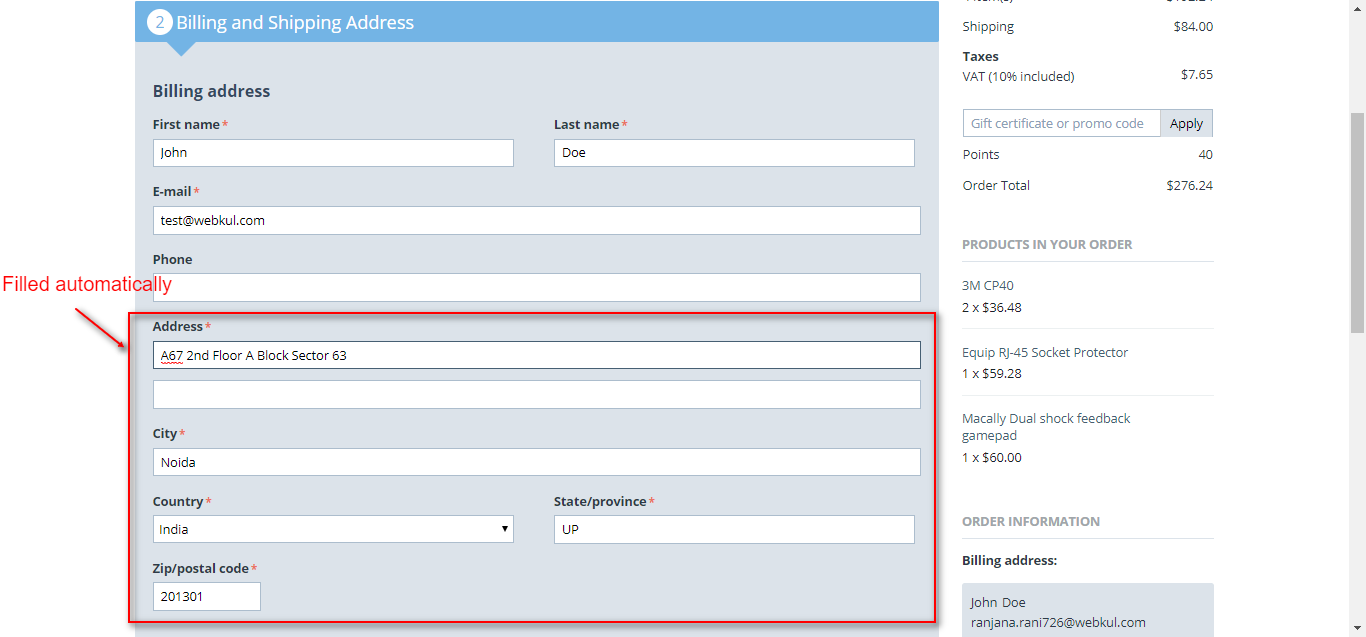
CS-Cart Google Address Autocomplete add-on, customers can easily add or update their shipping address from the customer profile page.
As soon as the customer starts typing the shipping address, smart Google-powered suggestions appear, helping them select the correct address quickly.
Address Autocomplete on Seller Registration
CS-Cart Google Address Autocomplete add-on enhances the seller registration process by making address entry fast, accurate, and hassle-free.
While registering as a seller, users simply start typing their address, and Google-powered suggestions automatically appear in real time.

This is how you can make life easier & enhance the user experience by just configuring the simple addon.
Support
For assistance with CS-Cart Google Address Autocomplete setup or customization, contact [email protected] or Webkul Support.
Discover more powerful CS-Cart extensions to enhance your store’s functionality!
Current Product Version - 1.4
Supported Framework Version - 4.19



Be the first to comment.