What Odoo offers over its peers is the wide range of capabilities that you can add at your end with customization and avail of the Best Odoo Modules.
The highly flexible nature of Odoo empowers you to add new features and functionalities, as its features depend on the effectiveness you want to achieve and apply in Odoo.
Therefore, keeping in mind growth and productivity, we have listed the 25 best Odoo modules, including some of the best Odoo Mobile Apps that every business absolutely needs.
Moreover, the modules are divided into different categories depending on the functionality or feature they add to your Odoo.
In this way, the 25 best Odoo modules help you manage your business more easily and efficiently.
Best Odoo Modules for E-commerce Integration
1. Shopify Multichannel Connector
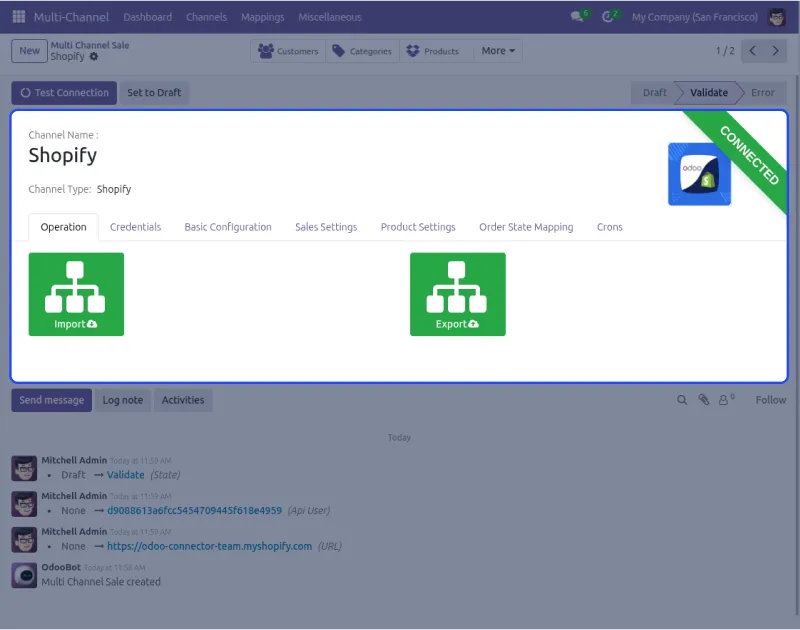
Odoo Multichannel Shopify Connector helps you manage information from your Shopify stores in your Odoo system. You can handle orders, products, customers, and categories in a centralized manner.
As a customer-facing platform, Shopify gets the orders from the customer, and Odoo, being one of the best tools for inventory management, manages the product stock, order delivery, etc.
So these can be easily managed by the Odoo multichannel Shopify connector.
Features
- You can import orders, products, and categories by hand in large amounts or automatically with all their details.
- You can map order statuses by hand and sync order statuses, shipment, invoice, cancel status, and inventory right away.
- You get a dynamic dashboard with donut charts and line graphs to study information with clickable tabs and data cards.
Benefits
- Makes managing many Shopify stores way easier from one Odoo place instead of going to different systems.
- Saves time by bringing in and sending out information automatically instead of typing it by hand.
- Helps you make better business choices with clear charts and graphs that show how your stores are doing.
- Keeps all your store information correct and up-to-date with real-time syncing between Shopify and Odoo.
- Makes your online selling work smoother by connecting everything in one system with an easy-to-use dashboard.
2. Power BI Odoo Connector
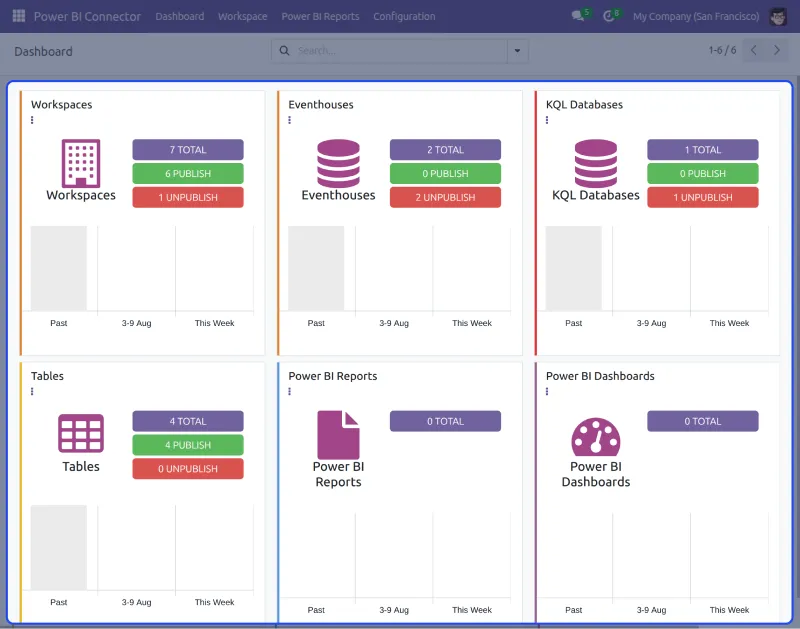
Odoo Power BI Connector helps you connect your Odoo system with Microsoft Power BI to create smart reports and dashboards. It allows you to export important data from Odoo.
With this connector, you can apply filters, link tables, and send only the data you need. It also supports automatic data exports to save time.
Odoo Power BI Connector works with both standard and custom modules. Whether you track sales, inventory, or customer activity, the module helps you for better decisions.
The connector is secure, easy to set up, and supports multiple Power BI workspaces. It’s the ideal tool for turning your Odoo data into clear, useful insights for business growth.
Features
- Easily connect your Odoo data with Microsoft Power BI to build reports. You can choose what tables to export and link them together.
- Apply filters to send only selected records to Power BI. This saves time and makes sure you always see the latest data.
- It supports both standard Odoo modules and custom ones, too. Whether it’s sales, inventory, or something unique, it works smoothly.
- The connector works with different workspaces. All transfers are done securely to protect your business data. You can even view dashboards inside Odoo for easy access.
Benefits
- You get clear and useful reports that help you understand your business. Tracking sales, inventory, and customer trends becomes easier.
- You can choose exactly what data to send to Power BI. This keeps your dashboards simple and relevant. It avoids confusion and helps you focus on key insights.
- All data is transferred securely, so it stays protected. You can manage reports for different teams easily in Odoo. Everything stays in sync without the need for extra tools.
3. PrestaShop Odoo Bridge
Running a webshop requires you to control every connected process, from product management and delivery to getting stock.
Don’t just manage sales on Prestashop, but also handle purchase and delivery work well in Odoo by connecting your Prestashop with Odoo using Prestashop Odoo Bridge.
You can manage accounting and inventory to keep track of the whole process from order placement to delivery and making bills.
You get real-time stock updates on Prestashop for changes made at Odoo’s end. You can sync simple and multi-variant products both ways and check the missing order history if orders fail to sync.

Features
- You can sync sales orders from Prestashop to Odoo in real-time and sync products and their features both ways between Odoo and Prestashop.
- You can sync inventory in real-time from Odoo to Prestashop and sync product categories both ways between the systems.
- You can sync payment methods, taxes, and delivery methods from Prestashop to Odoo and sync order statuses like paid, canceled, and delivered both ways.
- You can sync tracking numbers from Odoo to Prestashop and check the missing order history if orders fail to sync due to server issues.
Benefits
- Makes managing your Prestashop store way easier by controlling everything from one Odoo place instead of switching between different systems.
- Saves time by syncing information automatically in real-time instead of typing and updating things by hand on both platforms.
- Helps you keep track of your whole business from order to delivery with accounting and inventory management in one place.
- Make sure your stock information stays correct on both Prestashop and Odoo so customers see the right numbers.
- Works with Odoo POS, so inventory updates automatically sync at both ends when orders happen at Prestashop or POS.
4. Odoo ERP Connector For Magento 2
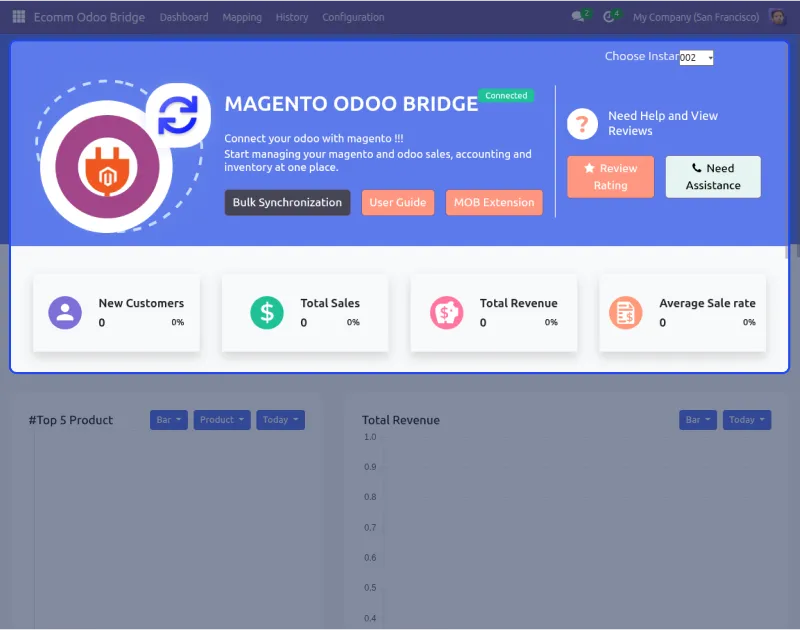
Odoo ERP Connector for Magento 2 connects your Magento store with Odoo and makes sure both systems work together.
It syncs features, products, groups, updated order status, shipment status, and addresses between Odoo and Magento in real time.
This connector reduces the gap between your website and inventory by bringing together Magento for managing websites and Odoo for managing inventory, groups, orders, and customers.
It helps you sync real-time updates of inventory, customers, and orders from Magento to Odoo. You can also manage order status across both platforms.
Features
- You can sync stock for mapped products in large amounts from Odoo and get auto invoice creation for orders brought from Magento to Odoo.
- You can sync order comments and order status updates in real time based on the status you pick between Magento and Odoo systems.
- You can sync product status updates in real time, where disabled products in Magento get stored away in Odoo, and active ones stay working.
- You can sync predefined features in products from Magento to Odoo and handle orders, customers, products, and groups together with regular sync.
Benefits
- First, it makes managing your Magento store and inventory easier by controlling everything from one Odoo system.
- Also, it saves time by syncing stock, orders, and customer details automatically in real time.
- In addition, it helps track your business with real-time stock sync and automatic invoice creation for new orders.
- Moreover, it ensures inventory information stays correct on both Magento and Odoo, so customers see accurate stock numbers.
- Finally, it removes the need to track stock manually, as updates happen automatically for all product types.
5. Odoo Multichannel WooCommerce Connector
WooCommerce is a simple but good e-commerce platform that takes the basic WordPress system and turns it into a fully working online store.
Now, it’s time to take out the best of two different platforms together with the help of Odoo Multichannel Woocommerce Connector.
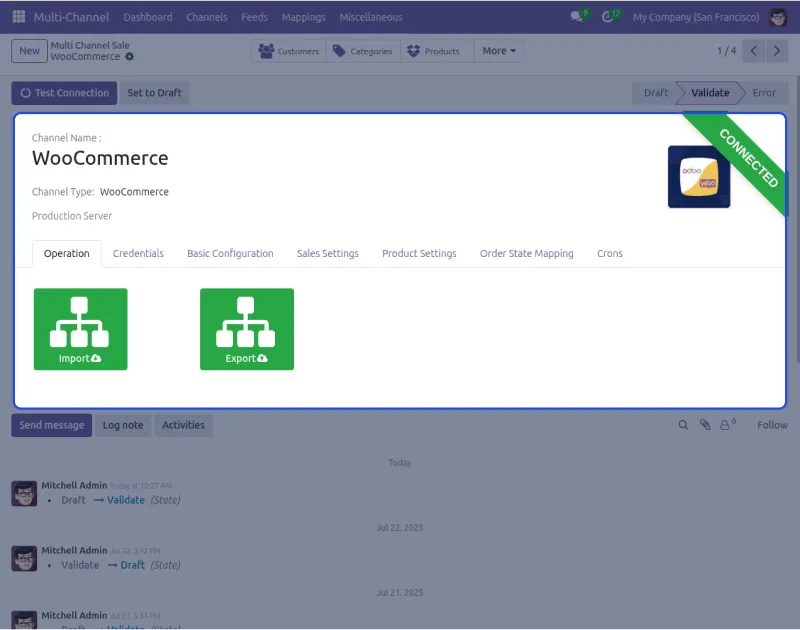
Odoo Multichannel WooCommerce Connector lets you connect one or more WooCommerce stores with Odoo. You can bring in, send out, and sync information for smooth working between both systems.
You can connect up to 3 stores with one Odoo for free. If you want to connect more than three stores to your Odoo, you can contact our support team.
Features
- First, you can import orders, products, categories, customers, and delivery methods manually or automatically with all details.
- Also, you can export products and categories from Odoo manually or select specific items to sync with WooCommerce.
- In addition, you can map order statuses and sync shipment, invoice, cancel status, and inventory in real time.
- Moreover, you get a dynamic dashboard to track WooCommerce information and perform import/export directly from Odoo.
Benefits
- First, it makes managing multiple WooCommerce stores easier by controlling everything from one Odoo system.
- Also, it saves time by automatically sending and receiving orders, products, and customer details between both platforms.
- In addition, it helps you make better business decisions with simple charts, graphs, and clickable data cards.
- Moreover, it keeps your store information correct and up-to-date with real-time syncing of stock and order status.
- Finally, it makes online selling smoother by connecting everything in one system using WooCommerce API details.
Best Odoo Modules for Core Business Operations
1. Odoo Hotel Management System
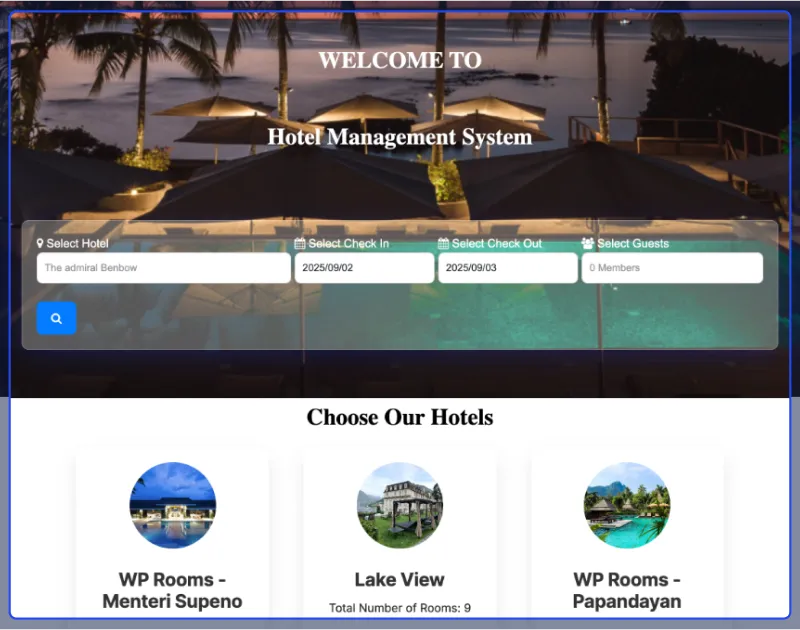
Odoo Hotel Management System makes it easy to manage bookings, payments, housekeeping, and guest services in one place.
It includes three dashboards, which are the Owner Dashboard, Room Dashboard, and Frontend Dashboard, to manage and track hotel activities.
From online bookings and advance payments to guest ratings and OTA connections, it helps hotels of any size run smoothly.
Guests can easily book rooms online, make advance payments, get instant booking confirmation, and enjoy faster service. This improves the guest experience while reducing manual work for hotel staff.
You can also connect your hotels to OTA platforms through the Channel Manager for wider reach and better occupancy.
Whether it’s a small guesthouse or a large hotel chain, Odoo Hotel Management System offers flexible tools to manage everything in one place.
Features
- Manage hotel room bookings from both the backend and website, track earnings and guest info in one dashboard.
- Display check-in/out details, send email confirmations, and updates to guests.
- Odoo Hotel Management also lets you add room facilities, laundry, billing, and handle agent commissions using fixed or percentage-based options.
- Allow guests to pay a part of the booking amount in advance and settle the remaining payment at checkout.
- Link restaurant and room orders to the guest’s final checkout bill for accurate invoicing and a smooth payment process with our Odoo POS Hotel Extension.
Benefits
- Manage all bookings, rooms, and guest data in one place for better organization and real-time performance tracking.
- Reduce manual work with automated housekeeping, invoicing, and report generation.
- Manage multiple hotels from a single system, with quick room updates and easy guest search by hotel, date, and guest count.
- Increase revenue through add-on services, advance payments, and commission tracking.
- Improve guest satisfaction with faster service, better communication, and transparent ratings and reviews.
2. Odoo Education Management System
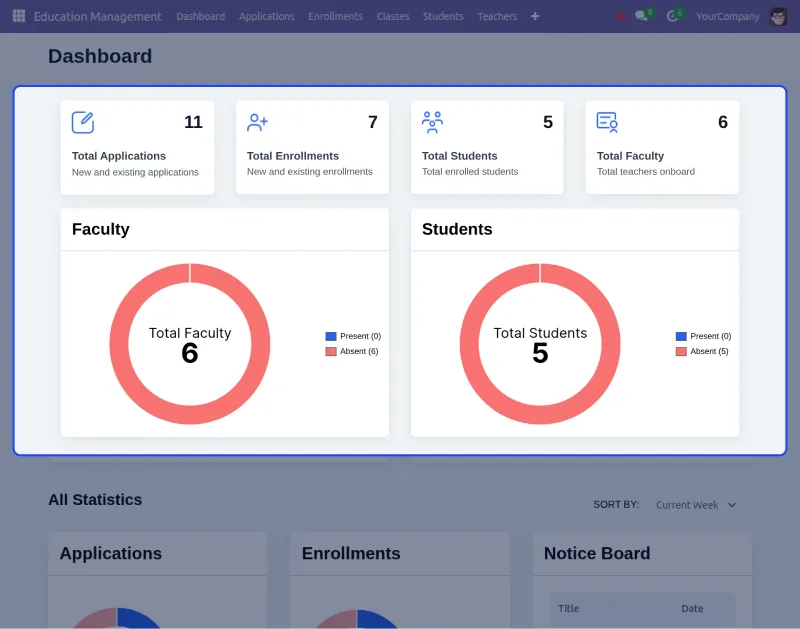
Odoo Education Management System helps schools handle daily work by putting all school information in one place.
It does important jobs by itself like making schedules, tracking attendance, collecting fees, and watching student progress.
The system has special pages for students, teachers, parents, and school managers. This makes it easy to handle jobs and talk to each other.
Everything from new students to school work and announcements is controlled in one place.
Students can check grades, homework, and attendance. Parents can see their child’s reports and pay fees online.
Teachers can organize lessons, handle attendance, and check homework. School managers can handle fees, track progress, and take care of many school buildings.
Features
- First, admins, teachers, students, and parents each get their own dashboard to manage tasks and access important information.
- Also, students can log in to check grades, assignments, and attendance all in one place through the student portal.
- In addition, schools can manage multiple branches in one system and track student applications using a unique application number.
- Moreover, fee invoices are created automatically, and all payment activity can be easily monitored.
- Attendance tracking is available for both school-wise and class-wise, with detailed reports that make monitoring easier.
- Finally, role-based access ensures users see only relevant information, and announcements can be shared to keep everyone informed.
Benefits
- First, academic and administrative information is stored in one place, making it easier to manage everything from student data to school finances.
- Also, automated tasks like fee invoicing, attendance, and academic records save time and let staff focus on important work.
- In addition, the system improves communication by letting students, parents, teachers, and admins access information quickly and easily.
- Moreover, from one campus to multiple branches, everything runs smoothly with standard processes, real-time dashboards, and clear oversight for better decisions.
3. Odoo Fleet Traccar Tracking
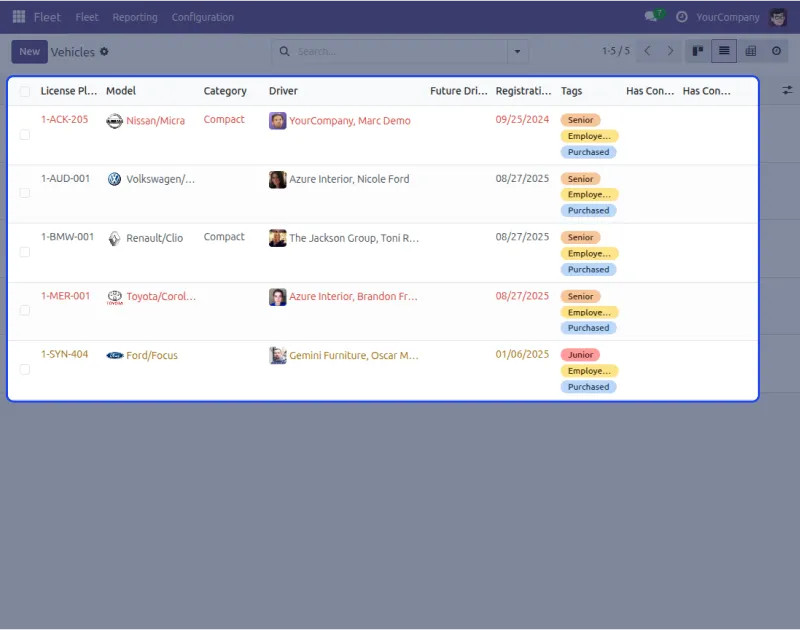
Odoo Fleet Traccar Tracking helps you manage your entire fleet of vehicles in Odoo. It gives you tracking of vehicle movements for all your drivers through the Traccar mobile app.
This app gives you better business management by letting you check tracking information and reports from one place.
You can manage everything about your vehicles, drivers, and trips without switching between different systems.
Managing and tracking vehicles on the road for business is not easy, especially when you have many vehicles.
This app helps solve all problems and gives you a better management setup from one Odoo place..
Features
- You can connect the Traccar Mobile app with Odoo to collect all details and status of vehicles using the Traccar Device ID and track all connected vehicles.
- You can view the trip history of any vehicle and check the history of drivers and vehicles in any area with Google Maps integration.
- You can set up live tracking to view the real-time location of vehicles and track drivers through mobile with detailed information.
- You can easily import vehicle trip history data and view the total trips of vehicles to track the trip count made by each vehicle.
Benefits
- Makes managing your vehicle fleet way easier by controlling everything from one Odoo place instead of checking different systems and apps.
- Saves time and energy by managing vehicle details, driver information, and trip records from one place with real-time tracking.
- Helps you make better business decisions with trip history, distance tracking, and availability status of all registered vehicles.
- Keeps you updated with live vehicle locations and driver status through green dots for online and red dots for offline vehicles.
- Makes vehicle maintenance and leasing management simpler by creating vehicle categories and managing monthly, daily, or yearly leasing plans in Odoo.
4. Odoo Google Drive Integration
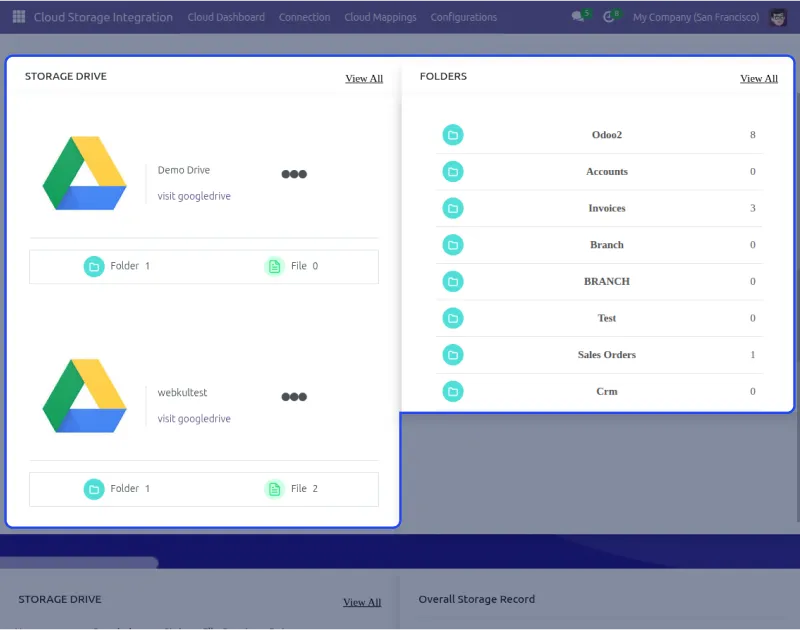
Now, your Odoo won’t slow down because of the large amount of data stored in it! Odoo Google Drive Cloud Storage lets you save your information to Google Drive right from Odoo.
If you want to share your information that is saved in Odoo with anyone, but can’t give them access to your Odoo.
you can share the information through Google Drive, which is a safe solution for cloud storage.
This lets you bring in as well as send out information in Odoo. Google Drive gives you complete safety with easy access and offers 15 GB of free storage to users.
You can share big files without trouble, access your documents from anywhere in the world, and it grows with your business needs.
Features
- You can store your Odoo information in Google Drive Cloud Storage and manage attachment types and their sizes in the cloud storage system.
- You can create folders and files right in Google Drive Cloud Storage and use the files and folders in Odoo directly from the cloud.
- You can send out files from Odoo to Google Drive cloud storage by hand, manage schedulers to export files, or export files in real-time.
- You can set limits to export files, create root folders in Odoo to manage all folders and files, and use advanced filters to separate the same objects into different folders.
Benefits
- Makes your Odoo work faster by storing heavy data files in Google Drive cloud storage instead of slowing down your main Odoo system.
- Saves time by letting you access files directly from Google Drive from anywhere without needing to log in to your Odoo system.
- Helps you share business information safely with others through Google Drive when you can’t give them direct Odoo access.
- Keeps your information organized with root folders, advanced filters, and a dynamic dashboard with donut charts and progress graphs to track everything.
- Makes data management easier with automatic sync options, bulk import/export features, and synchronization history tracking in one place.
5. Odoo Cloudflare Turnstile Authentication
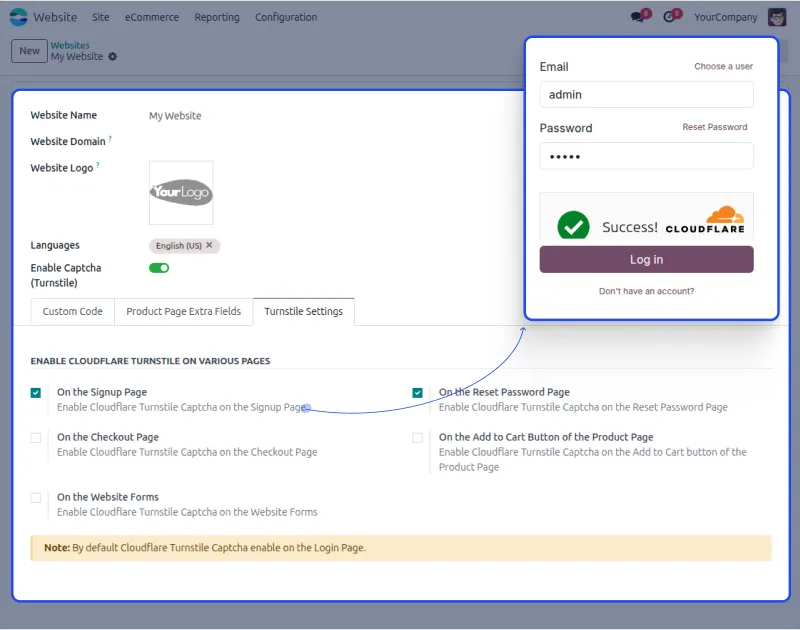
Verify users easily with Odoo Cloudflare Turnstile Authentication! This app lets you check if Odoo website visitors are real people and helps make your website safe from bots.
It makes the user experience on Odoo website better and doesn’t save information for trading off to sites for ads.
Turnstile is a new technology to check if users on the web are human. It replaces old captcha technology that takes lots of time and gives a better user experience.t
Odoo Cloudflare Turnstile Authentication helps you tell the difference between human and robot website visitors. You can easily install and connect it to your Odoo website in just a few minutes.
Features
- You can connect Turnstile checking into Odoo and use it on the sign-up or login page of your Odoo website for better security.
- You can make your website safer from bots and improve user experience by solving challenges based on how they behave on your site.
- You can set up the app by entering the secret and site key created from your Cloudflare account, and then use Turnstile checking on Odoo website.
- You can pick from different checking options and choose from before or after button click mode for user checking on your website.
Benefits
- Makes your Odoo website way safer by stopping bots from getting in while keeping it easy for real people to use.
- Saves time for your website visitors by replacing slow CAPTCHA technology with fast Turnstile checking, which works better.
- Helps protect user privacy since Cloudflare Turnstile doesn’t trade off your site information for showing ads to users.
- Makes website management easier with simple enable/disable options from Odoo backend and quick setup in just a few minutes.
- Gives you control over different checking modes and lets you set it up for different Odoo websites one at a time.
Best Odoo Modules for Point of Sale Excellence
1. Odoo POS Direct Print
With Odoo POS Direct Print, you can print receipts instantly – no complex setup, no extra hardware, just fast and reliable performance designed for hassle-free checkout.
With this app, you can print receipts right from your POS system using USB, Bluetooth, or network printers, all without needing an IoT Box.
It makes slow processes faster and works with ESC/POS and picture receipts, offering various ways to utilize it.
It also works with lots of printer setups, making sure the POS work goes smoothly and fast when lots of people are buying.
Even if it stops connecting, printing starts again by itself, making sure you never miss a receipt.

Features
- Instantly print receipts directly from the POS interface to speed up billing and enhance customer experience without extra steps or delays.
- It ensures that sales transactions are completed quickly and professionally at the counter.
- Supports both ESC/POS and image-based receipt formats, giving you flexible printing options for USB, Bluetooth, and Network printers.
- It works well for all kinds of businesses without needing extra tools.
- Eliminates the need for Odoo IoT Box or other additional tools, simplifying setup and reducing hardware costs for any business size.
- Automatically resumes receipt printing when the printer reconnects and includes the offline print queue to avoid lost prints.
- Even during network issues, receipts are reliably printed, maintaining transaction accuracy.
- Works with multiple printers and POS setups, making printing smooth and flexible in busy places. Perfect for retail stores or restaurants that need reliable and scalable receipt management
Benefits
- Speeds up checkout and minimizes customer wait times with instant receipt printing from the POS.
- Supports consistent, error-free receipt output even during connectivity drops using offline print queuing.
- Reduces reliance on extra hardware like the IoT Box, cutting down both setup and software costs.
- Ensures broad compatibility with USB, Bluetooth, and network printers, including thermal, inkjet, and laser types.
2. Odoo POS Kitchen Direct Print
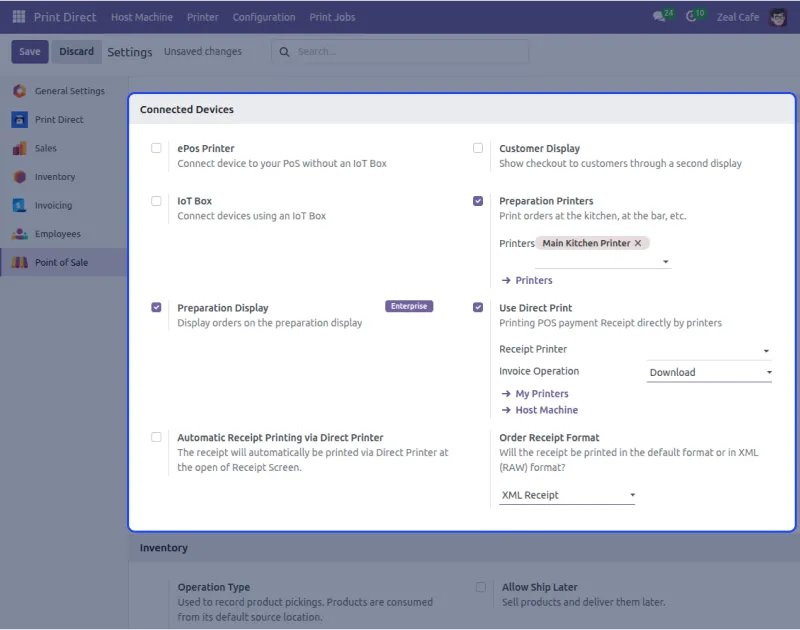
Odoo POS Kitchen Direct Print sends orders straight from the POS to kitchen printers without needing extra clicks or manual approval.
Orders reach the kitchen instantly, reducing errors and helping staff prepare meals faster. It supports multiple printers and keeps the order flow in real-time for smooth coordination.
Works instantly after setup with no subscription fees required, ideal for fast-paced dine-in, takeaway, or multi-counter restaurant environments.
Features
- Auto-prints kitchen orders directly from the POS the moment an order is confirmed, ensuring instant communication with the kitchen team.
- No manual approvals, extra clicks, or file downloads are required, allowing staff to focus more on service. The process is completely automated, saving valuable time at the counter.
- Fully supports network printers with minimal setup, offering a ready-to-use printing solution for fast-paced, multi-kitchen environments.
- Assign specific printers for food, drinks, or desserts, and manage them from a centralized backend.
- Real-time print commands ensure faster preparation, and there are no recurring subscription fees.
Benefits
- Improves kitchen efficiency by automating order printing directly from the POS, cutting down delays and manual effort.
- Minimizes mistakes by routing only the right items to designated kitchen stations without any extra steps.
- Helps dine-in, takeaway, and multi-counter setups serve customers faster with fewer errors and smoother coordination.
3. Odoo POS Advance Screen
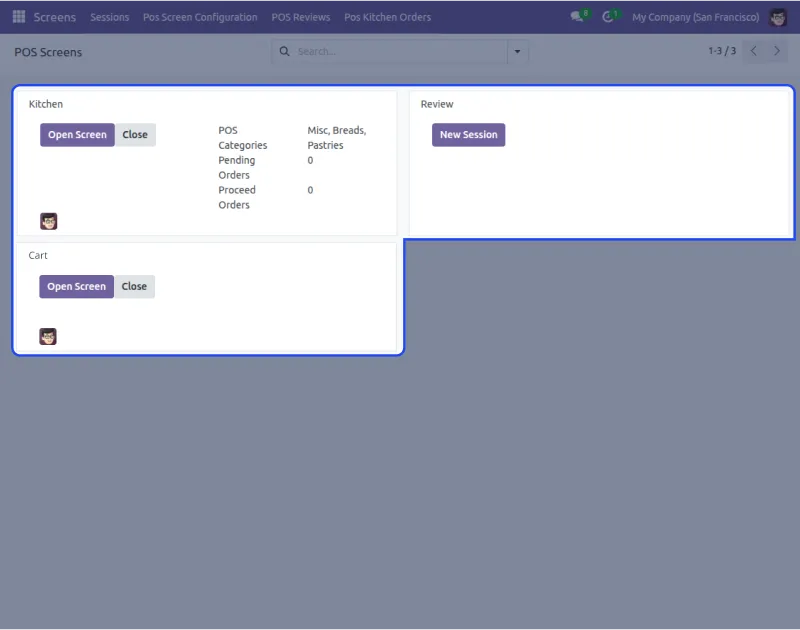
Odoo POS Advance Screen helps you manage kitchen displays, customer carts, and review panels, all from one streamlined module that centralizes your screen operations.
You can customize each screen with welcome messages and control product visibility as per your business needs.
Whether it’s showing live kitchen orders or letting customers view their cart and give feedback, the experience is smooth and efficient.
Each screen type gets a unique URL for quick access, allowing staff to open and manage screens directly during operations.
Features
- Configure kitchen, review, and cart screens all from one module, making it easy to manage POS display settings centrally.
- Customize each screen type per POS session with unique messages, headings, layouts, and background images.
- It adds flexibility and branding consistency across your restaurant or store.
- Show full product details, including pricing, discounts, taxes, and order summaries on the cart screen. This keeps the customer informed and reduces order errors at checkout.
- Collect real-time customer feedback through a personalized, branded review screen that’s easy to update anytime.
Benefits
- Centralize kitchen, cart, and review screen control to reduce manual setup across multiple POS terminals.
- Enhances customer experience with real-time cart summaries, branded feedback screens, and interactive layouts.
- Boosts kitchen efficiency through live order tracking and streamlined communication between staff for faster and more accurate service.
- Strengthens brand identity with customizable welcome messages, headings, and display images.
4. Odoo POS Fast Loading
Odoo POS Fast Loading makes loading speed go up to 80 times faster, cutting down waiting time and letting you handle thousands of products and customers in seconds.
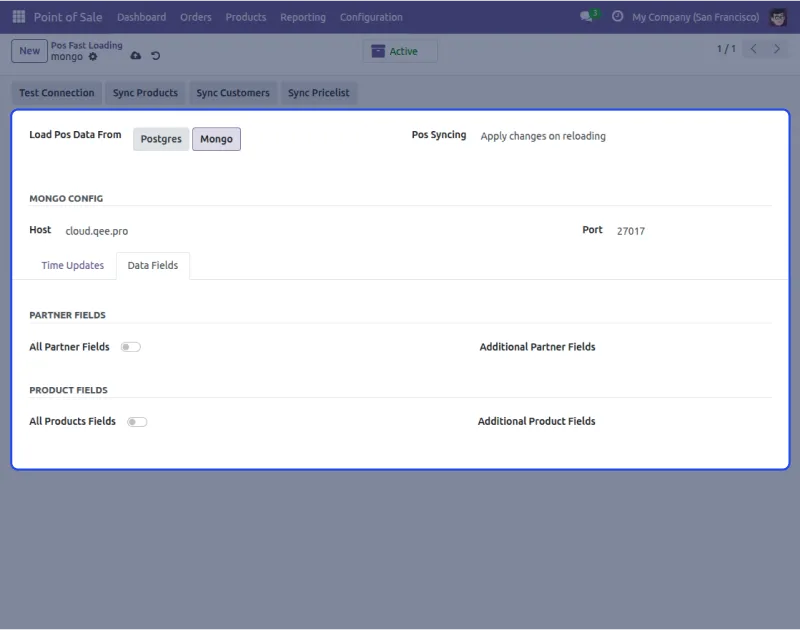
Whether you’re using MongoDB or your local database, this app helps load information right away without putting stress on your main Odoo server.
You can sync updated information by itself or with one click, making sure your POS session stays new and fresh, without waiting.
It also works with syncing extra things like features, prices, and customer information. Perfect for big stores, it makes sure your POS stays fast, smooth, and ready when lots of people come to buy.
Features
- Loads over 100,000 products and customers right away in just 8 seconds, making things work up to 80 times better than a regular Odoo POS setup.
- This makes sure buying stays smooth and doesn’t stop even when lots of people come to shop.
- Lets you use either MongoDB or your local database to handle POS information really well. This choice helps make speed and work better based on your computer setup you have.
- Works with both automatic and hand syncing of product and customer information, including extra things like prices, features, and partner info.
- Gives browser-based cache help to make reload time shorter and make the server work less. This makes session speed even better.
Benefits
- Drastically cuts down POS startup time, launching in seconds instead of minutes. Ensures a smooth experience even with large product and customer databases.
- Offloads data sync to MongoDB or LocalDB to reduce server load. Keeps your main Odoo instance responsive and efficient.
- Updates data automatically or manually without reloading the POS. Tracks all sync actions with detailed logs for easy monitoring.
5. Odoo POS Combo Products
Odoo POS Combo Products lets you make and sell product bundles like meal deals, kits, or special offers right from the POS.
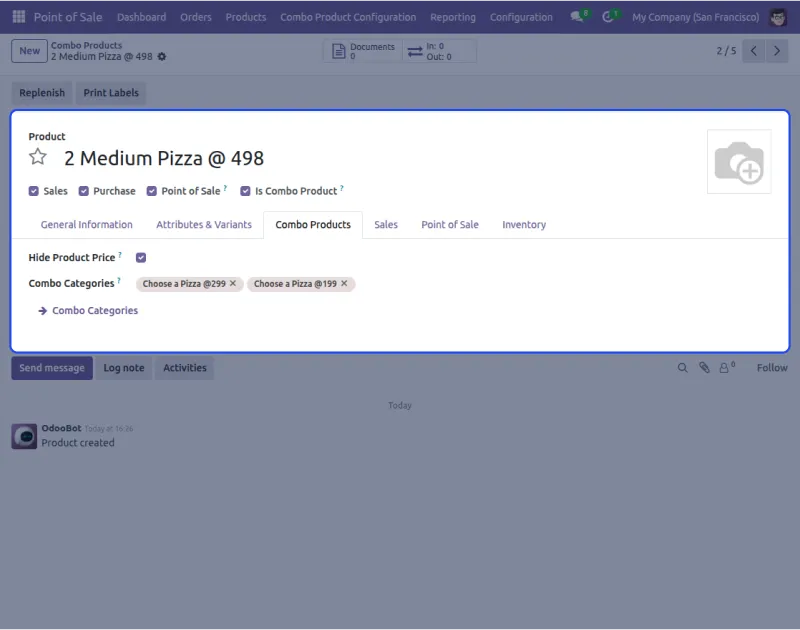
Pick between a list or grid view for choosing, group things by type, and hide single prices for smooth buying.
You can easily handle combo stuff from the back, set smallest/biggest choosing rules, and control how combos show up and work across POS setups.
Mix free and paid things in one combo to make special deals or fancy bundles that fit your business needs. This easy setup helps sell more, makes customers happier, and makes buying simple.
Features
- Make and sell combo products that you can change right from Odoo POS to help sell more and make customers happy. Great for meal deals, kits, or special bundles when buying.
- Pick between list or grid view for combo choosing, and easily set up combo groups from the back.
- This lets you change the POS screen based on what your store needs and what customers like.
- Set the smallest/biggest choosing rules for each combo, and put both free and paid things in one group. This gives you full control over combo rules and special deal flexibility.
- Hide single product prices and show only the final combo price on the POS screen. It makes it easier for customers to decide and makes checkout look cleaner and nicer.
Benefits
- Boosts average order value by offering bundled deals that encourage larger purchases. Helps you upsell effectively by grouping frequently bought items together.
- Speeds up checkout with pre-set combos and flexible selection rules. Makes promotions more attractive through custom combo configurations.
- Reduces inventory clutter by packaging related items into single combos. Enhances customer satisfaction with personalized and clear combo options.
Best Odoo Modules for Website Enhancement
1. Odoo Website Auction
Odoo Website Auction helps you run and organize auctions online on Odoo.
You can make and start auctions, while customers who want to join can sign up for the auctions to get updates and get emails about what’s happening.
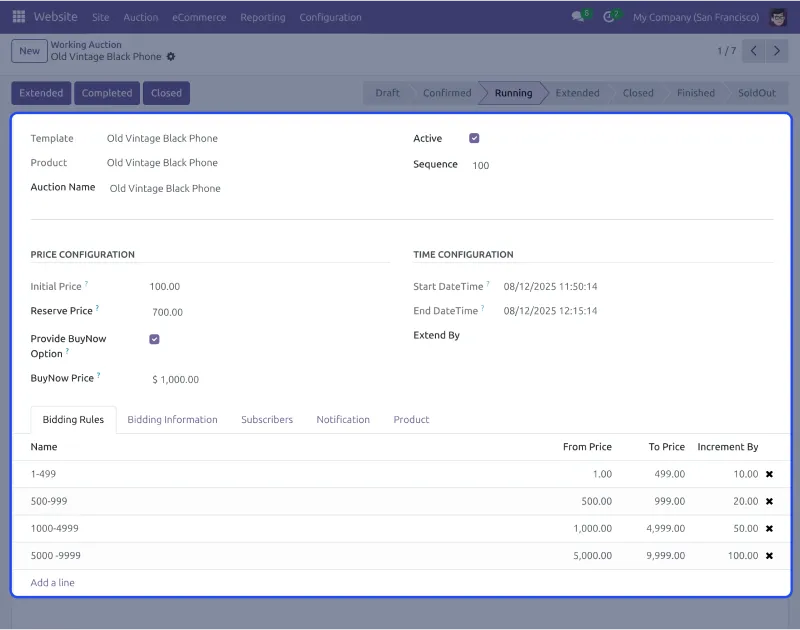
You can decide how long the auction goes on for a product, and you can see who joined, the auction list, and the list of people who joined.
Customers can buy the thing right away without trying to win it, or they can pick auto bidding or easy bidding.
Odoo Website Auction helps businesses start and run online auctions. The bidding system helps companies get more money for their things, making it the best way to have auctions on Odoo.
Features
- You can make product auctions right on your Odoo website with simple control. You can make lists, handle bids, and show auctions to people who want to buy.
- People can pick easy bidding or auto-bidding and also get a buy-right-now button for fast buying, all on the same page.
- The auction runs by itself when you set how much money bids go up, the smallest prices, and the time clocks. People who joined get emails about what’s happening and bidding stuff.
- You can see how auctions are doing from the back with a full look at all bids, who put in bids, and who joined for every auction you made.
Benefits
- Simplifies the process of managing auctions online and boosts engagement by giving users multiple bidding options.
- Saves manual effort with automation features like bidding rules, timers, and real-time email alerts for both sellers and participants.
- Improves sales potential by offering flexible buying methods via auction or direct purchase based on customer preference.
- Gives admins and bidders clear visibility into auction status, past activity, and updates, making the whole process smooth and transparent.
2. Odoo Affiliate Management
Odoo Affiliate Management lets you set up and run affiliate marketing programs directly from your Odoo system.
It simplifies affiliate registrations, account handling, and campaign tracking, all from the backend.
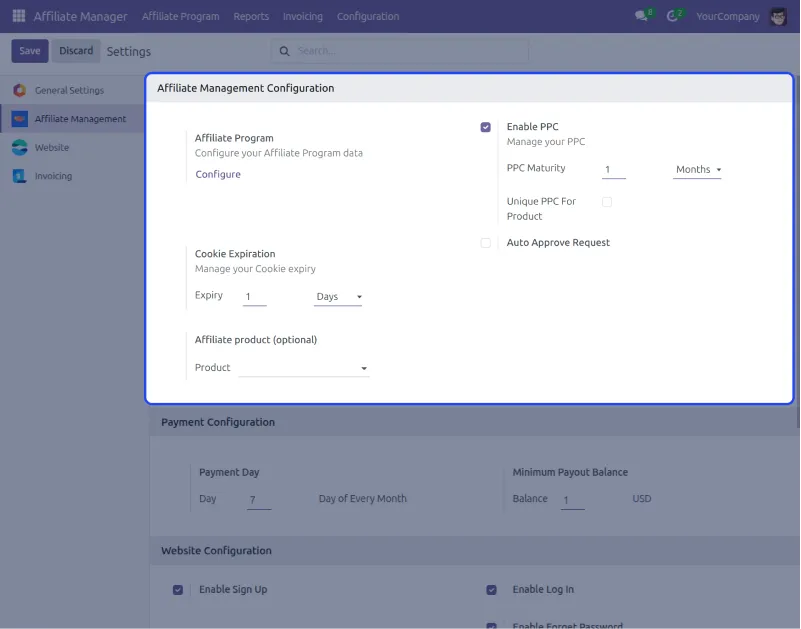
The module supports both Pay-Per-Click (PPC) and Pay-Per-Sale (PPS) campaigns. You can define commission rules, maturity periods, and approval workflows with complete control.
The module also automates communication with affiliates through welcome, approval, or rejection emails, saving time and reducing manual work.
Affiliate marketing becomes easier and more effective with Odoo Affiliate Management. It helps you increase reach, improve sales, and scale promotions directly within your ERP system.
Features
- Easily create and manage affiliate programs from your Odoo backend with simplified affiliate onboarding and access management.
- Run both Pay-Per-Click and Pay-Per-Sale campaigns with full control over commission types, maturity time, and performance thresholds.
- Track clicks and orders with automated reporting that helps you and your affiliates stay informed and aligned.
- Customize email templates for registration, welcome, or cancellation to maintain consistent and professional communication.
- Let affiliates promote products using banners or custom links, helping boost visibility across channels.
Benefits
- You can start affiliate programs and take care of them without outside tools. All from inside your Odoo system.
- You save time because it automatically watches how well things are going and figures out how much money to pay affiliates, while you can change how you talk to them.
- Affiliates get flexible tools to promote things while you keep control over all the settings from one place.
- You can reach more people and make more money with commission rewards. while keeping marketing work simple and well-watched.
3. Website Cash On Delivery
Odoo Website COD Payment Acquirer lets businesses accept cash on delivery payments and makes shopping easier for customers who want to pay when they receive items.
Customers can select COD at checkout for hassle-free purchase while businesses get a dedicated menu to track COD payments.
You can record payment details like collector name, date, amount, and comments using the “Collect Now” button that shows COD status instantly.
The system sends automatic emails to customers when COD payments are collected and updates remaining balance.
COD payment method builds customer trust by giving them a safe and flexible payment option while helping businesses manage COD orders without confusion.
Features
- You can let customers select COD at checkout and pay cash when they receive items, with a dedicated menu to track and manage all COD payments easily.
- You can record payment details like collected by, collected on, and COD amount using the “Collect Now” button that shows payment status instantly.
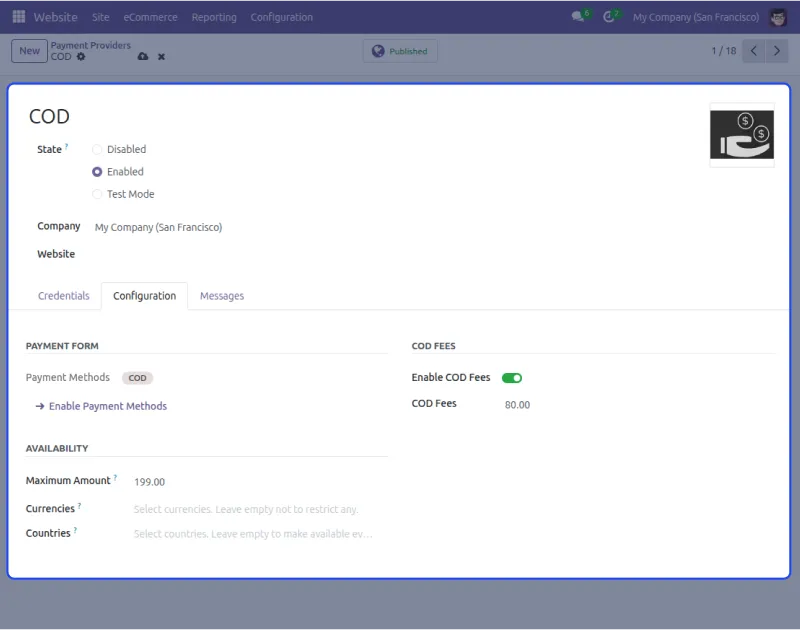
- You can set COD fees, terms, and conditions that match your business needs and manage partial payments with automatic amount updates.
- You can send automatic email notifications to customers when their COD payments are collected with real-time updates and balance tracking.
Benefits
- Makes shopping easier for customers by letting them pay with cash on delivery instead of requiring online payment and builds trust with safe payment options.
- Helps businesses manage COD orders without confusion by keeping all payment information organized in one place with clear status tracking.
- Saves time with automatic order tracking that updates payment status in real-time and sends notifications to customers about payment collection.
- Attracts more customers who feel unsure about online shopping by offering flexible payment method that lets them pay when items arrive.
4. Odoo Aramex Shipping Integration
Looking for good, reliable, and fast delivery services for your business?
Aramex gives you the best solution for both local and international order deliveries, and Odoo Aramex Shipping Integration app brings those services to Odoo.
Today, delivery times for orders have gotten shorter to 1-2 days and even hours. Quick and correct delivery has become very important for every online business.
And the quality of delivery services has become one of the most important things for customer happiness.
Aramex is one of the best shipping services with locations in over 54 countries. Having Aramex in your Odoo can make your delivery service better and improve delivery times for your orders.
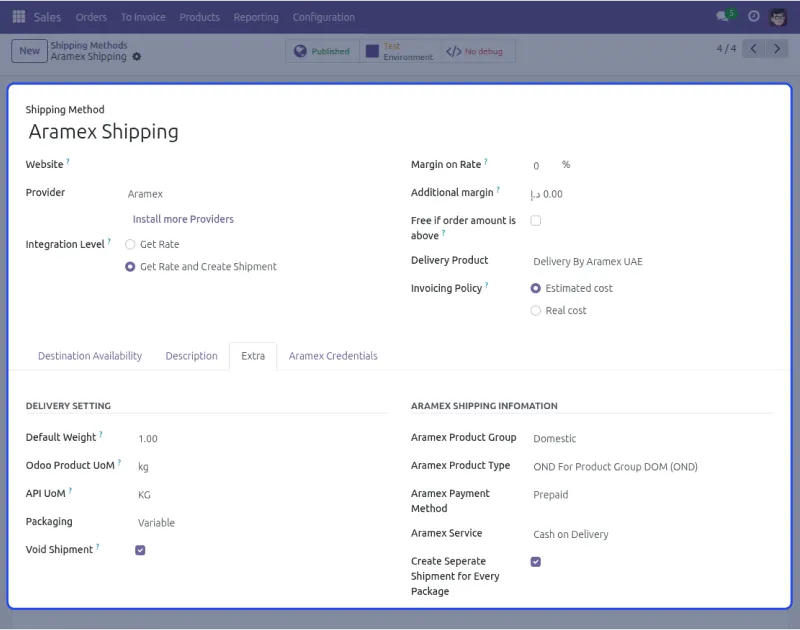
Features
- First, you can use Aramex on both the website and Odoo backend for customers and sales orders.
- Also, Aramex works for international and local delivery, with prices added automatically based on chosen services.
- In addition, you can connect Aramex in one step by entering login details like username, password, and account number in Odoo.
- Moreover, you can create real-time shipment labels and tracking numbers in sales orders and cancel shipments if needed.
Benefits
- Makes shipping way easier by letting customers pick Aramex delivery right from your website and automatically adding the correct shipping prices to orders.
- Saves time with default settings that automatically fill in values when creating Aramex shipments, so you don’t type the same information every time.
- Helps make customers happier with a reliable delivery service from Aramex that works in over 54 countries for both local and international orders.
- Makes order processing faster with automatic shipment label creation and tracking numbers that customers can use to track their packages.
- Gives you control over packaging options and extra service charges based on what services you have with Aramex for different types of deliveries.
5. Website CyberSource Payment Acquirer
Odoo Website CyberSource Payment Acquirer makes online checkout easy for your buyers and lets your store collect payments safely using CyberSource with automatic fraud protection.
It makes payments easy, safe, and user-friendly while letting you accept payments from anywhere in the world.
This app helps online stores make their checkout process smooth, flexible, and safe by letting businesses easily collect payments using CyberSource.,
It’s easy to set up and keep track of payments with this tool. This app is important for businesses that want to make paying online easy and safe for their customers.

Features
- You can smoothly connect Odoo with the Website CyberSource Payment Acquirer and let customers worldwide pay using the CyberSource gateway.
- You can easily track order details as Odoo admins and make sure payments are secure with 3D checking that protects against fraud.
- You can let customers use CyberSource Gateway for orders and view the total order amount with secure payment options.
- You can protect your business and customers from potential fraud with advanced fraud detection that finds and stops fake transactions.
Benefits
- Makes paying way easier for customers by giving them a smooth and flexible checkout process that works from anywhere in the world.
- Saves time with easy connection to Odoo and simple payment tracking that lets admins watch order details without trouble.
- Helps build customer trust with high security measures like 3DS checking and automatic fraud protection that keep transactions safe.
- Make your business grow globally by accepting payments from customers everywhere with CyberSource’s reliable payment system.
- Gives you peace of mind with advanced fraud detection that finds and stops bad transactions before they happen to your business.
Best Odoo Mobile Apps for Business Management
1. Odoo Delivery Boy App
Odoo Delivery Boy App helps delivery staff manage orders efficiently from their mobile devices. First, delivery boys can view assigned orders and navigate delivery locations using Google Maps.
Also, the app ensures secure handover with passcode confirmation and keeps customers informed through real-time tracking and updates.
In addition, delivery boys can mark deliveries complete, view earnings, and set their availability status easily.
Moreover, business owners get full backend control to manage delivery personnel, assign orders, and send push notifications from Odoo.

Features
- First, you can manage delivery boys, assign orders, and track delivery status from Odoo backend to keep work organized.
- Also, delivery people can accept orders, turn work time on/off, and mark deliveries as done using their app.
- In addition, built-in Google Maps helps delivery boys find the correct routes to customer locations.
- Moreover, deliveries are safely confirmed using special codes sent to customers, along with photos as proof of delivery.
- Admins can turn on phone messages for order updates, watch delivery boys in real time (with Odoo Mobile App Builder), and set up automatic settings.
Benefits
- Provides navigation assistance and real-time tracking capabilities for delivery management.
- Ensures secure and verified handovers through OTP/token verification and delivery proof images.
- Reduces manual work for admins by automating delivery validation, notifications, and order assignments within Odoo.
- Keeps both customers and delivery staff informed with status updates, availability controls, and mobile access for delivery management.
2. Odoo wrapper app
Odoo Mobile App (Wrapper) lets administrators manage all Odoo work right from their mobile phones by smoothly mixing all information with the app.
You can merge your Odoo information with the mobile app and get full access to Odoo’s backend work with a fully working view that works great with the app.
This app is a Flutter-based solution that connects your Odoo to a mobile-friendly interface and gives complete backend control.
Users can pick their database when logging in for a smooth connection and information syncing.
Users can access all backend features and manage work from their mobile device with an advanced logout that works from both the app and the website.
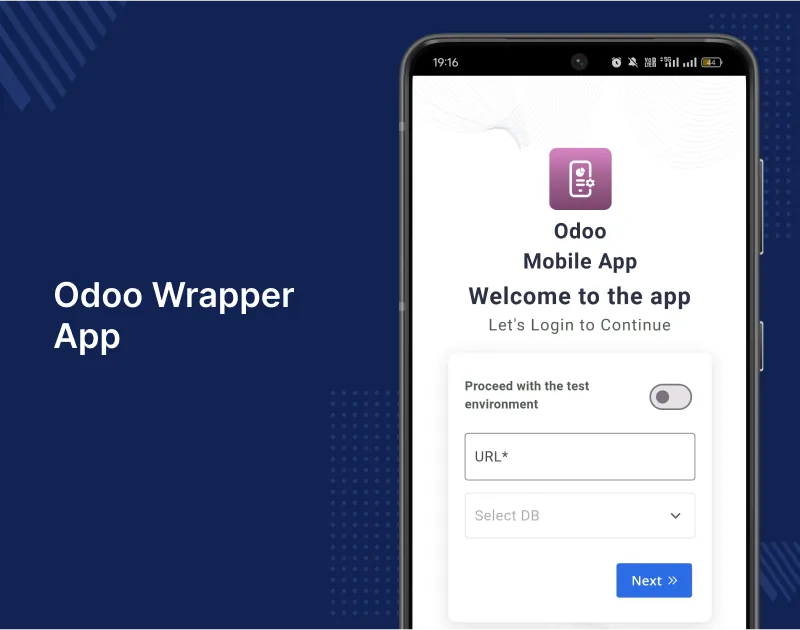
Features
- First, you can access all Odoo work from your mobile device and manage features while selecting your database easily.
- Also, you can personalize your app by removing default logos and watermarks, adding company branding, and hiding the “FREE” ribbon.
- In addition, you can connect your Odoo information smoothly by selecting the database and downloading reports directly from the app.
- Moreover, you can use advanced logout to sign out from the app and reset your password for added safety.
Benefits
- First, it makes managing your business easier by letting you control all Odoo work from your mobile phone.
- Also, it saves time by giving full access to backend features on your phone so you can work anywhere.
- In addition, it helps your business look professional with custom branding options that replace default logos with your company’s design.
- Moreover, it makes work smoother with easy database selection during login and automatic syncing between your app and Odoo system.
- Finally, it gives more control and security with advanced logout features and password reset options on both app and website.
3. Odoo e-commerce mobile app
Odoo Mobile App Builder converts your Odoo Store into a Flutter-based mobile application so customers no longer need desktops or laptops for shopping.
First, customers can easily visit your store using the mobile app on the go for a better experience.
Also, the app provides a user-friendly interface and improves customer engagement with full compatibility with your Odoo store.
In addition, you can create Android and iOS apps that offer superior features for better shopping.
Customers can track real-time location of the delivery boy and view the pickup location where orders are collected.
Features
- First, you can convert your Odoo store into a Flutter-based mobile app for Android and iOS with push notifications.
- Also, you can give customers smart search with barcode scanning and text search that instantly filters products.
- In addition, you can provide an easy checkout with pre-filled address details and a wishlist to save products for later.
- Moreover, you can send unlimited push notifications about offers, discounts, and new arrivals while supporting multi-currency and RTL languages.
Benefits
- First, it makes shopping easier for customers by letting them buy products from mobile phones instead of using a desktop.
- Also, it saves time with smart search features like barcode scanning and text search, helping customers find products quickly.
- In addition, it increases sales through push notifications, sharing offers and discounts directly to customers without visiting the store.
- Moreover, it improves customer experience with real-time synchronization, showing updated product information and delivery tracking for better engagement.
4. Odoo business card reader app
Odoo AI Business Card Reader App turns your business cards into leads and contacts in Odoo automatically and handles all data entry work for you.
You can scan one business card and save your contacts and leads in Odoo while managing all business card data in one easy place.
First, this app uses smart AI to read contact details from business cards. Then, it adds them directly to your Odoo CRM.
Also, you can capture business card details in the app and send them to Odoo. It syncs contacts automatically.
Moreover, you can turn every business card into a sales lead. This helps boost your sales pipeline with qualified leads.
Features
- You can capture contact details from business cards instantly using your smartphone camera and get accurate AI recognition that extracts contact information correctly.
- You can manage all business card data in one place. This makes it easy to access and add contacts to Odoo CRM.
- Also, you can boost your sales by turning business cards into qualified leads. The app syncs contacts with your Odoo database.
- In addition, you can capture business card details in the app and send them to Odoo.Moreover, the extracted data is stored on your device for future use.
Benefits
- Makes contact management easier by removing manual data entry and turning physical cards into valuable digital leads automatically.
- It saves time by capturing contact details instantly. This helps you focus on building relationships and driving sales.
- Also, it helps build stronger customer relationships by centralizing information and tracking interactions in your Odoo CRM system.
- In addition, it keeps business connections always accessible. This ensures information is available and synced between devices in Odoo.
5. Odoo multivendor app
Odoo Multi Vendor Mobile App brings your Odoo marketplace to mobile phones and lets customers browse products and place orders from their mobile app.
This Flutter-based app works on Android and iOS platforms with all key marketplace features.In fact, it is one of the 25 best Odoo modules to boost your business reach.
You can easily convert your Odoo marketplace into a mobile app for Google Play Store and Apple App Store downloads.
Moreover, sellers can access their shop dashboard through the mobile app.
This way, they can check product requests and order status instantly, improving efficiency.
Features
- You can bring your Odoo marketplace to Android and iOS mobile platforms using this Flutter-based hybrid app that customers can download from app stores.
- You can give customers easy navigation with a search box, voice search, and barcode scanning.This helps them find products fast and place orders easily.
- Also, you can show seller shop policies in their profiles.For example, customers can see shipping, return policies, ratings, and reviews from others.
- In addition, the mobile app syncs with your Odoo marketplace in real time.So, product and order updates appear instantly in the app.
- Moreover, the app supports multiple languages. This includes right-to-left scripts like Arabic and Hebrew for different customer backgrounds.
Benefits
- Makes shopping easier for customers by letting them browse your marketplace and place orders from their mobile phones instead of only using computers.
- It helps sellers manage their business better.
- For example, they can check product requests, order status, and contact details anytime.
- Also, it helps your marketplace reach more people.
- Because the app is available on Google Play Store and Apple App Store, more customers can find it.
- In addition, it improves customer experience.So, customers always see up-to-date product info and order updates in real time.
Need Help?
I hope you find the blog helpful. Please share your feedback and suggestions in the comments below.
If you have any issues/queries regarding any of the modules please raise a ticket at
https://webkul.uvdesk.com/en/customer/create-ticket/
For any doubt, contact us at [email protected].
For other blogs and user guides like this, Please Visit Our Blog Page.


2 comments
Thanks for your valuable feedback! Stay tuned for more…
Regards
Anisha Bahukhandi