CS-Cart EBS Payment Gateway : This magnificent extension allows user of site to use EBS payment gateway, India’s most popular payment method with CS-Cart. The payment gateway allows user to receive payment from customer through various transaction options provided. User can boost their payment success rate with complete transparency to develop trust and confidence.
Features
- Indeed Well integrated with CS-Cart/Multivendor.
- User friendly interface to receive online payments.
- Supports credit card options which includes Visa, Master card, Maestro, Amex, JCB, Diners.
- Working with INR currency(Indian)
- Also Supports international payment after EBS approval.
- Smooth reconciliation to handle risk management system.
- Moreover Option of Page Id feature has been provided. Admin can customize EBS payment as per look.
Please note that live demo link is not available due to unavailability of sandbox credentials. For detailed process flow of the add-on, Please go through this blogpost.
CS-Cart EBS Payment Gateway
Video Tutorial
Configuration
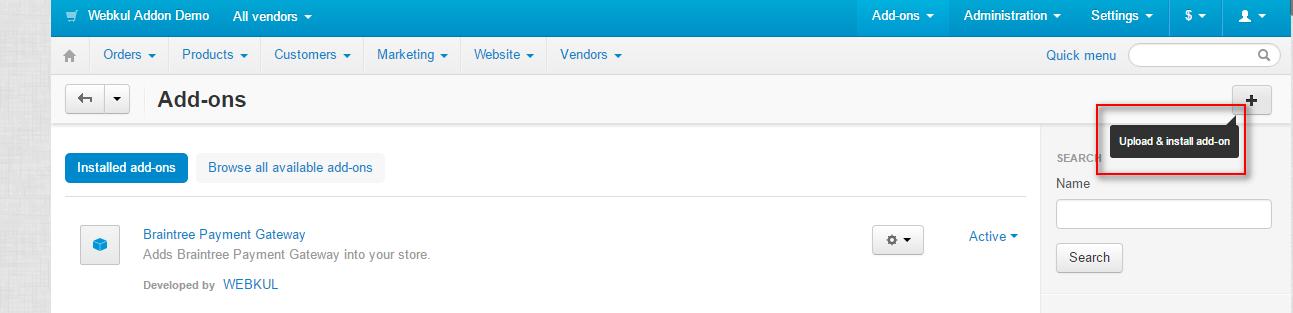
Firstly Go to “manage add-ons”. Click on “+” as shown below to upload and install the file
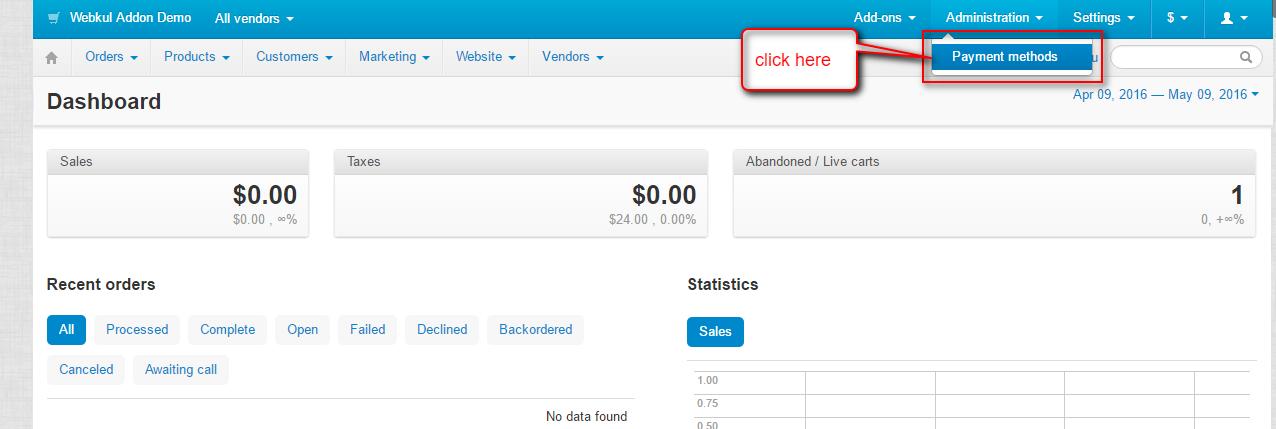
Go to “administrator” and click on “payment methods” as shown below
Click to “+” to add a new payment method.

- Set the name of the payment method.
- Select “EBS Payment Gateway” as the processor from the dropdown provided.
- Set template as ” cc_outside.tpl” from the dropdown.
- Select payment category as “credit card” as shown below.

- Enter the EBS account id and secret key.
- Set the mode of EBS.
- Select the status of order once the payment has been generated.

Frontend
Select “EBS payment” as the payment method for further process.

Enter the card details as shown below and click on “make payment”.

Click on “continue process” as shown below.

Successful payment notification.

Payment details of order at admin end.

Support
That’s all For the CS-Cart EBS Payment Gateway, still have any issue feel free to add a ticket and let us know your views to make the module better http://webkul.uvdesk.com
Besides this you can explore our cs-cart Development Services and Quality cs-cart add-ons
Current Product Version - 1.1
Supported Framework Version - 4.18


Be the first to comment.