WordPress dropins are likely a hidden feature of WordPress. Using dropins developers can replace, add, or enhance some advance core functionality of WordPress.
Even though Dropin Plugin are available on WordPress plugins page but they are much different from regular plugins. And we can not manage dropin directly from Plugin page unlike a regular plugin.
Dropin Plugin List
There are a total of 12 dropins in WordPress. These are single php files, we create in wp-content folder to achieve our desired goals.
| Dropin File | Installation | Loading triggers | Description |
| db.php | Normal | On site load | To implement custom database in WordPress. |
| db-error.php | Normal | On a DB Error | To show custom alert message a DB error. |
| install.php | Normal | On WP Installation | To run own script on installion. |
| maintenance.php | Normal | On maintenance mode activation | To display custom maintenance message. |
| object-cache.php | Normal | On site load | To enable Redis object caching. |
| advanced-cache.php | Normal | If WP_CACHE is set as true | To enable advance caching in WordPress. |
| php-error.php | Normal | On a PHP error | To display custom PHP error message. |
| fatal-error-handler.php | Normal | On a Fatal error | To display custom message on PHP Fatal error. |
| sunrise.php | Multisite | If SUNRISE is set as true | To execute custom script before a multi-site is loaded. |
| blog-deleted.php | Multisite | On deleting a blog | To display a custom message on a sub-site deleted. |
| blog-inactive.php | Multisite | On a blog deactivation | To display custom blog deactivation message. |
| blog-suspended.php | Multisite | On archiving or spamming a blog | To display custom message on marking a blog as Archived or spam. |
Use Cases
- One of the most popular plugin Query Monitor uses db.php dropin to analyse the queries running a page load.
- Most of caching plugins like W3 Total Cache, LiteSpeed Cache and WP Fastest Cache use the dropin ‘advanced-cache.php’ to implement their own caching mechanism in WordPress.
- Redis Object Cache plugin uses the ‘object-cache.php’ dropin to implement object caching for speedup the php code execution.
Using sunrise.php Dropin
To use a dropin we need to put the Dropin plugin PHP file into our wp-content folder openly without any folder. WordPress loads these unique named files at different triggers dynamically as mentioned in above table.
To achieve a custom domain mapping in a multisite network we have implemented the sunrise.php dropin.
<?php
/**
 * Domain mapping using sunrise dropins.
 *
 * We need to Map our domain from https://www.webkul.com/wordpress/ to https://www.webkul.com/web/wordpress/
 */

$extra_domains = array(
	'webkul.com/web/wordpress/' => 8, // 8 us the blog id of the subsite https://www.webkul.com/wordpress/
);
$server_uri    = $_SERVER['HTTP_HOST'] . $_SERVER['REQUEST_URI'];

if ( isset( $_SERVER['REQUEST_URI'] ) && array_key_exists( $server_uri, $extra_domains ) ) {
	$mask_domain = $_SERVER['HTTP_HOST'] . '/web/wordpress/';

	// Set globals.
	$blog_id      = $extra_domains[ $mask_domain ]; // phpcs:ignore WordPress.WP.GlobalVariablesOverride.Prohibited
	$current_blog = get_site( $blog_id ); // phpcs:ignore WordPress.WP.GlobalVariablesOverride.Prohibited

	// This should always be 1, unless you are running multiple WordPress networks.
	$current_site = get_network( 1 ); // phpcs:ignore WordPress.WP.GlobalVariablesOverride.Prohibited

	$origin_domain = $current_blog->domain . untrailingslashit( $current_blog->path );

	add_filter(
		'home_url',
		function( $url ) use ( $mask_domain, $origin_domain ) {
			return str_replace( $origin_domain, $mask_domain, $url );
		}
	);
}
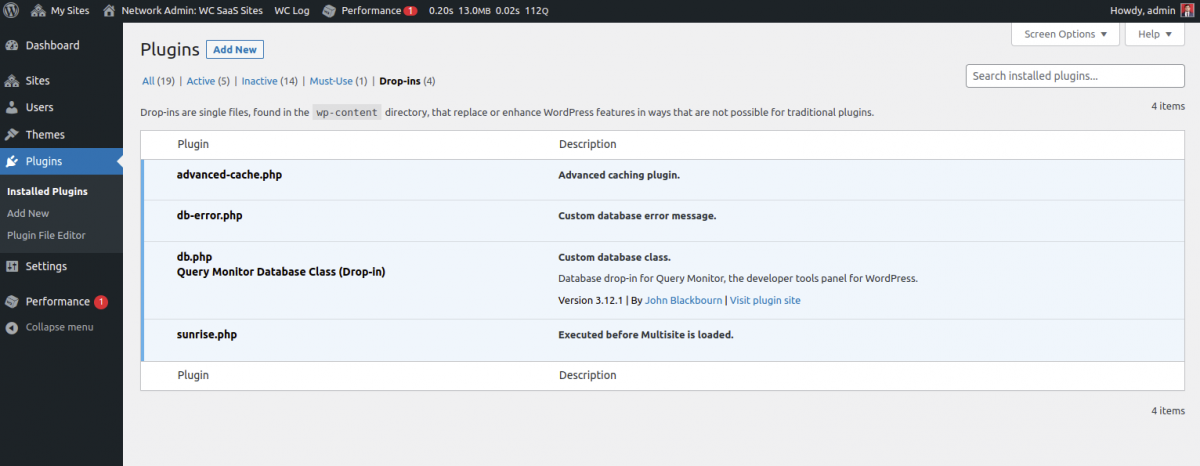
Dropins in WP Dashboard
WordPress shows all the implemented dropins under the Plugins page. However we can not manage them for activation, deactivation directly from the plugin page unlike a regular plugin.
Myths
Dropins are Harmful for WordPress Dropins are very less explained (or Hidden) feature of WordPress that is why there are some misconception among WordPress developers and users. One of them is Dropins are harmful for WordPress, they might break the site and slow down the performace.
We have done so much R&D before writing this blog and din’t found any reason dropins are harmful for WordPres.
Further Reading
To Get all Dropins use function _get_dropins
Support
For any kind of technical assistance, please raise a ticket or send us a mail at [email protected]
You may also check out our exclusive WooCommerce Addons and can also explore our WooCommerce Development Services.


Be the first to comment.