Transform your WooCommerce store into a powerful recurring delivery platform with Subscription Delivery Commerce.
Whether you are running a milk delivery service, meal prep business, water supply chain, or daily newspaper distribution.
This plugin provides a robust solution for managing daily scheduled deliveries and automated payments.
With an integrated wallet system and interactive delivery calendars, you can offer a premium, subscription-based experience that keeps customers coming back every single day.
Features
- Daily Recurring Subscriptions: Perfect for businesses requiring ongoing daily, weekly, or custom interval product deliveries.
- Integrated Wallet System: Customers can top up their virtual wallet, allowing the system to automatically deduct payments for recurring orders.
- Interactive Delivery Calendar: A visual interface for customers to view their upcoming schedules and manage individual delivery dates.
- Skip & Pause Functionality: Customers can skip specific delivery dates or pause their entire subscription (Vacation Mode) via their “My Account” area.
- Delivery Manifests: Admin can view and export daily delivery lists to optimize logistics and distribution.
- Product-Level Customization: Set specific delivery days, cutoff hours, and subscription discounts per product.
- Automated Order Generation: Reliably handles daily order creation and payment processing in the background.
- High-Performance Order Storage (HPOS) Compatible: Built for modern WooCommerce scaling and performance.
Subscription Delivery Commerce Installation
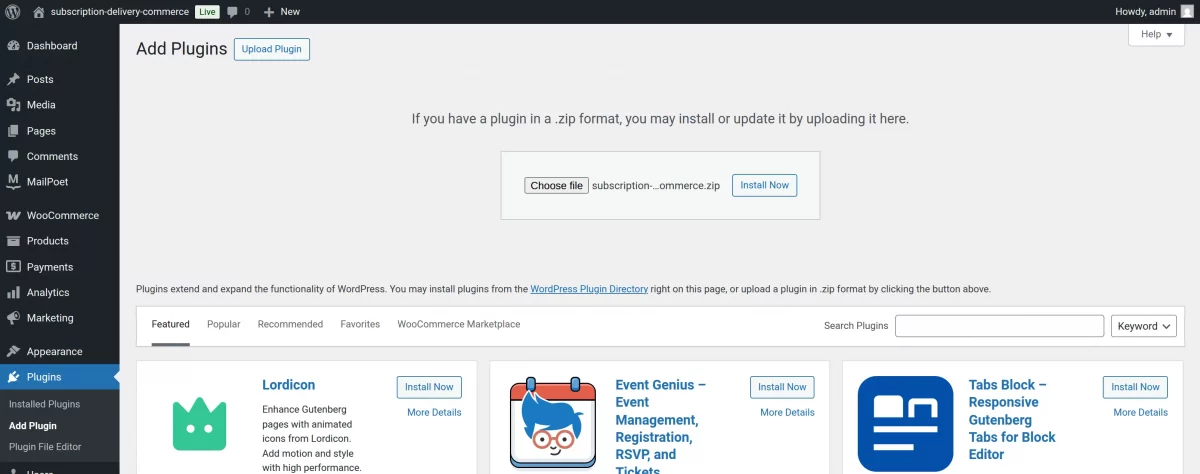
The user will get a zip file that he has to upload in the “Add New” menu option in the WordPress admin panel.
For this, login to WordPress Admin Panel, and Under the Dashboard hover your mouse over the “Plugins” menu option which brings out a Sub-Menu and then select the “Add New” option.

After this, you will see an option on the top of your page that is “Upload Plugin”, click the option to upload the zip file.

By clicking on the “Upload Plugin” option, below that you will see a button “Choose File” click on the button to browse for the zip file as per the snapshot below.

After browsing the file, click the “Install Now” button to install the plugin as per the snapshot.
Now when the plugin is installed correctly, you will see the success message and an option to activate the plugin. Henceforth now, click on “Activate Plugin” to activate the installed plugin.
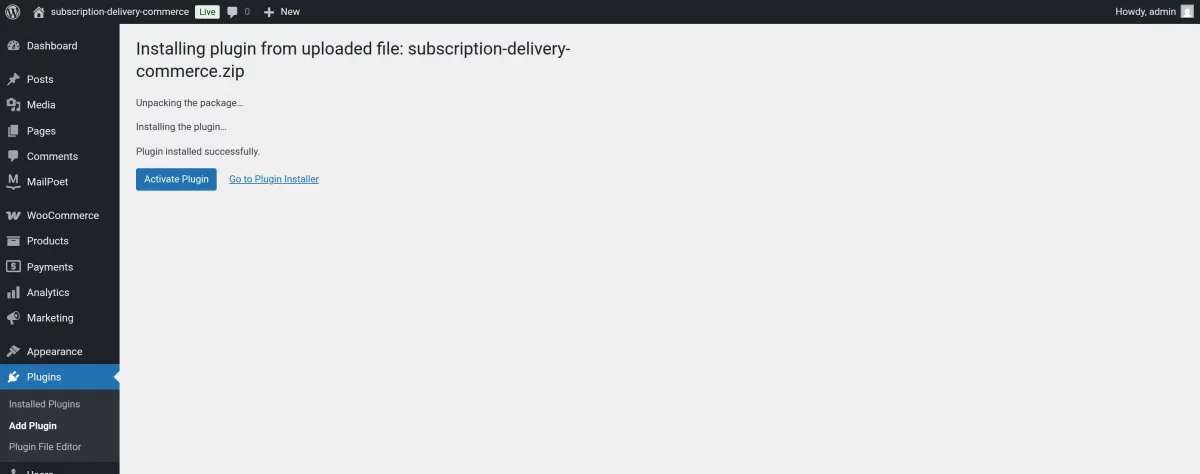
Thus, in this, the admin can install the module.
Subscription Delivery Commerce Admin Configuration
The Subscription Delivery Commerce plugin provides store administrators with a comprehensive suite of tools to manage recurring logistics directly from the WordPress dashboard.
Advanced Global Settings
The settings panel allows for granular control over the delivery engine’s behavior:
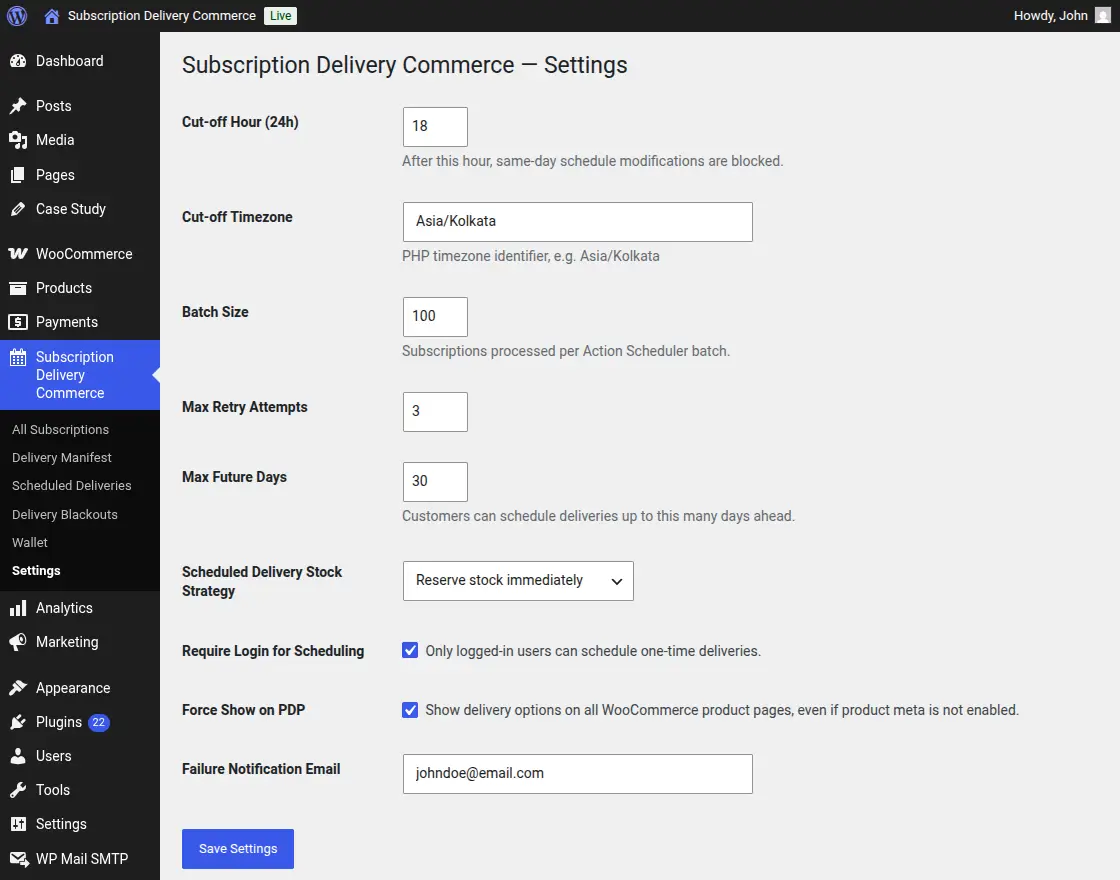
- Cut-off Hour & Timezone: Define the exact time (in 24h format) when same-day schedule modifications are blocked, ensuring logistics teams have a stable manifest.
- Batch Processing: Optimize performance by setting the Batch Size for subscription processing via the Action Scheduler.
- Scheduling Restrictions: Set Max Future Days to limit how far in advance customers can schedule, and toggle Require Login for one-time deliveries.
- Stock Management: Choose a Stock Strategy (e.g., “Reserve stock immediately”) to ensure inventory is available for upcoming recurring orders.
- Failure Notifications: Designate a specific email address to receive alerts if any automated order generation fails.
Subscription Delivery Commerce (Updated with Product-Level Settings)
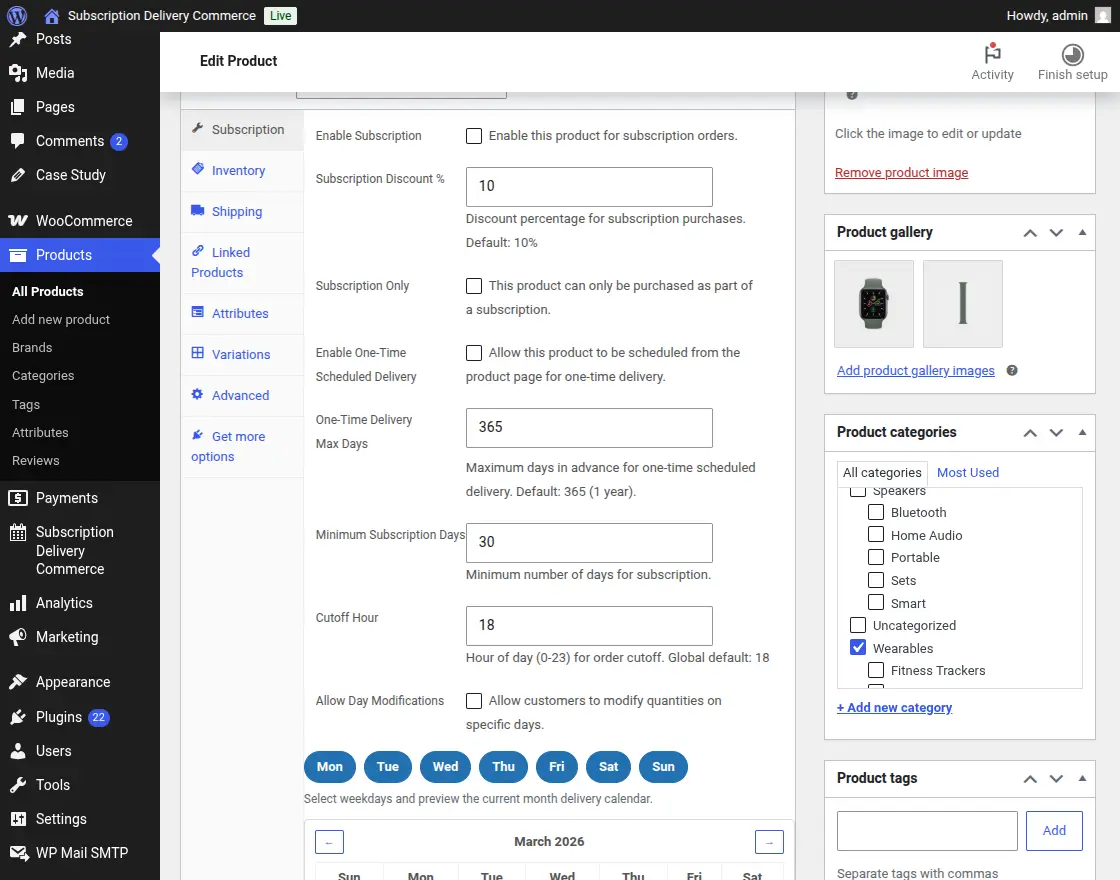
The Subscription Delivery Commerce plugin provides advanced product-level controls that allow store administrators to configure how each product behaves in the subscription system.
Within Product Data → Subscription Settings, admins can define flexible rules for scheduling, pricing, and delivery operations.
1. Subscription Enablement
Admins can activate subscription functionality for individual products:
- Enable Subscription
Allows the product to be purchased as a recurring subscription. - Subscription Only
Restricts the product to subscription purchases only (no one-time purchase allowed).
2. Subscription Discount
- Subscription Discount (%)
Set a discount percentage (e.g., 10%) to encourage customers to subscribe instead of making one-time purchases.
This helps boost recurring revenue and customer retention.
3. One-Time Scheduled Delivery Option
- Enable One-Time Scheduled Delivery
Allows customers to schedule a single delivery from the product page. - Max Delivery Days (e.g., 365)
Defines how far in advance customers can schedule a one-time delivery.
4. Minimum Subscription Duration
- Minimum Subscription Days (e.g., 30 days)
Ensures that customers commit to a minimum subscription period.
This prevents very short-term subscriptions and stabilizes business operations.
5. Cut-off Time Management
- Cutoff Hour (0–23 format)
Defines the daily deadline for modifying delivery schedules.
Example:
- If set to 18 (6 PM), customers cannot:
- Skip deliveries
- Modify schedules
after this time for the next day.
This ensures smooth logistics and delivery planning.
6. Day-wise Delivery Configuration
Admins can select specific delivery days:
- Monday to Sunday toggles available
- Only selected days will be available for delivery
Example:
- Select Mon, Wed, Fri → deliveries will only occur on these days
7. Allow Day Modifications
- Allow Day Modifications (Optional)
Lets customers modify quantities for specific delivery dates.
Useful for:
- Variable consumption products
- Personalized delivery needs
8. Delivery Calendar Preview
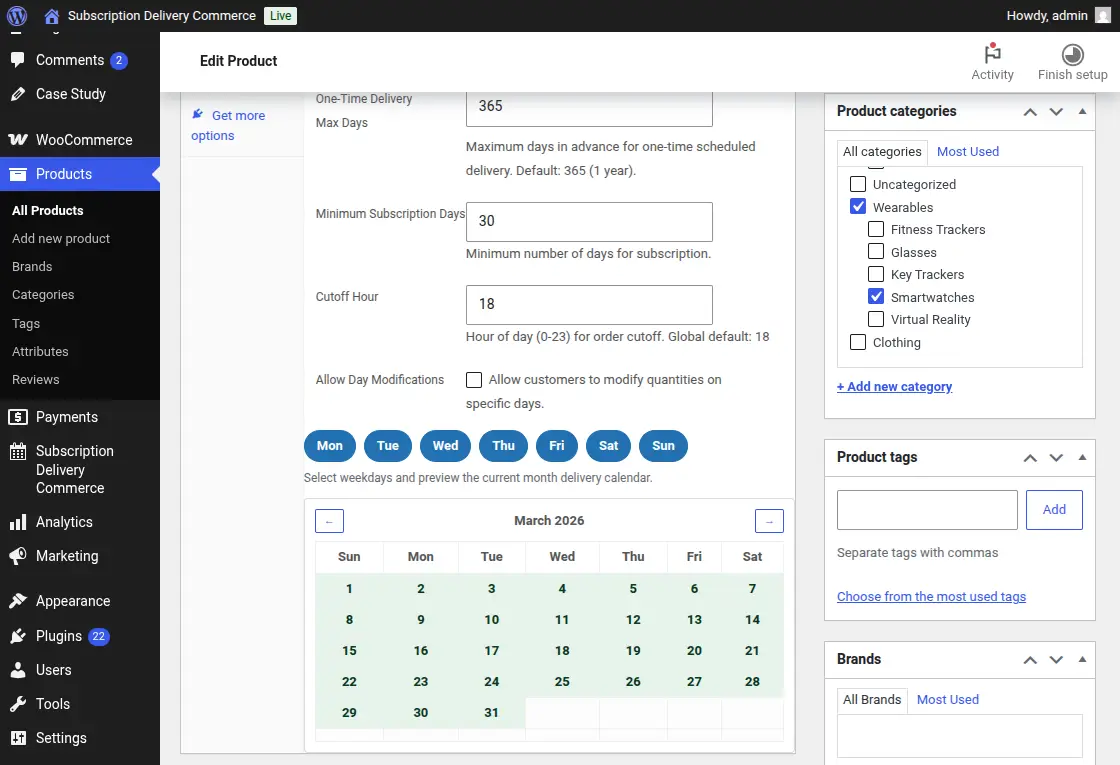
The built-in calendar provides:
- A visual preview of available delivery dates
- Highlighted active delivery days
- Monthly navigation for planning
This helps admins:
- Verify scheduling rules
- Ensure correct delivery configurations
All Subscriptions Management
The centralized subscription dashboard allows admins to monitor all customer contracts at a glance.
With status-based filters like Active, Paused, Cancelled, and Vacation, you can quickly identify the current health of your recurring revenue.
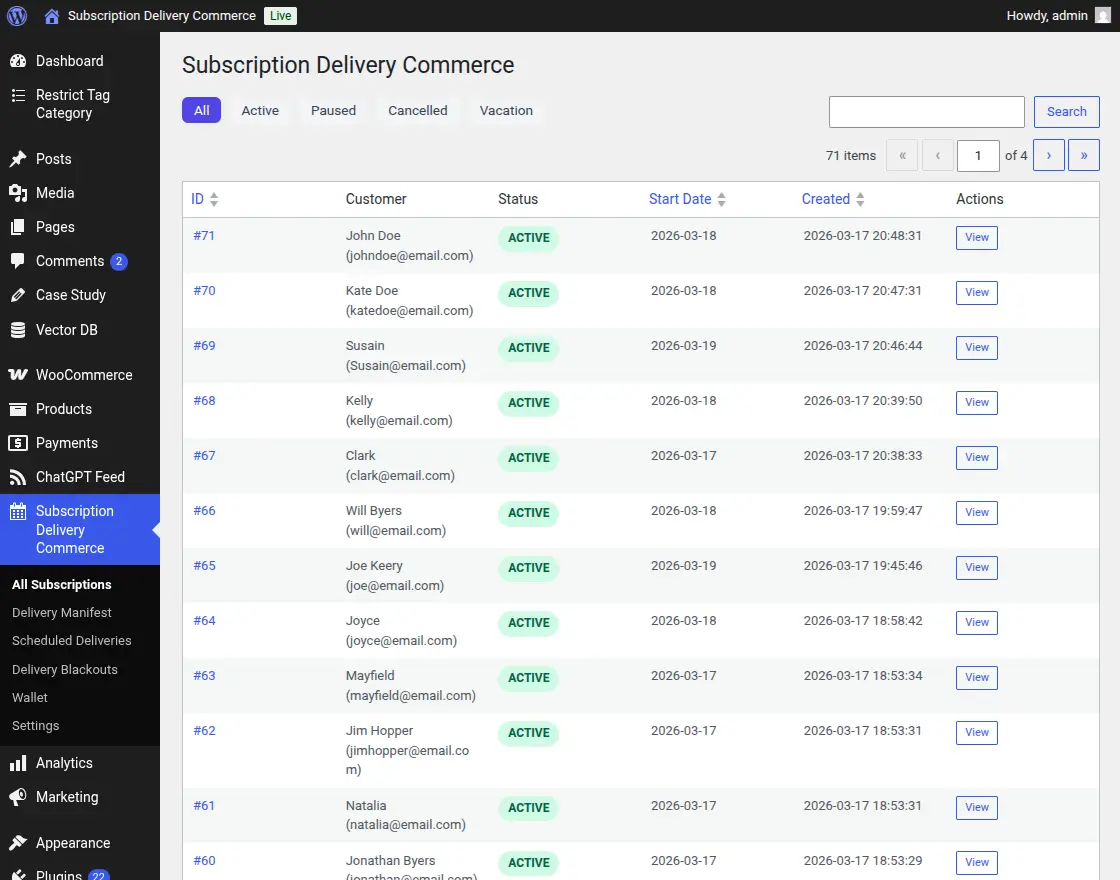
Each entry provides direct access to the customer’s specific products, start dates, and transaction history.
Delivery Manifest & Product Summaries
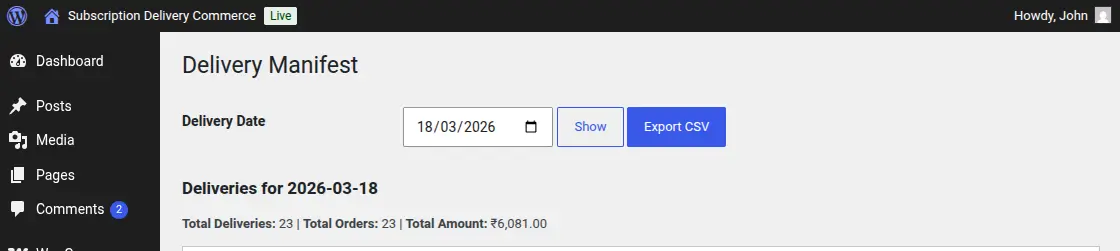
One of the most powerful tools for logistics is the Delivery Manifest:
- Daily View: Filter by date to see exactly who needs what delivered on any given day.
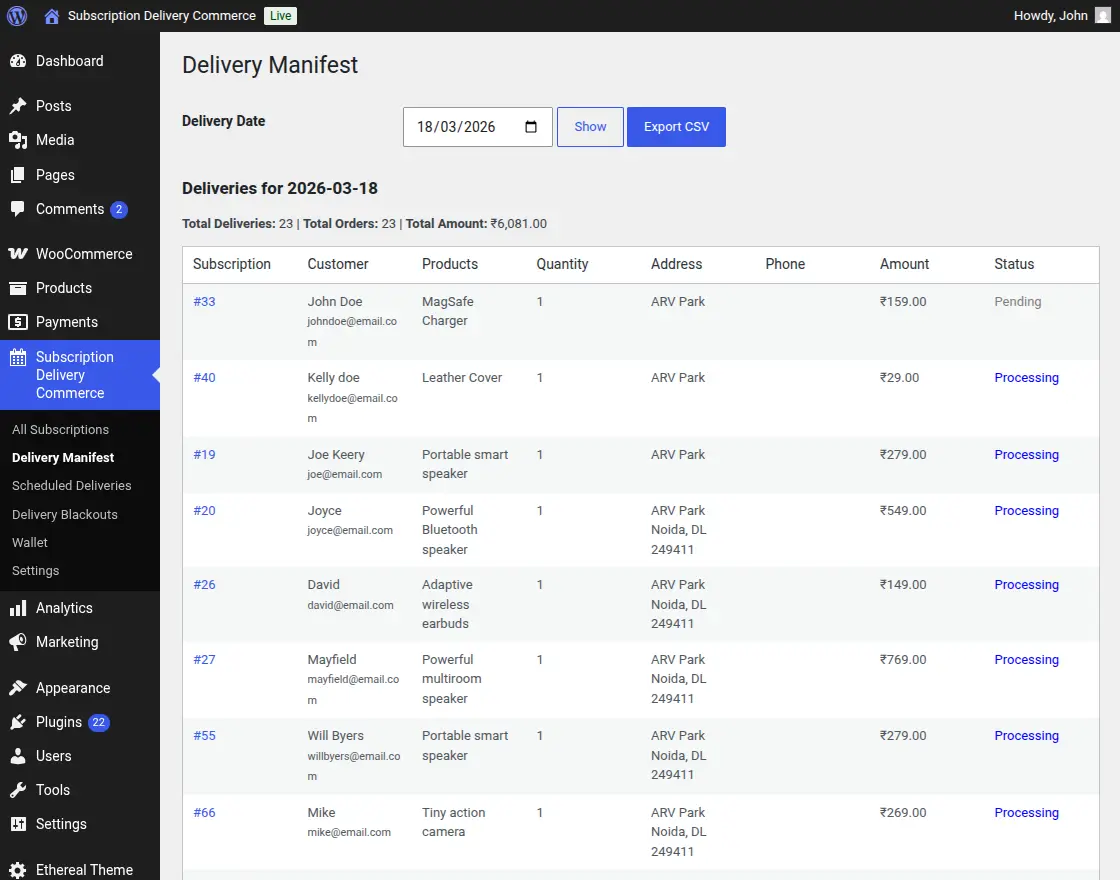
- Logistics Data: Access critical information including Customer Name, Product Quantities, Delivery Addresses, and Phone Numbers.
- Product Summary: A dedicated table aggregates the Total Quantity for each product, allowing warehouse staff to prepare stock efficiently without manually counting individual orders.
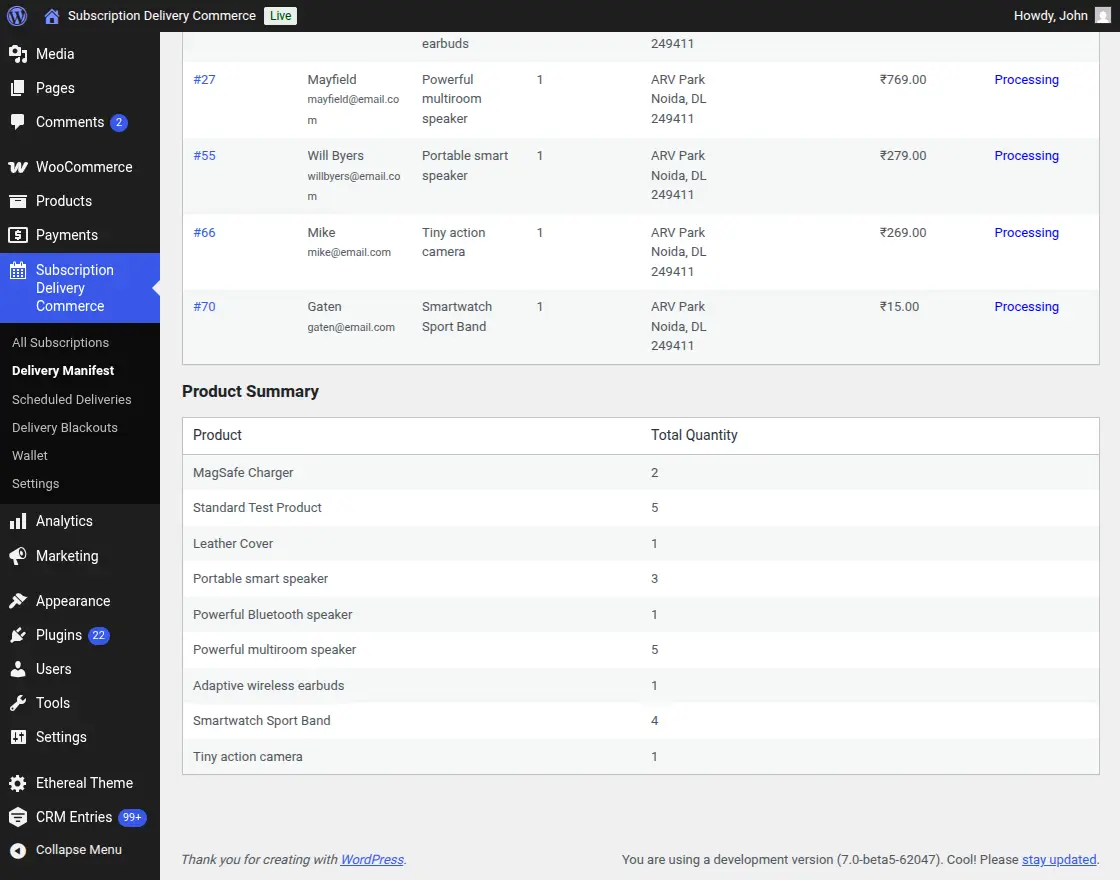
- Export CSV: Generate one-click reports for delivery drivers or third-party fulfillment partners.
Scheduled Deliveries Log
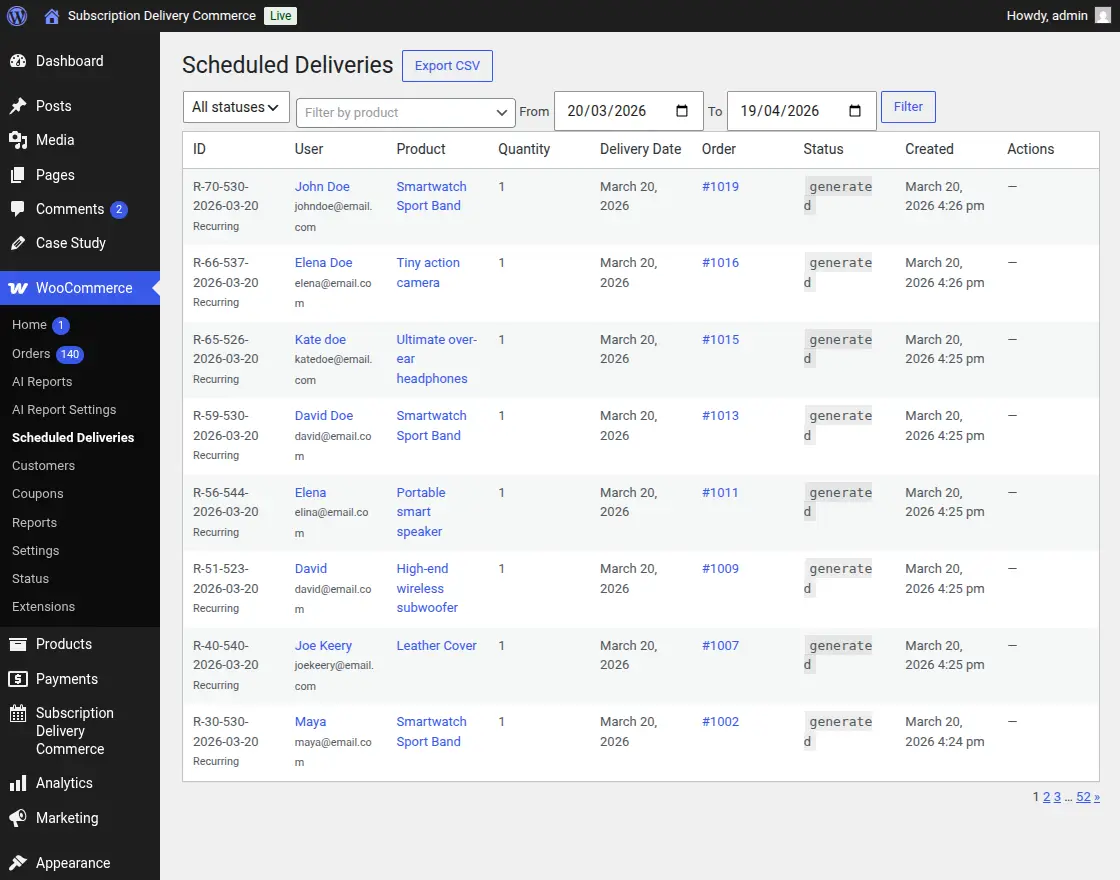
Track every individual delivery attempt (recurring or one-time) in the Scheduled Deliveries log.
This interface provides transparency into order generation, showing linked Order IDs and processing statuses (e.g., “generated” or “failed”) for specific dates.
Managing Delivery Blackouts
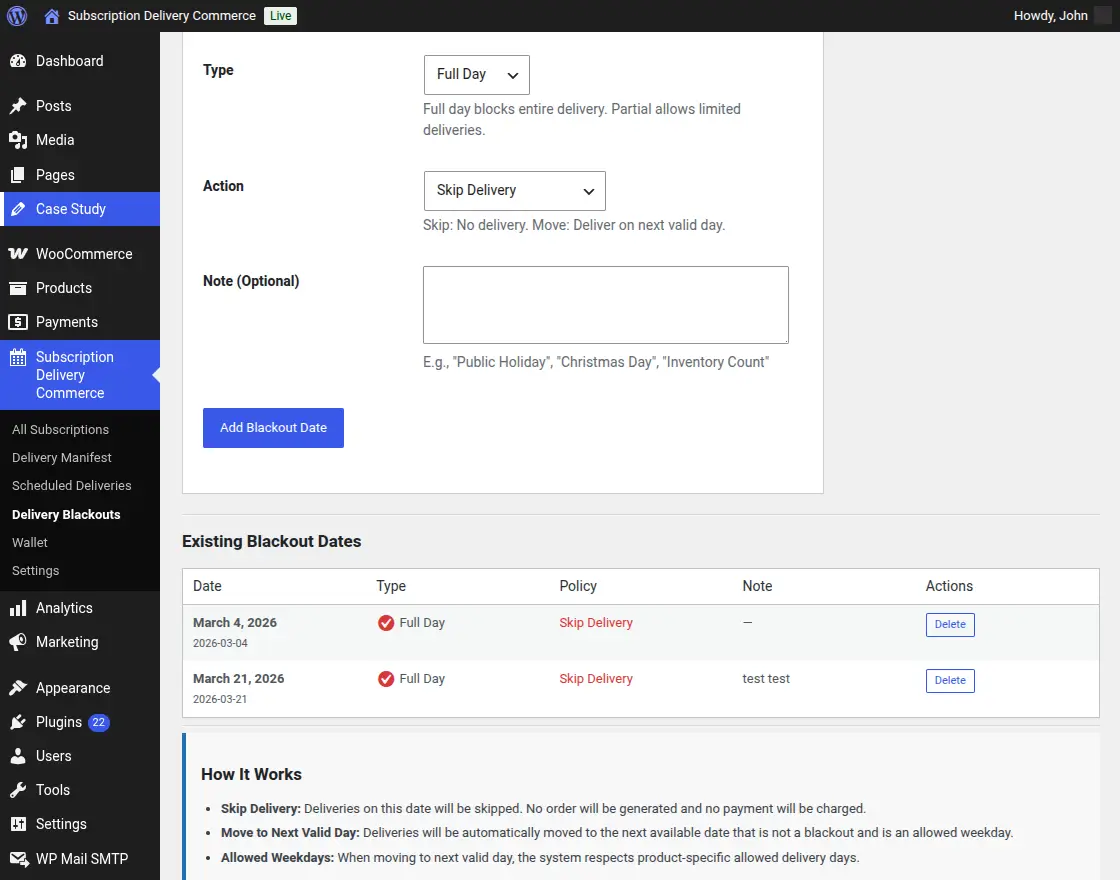
The Blackout Management system ensures you never commit to a delivery on a day you aren’t operating:
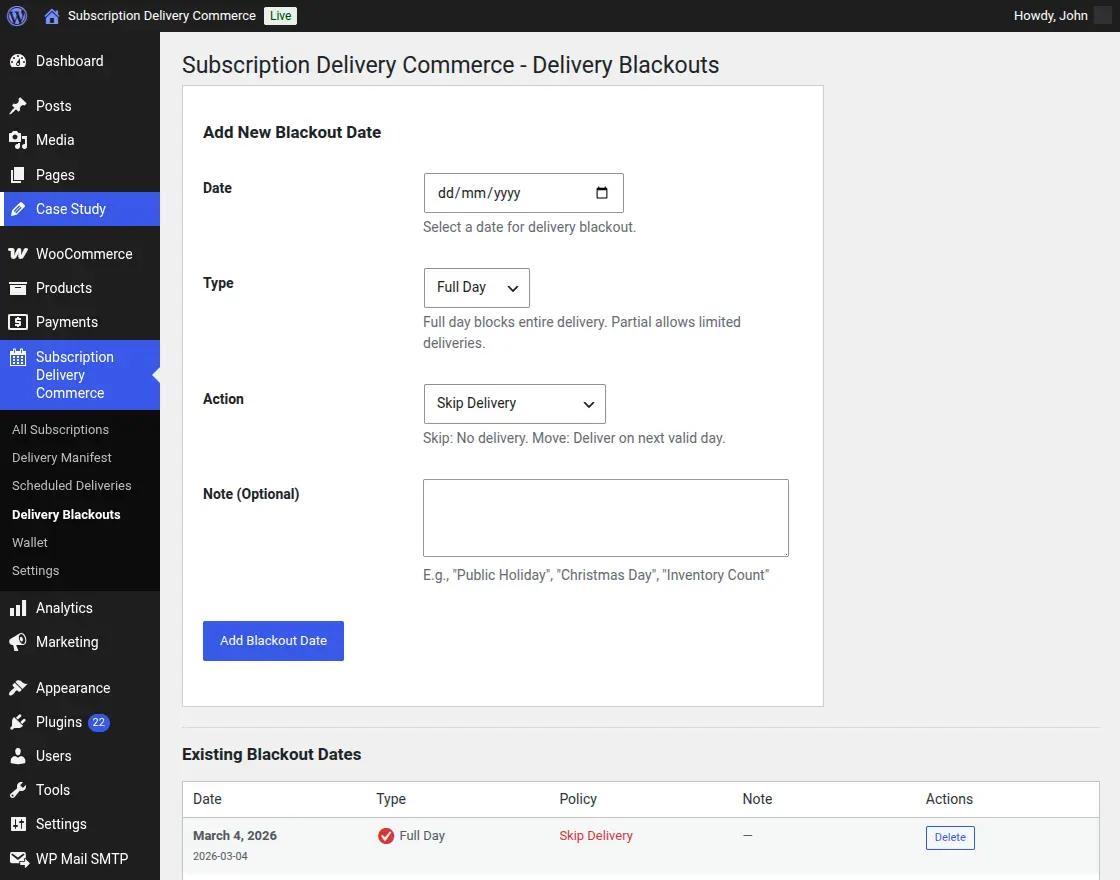
- Flexible Timing: Set blackouts as Full Day (blocking all deliveries) or Partial.
- Post-Blackout Actions: Choose to either Skip the delivery entirely or Move it to the next valid delivery day.
- Internal Notes: Keep track of the reasoning (e.g., “Public Holiday” or “Inventory Count”) for future reference.
Subscription Delivery Commerce Customer Workflow
The Subscription Delivery Commerce plugin significantly enhances the frontend “My Account” area for customers, providing an intuitive interface to manage their recurring needs.
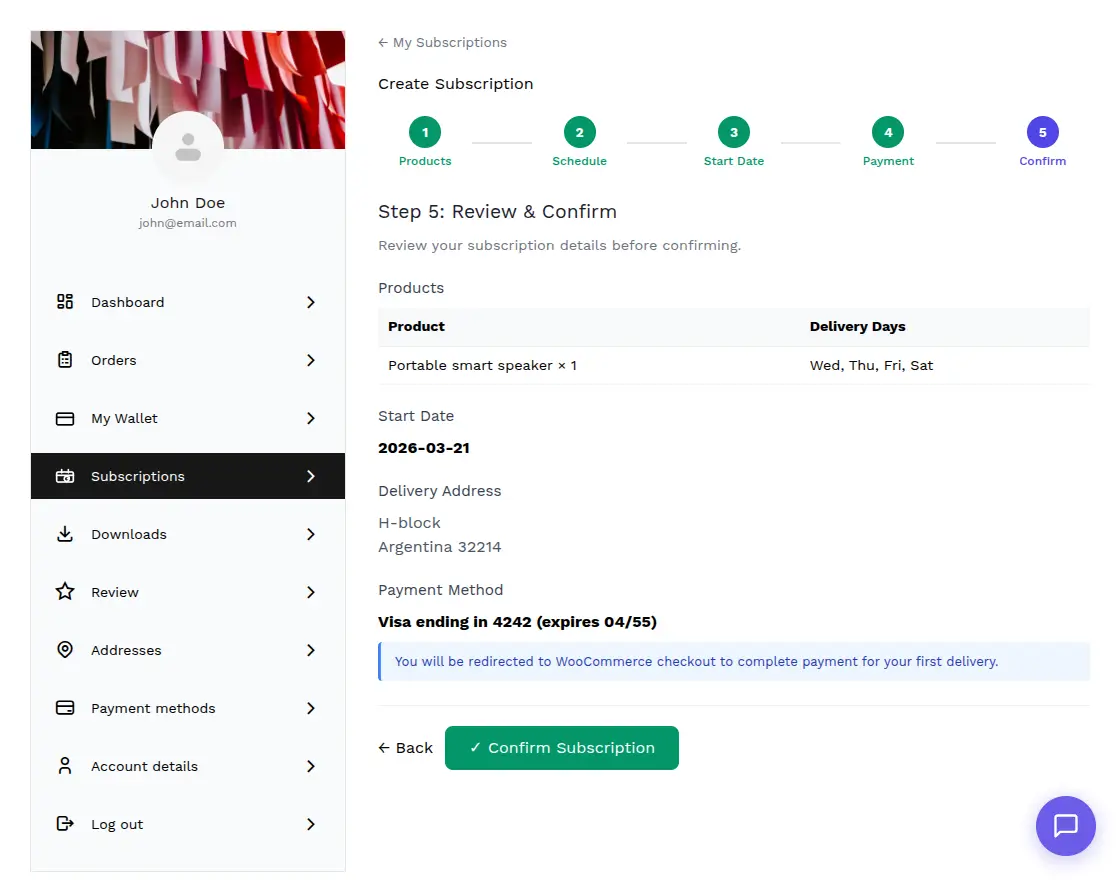
Subscription Creation Wizard
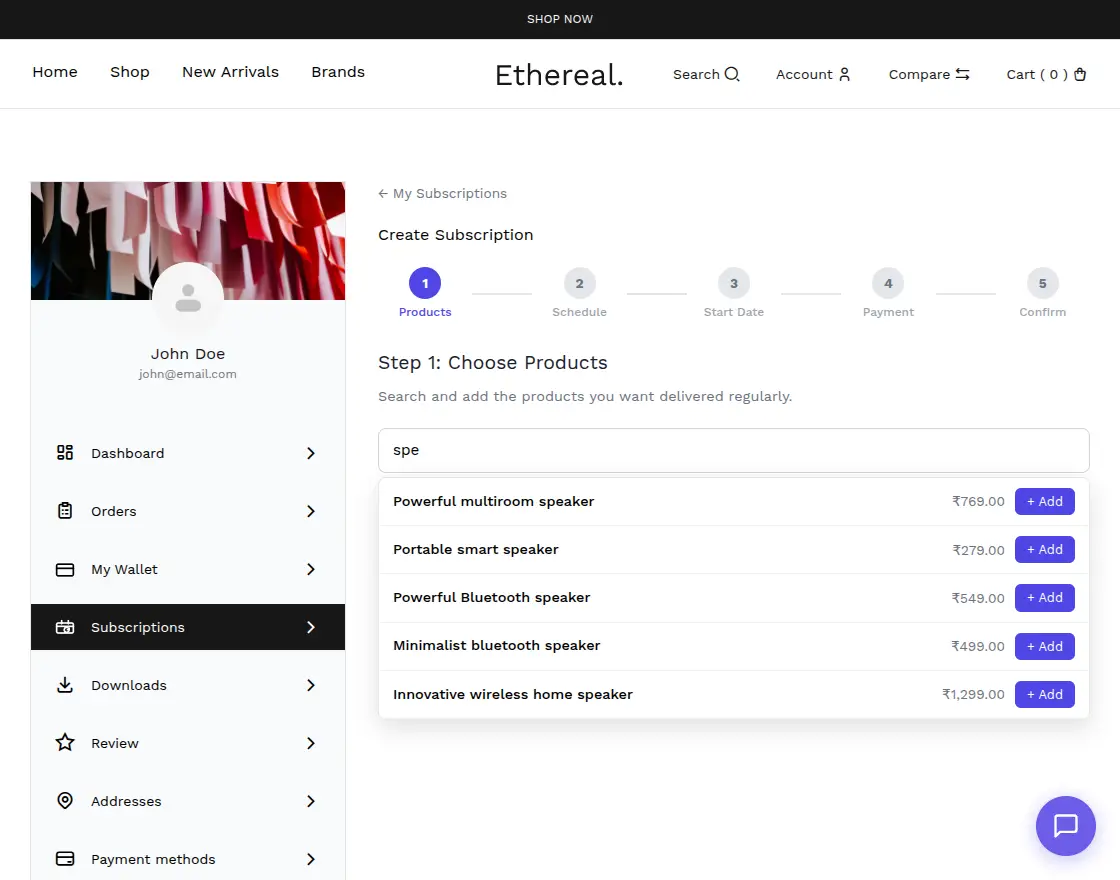
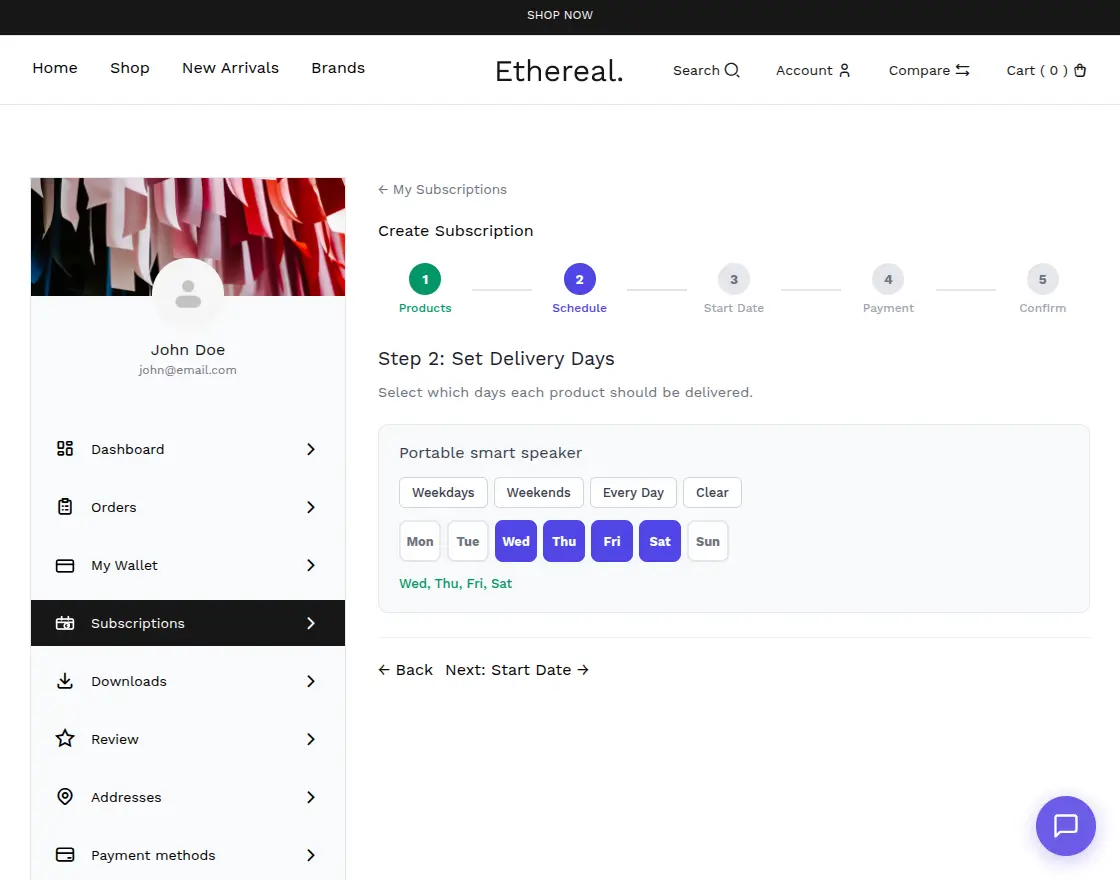
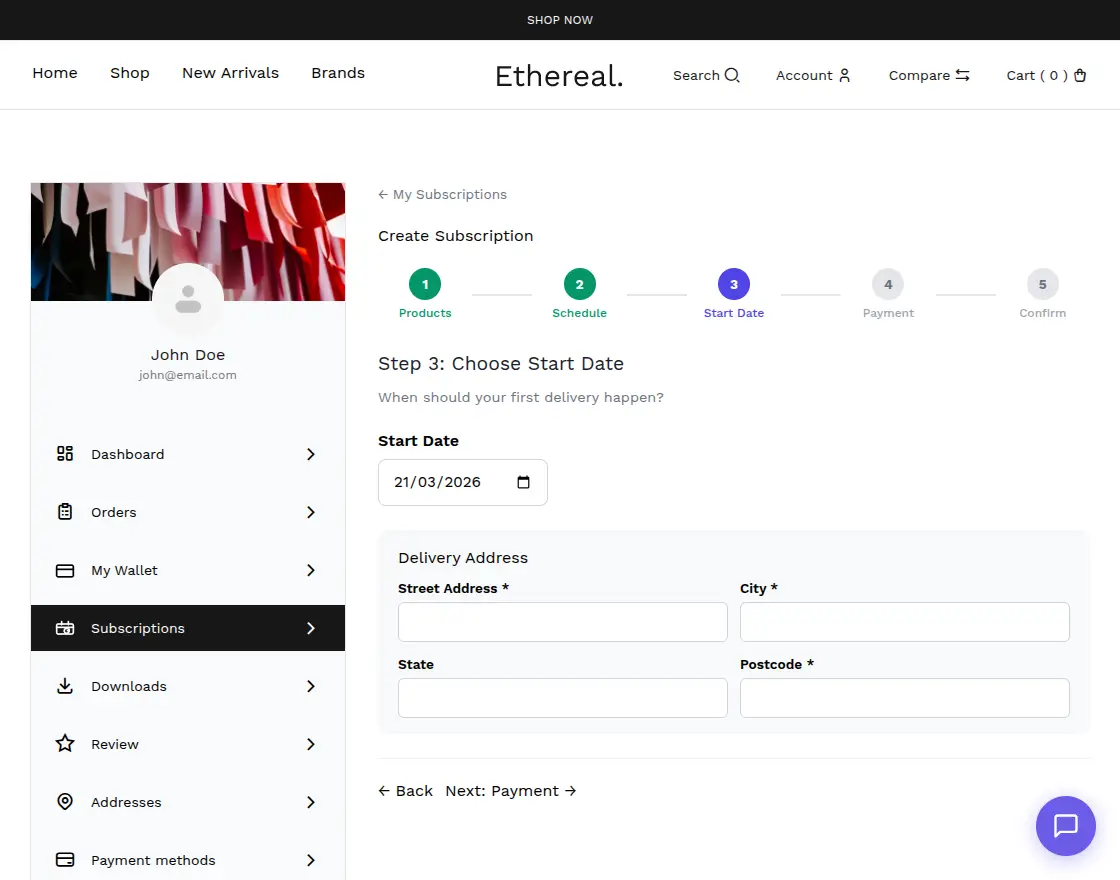
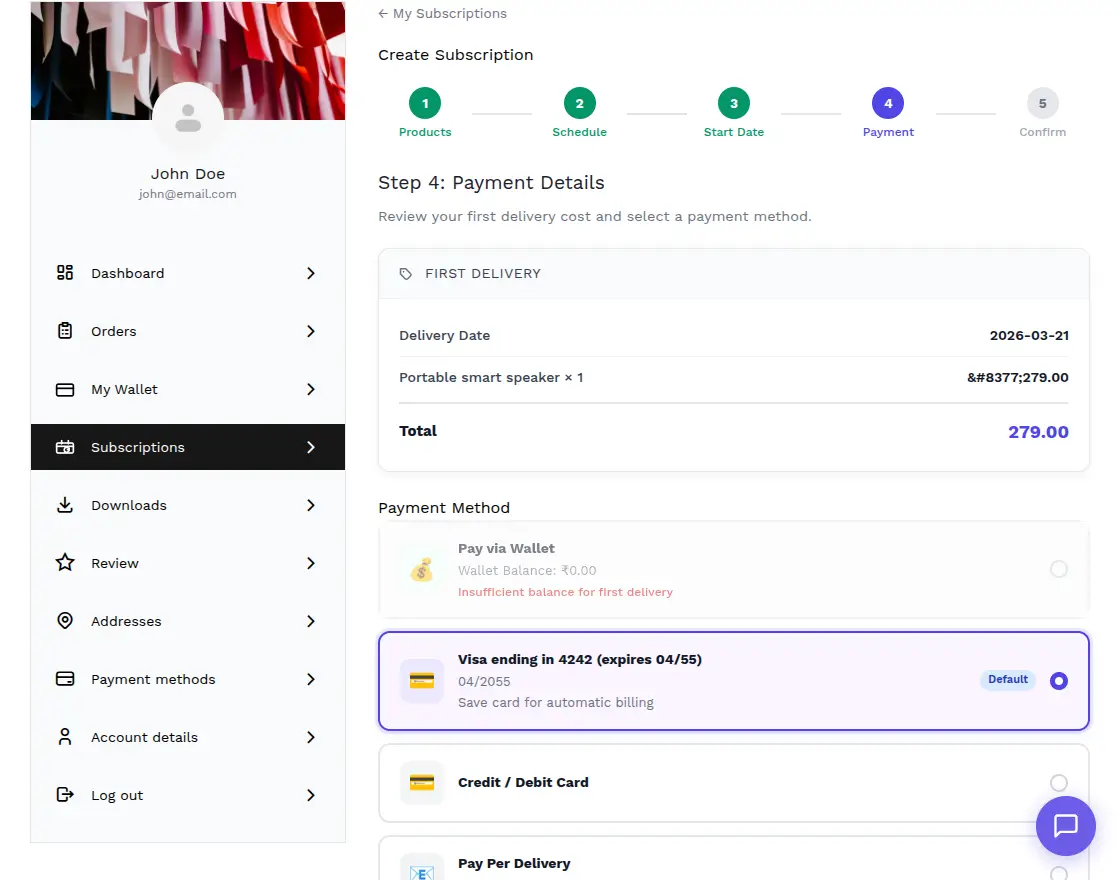
Customers can easily set up new subscriptions using a user-friendly, multi-step progress wizard:
- Step 1: Choose Products: An integrated search bar allows customers to quickly find and add multiple products to their subscription list.
- Step 2: Set Delivery Days: For each selected product, customers can specify delivery days using convenient presets like Weekdays, Weekends, or Every Day. They can also toggle individual days for complete control.
- Step 3: Start Date: Customers select when they want their first delivery to arrive.
- Step 4: Payment: A flexible payment step where customers can choose between saved Credit/Debit cards or utilize their Virtual Wallet.
- Step 5: Confirm: A final review of products, schedules, and delivery addresses before activation.
My Subscriptions Dashboard
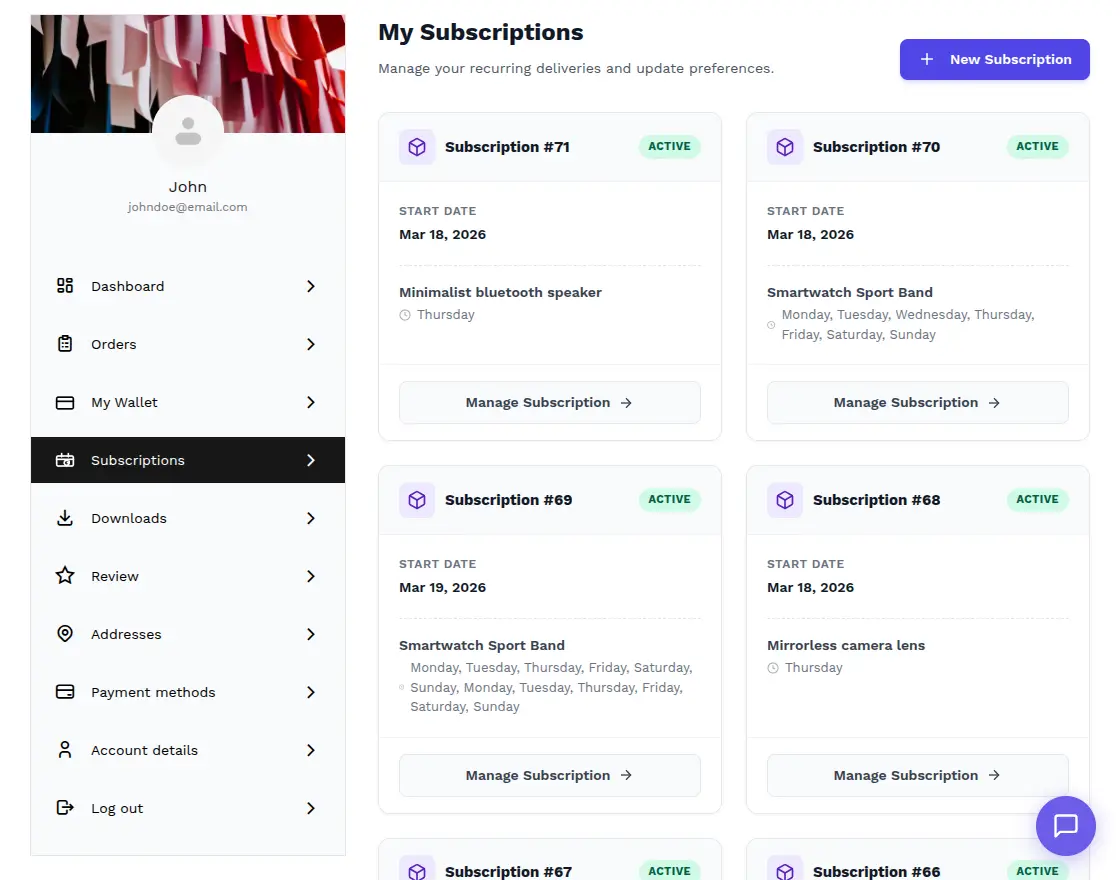
In the “My Account” section, a dedicated Subscriptions tab displays all active and past subscriptions in a clean, card-based layout. Each card provides a snapshot of:
- Subscription ID and Status.
- Current delivery schedule and next scheduled date.
- Quick action buttons to Manage Subscription for more granular control.
Flexible Payment & Wallet Integration
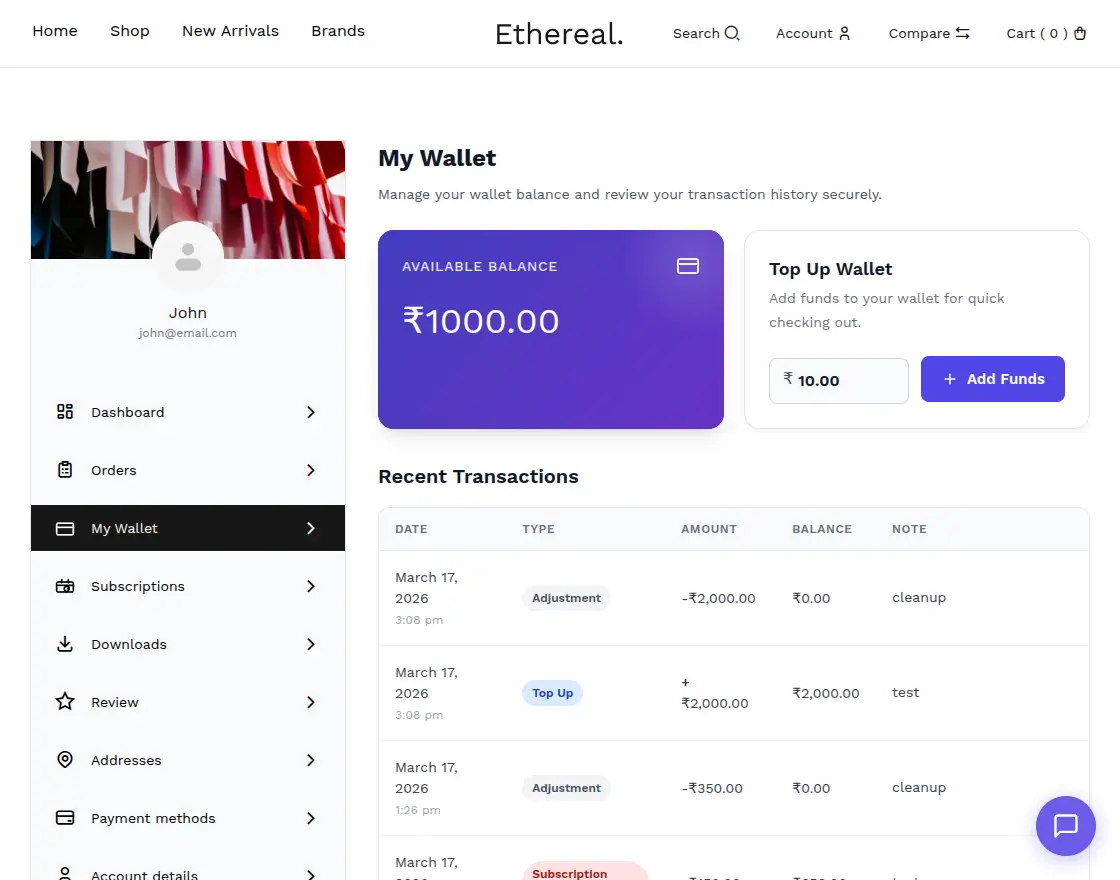
When checking out or paying for an ongoing order, customers are presented with a seamless payment interface:
- Pay via Wallet: A one-click payment option if the wallet has sufficient balance.
- Saved Methods: Integration with payment gateways like Stripe allows customers to use saved cards for recurring billing.
- Order Overviews: Clear breakdowns of product quantities and totals are provided before any deduction occurs.
Interactive Delivery Management
Within the subscription details, customers have access to an Interactive Calendar:
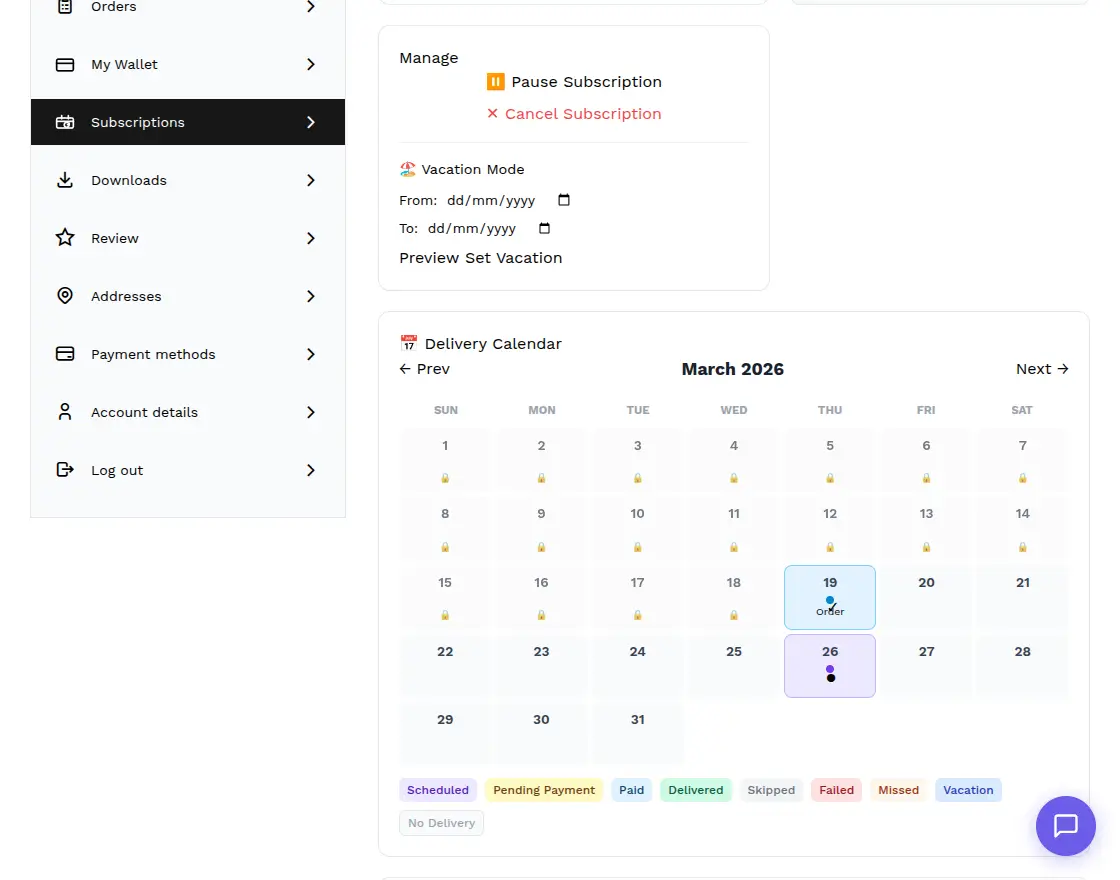
- View all confirmed delivery dates at a glance.
- Skip/Unskip individual dates if they don’t need a delivery (e.g., if they already have enough stock).
- All changes are synchronized with the admin’s Delivery Manifest in real-time.
Conclusion
The Subscription Delivery Commerce plugin is an essential tool for any WooCommerce store looking to build a reliable delivery service.
By combining flexible scheduling with a prepaid wallet system, you reduce payment friction and provide your customers with the control they need to manage their daily needs.
For more information or to purchase the module, please visit the Webkul Store.
Support
Dear Customers, if you have any questions or encounter issues, please raise a ticket at webkul.uvdesk.com.
Our dedicated support team is always ready to assist you and ensure a smooth experience with our modules.
Current Product Version - 1.0.0
Supported Framework Version - WordPress: 6.9 Woo-commerce: 10.6


Be the first to comment.