CS-Cart Amazon FBM is an extension that connects Amazon with CS-Cart via Fulfillment by Merchant.
CS-Cart Amazon connector allows vendors to connect Amazon and manage Amazon orders directly from their CS-Cart Store.
With the help of this add-on, you can manage your products and orders from Amazon via the CS-Cart backend.
With FBM, sellers list their products on Amazon but handle the storage, packaging, and shipping themselves, rather than letting Amazon do it.
Note: To use this connector, you need an Amazon developer account. For help, you’ll need to share your Amazon developer account details.
You need an AWS account because the Selling Partner API security model uses AWS authentication credentials.
If you’re not already an AWS customer, you can create a free AWS account. For more information, see AWS Free Tier.
Also, check out our CS-Cart USPS Shipping module now live on the Webkul Store for real-time USPS integration.
Features
- Import products from Amazon to CS-Cart.
- Import orders from Amazon into CS-Cart.
- Manage Amazon products and orders from CS-Cart.
- Handle Amazon order returns inside CS-Cart.
- Track Amazon orders easily from CS-Cart.
- Vendors can subscribe to Subscription Plans.
- Admin gets a commission from their sales.
Explore the CS-Cart AI Reporting extension that uses GenAI, LLMs, and Vanna AI to turn questions into SQL, simplifying reporting for admins and vendors.
Import Amazon Orders:
- Functionality to import Amazon orders to CS-Cart store.
- The admin can manage & process the imported Amazon orders from CS-Cart.
Real-Time Details Update:
- Option to update products on Amazon in real-time.
- Enable/disable the real-time synchronization of imported products’ details on Amazon shop.
Installation
After downloading CS-Cart Amazon Connector FBM add-on you’ll get one zip file, one install.txt file, and a relevant User Guide manual doc. Read it carefully for proper configuration.
Go to Manage Add-ons, and click on “Manual Installation” as shown below in the snapshot.
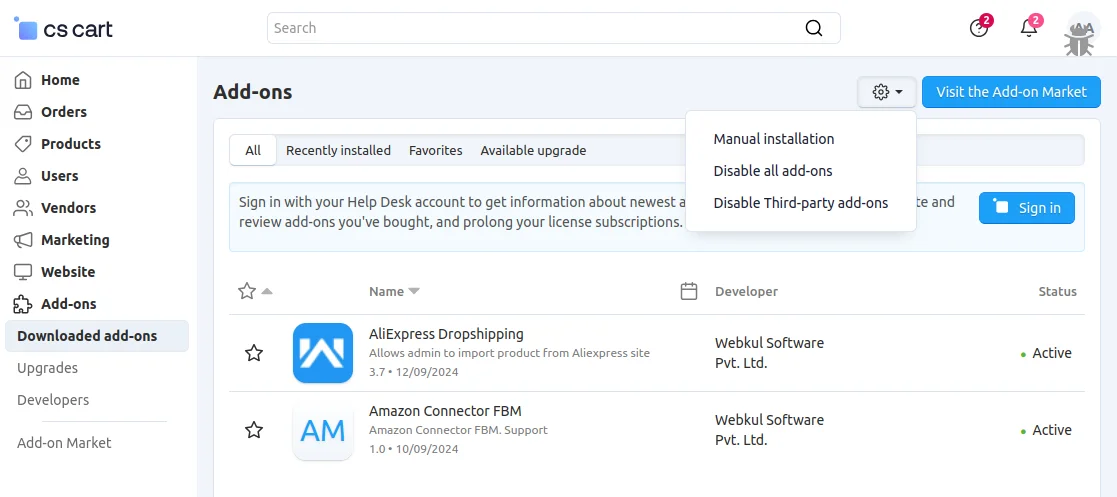
Click on “Local” to browse the zip file and then click on “Upload & Install” as shown below in the snapshot.

Add-on Configuration
After installing the add-on, you will find CS-Cart Amazon Connector FBM in the list of available add-ons. We will then configure the settings.
Click on “settings” to enable, disable, install, or refresh. Make sure the add-on is activated, as shown in the snapshot below.

CS-Cart Amazon FBM (Fulfillment By Merchant) – Admin Workflow
To configure the module, go to Admin Dashboard >> Add-Ons >> Developers >> Webkul Software Pvt Ltd. >> Amazon Connector FBM
- Go to Settings.
- Find the section related to Configuration.
- Need to fill in the required fields such as – state, country, App ID, Client ID, Client Secret, and Redirect URL.
- Click Save to apply the changes.

CS-Cart Amazon FBM – Admin Earns Commission
The admin earns a commission based on the vendor’s subscription plan (monthly, yearly, or one-time).
The vendor plans include various tiers such as Bronze, Silver, Gold, and Platinum.
To utilize this add-on, vendors are required to subscribe to a plan, which determines the commission applied to each transaction.

CS-Cart Amazon Connector FBM – Accounting
Admin receives the commission on each order placed by the customer on Amazon.
The vendors have to pay the transaction value on each order placed by a customer to the admin.

CS-Cart Amazon Connector FBM – Vendor Workflow
CS-Cart Amazon FBM is an add-on that connects CS-Cart with Amazon using Fulfillment by Merchant.
With FBM, sellers list products on Amazon but take care of storage, packing, shipping, and customer service themselves.
This extension lets vendors import Amazon orders into CS-Cart and manage them from one place.
After logging in with their Amazon account, the user will be presented with two fulfillment options – Fulfillment by Amazon (FBA) and Fulfillment by Merchant (FBM).
The vendor must choose and proceed with Fulfillment by Merchant (FBM).
CS-Cart Amazon FBM – Amazon Channel Configuration
Here, the vendor needs to navigate to the Vendor Panel >> Settings >> Amazon Connector.
Click the “+” button to add a channel. Vendors can connect to Amazon and manage Amazon products and orders directly from their CS-Cart store.

The Amazon Channel Status is Authenticated, and the Status is Enabled.
Amazon Connector FBM – Category Mapping
Vendors need to navigate to the Amazon Connector >> Action >> Gear >> Category Mapping as shown in the snapshot below to manage the category mapping for the products.

Vendors can now manage Amazon category mapping of the products with their CS-Cart store, as shown in the screenshot below.

How To Import Products From Amazon?
To import the products from Amazon, click on the Import Amazon Products button as shown below.

This action will import Amazon products to illustrate the import process.
How To Import Order Details From Amazon?
Go to the Orders section to import the orders from Amazon. To import the orders from Amazon, click on the Import Amazon Orders button as shown below.

Just click on the order ID to view and check the order status from the CS-Cart, such as open, complete, declined, or paid.
Easy Order Returns
Easily manage and track return requests for Amazon orders directly within your CS-Cart store, ensuring a smooth post-purchase experience for customers.

Support
If you have any questions, suggestions, or customization requests, feel free to contact us at [email protected] or submit a ticket at webkul.uvdesk.com.
You may also check our quality CS-Cart Extensions.
Current Product Version - 1.0
Supported Framework Version - 4.16.x, 4.17.x, 4.18.x


Be the first to comment.